Single-file index.html, no installation or terminal needed, all editing in the browser
HTMLCorporate Website
one-page-site — HTML Business Template
By BootForm
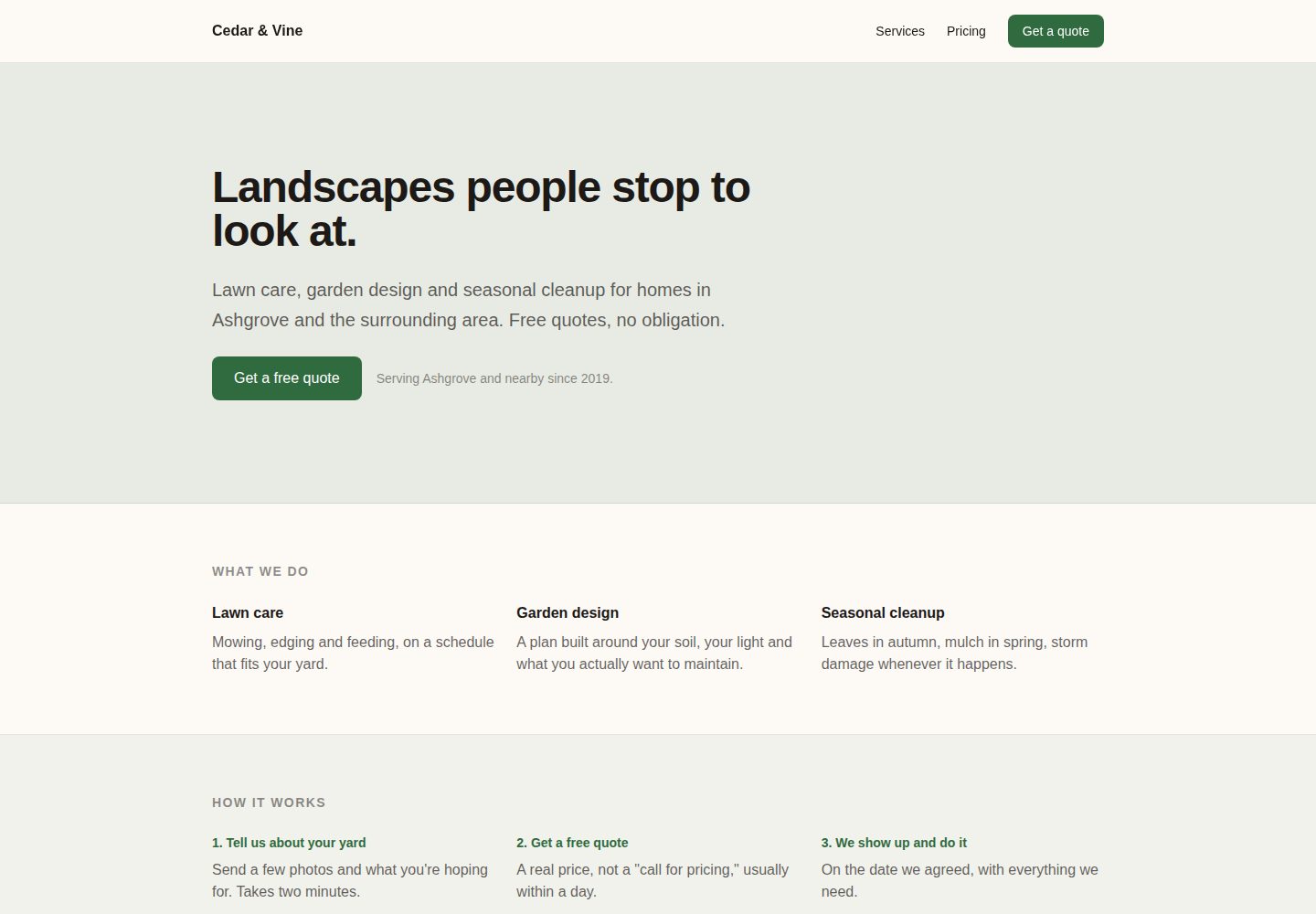
A single-page business website HTML template by BootForm, featuring a sticky nav, full-width hero, service/pricing/testimonial sections, and a working contact form, suitable for small or local businesses deploying to their own domain.
Explore the design
Compare the page layouts and mobile experience. Open any screenshot for a closer look.
Desktop homepage1 / 2
Desktop captureTop of page
Actual screenshot captured by the server browser.
All pages & views 2
Screenshots show visual appearance; interactive behavior may differ.
Recorded 2026-10-08View source
What stands out
A quick read of the recorded project description.
Includes sticky navigation, full-width hero, services, pricing, testimonials, and other section structures
Contact form can actually send messages, received via the BootForm service
README provides complete steps from copying the repository to binding a custom domain and enabling HTTPS
Supports replacing sample photos, links, and theme color variables
Template Details
This is a single-page company website template for small or local businesses. The source is a single index.html file, requiring no installation or terminal operations—everything is done in the browser. The page structure includes a sticky navigation bar, a full-width hero banner, and separate sections for services, pricing, and customer testimonials, along with a contact form that can actually send messages. The template uses Cedar & Vine Landscaping as sample content. The README provides step-by-step instructions on how to copy the repository, publish via GitHub Pages, modify copy and colors, integrate the BootForm form service, and bind a custom domain with HTTPS enabled.
Usage limitations: The contact form relies on the external BootForm service; the static page itself has no backend. After submission, the form must be claimed within 48 hours, otherwise temporarily stored messages will be deleted; before claiming, up to 10 submissions are stored. Binding a custom domain requires purchasing a domain (about $10–20 per year); GitHub Pages and the BootForm form itself are free. Third-party assets such as demo photos, fonts, and icons require separate license verification; the code's MIT license does not cover these.
HTMLBusiness website
Is it right for your project?
Use Cases
- Build a single-page website with a contact form for a small local service business
- Quickly publish a business landing page on GitHub Pages and bind a custom domain
- Use as a practice project for learning static site publishing, DNS configuration, and form integration
- Use as a starter template for a client website after replacing copy and color scheme
Suitable For
- Small or local business owners who need a single-page company website
- People unfamiliar with the command line who want to build a site in the browser
- Users who already have a domain and are willing to configure DNS records
- Teams that accept using a third-party form service to receive contact messages
Getting started & customization
Use these recorded setup notes alongside the repository instructions for your chosen version.
- 1
Click Use this template to create your own repository, then in Settings → Pages select the main branch and / (root) directory to publish
- 2
Edit the headings, color variables, business name, and hero copy marked as CHANGE ME in index.html
- 3
Generate a dedicated UUID in BootForm and replace __YOUR_FORM_ID__ in the form action; after submission, claim the form within 48 hours
- 4
To bind a custom domain, add a CNAME file, configure A records or CNAME records as required by your registrar, then enable Enforce HTTPS in the Pages settings
- 5
When replacing sample photos, upload a sample-profile-photo.jpg with the same name, or delete the corresponding img tag
License & source material
Usage conditions & limitations
Free to use · keep license noticeThis listing covers the free version under the MIT license in the public repository; the free scope is the code of this version and does not imply that external services or third-party assets are free.
Must comply with when using
- Free use, modification, commercial use, and distribution of this version's code are permitted.
- When distributing copies or substantial portions of the code, retain the original author's copyright notice and the full MIT license notice.
- The code is provided as-is; warranties and limitations of liability are governed by the original license and applicable law.
Additional costs & items to verify
- Demo images, fonts, icons, and other third-party assets must be checked under their respective licenses; the code's MIT license alone is not sufficient to determine this.
- External services such as domains, hosting, databases, payments, or AI may incur additional charges.
- Binding a custom domain requires purchasing a domain, typically $10–20 per year; a GitHub account is free.
- The contact form relies on the external BootForm service; the static page itself has no backend.
- Before claiming the form, temporarily stored messages are kept for only 48 hours and are deleted after that.
- Before claiming the form, up to 10 submissions are stored; the limit is lifted after claiming.
- Receiving form messages requires creating a free BootForm account and claiming the form.
- The template includes demo photos; verify asset licenses before replacing or deleting them.
View Original Text Basis
Permission is hereby granted, free of charge
Original License Text
You need a free GitHub account, and, for the domain step near the end, a domain name you've bought from somewhere (Namecheap, Google Domains' successor, Cloudflare, your registrar of choice). That part costs money, usually $10 to $20 a year.
Original README
We will use [BootForm](https://bootform.com), because you can point a form at it and it works immediately, with no account.
Original README
Held messages are kept for 48 hours before they are deleted. Claim > the form the same day you put it live.
Original README
**"This form has reached its limit of 10 held submissions."** You tested it more than ten times before claiming. Claim the form and the limit goes away.
Original README
Click the claim link and create a free account.
Original README
https://github.com/BootForm/one-page-site/blob/main/LICENSEhttps://github.com/BootForm/one-page-site/blob/main/README.md**Optional: use your own photo.** The "Who you'll talk to" section starts with a demo photo so you can see how it looks.
Original README
Compiled by DeepSeek based on repository license and README ·2026-10-08. Results only cover the materials read; dependencies, images, fonts, and subsequent term changes are subject to their respective original texts.
Project checks & description sources
Template Information
- Source platforms
- GitHub
- Documentation and maintenance reference score
- More documented · 80 / 100
- Technologies
- HTML
- Website type
- Corporate Website
How this score is calculated
Our heuristic uses license records (up to 30), a demo link (12), a preview (10), stars (15), recorded maintenance (15), description completeness (8), feature records (5) and classification data (5). It is not a code, security or performance test, or a Google score. A link does not establish tested functionality.
What to verify for this project
- Repository update recorded
- 2026-09-20
- Screenshot last checked
- 2026-10-08
A demo link is listed. Check it with your own content and viewport sizes; its presence does not confirm that forms, authentication or payments work.
The catalog identifies HTML as the primary stack. Check the actual dependency manifest and lockfile for versions and hosting requirements. These notes use recorded metadata, not a code audit or a deployment test.
Use a selection guide →How this description was prepared
AI-assisted description based on catalog records and repository material. Repository authors are not automatically the reviewers of this description.
Review declaration: [email protected] · 2026-10-08
Inspect the recorded source material
SHA-256: 6186de0a145586ea34372acc174c6029ca15bac959628360a26df78037cba10b
2026-10-08T02:38:01.970Z
Source file / repository# A real company page, on your own domain
No installs. No terminal. No account anywhere, until you claim your form, and even then it's free.
By the end you will have a real landing page for a small or local business, on a domain with your
own name on it, with a contact form that genuinely sends you the messages.
**[See what you are building →](https://bootform.github.io/one-page-site/)**
This picks up where [first-website](https://github.com/BootForm/first-website) leaves off. That one
is a personal bio in a single scrolling column. This one looks like a company site: a sticky nav, a
full-width hero banner, and separate bands for services, pricing and a testimonial, plus a step for
putting it on a domain you actually own instead of `github.io`.
---
## Before you start
You need a free GitHub account, and, for the domain step near the end, a domain name you've bought
from somewhere (Namecheap, Google Domains' successor, Cloudflare, your registrar of choice). That
part costs money, usually $10 to $20 a year. Everything else here is free.
Everything below happens in your browser.
---
## Step 1: Make your own copy
Click the green **Use this template** button at the top of this page, then **Create a new
repository**.
Name it `one-page-site`. Leave everything else alone and click **Create repository**.
You now have your own copy. Nothing you do from here can break the original.
---
## Step 2: Put it on the internet
In *your* new repository:
1. Click **Settings** (the tab along the top).
2. Click **Pages** in the left sidebar.
3. Under **Source**, choose **Deploy from a branch**.
4. Set the branch to **main** and the folder to **/ (root)**. Click **Save**.
Wait about a minute, then reload that Settings page. A green box appears at the top with your
address, something like `https://yourname.github.io/one-page-site/`.
**Open it.** That is your website. It is live, on the real internet, and anyone can visit it.
It still says Cedar & Vine Landscaping. We will fix that next.
> **If you get a 404:** give it another minute or two. The first build is the slow one.
---
## Step 3: Make it yours
Back on your repository's main page, click **`index.html`**, then click the pencil icon (✏️) to
edit it.
Look for the lines marked `CHANGE ME`. There are four:
- **The title**, near the top. This is what shows in the browser tab.
- **Two colours**, just below it. `--color-ink` is the text, `--color-paper` is the background,
`--color-accent` is the buttons, links and banded section backgrounds.
- **Your business name**, in the nav bar at the top of the page.
- **The hero headline**, the big line at the top of the page, plus the sentence under it.
Then change the actual words in each band further down the page: the three things under "What we
do", the three steps under "How it works", the two packages and their prices, and the quote under
"What neighbours say" (or delete that section until you have a real one to put there).
When you are done, click **Commit changes...** at the top right, then **Commit changes** in the box
that appears.
Wait a minute, reload your site, and it is yours.
> **Picking colours is the hard part.** If you have no idea, try `--color-paper: #0f1115` and
> `--color-ink: #e8e6e1` for a dark version, and pick any accent you like.
**Optional: use your own photo.** The "Who you'll talk to" section starts with a demo photo so you
can see how it looks. To swap in your own:
1. On your repository's main page, click **Add file → Upload files**.
2. Drag in your photo and name it exactly `sample-profile-photo.jpg`. Uploading a file with the
same name replaces the one that's there.
3. Commit the upload.
4. Edit `index.html`, find the `<img src="sample-profile-photo.jpg" ...>` line, and change its
`alt` text to your own name.
Don't want a photo at all? Delete the `<img>` line (and the `CHANGE ME` comment above it) and the
page still works, just without one.
**Optional: add your links.** Below the photo in "Who you'll talk to" is a row of links marked
`CHANGE ME: your links`. Each one is a single line, for example:
```html
<a href="https://instagram.com/yourbusiness" class="underline decoration-ink/25 underline-offset-4 hover:text-accent hover:decoration-accent">Instagram</a>
```
Change the address in `href` to your own, change the text between the tags to whatever you want it
to say, and delete any line you don't want. Copy a line and change both to add one that isn't there
already, like a Facebook page or a Google Business Profile.
---
## Step 4: Make the contact form actually work
Here is the bit most tutorials skip.
Your page is a *static* site. There is no program running behind it, so there is nowhere for a form
to send anything. That is why every "build a website" tutorial stops at a form that looks right and
does nothing.
You need somewhere for the message to go. We will use [BootForm](https://bootform.com), because you
can point a form at it and it works immediately, with no account.
**4a. Generate your form ID.**
It is just a random UUID, and it has to be yours alone. Pick any one of these:
- Open BootForm's own [UUID generator](https://bootform.com/uuidgenerator) and copy what it shows
you. Nothing you generate there is sent anywhere; it runs entirely in your browser.
- Or paste this into your browser's address bar and press enter:
`javascript:prompt("Your form ID", crypto.randomUUID())`
- Or, on any page, open the browser console (F12) and run `crypto.randomUUID()`.
You will get something like `11111111-1111-4111-8111-111111111111`, though a real one won't repeat
digits like that; a genuine random UUID looks far more scrambled.
> **Use your own.** Do not use the one printed above, and do not use a friend's. Whoever claims a
> form ID first owns it, and everything sent to it goes to them. Yours should be a fresh random one
> that nobody else has seen.
**4b. Paste it in.**
Edit `index.html` again. Find this line:
```html
<form action="https://f.bootform.com/__YOUR_FORM_ID__" method="POST" class="flex flex-col gap-5">
```
Replace `__YOUR_FORM_ID__` with your ID, so it reads:
```html
<form action="https://f.bootform.com/11111111-1111-4111-8111-111111111111" method="POST" class="flex flex-col gap-5">
```
Commit the change. Wait a minute.
**4c. Try it.**
Go to your live site, fill in the form, and send it.
You will land on a page that says the message is being held, and asks you to claim the form. That is
the point: it accepted your message before you had an account anywhere.
**4d. Claim it.**
Click the claim link and create a free account. Everything already sent to your form is delivered to
you straight away.
From now on, anything anyone sends through your site arrives in your inbox.
> **Don't leave it too long.** Held messages are kept for 48 hours before they are deleted. Claim
> the form the same day you put it live.
---
## Step 5: Put it on your own domain
`yourname.github.io/one-page-site` works, but a landing page for a real business needs a real
domain. This is the part that separates this template from a hobby page, and it takes about ten
minutes plus however long DNS takes to catch up (often minutes, sometimes up to 24 hours).
**5a. Buy a domain**, if you don't have one already. Any registrar works. BootForm doesn't sell
domains or have a preferred one to recommend.
**5b. Add a CNAME file to your repository.**
1. On your repository's main page, click **Add file → Create new file**.
2. Name the file exactly `CNAME` (no extension, all capitals).
3. In the file, type your domain on its own line: `yourname.com` (or `www.yourname.com`, whichever
you want people to actually visit).
4. Commit the file.
**5c. Point your domain at GitHub, at your registrar.**
The exact screen differs by registrar, but you're adding DNS records:
- For an apex domain (`yourname.com`, no `www`): add four **A** records, all pointing to GitHub
Pages' addresses: `185.199.108.153`, `185.199.109.153`, `185.199.110.153`, `185.199.111.153`.
- For a subdomain (`www.yourname.com`): add one **CNAME** record pointing to
`yourname.github.io` (your GitHub username, not the repo name).
[Setting up your computer](https://bootform.com/docs/computer-setup) has the same steps written
out in more detail, if anything here is unclear.
**5d. Wait, then confirm HTTPS.**
Back in your repository's Settings → Pages, wait for the domain to show a green checkmark (DNS
propagation, usually fast, occasionally slow). Once it does, tick **Enforce HTTPS**. This can take
up to a day to become available after the domain first verifies; if the checkbox is greyed out,
that's why.
> **Don't skip Enforce HTTPS.** Without it, your site loads over a plain, unencrypted connection
> for anyone who types the address without `https://`, which most people do.
---
## That's it
You have a real landing page, on your own domain, with a working contact form, and you did it
without installing anything.
### Where to go next
| | |
|---|---|
| **More pages** | Copy `index.html` to `about.html` and link to it. That is genuinely all it takes. |
| **A bigger site with a blog** | [vitepress-marketing](https://github.com/BootForm/vitepress-marketing). This one needs a terminal and Node.js: [setting up your computer](https://bootform.com/docs/computer-setup) walks through installing them. |
| **A portfolio** | [vitepress-portfolio](https://github.com/BootForm) when you have case studies to show, not just a pitch. |
| **More form options** | File uploads, autoresponders, Discord and Slack: [bootform.com/docs](https://bootform.com/docs/). |
### Stuck?
Open an [issue](https://github.com/BootForm/one-page-site/issues) and say what happened. There is no
such thing as a question that is too basic here. That is what this repo is for.
---
## Frequently hit problems
**My site shows a 404.** The first build takes a few minutes. If it has been longer, check Settings
→ Pages still says branch `main` and folder `/ (root)`.
**My changes aren't showing.** Each commit triggers a rebuild that takes about a minute. If it still
looks old after that, hard-reload the page: `Ctrl+Shift+R`, or `Cmd+Shift+R` on a Mac.
**The form shows raw text instead of a nice page.** You are seeing the response as JSON. That is
normal for now. Once you claim the form you can set a redirect so people land back on your site.
**"This form has reached its limit of 10 held submissions."** You tested it more than ten times
before claiming. Claim the form and the limit goes away.
**My domain shows GitHub's own "404" or a certificate warning, not my site.** DNS hasn't finished
propagating yet. Give it a few hours before assuming something is broken; `dig yourname.com` from a
terminal (or an online DNS checker) shows whether your records have actually taken effect.
**Enforce HTTPS is greyed out.** GitHub needs to issue a certificate for your domain first, which
only starts after DNS verifies. Check back in a few hours.
## Licence
MIT. Do whatever you like with it, including using it for a real business.
Explore similar templates
Compare previews and descriptions within the same stack and category.

mazer
Mazer is a free and open-source Bootstrap 5 admin dashboard and landing page template that does not depend on jQuery. It provides prebuilt releases, source builds, and CDN inclusion, and includes dark mode, perfect-scrollbar, and ApexCharts examples.
HTML · Admin dashboard

Freelancer
A bright, single-page Bootstrap portfolio template for freelancers, designers, and small studios. It includes a responsive portfolio grid with modal detail windows and an SB Forms contact form that requires an API token.
HTML · Portfolio

Creative
A single-page marketing template by Start Bootstrap for creative agencies and product services, built on Bootstrap with SCSS, featuring a portfolio grid and call-to-action sections. It includes pre-set SB Forms markers for form integration and npm build scripts for source customization.
HTML · Corporate Website

startbootstrap-agency
Agency is a one-page Bootstrap portfolio theme from Start Bootstrap, MIT licensed. It includes a responsive portfolio grid with modal details and a preconfigured SB Forms contact form that requires an API token.
HTML · Corporate Website

startbootstrap-landing-page
A general-purpose Bootstrap landing page template from Start Bootstrap, MIT licensed, with a Pug/SCSS/npm build pipeline.
HTML · Corporate Website

Landing-Page
A general-purpose landing page HTML template maintained by Tailwind Toolbox, written in pure HTML and loading the complete Tailwind CSS via CDN.
HTML · Corporate Website