单文件 index.html,无需安装或终端,全部在浏览器中编辑
HTML企业官网
one-page-site — HTML 企业官网模板
作者 BootForm
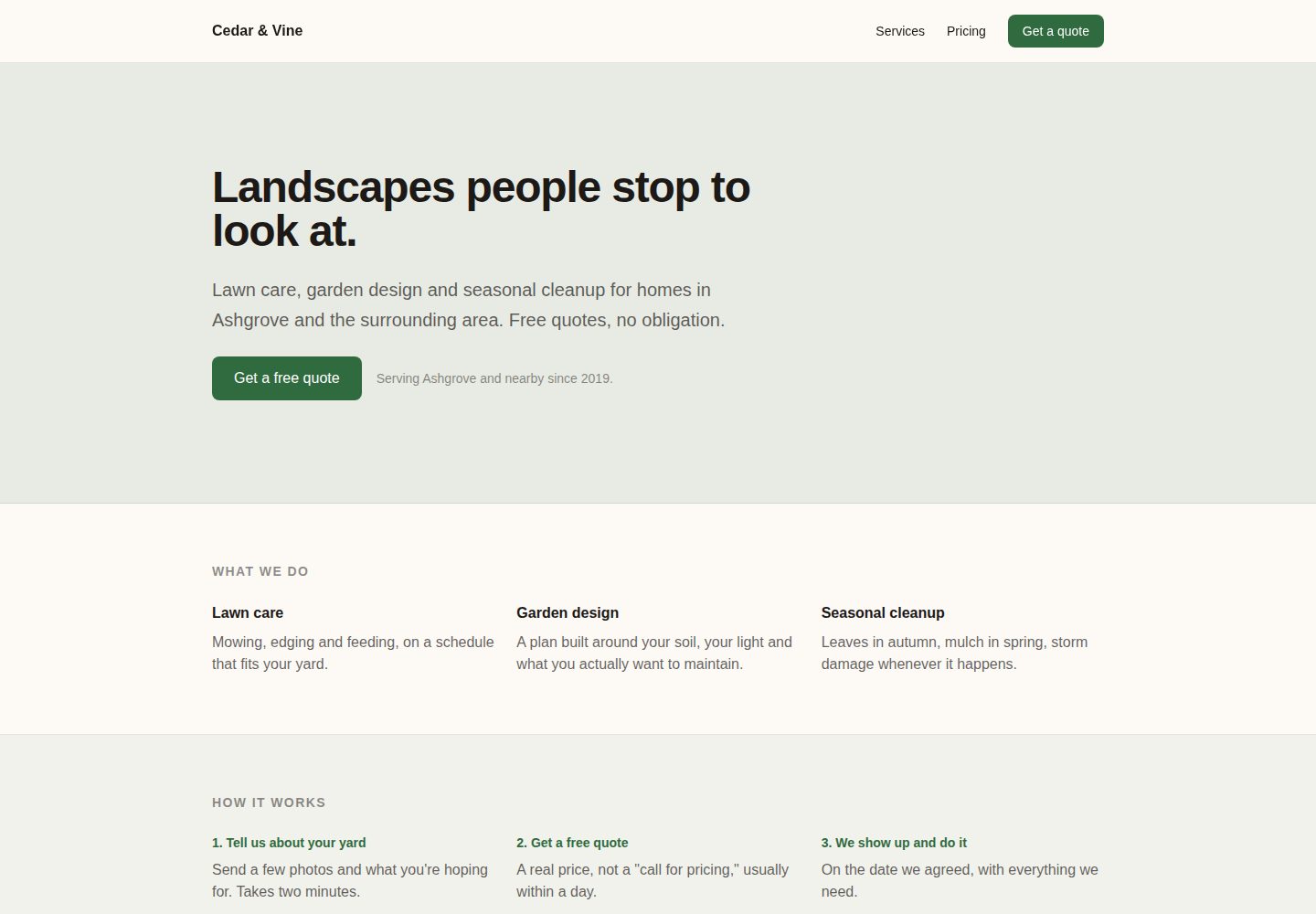
BootForm 出品的单页企业官网 HTML 模板,含粘性导航、全宽首屏、服务/定价/评价分栏和可用的联系表单,适合小型或本地企业部署到自有域名。
看看你的网站会是什么样
浏览真实页面截图,比较内容排版与手机效果。点击下方缩略图切换,放大查看整页细节。
全部页面与视图 2
截图用于了解视觉与布局,交互效果请以实际项目为准。
采集于 2026-10-08查看来源
值得关注的模板亮点
从已有项目资料中,快速了解它的特点。
包含粘性导航、全宽首屏、服务、定价、评价等分栏结构
联系表单可真实发送消息,通过 BootForm 服务接收
README 提供从复制仓库到绑定自有域名、启用 HTTPS 的完整步骤
支持替换示例照片、链接与主题颜色变量
模板详细介绍
这是一个面向小型或本地企业的单页公司官网模板,源码为单个 index.html,无需安装或终端操作,全部在浏览器中完成。页面结构包含粘性导航栏、全宽首屏横幅,以及服务、定价、客户评价等独立分栏,并带有一个真正可发送消息的联系表单。模板以 Cedar & Vine Landscaping 为示例内容,README 用分步方式说明如何复制仓库、通过 GitHub Pages 发布、修改文案与颜色、接入 BootForm 表单服务,以及绑定自有域名并启用 HTTPS。
使用限制方面:联系表单依赖 BootForm 外部服务,静态页面本身没有后端,表单提交后需在 48 小时内认领,否则暂存消息会被删除;未认领前最多暂存 10 条提交。绑定自有域名需要自行购买域名(约每年 10–20 美元),GitHub Pages 与 BootForm 表单本身免费。演示照片、字体、图标等第三方素材需单独核对许可,代码的 MIT 许可不覆盖这些内容。
HTML企业官网
适合你的项目吗?
适用场景
- 为本地服务型小企业搭建带联系表单的单页官网
- 在 GitHub Pages 上快速发布企业落地页并绑定自有域名
- 作为学习静态站点发布、DNS 配置与表单接入的练习项目
- 替换文案与配色后作为客户官网的起步模板
适合人群
- 需要单页公司官网的小型或本地企业主
- 不熟悉命令行、希望在浏览器中完成建站的人
- 已有域名并愿意配置 DNS 记录的使用者
- 接受使用第三方表单服务接收联系消息的团队
上手与定制指南
结合仓库当前版本的说明,按下面的资料检查内容、配置与运行要求。
- 1
点击 Use this template 创建自己的仓库,再在 Settings → Pages 中选择 main 分支和 / (root) 目录发布
- 2
编辑 index.html 中标记为 CHANGE ME 的标题、颜色变量、企业名称和首屏文案
- 3
在 BootForm 生成专属 UUID 并替换表单 action 中的 __YOUR_FORM_ID__,提交后需在 48 小时内认领表单
- 4
绑定自有域名需添加 CNAME 文件,并按注册商要求配置 A 记录或 CNAME 记录,随后在 Pages 设置中启用 Enforce HTTPS
- 5
替换示例照片时上传同名 sample-profile-photo.jpg,或删除对应 img 标签
授权与来源资料
使用条件与限制
免费使用 · 保留许可声明本次收录的是公开仓库中采用 MIT 许可的免费版本;免费范围为该版本代码,不代表外部服务或第三方素材免费。
使用时需要遵守
- 允许免费使用、修改、商用和分发该版本代码。
- 分发代码副本或实质性部分时,保留原作者版权声明和完整 MIT 许可声明。
- 代码按现状提供;担保与责任限制以原许可证及适用法律为准。
额外费用与待核对事项
- 演示图片、字体、图标及其他第三方素材需按各自许可核对,不能仅凭代码的 MIT 许可判断。
- 域名、托管、数据库、支付或 AI 等外部服务可能另外收费。
- 绑定自有域名需自行购买域名,通常每年 10–20 美元;GitHub 账号免费。
- 联系表单依赖 BootForm 外部服务,静态页面本身无后端。
- 未认领表单前,暂存消息仅保留 48 小时,逾期删除。
- 未认领表单前最多暂存 10 条提交,认领后限制解除。
- 接收表单消息需创建免费 BootForm 账号并认领表单。
- 模板自带演示照片,替换或删除前需自行确认素材许可。
查看原文依据
Permission is hereby granted, free of charge
许可证原文
You need a free GitHub account, and, for the domain step near the end, a domain name you've bought from somewhere (Namecheap, Google Domains' successor, Cloudflare, your registrar of choice). That part costs money, usually $10 to $20 a year.
README 原文
We will use [BootForm](https://bootform.com), because you can point a form at it and it works immediately, with no account.
README 原文
Held messages are kept for 48 hours before they are deleted. Claim > the form the same day you put it live.
README 原文
**"This form has reached its limit of 10 held submissions."** You tested it more than ten times before claiming. Claim the form and the limit goes away.
README 原文
Click the claim link and create a free account.
README 原文
https://github.com/BootForm/one-page-site/blob/main/LICENSEhttps://github.com/BootForm/one-page-site/blob/main/README.md**Optional: use your own photo.** The "Who you'll talk to" section starts with a demo photo so you can see how it looks.
README 原文
DeepSeek 根据仓库许可证和 README 整理 ·2026-10-08。结果仅覆盖已读取资料,依赖、图片、字体及后续条款变更以各自原文为准。
项目核对记录与介绍依据
模板资料
- 来源平台
- GitHub
- 资料与维护参考分
- 资料较完整 · 80 / 100
- 技术栈
- HTML
- 网站类型
- 企业官网
这个分数如何计算
本站按许可资料(最高30分)、演示链接(12分)、预览图(10分)、Star数(15分)、记录的维护时间(15分)、描述完整度(8分)、功能记录(5分)和分类资料(5分)计算。它不是代码、安全或性能测试,也不是 Google 评分;有链接不代表已实测可用。
这个项目需要核对什么
- 记录的仓库更新时间
- 2026-09-20
- 截图检查日期
- 2026-10-08
已收录演示链接。请用你的内容与屏幕尺寸检查;有演示不代表表单、认证或支付已经可用。
目录记录的主要技术栈是 HTML。请通过依赖清单和锁文件核对实际版本与托管要求。这些说明基于收录资料,不代表代码审计或部署实测。
查看具体选型方法 →介绍的制作与核对状态
介绍由 AI 辅助整理目录与仓库资料。仓库作者不等于这篇介绍的审核者。
审核声明: [email protected] · 2026-10-08
查看当时使用的来源资料
SHA-256: 6186de0a145586ea34372acc174c6029ca15bac959628360a26df78037cba10b
2026-10-08T02:38:01.970Z
来源文件 / 仓库# A real company page, on your own domain
No installs. No terminal. No account anywhere, until you claim your form, and even then it's free.
By the end you will have a real landing page for a small or local business, on a domain with your
own name on it, with a contact form that genuinely sends you the messages.
**[See what you are building →](https://bootform.github.io/one-page-site/)**
This picks up where [first-website](https://github.com/BootForm/first-website) leaves off. That one
is a personal bio in a single scrolling column. This one looks like a company site: a sticky nav, a
full-width hero banner, and separate bands for services, pricing and a testimonial, plus a step for
putting it on a domain you actually own instead of `github.io`.
---
## Before you start
You need a free GitHub account, and, for the domain step near the end, a domain name you've bought
from somewhere (Namecheap, Google Domains' successor, Cloudflare, your registrar of choice). That
part costs money, usually $10 to $20 a year. Everything else here is free.
Everything below happens in your browser.
---
## Step 1: Make your own copy
Click the green **Use this template** button at the top of this page, then **Create a new
repository**.
Name it `one-page-site`. Leave everything else alone and click **Create repository**.
You now have your own copy. Nothing you do from here can break the original.
---
## Step 2: Put it on the internet
In *your* new repository:
1. Click **Settings** (the tab along the top).
2. Click **Pages** in the left sidebar.
3. Under **Source**, choose **Deploy from a branch**.
4. Set the branch to **main** and the folder to **/ (root)**. Click **Save**.
Wait about a minute, then reload that Settings page. A green box appears at the top with your
address, something like `https://yourname.github.io/one-page-site/`.
**Open it.** That is your website. It is live, on the real internet, and anyone can visit it.
It still says Cedar & Vine Landscaping. We will fix that next.
> **If you get a 404:** give it another minute or two. The first build is the slow one.
---
## Step 3: Make it yours
Back on your repository's main page, click **`index.html`**, then click the pencil icon (✏️) to
edit it.
Look for the lines marked `CHANGE ME`. There are four:
- **The title**, near the top. This is what shows in the browser tab.
- **Two colours**, just below it. `--color-ink` is the text, `--color-paper` is the background,
`--color-accent` is the buttons, links and banded section backgrounds.
- **Your business name**, in the nav bar at the top of the page.
- **The hero headline**, the big line at the top of the page, plus the sentence under it.
Then change the actual words in each band further down the page: the three things under "What we
do", the three steps under "How it works", the two packages and their prices, and the quote under
"What neighbours say" (or delete that section until you have a real one to put there).
When you are done, click **Commit changes...** at the top right, then **Commit changes** in the box
that appears.
Wait a minute, reload your site, and it is yours.
> **Picking colours is the hard part.** If you have no idea, try `--color-paper: #0f1115` and
> `--color-ink: #e8e6e1` for a dark version, and pick any accent you like.
**Optional: use your own photo.** The "Who you'll talk to" section starts with a demo photo so you
can see how it looks. To swap in your own:
1. On your repository's main page, click **Add file → Upload files**.
2. Drag in your photo and name it exactly `sample-profile-photo.jpg`. Uploading a file with the
same name replaces the one that's there.
3. Commit the upload.
4. Edit `index.html`, find the `<img src="sample-profile-photo.jpg" ...>` line, and change its
`alt` text to your own name.
Don't want a photo at all? Delete the `<img>` line (and the `CHANGE ME` comment above it) and the
page still works, just without one.
**Optional: add your links.** Below the photo in "Who you'll talk to" is a row of links marked
`CHANGE ME: your links`. Each one is a single line, for example:
```html
<a href="https://instagram.com/yourbusiness" class="underline decoration-ink/25 underline-offset-4 hover:text-accent hover:decoration-accent">Instagram</a>
```
Change the address in `href` to your own, change the text between the tags to whatever you want it
to say, and delete any line you don't want. Copy a line and change both to add one that isn't there
already, like a Facebook page or a Google Business Profile.
---
## Step 4: Make the contact form actually work
Here is the bit most tutorials skip.
Your page is a *static* site. There is no program running behind it, so there is nowhere for a form
to send anything. That is why every "build a website" tutorial stops at a form that looks right and
does nothing.
You need somewhere for the message to go. We will use [BootForm](https://bootform.com), because you
can point a form at it and it works immediately, with no account.
**4a. Generate your form ID.**
It is just a random UUID, and it has to be yours alone. Pick any one of these:
- Open BootForm's own [UUID generator](https://bootform.com/uuidgenerator) and copy what it shows
you. Nothing you generate there is sent anywhere; it runs entirely in your browser.
- Or paste this into your browser's address bar and press enter:
`javascript:prompt("Your form ID", crypto.randomUUID())`
- Or, on any page, open the browser console (F12) and run `crypto.randomUUID()`.
You will get something like `11111111-1111-4111-8111-111111111111`, though a real one won't repeat
digits like that; a genuine random UUID looks far more scrambled.
> **Use your own.** Do not use the one printed above, and do not use a friend's. Whoever claims a
> form ID first owns it, and everything sent to it goes to them. Yours should be a fresh random one
> that nobody else has seen.
**4b. Paste it in.**
Edit `index.html` again. Find this line:
```html
<form action="https://f.bootform.com/__YOUR_FORM_ID__" method="POST" class="flex flex-col gap-5">
```
Replace `__YOUR_FORM_ID__` with your ID, so it reads:
```html
<form action="https://f.bootform.com/11111111-1111-4111-8111-111111111111" method="POST" class="flex flex-col gap-5">
```
Commit the change. Wait a minute.
**4c. Try it.**
Go to your live site, fill in the form, and send it.
You will land on a page that says the message is being held, and asks you to claim the form. That is
the point: it accepted your message before you had an account anywhere.
**4d. Claim it.**
Click the claim link and create a free account. Everything already sent to your form is delivered to
you straight away.
From now on, anything anyone sends through your site arrives in your inbox.
> **Don't leave it too long.** Held messages are kept for 48 hours before they are deleted. Claim
> the form the same day you put it live.
---
## Step 5: Put it on your own domain
`yourname.github.io/one-page-site` works, but a landing page for a real business needs a real
domain. This is the part that separates this template from a hobby page, and it takes about ten
minutes plus however long DNS takes to catch up (often minutes, sometimes up to 24 hours).
**5a. Buy a domain**, if you don't have one already. Any registrar works. BootForm doesn't sell
domains or have a preferred one to recommend.
**5b. Add a CNAME file to your repository.**
1. On your repository's main page, click **Add file → Create new file**.
2. Name the file exactly `CNAME` (no extension, all capitals).
3. In the file, type your domain on its own line: `yourname.com` (or `www.yourname.com`, whichever
you want people to actually visit).
4. Commit the file.
**5c. Point your domain at GitHub, at your registrar.**
The exact screen differs by registrar, but you're adding DNS records:
- For an apex domain (`yourname.com`, no `www`): add four **A** records, all pointing to GitHub
Pages' addresses: `185.199.108.153`, `185.199.109.153`, `185.199.110.153`, `185.199.111.153`.
- For a subdomain (`www.yourname.com`): add one **CNAME** record pointing to
`yourname.github.io` (your GitHub username, not the repo name).
[Setting up your computer](https://bootform.com/docs/computer-setup) has the same steps written
out in more detail, if anything here is unclear.
**5d. Wait, then confirm HTTPS.**
Back in your repository's Settings → Pages, wait for the domain to show a green checkmark (DNS
propagation, usually fast, occasionally slow). Once it does, tick **Enforce HTTPS**. This can take
up to a day to become available after the domain first verifies; if the checkbox is greyed out,
that's why.
> **Don't skip Enforce HTTPS.** Without it, your site loads over a plain, unencrypted connection
> for anyone who types the address without `https://`, which most people do.
---
## That's it
You have a real landing page, on your own domain, with a working contact form, and you did it
without installing anything.
### Where to go next
| | |
|---|---|
| **More pages** | Copy `index.html` to `about.html` and link to it. That is genuinely all it takes. |
| **A bigger site with a blog** | [vitepress-marketing](https://github.com/BootForm/vitepress-marketing). This one needs a terminal and Node.js: [setting up your computer](https://bootform.com/docs/computer-setup) walks through installing them. |
| **A portfolio** | [vitepress-portfolio](https://github.com/BootForm) when you have case studies to show, not just a pitch. |
| **More form options** | File uploads, autoresponders, Discord and Slack: [bootform.com/docs](https://bootform.com/docs/). |
### Stuck?
Open an [issue](https://github.com/BootForm/one-page-site/issues) and say what happened. There is no
such thing as a question that is too basic here. That is what this repo is for.
---
## Frequently hit problems
**My site shows a 404.** The first build takes a few minutes. If it has been longer, check Settings
→ Pages still says branch `main` and folder `/ (root)`.
**My changes aren't showing.** Each commit triggers a rebuild that takes about a minute. If it still
looks old after that, hard-reload the page: `Ctrl+Shift+R`, or `Cmd+Shift+R` on a Mac.
**The form shows raw text instead of a nice page.** You are seeing the response as JSON. That is
normal for now. Once you claim the form you can set a redirect so people land back on your site.
**"This form has reached its limit of 10 held submissions."** You tested it more than ten times
before claiming. Claim the form and the limit goes away.
**My domain shows GitHub's own "404" or a certificate warning, not my site.** DNS hasn't finished
propagating yet. Give it a few hours before assuming something is broken; `dig yourname.com` from a
terminal (or an online DNS checker) shows whether your records have actually taken effect.
**Enforce HTTPS is greyed out.** GitHub needs to issue a certificate for your domain first, which
only starts after DNS verifies. Check back in a few hours.
## Licence
MIT. Do whatever you like with it, including using it for a real business.
看看同类模板
对比同技术栈与用途的模板,找到更适合的视觉与内容结构。

mazer
Free and Open-source Bootstrap 5 Admin Dashboard Template and Landing Page
HTML · 后台

Freelancer
Freelancer 是 Start Bootstrap 出品的单页作品集模板,专为自由职业者、设计师和小型工作室设计。 页面结构清晰,包含多个内容区块、响应式作品集网格,每个作品项目配有模态窗口展示详情。
HTML · 作品集

Creative
Creative 是 Start Bootstrap 团队维护的一款单页营销模板,定位明确:为创意机构或产品服务提供一个以作品展示和行动号召为核心的落地页。
HTML · 企业官网

startbootstrap-agency
Agency 是 Start Bootstrap 维护的单页代理商作品集主题,基于 Bootstrap 构建,MIT 许可。
HTML · 企业官网

startbootstrap-landing-page
这是 Start Bootstrap 系列中一款通用型落地页模板,基于 Bootstrap 构建,定位是给产品或服务做单页推广。
HTML · 企业官网

Landing-Page
Tailwind CSS Starter Template - Landing Page
HTML · 企业官网