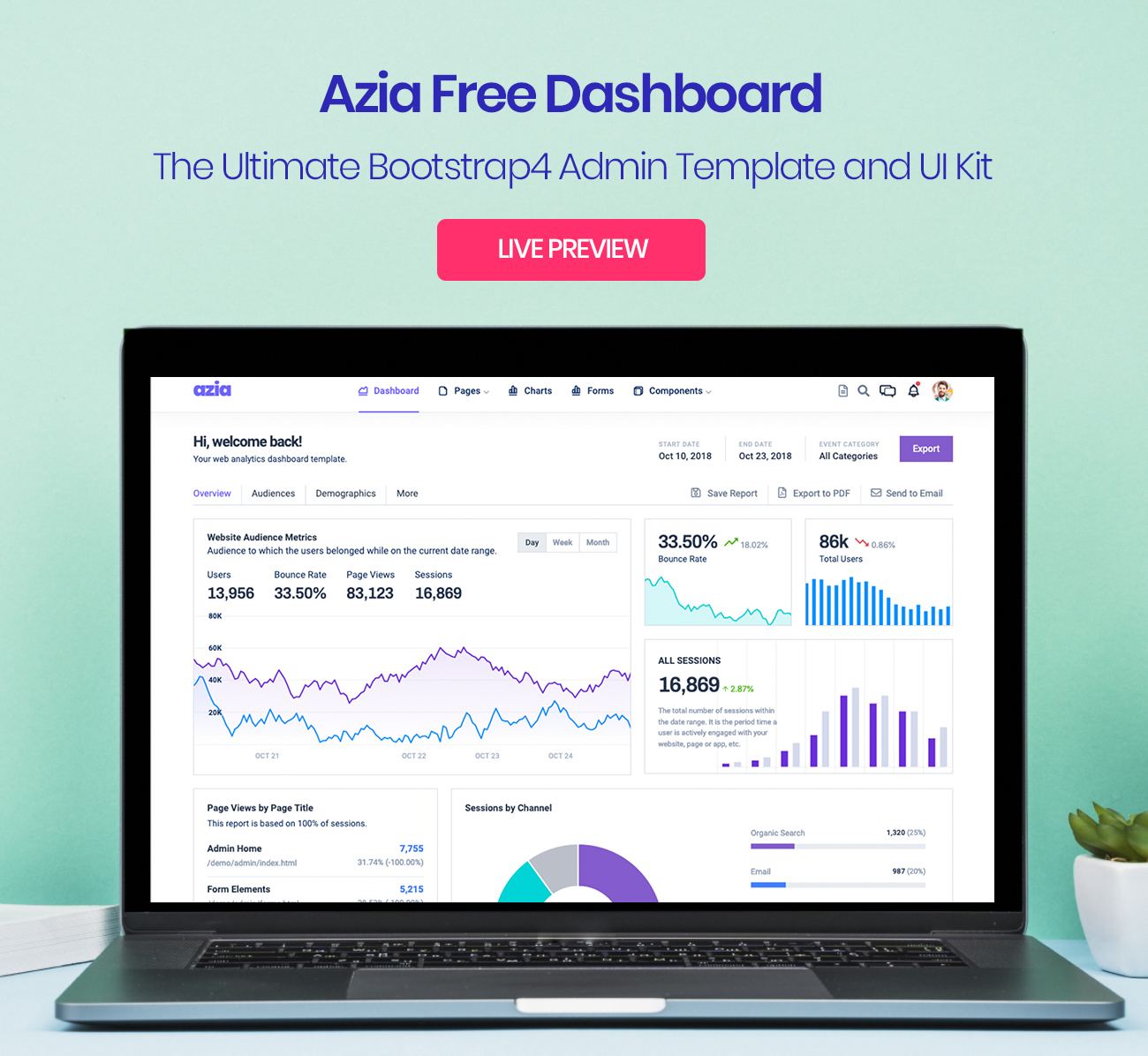
Free responsive admin template based on Bootstrap 4, repository under MIT license
HTMLAdmin dashboard
Azia-Admin-Bootstrap-Template — HTML Admin dashboard Template
By BootstrapDash
Azia Admin is a free responsive admin template released by BootstrapDash, built with Bootstrap 4 and HTML under the MIT license, suitable as a starting point for admin panels, e-commerce backends, project management systems, CMS, or CRM interfaces.
Explore the design
Compare the page layouts and mobile experience. Open any screenshot for a closer look.
Author preview
Author-provided previewTop of page
Preview provided in the project README.
One original preview is available. Open the full image to inspect the design.
Screenshots show visual appearance; interactive behavior may differ.
Recorded 2026-10-01View source
What stands out
A quick read of the recorded project description.
Includes dependencies such as Bootstrap 4, Font Awesome, jQuery, Gulp, and Chart.js
Code is commented for easy adjustment of the interface to project needs
README lists suitable directions including admin panels, e-commerce, project management systems, CMS, and CRM
Provides a Gulp development workflow, with preview in the browser via gulp serve
Template Details
Azia Admin is a free, responsive admin dashboard template built with Bootstrap 4, with HTML as the primary technology stack in the repository. The template is positioned as a data interface style, offering a colorful and clean visual design with organized and arranged components, suitable as a foundation for admin backend interfaces. The README states it is suitable for admin panels, e-commerce systems, project management systems, CMS, or CRM scenarios, and emphasizes that the code is commented for easy customization.
The template depends on Bootstrap 4, Font Awesome, jQuery, Gulp, and Chart.js. To use it, download the ZIP from GitHub or clone the repository, install node-gyp, run npm install to install dependencies, and then edit components in index.html. If using laravel-mix, the README notes that commands must be run with administrator privileges. The contribution process requires installing Node.js, npm, and Gulp CLI, cloning the repository, then running npm install and gulp serve to preview in the browser.
Regarding licensing, the repository contains the standard MIT license text, allowing free use, modification, commercial use, and distribution of this version of the code, provided the copyright notice and full MIT license notice are retained when distributing. Note that demo images, fonts, icons, and other third-party assets must be checked against their respective licenses, and external services such as domain, hosting, database, payment, or AI may incur additional charges. The "Go Premium" mentioned in the README points to BootstrapDash's paid template series, which is independent of the free version included here.
HTMLAdmin panel
Is it right for your project?
Use Cases
- Building admin backend or data dashboard interfaces
- As a starting point for e-commerce system backend interfaces
- For interface development of project management systems or CMS
- As a foundation for CRM-type application interfaces
Suitable For
- Front-end developers needing a free MIT-licensed admin template
- Projects building admin interfaces with Bootstrap 4 and HTML
- Teams wanting to quickly adjust admin styles based on ready-made components
Getting started & customization
Use these recorded setup notes alongside the repository instructions for your chosen version.
- 1
Download the ZIP from GitHub or clone the repository to obtain the template files
- 2
Install node-gyp, then run npm install to install dependencies
- 3
Edit index.html and adjust components as needed
- 4
When using laravel-mix, commands must be run with administrator privileges
- 5
Before contributing code, install Node.js, npm, and Gulp CLI, and run gulp serve for preview
License & source material
Usage conditions & limitations
Free to use · keep license noticeThis entry covers the free version under the MIT license in the public repository; the free scope is the code of this version and does not mean external services or third-party assets are free.
Must comply with when using
- Free use, modification, commercial use, and distribution of this version of the code are permitted.
- When distributing copies or substantial portions of the code, retain the original author's copyright notice and the full MIT license notice.
- The code is provided as is; warranties and limitations of liability are governed by the original license and applicable law.
Additional costs & items to verify
- Before using the template, the node-gyp package must be installed, otherwise dependency installation may fail; this is a prerequisite for the build environment.
- When installing dependencies, the terminal must be run with administrator privileges, otherwise errors may occur.
- If using laravel-mix, all commands must be run with administrator privileges.
- The README promotes BootstrapDash's paid premium template series; more plugins, animations, UI components, and example pages are paid products and not included in this free version.
- Demo images, fonts, icons, and other third-party assets must be checked against their respective licenses and cannot be judged solely by the code's MIT license.
- External services such as domain, hosting, database, payment, or AI may incur additional charges.
View Original Text Basis
Permission is hereby granted, free of charge
Original License Text
0 - Install `node-gyp` package. If you dont know installation steps, please [click here](https://github.com/nodejs/node-gyp)
Original README
3 - Open your terminal (Run as Administrator). You can install all the dependencies in the template by running the command npm install.
Original README
**Note :** If you use laravel-mix, please run all command with admin authorities.
Original README
https://github.com/BootstrapDash/Azia-Admin-Bootstrap-Template/blob/master/LICENSEhttps://github.com/BootstrapDash/Azia-Admin-Bootstrap-Template/blob/master/README.mdDo you need a template with more features and functionalities? Get more with our collection of the premium template with more plugins, eye catching animations, UI components, and sample pages all fitting together with a high-quality design.
Original README
Compiled by DeepSeek based on repository license and README ·2026-10-01. Results only cover the materials read; dependencies, images, fonts, and subsequent term changes are subject to their respective original texts.
Project checks & description sources
Template Information
- Source platforms
- GitHub
- Documentation and maintenance reference score
- Partly documented · 72 / 100
- Technologies
- HTML
- Website type
- Admin dashboard
How this score is calculated
Our heuristic uses license records (up to 30), a demo link (12), a preview (10), stars (15), recorded maintenance (15), description completeness (8), feature records (5) and classification data (5). It is not a code, security or performance test, or a Google score. A link does not establish tested functionality.
What to verify for this project
- Repository update recorded
- 2020-11-19
- Screenshot last checked
- 2026-10-01
A demo link is listed. Check it with your own content and viewport sizes; its presence does not confirm that forms, authentication or payments work.
The catalog identifies HTML as the primary stack. Check the actual dependency manifest and lockfile for versions and hosting requirements. These notes use recorded metadata, not a code audit or a deployment test.
Use a selection guide →How this description was prepared
AI-assisted description based on catalog records and repository material. Repository authors are not automatically the reviewers of this description.
Automatically checked against source and license rules; no manual editorial review.
Inspect the recorded source material
SHA-256: 2ab818a0e851edf9590b28af142e68892adf96cfd1b2ea9ba0d1b28a58c1f8d1
2026-10-01T01:46:31.413Z
Source file / repository<h1>AziaAdmin-Free-Bootstrap-Admin-Template</h1> Azia Admin is a free responsive admin template built with Bootstrap 4. The template has colorful, attractive yet simple and elegant design. The template is well crafted, with all the components neatly and carefully designed and arranged within the template. Azia Admin is packed with all the features that fit your needs but not cramped with components you would not even use. It is an excellent fit to build admin panels, e-commerce systems, project management systems, CMS or CRM. Although the template has a design like none other, it is easily customizable to suit your requirements. Azia Admin comes with a clean and well-commented code that makes it easy to work with the template. Thus making it an ideal pick for jump starting your project. <h1>Demo</h1> <hr style="margin-bottom: 30px"> [](https://www.bootstrapdash.com/demo/azia-free/template/) <h1>Credits:</h1> - Bootstrap 4 - Font Awesome - jQuery - Gulp - Chart.js <h1>Browser Support:</h1> AziaAdmin is designed to work flawlessly with all the latest and modern web browsers. - Chrome (latest) - FireFox (latest) - Safari (latest) - Opera (latest) - IE10+ <h1>License Information:</h1> <hr> Azia Admin is released under MIT license. Azia Admin is a free Bootstrap 4 admin template developed from BootstrapDash. Feel free to download it, use it, share it, get creative with it. <h1>How to use Azia Admin?</h1> <hr> 0 - Install `node-gyp` package. If you dont know installation steps, please [click here](https://github.com/nodejs/node-gyp) 1 - Click the Clone or Download button in GitHub and download as a ZIP file or you can enter the command git clone https://github.com/BootstrapDash/azia-admin.git in you terminal to get a copy of this template. 2 - After the files have been downloaded you will get a folder with all the required files 3 - Open your terminal (Run as Administrator). You can install all the dependencies in the template by running the command npm install. All the required files are in the node modules. If you didn't run with admin authorities, you can see errors. 4 - Find the file named index.html, check what all components you need. Open the file in a text editor and you can start editing. 5 - Now that your project has now kick-started, all you need to do now is to code, code, and code to your heart's content. **Note :** If you use laravel-mix, please run all command with admin authorities. <h1>How to Contribute?:</h1> <hr> We love your contributions and we welcome them wholeheartedly. We believe the more the merrier. To contribute make sure you have a Node.js and npm installed. Now run the command gulp --version. If the command returns with the Gulp version number, it means you have Gulp installed. If not you need to run the command npm install --global gulp-cli to install Gulp. <h2>Next</h2> After Gulp has been installed, follow the steps below to contribute. <br> 1 - Fork and clone the repo of Azia Admin. <br> 2 - Run the command npm install to install all the dependencies. <br> 3 - Enter the command gulp serve. This will open Azia Admin in your default browser. <br> 4 - Make you valuable contribution <br> 5 - Submit a pull request. <h1>Go Premium!!</h1> <hr> Do you need a template with more features and functionalities? Get more with our collection of the premium template with more plugins, eye catching animations, UI components, and sample pages all fitting together with a high-quality design. Visit <a href="https://www.bootstrapdash.com" target="_blank">https://www.bootstrapdash.com</a> for more admin templates.
Explore similar templates
Compare previews and descriptions within the same stack and category.

gentelella
Gentelella v4 is a free, open-source admin dashboard template maintained by Colorlib, built with vanilla JavaScript, SCSS, and Vite 8 without Bootstrap or jQuery.
HTML · Admin dashboard

coreui-free-bootstrap-admin-template
A free Bootstrap admin template maintained by CoreUI, built on CoreUI's own UI component library. It provides compiled HTML pages and Pug template source code, covering dashboards, authentication, forms, components, icons, and error pages.
HTML · Admin dashboard

dashboards
A collection of responsive dashboard HTML templates open-sourced by Keen IO, built on CSS Grid, offering multiple prebuilt admin data interface layouts.
HTML · Admin dashboard

SB Admin 2
SB Admin 2 is a classic Bootstrap admin template from Start Bootstrap, offering dashboards, charts, tables, and common management pages.
HTML · Admin dashboard

Adminator-admin-dashboard
Adminator 4 is a vanilla HTML, CSS and JavaScript admin dashboard template with a CSS-variable token design system, built-in light and dark themes, no jQuery or Bootstrap dependency, and 18 pages covering dashboards, mail, calendar, charts, forms, tables and error pages.
HTML · Admin dashboard

SB Admin
SB Admin is a lightweight, open-source Bootstrap admin template from Start Bootstrap. It offers a sidebar-and-top-bar layout with data tables, forms, and stat cards, plus responsive design.
HTML · Admin dashboard