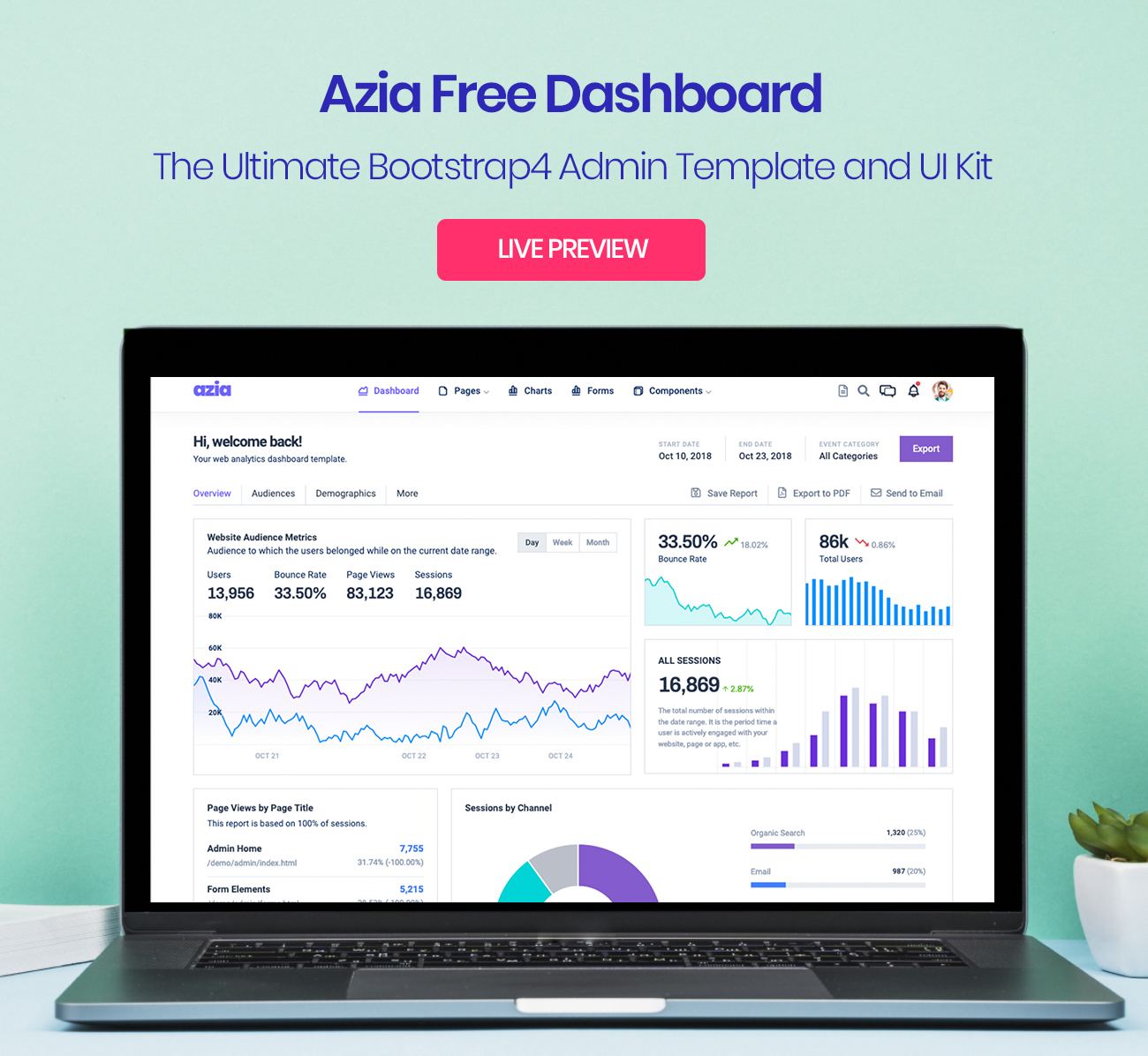
基于 Bootstrap 4 的免费响应式后台模板,仓库采用 MIT 许可
HTML后台
Azia-Admin-Bootstrap-Template — HTML 后台模板
作者 BootstrapDash
Azia Admin 是 BootstrapDash 发布的免费响应式后台模板,基于 Bootstrap 4 与 HTML 构建,采用 MIT 许可,适合用作管理面板、电商后台、项目管理系统、CMS 或 CRM 的界面起点。
看看你的网站会是什么样
浏览真实页面截图,比较内容排版与手机效果。点击下方缩略图切换,放大查看整页细节。
目前有 1 张原始预览,可打开完整图片查看设计细节。
截图用于了解视觉与布局,交互效果请以实际项目为准。
采集于 2026-10-01查看来源
值得关注的模板亮点
从已有项目资料中,快速了解它的特点。
包含 Bootstrap 4、Font Awesome、jQuery、Gulp 与 Chart.js 等依赖
代码带有注释,便于按项目需求调整界面
README 列出管理面板、电商、项目管理系统、CMS、CRM 等适用方向
提供 Gulp 开发流程,可通过 gulp serve 在浏览器中预览
模板详细介绍
Azia Admin 是一个免费、响应式的后台管理模板,使用 Bootstrap 4 构建,仓库以 HTML 为主要技术栈。模板定位为数据界面风格,提供彩色且简洁的视觉设计,组件经过整理与排列,适合直接作为管理后台界面的基础。README 说明其适用于管理面板、电商系统、项目管理系统、CMS 或 CRM 等场景,并强调代码带有注释、便于按需定制。
模板依赖 Bootstrap 4、Font Awesome、jQuery、Gulp 与 Chart.js。使用方式为从 GitHub 下载 ZIP 或克隆仓库,安装 node-gyp 后运行 npm install 安装依赖,再编辑 index.html 中的组件。若使用 laravel-mix,README 提示需以管理员权限运行命令。贡献流程要求安装 Node.js、npm 与 Gulp CLI,克隆仓库后执行 npm install 与 gulp serve 在浏览器中预览。
许可方面,仓库包含标准 MIT 许可文本,允许免费使用、修改、商用与分发该版本代码,分发时需保留版权声明与完整 MIT 许可声明。需要注意,演示图片、字体、图标等第三方素材需按各自许可核对,域名、托管、数据库、支付或 AI 等外部服务可能另外收费。README 中提到的“Go Premium”指向 BootstrapDash 的付费模板系列,与本次收录的免费版本相互独立。
HTML后台
适合你的项目吗?
适用场景
- 搭建管理后台或数据看板界面
- 作为电商系统后台的界面起点
- 用于项目管理系统或 CMS 的界面开发
- 作为 CRM 类应用的界面基础
适合人群
- 需要免费 MIT 许可后台模板的前端开发者
- 使用 Bootstrap 4 与 HTML 构建后台界面的项目
- 希望基于现成组件快速调整后台样式的团队
上手与定制指南
结合仓库当前版本的说明,按下面的资料检查内容、配置与运行要求。
- 1
从 GitHub 下载 ZIP 或克隆仓库获取模板文件
- 2
安装 node-gyp 后运行 npm install 安装依赖
- 3
编辑 index.html 并按需调整组件
- 4
使用 laravel-mix 时需以管理员权限运行命令
- 5
贡献代码前需安装 Node.js、npm 与 Gulp CLI,并执行 gulp serve 预览
授权与来源资料
使用条件与限制
免费使用 · 保留许可声明本次收录的是公开仓库中采用 MIT 许可的免费版本;免费范围为该版本代码,不代表外部服务或第三方素材免费。
使用时需要遵守
- 允许免费使用、修改、商用和分发该版本代码。
- 分发代码副本或实质性部分时,保留原作者版权声明和完整 MIT 许可声明。
- 代码按现状提供;担保与责任限制以原许可证及适用法律为准。
额外费用与待核对事项
- 使用该模板前需先安装 node-gyp 包,否则依赖安装可能失败;这是构建环境的前置要求。
- 安装依赖时需以管理员权限运行终端,否则可能出现错误。
- 若使用 laravel-mix,所有命令都需以管理员权限运行。
- README 推广 BootstrapDash 的付费高级模板系列,更多插件、动画、UI 组件与示例页面属于付费产品,不在本免费版本范围内。
- 演示图片、字体、图标及其他第三方素材需按各自许可核对,不能仅凭代码的 MIT 许可判断。
- 域名、托管、数据库、支付或 AI 等外部服务可能另外收费。
查看原文依据
Permission is hereby granted, free of charge
许可证原文
0 - Install `node-gyp` package. If you dont know installation steps, please [click here](https://github.com/nodejs/node-gyp)
README 原文
3 - Open your terminal (Run as Administrator). You can install all the dependencies in the template by running the command npm install.
README 原文
**Note :** If you use laravel-mix, please run all command with admin authorities.
README 原文
https://github.com/BootstrapDash/Azia-Admin-Bootstrap-Template/blob/master/LICENSEhttps://github.com/BootstrapDash/Azia-Admin-Bootstrap-Template/blob/master/README.mdDo you need a template with more features and functionalities? Get more with our collection of the premium template with more plugins, eye catching animations, UI components, and sample pages all fitting together with a high-quality design.
README 原文
DeepSeek 根据仓库许可证和 README 整理 ·2026-10-01。结果仅覆盖已读取资料,依赖、图片、字体及后续条款变更以各自原文为准。
项目核对记录与介绍依据
模板资料
- 来源平台
- GitHub
- 资料与维护参考分
- 资料一般 · 72 / 100
- 技术栈
- HTML
- 网站类型
- 后台
这个分数如何计算
本站按许可资料(最高30分)、演示链接(12分)、预览图(10分)、Star数(15分)、记录的维护时间(15分)、描述完整度(8分)、功能记录(5分)和分类资料(5分)计算。它不是代码、安全或性能测试,也不是 Google 评分;有链接不代表已实测可用。
这个项目需要核对什么
- 记录的仓库更新时间
- 2020-11-19
- 截图检查日期
- 2026-10-01
已收录演示链接。请用你的内容与屏幕尺寸检查;有演示不代表表单、认证或支付已经可用。
目录记录的主要技术栈是 HTML。请通过依赖清单和锁文件核对实际版本与托管要求。这些说明基于收录资料,不代表代码审计或部署实测。
查看具体选型方法 →介绍的制作与核对状态
介绍由 AI 辅助整理目录与仓库资料。仓库作者不等于这篇介绍的审核者。
已完成服务器许可规则与 AI 来源核对;未经过人工编辑审核。
查看当时使用的来源资料
SHA-256: 2ab818a0e851edf9590b28af142e68892adf96cfd1b2ea9ba0d1b28a58c1f8d1
2026-10-01T01:46:31.413Z
来源文件 / 仓库<h1>AziaAdmin-Free-Bootstrap-Admin-Template</h1> Azia Admin is a free responsive admin template built with Bootstrap 4. The template has colorful, attractive yet simple and elegant design. The template is well crafted, with all the components neatly and carefully designed and arranged within the template. Azia Admin is packed with all the features that fit your needs but not cramped with components you would not even use. It is an excellent fit to build admin panels, e-commerce systems, project management systems, CMS or CRM. Although the template has a design like none other, it is easily customizable to suit your requirements. Azia Admin comes with a clean and well-commented code that makes it easy to work with the template. Thus making it an ideal pick for jump starting your project. <h1>Demo</h1> <hr style="margin-bottom: 30px"> [](https://www.bootstrapdash.com/demo/azia-free/template/) <h1>Credits:</h1> - Bootstrap 4 - Font Awesome - jQuery - Gulp - Chart.js <h1>Browser Support:</h1> AziaAdmin is designed to work flawlessly with all the latest and modern web browsers. - Chrome (latest) - FireFox (latest) - Safari (latest) - Opera (latest) - IE10+ <h1>License Information:</h1> <hr> Azia Admin is released under MIT license. Azia Admin is a free Bootstrap 4 admin template developed from BootstrapDash. Feel free to download it, use it, share it, get creative with it. <h1>How to use Azia Admin?</h1> <hr> 0 - Install `node-gyp` package. If you dont know installation steps, please [click here](https://github.com/nodejs/node-gyp) 1 - Click the Clone or Download button in GitHub and download as a ZIP file or you can enter the command git clone https://github.com/BootstrapDash/azia-admin.git in you terminal to get a copy of this template. 2 - After the files have been downloaded you will get a folder with all the required files 3 - Open your terminal (Run as Administrator). You can install all the dependencies in the template by running the command npm install. All the required files are in the node modules. If you didn't run with admin authorities, you can see errors. 4 - Find the file named index.html, check what all components you need. Open the file in a text editor and you can start editing. 5 - Now that your project has now kick-started, all you need to do now is to code, code, and code to your heart's content. **Note :** If you use laravel-mix, please run all command with admin authorities. <h1>How to Contribute?:</h1> <hr> We love your contributions and we welcome them wholeheartedly. We believe the more the merrier. To contribute make sure you have a Node.js and npm installed. Now run the command gulp --version. If the command returns with the Gulp version number, it means you have Gulp installed. If not you need to run the command npm install --global gulp-cli to install Gulp. <h2>Next</h2> After Gulp has been installed, follow the steps below to contribute. <br> 1 - Fork and clone the repo of Azia Admin. <br> 2 - Run the command npm install to install all the dependencies. <br> 3 - Enter the command gulp serve. This will open Azia Admin in your default browser. <br> 4 - Make you valuable contribution <br> 5 - Submit a pull request. <h1>Go Premium!!</h1> <hr> Do you need a template with more features and functionalities? Get more with our collection of the premium template with more plugins, eye catching animations, UI components, and sample pages all fitting together with a high-quality design. Visit <a href="https://www.bootstrapdash.com" target="_blank">https://www.bootstrapdash.com</a> for more admin templates.
看看同类模板
对比同技术栈与用途的模板,找到更适合的视觉与内容结构。

gentelella
Free admin dashboard template — vanilla JS, SCSS, Vite 8. No Bootstrap, no jQuery.
HTML · 后台

coreui-free-bootstrap-admin-template
Free Bootstrap Admin & Dashboard Template Built for AI-Assisted Development
HTML · 后台

dashboards
Responsive dashboard templates 📊✨
HTML · 后台

SB Admin 2
SB Admin 2 是 Start Bootstrap 推出的开源后台模板,基于 Bootstrap 构建,整体风格偏向经典管理界面。
HTML · 后台

Adminator-admin-dashboard
Adminator is easy to use and well design admin dashboard template with dark mode for web apps, websites, servi…
HTML · 后台

SB Admin
SB Admin 是 Start Bootstrap 推出的开源后台管理模板,基于 Bootstrap 构建,定位是简洁、实用的管理界面。
HTML · 后台