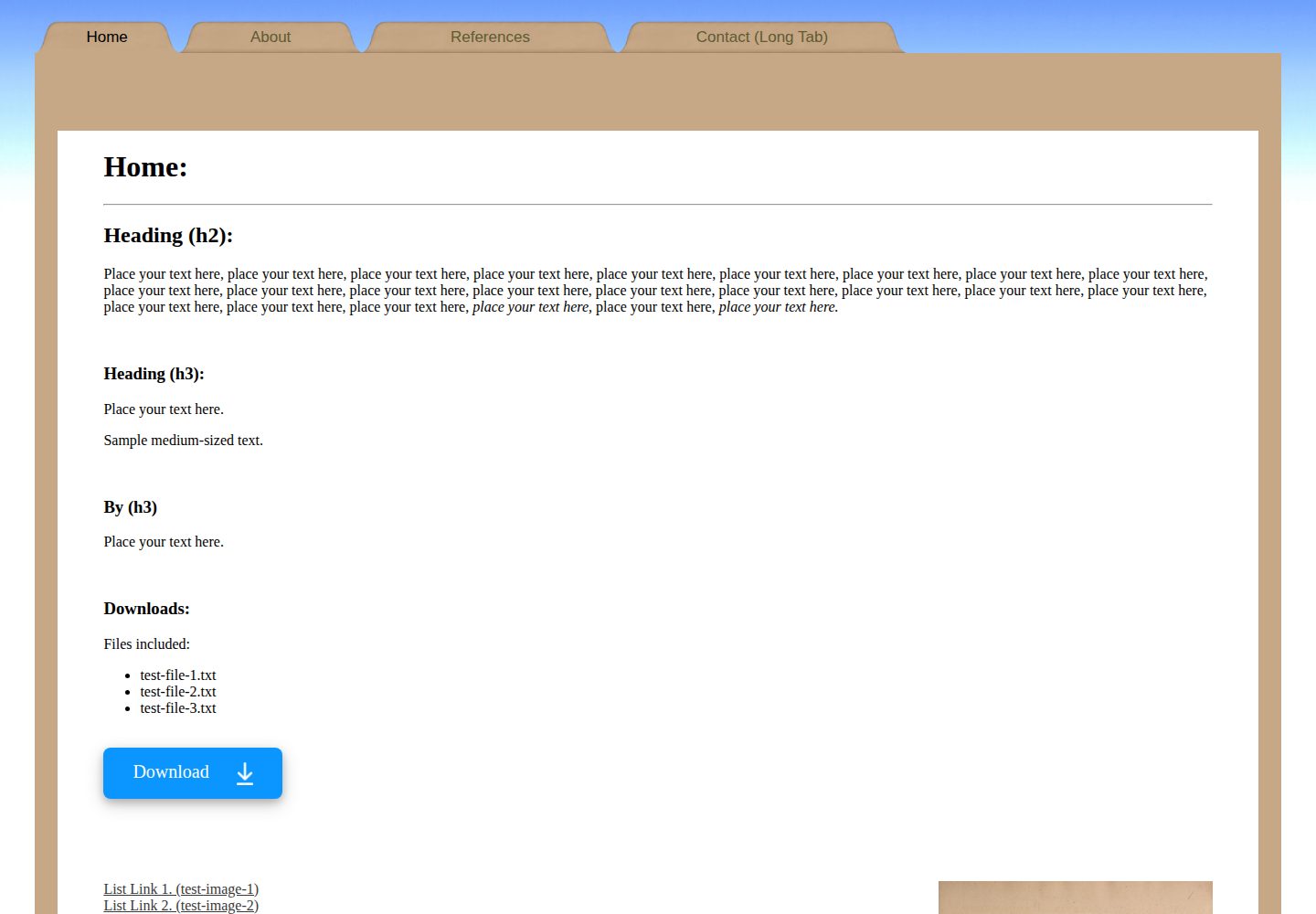
Pure HTML static template; pages consist of index.html files in multiple subdirectories, with no build step required
HTMLStarter
simple-website-template-folder-style-v1 — HTML Starter Template
By boxbot6
A pure HTML static website template with a Manila folder visual style, including step-by-step instructions for hosting on GitHub Pages.
Explore the design
Compare the page layouts and mobile experience. Open any screenshot for a closer look.
Desktop homepage1 / 3
Desktop captureTop of page
Actual screenshot captured by the server browser.
All pages & views 3
Screenshots show visual appearance; interactive behavior may differ.
Recorded 2026-10-03View source
What stands out
A quick read of the recorded project description.
Uses a Manila folder visual style, including a homepage and several inner page examples
README provides complete steps from downloading the ZIP to local editing and then deploying on GitHub Pages
Includes examples of navigation tab hover, click, and current page states; icons are stored in the images directory
Comes with suggestions for sitemap.xml and Google Search Console indexing
Template Details
This is a pure HTML static website template. The repository is named simple-website-template-folder-style-v1, maintained by boxbot6, and licensed under MIT. The template presents pages in a Manila folder style, including a homepage and several subpages, each located in its own subdirectory with its own index.html. The README describes two usage paths: first, download the repository as a ZIP, extract it to a newly created local root folder, and use Notepad or an HTML editor to modify index.html, images, and .css files to personalize the content; second, upload the entire root directory to a GitHub repository and select deployment from the main branch under Settings > Pages, where GitHub Pages provides free hosting. The template also provides tips for replacing the README, adding a sitemap.xml, and submitting the site via Google Search Console to speed up indexing.
Regarding usage limitations, the template itself consists only of static HTML and CSS files, with no backend, database, or build process. The free GitHub Pages hosting mentioned in the README has capacity and bandwidth limits (site size no more than 1 GB, soft bandwidth limit of about 100 GB per month), and new sites may take days to weeks to be indexed by search engines. Demo images, icons, and other assets in the repository must be checked individually under their respective licenses; the MIT license for the code does not automatically cover third-party assets.
HTMLLauncher
Is it right for your project?
Use Cases
- Quickly building a personal or project static showcase site and hosting it on GitHub Pages
- As an HTML/CSS beginner exercise, following the README to modify page structure and styles step by step
- Needing a pure static multi-page (homepage plus subpages) site skeleton as a starting point
Suitable For
- Individual developers familiar with basic HTML editing who want to launch a static site with zero build process
- GitHub users who need free hosting for personal, organization, or project pages
- HTML beginners using this template as teaching or practice material
Getting started & customization
Use these recorded setup notes alongside the repository instructions for your chosen version.
- 1
Download the ZIP from the repository and extract it, copy the contents into a self-created website root folder, keeping the subfolder structure unchanged
- 2
Use Notepad or another HTML editor to modify index.html, the index.html of each subpage, and .css files; place images in the images directory and reference them as shown in the examples
- 3
Create a new public repository on GitHub and upload all files and folders from the root directory, then select deployment from the main branch under Settings > Pages
- 4
GitHub Pages has limits: site size no more than 1 GB and a soft bandwidth limit of about 100 GB per month; new sites may take days to weeks to be indexed by search engines
- 5
Third-party assets such as demo images and icons must be checked under their respective licenses; the MIT license for the code does not automatically cover these assets
License & source material
Usage conditions & limitations
Free to use · keep license noticeThis entry covers the free version under the MIT license in the public repository; the free scope applies to that version's code and does not imply that external services or third-party assets are free.
Must comply with when using
- Free use, modification, commercial use, and distribution of this version's code are permitted.
- When distributing copies or substantial portions of the code, retain the original author's copyright notice and the full MIT license notice.
- The code is provided as is; warranties and liability limitations are governed by the original license and applicable law.
Additional costs & items to verify
- Demo images, fonts, icons, and other third-party assets must be checked under their respective licenses; they cannot be judged solely by the code's MIT license.
- External services such as domains, hosting, databases, payments, or AI may incur additional charges.
- When using free GitHub Pages hosting, there are capacity and bandwidth limits: the site must not exceed 1 GB, and the soft bandwidth limit is about 100 GB per month.
- Submitting the site via Google Search Console to speed up indexing requires logging into a Google account.
- Newly created GitHub Pages sites may take days or even weeks to be indexed by search engines; immediate searchability is not guaranteed.
View Original Text Basis
Permission is hereby granted, free of charge
Original License Text
GitHub Pages is designed to host your personal, organization, or project pages from a GitHub repository (Size\/usage limits apply: sites may be no larger than 1 GB with a soft bandwidth limit of 100 GB per month).
Original README
you will need to sign in with your google account
Original README
https://github.com/boxbot6/simple-website-template-folder-style-v1/blob/main/LICENSEhttps://github.com/boxbot6/simple-website-template-folder-style-v1/blob/main/README.mdmay not be indexed for many days or even weeks after you create it
Original README
Compiled by DeepSeek based on repository license and README ·2026-10-04. Results only cover the materials read; dependencies, images, fonts, and subsequent term changes are subject to their respective original texts.
Project checks & description sources
Template Information
- Source platforms
- GitHub
- Documentation and maintenance reference score
- More documented · 77 / 100
- Technologies
- HTML
- Website type
- Starter
How this score is calculated
Our heuristic uses license records (up to 30), a demo link (12), a preview (10), stars (15), recorded maintenance (15), description completeness (8), feature records (5) and classification data (5). It is not a code, security or performance test, or a Google score. A link does not establish tested functionality.
What to verify for this project
- Repository update recorded
- 2025-08-26
- Screenshot last checked
- 2026-10-04
A demo link is listed. Check it with your own content and viewport sizes; its presence does not confirm that forms, authentication or payments work.
The catalog identifies HTML as the primary stack. Check the actual dependency manifest and lockfile for versions and hosting requirements. These notes use recorded metadata, not a code audit or a deployment test.
Use a selection guide →How this description was prepared
AI-assisted description based on catalog records and repository material. Repository authors are not automatically the reviewers of this description.
Review declaration: [email protected] · 2026-10-05
Inspect the recorded source material
SHA-256: 869c6b8b91e6b74151f2d96127a18ebd156ccaf2f2183f47db961a87e1f2f649
2026-10-04T23:30:23.818Z
Source file / repository# A simple free HTML website template for hosting on GitHub and elsewhere:

## Click on the link below to open and try out the template.
* [Click this link to visit and try the website being created from this repository and hosted on github-pages.](https://boxbot6.github.io/simple-website-template-folder-style-v1/)
## To copy and use the template:
* Create a new folder on your computer and name it - this folder will be your new websites root directory folder.
* Use the green '\<\> Code' button at the top of this repository's github page to 'Download ZIP' of this repository.
* Unzip the download and copy the internal contents to the new folder keeping all its subfolders intact.
* This folder now contains your new website ready to be personalised by editing the contents as outlined in the section below and when you are happy with the results you can host it for free on GitHub (as shown further down on this page) or simply move the complete new root directory folder to wherever else you wish to host it.
## To edit your new website:
* Open the index.html file from your new folder (using Notepad or another html editor) and edit the contents to create your own home page (A good beginners guide here: [HTML For Beginners The Easy Way: Start Learning HTML & CSS Today](https://html.com/)).
* (To test the website while you are editing - save changes and then click on the index.html and a browser window will open and display the results of your current edits - refresh the browser tab after saving any further edits to display subsequent changes).
* Update \<title\> with your own info.
* Put any images you want to use into the images folder and link to them in the index.html by copying how its done for the demo images.
* Duplicate, add or remove elements that you want and reposition them on the page to suit your own purposes.
* If you are new to coding the header tabs might look a little complicated at first because they contain options for displaying different images dependant on if you are hovering over them, clicking on them or currently viewing that particular page etc. (as well as having different demo sizes for the tabs) - just rename or duplicate the existing ones for ease until you are comfortable with how they work (all the icons for the tabs are stored in images).
* Update any other elements\/text on the page as required including the footer and then check that all the links are working (see the links already included in the template for examples).
* Edit the .css file to change the website presentation and styles.
* Delete or \<\!\-\- comment out \-\-\> anything not needed.
* Add any new pages you want by studying and copying the way the code is used for the existing pages (or just rename the existing pages and tabs to what you want).
* Edit the index.html files for the other pages including any new pages you have created (every page should have an index.html that is located in their own subdirectory folder) - add your own content to each of these subsequent pages as you did for the home page.
* When you are happy with everything host it on GitHub as below, upload it to a hosting service or move the main root directory folder to the location where you wish to host it from your own server.
## Using free github hosting:
GitHub Pages is designed to host your personal, organization, or project pages from a GitHub repository (Size\/usage limits apply: sites may be no larger than 1 GB with a soft bandwidth limit of 100 GB per month).
### github repository bit:
* Sign in to your account on [Github.com](https://github.com/), go to 'Your repositories' and select 'New' (top right).
* In 'create a new repository' give the new repository a name (this name will also apply to your website), add an optional description, keep check box 'Public' to make your repository and website created from it visible online to the general public. (don't add a README file, .gitignore or Licence here, the relevant files will be added later).
* Press 'Create repository' at the bottom.
* This will take you to Quick setup, select 'uploading an existing file'
* On the next page drag and drop all the files and folders together as a bundle from inside the new root directory folder that you made earlier in 'To copy and use the template' onto the upload section.
* Press 'Commit changes' at the bottom
* After creating the repository double-check that it is listed as Public (if not change the visibility in settings).
* Change the Licence etc. at this time if you want to.
### github-pages bit:
* Now use 'Settings' to open GitHub Pages (shown as Pages in the column on the left).
* Select Source - Deploy from a branch, select main, then save.
* Wait a few minutes for the website to be created and become active - when its done the https address will be shown in github-pages - copy the link and you can use it in the option below to replace this README.md file with a simpler one that displays just the name and description of your own website and contains the link to that new site.
<br>
Example of a simple README.md file to replace this one:
---
# HTML Website Hosting For:
### put-your-website-name-here
<br>
* [Click this link to visit the website being created from this repository by github-pages.](https://put-your-github-name-here.github.io/put-your-website-name-here/)
<br>
(After creating your own website you can edit this README.md to show your own sites name above and update the https link beneath it to take you to your new websites address (find the link in github-pages)). - You can then write your own description here and if you want add an image to help visitors quickly see what your site looks like - you can then delete this comment!)
---
<br>
Code for the above example: (replace the text in your repository's README.md with this).
# HTML Website Hosting For:
### put-your-website-name-here
<br>
* [Click this link to visit the website being created from this repository by github-pages.](https://put-your-github-name-here.github.io/put-your-website-name-here/)
<br>
(After creating your own website you can edit this README.md to show your own sites name above and update the https link beneath it to take you to your new websites address (find the link in github-pages)). - You can then write your own description here and if you want add an image to help visitors quickly see what your site looks like - you can then delete this comment!)
<br>
<br>
You can now share or embed the link to your newly created GitHub Pages site wherever you like (the link can be found in your GitHub repository under Settings > Pages). This link can also be copied into a search bar for anyone to visit the site.
<br>
<br>
**Update:** If you are having trouble getting your site to appear in google search results:
You may have to wait a day or so for your original GitHub repository to show up in google searches but unfortunately the new github-pages website that you just created (https<nolink>://yourname.<ins>github.io</ins>/yoursitename/) may not be indexed for many days or even weeks after you create it - there are many different remedies on the internet explaining how to get google to index your website quicker - here are a few pointers:
* Go to [google search console](https://search.google.com/search-console/about) to verify your site (you will need to sign in with your google account). There are various ways to add your new property and verify your website, but the easiest is probably to enter the URL of your github-pages site, download a google verification file and then put it in the main directory of your repository, then after waiting a couple of minutes for github-pages to refresh after the addition of the new file and become live again verify it in google search console).
* Add a sitemap.xml to the main directory of your repository to encourage google to index your site if it is crawled (a sitemap is a simple text file to tell search engines about the layout of your site - copy and amend a sitemap.xml from one my other example sites with the info from your site (it's just a text file and can be edited in notepad)).
* After adding the sitemap.xml to your repository you can also add the sitemaps location to google search console (Google Search Console > Indexing > Sitemaps > Add a new sitemap).
* Images may take even longer to be indexed because a different slower googlebot is used for image crawling (you can try also including the images in the sitemap to help).
* **Please note:** Probably the best thing you can do to get indexed quickly is to make lots of links from other websites that lead to your site so it can be easily accessed in many different ways by the bots.
<br>
Cick the link below to visit the website being created from this repository by github-pages.
[https://boxbot6.github.io/simple-website-template-folder-style-v1/](https://boxbot6.github.io/simple-website-template-folder-style-v1/)
<br>
---
* [Click this link to see more templates.](https://boxbot6.github.io/simple-website-templates/)
<br>
Explore similar templates
Compare previews and descriptions within the same stack and category.

startbootstrap-simple-sidebar
A Bootstrap off-canvas sidebar navigation HTML starter template from Start Bootstrap. It provides directly editable HTML and CSS in the dist directory, while the source uses Pug, SCSS, and JavaScript with npm build scripts for live preview and compilation.
HTML · Starter

adminkit
AdminKit is a free, MIT-licensed HTML admin and dashboard template built on Bootstrap 5. The free version includes 15 demo pages, 1 plugin, and 1 color scheme, with hundreds of UI components, forms, tables, charts, and icons.
HTML · Admin dashboard

Landing-Page
A general-purpose landing page HTML template maintained by Tailwind Toolbox, written in pure HTML and loading the complete Tailwind CSS via CDN.
HTML · Corporate Website

light-bootstrap-dashboard
Light Bootstrap Dashboard is a free, MIT-licensed admin dashboard template from Creative Tim, built on Bootstrap with a responsive static HTML structure.
HTML · Admin dashboard

sing-app
Sing App Lite is a free, open-source admin dashboard template from Flatlogic, built with Bootstrap 4.5 and SCSS. It provides a responsive layout, dashboard examples, typography, tables, notifications, basic charts, icons, maps, and a hover sidebar, along with styled Bootstrap components.
HTML · Admin dashboard

startbootstrap-modern-business
Modern Business is a multipurpose Bootstrap full-site HTML template from Start Bootstrap with 17 standalone pages covering home, about, services, portfolio, pricing, blog, FAQ, and contact.
HTML · Starter