纯 HTML 静态模板,页面由多个子目录中的 index.html 组成,无需构建步骤
HTML启动器
simple-website-template-folder-style-v1 — HTML 启动器模板
作者 boxbot6
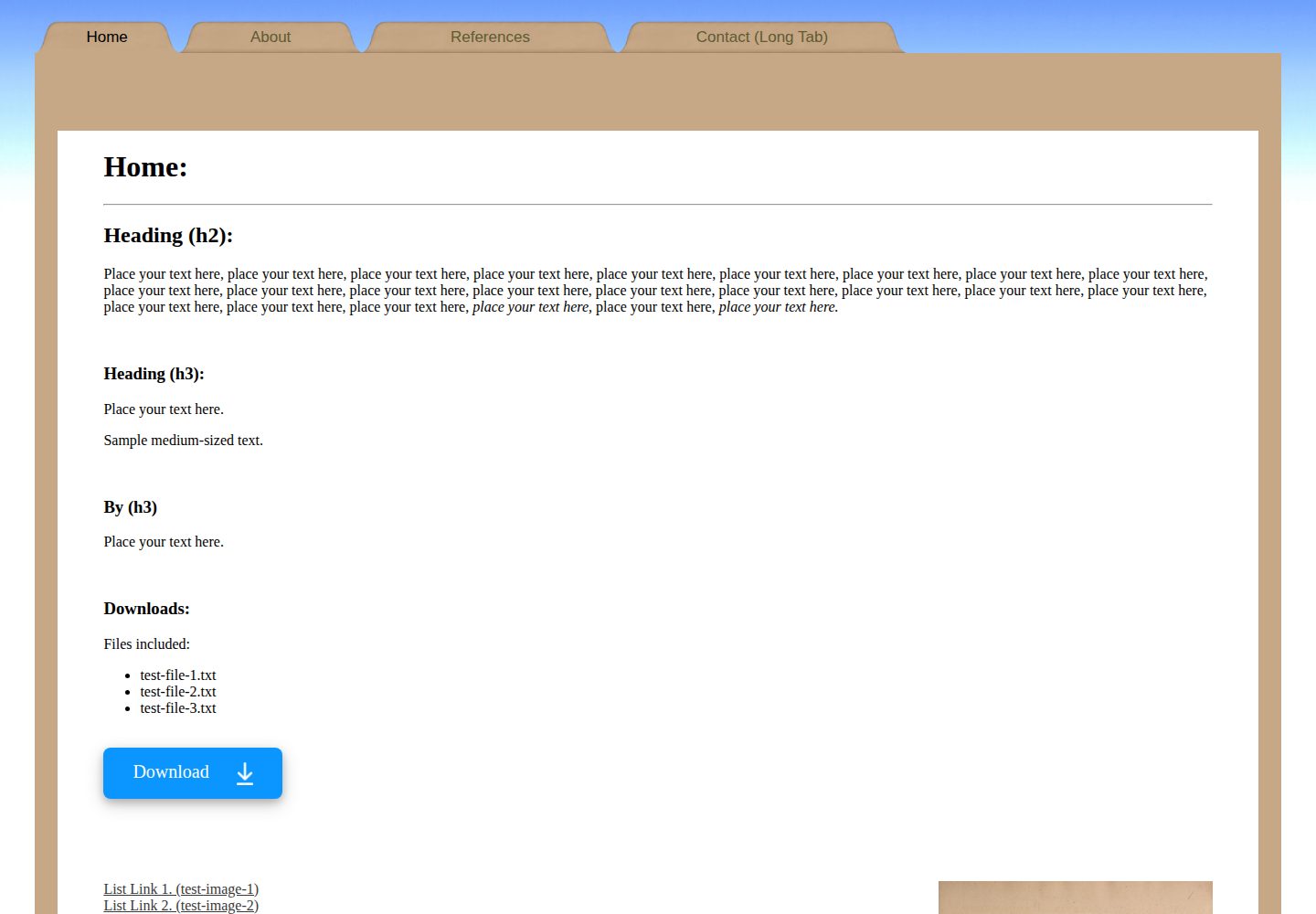
一个纯 HTML 的静态网站模板,采用文件夹(Manila folder)视觉风格,附带在 GitHub Pages 上托管的分步说明。
看看你的网站会是什么样
浏览真实页面截图,比较内容排版与手机效果。点击下方缩略图切换,放大查看整页细节。
全部页面与视图 3
截图用于了解视觉与布局,交互效果请以实际项目为准。
采集于 2026-10-03查看来源
值得关注的模板亮点
从已有项目资料中,快速了解它的特点。
采用文件夹(Manila folder)视觉风格,含首页与多个内页示例
README 提供从下载 ZIP 到本地编辑、再到 GitHub Pages 部署的完整步骤
包含导航标签的悬停、点击与当前页状态示例,图标存放在 images 目录
附带 sitemap.xml 与 Google Search Console 的收录建议
模板详细介绍
这是一个纯 HTML 静态网站模板,仓库名为 simple-website-template-folder-style-v1,由 boxbot6 维护,采用 MIT 许可。模板以文件夹(Manila folder)风格呈现页面,包含首页与若干子页面,每个页面各自位于独立子目录中并拥有自己的 index.html。README 说明了两种使用路径:一是把仓库打包下载后解压到本地新建的根目录文件夹,用记事本或 HTML 编辑器修改 index.html、图片与 .css 文件来个性化内容;二是把整个根目录上传到 GitHub 仓库,并在 Settings > Pages 中选择从 main 分支部署,由 GitHub Pages 免费托管。模板还给出了替换 README、添加 sitemap.xml 以及通过 Google Search Console 提交站点以加快收录的提示。
使用限制方面,模板本身只是静态 HTML 与 CSS 文件,不包含后端、数据库或构建流程;README 中提到的 GitHub Pages 免费托管有容量与带宽限制(站点不超过 1 GB,每月约 100 GB 软性带宽上限),且新站点被搜索引擎收录可能需要数天到数周。仓库中的演示图片、图标等素材需按各自许可单独核对,代码的 MIT 许可不自动覆盖第三方素材。
HTML启动器
适合你的项目吗?
适用场景
- 想快速搭建一个个人或项目静态展示站点并托管在 GitHub Pages
- 作为 HTML/CSS 入门练习,按 README 逐步修改页面结构与样式
- 需要一个多页面(首页加子页面)的纯静态站点骨架作为起点
适合人群
- 熟悉基本 HTML 编辑、希望零构建流程上线静态页面的个人开发者
- 需要免费托管个人、组织或项目页面的 GitHub 用户
- 把该模板作为教学或练习素材的 HTML 初学者
上手与定制指南
结合仓库当前版本的说明,按下面的资料检查内容、配置与运行要求。
- 1
从仓库下载 ZIP 并解压,把内部内容复制到自建的网站根目录文件夹,保持子文件夹结构不变
- 2
用记事本或其他 HTML 编辑器修改 index.html、各子页面的 index.html 以及 .css 文件,图片放入 images 目录并按示例方式引用
- 3
在 GitHub 新建公开仓库并上传根目录内的全部文件与文件夹,然后在 Settings > Pages 中选择从 main 分支部署
- 4
GitHub Pages 有站点不超过 1 GB、每月约 100 GB 软性带宽的限制;新站点被搜索引擎收录可能需要数天到数周
- 5
演示图片、图标等第三方素材需按各自许可核对,代码的 MIT 许可不自动覆盖这些素材
授权与来源资料
使用条件与限制
免费使用 · 保留许可声明本次收录的是公开仓库中采用 MIT 许可的免费版本;免费范围为该版本代码,不代表外部服务或第三方素材免费。
使用时需要遵守
- 允许免费使用、修改、商用和分发该版本代码。
- 分发代码副本或实质性部分时,保留原作者版权声明和完整 MIT 许可声明。
- 代码按现状提供;担保与责任限制以原许可证及适用法律为准。
额外费用与待核对事项
- 演示图片、字体、图标及其他第三方素材需按各自许可核对,不能仅凭代码的 MIT 许可判断。
- 域名、托管、数据库、支付或 AI 等外部服务可能另外收费。
- 使用 GitHub Pages 免费托管时存在容量与带宽限制:站点不得超过 1 GB,每月软性带宽上限约 100 GB。
- 若要通过 Google Search Console 提交站点以加快收录,需要登录 Google 账号。
- 新建的 GitHub Pages 站点可能数天甚至数周后才被搜索引擎收录,无法保证即时可被搜索到。
查看原文依据
Permission is hereby granted, free of charge
许可证原文
GitHub Pages is designed to host your personal, organization, or project pages from a GitHub repository (Size\/usage limits apply: sites may be no larger than 1 GB with a soft bandwidth limit of 100 GB per month).
README 原文
you will need to sign in with your google account
README 原文
https://github.com/boxbot6/simple-website-template-folder-style-v1/blob/main/LICENSEhttps://github.com/boxbot6/simple-website-template-folder-style-v1/blob/main/README.mdmay not be indexed for many days or even weeks after you create it
README 原文
DeepSeek 根据仓库许可证和 README 整理 ·2026-10-04。结果仅覆盖已读取资料,依赖、图片、字体及后续条款变更以各自原文为准。
项目核对记录与介绍依据
模板资料
- 来源平台
- GitHub
- 资料与维护参考分
- 资料较完整 · 77 / 100
- 技术栈
- HTML
- 网站类型
- 启动器
这个分数如何计算
本站按许可资料(最高30分)、演示链接(12分)、预览图(10分)、Star数(15分)、记录的维护时间(15分)、描述完整度(8分)、功能记录(5分)和分类资料(5分)计算。它不是代码、安全或性能测试,也不是 Google 评分;有链接不代表已实测可用。
这个项目需要核对什么
- 记录的仓库更新时间
- 2025-08-26
- 截图检查日期
- 2026-10-04
已收录演示链接。请用你的内容与屏幕尺寸检查;有演示不代表表单、认证或支付已经可用。
目录记录的主要技术栈是 HTML。请通过依赖清单和锁文件核对实际版本与托管要求。这些说明基于收录资料,不代表代码审计或部署实测。
查看具体选型方法 →介绍的制作与核对状态
介绍由 AI 辅助整理目录与仓库资料。仓库作者不等于这篇介绍的审核者。
审核声明: [email protected] · 2026-10-05
查看当时使用的来源资料
SHA-256: 869c6b8b91e6b74151f2d96127a18ebd156ccaf2f2183f47db961a87e1f2f649
2026-10-04T23:30:23.818Z
来源文件 / 仓库# A simple free HTML website template for hosting on GitHub and elsewhere:

## Click on the link below to open and try out the template.
* [Click this link to visit and try the website being created from this repository and hosted on github-pages.](https://boxbot6.github.io/simple-website-template-folder-style-v1/)
## To copy and use the template:
* Create a new folder on your computer and name it - this folder will be your new websites root directory folder.
* Use the green '\<\> Code' button at the top of this repository's github page to 'Download ZIP' of this repository.
* Unzip the download and copy the internal contents to the new folder keeping all its subfolders intact.
* This folder now contains your new website ready to be personalised by editing the contents as outlined in the section below and when you are happy with the results you can host it for free on GitHub (as shown further down on this page) or simply move the complete new root directory folder to wherever else you wish to host it.
## To edit your new website:
* Open the index.html file from your new folder (using Notepad or another html editor) and edit the contents to create your own home page (A good beginners guide here: [HTML For Beginners The Easy Way: Start Learning HTML & CSS Today](https://html.com/)).
* (To test the website while you are editing - save changes and then click on the index.html and a browser window will open and display the results of your current edits - refresh the browser tab after saving any further edits to display subsequent changes).
* Update \<title\> with your own info.
* Put any images you want to use into the images folder and link to them in the index.html by copying how its done for the demo images.
* Duplicate, add or remove elements that you want and reposition them on the page to suit your own purposes.
* If you are new to coding the header tabs might look a little complicated at first because they contain options for displaying different images dependant on if you are hovering over them, clicking on them or currently viewing that particular page etc. (as well as having different demo sizes for the tabs) - just rename or duplicate the existing ones for ease until you are comfortable with how they work (all the icons for the tabs are stored in images).
* Update any other elements\/text on the page as required including the footer and then check that all the links are working (see the links already included in the template for examples).
* Edit the .css file to change the website presentation and styles.
* Delete or \<\!\-\- comment out \-\-\> anything not needed.
* Add any new pages you want by studying and copying the way the code is used for the existing pages (or just rename the existing pages and tabs to what you want).
* Edit the index.html files for the other pages including any new pages you have created (every page should have an index.html that is located in their own subdirectory folder) - add your own content to each of these subsequent pages as you did for the home page.
* When you are happy with everything host it on GitHub as below, upload it to a hosting service or move the main root directory folder to the location where you wish to host it from your own server.
## Using free github hosting:
GitHub Pages is designed to host your personal, organization, or project pages from a GitHub repository (Size\/usage limits apply: sites may be no larger than 1 GB with a soft bandwidth limit of 100 GB per month).
### github repository bit:
* Sign in to your account on [Github.com](https://github.com/), go to 'Your repositories' and select 'New' (top right).
* In 'create a new repository' give the new repository a name (this name will also apply to your website), add an optional description, keep check box 'Public' to make your repository and website created from it visible online to the general public. (don't add a README file, .gitignore or Licence here, the relevant files will be added later).
* Press 'Create repository' at the bottom.
* This will take you to Quick setup, select 'uploading an existing file'
* On the next page drag and drop all the files and folders together as a bundle from inside the new root directory folder that you made earlier in 'To copy and use the template' onto the upload section.
* Press 'Commit changes' at the bottom
* After creating the repository double-check that it is listed as Public (if not change the visibility in settings).
* Change the Licence etc. at this time if you want to.
### github-pages bit:
* Now use 'Settings' to open GitHub Pages (shown as Pages in the column on the left).
* Select Source - Deploy from a branch, select main, then save.
* Wait a few minutes for the website to be created and become active - when its done the https address will be shown in github-pages - copy the link and you can use it in the option below to replace this README.md file with a simpler one that displays just the name and description of your own website and contains the link to that new site.
<br>
Example of a simple README.md file to replace this one:
---
# HTML Website Hosting For:
### put-your-website-name-here
<br>
* [Click this link to visit the website being created from this repository by github-pages.](https://put-your-github-name-here.github.io/put-your-website-name-here/)
<br>
(After creating your own website you can edit this README.md to show your own sites name above and update the https link beneath it to take you to your new websites address (find the link in github-pages)). - You can then write your own description here and if you want add an image to help visitors quickly see what your site looks like - you can then delete this comment!)
---
<br>
Code for the above example: (replace the text in your repository's README.md with this).
# HTML Website Hosting For:
### put-your-website-name-here
<br>
* [Click this link to visit the website being created from this repository by github-pages.](https://put-your-github-name-here.github.io/put-your-website-name-here/)
<br>
(After creating your own website you can edit this README.md to show your own sites name above and update the https link beneath it to take you to your new websites address (find the link in github-pages)). - You can then write your own description here and if you want add an image to help visitors quickly see what your site looks like - you can then delete this comment!)
<br>
<br>
You can now share or embed the link to your newly created GitHub Pages site wherever you like (the link can be found in your GitHub repository under Settings > Pages). This link can also be copied into a search bar for anyone to visit the site.
<br>
<br>
**Update:** If you are having trouble getting your site to appear in google search results:
You may have to wait a day or so for your original GitHub repository to show up in google searches but unfortunately the new github-pages website that you just created (https<nolink>://yourname.<ins>github.io</ins>/yoursitename/) may not be indexed for many days or even weeks after you create it - there are many different remedies on the internet explaining how to get google to index your website quicker - here are a few pointers:
* Go to [google search console](https://search.google.com/search-console/about) to verify your site (you will need to sign in with your google account). There are various ways to add your new property and verify your website, but the easiest is probably to enter the URL of your github-pages site, download a google verification file and then put it in the main directory of your repository, then after waiting a couple of minutes for github-pages to refresh after the addition of the new file and become live again verify it in google search console).
* Add a sitemap.xml to the main directory of your repository to encourage google to index your site if it is crawled (a sitemap is a simple text file to tell search engines about the layout of your site - copy and amend a sitemap.xml from one my other example sites with the info from your site (it's just a text file and can be edited in notepad)).
* After adding the sitemap.xml to your repository you can also add the sitemaps location to google search console (Google Search Console > Indexing > Sitemaps > Add a new sitemap).
* Images may take even longer to be indexed because a different slower googlebot is used for image crawling (you can try also including the images in the sitemap to help).
* **Please note:** Probably the best thing you can do to get indexed quickly is to make lots of links from other websites that lead to your site so it can be easily accessed in many different ways by the bots.
<br>
Cick the link below to visit the website being created from this repository by github-pages.
[https://boxbot6.github.io/simple-website-template-folder-style-v1/](https://boxbot6.github.io/simple-website-template-folder-style-v1/)
<br>
---
* [Click this link to see more templates.](https://boxbot6.github.io/simple-website-templates/)
<br>
看看同类模板
对比同技术栈与用途的模板,找到更适合的视觉与内容结构。

startbootstrap-simple-sidebar
An off canvas sidebar navigation Bootstrap HTML template created by Start Bootstrap
HTML · 启动器

adminkit
AdminKit is a free & open-source HTML dashboard & admin template based on Bootstrap 5
HTML · 后台

Landing-Page
Tailwind CSS Starter Template - Landing Page
HTML · 企业官网

light-bootstrap-dashboard
Light Bootstrap Dashboard is an admin dashboard template designed to be beautiful and simple.
HTML · 后台

sing-app
💥Free and open-source admin dashboard template built with Bootstrap 4.5 💥
HTML · 后台

startbootstrap-modern-business
A multipurpose Bootstrap full website template created by Start Bootstrap
HTML · 启动器