Content managed via JSON and Markdown files, no database required
Next.jsReactPortfolioBlog
portfolio (caiolombello) — Next.js Portfolio Template
By caiolombello
A personal portfolio template based on Next.js and TypeScript, with content managed via JSON and Markdown files, featuring a built-in blog, resume generation, and multilingual support.
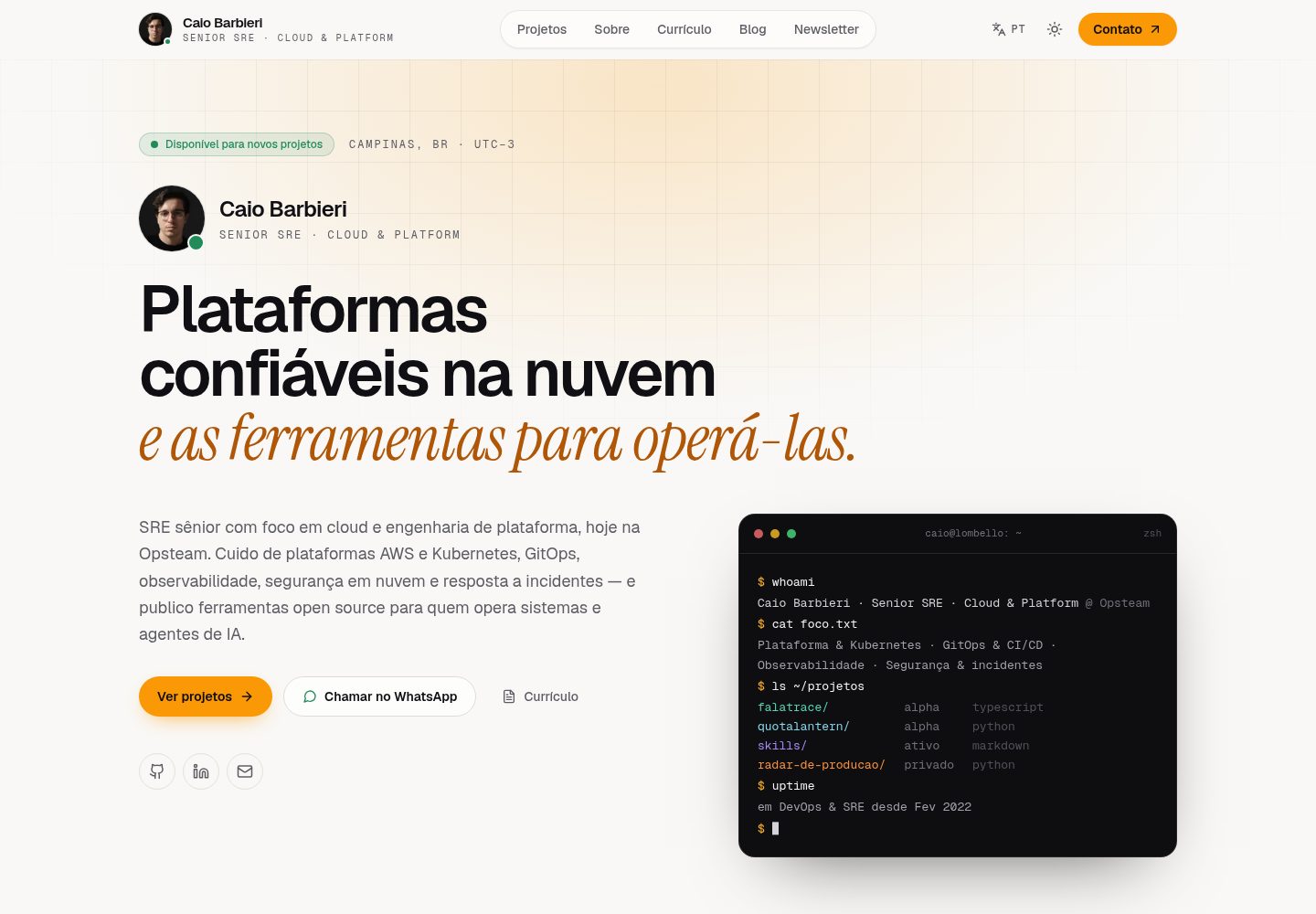
Explore the design
Compare the page layouts and mobile experience. Open any screenshot for a closer look.
Desktop homepage1 / 3
Desktop captureTop of page
Actual screenshot captured by the server browser.
All pages & views 3
Screenshots show visual appearance; interactive behavior may differ.
Recorded 2026-10-08View source
What stands out
A quick read of the recorded project description.
Built-in English, Portuguese, and Spanish languages with content fallback
Supports Markdown blog, syntax highlighting, and RSS output
Resume page can generate PDF and Markdown, with an interactive timeline
Dynamically generated Open Graph images per page, including sitemap and structured data
Provides an npm run setup interactive configuration wizard
Template Details
This is a personal portfolio template for developers, designers, and other professionals, built with Next.js App Router, TypeScript, and Tailwind CSS. The demo site is caio.lombello.com. The template separates site configuration from content: site information is stored in config/site.json, while profile, work experience, education, projects, skills, testimonials, and blog posts are stored in JSON or Markdown files under content/. It does not rely on a database and uses file-based content management.
Functionally, it covers common portfolio needs: project showcases (images, technology tags, links), a Markdown blog (with syntax highlighting and RSS), a resume page (which can generate PDF and Markdown, with an interactive timeline), dynamically generated Open Graph images per page, SEO configurations such as sitemaps and structured data, and Credly certification display. The interface supports dark/light mode and includes built-in English, Portuguese, and Spanish languages with content fallback.
Usage starts with cloning or forking the repository, running npm run setup to generate configuration files via an interactive wizard, or manually copying template files and filling in content. LinkedIn sync, image optimization, and similar tasks are optional commands; LinkedIn sync requires providing the li_at cookie, and a sync failure during build will not interrupt the build. The template is MIT licensed, and the code can be used, modified, and distributed for free; costs for third-party assets such as demo images, fonts, and icons, as well as external services like domains and hosting, must be verified separately.
Next.jsPortfolioBlog
Is it right for your project?
Use Cases
- Build a personal portfolio website to showcase projects, skills, and work experience
- Include a Markdown blog within the portfolio and output RSS
- Generate downloadable PDF or Markdown resumes
- Need multilingual (English/Portuguese/Spanish) display of personal profiles and content
- Automatically display certification information via Credly username
Suitable For
- Developers or designers who want to maintain content with files and avoid introducing a database
- Personal sites that need both a portfolio and a blog
- Professionals who need multilingual resumes and work showcases
- Users who accept the Next.js and TypeScript stack and deploy it themselves
Getting started & customization
Use these recorded setup notes alongside the repository instructions for your chosen version.
- 1
After cloning or forking the repository, run npm install, then npm run setup to generate config/site.json and content/profile/profile.json, or manually copy the corresponding .template files and fill them in
- 2
Replace the example content according to the directory structure under content/: experience, education, projects, posts, skills, profile, and testimonials.json
- 3
Optional integrations require copying .env.example to .env.local and configuring, including Google Search Console, AWS S3, Vercel Blob, Giscus comments, and LinkedIn sync
- 4
LinkedIn sync requires obtaining the li_at cookie from browser DevTools and setting LINKEDIN_COOKIE and LINKEDIN_USERNAME; sync failures will not interrupt the build
- 5
The prebuild step automatically generates resume files before building; image optimization and LinkedIn sync require manual command execution
License & source material
Usage conditions & limitations
Free to use · keep license noticeThis entry covers the free version under the MIT license in the public repository; the free scope is the code of this version and does not imply that external services or third-party assets are free.
Must comply with when using
- The code of this version may be used, modified, used commercially, and distributed for free.
- When distributing copies or substantial portions of the code, retain the original author's copyright notice and the full MIT license notice.
- The code is provided as is; warranties and limitations of liability are governed by the original license and applicable law.
Additional costs & items to verify
- Demo images, fonts, icons, and other third-party assets must be verified under their respective licenses; they cannot be judged solely by the code's MIT license.
- External services such as domains, hosting, databases, payments, or AI may incur additional charges.
- LinkedIn sync is an optional feature and requires obtaining the li_at cookie from browser DevTools and configuring LINKEDIN_COOKIE and LINKEDIN_USERNAME.
- Google Search Console, AWS S3, Vercel Blob, Giscus comments, and LinkedIn sync are all optional integrations and require configuring the corresponding external services yourself.
- LinkedIn sync runs automatically during build, but an expired or missing cookie will not interrupt the build; existing data will be used.
- Image optimization and LinkedIn sync require manual command execution and will not run automatically during deployment builds.
View Original Text Basis
Permission is hereby granted, free of charge
Original License Text
Get your `li_at` cookie from browser DevTools (LinkedIn > Application > Cookies)
Original README
Available integrations: Google Search Console, AWS S3, Vercel Blob, Giscus comments, and LinkedIn sync. All are optional.
Original README
The sync runs automatically during `npm run build` (prebuild step). It's non-fatal — if the cookie expires or is missing, the build continues with existing data.
Original README
https://github.com/caiolombello/portfolio/blob/main/LICENSEhttps://github.com/caiolombello/portfolio/blob/main/README.mdImage optimization and LinkedIn synchronization remain explicit commands so an external service cannot make the deployment build nondeterministic.
Original README
Compiled by DeepSeek based on repository license and README ·2026-10-08. Results only cover the materials read; dependencies, images, fonts, and subsequent term changes are subject to their respective original texts.
Project checks & description sources
Template Information
- Source platforms
- GitHub
- Documentation and maintenance reference score
- More documented · 85 / 100
- Technologies
- Next.js · React
- Website type
- Portfolio · Blog
How this score is calculated
Our heuristic uses license records (up to 30), a demo link (12), a preview (10), stars (15), recorded maintenance (15), description completeness (8), feature records (5) and classification data (5). It is not a code, security or performance test, or a Google score. A link does not establish tested functionality.
What to verify for this project
- Repository update recorded
- 2026-10-08
- Screenshot last checked
- 2026-10-08
A demo link is listed. Check it with your own content and viewport sizes; its presence does not confirm that forms, authentication or payments work.
The catalog identifies Next.js as the primary stack. Check the actual dependency manifest and lockfile for versions and hosting requirements. These notes use recorded metadata, not a code audit or a deployment test.
Use a selection guide →How this description was prepared
AI-assisted description based on catalog records and repository material. Repository authors are not automatically the reviewers of this description.
Review declaration: [email protected] · 2026-10-08
Inspect the recorded source material
SHA-256: 3d60970cd3a28c62fddd97212bf25f40be7824fbbdf4399ebb04fea9c221480e
2026-10-08T04:47:14.431Z
Source file / repository# Modern Portfolio Template
A modern, responsive, and fully configurable portfolio template built with Next.js 16, TypeScript, and Tailwind CSS. Perfect for developers, designers, and professionals who want to showcase their work beautifully.

## Features
- **Dark/Light mode** with smooth transitions and WCAG-compliant colors
- **Multilingual** (EN, PT, ES) with automatic content fallbacks
- **File-based CMS** — edit JSON and Markdown, no database needed
- **Blog** with Markdown, syntax highlighting, and RSS feed
- **Project showcase** with images, technologies, and links
- **Resume/CV** with PDF and Markdown generation in TypeScript and an interactive timeline
- **Company & institution logos** on experience/education items with graceful fallback
- **LinkedIn sync** — optionally pull experience and education data during build
- **Dynamic Open Graph images** per page (blog posts, projects, resume, contact)
- **Credly certifications** displayed automatically from your username
- **SEO optimized** — sitemaps, structured data, meta tags, `metadataBase`
- **Vercel Analytics & Speed Insights** built-in
- **Interactive setup wizard** (`npm run setup`)
## Quick Start
### 1. Fork & Clone
Click **"Use this template"** or **"Fork"** on GitHub, then:
```bash
git clone https://github.com/YOUR_USERNAME/portfolio.git
cd portfolio
npm install
```
### 2. Run Interactive Setup
```bash
npm run setup
```
This prompts for your name, email, GitHub username, etc. and generates `config/site.json` and `content/profile/profile.json`.
**Or configure manually:**
```bash
cp config/site.json.template config/site.json
cp content/profile/profile.json.template content/profile/profile.json
# Edit both files with your information
```
### 3. Add Your Content
```
content/
├── experience/ # Work experience (JSON)
├── education/ # Education (JSON)
├── projects/ # Portfolio projects (JSON)
├── posts/ # Blog posts (Markdown)
├── skills/ # Skills list (JSON)
├── profile/ # Personal info (JSON)
└── testimonials.json # Testimonials
```
See [CONFIG.md](CONFIG.md) for content file formats and examples.
### 4. Environment Variables (optional)
```bash
cp .env.example .env.local
```
Available integrations: Google Search Console, AWS S3, Vercel Blob, Giscus comments, and LinkedIn sync. All are optional.
### 5. Run Development Server
```bash
npm run dev
```
Open [http://localhost:3000](http://localhost:3000) to see your portfolio.
## After Forking Checklist
- [ ] Run `npm run setup` or manually create `config/site.json` from the template
- [ ] Update `content/profile/profile.json` with your bio
- [ ] Replace example content in `content/experience/`, `content/projects/`, `content/education/`
- [ ] Update `content/skills/skills.json` with your skills
- [ ] Copy `.env.example` to `.env.local` and configure integrations
- [ ] (Optional) Add your profile photo to `public/images/profile/`
- [ ] (Optional) Add blog posts to `content/posts/`
- [ ] (Optional) Set up LinkedIn sync for automatic experience/education updates
- [ ] (Optional) Update `LICENSE` with your name
## Project Structure
```
portfolio/
├── app/ # Next.js 16 App Router
│ ├── api/ # API routes
│ ├── blog/ # Blog pages + OG images
│ ├── contact/ # Contact page + OG image
│ ├── portfolio/ # Portfolio pages + OG images
│ └── resume/ # Resume page + OG image
├── components/ # React components
├── config/ # Site configuration
│ ├── site.json # Main config file
│ └── site.json.template # Template for new users
├── content/ # Your content (JSON/Markdown)
├── hooks/ # Custom React hooks
├── lib/ # Utility functions
├── proxy.ts # Request proxy (redirects)
├── scripts/ # Build & automation scripts
│ ├── setup.sh # Interactive setup wizard
│ ├── sync-linkedin.ts # LinkedIn experience/education sync
│ ├── generate-resumes.ts # PDF/Markdown resume generator
│ └── optimize-images.mjs # Image optimization (WebP/AVIF)
├── public/ # Static assets & generated PDFs
└── types/ # TypeScript definitions
```
## Configuration
### Site Configuration (`config/site.json`)
```json
{
"site": {
"name": "Your Portfolio Name",
"title": "Your Name - Your Profession",
"shortName": "Your Name",
"description": "Your professional description...",
"url": "https://yourdomain.com",
"author": "Your Full Name",
"email": "[email protected]",
"location": "Your Location"
},
"social": {
"github": "https://github.com/yourusername",
"linkedin": "https://linkedin.com/in/yourprofile",
"twitter": "https://twitter.com/yourusername",
"website": "https://yourdomain.com"
},
"integrations": {
"credlyUsername": "your-credly-username",
"twitterHandle": "@yourusername"
}
}
```
For detailed configuration instructions, see [CONFIG.md](CONFIG.md).
### LinkedIn Sync (optional)
Automatically syncs experience and education data from LinkedIn during build. The script updates metadata (titles, dates, logos, URLs) while preserving your manual content (responsibilities, translations, descriptions).
1. Get your `li_at` cookie from browser DevTools (LinkedIn > Application > Cookies)
2. Add to `.env.local`:
```
LINKEDIN_COOKIE=your-li_at-cookie-value
LINKEDIN_USERNAME=your-linkedin-username
```
3. The sync runs automatically during `npm run build` (prebuild step). It's non-fatal — if the cookie expires or is missing, the build continues with existing data.
You can also run it manually: `npm run sync-linkedin`
## Customization
### Styling
- **Colors**: Edit CSS variables in `app/globals.css` (gold accent uses WCAG AA compliant values)
- **Fonts**: Modify `app/layout.tsx`
- **Components**: Customize in `/components`
### Images
- **Profile**: `public/images/profile/`
- **Projects**: `public/images/projects/`
- **Blog**: `public/images/posts/`
## Build Pipeline
The deterministic `prebuild` step runs automatically before `next build`:
1. **Resume generation** — creates the Portuguese and English PDF/Markdown files directly from `content/`
The generator is pure TypeScript and needs no Docker, LaTeX installation, browser, or serverless function. Image optimization and LinkedIn synchronization remain explicit commands so an external service cannot make the deployment build nondeterministic.
## Deployment
### Vercel (Recommended)
1. Push your code to GitHub
2. Connect your repository to Vercel
3. Deploy with zero configuration
### Other Platforms
Works on any platform that supports Next.js: Netlify, Railway, AWS Amplify, or self-hosted.
## Scripts
```bash
npm run setup # Interactive setup wizard
npm run dev # Start dev server (Turbopack)
npm run build # Build for production (includes prebuild pipeline)
npm run start # Start production server
npm run lint # Run ESLint
npm run test # Run tests (Vitest)
npm run test:watch # Run tests in watch mode
npm run test:coverage # Run tests with coverage
npm run analyze # Bundle analysis
npm run resume:generate # Generate PT/EN PDF and Markdown resumes
npm run sync-linkedin # Sync experience/education from LinkedIn
npm run optimize-images # Optimize images (WebP/AVIF)
```
## Internationalization
Built-in support for multiple languages:
- **English (en)**
- **Portuguese (pt)**
- **Spanish (es)**
Language switching via header controls, with automatic content fallbacks.
## Testing
```bash
npm test # Run all tests
npm run test:watch # Watch mode
npm run test:coverage # Coverage report
```
## Contributing
Contributions are welcome! Whether you're fixing bugs, adding features, or improving documentation.
1. Fork the repository
2. Create a feature branch
3. Make your changes
4. Add tests if needed
5. Submit a pull request
## License
This project is open source and available under the [MIT License](LICENSE).
## Support
- [Configuration Guide](CONFIG.md)
- [Report issues](https://github.com/caiolombello/portfolio/issues)
- [Start a discussion](https://github.com/caiolombello/portfolio/discussions)
---
Give it a star if this template helped you build your portfolio!
Explore similar templates
Compare previews and descriptions within the same stack and category.

tailwind-nextjs-starter-blog
A Next.js and Tailwind CSS blog starter template using Contentlayer for Markdown/MDX, with built-in SEO, code highlighting, and tags. It targets personal technical blogs and migration from Jekyll/Hugo to React, and supports one-click Vercel deployment.
Next.js · Blog

react-resume-template
A personal resume website template for software developers, built with Next.js, React, and TypeScript and styled with Tailwind CSS. Site content is driven by a single data file at /src/data/data.tsx, with types in dataDef.ts and images in src/images/.
Next.js · Portfolio

Nextjs-tailwindcss-blog-template
A personal blog template built with Next.js and Tailwind CSS, using Velite to process Markdown content. It includes home, about, contact and article pages, with a demo site and a companion YouTube tutorial.
Next.js · Blog

Next-js-Blog-Boilerplate
A blog starter built on Next.js 12 and Tailwind CSS 3, integrating TypeScript, ESLint, Prettier, and PostCSS.
Next.js · Blog

nextjs-blog-theme
A Next.js 15 and Tailwind CSS 4.x blog starter by Netlify, designed by Bejamas, with MDX support, dark/light theme switching, and environment-variable configuration. It includes a visual setup wizard for deploying to Netlify and manages content via local .mdx files.
Next.js · Blog

blog
A personal blog forked from Timlrx's tailwind-nextjs-starter-blog, built with Next.js, React, and Tailwind CSS. Content is stored as Markdown/MDX under data/, with site, author, navigation, and project data in separate files.
Next.js · Blog