内容以 JSON 和 Markdown 文件管理,无需数据库
Next.jsReact作品集博客
portfolio (caiolombello) — Next.js 作品集模板
作者 caiolombello
基于 Next.js 与 TypeScript 的个人作品集模板,内容以 JSON 和 Markdown 文件管理,内置博客、简历生成与多语言支持。
看看你的网站会是什么样
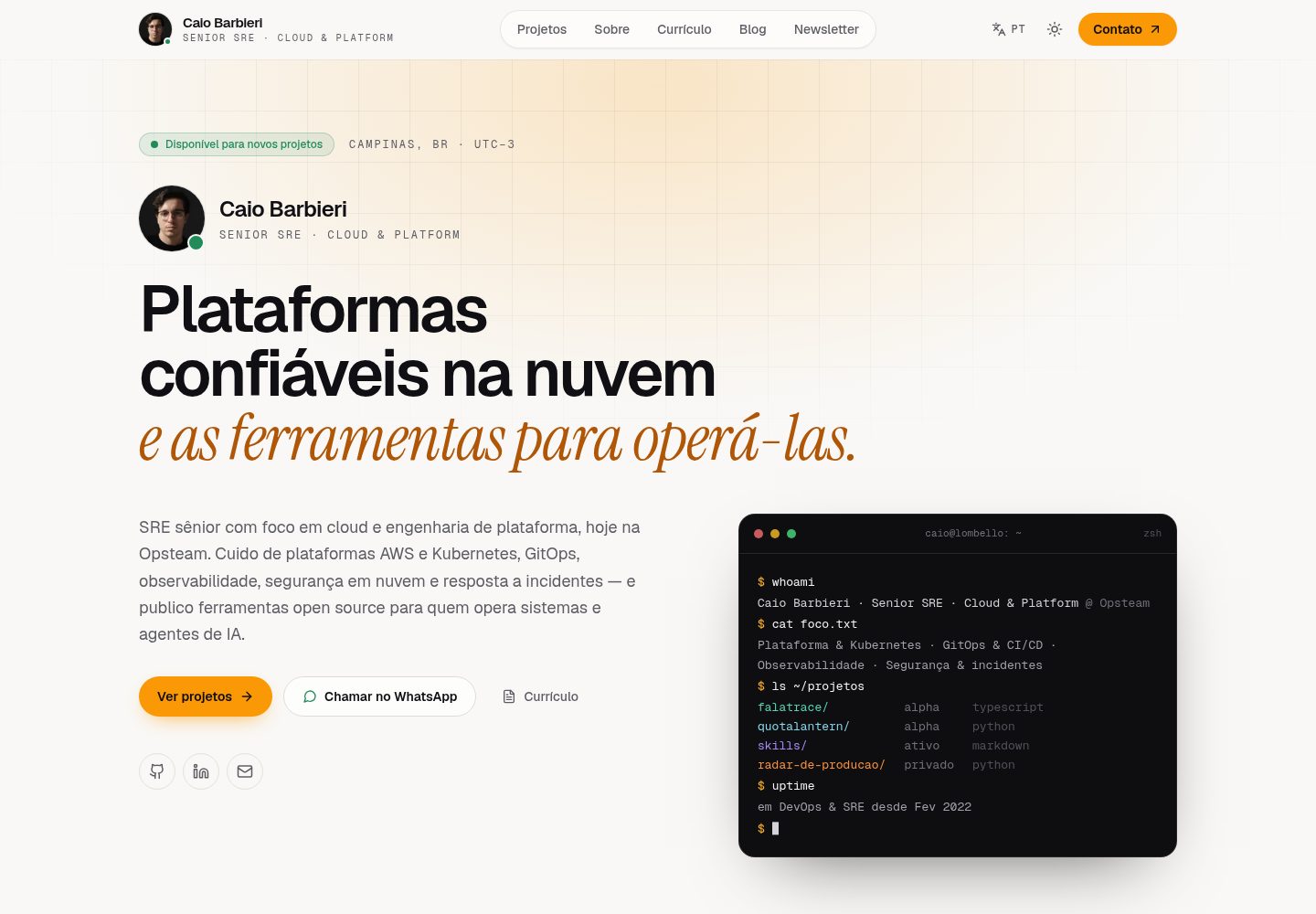
浏览真实页面截图,比较内容排版与手机效果。点击下方缩略图切换,放大查看整页细节。
全部页面与视图 3
截图用于了解视觉与布局,交互效果请以实际项目为准。
采集于 2026-10-08查看来源
值得关注的模板亮点
从已有项目资料中,快速了解它的特点。
内置英语、葡萄牙语、西班牙语三种语言及内容回退
支持 Markdown 博客、语法高亮与 RSS 输出
简历页面可生成 PDF 和 Markdown,并带交互式时间线
按页面生成动态 Open Graph 图片,包含站点地图与结构化数据
提供 npm run setup 交互式配置向导
模板详细介绍
这是一个面向开发者、设计师等专业人士的个人作品集模板,使用 Next.js App Router、TypeScript 和 Tailwind CSS 构建,演示站点为 caio.lombello.com。模板把站点配置与内容分离:站点信息放在 config/site.json,个人资料、工作经历、教育经历、项目、技能、推荐语和博客文章分别放在 content/ 下的 JSON 或 Markdown 文件中,不依赖数据库,属于文件式内容管理。
功能上覆盖作品集常见需求:项目展示(图片、技术标签、链接)、Markdown 博客(含语法高亮和 RSS)、简历页面(可生成 PDF 与 Markdown,并带交互式时间线)、按页面生成的动态 Open Graph 图片、站点地图与结构化数据等 SEO 配置,以及 Credly 认证展示。界面支持深色/浅色模式,并内置英语、葡萄牙语和西班牙语三种语言及内容回退。
使用方式以克隆或 fork 仓库为起点,运行 npm run setup 交互式向导生成配置文件,或手动复制模板文件后填写内容。LinkedIn 同步、图片优化等属于可选命令,其中 LinkedIn 同步需要提供 li_at cookie,且构建时同步失败不会中断构建。模板采用 MIT 许可,代码可免费使用、修改和分发;演示图片、字体、图标等第三方素材以及域名、托管等外部服务的费用需另行核对。
Next.js作品集博客
适合你的项目吗?
适用场景
- 搭建个人作品集网站,集中展示项目、技能与工作经历
- 在作品集内附带 Markdown 博客并输出 RSS
- 生成可下载的 PDF 或 Markdown 简历
- 需要多语言(英/葡/西)展示个人资料与内容
- 通过 Credly 用户名自动展示认证信息
适合人群
- 希望用文件维护内容、不想引入数据库的开发者或设计师
- 需要作品集与博客合一的个人站点
- 需要多语言简历与作品展示的专业人士
- 接受 Next.js 与 TypeScript 技术栈并自行部署的用户
上手与定制指南
结合仓库当前版本的说明,按下面的资料检查内容、配置与运行要求。
- 1
克隆或 fork 仓库后运行 npm install,再执行 npm run setup 生成 config/site.json 与 content/profile/profile.json,或手动复制对应 .template 文件填写
- 2
按 content/ 下的目录结构替换示例内容:experience、education、projects、posts、skills、profile 及 testimonials.json
- 3
可选集成需复制 .env.example 为 .env.local 后配置,包括 Google Search Console、AWS S3、Vercel Blob、Giscus 评论和 LinkedIn 同步
- 4
LinkedIn 同步需要从浏览器 DevTools 获取 li_at cookie 并设置 LINKEDIN_COOKIE 与 LINKEDIN_USERNAME,同步失败不会中断构建
- 5
构建前会自动运行 prebuild 生成简历文件;图片优化和 LinkedIn 同步需手动执行命令
授权与来源资料
使用条件与限制
免费使用 · 保留许可声明本次收录的是公开仓库中采用 MIT 许可的免费版本;免费范围为该版本代码,不代表外部服务或第三方素材免费。
使用时需要遵守
- 允许免费使用、修改、商用和分发该版本代码。
- 分发代码副本或实质性部分时,保留原作者版权声明和完整 MIT 许可声明。
- 代码按现状提供;担保与责任限制以原许可证及适用法律为准。
额外费用与待核对事项
- 演示图片、字体、图标及其他第三方素材需按各自许可核对,不能仅凭代码的 MIT 许可判断。
- 域名、托管、数据库、支付或 AI 等外部服务可能另外收费。
- LinkedIn 同步为可选功能,需从浏览器 DevTools 获取 li_at cookie 并配置 LINKEDIN_COOKIE 与 LINKEDIN_USERNAME 才能使用。
- Google Search Console、AWS S3、Vercel Blob、Giscus 评论和 LinkedIn 同步均为可选集成,需自行配置相应外部服务。
- LinkedIn 同步在构建时自动运行,但 cookie 过期或缺失不会中断构建,会沿用已有数据。
- 图片优化与 LinkedIn 同步需手动执行命令,不会在部署构建中自动运行。
查看原文依据
Permission is hereby granted, free of charge
许可证原文
Get your `li_at` cookie from browser DevTools (LinkedIn > Application > Cookies)
README 原文
Available integrations: Google Search Console, AWS S3, Vercel Blob, Giscus comments, and LinkedIn sync. All are optional.
README 原文
The sync runs automatically during `npm run build` (prebuild step). It's non-fatal — if the cookie expires or is missing, the build continues with existing data.
README 原文
https://github.com/caiolombello/portfolio/blob/main/LICENSEhttps://github.com/caiolombello/portfolio/blob/main/README.mdImage optimization and LinkedIn synchronization remain explicit commands so an external service cannot make the deployment build nondeterministic.
README 原文
DeepSeek 根据仓库许可证和 README 整理 ·2026-10-08。结果仅覆盖已读取资料,依赖、图片、字体及后续条款变更以各自原文为准。
项目核对记录与介绍依据
模板资料
- 来源平台
- GitHub
- 资料与维护参考分
- 资料较完整 · 85 / 100
- 技术栈
- Next.js · React
- 网站类型
- 作品集 · 博客
这个分数如何计算
本站按许可资料(最高30分)、演示链接(12分)、预览图(10分)、Star数(15分)、记录的维护时间(15分)、描述完整度(8分)、功能记录(5分)和分类资料(5分)计算。它不是代码、安全或性能测试,也不是 Google 评分;有链接不代表已实测可用。
这个项目需要核对什么
- 记录的仓库更新时间
- 2026-10-08
- 截图检查日期
- 2026-10-08
已收录演示链接。请用你的内容与屏幕尺寸检查;有演示不代表表单、认证或支付已经可用。
目录记录的主要技术栈是 Next.js。请通过依赖清单和锁文件核对实际版本与托管要求。这些说明基于收录资料,不代表代码审计或部署实测。
查看具体选型方法 →介绍的制作与核对状态
介绍由 AI 辅助整理目录与仓库资料。仓库作者不等于这篇介绍的审核者。
审核声明: [email protected] · 2026-10-08
查看当时使用的来源资料
SHA-256: 3d60970cd3a28c62fddd97212bf25f40be7824fbbdf4399ebb04fea9c221480e
2026-10-08T04:47:14.431Z
来源文件 / 仓库# Modern Portfolio Template
A modern, responsive, and fully configurable portfolio template built with Next.js 16, TypeScript, and Tailwind CSS. Perfect for developers, designers, and professionals who want to showcase their work beautifully.

## Features
- **Dark/Light mode** with smooth transitions and WCAG-compliant colors
- **Multilingual** (EN, PT, ES) with automatic content fallbacks
- **File-based CMS** — edit JSON and Markdown, no database needed
- **Blog** with Markdown, syntax highlighting, and RSS feed
- **Project showcase** with images, technologies, and links
- **Resume/CV** with PDF and Markdown generation in TypeScript and an interactive timeline
- **Company & institution logos** on experience/education items with graceful fallback
- **LinkedIn sync** — optionally pull experience and education data during build
- **Dynamic Open Graph images** per page (blog posts, projects, resume, contact)
- **Credly certifications** displayed automatically from your username
- **SEO optimized** — sitemaps, structured data, meta tags, `metadataBase`
- **Vercel Analytics & Speed Insights** built-in
- **Interactive setup wizard** (`npm run setup`)
## Quick Start
### 1. Fork & Clone
Click **"Use this template"** or **"Fork"** on GitHub, then:
```bash
git clone https://github.com/YOUR_USERNAME/portfolio.git
cd portfolio
npm install
```
### 2. Run Interactive Setup
```bash
npm run setup
```
This prompts for your name, email, GitHub username, etc. and generates `config/site.json` and `content/profile/profile.json`.
**Or configure manually:**
```bash
cp config/site.json.template config/site.json
cp content/profile/profile.json.template content/profile/profile.json
# Edit both files with your information
```
### 3. Add Your Content
```
content/
├── experience/ # Work experience (JSON)
├── education/ # Education (JSON)
├── projects/ # Portfolio projects (JSON)
├── posts/ # Blog posts (Markdown)
├── skills/ # Skills list (JSON)
├── profile/ # Personal info (JSON)
└── testimonials.json # Testimonials
```
See [CONFIG.md](CONFIG.md) for content file formats and examples.
### 4. Environment Variables (optional)
```bash
cp .env.example .env.local
```
Available integrations: Google Search Console, AWS S3, Vercel Blob, Giscus comments, and LinkedIn sync. All are optional.
### 5. Run Development Server
```bash
npm run dev
```
Open [http://localhost:3000](http://localhost:3000) to see your portfolio.
## After Forking Checklist
- [ ] Run `npm run setup` or manually create `config/site.json` from the template
- [ ] Update `content/profile/profile.json` with your bio
- [ ] Replace example content in `content/experience/`, `content/projects/`, `content/education/`
- [ ] Update `content/skills/skills.json` with your skills
- [ ] Copy `.env.example` to `.env.local` and configure integrations
- [ ] (Optional) Add your profile photo to `public/images/profile/`
- [ ] (Optional) Add blog posts to `content/posts/`
- [ ] (Optional) Set up LinkedIn sync for automatic experience/education updates
- [ ] (Optional) Update `LICENSE` with your name
## Project Structure
```
portfolio/
├── app/ # Next.js 16 App Router
│ ├── api/ # API routes
│ ├── blog/ # Blog pages + OG images
│ ├── contact/ # Contact page + OG image
│ ├── portfolio/ # Portfolio pages + OG images
│ └── resume/ # Resume page + OG image
├── components/ # React components
├── config/ # Site configuration
│ ├── site.json # Main config file
│ └── site.json.template # Template for new users
├── content/ # Your content (JSON/Markdown)
├── hooks/ # Custom React hooks
├── lib/ # Utility functions
├── proxy.ts # Request proxy (redirects)
├── scripts/ # Build & automation scripts
│ ├── setup.sh # Interactive setup wizard
│ ├── sync-linkedin.ts # LinkedIn experience/education sync
│ ├── generate-resumes.ts # PDF/Markdown resume generator
│ └── optimize-images.mjs # Image optimization (WebP/AVIF)
├── public/ # Static assets & generated PDFs
└── types/ # TypeScript definitions
```
## Configuration
### Site Configuration (`config/site.json`)
```json
{
"site": {
"name": "Your Portfolio Name",
"title": "Your Name - Your Profession",
"shortName": "Your Name",
"description": "Your professional description...",
"url": "https://yourdomain.com",
"author": "Your Full Name",
"email": "[email protected]",
"location": "Your Location"
},
"social": {
"github": "https://github.com/yourusername",
"linkedin": "https://linkedin.com/in/yourprofile",
"twitter": "https://twitter.com/yourusername",
"website": "https://yourdomain.com"
},
"integrations": {
"credlyUsername": "your-credly-username",
"twitterHandle": "@yourusername"
}
}
```
For detailed configuration instructions, see [CONFIG.md](CONFIG.md).
### LinkedIn Sync (optional)
Automatically syncs experience and education data from LinkedIn during build. The script updates metadata (titles, dates, logos, URLs) while preserving your manual content (responsibilities, translations, descriptions).
1. Get your `li_at` cookie from browser DevTools (LinkedIn > Application > Cookies)
2. Add to `.env.local`:
```
LINKEDIN_COOKIE=your-li_at-cookie-value
LINKEDIN_USERNAME=your-linkedin-username
```
3. The sync runs automatically during `npm run build` (prebuild step). It's non-fatal — if the cookie expires or is missing, the build continues with existing data.
You can also run it manually: `npm run sync-linkedin`
## Customization
### Styling
- **Colors**: Edit CSS variables in `app/globals.css` (gold accent uses WCAG AA compliant values)
- **Fonts**: Modify `app/layout.tsx`
- **Components**: Customize in `/components`
### Images
- **Profile**: `public/images/profile/`
- **Projects**: `public/images/projects/`
- **Blog**: `public/images/posts/`
## Build Pipeline
The deterministic `prebuild` step runs automatically before `next build`:
1. **Resume generation** — creates the Portuguese and English PDF/Markdown files directly from `content/`
The generator is pure TypeScript and needs no Docker, LaTeX installation, browser, or serverless function. Image optimization and LinkedIn synchronization remain explicit commands so an external service cannot make the deployment build nondeterministic.
## Deployment
### Vercel (Recommended)
1. Push your code to GitHub
2. Connect your repository to Vercel
3. Deploy with zero configuration
### Other Platforms
Works on any platform that supports Next.js: Netlify, Railway, AWS Amplify, or self-hosted.
## Scripts
```bash
npm run setup # Interactive setup wizard
npm run dev # Start dev server (Turbopack)
npm run build # Build for production (includes prebuild pipeline)
npm run start # Start production server
npm run lint # Run ESLint
npm run test # Run tests (Vitest)
npm run test:watch # Run tests in watch mode
npm run test:coverage # Run tests with coverage
npm run analyze # Bundle analysis
npm run resume:generate # Generate PT/EN PDF and Markdown resumes
npm run sync-linkedin # Sync experience/education from LinkedIn
npm run optimize-images # Optimize images (WebP/AVIF)
```
## Internationalization
Built-in support for multiple languages:
- **English (en)**
- **Portuguese (pt)**
- **Spanish (es)**
Language switching via header controls, with automatic content fallbacks.
## Testing
```bash
npm test # Run all tests
npm run test:watch # Watch mode
npm run test:coverage # Coverage report
```
## Contributing
Contributions are welcome! Whether you're fixing bugs, adding features, or improving documentation.
1. Fork the repository
2. Create a feature branch
3. Make your changes
4. Add tests if needed
5. Submit a pull request
## License
This project is open source and available under the [MIT License](LICENSE).
## Support
- [Configuration Guide](CONFIG.md)
- [Report issues](https://github.com/caiolombello/portfolio/issues)
- [Start a discussion](https://github.com/caiolombello/portfolio/discussions)
---
Give it a star if this template helped you build your portfolio!
看看同类模板
对比同技术栈与用途的模板,找到更适合的视觉与内容结构。

tailwind-nextjs-starter-blog
tailwind-nextjs-starter-blog 是一个面向个人技术博客的 Next.js 与 Tailwind CSS 启动模板,其 v2 版本基于 App Router 与 React Server Comp…
Next.js · 博客

react-resume-template
A personal resume website template built with React.js, Typescript, Next.js, and styled with Tailwind css
Next.js · 作品集

Nextjs-tailwindcss-blog-template
⭐Build SEO optimized personal blog website with Next.js, Tailwind CSS and Contentlayer. If you want to learn t…
Next.js · 博客

Next-js-Blog-Boilerplate
Next-js-Blog-Boilerplate 是一套面向个人与技术博客的启动代码,基于 Next.js 12 与 Tailwind CSS 3 构建,同时集成了 TypeScript、ESLint、Prettier …
Next.js · 博客

nextjs-blog-theme
nextjs-blog-theme 是 Netlify 团队维护的一个博客启动模板,基于 Next.js 15(Pages Router)和 Tailwind CSS 4.x 构建,设计由 Bejamas 机构完成。
Next.js · 博客

blog
🚀 My personal blog made with Tailwind CSS and NextJS. Template from Timlrx. Feel free to fork, follow and use…
Next.js · 博客