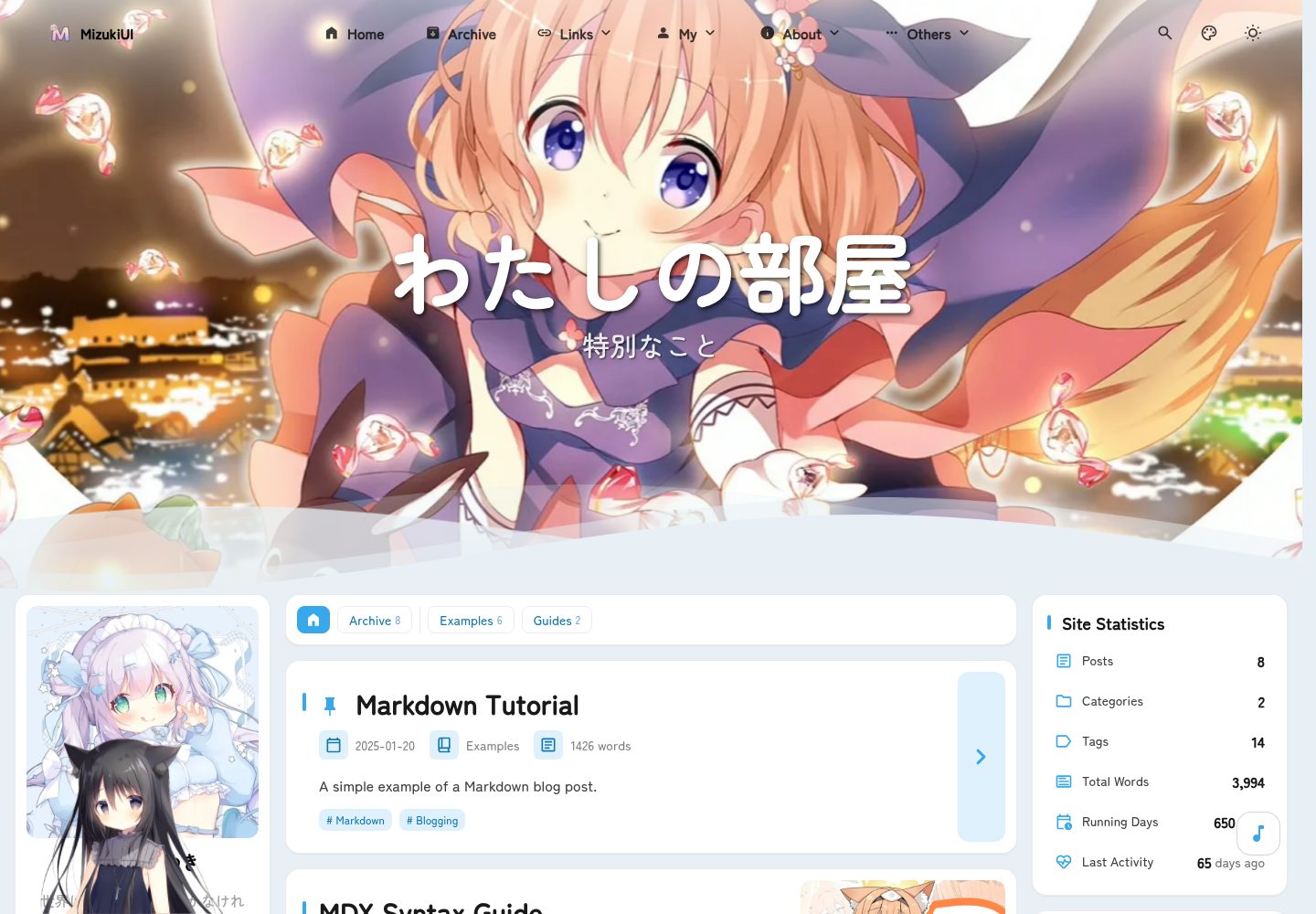
A static blog template built on Astro and Tailwind CSS, using Swup for page transition animations
AstroBlog
Intellectual-Property — Astro Blog Template
By captain-ht
Mizuki is a static blog template built on Astro, featuring anime tracking, friend links, diary, archive and other special pages, and providing search, comments, RSS and multiple Markdown extensions.
Explore the design
Compare the page layouts and mobile experience. Open any screenshot for a closer look.
Desktop homepage1 / 3
Desktop captureTop of page
Actual screenshot captured by the server browser.
All pages & views 3
Screenshots show visual appearance; interactive behavior may differ.
Recorded 2026-10-12View source
What stands out
A quick read of the recorded project description.
Built-in special pages such as anime tracking, friend links, diary, archive and about, with page toggles and SEO optimization modules
Integrates Pagefind search, Twikoo comments, RSS generation, reading time estimation and a post category/tag system
Supports KaTeX math formulas, Expressive Code code blocks, Mermaid diagrams, PhotoSwipe image galleries and GitHub cards
Sidebar components are loaded in a configuration-driven way, supporting left/right position switching and responsive layout
Template Details
Mizuki is a static blog template built with Astro, maintained in the repository by captain-ht and licensed under MIT. The template uses src/config.ts as the main configuration entry, where you can set the site title, subtitle, language, theme hue, banner image and carousel interval. For content, posts go in src/content/posts/, special page content goes in src/content/spec/, and a pnpm new-post command is provided to create new posts. Post frontmatter supports title, publication date, description, cover image, tags, categories, draft, pinned and language fields.
The template includes several special pages, including anime tracking, friend links, diary, archive and about pages, and integrates Pagefind-based search, Twikoo comments, RSS generation, reading time estimation, KaTeX math formulas, Expressive Code code blocks, PhotoSwipe image galleries, Mermaid diagrams and Umami analytics support. Sidebar components are loaded in a configuration-driven way, supporting left/right position switching and responsive layout.
Regarding usage constraints, the template requires Node.js 20 or above, pnpm 9 or above, and depends on Astro and TypeScript for building. Before deployment, update the site URL in astro.config.mjs; it can be deployed to static hosting platforms such as Vercel, Netlify, GitHub Pages or Cloudflare Pages. If using Umami analytics, it is recommended to set the UMAMI_API_KEY environment variable on the deployment platform. The code is licensed under MIT, but third-party assets such as demo images, fonts and icons need to be checked separately for licensing; external services such as domains, hosting, databases, payments or AI may incur additional charges.
AstroBlog
Is it right for your project?
Use Cases
- Building a personal tech blog and publishing Markdown posts
- Displaying anime watch progress and rating records
- Organizing and displaying friend links and personal diary entries
- Archiving posts and personal growth records in a timeline format
Suitable For
- Individual developers who want to build a static blog with Astro
- Content creators who need special pages such as anime, diary and friend links
- Users who prefer centrally managing site settings through configuration files
- Developers planning to deploy the blog to Vercel, Netlify, GitHub Pages or Cloudflare Pages
Getting started & customization
Use these recorded setup notes alongside the repository instructions for your chosen version.
- 1
Requires Node.js 20 or above, and uses pnpm 9 or above to install dependencies
- 2
After cloning the repository, run pnpm install, then start the local development server with pnpm dev (default http://localhost:4321)
- 3
Edit src/config.ts to configure site information, theme color, banner image and social links
- 4
Posts go in src/content/posts/, special page content goes in src/content/spec/, and pnpm new-post <filename> can be used to create a new post
- 5
Before deployment, update the site URL in astro.config.mjs; if using Umami analytics, it is recommended to set the UMAMI_API_KEY environment variable
License & source material
Usage conditions & limitations
Free to use · keep license noticeThis listing covers the free version under the MIT license in the public repository; the free scope is the code of this version and does not mean external services or third-party assets are free.
Must comply with when using
- Allows free use, modification, commercial use and distribution of this version's code.
- When distributing copies or substantial portions of the code, retain the original author's copyright notice and the complete MIT license notice.
- The code is provided as is; warranties and limitations of liability are governed by the original license and applicable law.
Additional costs & items to verify
- Demo images, fonts, icons and other third-party assets need to be checked under their respective licenses and cannot be judged solely by the code's MIT license.
- External services such as domains, hosting, databases, payments or AI may incur additional charges.
- When using the Umami analytics feature, it is recommended to set the UMAMI_API_KEY environment variable on the deployment platform, or configure the key directly in the project configuration file.
- Before deployment, the site URL in astro.config.mjs needs to be updated.
- Requires Node.js 20 or above.
- Requires pnpm 9 or above.
View Original Text Basis
Permission is hereby granted, free of charge
Original License Text
- **Umami API key (optional):** If you plan to use Umami analytics, we recommend setting the environment variable `UMAMI_API_KEY` on your deployment platform, or alternatively configure the key directly in the project's configuration files.
Original README
Before deployment, update the `site` URL in `astro.config.mjs`.
Original README

Original README
https://github.com/captain-ht/Intellectual-Property/blob/main/LICENSEhttps://github.com/captain-ht/Intellectual-Property/blob/main/README.md
Original README
Compiled by DeepSeek based on repository license and README ·2026-10-12. Results only cover the materials read; dependencies, images, fonts, and subsequent term changes are subject to their respective original texts.
Project checks & description sources
Template Information
- Source platforms
- GitHub
- Documentation and maintenance reference score
- More documented · 80 / 100
- Technologies
- Astro
- Website type
- Blog
How this score is calculated
Our heuristic uses license records (up to 30), a demo link (12), a preview (10), stars (15), recorded maintenance (15), description completeness (8), feature records (5) and classification data (5). It is not a code, security or performance test, or a Google score. A link does not establish tested functionality.
What to verify for this project
- Repository update recorded
- 2026-04-27
- Screenshot last checked
- 2026-10-12
A demo link is listed. Check it with your own content and viewport sizes; its presence does not confirm that forms, authentication or payments work.
The catalog identifies Astro as the primary stack. Check the actual dependency manifest and lockfile for versions and hosting requirements. These notes use recorded metadata, not a code audit or a deployment test.
Use a selection guide →How this description was prepared
AI-assisted description based on catalog records and repository material. Repository authors are not automatically the reviewers of this description.
Review declaration: codex-user-requested-batch-review-20261015 · 2026-10-15
Inspect the recorded source material
SHA-256: 0049045c96616f83b66772ef2b2bc7c89af5602138b3f5ccc0a8832b7a7926d6
2026-10-12T22:01:44.193Z
Source file / repository# 🌸 Mizuki



[](https://opensource.org/licenses/MIT)

<table>
<tr>
<td><img alt="" src="docs/image/1.webp"></td>
<td><img alt="" src="docs/image/2.webp"></td>
<td><img alt="" src="docs/image/3.webp"></td>
<tr>
<tr>
<td><img alt="" src="docs/image/4.webp"></td>
<td><img alt="" src="docs/image/5.webp"></td>
<td><img alt="" src="docs/image/6.webp"></td>
<tr>
</table>
A modern, feature-rich static blog template built with [Astro](https://astro.build), featuring advanced functionality and beautiful design.
[**🖥️ Live Demo**](https://mizuki.mysqil.com/)
[**📝 Documentation**](https://docs.mizuki.mysqil.com/)
🌏 README Languages
[**English**](./README.md) /
[**中文**](./README.zh.md) /
[**日本語**](./docs/README.ja.md) /
[**中文繁体**](./docs/README.tw.md) /
## 🆕 v6.0 Update
- **Page Refactoring**: Completely refactored anime, timeline, projects, skills, albums, friends, diary, and about pages for better performance and user experience.
- **Page Toggle Feature**: Added page toggle functionality with SEO optimization modules, allowing control over feature page visibility.
- **New Grid Layout**: Introduced new grid article list layout for improved content presentation.
- **Ripple Management**: Added ripple effect management module for enhanced visual interactions.
## 🆕 v5.0 Update
- **Pio Live2D Integration**: Added Pio Live2D character, providing a cute interactive companion to enhance user engagement.
- **Highly Configurable**: Supports detailed configuration in `src/config.ts`, including model path, position, size, dialogue content, etc., to meet personalized needs.
- **Seamless Navigation**: The "Back to Home" feature now uses the theme's built-in Swup for smooth, no-refresh page transitions.
## 🆕 v4.3 Update
- **Anime Page:** Redesigned a cuter and more attractive anime page, including anime list, details, and timeline.
- **Album Page:** Restructured the album page using pagination + folder data indexing solution.
## 🆕 v3.4 Update
- **New Pages:** Added project showcase, skills showcase, and timeline pages to display your work, professional skills, and growth journey.
- **Dropdown Menu Fix:** Resolved the issue of border outlines appearing when clicking dropdown menus, improving interface consistency.
- **Search Optimization:** Enhanced search functionality performance and accuracy.
- **Footer HTML Injection:** Introduced a new feature allowing custom HTML content injection at the bottom of pages, providing greater flexibility.
## 🆕 v3.3 Update
- **Mermaid Syntax Support:** Added support for Mermaid chart syntax, now you can embed flowcharts, sequence diagrams, Gantt charts, etc. directly in Markdown.
- **Umami Analytics:** Added support for Umami analytics, making it easy to integrate website visit data analysis.

### 🔧 Component Configuration System Restructuring
- **Unified Configuration Architecture:** Brand new modular component configuration system, supporting dynamic component management and order configuration
- **Configuration-Driven Component Loading:** Restructured SideBar component, implementing fully configuration-based component loading mechanism
- **Unified Control Switches:** Removed independent enable switches for music player and announcement components, unified control through sidebarLayoutConfig
- **Responsive Layout Adaptation:** Components support responsive layouts, automatically adjusting display based on device type
### 📐 Layout System Optimization
- **Dynamic Sidebar Position Adjustment:** Support for left/right sidebar switching, with automatic layout adaptation
- **Intelligent Article Directory Positioning:** When sidebar is on the right, article navigation automatically moves to the left, providing a better reading experience
- **Grid Layout Improvements:** Optimized CSS Grid layout, resolving container width anomaly issues
### 🎛️ Configuration File Format Standardization
- **Standardized Configuration Format:** Created unified component configuration file format specifications
- **Type Safety:** Comprehensive TypeScript type definitions ensuring configuration type safety
- **Extensibility:** Support for custom component types and configuration options
### 🧹 Code Optimization
- **Test File Cleanup:** Removed unused test configurations and dependencies, reducing project size
- **Code Structure Optimization:** Improved component architecture, enhancing code maintainability
- **Performance Improvement:** Optimized component loading logic, improving page rendering performance
---
## ✨ Features
### 🎨 Design & Interface
- [x] Built with [Astro](https://astro.build) and [Tailwind CSS](https://tailwindcss.com)
- [x] Smooth animations and page transitions using [Swup](https://swup.js.org/)
- [x] Light/dark theme switching with system preference detection
- [x] Customizable theme colors and dynamic banner carousel
- [x] Fullscreen background images with carousel, opacity, and blur effects
- [x] Fully responsive design for all devices
- [x] Beautiful typography with JetBrains Mono font
### 🔍 Content & Search
- [x] Advanced search functionality based on [Pagefind](https://pagefind.app/)
- [x] [Enhanced Markdown features](#-markdown-extensions) with syntax highlighting
- [x] Interactive table of contents with auto-scrolling
- [x] RSS feed generation
- [x] Reading time estimation
- [x] Article categorization and tagging system
### 📱 Special Pages
- [x] **Anime Tracking Page** - Track anime watching progress and ratings
- [x] **Friends Page** - Beautiful cards showcasing friend websites
- [x] **Diary Page** - Share life moments, similar to social media
- [x] **Archive Page** - Organized timeline view of articles
- [x] **About Page** - Customizable personal introduction
### 🛠 Technical Features
- [x] **Enhanced code blocks** based on [Expressive Code](https://expressive-code.com/)
- [x] **Math formula support** with KaTeX rendering
- [x] **Image optimization** with PhotoSwipe gallery integration
- [x] **SEO optimization** including sitemaps and meta tags
- [x] **Performance optimization** with lazy loading and caching
- [x] **Comment system** with Twikoo integration
## 🚀 Quick Start
### 📦 Installation
1. **Clone the repository:**
```bash
git clone https://github.com/captain-ht/Mizuki.git
cd mizuki
```
2. **Install dependencies:**
```bash
# Install pnpm if not already installed
npm install -g pnpm
# Install project dependencies
pnpm install
```
3. **Configure your blog:**
- Edit `src/config.ts` to customize blog settings
- Update site information, theme colors, banner images, and social links
- Configure feature page functionality
4. **Start the development server:**
```bash
pnpm dev
```
Your blog will be available at `http://localhost:4321`
### 📝 Content Management
- **Create new posts:** `pnpm new-post <filename>`
- **Edit posts:** Modify files in `src/content/posts/`
- **Customize special pages:** Edit files in `src/content/spec/`
- **Add images:** Place images in `src/assets/` or `public/`
### 🚀 Deployment
Deploy your blog to any static hosting platform:
- **Vercel:** Connect your GitHub repository to Vercel
- **Netlify:** Deploy directly from GitHub
- **GitHub Pages:** Use the included GitHub Actions workflow
- **Cloudflare Pages:** Connect your repository
Before deployment, update the `site` URL in `astro.config.mjs`.
- **Umami API key (optional):** If you plan to use Umami analytics, we recommend setting the environment variable `UMAMI_API_KEY` on your deployment platform, or alternatively configure the key directly in the project's configuration files.
## 📝 Post Frontmatter Format
```yaml
---
title: My First Blog Post
published: 2023-09-09
description: This is the first post of my new blog.
image: ./cover.jpg
tags: [tag1, tag2]
category: Frontend
draft: false
pinned: false
lang: en # Only set when article language differs from site language in config.ts
---
```
### Frontmatter Field Descriptions
- **title**: Article title (required)
- **published**: Publication date (required)
- **description**: Article description for SEO and previews
- **image**: Cover image path (relative to article file)
- **tags**: Array of tags for categorization
- **category**: Article category
- **draft**: Set to `true` to hide article in production
- **pinned**: Set to `true` to pin article to top
- **lang**: Article language (only set when different from site default)
### Pinned Articles Feature
The `pinned` field allows you to pin important articles to the top of your blog list. Pinned articles will always appear before regular articles regardless of their publication date.
**Usage:**
```yaml
pinned: true # Pin this article to the top
pinned: false # Regular article (default)
```
**Sorting Rules:**
1. Pinned articles appear first, sorted by publication date (newest first)
2. Regular articles follow, sorted by publication date (newest first)
## 🧩 Markdown Extensions
Mizuki supports enhanced features beyond standard GitHub Flavored Markdown:
### 📝 Enhanced Writing
- **Callouts:** Create beautiful annotation boxes using `> [!NOTE]`, `> [!TIP]`, `> [!WARNING]`, etc.
- **Math Formulas:** Write LaTeX math formulas using `$inline$` and `$$block$$` syntax
- **Code Highlighting:** Advanced syntax highlighting with line numbers and copy buttons
- **GitHub Cards:** Embed repository cards using `::github{repo="user/repo"}`
### 🎨 Visual Elements
- **Image Gallery:** Automatic PhotoSwipe integration for image viewing
- **Collapsible Sections:** Create expandable content blocks
- **Custom Components:** Enhance content with special directives
### 📊 Content Organization
- **Table of Contents:** Automatically generated from headings with smooth scrolling
- **Reading Time:** Automatically calculated and displayed
- **Article Metadata:** Rich frontmatter support with categories and tags
## ⚡ Commands
All commands are run from the project root:
| Command | Action |
|:---------------------------|:-----------------------------------------|
| `pnpm install` | Install dependencies |
| `pnpm dev` | Start local dev server at `localhost:4321` |
| `pnpm build` | Build production site to `./dist/` |
| `pnpm preview` | Preview build locally before deployment |
| `pnpm check` | Run Astro error checking |
| `pnpm format` | Format code with Biome |
| `pnpm lint` | Check and fix code issues |
| `pnpm new-post <filename>` | Create a new blog post |
| `pnpm astro ...` | Run Astro CLI commands |
## 🎯 Configuration Guide
### 🔧 Basic Configuration
Edit `src/config.ts` to customize your blog:
```typescript
export const siteConfig: SiteConfig = {
title: "Your Blog Name",
subtitle: "Your Blog Description",
lang: "en", // or "zh-CN", "ja", etc.
themeColor: {
hue: 210, // 0-360, theme hue
fixed: false, // Hide theme color picker
},
banner: {
enable: true,
src: ["assets/banner/1.webp"], // Banner images
carousel: {
enable: true,
interval: 0.8, // seconds
},
},
};
```
### 📱 Feature Page Configuration
- **Anime Page:** Edit anime list in `src/pages/anime.astro`
- **Friends Page:** Edit friend data in `src/content/spec/friends.md`
- **Diary Page:** Edit moments in `src/pages/diary.astro`
- **About Page:** Edit content in `src/content/spec/about.md`
## ✏️ Contributing
Contributions are welcome! Feel free to submit issues and pull requests.
1. Fork the repository
2. Create a feature branch (`git checkout -b feature/amazing-feature`)
3. Commit your changes (`git commit -m 'Add some amazing feature'`)
4. Push to the branch (`git push origin feature/amazing-feature`)
5. Open a Pull Request
## 📄 License
This project is licensed under the MIT License - see the [LICENSE](LICENSE) file for details.
## 🙏 Acknowledgements
- Based on the original [Fuwari](https://github.com/saicaca/fuwari) template
- Built with [Astro](https://astro.build) and [Tailwind CSS](https://tailwindcss.com)
- Inspired by [Yukina](https://github.com/WhitePaper233/yukina) - a beautiful and elegant blog template
- Icons from [Iconify](https://iconify.design/)
### Special Thanks
- **[Yukina](https://github.com/WhitePaper233/yukina)** - Thanks for providing design inspiration and creativity that helped shape this project. Yukina is an elegant blog template that demonstrates excellent design principles and user experience.
---
⭐ If you find this project helpful, please consider giving it a star!Explore similar templates
Compare previews and descriptions within the same stack and category.

astrowind
AstroWind is a free, open-source Astro starter theme using Astro and Tailwind CSS, released under the MIT license.
Astro · Blog

astro-paper
An Astro blog theme with Markdown/MDX content, Tailwind styling and Pagefind search. Search is a feature of the blog, rather than a separate tool-site product.
Astro · Blog

fuwari
Fuwari is a static blog template built with Astro and Tailwind CSS for personal blogs. It manages posts as Markdown files in src/content/posts/, with frontmatter for title, date, description, cover, tags, categories, draft status, and language.
Astro · Blog

Firefly
Firefly is a clean personal blog theme forked from Astro and Fuwari, offering four background modes, single/double sidebar and list/grid layouts, Pagefind client-side full-text search, and a six-language UI.
Astro · Blog

astro-theme-cactus
An Astro blog and notes starter with Markdown/MDX content, Tailwind styling and Pagefind search. Its main purpose is publishing posts and notes.
Astro · Blog

astrofy
Astrofy is a free and open-source personal portfolio website template built with Astro and TailwindCSS, with built-in blog, CV timeline, project showcase, store, and RSS feed modules.
Astro · Portfolio