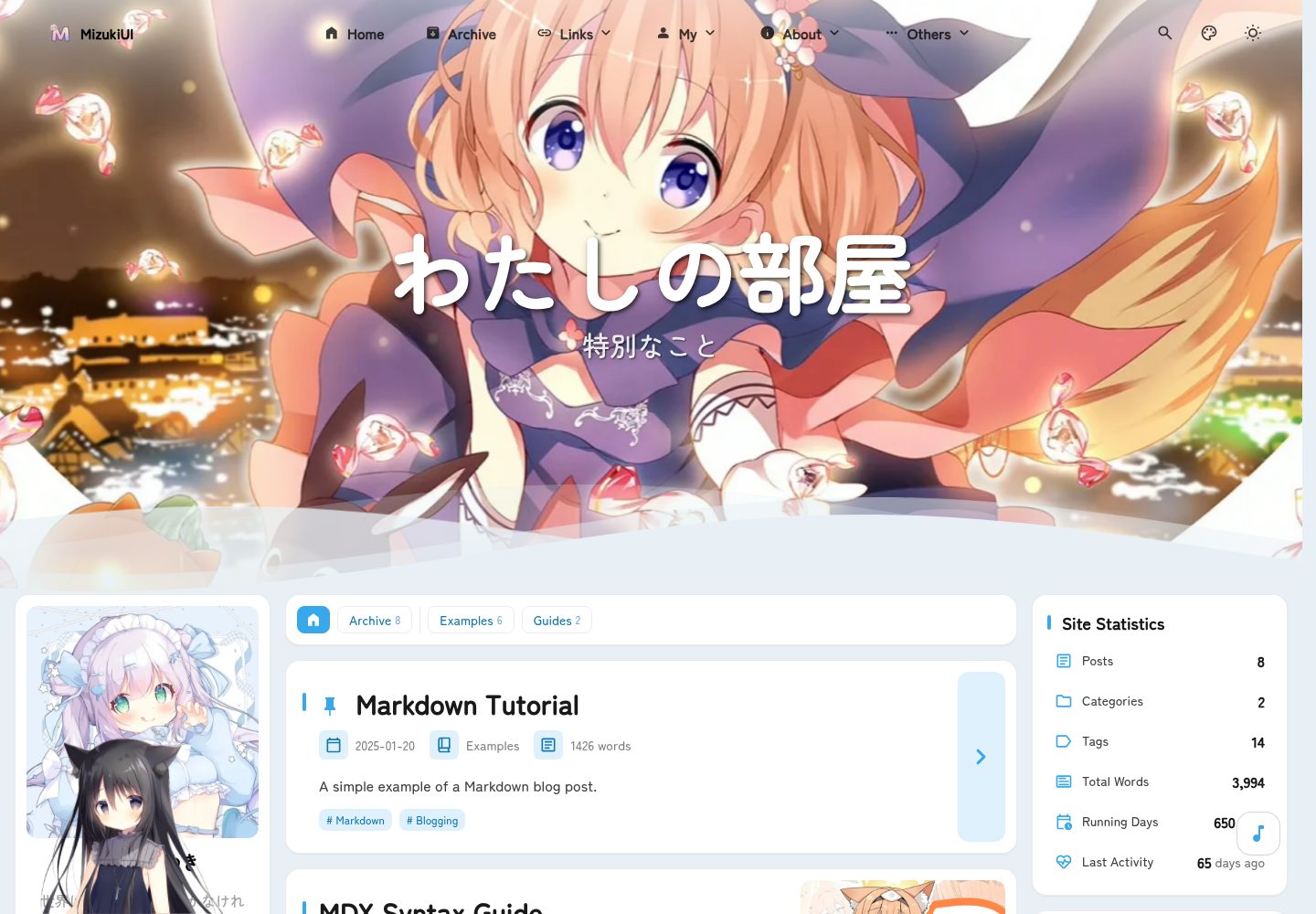
基于 Astro 与 Tailwind CSS 构建的静态博客模板,使用 Swup 实现页面过渡动画
Astro博客
Intellectual-Property — Astro 博客模板
作者 captain-ht
Mizuki 是一个基于 Astro 的静态博客模板,包含动漫追踪、友链、日记、归档等特色页面,并提供搜索、评论、RSS 与多种 Markdown 扩展。
看看你的网站会是什么样
浏览真实页面截图,比较内容排版与手机效果。点击下方缩略图切换,放大查看整页细节。
全部页面与视图 3
截图用于了解视觉与布局,交互效果请以实际项目为准。
采集于 2026-10-12查看来源
值得关注的模板亮点
从已有项目资料中,快速了解它的特点。
内置动漫追踪、友链、日记、归档、关于等特色页面,并支持页面开关与 SEO 优化模块
集成 Pagefind 搜索、Twikoo 评论、RSS 生成、阅读时间估算与文章分类标签系统
支持 KaTeX 数学公式、Expressive Code 代码块、Mermaid 图表、PhotoSwipe 图片画廊与 GitHub 卡片
侧边栏组件采用配置驱动加载,支持左右位置切换与响应式布局
模板详细介绍
Mizuki 是一个使用 Astro 构建的静态博客模板,仓库由 captain-ht 维护,采用 MIT 许可。模板以 src/config.ts 作为主要配置入口,可设置站点标题、副标题、语言、主题色相、横幅图片与轮播间隔等。内容方面,文章放在 src/content/posts/,特色页面内容放在 src/content/spec/,并提供 pnpm new-post 命令创建新文章。文章 frontmatter 支持标题、发布日期、描述、封面图、标签、分类、草稿、置顶与语言字段。
模板内置多个特色页面,包括动漫追踪、友链、日记、归档与关于页面,并集成了基于 Pagefind 的搜索、Twikoo 评论、RSS 生成、阅读时间估算、KaTeX 数学公式、Expressive Code 代码块、PhotoSwipe 图片画廊、Mermaid 图表与 Umami 分析支持。侧边栏组件采用配置驱动加载,支持左右位置切换与响应式布局。
使用限制方面,该模板需要 Node.js 20 及以上、pnpm 9 及以上,并依赖 Astro 与 TypeScript 构建。部署前需更新 astro.config.mjs 中的 site URL,可部署到 Vercel、Netlify、GitHub Pages 或 Cloudflare Pages 等静态托管平台。若使用 Umami 分析,建议在部署平台设置 UMAMI_API_KEY 环境变量。代码采用 MIT 许可,但演示图片、字体、图标等第三方素材需单独核对许可;域名、托管、数据库、支付或 AI 等外部服务可能另外收费。
Astro博客
适合你的项目吗?
适用场景
- 搭建个人技术博客并发布 Markdown 文章
- 展示动漫观看进度与评分记录
- 整理并展示友情链接与个人日记
- 以时间线方式归档文章与个人成长记录
适合人群
- 希望使用 Astro 构建静态博客的个人开发者
- 需要动漫、日记、友链等特色页面的内容创作者
- 偏好通过配置文件集中管理站点设置的用户
- 计划将博客部署到 Vercel、Netlify、GitHub Pages 或 Cloudflare Pages 的开发者
上手与定制指南
结合仓库当前版本的说明,按下面的资料检查内容、配置与运行要求。
- 1
需要 Node.js 20 及以上版本,并使用 pnpm 9 及以上安装依赖
- 2
克隆仓库后运行 pnpm install,再通过 pnpm dev 启动本地开发服务器(默认 http://localhost:4321)
- 3
编辑 src/config.ts 配置站点信息、主题色、横幅图片与社交链接
- 4
文章放在 src/content/posts/,特色页面内容放在 src/content/spec/,可用 pnpm new-post <filename> 创建新文章
- 5
部署前更新 astro.config.mjs 中的 site URL;如使用 Umami 分析,建议设置 UMAMI_API_KEY 环境变量
授权与来源资料
使用条件与限制
免费使用 · 保留许可声明本次收录的是公开仓库中采用 MIT 许可的免费版本;免费范围为该版本代码,不代表外部服务或第三方素材免费。
使用时需要遵守
- 允许免费使用、修改、商用和分发该版本代码。
- 分发代码副本或实质性部分时,保留原作者版权声明和完整 MIT 许可声明。
- 代码按现状提供;担保与责任限制以原许可证及适用法律为准。
额外费用与待核对事项
- 演示图片、字体、图标及其他第三方素材需按各自许可核对,不能仅凭代码的 MIT 许可判断。
- 域名、托管、数据库、支付或 AI 等外部服务可能另外收费。
- 使用 Umami 分析功能时,建议在部署平台设置 UMAMI_API_KEY 环境变量,或在项目配置文件中直接配置密钥。
- 部署前需要更新 astro.config.mjs 中的 site URL。
- 需要 Node.js 20 及以上版本。
- 需要 pnpm 9 及以上版本。
查看原文依据
Permission is hereby granted, free of charge
许可证原文
- **Umami API key (optional):** If you plan to use Umami analytics, we recommend setting the environment variable `UMAMI_API_KEY` on your deployment platform, or alternatively configure the key directly in the project's configuration files.
README 原文
Before deployment, update the `site` URL in `astro.config.mjs`.
README 原文

README 原文
https://github.com/captain-ht/Intellectual-Property/blob/main/LICENSEhttps://github.com/captain-ht/Intellectual-Property/blob/main/README.md
README 原文
DeepSeek 根据仓库许可证和 README 整理 ·2026-10-12。结果仅覆盖已读取资料,依赖、图片、字体及后续条款变更以各自原文为准。
项目核对记录与介绍依据
模板资料
- 来源平台
- GitHub
- 资料与维护参考分
- 资料较完整 · 80 / 100
- 技术栈
- Astro
- 网站类型
- 博客
这个分数如何计算
本站按许可资料(最高30分)、演示链接(12分)、预览图(10分)、Star数(15分)、记录的维护时间(15分)、描述完整度(8分)、功能记录(5分)和分类资料(5分)计算。它不是代码、安全或性能测试,也不是 Google 评分;有链接不代表已实测可用。
这个项目需要核对什么
- 记录的仓库更新时间
- 2026-04-27
- 截图检查日期
- 2026-10-12
已收录演示链接。请用你的内容与屏幕尺寸检查;有演示不代表表单、认证或支付已经可用。
目录记录的主要技术栈是 Astro。请通过依赖清单和锁文件核对实际版本与托管要求。这些说明基于收录资料,不代表代码审计或部署实测。
查看具体选型方法 →介绍的制作与核对状态
介绍由 AI 辅助整理目录与仓库资料。仓库作者不等于这篇介绍的审核者。
审核声明: codex-user-requested-batch-review-20261015 · 2026-10-15
查看当时使用的来源资料
SHA-256: 0049045c96616f83b66772ef2b2bc7c89af5602138b3f5ccc0a8832b7a7926d6
2026-10-12T22:01:44.193Z
来源文件 / 仓库# 🌸 Mizuki



[](https://opensource.org/licenses/MIT)

<table>
<tr>
<td><img alt="" src="docs/image/1.webp"></td>
<td><img alt="" src="docs/image/2.webp"></td>
<td><img alt="" src="docs/image/3.webp"></td>
<tr>
<tr>
<td><img alt="" src="docs/image/4.webp"></td>
<td><img alt="" src="docs/image/5.webp"></td>
<td><img alt="" src="docs/image/6.webp"></td>
<tr>
</table>
A modern, feature-rich static blog template built with [Astro](https://astro.build), featuring advanced functionality and beautiful design.
[**🖥️ Live Demo**](https://mizuki.mysqil.com/)
[**📝 Documentation**](https://docs.mizuki.mysqil.com/)
🌏 README Languages
[**English**](./README.md) /
[**中文**](./README.zh.md) /
[**日本語**](./docs/README.ja.md) /
[**中文繁体**](./docs/README.tw.md) /
## 🆕 v6.0 Update
- **Page Refactoring**: Completely refactored anime, timeline, projects, skills, albums, friends, diary, and about pages for better performance and user experience.
- **Page Toggle Feature**: Added page toggle functionality with SEO optimization modules, allowing control over feature page visibility.
- **New Grid Layout**: Introduced new grid article list layout for improved content presentation.
- **Ripple Management**: Added ripple effect management module for enhanced visual interactions.
## 🆕 v5.0 Update
- **Pio Live2D Integration**: Added Pio Live2D character, providing a cute interactive companion to enhance user engagement.
- **Highly Configurable**: Supports detailed configuration in `src/config.ts`, including model path, position, size, dialogue content, etc., to meet personalized needs.
- **Seamless Navigation**: The "Back to Home" feature now uses the theme's built-in Swup for smooth, no-refresh page transitions.
## 🆕 v4.3 Update
- **Anime Page:** Redesigned a cuter and more attractive anime page, including anime list, details, and timeline.
- **Album Page:** Restructured the album page using pagination + folder data indexing solution.
## 🆕 v3.4 Update
- **New Pages:** Added project showcase, skills showcase, and timeline pages to display your work, professional skills, and growth journey.
- **Dropdown Menu Fix:** Resolved the issue of border outlines appearing when clicking dropdown menus, improving interface consistency.
- **Search Optimization:** Enhanced search functionality performance and accuracy.
- **Footer HTML Injection:** Introduced a new feature allowing custom HTML content injection at the bottom of pages, providing greater flexibility.
## 🆕 v3.3 Update
- **Mermaid Syntax Support:** Added support for Mermaid chart syntax, now you can embed flowcharts, sequence diagrams, Gantt charts, etc. directly in Markdown.
- **Umami Analytics:** Added support for Umami analytics, making it easy to integrate website visit data analysis.

### 🔧 Component Configuration System Restructuring
- **Unified Configuration Architecture:** Brand new modular component configuration system, supporting dynamic component management and order configuration
- **Configuration-Driven Component Loading:** Restructured SideBar component, implementing fully configuration-based component loading mechanism
- **Unified Control Switches:** Removed independent enable switches for music player and announcement components, unified control through sidebarLayoutConfig
- **Responsive Layout Adaptation:** Components support responsive layouts, automatically adjusting display based on device type
### 📐 Layout System Optimization
- **Dynamic Sidebar Position Adjustment:** Support for left/right sidebar switching, with automatic layout adaptation
- **Intelligent Article Directory Positioning:** When sidebar is on the right, article navigation automatically moves to the left, providing a better reading experience
- **Grid Layout Improvements:** Optimized CSS Grid layout, resolving container width anomaly issues
### 🎛️ Configuration File Format Standardization
- **Standardized Configuration Format:** Created unified component configuration file format specifications
- **Type Safety:** Comprehensive TypeScript type definitions ensuring configuration type safety
- **Extensibility:** Support for custom component types and configuration options
### 🧹 Code Optimization
- **Test File Cleanup:** Removed unused test configurations and dependencies, reducing project size
- **Code Structure Optimization:** Improved component architecture, enhancing code maintainability
- **Performance Improvement:** Optimized component loading logic, improving page rendering performance
---
## ✨ Features
### 🎨 Design & Interface
- [x] Built with [Astro](https://astro.build) and [Tailwind CSS](https://tailwindcss.com)
- [x] Smooth animations and page transitions using [Swup](https://swup.js.org/)
- [x] Light/dark theme switching with system preference detection
- [x] Customizable theme colors and dynamic banner carousel
- [x] Fullscreen background images with carousel, opacity, and blur effects
- [x] Fully responsive design for all devices
- [x] Beautiful typography with JetBrains Mono font
### 🔍 Content & Search
- [x] Advanced search functionality based on [Pagefind](https://pagefind.app/)
- [x] [Enhanced Markdown features](#-markdown-extensions) with syntax highlighting
- [x] Interactive table of contents with auto-scrolling
- [x] RSS feed generation
- [x] Reading time estimation
- [x] Article categorization and tagging system
### 📱 Special Pages
- [x] **Anime Tracking Page** - Track anime watching progress and ratings
- [x] **Friends Page** - Beautiful cards showcasing friend websites
- [x] **Diary Page** - Share life moments, similar to social media
- [x] **Archive Page** - Organized timeline view of articles
- [x] **About Page** - Customizable personal introduction
### 🛠 Technical Features
- [x] **Enhanced code blocks** based on [Expressive Code](https://expressive-code.com/)
- [x] **Math formula support** with KaTeX rendering
- [x] **Image optimization** with PhotoSwipe gallery integration
- [x] **SEO optimization** including sitemaps and meta tags
- [x] **Performance optimization** with lazy loading and caching
- [x] **Comment system** with Twikoo integration
## 🚀 Quick Start
### 📦 Installation
1. **Clone the repository:**
```bash
git clone https://github.com/captain-ht/Mizuki.git
cd mizuki
```
2. **Install dependencies:**
```bash
# Install pnpm if not already installed
npm install -g pnpm
# Install project dependencies
pnpm install
```
3. **Configure your blog:**
- Edit `src/config.ts` to customize blog settings
- Update site information, theme colors, banner images, and social links
- Configure feature page functionality
4. **Start the development server:**
```bash
pnpm dev
```
Your blog will be available at `http://localhost:4321`
### 📝 Content Management
- **Create new posts:** `pnpm new-post <filename>`
- **Edit posts:** Modify files in `src/content/posts/`
- **Customize special pages:** Edit files in `src/content/spec/`
- **Add images:** Place images in `src/assets/` or `public/`
### 🚀 Deployment
Deploy your blog to any static hosting platform:
- **Vercel:** Connect your GitHub repository to Vercel
- **Netlify:** Deploy directly from GitHub
- **GitHub Pages:** Use the included GitHub Actions workflow
- **Cloudflare Pages:** Connect your repository
Before deployment, update the `site` URL in `astro.config.mjs`.
- **Umami API key (optional):** If you plan to use Umami analytics, we recommend setting the environment variable `UMAMI_API_KEY` on your deployment platform, or alternatively configure the key directly in the project's configuration files.
## 📝 Post Frontmatter Format
```yaml
---
title: My First Blog Post
published: 2023-09-09
description: This is the first post of my new blog.
image: ./cover.jpg
tags: [tag1, tag2]
category: Frontend
draft: false
pinned: false
lang: en # Only set when article language differs from site language in config.ts
---
```
### Frontmatter Field Descriptions
- **title**: Article title (required)
- **published**: Publication date (required)
- **description**: Article description for SEO and previews
- **image**: Cover image path (relative to article file)
- **tags**: Array of tags for categorization
- **category**: Article category
- **draft**: Set to `true` to hide article in production
- **pinned**: Set to `true` to pin article to top
- **lang**: Article language (only set when different from site default)
### Pinned Articles Feature
The `pinned` field allows you to pin important articles to the top of your blog list. Pinned articles will always appear before regular articles regardless of their publication date.
**Usage:**
```yaml
pinned: true # Pin this article to the top
pinned: false # Regular article (default)
```
**Sorting Rules:**
1. Pinned articles appear first, sorted by publication date (newest first)
2. Regular articles follow, sorted by publication date (newest first)
## 🧩 Markdown Extensions
Mizuki supports enhanced features beyond standard GitHub Flavored Markdown:
### 📝 Enhanced Writing
- **Callouts:** Create beautiful annotation boxes using `> [!NOTE]`, `> [!TIP]`, `> [!WARNING]`, etc.
- **Math Formulas:** Write LaTeX math formulas using `$inline$` and `$$block$$` syntax
- **Code Highlighting:** Advanced syntax highlighting with line numbers and copy buttons
- **GitHub Cards:** Embed repository cards using `::github{repo="user/repo"}`
### 🎨 Visual Elements
- **Image Gallery:** Automatic PhotoSwipe integration for image viewing
- **Collapsible Sections:** Create expandable content blocks
- **Custom Components:** Enhance content with special directives
### 📊 Content Organization
- **Table of Contents:** Automatically generated from headings with smooth scrolling
- **Reading Time:** Automatically calculated and displayed
- **Article Metadata:** Rich frontmatter support with categories and tags
## ⚡ Commands
All commands are run from the project root:
| Command | Action |
|:---------------------------|:-----------------------------------------|
| `pnpm install` | Install dependencies |
| `pnpm dev` | Start local dev server at `localhost:4321` |
| `pnpm build` | Build production site to `./dist/` |
| `pnpm preview` | Preview build locally before deployment |
| `pnpm check` | Run Astro error checking |
| `pnpm format` | Format code with Biome |
| `pnpm lint` | Check and fix code issues |
| `pnpm new-post <filename>` | Create a new blog post |
| `pnpm astro ...` | Run Astro CLI commands |
## 🎯 Configuration Guide
### 🔧 Basic Configuration
Edit `src/config.ts` to customize your blog:
```typescript
export const siteConfig: SiteConfig = {
title: "Your Blog Name",
subtitle: "Your Blog Description",
lang: "en", // or "zh-CN", "ja", etc.
themeColor: {
hue: 210, // 0-360, theme hue
fixed: false, // Hide theme color picker
},
banner: {
enable: true,
src: ["assets/banner/1.webp"], // Banner images
carousel: {
enable: true,
interval: 0.8, // seconds
},
},
};
```
### 📱 Feature Page Configuration
- **Anime Page:** Edit anime list in `src/pages/anime.astro`
- **Friends Page:** Edit friend data in `src/content/spec/friends.md`
- **Diary Page:** Edit moments in `src/pages/diary.astro`
- **About Page:** Edit content in `src/content/spec/about.md`
## ✏️ Contributing
Contributions are welcome! Feel free to submit issues and pull requests.
1. Fork the repository
2. Create a feature branch (`git checkout -b feature/amazing-feature`)
3. Commit your changes (`git commit -m 'Add some amazing feature'`)
4. Push to the branch (`git push origin feature/amazing-feature`)
5. Open a Pull Request
## 📄 License
This project is licensed under the MIT License - see the [LICENSE](LICENSE) file for details.
## 🙏 Acknowledgements
- Based on the original [Fuwari](https://github.com/saicaca/fuwari) template
- Built with [Astro](https://astro.build) and [Tailwind CSS](https://tailwindcss.com)
- Inspired by [Yukina](https://github.com/WhitePaper233/yukina) - a beautiful and elegant blog template
- Icons from [Iconify](https://iconify.design/)
### Special Thanks
- **[Yukina](https://github.com/WhitePaper233/yukina)** - Thanks for providing design inspiration and creativity that helped shape this project. Yukina is an elegant blog template that demonstrates excellent design principles and user experience.
---
⭐ If you find this project helpful, please consider giving it a star!看看同类模板
对比同技术栈与用途的模板,找到更适合的视觉与内容结构。

astrowind
⭕️ AstroWind: A free template using Astro v7 and Tailwind CSS v4. Astro starter theme.
Astro · 博客

astro-paper
基于 Astro 的博客主题,使用 Markdown/MDX 内容、Tailwind 样式和 Pagefind 搜索。搜索属于博客功能,不代表独立工具站产品。
Astro · 博客

fuwari
✨A static blog template built with Astro.
Astro · 博客

Firefly
Firefly 是一款基于 Astro 的静态博客主题,由 CuteLeaf 在 saicaca 的 Fuwari 模板基础上二次开发,主打清新美观的视觉风格。
Astro · 博客

astro-theme-cactus
面向博客与笔记发布的 Astro 启动模板,支持 Markdown/MDX 内容、Tailwind 样式与 Pagefind 搜索,主要用途是发布文章和笔记。
Astro · 博客

astrofy
Astrofy is a free and open-source template for your Personal Portfolio Website built with Astro and TailwindCS…
Astro · 作品集