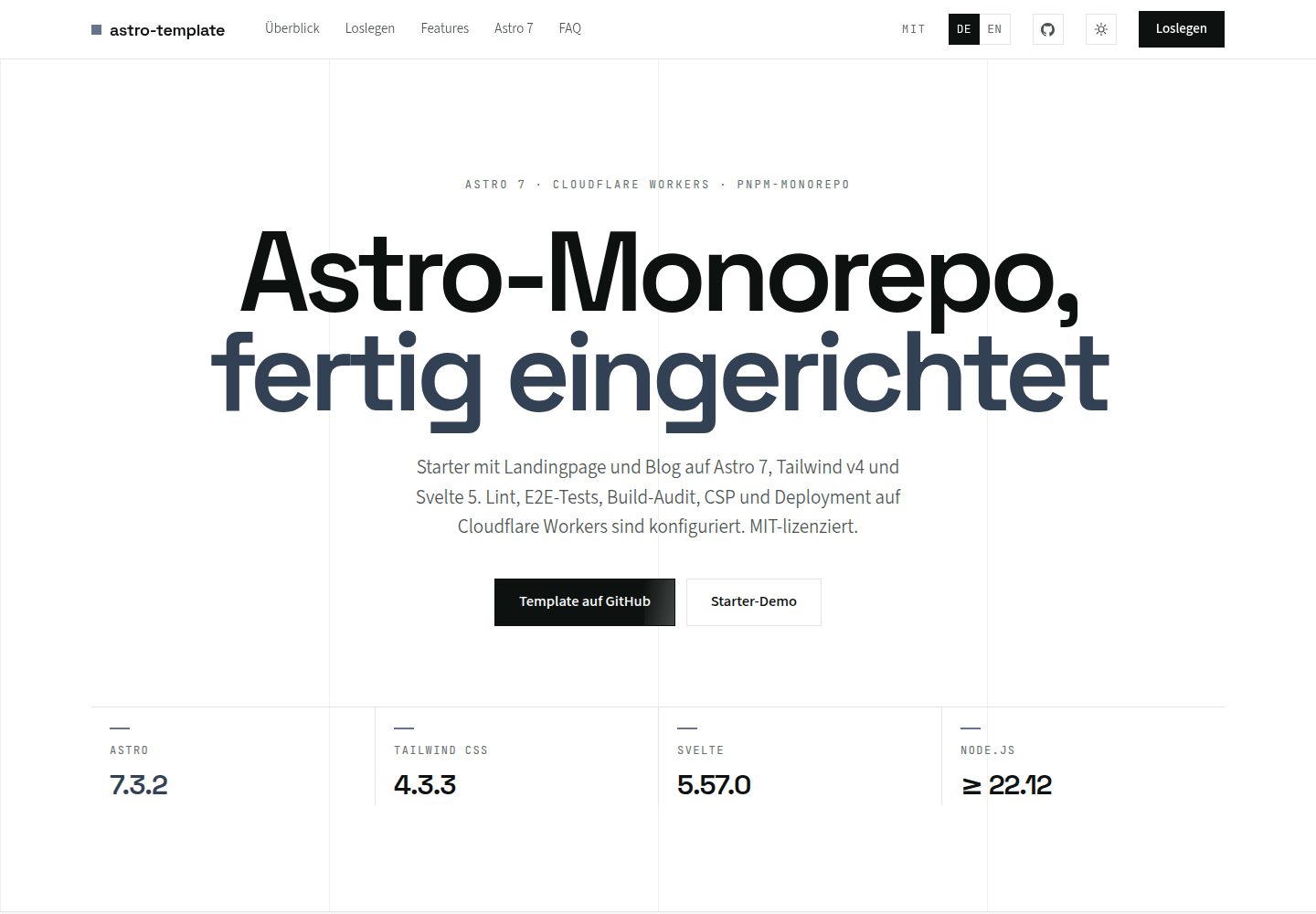
pnpm workspaces monorepo with two independently deployable applications, starter and blog, sharing design tokens, components, layouts and utilities from the shared package
AstroSvelteBlog
astro-v6-template — Astro Blog Template
By casoon
An Astro v6 pnpm monorepo blog template with starter and blog applications, sharing design tokens, components and utilities, and supporting i18n, OG image generation and post-build auditing.
Explore the design
Compare the page layouts and mobile experience. Open any screenshot for a closer look.
Desktop homepage1 / 2
Desktop captureTop of page
Actual screenshot captured by the server browser.
All pages & views 2
Screenshots show visual appearance; interactive behavior may differ.
Recorded 2026-10-03View source
What stands out
A quick read of the recorded project description.
Astro v6 with Tailwind v4 and Svelte 5, supporting MDX, the content collections Loader API, Astro Actions and CSP
Built-in English-German i18n routing and language switching, supported by both starter and blog
Automatically generates OG images, robots.txt, sitemap.xml, llms.txt and other site files at build time, and outputs JSON-LD structured data
Integrates Playwright E2E tests and axe-core WCAG 2.1 AA scanning, with Biome handling unified linting and formatting
Provides fallow code analysis, nosecrets secret scanning, build performance measurement and post-build SEO/link/WCAG audit scripts
Template Details
This template is an Astro v6 monorepo using pnpm workspaces, containing two independently deployable applications: starter and blog. The starter provides a landing page, a contact form with Astro Actions and Zod validation, a dark mode toggle and English-German bilingual support; the blog provides MDX articles, content collections, a table-of-contents sidebar, a reading progress bar, RSS and sitemap. Both applications share design tokens, UI components, layouts, SEO components and utility functions from the shared package. To add an application, create a new directory under apps/ and reference shared.
On the technical side, the template uses Tailwind v4's CSS-first configuration, Svelte 5's Runes reactive islands, Zod v4 for runtime validation, Biome for unified linting and formatting, and integrates Playwright end-to-end tests with axe-core accessibility scanning. The build process generates OG images, robots.txt, sitemap.xml, llms.txt and other site files, and runs SEO, link and WCAG checks after build via @casoon/astro-post-audit.
Note: the repository README explicitly states that the repository is archived, with the successor being astro-v7-template; new projects should use the v7 template. The template requires Node.js >= 22.12.0 and pnpm >= 11.0.0. The code is MIT licensed, but third-party assets such as demo images, fonts and icons require separate license verification, and external services such as domains and hosting may incur additional charges.
AstroSvelteBlog
Is it right for your project?
Use Cases
- Maintaining both a main site and a blog in one repository while sharing a design system and components
- Building an independently deployable landing page for a marketing campaign or product launch while reusing existing UI and utilities
- Building a content-focused blog with English-German bilingual support, RSS and sitemap
- Running end-to-end tests, accessibility scans and post-build SEO audits in CI for an Astro project
- Managing multiple Astro applications as a monorepo with centralized dependency version management
Suitable For
- Front-end developers familiar with Astro, pnpm workspaces and TypeScript
- Teams that need multiple applications to share design tokens and components
- Projects planning to build a blog or landing page with Astro v6 and Tailwind v4
- Sites that want built-in i18n, OG image generation and a post-build audit workflow
Getting started & customization
Use these recorded setup notes alongside the repository instructions for your chosen version.
- 1
Requires Node.js >= 22.12.0 and pnpm >= 11.0.0
- 2
After cloning the repository, run pnpm install; use pnpm dev to start starter (port 4321) and pnpm dev:blog to start blog (port 4322)
- 3
The repository is archived; the README recommends that new projects use the successor astro-v7-template
- 4
The code is MIT licensed, but third-party assets such as demo images, fonts and icons require separate license verification, and external services such as domains and hosting may incur additional charges
- 5
To add an application, create a directory under apps/, configure package.json, astro.config.mjs and tsconfig.json, and reference the styles, components and utilities from @astro-v6/shared
License & source material
Usage conditions & limitations
Free to use · keep license noticeThis listing covers the free version under the MIT license in the public repository; the free scope is the code of that version and does not mean that external services or third-party assets are free.
Must comply with when using
- You may use, modify, commercialize and distribute the code of this version for free.
- When distributing copies or substantial portions of the code, retain the original author's copyright notice and the full MIT license notice.
- The code is provided as is; warranties and limitations of liability are governed by the original license and applicable law.
Additional costs & items to verify
- The repository is archived and no longer maintained; the README recommends that new projects use the successor astro-v7-template, so using this template means building on a discontinued codebase.
- Running requires Node.js 22.12.0 or later and pnpm 11.0.0 or later as the package manager; otherwise installation and build will fail.
- The default deployment target is Cloudflare Workers, which requires a Cloudflare account and the wrangler tool; switching to another platform requires modifying the adapter and image service and removing the wrangler configuration.
- The template's preconfigured Claude Code MCP servers depend on external services such as context7 and Cloudflare; using the related AI-assisted features may require corresponding accounts or access permissions.
- Demo images, fonts, icons and other third-party assets must be checked against their respective licenses and cannot be judged solely by the code's MIT license.
- External services such as domains, hosting, databases, payments or AI may incur additional charges.
View Original Text Basis
Permission is hereby granted, free of charge
Original License Text
**This repository is archived.** Its successor is [astro-v7-template](https://github.com/casoon/astro-v7-template). Please use the v7 template for new projects.
Original README
- **Node.js** >= 22.12.0 - **pnpm** >= 11.0.0
Original README
The template ships pre-configured for **Cloudflare Workers** — the default deployment target.
Original README
https://github.com/casoon/astro-v6-template/blob/master/LICENSEhttps://github.com/casoon/astro-v6-template/blob/master/README.md**MCP Servers** (`.claude/mcp.json`) — Pre-configured MCP servers for context7 documentation lookup and Cloudflare tooling
Original README
Compiled by DeepSeek based on repository license and README ·2026-10-03. Results only cover the materials read; dependencies, images, fonts, and subsequent term changes are subject to their respective original texts.
Project checks & description sources
Template Information
- Source platforms
- GitHub
- Documentation and maintenance reference score
- More documented · 88 / 100
- Technologies
- Astro · Svelte
- Website type
- Blog
How this score is calculated
Our heuristic uses license records (up to 30), a demo link (12), a preview (10), stars (15), recorded maintenance (15), description completeness (8), feature records (5) and classification data (5). It is not a code, security or performance test, or a Google score. A link does not establish tested functionality.
What to verify for this project
- Repository update recorded
- 2026-09-19
- Screenshot last checked
- 2026-10-03
A demo link is listed. Check it with your own content and viewport sizes; its presence does not confirm that forms, authentication or payments work.
The catalog identifies Astro as the primary stack. Check the actual dependency manifest and lockfile for versions and hosting requirements. These notes use recorded metadata, not a code audit or a deployment test.
Use a selection guide →How this description was prepared
AI-assisted description based on catalog records and repository material. Repository authors are not automatically the reviewers of this description.
Automatically checked against source and license rules; no manual editorial review.
Inspect the recorded source material
SHA-256: 07a72123144f5397507fd439b38278e7468de98822fa1095581798b295d67b76
2026-10-03T06:33:06.500Z
Source file / repository# Astro v6 Template
<!-- BADGES:START -->
[](https://github.com/casoon/astro-v6-template/actions/workflows/ci.yml)
[](https://astro.build)
[](https://tailwindcss.com)
[](https://svelte.dev)
[](https://www.typescriptlang.org/)
[](https://biomejs.dev)
[](https://zod.dev)
[](https://pnpm.io/)
[](https://www.npmjs.com/package/@casoon/nosecrets)
[](https://opensource.org/licenses/MIT)
<!-- BADGES:END -->
> [!IMPORTANT]
> **This repository is archived.** Its successor is [astro-v7-template](https://github.com/casoon/astro-v7-template). Please use the v7 template for new projects.
A lean, production-ready **Astro v6** monorepo template with Tailwind v4, Svelte 5 and Biome.
**Live Demos:** [Starter](https://astrov6.casoon.dev) · [Blog](https://astrov6blog.casoon.dev)
> **Status:** Astro v6 is stable. This template tracks the latest Astro v6 releases.
## Multi-Project Architecture
This template uses **pnpm workspaces** with a shared library, making it an ideal foundation for running **multiple projects from a single repository**. Typical use cases:
- **Main site** + **Blog** (included as `starter` and `blog`)
- **Landing pages** for campaigns or product launches
- **Online shop** storefront
- **Documentation** site
All projects share the same design tokens, UI components and utilities — ensuring a consistent look and feel while keeping each app independently deployable. Adding a new project is as simple as creating a new folder under `apps/` and importing from `shared/`.
## Predecessor
This template succeeds [astro-v5-template](https://github.com/casoon/astro-v5-template). It was rebuilt from scratch with a focus on simplicity and the Astro v6 feature set.
### What Changed from v5?
| Area | v5 | v6 |
|---|---|---|
| Apps | 3 (blank, base, demo) | 2 (starter, blog) |
| Linting | Biome + ESLint + Prettier | Biome only |
| Fonts | 16 packages | 3 (Inter, Lora, Fira Code) |
| Styling | @casoon/atlas + Tailwind | Custom tokens + Tailwind v4 |
| Node | >= 20 | >= 22.12.0 |
| Zod | v3 | v4 |
| Content | Legacy Collections | Loader API |
| Dev server | Standard Vite | Vite Environment API |
## Features
- **Astro v6** — New dev server, Live Content Collections, CSP
- **Tailwind v4** — CSS-first config, Vite plugin, OKLCH colors
- **Svelte 5** — Runes API ($state, $derived) for reactive islands
- **i18n** — Multi-language support (en/de) with Astro i18n routing
- **OG Images** — Auto-generated Open Graph images at build time (Satori + resvg)
- **Astro Actions** — Server-side contact form handling
- **CSP** — Content Security Policy with SHA-256 nonces
- **Build Metrics** — [`@casoon/astro-speed-measure`](https://github.com/casoon/astro-speed-measure) for build performance tracking
- **Post-Build Audit** — [`@casoon/astro-post-audit`](https://github.com/casoon/astro-post-audit) for SEO, link and WCAG checks after every build
- **Code Analysis** — [fallow](https://fallow.tools) for dead code, complexity hotspots and duplication detection
- **Secret Scanning** — [`@casoon/nosecrets`](https://github.com/casoon/nosecrets) in pre-commit plus manual workspace scans
- **Playwright** — E2E tests for both apps with axe-core a11y scanning
- **Biome** — Single tool for linting + formatting (replaces ESLint + Prettier)
- **Zod v4** — Runtime validation for env and forms
- **pnpm Workspaces** — Monorepo with catalog for centralized dependency management
- **Dark Mode** — System preference + manual toggle
- **Site Files** — [`@casoon/astro-site-files`](https://github.com/casoon/astro-site-files) generates `robots.txt`, `sitemap.xml`, `llms.txt`, `security.txt` and `humans.txt` at build time
- **Structured Data** — [`@casoon/astro-structured-data`](https://github.com/casoon/astro-structured-data) generates JSON-LD via typed Astro components (`ArticleSchema`, `WebSiteSchema`, `FAQSchema`, …)
- **SEO** — robots.txt, canonical URLs, meta descriptions, Open Graph
- **WCAG 2.1 AA** — Two-layer accessibility: axe-core runtime checks + static HTML audit
- **TypeScript Strict** — Fully typed throughout
## Structure
```
astro-v6-template/
├── apps/
│ ├── starter/ # Landing page + contact form + i18n
│ └── blog/ # Blog with MDX + RSS + i18n
├── shared/ # Design tokens, components, layouts, SEO, utilities
├── e2e/
│ ├── starter/ # Playwright E2E tests for starter
│ └── blog/ # Playwright E2E tests for blog
├── .github/workflows/ # CI pipeline
├── biome.json # Linting & formatting
├── playwright.config.ts # E2E test configuration
└── pnpm-workspace.yaml # Workspace + catalog
```
## Prerequisites
- **Node.js** >= 22.12.0
- **pnpm** >= 11.0.0
## Quick Start
```bash
# Clone the repository
git clone https://github.com/casoon/astro-v6-template.git
cd astro-v6-template
# Install dependencies
pnpm install
# Start the starter app
pnpm dev
# Start the blog app
pnpm dev:blog
```
## Available Scripts
| Script | Description |
|---|---|
| `pnpm dev` | Start the starter app (port 4321) |
| `pnpm dev:blog` | Start the blog app (port 4322) |
| `pnpm build` | Build all apps |
| `pnpm build:starter` | Build starter only |
| `pnpm build:blog` | Build blog only |
| `pnpm check` | Run Biome lint + format check |
| `pnpm check:fix` | Biome auto-fix |
| `pnpm format` | Format all files |
| `pnpm test:e2e` | Run all Playwright E2E tests |
| `pnpm test:e2e:starter` | E2E tests for starter only |
| `pnpm test:e2e:blog` | E2E tests for blog only |
| `pnpm type-check` | TypeScript check |
| `pnpm fallow:dead` | Detect unused files, exports and dependencies |
| `pnpm fallow:health` | Complexity score, hotspots and refactor targets |
| `pnpm fallow:audit` | Combined dead-code + complexity + duplication audit |
| `pnpm clean` | Remove build artifacts + node_modules |
## Apps
### Starter
Landing page featuring:
- Hero section with feature grid
- Contact form with Astro Actions + Zod validation
- i18n (English + German) with language switcher
- OG image generation per page and locale
- Dark mode toggle
- SEO component with JSON-LD
### Blog
Blog template featuring:
- MDX support with remark-gfm, rehype-slug, code block language labels and Shiki title transformer
- Content Collections (Loader API) with schema fields for `readTime`, `articleType`, `series` and `seriesOrder`
- Table of Contents — sticky sidebar on desktop with IntersectionObserver scrollspy
- Reading progress bar — thin indicator at the top of every post
- Enriched RSS feed (`/rss.xml`) with `article:readingTime`, `article:series` and OG image enclosures
- Automatic sitemap (`/sitemap.xml`) with i18n hreflang via `@casoon/astro-site-files`
- i18n (English + German) with language switcher
- OG image generation per page and blog post
- Tag display
## Adding Another App
Use `apps/starter` or `apps/blog` as the starting point, depending on whether the new project is page-focused or content-focused.
1. Create `apps/<name>/` with its own `package.json`, `astro.config.mjs`, `tsconfig.json`, `src/` and `public/` folders.
2. Set the package name to `@astro-v6/<name>` and add scripts for `dev`, `build`, `preview`, `type-check`, `clean` and `deploy`.
3. Import shared styles from `@astro-v6/shared/styles/global.css` in the app layout, and import shared components, layouts, SEO helpers and utilities via `@astro-v6/shared/*`.
4. Copy the app-level `tsconfig.json` path aliases so `@/*` points to local `src/*` and `@astro-v6/shared/*` points to `../../shared/src/*`.
5. Configure `astro.config.mjs` with the same core integrations: Tailwind, Svelte, `@casoon/astro-site-files`, `@casoon/astro-structured-data`, `@casoon/astro-post-audit` and `@casoon/astro-speed-measure`.
6. Choose a unique dev port if the app should run alongside the existing apps.
7. Add root scripts such as `dev:<name>`, `build:<name>` and `preview:<name>` when the app should be addressable from the workspace root.
8. Add an optional Playwright project in `playwright.config.ts` plus tests under `e2e/<name>/` when the app needs CI browser coverage.
## Shared Package (`@astro-v6/shared`)
All shared code lives in `shared/`:
- **Styles** — Design tokens (OKLCH), global CSS, Tailwind theme
- **Components** — `Navbar.astro`, `ThemeToggle.svelte`, `TableOfContents.svelte`, `ReadingProgress.svelte`
- **Layouts** — `BaseLayout.astro` (HTML base with skip link)
- **SEO** — `PageSEO.astro` (meta tags, Open Graph, JSON-LD via `@casoon/astro-structured-data`)
- **Utilities** — `env.ts`, `api.ts`, `cn.ts`, `i18n.ts`, `og.ts`
## i18n
Both apps support English (default) and German:
- English pages at root: `/`, `/contact`, `/blog/welcome`
- German pages with prefix: `/de/`, `/de/contact`
- Language switcher in the navbar (EN/DE links)
- Translation files per app in `src/i18n/`
- Shared locale utilities in `@astro-v6/shared/utils/i18n`
## OG Image Generation
Open Graph images are generated at build time:
```bash
# Generate manually
pnpm --filter starter generate:og
pnpm --filter blog generate:og
# Runs automatically before `astro build`
pnpm build
```
- Output: `public/og/*.png` (1200x630, gitignored)
- Blog script reads MDX frontmatter to generate post-specific images
- All pages reference their OG image via `<PageSEO ogImage={...}>`
## E2E Tests
```bash
# Run all tests (builds must exist)
pnpm test:e2e
# Run per app
pnpm test:e2e:starter
pnpm test:e2e:blog
```
Tests covering navigation, i18n, SEO/OG meta tags, contact form, theme toggle, RSS, accessibility (axe-core WCAG 2.1 AA), robots.txt and sitemap.
## Code Analysis
[fallow](https://fallow.tools) is included as a dev dependency for static analysis of the TypeScript/JavaScript codebase.
```bash
# Detect unused files, exports, types and dependencies
pnpm fallow:dead
# Complexity score with hotspots and refactor targets
pnpm fallow:health
# Combined audit: dead code + complexity + duplication
pnpm fallow:audit
```
fallow understands the monorepo structure and resolves cross-workspace imports correctly. It also integrates as an MCP server for AI-assisted analysis directly in your editor — see the [fallow MCP docs](https://fallow.tools/mcp) for setup.
## Secret Scanning
```bash
# Scan the whole workspace
pnpm secrets:scan
# Scan only staged files (used by pre-commit)
pnpm secrets:scan:staged
```
## Build Performance Metrics
Both apps include [`@casoon/astro-speed-measure`](https://github.com/casoon/astro-speed-measure) to track build performance. It measures integration hooks, Vite plugin timing, per-page rendering and asset processing — giving you visibility into what slows down your build.
```js
// astro.config.mjs
import speedMeasure from '@casoon/astro-speed-measure';
export default defineConfig({
integrations: [
// ... other integrations
speedMeasure(), // always add as last integration
],
});
```
Each build prints a performance report to the console and writes a JSON baseline for trend comparisons. Supports budgets, HTML reports and GitHub Actions CI summaries.
## Post-Build Audit
Both apps include [`@casoon/astro-post-audit`](https://github.com/casoon/astro-post-audit) for automatic SEO, link and WCAG checks after every build. It runs a fast Rust binary against the build output via the `astro:build:done` hook.
The template ships with comprehensive rules enabled out of the box:
```js
// astro.config.mjs
postAudit({
preset: 'standard',
failOn: 'errors',
hints: { sourceFiles: true },
rules: {
filters: { exclude: ['404.html'] },
canonical: { self_reference: true },
opengraph: { require_og_image: true },
a11y: { require_skip_link: true },
links: { check_fragments: true },
structured_data: { check_json_ld: true },
content_quality: {
detect_duplicate_titles: true,
detect_duplicate_descriptions: true,
},
},
}),
```
Checks include canonical self-references, Open Graph image presence, skip navigation link, fragment link integrity, JSON-LD validity and duplicate title/description detection — on top of everything the `standard` preset covers. Use `failOn: 'warnings'` for stricter CI enforcement.
## Structured Data (JSON-LD)
Both apps use [`@casoon/astro-structured-data`](https://github.com/casoon/astro-structured-data) to generate JSON-LD markup via typed Astro components. The integration is registered in `astro.config.mjs` and provides a virtual config module consumed by the components at build time.
`PageSEO.astro` in `shared/` selects the right schema automatically:
- **Article pages** (`ogType="article"`) — renders `<ArticleSchema>` with headline, author, dates, image and publisher
- **All other pages** — renders `<Schema>` with `@type: "WebPage"`, name, description and canonical URL
Additional schema components are available for FAQs, products, local businesses, events, breadcrumbs and more:
```astro
---
import { ArticleSchema, FAQSchema, BreadcrumbSchema } from '@casoon/astro-structured-data/components';
---
<ArticleSchema
title="My Post"
description="..."
datePublished="2026-01-01"
authorName="Author"
imageUrl="/og/post.png"
/>
```
The integration also adds a **Structured Data validator** to Astro's dev toolbar for real-time inspection. JSON-LD validity is verified at build time by `@casoon/astro-post-audit` (`structured_data: { check_json_ld: true }`).
## Site Files
Both apps use [`@casoon/astro-site-files`](https://github.com/casoon/astro-site-files) to generate all standard site meta-files at build time:
`@casoon/astro-site-files` replaces the older split packages `@casoon/astro-sitemap` and `@casoon/astro-crawler-policy`.
```js
// astro.config.mjs
import siteFiles from '@casoon/astro-site-files';
siteFiles({
sitemap: {
i18n: { defaultLocale: 'en', locales: { en: 'en', de: 'de-DE' } },
sources: [getBlogSitemapEntries], // blog: inject lastmod from MDX frontmatter
},
robots: {}, // allow all, sitemap URL auto-derived from astro.config.site
llms: {
title: 'Astro v6 Blog',
description: 'A blog template built with Astro v6, MDX and Content Collections.',
},
}),
```
Generated files: `robots.txt`, `sitemap.xml` (with i18n hreflang), `llms.txt`. Optional: `/.well-known/security.txt`, `humans.txt`.
The blog RSS feed is generated as a prerendered page endpoint (`src/pages/rss.xml.ts`) using `@astrojs/rss` + `getCollection()`. Posts are sorted by `lastmod ?? date` and enriched with `article:readingTime`, `article:series` and OG image `<enclosure>` elements via a custom `article:` XML namespace.
## Accessibility (WCAG 2.1 AA)
This template enforces WCAG 2.1 Level AA compliance through two complementary layers:
### Layer 1: Static HTML Audit (Build Time)
[`@casoon/astro-post-audit`](https://github.com/casoon/astro-post-audit) runs automatically after every build and checks the raw HTML output for:
- Missing `alt` attributes on images
- Empty links (`<a>` without text or aria-label)
- Missing page landmarks and heading structure
- Duplicate `<h1>` elements per page
### Layer 2: Runtime Accessibility Testing (E2E)
[axe-core](https://github.com/dequelabs/axe-core) via `@axe-core/playwright` validates the fully rendered pages in a real browser:
- Color contrast ratios (>= 4.5:1)
- ARIA roles and attributes
- Keyboard navigation and focus management
- Form label associations
```bash
# Run accessibility tests
pnpm test:e2e # all tests including a11y
```
Tests are located in `e2e/starter/a11y.spec.ts` and `e2e/blog/a11y.spec.ts`.
### Built-in Accessibility Features
- **Skip to content** link in `BaseLayout`
- **Semantic HTML** — `<header>`, `<nav>`, `<main>`, `<article>`, `<section>` throughout
- **ARIA attributes** — `aria-label`, `aria-current`, `role` where needed
- **Link underlines** — Always visible, not just on hover
- **Focus indicators** — Visible focus rings on all interactive elements
- **Dark mode** — Respects `prefers-color-scheme`, OKLCH colors maintain contrast in both modes
## Deployment
The template ships pre-configured for **Cloudflare Workers** — the default deployment target. All application logic (forms, i18n, routing, SEO) is platform-agnostic. Switching platforms requires only three config changes.
### Cloudflare Workers (default)
No changes needed. Deploy after building:
```bash
pnpm build:starter
wrangler deploy --config apps/starter/dist/server/wrangler.json
pnpm build:blog
cd apps/blog && wrangler deploy
```
Cloudflare's edge runtime gives you global low-latency SSR out of the box, without managing servers.
### Other platforms (Node.js, Vercel, Netlify, …)
Three config changes per app:
**1. Swap the adapter** in `astro.config.mjs`:
```js
// Node.js
import node from '@astrojs/node';
adapter: node({ mode: 'standalone' })
// Vercel
import vercel from '@astrojs/vercel';
adapter: vercel()
// Netlify
import netlify from '@astrojs/netlify';
adapter: netlify()
```
**2. Enable Sharp image optimization** (Sharp runs on Node.js but not on Cloudflare Workers):
```js
image: {
service: {
entrypoint: 'astro/assets/services/sharp',
},
},
```
**3. Delete `wrangler.toml`** — not needed outside of Cloudflare.
Everything else — Astro Actions, contact form, i18n, CSP, post-build audit, sitemap — works identically on every platform.
## Astro v6 Highlights
This template leverages the key features of Astro v6:
- **Vite Environment API** — Dev server runs in the same runtime as production
- **Content Collections Loader API** — `glob()` loader instead of legacy `type: 'content'`
- **Content Security Policy** — Built-in CSP with SHA-256 nonces
- **Astro Actions** — Type-safe server-side form handling
- **Zod v4** — `z.email()`, `z.url()` as top-level functions
- **Node 22+** — Minimum requirement
## Claude Code Integration
This template includes a [Claude Code](https://docs.anthropic.com/en/docs/claude-code) setup for AI-assisted development:
- **MCP Servers** (`.claude/mcp.json`) — Pre-configured MCP servers for context7 documentation lookup and Cloudflare tooling
- **Project instructions** (`CLAUDE.md`) — Architecture rules, code conventions, and dependency constraints
For the full set of reusable Claude Code skills (Astro, Tailwind, Svelte, SEO, Playwright, and more), see [casoon/ai-agent-config](https://github.com/casoon/ai-agent-config).
### Installing skills from Anthropic
[anthropics/skills](https://github.com/anthropics/skills) is the official skill repository with `frontend-design`, `mcp-builder`, `skill-creator`, and Office document skills. Install individual skills globally (available in every project):
```bash
git clone https://github.com/anthropics/skills.git /tmp/anthropic-skills
cp -r /tmp/anthropic-skills/skills/skill-creator ~/.claude/skills/
cp -r /tmp/anthropic-skills/skills/mcp-builder ~/.claude/skills/
cp -r /tmp/anthropic-skills/skills/frontend-design ~/.claude/skills/
```
Skill lookup order: `~/.claude/skills/` (global) → `.claude/skills/` (project, checked into Git).
### Skills for other AI coding agents
| Agent | Instruction file | Notes |
|-------|-----------------|-------|
| **Claude Code** | `CLAUDE.md` + `.claude/skills/` | Skills via description-based triggering |
| **OpenAI Codex** | `AGENTS.md` in repo root | Read on startup; no skill marketplace, use `AGENTS.md` for project conventions |
| **Gemini CLI** | `GEMINI.md` in repo root | Same pattern; project-level instructions, no skill system |
The core principles — trigger descriptions, progressive disclosure, runnable scripts alongside instructions — are agent-agnostic. A well-written `AGENTS.md` or `GEMINI.md` follows the same "explain the *why*" approach as a good `SKILL.md`.
## License
MIT
Explore similar templates
Compare previews and descriptions within the same stack and category.

astrowind
AstroWind is a free, open-source Astro starter theme using Astro and Tailwind CSS, released under the MIT license.
Astro · Blog

astro-paper
AstroPaper is a minimal, responsive, accessible, and SEO-friendly Astro blog theme. Articles are stored as Markdown/MDX in src/content/posts/, with subdirectories affecting URLs.
Astro · Blog

fuwari
Fuwari is a static blog template built with Astro and Tailwind CSS for personal blogs. It manages posts as Markdown files in src/content/posts/, with frontmatter for title, date, description, cover, tags, categories, draft status, and language.
Astro · Blog

Firefly
Firefly is a clean personal blog theme forked from Astro and Fuwari, offering four background modes, single/double sidebar and list/grid layouts, Pagefind client-side full-text search, and a six-language UI.
Astro · Blog

astro-theme-cactus
Astro Cactus is an Astro-based blog and portfolio theme that uses Markdown/MDX content collections to manage posts, notes, and tags, with frontmatter type-checked by a schema.
Astro · Portfolio

astrofy
Astrofy is a free and open-source personal portfolio website template built with Astro and TailwindCSS, with built-in blog, CV timeline, project showcase, store, and RSS feed modules.
Astro · Portfolio