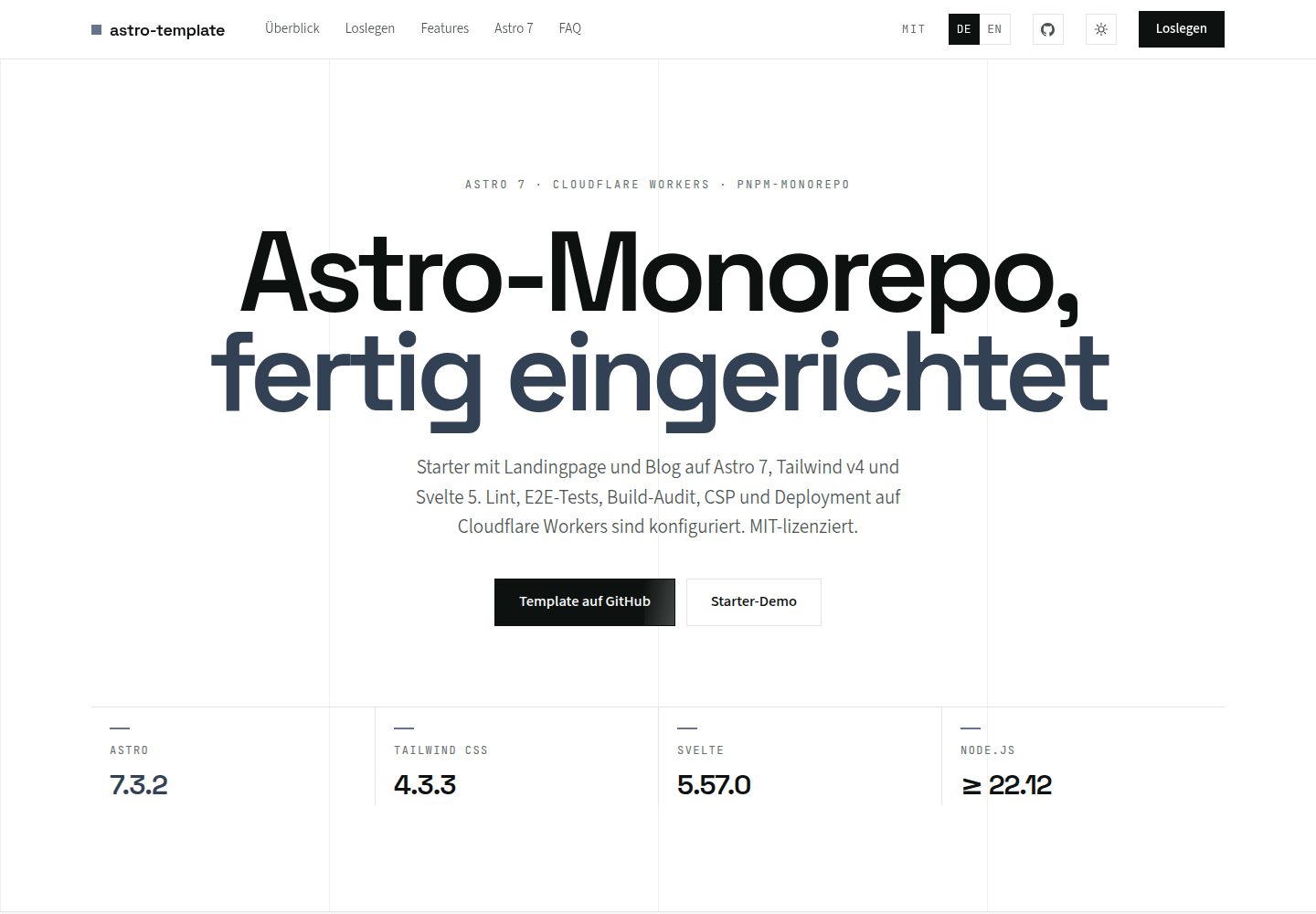
pnpm workspaces monorepo,含 starter 与 blog 两个可独立部署的应用,共用 shared 包中的设计令牌、组件、布局与工具
AstroSvelte博客
astro-v6-template — Astro 博客模板
作者 casoon
基于 Astro v6 的 pnpm monorepo 博客模板,含 starter 与 blog 两个应用,共用设计令牌、组件与工具,支持 i18n、OG 图生成与构建后审计。
看看你的网站会是什么样
浏览真实页面截图,比较内容排版与手机效果。点击下方缩略图切换,放大查看整页细节。
全部页面与视图 2
截图用于了解视觉与布局,交互效果请以实际项目为准。
采集于 2026-10-03查看来源
值得关注的模板亮点
从已有项目资料中,快速了解它的特点。
Astro v6 搭配 Tailwind v4 与 Svelte 5,支持 MDX、内容集合 Loader API、Astro Actions 和 CSP
内置英德双语 i18n 路由与语言切换,starter 与 blog 均支持
构建时自动生成 OG 图片、robots.txt、sitemap.xml、llms.txt 等站点文件,并输出 JSON-LD 结构化数据
集成 Playwright E2E 测试与 axe-core WCAG 2.1 AA 扫描,Biome 统一负责 lint 与格式化
提供 fallow 代码分析、nosecrets 密钥扫描、构建性能度量与构建后 SEO/链接/WCAG 审计脚本
模板详细介绍
该模板是一个采用 pnpm workspaces 的 Astro v6 monorepo,仓库内包含两个可独立部署的应用:starter 与 blog。starter 提供落地页、带 Astro Actions 与 Zod 校验的联系表单、暗色模式切换和英德双语;blog 提供 MDX 文章、内容集合、目录侧边栏、阅读进度条、RSS 与 sitemap。两个应用共用 shared 包中的设计令牌、UI 组件、布局、SEO 组件和工具函数,新增应用时可从 apps/ 下新建目录并引用 shared。
技术栈方面,模板使用 Tailwind v4 的 CSS-first 配置、Svelte 5 的 Runes 响应式岛屿、Zod v4 做运行时校验、Biome 统一做 lint 与格式化,并集成 Playwright 端到端测试与 axe-core 无障碍扫描。构建流程中会生成 OG 图片、robots.txt、sitemap.xml、llms.txt 等站点文件,并通过 @casoon/astro-post-audit 在构建后执行 SEO、链接与 WCAG 检查。
需要注意:仓库 README 明确标注该仓库已归档,后继版本为 astro-v7-template,新项目应使用 v7 模板。模板要求 Node.js >= 22.12.0 与 pnpm >= 11.0.0。代码采用 MIT 许可,但演示图片、字体、图标等第三方素材需单独核对许可,域名、托管等外部服务可能另行收费。
AstroSvelte博客
适合你的项目吗?
适用场景
- 需要在一个仓库中同时维护主站与博客,并让两者共享设计系统与组件
- 为营销活动或产品发布搭建可独立部署的落地页,同时复用已有 UI 与工具
- 构建支持英德双语、带 RSS 与 sitemap 的内容型博客
- 在 CI 中运行端到端测试、无障碍扫描和构建后 SEO 审计的 Astro 项目
- 以 monorepo 方式管理多个 Astro 应用,并集中管理依赖版本
适合人群
- 熟悉 Astro、pnpm workspaces 与 TypeScript 的前端开发者
- 需要多应用共享设计令牌与组件的团队
- 计划使用 Astro v6 与 Tailwind v4 搭建博客或落地页的项目
- 希望内置 i18n、OG 图生成和构建后审计流程的站点
上手与定制指南
结合仓库当前版本的说明,按下面的资料检查内容、配置与运行要求。
- 1
环境要求 Node.js >= 22.12.0 与 pnpm >= 11.0.0
- 2
克隆仓库后执行 pnpm install,使用 pnpm dev 启动 starter(端口 4321),pnpm dev:blog 启动 blog(端口 4322)
- 3
仓库已归档,README 建议新项目改用后继的 astro-v7-template
- 4
代码为 MIT 许可,但演示图片、字体、图标等第三方素材需单独核对许可,域名与托管等外部服务可能另行收费
- 5
新增应用需在 apps/ 下创建目录,配置 package.json、astro.config.mjs、tsconfig.json,并引用 @astro-v6/shared 的样式、组件与工具
授权与来源资料
使用条件与限制
免费使用 · 保留许可声明本次收录的是公开仓库中采用 MIT 许可的免费版本;免费范围为该版本代码,不代表外部服务或第三方素材免费。
使用时需要遵守
- 允许免费使用、修改、商用和分发该版本代码。
- 分发代码副本或实质性部分时,保留原作者版权声明和完整 MIT 许可声明。
- 代码按现状提供;担保与责任限制以原许可证及适用法律为准。
额外费用与待核对事项
- 该仓库已归档,不再维护更新;README 建议新项目改用后继的 astro-v7-template,使用本模板意味着基于已停止维护的代码库。
- 运行需 Node.js 22.12.0 及以上版本,并使用 pnpm 11.0.0 及以上版本作为包管理器,不满足则无法安装与构建。
- 默认部署目标为 Cloudflare Workers,部署需使用 Cloudflare 账号与 wrangler 工具;改用其他平台需自行修改适配器、图片服务并删除 wrangler 配置。
- 模板预置的 Claude Code MCP 服务器依赖 context7 与 Cloudflare 等外部服务,使用相关 AI 辅助功能可能需要相应账号或访问权限。
- 演示图片、字体、图标及其他第三方素材需按各自许可核对,不能仅凭代码的 MIT 许可判断。
- 域名、托管、数据库、支付或 AI 等外部服务可能另外收费。
查看原文依据
Permission is hereby granted, free of charge
许可证原文
**This repository is archived.** Its successor is [astro-v7-template](https://github.com/casoon/astro-v7-template). Please use the v7 template for new projects.
README 原文
- **Node.js** >= 22.12.0 - **pnpm** >= 11.0.0
README 原文
The template ships pre-configured for **Cloudflare Workers** — the default deployment target.
README 原文
https://github.com/casoon/astro-v6-template/blob/master/LICENSEhttps://github.com/casoon/astro-v6-template/blob/master/README.md**MCP Servers** (`.claude/mcp.json`) — Pre-configured MCP servers for context7 documentation lookup and Cloudflare tooling
README 原文
DeepSeek 根据仓库许可证和 README 整理 ·2026-10-03。结果仅覆盖已读取资料,依赖、图片、字体及后续条款变更以各自原文为准。
项目核对记录与介绍依据
模板资料
- 来源平台
- GitHub
- 资料与维护参考分
- 资料较完整 · 88 / 100
- 技术栈
- Astro · Svelte
- 网站类型
- 博客
这个分数如何计算
本站按许可资料(最高30分)、演示链接(12分)、预览图(10分)、Star数(15分)、记录的维护时间(15分)、描述完整度(8分)、功能记录(5分)和分类资料(5分)计算。它不是代码、安全或性能测试,也不是 Google 评分;有链接不代表已实测可用。
这个项目需要核对什么
- 记录的仓库更新时间
- 2026-09-19
- 截图检查日期
- 2026-10-03
已收录演示链接。请用你的内容与屏幕尺寸检查;有演示不代表表单、认证或支付已经可用。
目录记录的主要技术栈是 Astro。请通过依赖清单和锁文件核对实际版本与托管要求。这些说明基于收录资料,不代表代码审计或部署实测。
查看具体选型方法 →介绍的制作与核对状态
介绍由 AI 辅助整理目录与仓库资料。仓库作者不等于这篇介绍的审核者。
已完成服务器许可规则与 AI 来源核对;未经过人工编辑审核。
查看当时使用的来源资料
SHA-256: 07a72123144f5397507fd439b38278e7468de98822fa1095581798b295d67b76
2026-10-03T06:33:06.500Z
来源文件 / 仓库# Astro v6 Template
<!-- BADGES:START -->
[](https://github.com/casoon/astro-v6-template/actions/workflows/ci.yml)
[](https://astro.build)
[](https://tailwindcss.com)
[](https://svelte.dev)
[](https://www.typescriptlang.org/)
[](https://biomejs.dev)
[](https://zod.dev)
[](https://pnpm.io/)
[](https://www.npmjs.com/package/@casoon/nosecrets)
[](https://opensource.org/licenses/MIT)
<!-- BADGES:END -->
> [!IMPORTANT]
> **This repository is archived.** Its successor is [astro-v7-template](https://github.com/casoon/astro-v7-template). Please use the v7 template for new projects.
A lean, production-ready **Astro v6** monorepo template with Tailwind v4, Svelte 5 and Biome.
**Live Demos:** [Starter](https://astrov6.casoon.dev) · [Blog](https://astrov6blog.casoon.dev)
> **Status:** Astro v6 is stable. This template tracks the latest Astro v6 releases.
## Multi-Project Architecture
This template uses **pnpm workspaces** with a shared library, making it an ideal foundation for running **multiple projects from a single repository**. Typical use cases:
- **Main site** + **Blog** (included as `starter` and `blog`)
- **Landing pages** for campaigns or product launches
- **Online shop** storefront
- **Documentation** site
All projects share the same design tokens, UI components and utilities — ensuring a consistent look and feel while keeping each app independently deployable. Adding a new project is as simple as creating a new folder under `apps/` and importing from `shared/`.
## Predecessor
This template succeeds [astro-v5-template](https://github.com/casoon/astro-v5-template). It was rebuilt from scratch with a focus on simplicity and the Astro v6 feature set.
### What Changed from v5?
| Area | v5 | v6 |
|---|---|---|
| Apps | 3 (blank, base, demo) | 2 (starter, blog) |
| Linting | Biome + ESLint + Prettier | Biome only |
| Fonts | 16 packages | 3 (Inter, Lora, Fira Code) |
| Styling | @casoon/atlas + Tailwind | Custom tokens + Tailwind v4 |
| Node | >= 20 | >= 22.12.0 |
| Zod | v3 | v4 |
| Content | Legacy Collections | Loader API |
| Dev server | Standard Vite | Vite Environment API |
## Features
- **Astro v6** — New dev server, Live Content Collections, CSP
- **Tailwind v4** — CSS-first config, Vite plugin, OKLCH colors
- **Svelte 5** — Runes API ($state, $derived) for reactive islands
- **i18n** — Multi-language support (en/de) with Astro i18n routing
- **OG Images** — Auto-generated Open Graph images at build time (Satori + resvg)
- **Astro Actions** — Server-side contact form handling
- **CSP** — Content Security Policy with SHA-256 nonces
- **Build Metrics** — [`@casoon/astro-speed-measure`](https://github.com/casoon/astro-speed-measure) for build performance tracking
- **Post-Build Audit** — [`@casoon/astro-post-audit`](https://github.com/casoon/astro-post-audit) for SEO, link and WCAG checks after every build
- **Code Analysis** — [fallow](https://fallow.tools) for dead code, complexity hotspots and duplication detection
- **Secret Scanning** — [`@casoon/nosecrets`](https://github.com/casoon/nosecrets) in pre-commit plus manual workspace scans
- **Playwright** — E2E tests for both apps with axe-core a11y scanning
- **Biome** — Single tool for linting + formatting (replaces ESLint + Prettier)
- **Zod v4** — Runtime validation for env and forms
- **pnpm Workspaces** — Monorepo with catalog for centralized dependency management
- **Dark Mode** — System preference + manual toggle
- **Site Files** — [`@casoon/astro-site-files`](https://github.com/casoon/astro-site-files) generates `robots.txt`, `sitemap.xml`, `llms.txt`, `security.txt` and `humans.txt` at build time
- **Structured Data** — [`@casoon/astro-structured-data`](https://github.com/casoon/astro-structured-data) generates JSON-LD via typed Astro components (`ArticleSchema`, `WebSiteSchema`, `FAQSchema`, …)
- **SEO** — robots.txt, canonical URLs, meta descriptions, Open Graph
- **WCAG 2.1 AA** — Two-layer accessibility: axe-core runtime checks + static HTML audit
- **TypeScript Strict** — Fully typed throughout
## Structure
```
astro-v6-template/
├── apps/
│ ├── starter/ # Landing page + contact form + i18n
│ └── blog/ # Blog with MDX + RSS + i18n
├── shared/ # Design tokens, components, layouts, SEO, utilities
├── e2e/
│ ├── starter/ # Playwright E2E tests for starter
│ └── blog/ # Playwright E2E tests for blog
├── .github/workflows/ # CI pipeline
├── biome.json # Linting & formatting
├── playwright.config.ts # E2E test configuration
└── pnpm-workspace.yaml # Workspace + catalog
```
## Prerequisites
- **Node.js** >= 22.12.0
- **pnpm** >= 11.0.0
## Quick Start
```bash
# Clone the repository
git clone https://github.com/casoon/astro-v6-template.git
cd astro-v6-template
# Install dependencies
pnpm install
# Start the starter app
pnpm dev
# Start the blog app
pnpm dev:blog
```
## Available Scripts
| Script | Description |
|---|---|
| `pnpm dev` | Start the starter app (port 4321) |
| `pnpm dev:blog` | Start the blog app (port 4322) |
| `pnpm build` | Build all apps |
| `pnpm build:starter` | Build starter only |
| `pnpm build:blog` | Build blog only |
| `pnpm check` | Run Biome lint + format check |
| `pnpm check:fix` | Biome auto-fix |
| `pnpm format` | Format all files |
| `pnpm test:e2e` | Run all Playwright E2E tests |
| `pnpm test:e2e:starter` | E2E tests for starter only |
| `pnpm test:e2e:blog` | E2E tests for blog only |
| `pnpm type-check` | TypeScript check |
| `pnpm fallow:dead` | Detect unused files, exports and dependencies |
| `pnpm fallow:health` | Complexity score, hotspots and refactor targets |
| `pnpm fallow:audit` | Combined dead-code + complexity + duplication audit |
| `pnpm clean` | Remove build artifacts + node_modules |
## Apps
### Starter
Landing page featuring:
- Hero section with feature grid
- Contact form with Astro Actions + Zod validation
- i18n (English + German) with language switcher
- OG image generation per page and locale
- Dark mode toggle
- SEO component with JSON-LD
### Blog
Blog template featuring:
- MDX support with remark-gfm, rehype-slug, code block language labels and Shiki title transformer
- Content Collections (Loader API) with schema fields for `readTime`, `articleType`, `series` and `seriesOrder`
- Table of Contents — sticky sidebar on desktop with IntersectionObserver scrollspy
- Reading progress bar — thin indicator at the top of every post
- Enriched RSS feed (`/rss.xml`) with `article:readingTime`, `article:series` and OG image enclosures
- Automatic sitemap (`/sitemap.xml`) with i18n hreflang via `@casoon/astro-site-files`
- i18n (English + German) with language switcher
- OG image generation per page and blog post
- Tag display
## Adding Another App
Use `apps/starter` or `apps/blog` as the starting point, depending on whether the new project is page-focused or content-focused.
1. Create `apps/<name>/` with its own `package.json`, `astro.config.mjs`, `tsconfig.json`, `src/` and `public/` folders.
2. Set the package name to `@astro-v6/<name>` and add scripts for `dev`, `build`, `preview`, `type-check`, `clean` and `deploy`.
3. Import shared styles from `@astro-v6/shared/styles/global.css` in the app layout, and import shared components, layouts, SEO helpers and utilities via `@astro-v6/shared/*`.
4. Copy the app-level `tsconfig.json` path aliases so `@/*` points to local `src/*` and `@astro-v6/shared/*` points to `../../shared/src/*`.
5. Configure `astro.config.mjs` with the same core integrations: Tailwind, Svelte, `@casoon/astro-site-files`, `@casoon/astro-structured-data`, `@casoon/astro-post-audit` and `@casoon/astro-speed-measure`.
6. Choose a unique dev port if the app should run alongside the existing apps.
7. Add root scripts such as `dev:<name>`, `build:<name>` and `preview:<name>` when the app should be addressable from the workspace root.
8. Add an optional Playwright project in `playwright.config.ts` plus tests under `e2e/<name>/` when the app needs CI browser coverage.
## Shared Package (`@astro-v6/shared`)
All shared code lives in `shared/`:
- **Styles** — Design tokens (OKLCH), global CSS, Tailwind theme
- **Components** — `Navbar.astro`, `ThemeToggle.svelte`, `TableOfContents.svelte`, `ReadingProgress.svelte`
- **Layouts** — `BaseLayout.astro` (HTML base with skip link)
- **SEO** — `PageSEO.astro` (meta tags, Open Graph, JSON-LD via `@casoon/astro-structured-data`)
- **Utilities** — `env.ts`, `api.ts`, `cn.ts`, `i18n.ts`, `og.ts`
## i18n
Both apps support English (default) and German:
- English pages at root: `/`, `/contact`, `/blog/welcome`
- German pages with prefix: `/de/`, `/de/contact`
- Language switcher in the navbar (EN/DE links)
- Translation files per app in `src/i18n/`
- Shared locale utilities in `@astro-v6/shared/utils/i18n`
## OG Image Generation
Open Graph images are generated at build time:
```bash
# Generate manually
pnpm --filter starter generate:og
pnpm --filter blog generate:og
# Runs automatically before `astro build`
pnpm build
```
- Output: `public/og/*.png` (1200x630, gitignored)
- Blog script reads MDX frontmatter to generate post-specific images
- All pages reference their OG image via `<PageSEO ogImage={...}>`
## E2E Tests
```bash
# Run all tests (builds must exist)
pnpm test:e2e
# Run per app
pnpm test:e2e:starter
pnpm test:e2e:blog
```
Tests covering navigation, i18n, SEO/OG meta tags, contact form, theme toggle, RSS, accessibility (axe-core WCAG 2.1 AA), robots.txt and sitemap.
## Code Analysis
[fallow](https://fallow.tools) is included as a dev dependency for static analysis of the TypeScript/JavaScript codebase.
```bash
# Detect unused files, exports, types and dependencies
pnpm fallow:dead
# Complexity score with hotspots and refactor targets
pnpm fallow:health
# Combined audit: dead code + complexity + duplication
pnpm fallow:audit
```
fallow understands the monorepo structure and resolves cross-workspace imports correctly. It also integrates as an MCP server for AI-assisted analysis directly in your editor — see the [fallow MCP docs](https://fallow.tools/mcp) for setup.
## Secret Scanning
```bash
# Scan the whole workspace
pnpm secrets:scan
# Scan only staged files (used by pre-commit)
pnpm secrets:scan:staged
```
## Build Performance Metrics
Both apps include [`@casoon/astro-speed-measure`](https://github.com/casoon/astro-speed-measure) to track build performance. It measures integration hooks, Vite plugin timing, per-page rendering and asset processing — giving you visibility into what slows down your build.
```js
// astro.config.mjs
import speedMeasure from '@casoon/astro-speed-measure';
export default defineConfig({
integrations: [
// ... other integrations
speedMeasure(), // always add as last integration
],
});
```
Each build prints a performance report to the console and writes a JSON baseline for trend comparisons. Supports budgets, HTML reports and GitHub Actions CI summaries.
## Post-Build Audit
Both apps include [`@casoon/astro-post-audit`](https://github.com/casoon/astro-post-audit) for automatic SEO, link and WCAG checks after every build. It runs a fast Rust binary against the build output via the `astro:build:done` hook.
The template ships with comprehensive rules enabled out of the box:
```js
// astro.config.mjs
postAudit({
preset: 'standard',
failOn: 'errors',
hints: { sourceFiles: true },
rules: {
filters: { exclude: ['404.html'] },
canonical: { self_reference: true },
opengraph: { require_og_image: true },
a11y: { require_skip_link: true },
links: { check_fragments: true },
structured_data: { check_json_ld: true },
content_quality: {
detect_duplicate_titles: true,
detect_duplicate_descriptions: true,
},
},
}),
```
Checks include canonical self-references, Open Graph image presence, skip navigation link, fragment link integrity, JSON-LD validity and duplicate title/description detection — on top of everything the `standard` preset covers. Use `failOn: 'warnings'` for stricter CI enforcement.
## Structured Data (JSON-LD)
Both apps use [`@casoon/astro-structured-data`](https://github.com/casoon/astro-structured-data) to generate JSON-LD markup via typed Astro components. The integration is registered in `astro.config.mjs` and provides a virtual config module consumed by the components at build time.
`PageSEO.astro` in `shared/` selects the right schema automatically:
- **Article pages** (`ogType="article"`) — renders `<ArticleSchema>` with headline, author, dates, image and publisher
- **All other pages** — renders `<Schema>` with `@type: "WebPage"`, name, description and canonical URL
Additional schema components are available for FAQs, products, local businesses, events, breadcrumbs and more:
```astro
---
import { ArticleSchema, FAQSchema, BreadcrumbSchema } from '@casoon/astro-structured-data/components';
---
<ArticleSchema
title="My Post"
description="..."
datePublished="2026-01-01"
authorName="Author"
imageUrl="/og/post.png"
/>
```
The integration also adds a **Structured Data validator** to Astro's dev toolbar for real-time inspection. JSON-LD validity is verified at build time by `@casoon/astro-post-audit` (`structured_data: { check_json_ld: true }`).
## Site Files
Both apps use [`@casoon/astro-site-files`](https://github.com/casoon/astro-site-files) to generate all standard site meta-files at build time:
`@casoon/astro-site-files` replaces the older split packages `@casoon/astro-sitemap` and `@casoon/astro-crawler-policy`.
```js
// astro.config.mjs
import siteFiles from '@casoon/astro-site-files';
siteFiles({
sitemap: {
i18n: { defaultLocale: 'en', locales: { en: 'en', de: 'de-DE' } },
sources: [getBlogSitemapEntries], // blog: inject lastmod from MDX frontmatter
},
robots: {}, // allow all, sitemap URL auto-derived from astro.config.site
llms: {
title: 'Astro v6 Blog',
description: 'A blog template built with Astro v6, MDX and Content Collections.',
},
}),
```
Generated files: `robots.txt`, `sitemap.xml` (with i18n hreflang), `llms.txt`. Optional: `/.well-known/security.txt`, `humans.txt`.
The blog RSS feed is generated as a prerendered page endpoint (`src/pages/rss.xml.ts`) using `@astrojs/rss` + `getCollection()`. Posts are sorted by `lastmod ?? date` and enriched with `article:readingTime`, `article:series` and OG image `<enclosure>` elements via a custom `article:` XML namespace.
## Accessibility (WCAG 2.1 AA)
This template enforces WCAG 2.1 Level AA compliance through two complementary layers:
### Layer 1: Static HTML Audit (Build Time)
[`@casoon/astro-post-audit`](https://github.com/casoon/astro-post-audit) runs automatically after every build and checks the raw HTML output for:
- Missing `alt` attributes on images
- Empty links (`<a>` without text or aria-label)
- Missing page landmarks and heading structure
- Duplicate `<h1>` elements per page
### Layer 2: Runtime Accessibility Testing (E2E)
[axe-core](https://github.com/dequelabs/axe-core) via `@axe-core/playwright` validates the fully rendered pages in a real browser:
- Color contrast ratios (>= 4.5:1)
- ARIA roles and attributes
- Keyboard navigation and focus management
- Form label associations
```bash
# Run accessibility tests
pnpm test:e2e # all tests including a11y
```
Tests are located in `e2e/starter/a11y.spec.ts` and `e2e/blog/a11y.spec.ts`.
### Built-in Accessibility Features
- **Skip to content** link in `BaseLayout`
- **Semantic HTML** — `<header>`, `<nav>`, `<main>`, `<article>`, `<section>` throughout
- **ARIA attributes** — `aria-label`, `aria-current`, `role` where needed
- **Link underlines** — Always visible, not just on hover
- **Focus indicators** — Visible focus rings on all interactive elements
- **Dark mode** — Respects `prefers-color-scheme`, OKLCH colors maintain contrast in both modes
## Deployment
The template ships pre-configured for **Cloudflare Workers** — the default deployment target. All application logic (forms, i18n, routing, SEO) is platform-agnostic. Switching platforms requires only three config changes.
### Cloudflare Workers (default)
No changes needed. Deploy after building:
```bash
pnpm build:starter
wrangler deploy --config apps/starter/dist/server/wrangler.json
pnpm build:blog
cd apps/blog && wrangler deploy
```
Cloudflare's edge runtime gives you global low-latency SSR out of the box, without managing servers.
### Other platforms (Node.js, Vercel, Netlify, …)
Three config changes per app:
**1. Swap the adapter** in `astro.config.mjs`:
```js
// Node.js
import node from '@astrojs/node';
adapter: node({ mode: 'standalone' })
// Vercel
import vercel from '@astrojs/vercel';
adapter: vercel()
// Netlify
import netlify from '@astrojs/netlify';
adapter: netlify()
```
**2. Enable Sharp image optimization** (Sharp runs on Node.js but not on Cloudflare Workers):
```js
image: {
service: {
entrypoint: 'astro/assets/services/sharp',
},
},
```
**3. Delete `wrangler.toml`** — not needed outside of Cloudflare.
Everything else — Astro Actions, contact form, i18n, CSP, post-build audit, sitemap — works identically on every platform.
## Astro v6 Highlights
This template leverages the key features of Astro v6:
- **Vite Environment API** — Dev server runs in the same runtime as production
- **Content Collections Loader API** — `glob()` loader instead of legacy `type: 'content'`
- **Content Security Policy** — Built-in CSP with SHA-256 nonces
- **Astro Actions** — Type-safe server-side form handling
- **Zod v4** — `z.email()`, `z.url()` as top-level functions
- **Node 22+** — Minimum requirement
## Claude Code Integration
This template includes a [Claude Code](https://docs.anthropic.com/en/docs/claude-code) setup for AI-assisted development:
- **MCP Servers** (`.claude/mcp.json`) — Pre-configured MCP servers for context7 documentation lookup and Cloudflare tooling
- **Project instructions** (`CLAUDE.md`) — Architecture rules, code conventions, and dependency constraints
For the full set of reusable Claude Code skills (Astro, Tailwind, Svelte, SEO, Playwright, and more), see [casoon/ai-agent-config](https://github.com/casoon/ai-agent-config).
### Installing skills from Anthropic
[anthropics/skills](https://github.com/anthropics/skills) is the official skill repository with `frontend-design`, `mcp-builder`, `skill-creator`, and Office document skills. Install individual skills globally (available in every project):
```bash
git clone https://github.com/anthropics/skills.git /tmp/anthropic-skills
cp -r /tmp/anthropic-skills/skills/skill-creator ~/.claude/skills/
cp -r /tmp/anthropic-skills/skills/mcp-builder ~/.claude/skills/
cp -r /tmp/anthropic-skills/skills/frontend-design ~/.claude/skills/
```
Skill lookup order: `~/.claude/skills/` (global) → `.claude/skills/` (project, checked into Git).
### Skills for other AI coding agents
| Agent | Instruction file | Notes |
|-------|-----------------|-------|
| **Claude Code** | `CLAUDE.md` + `.claude/skills/` | Skills via description-based triggering |
| **OpenAI Codex** | `AGENTS.md` in repo root | Read on startup; no skill marketplace, use `AGENTS.md` for project conventions |
| **Gemini CLI** | `GEMINI.md` in repo root | Same pattern; project-level instructions, no skill system |
The core principles — trigger descriptions, progressive disclosure, runnable scripts alongside instructions — are agent-agnostic. A well-written `AGENTS.md` or `GEMINI.md` follows the same "explain the *why*" approach as a good `SKILL.md`.
## License
MIT
看看同类模板
对比同技术栈与用途的模板,找到更适合的视觉与内容结构。

astrowind
⭕️ AstroWind: A free template using Astro v7 and Tailwind CSS v4. Astro starter theme.
Astro · 博客

astro-paper
A minimal, accessible and SEO-friendly Astro blog theme.
Astro · 博客

fuwari
✨A static blog template built with Astro.
Astro · 博客

Firefly
Firefly 是一款基于 Astro 的静态博客主题,由 CuteLeaf 在 saicaca 的 Fuwari 模板基础上二次开发,主打清新美观的视觉风格。
Astro · 博客

astro-theme-cactus
A simple Astro theme. Use it to create your blog or website.
Astro · 作品集

astrofy
Astrofy is a free and open-source template for your Personal Portfolio Website built with Astro and TailwindCS…
Astro · 作品集