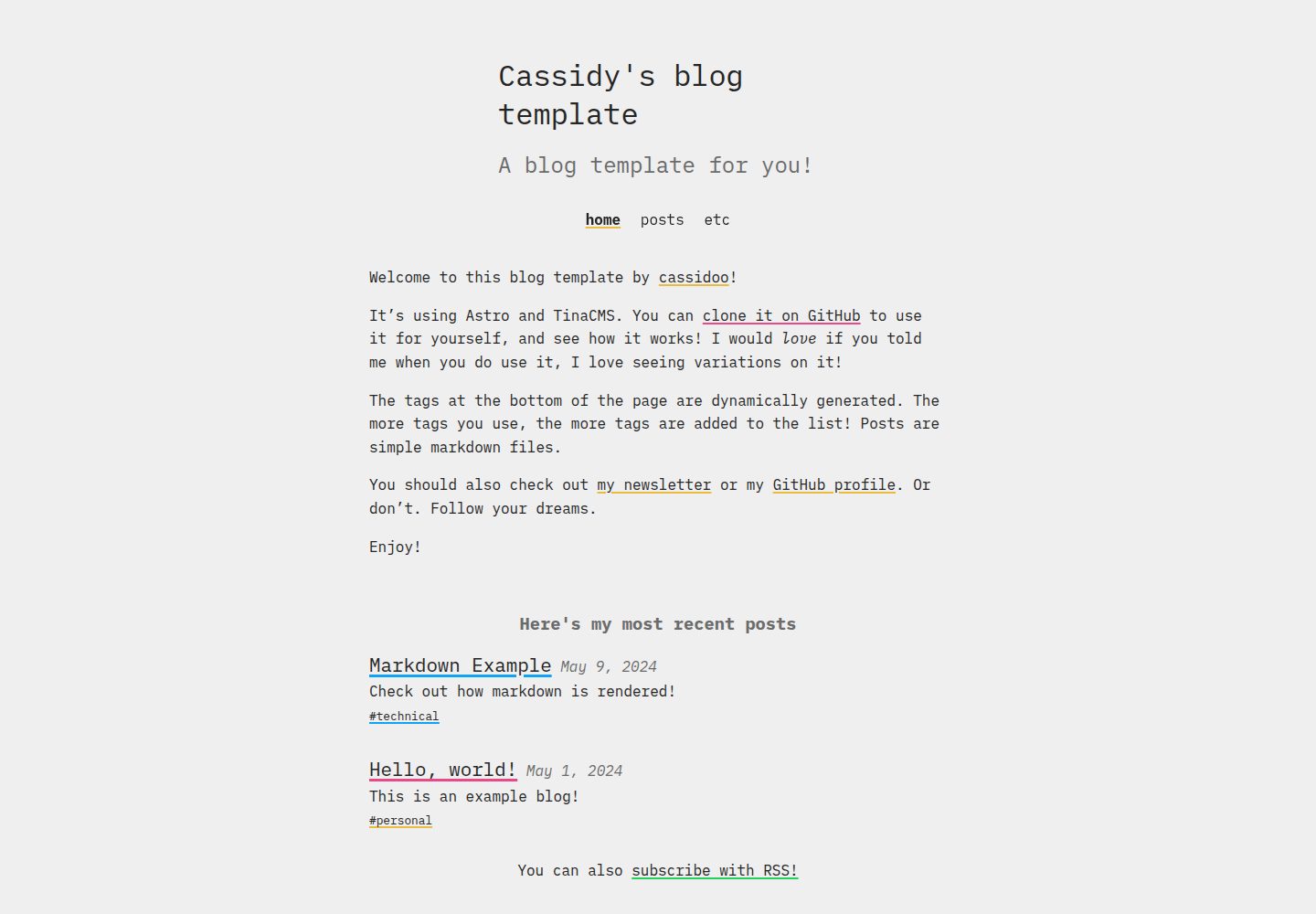
Uses Astro to build static blog pages
AstroBlog
blahg — Astro Blog Template
By cassidoo
A personal blog template built with Astro and TinaCMS by cassidoo, MIT-licensed, supporting Markdown writing and visual admin editing.
Explore the design
Compare the page layouts and mobile experience. Open any screenshot for a closer look.
Desktop homepage1 / 2
Desktop captureTop of page
Actual screenshot captured by the server browser.
All pages & views 2
Screenshots show visual appearance; interactive behavior may differ.
Recorded 2026-10-04View source
What stands out
A quick read of the recorded project description.
Provides visual content editing via TinaCMS at the /admin path
Articles are stored as Markdown files in the posts/ directory
Includes basic structures such as site settings, about page, header navigation, and RSS output
MIT-licensed, allowing free use, modification, commercial use, and distribution
Provides a Netlify one-click deploy button and local development command instructions
Template Details
blahg is a personal blog template released by developer cassidoo, using Astro to build pages and integrating TinaCMS as the content editing backend. The repository is MIT-licensed, free to use, modify, and distribute, with a demo site deployed on Netlify.
For content organization, articles are stored as Markdown files in the posts/ directory, and can also be edited through the TinaCMS interface by visiting the site's /admin path. The template provides basic structures such as a site settings file, an about page, header navigation, RSS output, and robots.txt. The README lists the domains, social accounts, navigation links, and images that need to be replaced.
Before use, you need to register a tina.io account and configure TinaCMS client ID, token, and search-related environment variables. Local development relies on a .env.development file. The template itself does not include licensing for hosting, domains, or third-party assets; demo images, fonts, and icons must be checked separately under their respective licenses.
AstroBlog
Is it right for your project?
Use Cases
- Building a personal tech blog or writing site
- Wanting to write in Markdown while retaining visual admin editing
- Customizing an Astro-based blog to match your own style
- Deploying the template to Netlify or another hosting platform of your choice
Suitable For
- Individual developers familiar with or willing to learn Astro and Markdown
- Blog authors who need a visual content editing backend
- Users who accept configuring their own TinaCMS account and environment variables
- Developers who want to modify the code under the MIT license
Getting started & customization
Use these recorded setup notes alongside the repository instructions for your chosen version.
- 1
Register an account at tina.io and fill in TINACLIENTID, TINATOKEN, and TINASEARCH in .env.development
- 2
Update the domain in astro.config.mjs and modify the site URL on the first line of public/robots.txt
- 3
Adjust site settings in src/settings/settings.json and add navigation links in src/components/Header.astro
- 4
Set twitter:creator in src/components/BaseHead.astro and update the intro content in pages/about.md
- 5
For local development, run npm run dev; if the regular command fails, use npx tinacms dev -c 'astro dev'
License & source material
Usage conditions & limitations
Free to use · keep license noticeThis entry covers the free version in the public repository under the MIT license; the free scope is the code of this version and does not mean external services or third-party assets are free.
Must comply with when using
- Free use, modification, commercial use, and distribution of this version's code are permitted.
- When distributing copies or substantial portions of the code, retain the original author's copyright notice and the full MIT license notice.
- The code is provided as is; warranties and limitations of liability are governed by the original license and applicable law.
Additional costs & items to verify
- Demo images, fonts, icons, and other third-party assets must be checked under their respective licenses and cannot be judged solely by the code's MIT license.
- External services such as domains, hosting, databases, payments, or AI may incur additional fees.
- Using this template requires registering an account at tina.io, which is an external service dependency.
- TinaCMS keys must be configured to use the content editing feature.
- Local development requires creating a .env.development file and filling in TinaCMS-related environment variables.
- Client ID, token, and search key must be obtained from tina.io, which is an external service credential requirement.
View Original Text Basis
Permission is hereby granted, free of charge
Original License Text
Make an account at [tina.io](https://tina.io/)
Original README
Add your TinaCMS keys (see below)
Original README
you'll need a `.env.development` file that has the following in it:
Original README
https://github.com/cassidoo/blahg/blob/main/LICENSEhttps://github.com/cassidoo/blahg/blob/main/README.mdTINACLIENTID=<from tina.io> TINATOKEN=<from tina.io> TINASEARCH=<from tina.io>
Original README
Compiled by DeepSeek based on repository license and README ·2026-10-04. Results only cover the materials read; dependencies, images, fonts, and subsequent term changes are subject to their respective original texts.
Project checks & description sources
Template Information
- Source platforms
- Astro Themes
- Documentation and maintenance reference score
- More documented · 91 / 100
- Technologies
- Astro
- Website type
- Blog
How this score is calculated
Our heuristic uses license records (up to 30), a demo link (12), a preview (10), stars (15), recorded maintenance (15), description completeness (8), feature records (5) and classification data (5). It is not a code, security or performance test, or a Google score. A link does not establish tested functionality.
What to verify for this project
- Repository update recorded
- 2026-06-29
- Screenshot last checked
- 2026-10-04
A demo link is listed. Check it with your own content and viewport sizes; its presence does not confirm that forms, authentication or payments work.
The catalog identifies Astro as the primary stack. Check the actual dependency manifest and lockfile for versions and hosting requirements. These notes use recorded metadata, not a code audit or a deployment test.
Use a selection guide →How this description was prepared
AI-assisted description based on catalog records and repository material. Repository authors are not automatically the reviewers of this description.
Review declaration: [email protected] · 2026-10-04
Inspect the recorded source material
SHA-256: 2e27e44a611d92863cea88c916f5100d197fe9997bffafc3cc2634f577c7987b
2026-10-04T11:18:09.053Z
Source file / repository# Cassidy's blog template
[](https://app.netlify.com/sites/blahg/deploys)
Hello, welcome. This is a blog ("blahg" is the proper spelling for Chicagoans) template. It's built with [Astro](https://astro.build), and uses [TinaCMS](https://tina.io) to edit the content!

## See the blahg
[blahg.netlify.app](https://blahg.netlify.app/)
## To use the template
- Connect to your chosen hosting provider (see Deploy to Netlify button below if you want to go that route, otherwise use the GitHub template button above and pick a different one)
- Make an account at [tina.io](https://tina.io/)
- Add your TinaCMS keys (see below)
- Update `astro.config.mjs` with your domain
- Edit `src/settings/settings.json` (or update it in Tina, see below)
- Set your Twitter creator handle in `src/components/BaseHead.astro` (`twitter:creator` meta tag)
- Add your URL in line 1 of `public/robots.txt`
- Add your links in `src/components/Header.astro`
- Update the intro in `pages/about.md`
- Edit the images in `public/` (optional)
- Edit the RSS styles in `public/` (optional)
- Edit whatever tags you want in `tina/config.js` (optional)
After this, you can add your content to `posts/` with Markdown files, or with TinaCMS by going to `yoururl.com/admin`!
[](https://app.netlify.com/start/deploy?repository=https://github.com/cassidoo/blahg)
And finally, please ping me (via social media, or in a GitHub Issue, or whatever) if you use this template! I would love to see your writing and subscribe to your RSS feed!
## Run it yourself
All commands are run from the root of the project, from a terminal:
| Command | Action |
| :------------------------------- | :------------------------------------------------------------ |
| `npm install` | Installs dependencies |
| `npm run dev` | Starts local dev server at `localhost:4321` |
| `npx tinacms dev -c 'astro dev'` | Manually run local server if the regular command doesn't work |
| `npm run build` | Build your production site to `./dist/` |
| `npm run preview` | Preview your build locally, before deploying |
You go to `localhost:4321/admin/index.html` to see the CMS and use it. If you want to clone this for yourself, you'll need a `.env.development` file that has the following in it:
```
TINACLIENTID=<from tina.io>
TINATOKEN=<from tina.io>
TINASEARCH=<from tina.io>
```
If you get a remote GraphQL schema error, chances are you need to update TinaCMS, [details here](https://tina.io/docs/introduction/faq#how-do-i-resolve-the-local-graphql-schema-doesnt-match-the-remote-graphql-schema-errors)!
Note: if you want to edit your RSS feed styles (in `public/rss-styles.xsl`), that does _not_ have hot reloading, so you will have to refresh the page with every change. It seems hard-coded, but that's how XSL styles work (you'll see)!
**Have fun!**
Explore similar templates
Compare previews and descriptions within the same stack and category.

astrowind
AstroWind is a free, open-source Astro starter theme using Astro and Tailwind CSS, released under the MIT license.
Astro · Blog

astro-paper
AstroPaper is a minimal, responsive, accessible, and SEO-friendly Astro blog theme. Articles are stored as Markdown/MDX in src/content/posts/, with subdirectories affecting URLs.
Astro · Blog

fuwari
Fuwari is a static blog template built with Astro and Tailwind CSS for personal blogs. It manages posts as Markdown files in src/content/posts/, with frontmatter for title, date, description, cover, tags, categories, draft status, and language.
Astro · Blog

Firefly
Firefly is a clean personal blog theme forked from Astro and Fuwari, offering four background modes, single/double sidebar and list/grid layouts, Pagefind client-side full-text search, and a six-language UI.
Astro · Blog

astro-theme-cactus
Astro Cactus is an Astro-based blog and portfolio theme that uses Markdown/MDX content collections to manage posts, notes, and tags, with frontmatter type-checked by a schema.
Astro · Portfolio

astrofy
Astrofy is a free and open-source personal portfolio website template built with Astro and TailwindCSS, with built-in blog, CV timeline, project showcase, store, and RSS feed modules.
Astro · Portfolio