使用 Astro 构建静态博客页面
Astro博客
blahg — Astro 博客模板
作者 cassidoo
基于 Astro 与 TinaCMS 的个人博客模板,作者为 cassidoo,采用 MIT 许可,支持 Markdown 写作与可视化后台编辑。
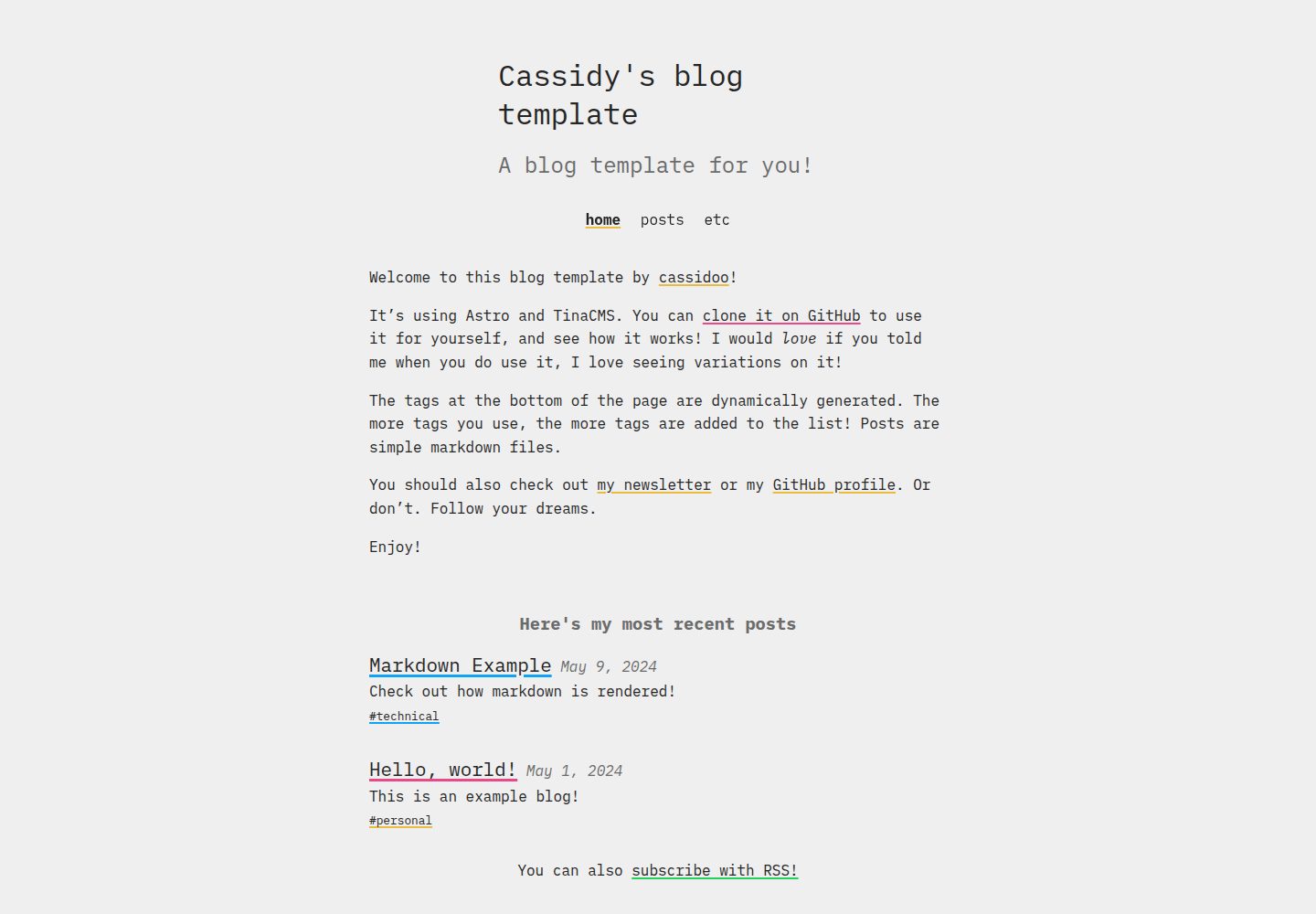
看看你的网站会是什么样
浏览真实页面截图,比较内容排版与手机效果。点击下方缩略图切换,放大查看整页细节。
全部页面与视图 2
截图用于了解视觉与布局,交互效果请以实际项目为准。
采集于 2026-10-04查看来源
值得关注的模板亮点
从已有项目资料中,快速了解它的特点。
通过 TinaCMS 在 /admin 路径提供可视化内容编辑
文章以 Markdown 文件形式存放在 posts/ 目录
附带站点设置、关于页、页头导航与 RSS 输出等基础结构
MIT 许可,允许免费使用、修改、商用与分发
提供 Netlify 一键部署按钮与本地开发命令说明
模板详细介绍
blahg 是开发者 cassidoo 发布的个人博客模板,使用 Astro 构建页面,并接入 TinaCMS 作为内容编辑后台。仓库采用 MIT 许可,可免费使用、修改和分发,演示站点部署在 Netlify。
内容组织上,文章以 Markdown 文件存放在 posts/ 目录,也可以通过访问站点的 /admin 路径进入 TinaCMS 界面进行编辑。模板提供了站点设置文件、关于页面、页头导航、RSS 输出与 robots.txt 等基础结构,README 中列出了需要替换的域名、社交账号、导航链接和图片等位置。
使用前需要自行注册 tina.io 账号并配置 TinaCMS 的客户端 ID、Token 与搜索相关环境变量,本地开发依赖 .env.development 文件。模板本身不包含托管、域名或第三方素材的授权,演示图片、字体与图标需按各自许可单独核对。
Astro博客
适合你的项目吗?
适用场景
- 搭建个人技术博客或写作站点
- 希望用 Markdown 写作同时保留可视化后台编辑
- 以 Astro 为基础改造出符合自己风格的博客
- 将模板部署到 Netlify 或自行选择的其他托管平台
适合人群
- 熟悉或愿意了解 Astro 与 Markdown 的个人开发者
- 需要可视化内容编辑后台的博客作者
- 接受自行配置 TinaCMS 账号与环境变量的使用者
- 希望基于 MIT 许可代码二次修改的开发者
上手与定制指南
结合仓库当前版本的说明,按下面的资料检查内容、配置与运行要求。
- 1
需在 tina.io 注册账号,并在 .env.development 中填写 TINACLIENTID、TINATOKEN、TINASEARCH
- 2
更新 astro.config.mjs 中的域名,并修改 public/robots.txt 第一行的站点 URL
- 3
在 src/settings/settings.json 中调整站点设置,在 src/components/Header.astro 中添加导航链接
- 4
在 src/components/BaseHead.astro 中设置 twitter:creator,并更新 pages/about.md 的简介内容
- 5
本地开发可运行 npm run dev,若常规命令失效可改用 npx tinacms dev -c 'astro dev'
授权与来源资料
使用条件与限制
免费使用 · 保留许可声明本次收录的是公开仓库中采用 MIT 许可的免费版本;免费范围为该版本代码,不代表外部服务或第三方素材免费。
使用时需要遵守
- 允许免费使用、修改、商用和分发该版本代码。
- 分发代码副本或实质性部分时,保留原作者版权声明和完整 MIT 许可声明。
- 代码按现状提供;担保与责任限制以原许可证及适用法律为准。
额外费用与待核对事项
- 演示图片、字体、图标及其他第三方素材需按各自许可核对,不能仅凭代码的 MIT 许可判断。
- 域名、托管、数据库、支付或 AI 等外部服务可能另外收费。
- 使用该模板需在 tina.io 注册账号,属于外部服务依赖。
- 需配置 TinaCMS 密钥才能使用内容编辑功能。
- 本地开发需创建 .env.development 文件并填写 TinaCMS 相关环境变量。
- 需从 tina.io 获取客户端 ID、Token 与搜索密钥,属于外部服务凭证要求。
查看原文依据
Permission is hereby granted, free of charge
许可证原文
Make an account at [tina.io](https://tina.io/)
README 原文
Add your TinaCMS keys (see below)
README 原文
you'll need a `.env.development` file that has the following in it:
README 原文
https://github.com/cassidoo/blahg/blob/main/LICENSEhttps://github.com/cassidoo/blahg/blob/main/README.mdTINACLIENTID=<from tina.io> TINATOKEN=<from tina.io> TINASEARCH=<from tina.io>
README 原文
DeepSeek 根据仓库许可证和 README 整理 ·2026-10-04。结果仅覆盖已读取资料,依赖、图片、字体及后续条款变更以各自原文为准。
项目核对记录与介绍依据
模板资料
- 来源平台
- Astro Themes
- 资料与维护参考分
- 资料较完整 · 91 / 100
- 技术栈
- Astro
- 网站类型
- 博客
这个分数如何计算
本站按许可资料(最高30分)、演示链接(12分)、预览图(10分)、Star数(15分)、记录的维护时间(15分)、描述完整度(8分)、功能记录(5分)和分类资料(5分)计算。它不是代码、安全或性能测试,也不是 Google 评分;有链接不代表已实测可用。
这个项目需要核对什么
- 记录的仓库更新时间
- 2026-06-29
- 截图检查日期
- 2026-10-04
已收录演示链接。请用你的内容与屏幕尺寸检查;有演示不代表表单、认证或支付已经可用。
目录记录的主要技术栈是 Astro。请通过依赖清单和锁文件核对实际版本与托管要求。这些说明基于收录资料,不代表代码审计或部署实测。
查看具体选型方法 →介绍的制作与核对状态
介绍由 AI 辅助整理目录与仓库资料。仓库作者不等于这篇介绍的审核者。
审核声明: [email protected] · 2026-10-04
查看当时使用的来源资料
SHA-256: 2e27e44a611d92863cea88c916f5100d197fe9997bffafc3cc2634f577c7987b
2026-10-04T11:18:09.053Z
来源文件 / 仓库# Cassidy's blog template
[](https://app.netlify.com/sites/blahg/deploys)
Hello, welcome. This is a blog ("blahg" is the proper spelling for Chicagoans) template. It's built with [Astro](https://astro.build), and uses [TinaCMS](https://tina.io) to edit the content!

## See the blahg
[blahg.netlify.app](https://blahg.netlify.app/)
## To use the template
- Connect to your chosen hosting provider (see Deploy to Netlify button below if you want to go that route, otherwise use the GitHub template button above and pick a different one)
- Make an account at [tina.io](https://tina.io/)
- Add your TinaCMS keys (see below)
- Update `astro.config.mjs` with your domain
- Edit `src/settings/settings.json` (or update it in Tina, see below)
- Set your Twitter creator handle in `src/components/BaseHead.astro` (`twitter:creator` meta tag)
- Add your URL in line 1 of `public/robots.txt`
- Add your links in `src/components/Header.astro`
- Update the intro in `pages/about.md`
- Edit the images in `public/` (optional)
- Edit the RSS styles in `public/` (optional)
- Edit whatever tags you want in `tina/config.js` (optional)
After this, you can add your content to `posts/` with Markdown files, or with TinaCMS by going to `yoururl.com/admin`!
[](https://app.netlify.com/start/deploy?repository=https://github.com/cassidoo/blahg)
And finally, please ping me (via social media, or in a GitHub Issue, or whatever) if you use this template! I would love to see your writing and subscribe to your RSS feed!
## Run it yourself
All commands are run from the root of the project, from a terminal:
| Command | Action |
| :------------------------------- | :------------------------------------------------------------ |
| `npm install` | Installs dependencies |
| `npm run dev` | Starts local dev server at `localhost:4321` |
| `npx tinacms dev -c 'astro dev'` | Manually run local server if the regular command doesn't work |
| `npm run build` | Build your production site to `./dist/` |
| `npm run preview` | Preview your build locally, before deploying |
You go to `localhost:4321/admin/index.html` to see the CMS and use it. If you want to clone this for yourself, you'll need a `.env.development` file that has the following in it:
```
TINACLIENTID=<from tina.io>
TINATOKEN=<from tina.io>
TINASEARCH=<from tina.io>
```
If you get a remote GraphQL schema error, chances are you need to update TinaCMS, [details here](https://tina.io/docs/introduction/faq#how-do-i-resolve-the-local-graphql-schema-doesnt-match-the-remote-graphql-schema-errors)!
Note: if you want to edit your RSS feed styles (in `public/rss-styles.xsl`), that does _not_ have hot reloading, so you will have to refresh the page with every change. It seems hard-coded, but that's how XSL styles work (you'll see)!
**Have fun!**
看看同类模板
对比同技术栈与用途的模板,找到更适合的视觉与内容结构。

astrowind
⭕️ AstroWind: A free template using Astro v7 and Tailwind CSS v4. Astro starter theme.
Astro · 博客

astro-paper
A minimal, accessible and SEO-friendly Astro blog theme.
Astro · 博客

fuwari
✨A static blog template built with Astro.
Astro · 博客

Firefly
Firefly 是一款基于 Astro 的静态博客主题,由 CuteLeaf 在 saicaca 的 Fuwari 模板基础上二次开发,主打清新美观的视觉风格。
Astro · 博客

astro-theme-cactus
A simple Astro theme. Use it to create your blog or website.
Astro · 作品集

astrofy
Astrofy is a free and open-source template for your Personal Portfolio Website built with Astro and TailwindCS…
Astro · 作品集