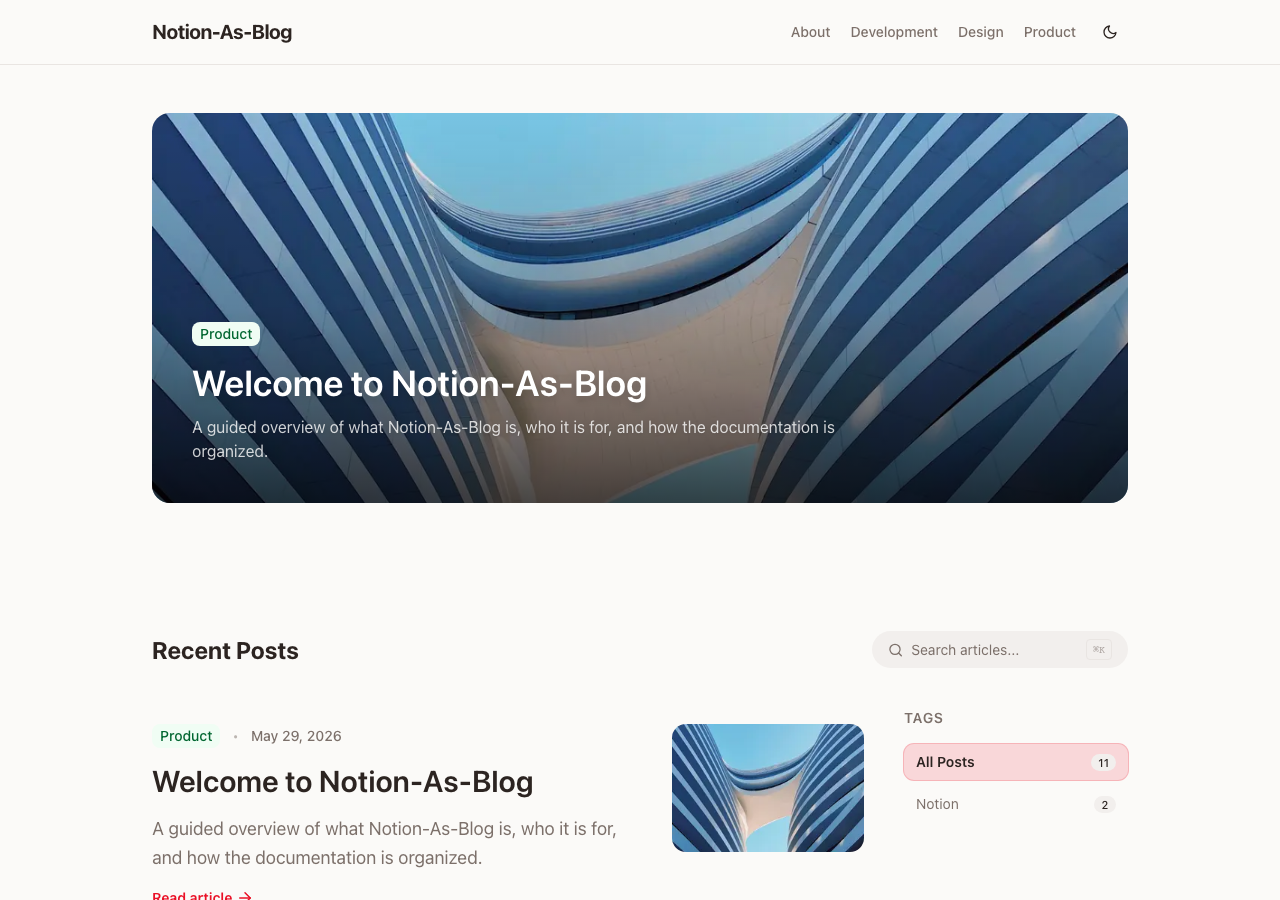
Uses a Notion database as the content source, so articles are written and published in Notion
Next.jsReactBlog
notion-as-blog — Next.js Blog Template
By catuscio
An open-source blog template built on Next.js 16 and Notion: write in Notion and generate static blog pages through the Notion API.
Explore the design
Compare the page layouts and mobile experience. Open any screenshot for a closer look.
Overview
Author-provided preview
Explore the available preview. Additional pages have not been captured.
One original preview is available. Open the full image to inspect the design.
Screenshots show visual appearance; interactive behavior may differ.
Recorded 2026-09-25View source
What stands out
A quick read of the recorded project description.
Supports categories, tags, previous/next navigation within a series, and full-text search
Built-in RSS, sitemap, robots.txt, dynamic OG images, and Organization JSON-LD
A signed image proxy solves the issue of Notion-uploaded file source URLs expiring
Provides a multi-stage Dockerfile and a protected on-demand revalidation endpoint
Site name, colors, fonts, categories, and social links are configured centrally in brand.ts
Template Details
notion-as-blog is a blog template that uses Notion as its content management backend, built with Next.js 16, TypeScript, and Tailwind CSS 4. Writers create entries in a Notion Posts database, filling in properties such as title, slug, status, date, category, tags, series, author, summary, and thumbnail, while the body is written directly in the Notion page. The template reads this data through the Notion API and generates blog pages.
The template provides category pages, tag filtering, previous/next navigation within a series, full-text search, RSS, a sitemap, robots.txt, dynamic OG images, and Organization JSON-LD. For images, it provides a signed proxy to handle the issue of Notion-uploaded file source URLs expiring. The status field distinguishes Public, PublicOnDetail, Draft, and Private; PublicOnDetail does not appear in lists, search, RSS, the sitemap, or structured data, but anyone who knows the URL can still access it, so it is not suitable for protecting sensitive content.
Site name, title, description, logo, favicon, colors, fonts, categories, social links, and footer are configured centrally in src/config/brand.ts, and category names must match the Select values in the Notion database. Author information is optional and is matched by Notion user ID through an Authors data source, with fields for avatar, bio, job title, and social links. For deployment, it provides a multi-stage Dockerfile and compose example, along with a protected on-demand revalidation endpoint. The project uses the MIT license, has few repository stars, and is a personal open-source template.
Next.jsReactBlog
Is it right for your project?
Use Cases
- A personal blog where you want to write articles in Notion without maintaining a separate CMS backend
- A technical content site that needs categories, tags, serialized series, and full-text search
- A blog that needs basic SEO output such as RSS, a sitemap, and structured data
- A blog project you want to deploy yourself via Docker or your own Node.js host
Suitable For
- Developers familiar with Next.js and the Notion API setup process
- Writers willing to maintain their article database in Notion
- Blog projects that need self-hosting and adjustments to brand styling and category structure
Getting started & customization
Use these recorded setup notes alongside the repository instructions for your chosen version.
- 1
First duplicate the public Notion template, then create a Notion integration and connect it to the Posts and Authors databases
- 2
NOTION_DATA_SOURCE_ID must be filled with the Notion data source ID, not the database ID, otherwise the build may report object_not_found
- 3
Copy .env.example to .env.local and fill in variables such as NOTION_API_KEY, the data source ID, and the revalidation token
- 4
Category names must match the categories defined in src/config/brand.ts and the Select values in the Notion database
- 5
PublicOnDetail content is not indexed but remains accessible via URL, so sensitive content should not rely on that status for protection
License & source material
Usage conditions & limitations
Pending verification- Usage condition assessment not yet completed; please check the original repository license first.
Project checks & description sources
Template Information
- Source platforms
- GitHub
- Documentation and maintenance reference score
- More documented · 82 / 100
- Technologies
- Next.js · React
- Website type
- Blog
How this score is calculated
Our heuristic uses license records (up to 30), a demo link (12), a preview (10), stars (15), recorded maintenance (15), description completeness (8), feature records (5) and classification data (5). It is not a code, security or performance test, or a Google score. A link does not establish tested functionality.
What to verify for this project
- Repository update recorded
- 2026-09-25
- Screenshot last checked
- 2026-09-25
A demo link is listed. Check it with your own content and viewport sizes; its presence does not confirm that forms, authentication or payments work.
The catalog identifies Next.js as the primary stack. Check the actual dependency manifest and lockfile for versions and hosting requirements. These notes use recorded metadata, not a code audit or a deployment test.
Use a selection guide →How this description was prepared
AI-assisted description based on catalog records and repository material. Repository authors are not automatically the reviewers of this description.
Review declaration: [email protected] · 2026-10-04
Inspect the recorded source material
SHA-256: e87dfba1931d9b4b19310b310e7f0f38bf5a404c0e8138cc0a6f1cc8cf3cd043
2026-09-25T18:18:04.049Z
Source file / repository<div align="center">
<a href="https://notion-as-blog.vercel.app">
<img src="docs/screenshots/readme-hero.svg" alt="Notion-As-Blog — write in Notion, publish with Next.js" width="100%" />
</a>
<h1>Notion-As-Blog</h1>
<p>
<strong>Write in Notion. Publish with Next.js.</strong><br />
A polished, self-hostable blog template powered by <strong>Notion</strong>, <strong>Next.js 16</strong>, and <strong>Tailwind CSS 4</strong>.
</p>
<p>
<a href="https://notion-as-blog.vercel.app"><strong>Live Docs</strong></a>
·
<a href="https://welcometogyuminworld.notion.site/Notion-As-Blog-30ab152141a480309a9ede1f8cac4cc7?source=copy_link"><strong>Duplicate Template</strong></a>
·
<a href="#quick-start"><strong>Quick Start</strong></a>
·
<strong>English</strong>
·
<a href="README.ko.md"><strong>한국어</strong></a>
·
<a href="README.zh-CN.md"><strong>简体中文</strong></a>
·
<a href="README.ja.md"><strong>日本語</strong></a>
</p>
<p>
<img alt="Next.js" src="https://img.shields.io/badge/Next.js-16-000000?style=for-the-badge&logo=next.js&logoColor=white" />
<img alt="TypeScript" src="https://img.shields.io/badge/TypeScript-5-3178C6?style=for-the-badge&logo=typescript&logoColor=white" />
<img alt="Tailwind CSS" src="https://img.shields.io/badge/Tailwind_CSS-4-38BDF8?style=for-the-badge&logo=tailwindcss&logoColor=white" />
<img alt="Notion" src="https://img.shields.io/badge/Notion-CMS-000000?style=for-the-badge&logo=notion&logoColor=white" />
<img alt="License" src="https://img.shields.io/badge/License-MIT-22C55E?style=for-the-badge" />
</p>
</div>
---
## Why Notion-As-Blog?
Notion-As-Blog turns a duplicated Notion template into a production-grade blog: fast pages, stable Notion image delivery, first-class SEO, dark mode, search, RSS, sitemap, author profiles, and a clean publishing workflow that stays inside Notion.
<table>
<tr>
<td><strong>Notion-native writing</strong><br />Create posts, pages, tags, categories, series, authors, thumbnails, and summaries directly in Notion.</td>
<td><strong>Production web defaults</strong><br />Next.js App Router, static generation, image proxying, RSS, sitemap, robots.txt, dynamic OG images, and Organization JSON-LD.</td>
</tr>
<tr>
<td><strong>Beautiful out of the box</strong><br />Responsive layout, dark mode, post animations, pinned-post slideshow, Giscus comments, and customizable branding.</td>
<td><strong>Self-host friendly</strong><br />Deploy to Vercel, Docker, or your own Node.js host with explicit environment variables and cache behavior.</td>
</tr>
</table>
---
## Preview
Fresh screenshots are captured from the deployed documentation site.
| Light | Dark |
|:---:|:---:|
|  |  |
<p align="center">
<img src="docs/screenshots/post-desktop.png" alt="Documentation article" width="70%" />
<br />
<img src="docs/screenshots/home-mobile.png" alt="Mobile documentation home" width="260" />
</p>
---
## Features
- **Notion as CMS** — Write and manage posts directly in Notion.
- **Multi-author support** — Optional Authors data source with avatars, bios, roles, and social links.
- **Categories, tags, and series** — Organize posts with category pages, tag filtering, and previous/next series navigation.
- **Full-text search** — Built-in search API with instant dropdown results and a dedicated search page.
- **Dark mode** — System-aware theme switching with a small built-in preference hook.
- **SEO optimized** — Open Graph, dynamic OG image generation, sitemap, robots.txt, RSS feed, canonical URLs, and Organization JSON-LD.
- **Stable Notion images** — Signed image proxy for uploaded Notion files whose source URLs expire.
- **Giscus comments** — GitHub Discussions-based comments for post detail pages.
- **Responsive UI** — Mobile-first layout styled with Tailwind CSS 4.
- **Custom branding** — Configure name, logo, favicon, colors, fonts, footer links, social links, categories, and copy.
- **Docker ready** — Multi-stage production Dockerfile and compose example.
- **On-demand revalidation** — Refresh content immediately through a protected revalidation endpoint.
---
## Quick Start
### 1. Duplicate the Notion template
Open the public Notion page below and click **Duplicate** to copy the full template into your own Notion workspace.
> **[Duplicate the Notion-As-Blog Template](https://welcometogyuminworld.notion.site/Notion-As-Blog-30ab152141a480309a9ede1f8cac4cc7?source=copy_link)**
The template includes a **Posts** data source, an optional **Authors** data source, and documentation-style sample content. After duplicating, all database rows belong to your workspace, so you can safely edit or delete them.
### 2. Create a Notion integration
1. Go to [My Integrations](https://www.notion.so/profile/integrations) and click **New integration**.
2. Give it a name, for example `notion-as-blog`.
3. Select the workspace where you duplicated the template.
4. Copy the **Internal Integration Secret** — this is your `NOTION_API_KEY`.
### 3. Connect the integration to your databases
1. Open the **Posts** database page in Notion.
2. Click **···** (top-right) → **Connections** → find your integration and **Connect**.
3. Repeat for the **Authors** database if you want rich author profiles.
### 4. Get your data source IDs
`NOTION_DATA_SOURCE_ID` expects the **Notion data source ID**, which can be different from the database ID shown in the URL in recent Notion API versions.
Open the duplicated Posts database, connect your integration, then copy the Posts data source ID for `NOTION_DATA_SOURCE_ID`. Repeat for the Authors data source if you want author profiles. If you accidentally use the database ID, builds can fail with `object_not_found`.
### 5. Clone and configure
```bash
git clone https://github.com/catuscio/notion-as-blog.git
cd notion-as-blog
npm install
cp .env.example .env.local
```
Edit `.env.local`:
```env
NOTION_API_KEY=secret_xxxxxxxxxxxxxxxxxxxxx
NOTION_DATA_SOURCE_ID=your_posts_data_source_id
NOTION_AUTHORS_DATA_SOURCE_ID=your_authors_data_source_id
TOKEN_FOR_REVALIDATE=any_random_secret_string
NEXT_PUBLIC_GA_ID=G-XXXXXXXXXX
```
### 6. Run locally
```bash
npm run dev
```
Open [http://localhost:3000](http://localhost:3000) to see your blog.
---
## Writing Posts in Notion
### Creating a new post
1. Open the **Posts** database in Notion
2. Add a new row and fill in the properties
3. Write your post content in the page body — headings, lists, code blocks, images, and more are all supported
4. Set `status` to **Public** when ready to publish
### Posts database columns
| Column | Type | Required | Description |
|---|---|---|---|
| **title** | Title | Yes | Post title |
| **slug** | Rich text | No | URL slug (e.g. `my-first-post`). Auto-generated from page ID if empty |
| **status** | Select | Yes | Publishing status (see below) |
| **type** | Select | No | `Post` (default) or `Page` |
| **date** | Date | Yes | Publish date. Posts are sorted by this field |
| **category** | Select | Yes | Must match a category name defined in `brand.ts` |
| **tags** | Multi-select | No | Freeform tags for filtering (e.g. `Next.js`, `React`) |
| **series** | Select | No | Series name. Posts with the same selected series are grouped with previous/next navigation |
| **author** | People | No | Notion workspace member(s). Rich author profiles are matched through the Authors data source `people` property |
| **summary** | Rich text | No | Short description shown in post cards and SEO meta |
| **thumbnail** | Files & media | No | Cover image (upload or paste an external URL) |
### Status values
| Value | Shown in listings | Accessible via direct URL |
|---|---|---|
| `Public` | Yes | Yes |
| `PublicOnDetail` | No | Yes — unlisted and excluded from search indexing, but not access-controlled |
| `Draft` | No | No |
| `Private` | No | No |
`PublicOnDetail` applies to both `Post` and `Page` content. It is excluded from feeds, search, category/tag/series/author pages, RSS, sitemap, structured data, comments, and build-time route generation. Anyone who knows the URL can still access and share it; use authentication for sensitive content.
### Type values
| Value | Description |
|---|---|
| `Post` | Standard blog post. Shown in home feed, category pages, and search |
| `Page` | Standalone page (e.g. a landing page). Not shown in post listings |
### Using series
To group posts into a series, select the same `series` value (e.g. `Next.js Blog Tutorial`) on multiple posts. The blog renders series navigation with previous/next links on each post detail page and exposes `/series/[name]` pages.
### Authors database (optional)
If you want richer author profiles beyond the plain Notion People name, create (or use the template's) Authors data source. Posts are linked to author profile rows by Notion user ID: set the author row's `people` property to the same Notion user selected in a post's `author` property.
| Column | Type | Description |
|---|---|---|
| **name** | Title | Display name shown on author cards and author pages |
| **people** | People | Notion workspace user(s) this profile represents. Used for matching posts to author profiles |
| **role** | Rich text | Job title or role (e.g. `Frontend Engineer`) |
| **bio** | Rich text | Short biography |
| **avatar** | Files & media | Profile picture |
| **email** | Rich text | Email address |
| **github** | URL | GitHub profile URL |
| **x** | URL | X (Twitter) profile URL |
| **linkedin** | URL | LinkedIn profile URL |
| **website** | URL | Personal website URL |
---
## Customization
All site-wide settings are in `src/config/brand.ts`:
### Site Info
```ts
name: "My Blog",
title: "A Developer Blog",
highlight: "Developer", // Highlighted word in the title
description: "Your blog description.",
url: "https://your-domain.com",
since: 2025, // Footer copyright start year
lang: "en",
```
### Logo & Favicon
```ts
logo: {
image: "", // Logo image path (relative to /public). "" = text-only
showNameWithLogo: true, // Show blog name next to logo image
png: "/logo.png", // Used in JSON-LD and RSS feed
ogWhite: "/logo-white.png", // White logo overlay for OG images
favicon: "", // Custom favicon path. "" = auto-generated letter icon
},
```
### Colors
Customize the color theme using HSL values in the `colors` object. Both light and dark mode colors are configurable. Each theme is built from 5 base values:
- **brand** — Accent color (buttons, links, focus rings)
- **bg** — Page background
- **text** — Body text
- **surface** — Card and muted area backgrounds
- **edge** — Borders and input outlines
### Fonts
```ts
fonts: {
sans: {
stack: 'Inter, -apple-system, BlinkMacSystemFont, system-ui, sans-serif',
},
mono: {
family: "JetBrains Mono",
cdn: "https://fonts.googleapis.com/css2?family=JetBrains+Mono:wght@400;500&display=swap",
preconnect: ["https://fonts.googleapis.com", "https://fonts.gstatic.com"],
},
og: {
family: "Pretendard",
url: "https://cdn.jsdelivr.net/.../Pretendard-Bold.otf",
},
},
```
- **sans** — Font stack for body text. Prepend a web font for non-Latin languages (e.g. `'Pretendard, -apple-system, ...'`)
- **mono** — Monospace font for code blocks, loaded from Google Fonts CDN
- **og** — Font used for dynamic OG image generation (`.otf` or `.ttf` URL)
### Categories
Category names **must match** the Select values in your Notion Posts database:
```ts
categories: [
{ name: "Development", slug: "development", color: "orange", icon: "dns", description: "..." },
{ name: "Design", slug: "design", color: "teal", icon: "palette", description: "..." },
{ name: "Product", slug: "product", color: "green", icon: "work", description: "..." },
],
```
### Social Links
SociaExplore similar templates
Compare previews and descriptions within the same stack and category.

tailwind-nextjs-starter-blog
A Next.js and Tailwind CSS blog starter template using Contentlayer for Markdown/MDX, with built-in SEO, code highlighting, and tags. It targets personal technical blogs and migration from Jekyll/Hugo to React, and supports one-click Vercel deployment.
Next.js · Blog

Nextjs-tailwindcss-blog-template
A personal blog template built with Next.js and Tailwind CSS, using Velite to process Markdown content. It includes home, about, contact and article pages, with a demo site and a companion YouTube tutorial.
Next.js · Blog

Next-js-Blog-Boilerplate
A blog starter built on Next.js 12 and Tailwind CSS 3, integrating TypeScript, ESLint, Prettier, and PostCSS.
Next.js · Blog

nextjs-blog-theme
A Next.js 15 and Tailwind CSS 4.x blog starter by Netlify, designed by Bejamas, with MDX support, dark/light theme switching, and environment-variable configuration. It includes a visual setup wizard for deploying to Netlify and manages content via local .mdx files.
Next.js · Blog

blog
A personal blog forked from Timlrx's tailwind-nextjs-starter-blog, built with Next.js, React, and Tailwind CSS. Content is stored as Markdown/MDX under data/, with site, author, navigation, and project data in separate files.
Next.js · Blog

tailnext
Tailnext is a free, open-source template built on the Next.js 14 App Router and Tailwind CSS, created by the onWidget team.
Next.js · Blog