以 Notion 数据库作为内容源,在 Notion 中撰写和发布文章
Next.jsReact博客
notion-as-blog — Next.js 博客模板
作者 catuscio
基于 Next.js 16 与 Notion 的开源博客模板,在 Notion 中写作,通过 Notion API 生成静态博客页面。
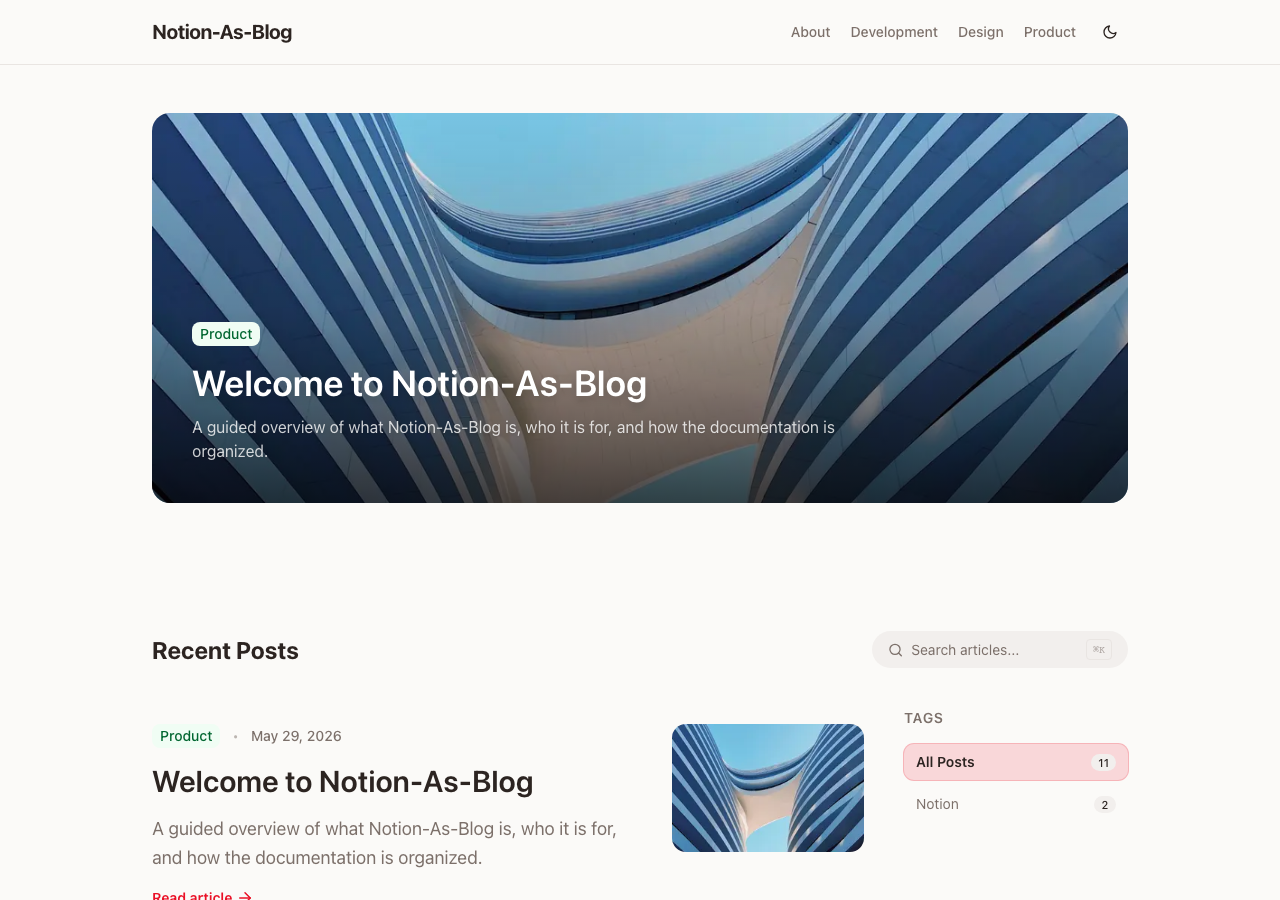
看看你的网站会是什么样
浏览真实页面截图,比较内容排版与手机效果。点击下方缩略图切换,放大查看整页细节。
目前有 1 张原始预览,可打开完整图片查看设计细节。
截图用于了解视觉与布局,交互效果请以实际项目为准。
采集于 2026-09-25查看来源
值得关注的模板亮点
从已有项目资料中,快速了解它的特点。
支持分类、标签、系列前后篇导航以及全文搜索
内置 RSS、站点地图、robots.txt、动态 OG 图片和 Organization JSON-LD
通过签名图片代理解决 Notion 上传文件源地址过期的问题
提供多阶段 Dockerfile 与受保护的按需重新验证接口
站点名称、颜色、字体、分类和社交链接集中在 brand.ts 配置
模板详细介绍
notion-as-blog 是一个以 Notion 作为内容管理后台的博客模板,使用 Next.js 16、TypeScript 和 Tailwind CSS 4 构建。写作者在 Notion 的 Posts 数据库中创建条目,填写标题、slug、状态、日期、分类、标签、系列、作者、摘要和缩略图等属性,正文直接写在 Notion 页面里,模板通过 Notion API 读取这些数据并生成博客页面。
模板提供分类页、标签筛选、系列的前后篇导航、全文搜索、RSS、站点地图、robots.txt、动态 OG 图片和 Organization JSON-LD。图片方面提供签名代理,用于处理 Notion 上传文件源地址会过期的问题。状态字段区分 Public、PublicOnDetail、Draft 和 Private;其中 PublicOnDetail 不出现在列表、搜索、RSS、站点地图和结构化数据中,但知道 URL 的人仍可访问,因此不适合用来保护敏感内容。
站点名称、标题、描述、Logo、favicon、颜色、字体、分类、社交链接和页脚等集中在 src/config/brand.ts 中配置,分类名称需要与 Notion 数据库中的 Select 值一致。作者信息可选,通过 Authors 数据源按 Notion 用户 ID 匹配,可填写头像、简介、职位和社交链接。部署方面提供多阶段 Dockerfile 和 compose 示例,并有一个受保护的按需重新验证接口。项目采用 MIT 许可证,仓库星标数较少,属于个人开源模板。
Next.jsReact博客
适合你的项目吗?
适用场景
- 希望用 Notion 写文章、不额外维护独立 CMS 后台的个人博客
- 需要分类、标签、系列连载和全文搜索的技术内容站点
- 需要 RSS、站点地图和结构化数据等基础 SEO 输出的博客
- 希望通过 Docker 或自有 Node.js 主机自行部署的博客项目
适合人群
- 熟悉 Next.js 和 Notion API 配置流程的开发者
- 愿意在 Notion 中维护文章数据库的写作者
- 需要自行托管并调整品牌样式与分类结构的博客项目
上手与定制指南
结合仓库当前版本的说明,按下面的资料检查内容、配置与运行要求。
- 1
先复制公开的 Notion 模板,再创建 Notion 集成并把集成连接到 Posts 与 Authors 数据库
- 2
NOTION_DATA_SOURCE_ID 需要填 Notion 数据源 ID,而不是数据库 ID,否则构建可能报 object_not_found
- 3
复制 .env.example 为 .env.local,填写 NOTION_API_KEY、数据源 ID、重新验证令牌等变量
- 4
分类名称必须与 src/config/brand.ts 中定义的分类以及 Notion 数据库的 Select 值保持一致
- 5
PublicOnDetail 内容不会被索引但仍可通过 URL 访问,敏感内容不应依赖该状态保护
授权与来源资料
使用条件与限制
待核对- 尚未完成使用条件评估,请先查看原仓库许可证。
项目核对记录与介绍依据
模板资料
- 来源平台
- GitHub
- 资料与维护参考分
- 资料较完整 · 82 / 100
- 技术栈
- Next.js · React
- 网站类型
- 博客
这个分数如何计算
本站按许可资料(最高30分)、演示链接(12分)、预览图(10分)、Star数(15分)、记录的维护时间(15分)、描述完整度(8分)、功能记录(5分)和分类资料(5分)计算。它不是代码、安全或性能测试,也不是 Google 评分;有链接不代表已实测可用。
这个项目需要核对什么
- 记录的仓库更新时间
- 2026-09-25
- 截图检查日期
- 2026-09-25
已收录演示链接。请用你的内容与屏幕尺寸检查;有演示不代表表单、认证或支付已经可用。
目录记录的主要技术栈是 Next.js。请通过依赖清单和锁文件核对实际版本与托管要求。这些说明基于收录资料,不代表代码审计或部署实测。
查看具体选型方法 →介绍的制作与核对状态
介绍由 AI 辅助整理目录与仓库资料。仓库作者不等于这篇介绍的审核者。
审核声明: [email protected] · 2026-10-04
查看当时使用的来源资料
SHA-256: e87dfba1931d9b4b19310b310e7f0f38bf5a404c0e8138cc0a6f1cc8cf3cd043
2026-09-25T18:18:04.049Z
来源文件 / 仓库<div align="center">
<a href="https://notion-as-blog.vercel.app">
<img src="docs/screenshots/readme-hero.svg" alt="Notion-As-Blog — write in Notion, publish with Next.js" width="100%" />
</a>
<h1>Notion-As-Blog</h1>
<p>
<strong>Write in Notion. Publish with Next.js.</strong><br />
A polished, self-hostable blog template powered by <strong>Notion</strong>, <strong>Next.js 16</strong>, and <strong>Tailwind CSS 4</strong>.
</p>
<p>
<a href="https://notion-as-blog.vercel.app"><strong>Live Docs</strong></a>
·
<a href="https://welcometogyuminworld.notion.site/Notion-As-Blog-30ab152141a480309a9ede1f8cac4cc7?source=copy_link"><strong>Duplicate Template</strong></a>
·
<a href="#quick-start"><strong>Quick Start</strong></a>
·
<strong>English</strong>
·
<a href="README.ko.md"><strong>한국어</strong></a>
·
<a href="README.zh-CN.md"><strong>简体中文</strong></a>
·
<a href="README.ja.md"><strong>日本語</strong></a>
</p>
<p>
<img alt="Next.js" src="https://img.shields.io/badge/Next.js-16-000000?style=for-the-badge&logo=next.js&logoColor=white" />
<img alt="TypeScript" src="https://img.shields.io/badge/TypeScript-5-3178C6?style=for-the-badge&logo=typescript&logoColor=white" />
<img alt="Tailwind CSS" src="https://img.shields.io/badge/Tailwind_CSS-4-38BDF8?style=for-the-badge&logo=tailwindcss&logoColor=white" />
<img alt="Notion" src="https://img.shields.io/badge/Notion-CMS-000000?style=for-the-badge&logo=notion&logoColor=white" />
<img alt="License" src="https://img.shields.io/badge/License-MIT-22C55E?style=for-the-badge" />
</p>
</div>
---
## Why Notion-As-Blog?
Notion-As-Blog turns a duplicated Notion template into a production-grade blog: fast pages, stable Notion image delivery, first-class SEO, dark mode, search, RSS, sitemap, author profiles, and a clean publishing workflow that stays inside Notion.
<table>
<tr>
<td><strong>Notion-native writing</strong><br />Create posts, pages, tags, categories, series, authors, thumbnails, and summaries directly in Notion.</td>
<td><strong>Production web defaults</strong><br />Next.js App Router, static generation, image proxying, RSS, sitemap, robots.txt, dynamic OG images, and Organization JSON-LD.</td>
</tr>
<tr>
<td><strong>Beautiful out of the box</strong><br />Responsive layout, dark mode, post animations, pinned-post slideshow, Giscus comments, and customizable branding.</td>
<td><strong>Self-host friendly</strong><br />Deploy to Vercel, Docker, or your own Node.js host with explicit environment variables and cache behavior.</td>
</tr>
</table>
---
## Preview
Fresh screenshots are captured from the deployed documentation site.
| Light | Dark |
|:---:|:---:|
|  |  |
<p align="center">
<img src="docs/screenshots/post-desktop.png" alt="Documentation article" width="70%" />
<br />
<img src="docs/screenshots/home-mobile.png" alt="Mobile documentation home" width="260" />
</p>
---
## Features
- **Notion as CMS** — Write and manage posts directly in Notion.
- **Multi-author support** — Optional Authors data source with avatars, bios, roles, and social links.
- **Categories, tags, and series** — Organize posts with category pages, tag filtering, and previous/next series navigation.
- **Full-text search** — Built-in search API with instant dropdown results and a dedicated search page.
- **Dark mode** — System-aware theme switching with a small built-in preference hook.
- **SEO optimized** — Open Graph, dynamic OG image generation, sitemap, robots.txt, RSS feed, canonical URLs, and Organization JSON-LD.
- **Stable Notion images** — Signed image proxy for uploaded Notion files whose source URLs expire.
- **Giscus comments** — GitHub Discussions-based comments for post detail pages.
- **Responsive UI** — Mobile-first layout styled with Tailwind CSS 4.
- **Custom branding** — Configure name, logo, favicon, colors, fonts, footer links, social links, categories, and copy.
- **Docker ready** — Multi-stage production Dockerfile and compose example.
- **On-demand revalidation** — Refresh content immediately through a protected revalidation endpoint.
---
## Quick Start
### 1. Duplicate the Notion template
Open the public Notion page below and click **Duplicate** to copy the full template into your own Notion workspace.
> **[Duplicate the Notion-As-Blog Template](https://welcometogyuminworld.notion.site/Notion-As-Blog-30ab152141a480309a9ede1f8cac4cc7?source=copy_link)**
The template includes a **Posts** data source, an optional **Authors** data source, and documentation-style sample content. After duplicating, all database rows belong to your workspace, so you can safely edit or delete them.
### 2. Create a Notion integration
1. Go to [My Integrations](https://www.notion.so/profile/integrations) and click **New integration**.
2. Give it a name, for example `notion-as-blog`.
3. Select the workspace where you duplicated the template.
4. Copy the **Internal Integration Secret** — this is your `NOTION_API_KEY`.
### 3. Connect the integration to your databases
1. Open the **Posts** database page in Notion.
2. Click **···** (top-right) → **Connections** → find your integration and **Connect**.
3. Repeat for the **Authors** database if you want rich author profiles.
### 4. Get your data source IDs
`NOTION_DATA_SOURCE_ID` expects the **Notion data source ID**, which can be different from the database ID shown in the URL in recent Notion API versions.
Open the duplicated Posts database, connect your integration, then copy the Posts data source ID for `NOTION_DATA_SOURCE_ID`. Repeat for the Authors data source if you want author profiles. If you accidentally use the database ID, builds can fail with `object_not_found`.
### 5. Clone and configure
```bash
git clone https://github.com/catuscio/notion-as-blog.git
cd notion-as-blog
npm install
cp .env.example .env.local
```
Edit `.env.local`:
```env
NOTION_API_KEY=secret_xxxxxxxxxxxxxxxxxxxxx
NOTION_DATA_SOURCE_ID=your_posts_data_source_id
NOTION_AUTHORS_DATA_SOURCE_ID=your_authors_data_source_id
TOKEN_FOR_REVALIDATE=any_random_secret_string
NEXT_PUBLIC_GA_ID=G-XXXXXXXXXX
```
### 6. Run locally
```bash
npm run dev
```
Open [http://localhost:3000](http://localhost:3000) to see your blog.
---
## Writing Posts in Notion
### Creating a new post
1. Open the **Posts** database in Notion
2. Add a new row and fill in the properties
3. Write your post content in the page body — headings, lists, code blocks, images, and more are all supported
4. Set `status` to **Public** when ready to publish
### Posts database columns
| Column | Type | Required | Description |
|---|---|---|---|
| **title** | Title | Yes | Post title |
| **slug** | Rich text | No | URL slug (e.g. `my-first-post`). Auto-generated from page ID if empty |
| **status** | Select | Yes | Publishing status (see below) |
| **type** | Select | No | `Post` (default) or `Page` |
| **date** | Date | Yes | Publish date. Posts are sorted by this field |
| **category** | Select | Yes | Must match a category name defined in `brand.ts` |
| **tags** | Multi-select | No | Freeform tags for filtering (e.g. `Next.js`, `React`) |
| **series** | Select | No | Series name. Posts with the same selected series are grouped with previous/next navigation |
| **author** | People | No | Notion workspace member(s). Rich author profiles are matched through the Authors data source `people` property |
| **summary** | Rich text | No | Short description shown in post cards and SEO meta |
| **thumbnail** | Files & media | No | Cover image (upload or paste an external URL) |
### Status values
| Value | Shown in listings | Accessible via direct URL |
|---|---|---|
| `Public` | Yes | Yes |
| `PublicOnDetail` | No | Yes — unlisted and excluded from search indexing, but not access-controlled |
| `Draft` | No | No |
| `Private` | No | No |
`PublicOnDetail` applies to both `Post` and `Page` content. It is excluded from feeds, search, category/tag/series/author pages, RSS, sitemap, structured data, comments, and build-time route generation. Anyone who knows the URL can still access and share it; use authentication for sensitive content.
### Type values
| Value | Description |
|---|---|
| `Post` | Standard blog post. Shown in home feed, category pages, and search |
| `Page` | Standalone page (e.g. a landing page). Not shown in post listings |
### Using series
To group posts into a series, select the same `series` value (e.g. `Next.js Blog Tutorial`) on multiple posts. The blog renders series navigation with previous/next links on each post detail page and exposes `/series/[name]` pages.
### Authors database (optional)
If you want richer author profiles beyond the plain Notion People name, create (or use the template's) Authors data source. Posts are linked to author profile rows by Notion user ID: set the author row's `people` property to the same Notion user selected in a post's `author` property.
| Column | Type | Description |
|---|---|---|
| **name** | Title | Display name shown on author cards and author pages |
| **people** | People | Notion workspace user(s) this profile represents. Used for matching posts to author profiles |
| **role** | Rich text | Job title or role (e.g. `Frontend Engineer`) |
| **bio** | Rich text | Short biography |
| **avatar** | Files & media | Profile picture |
| **email** | Rich text | Email address |
| **github** | URL | GitHub profile URL |
| **x** | URL | X (Twitter) profile URL |
| **linkedin** | URL | LinkedIn profile URL |
| **website** | URL | Personal website URL |
---
## Customization
All site-wide settings are in `src/config/brand.ts`:
### Site Info
```ts
name: "My Blog",
title: "A Developer Blog",
highlight: "Developer", // Highlighted word in the title
description: "Your blog description.",
url: "https://your-domain.com",
since: 2025, // Footer copyright start year
lang: "en",
```
### Logo & Favicon
```ts
logo: {
image: "", // Logo image path (relative to /public). "" = text-only
showNameWithLogo: true, // Show blog name next to logo image
png: "/logo.png", // Used in JSON-LD and RSS feed
ogWhite: "/logo-white.png", // White logo overlay for OG images
favicon: "", // Custom favicon path. "" = auto-generated letter icon
},
```
### Colors
Customize the color theme using HSL values in the `colors` object. Both light and dark mode colors are configurable. Each theme is built from 5 base values:
- **brand** — Accent color (buttons, links, focus rings)
- **bg** — Page background
- **text** — Body text
- **surface** — Card and muted area backgrounds
- **edge** — Borders and input outlines
### Fonts
```ts
fonts: {
sans: {
stack: 'Inter, -apple-system, BlinkMacSystemFont, system-ui, sans-serif',
},
mono: {
family: "JetBrains Mono",
cdn: "https://fonts.googleapis.com/css2?family=JetBrains+Mono:wght@400;500&display=swap",
preconnect: ["https://fonts.googleapis.com", "https://fonts.gstatic.com"],
},
og: {
family: "Pretendard",
url: "https://cdn.jsdelivr.net/.../Pretendard-Bold.otf",
},
},
```
- **sans** — Font stack for body text. Prepend a web font for non-Latin languages (e.g. `'Pretendard, -apple-system, ...'`)
- **mono** — Monospace font for code blocks, loaded from Google Fonts CDN
- **og** — Font used for dynamic OG image generation (`.otf` or `.ttf` URL)
### Categories
Category names **must match** the Select values in your Notion Posts database:
```ts
categories: [
{ name: "Development", slug: "development", color: "orange", icon: "dns", description: "..." },
{ name: "Design", slug: "design", color: "teal", icon: "palette", description: "..." },
{ name: "Product", slug: "product", color: "green", icon: "work", description: "..." },
],
```
### Social Links
Socia看看同类模板
对比同技术栈与用途的模板,找到更适合的视觉与内容结构。

tailwind-nextjs-starter-blog
tailwind-nextjs-starter-blog 是一个面向个人技术博客的 Next.js 与 Tailwind CSS 启动模板,其 v2 版本基于 App Router 与 React Server Comp…
Next.js · 博客

Nextjs-tailwindcss-blog-template
⭐Build SEO optimized personal blog website with Next.js, Tailwind CSS and Contentlayer. If you want to learn t…
Next.js · 博客

Next-js-Blog-Boilerplate
Next-js-Blog-Boilerplate 是一套面向个人与技术博客的启动代码,基于 Next.js 12 与 Tailwind CSS 3 构建,同时集成了 TypeScript、ESLint、Prettier …
Next.js · 博客

nextjs-blog-theme
nextjs-blog-theme 是 Netlify 团队维护的一个博客启动模板,基于 Next.js 15(Pages Router)和 Tailwind CSS 4.x 构建,设计由 Bejamas 机构完成。
Next.js · 博客

blog
🚀 My personal blog made with Tailwind CSS and NextJS. Template from Timlrx. Feel free to fork, follow and use…
Next.js · 博客

tailnext
Tailnext 是一个基于 Next.js 14 App Router 和 Tailwind CSS 的免费开源模板,由 onWidget 团队创建并维护。
Next.js · 博客