Browser-side template engine supporting set, if/elif/else, for, macro, range(), now(), states(), state_attr(), and about thirty filters
HTMLAdmin dashboard
neon-markdown-card — HTML Admin dashboard Template
By cerealkiller57540
A Home Assistant custom Markdown card that renders full HTML/SVG/CSS in the browser using Jinja-style templates, with a neon header.
Explore the design
Compare the page layouts and mobile experience. Open any screenshot for a closer look.
Author preview
Author-provided previewTop of page
Preview provided in the project README.
One original preview is available. Open the full image to inspect the design.
Screenshots show visual appearance; interactive behavior may differ.
Recorded 2026-10-02View source
What stands out
A quick read of the recorded project description.
Body supports full HTML and inline SVG and is sanitized, and can include scoped <style> blocks, @container, @media, and animations
Declare entity history via history and draw hist['sensor.x'].pts as an SVG mini trend chart
Any element with data-entity opens the native more-info dialog when clicked
Neon header supports icons, glow, two-color gradients, flicker, scanlines, and hover glitch effects
Includes 25 keyframe animations, plus a debug mode and limits on output, loops, and nesting depth
Template Details
Neon Markdown Card is a custom card for Home Assistant. Once installed via HACS or manually, it renders HTML or Markdown content as a single card in a dashboard. The card includes a browser-side template engine supporting set, if/elif/else, for (including loop.* and else), macro, range(), now(), states(), state_attr(), as_timestamp(), ternary expressions, ~ concatenation, and about thirty filters. Templates read live entity states directly and re-render only when a referenced entity changes.
The body supports full HTML and inline SVG and is sanitized: scripts, event handler attributes, external images, @import, external fonts, and non-local url() are removed; <style> blocks can apply within the card and support class selectors, @container, @media, gradients, clip-path, mask, and animations. History data can be declared via history: [{entity, hours}], and hist['sensor.x'].pts can be drawn in an SVG polyline to produce mini trend charts; any element with data-entity="sensor.x" opens the native more-info dialog when clicked. The header provides neon effects including icons, glow, two-color gradients, flicker, scanlines, and hover glitch effects, with modes title, body, or both.
The card offers a visual editor for the title and border, while the body is edited as text; debug: true displays template errors below the body. The engine sets limits on output size, loop iterations, and nesting depth to prevent faulty templates from freezing the dashboard. Note that this template engine is not Home Assistant's Jinja implementation and covers only a common subset; some syntax that works in HA Developer Tools (such as {% call %}, macro keyword arguments, and | in compound arithmetic expressions) requires adjustment. Editor labels are currently in French, and all options can be set via YAML. The card itself provides only the engine and header, not the specific layouts shown in screenshots; the body must be written by the user.
HTMLBackend
Is it right for your project?
Use Cases
- Display a custom HTML/SVG panel as a single card in a Home Assistant dashboard, such as a battery status list or network port diagram
- Generate inline SVG trend charts for entity states, drawing mini curves with historical data
- Build data display cards for dark themes using neon headers and animations
- Use data-entity to let elements within the card open the entity details dialog when clicked
Suitable For
- Users running Home Assistant who want to install a custom card via HACS or manual resources
- Advanced users who need to write HTML, SVG, and CSS directly in the dashboard body
- Users who prefer neon/dark visual styles and are willing to write their own template content
Getting started & customization
Use these recorded setup notes alongside the repository instructions for your chosen version.
- 1
HACS installation: add the repository as a custom repository (category Dashboard), download Neon Markdown Card, then refresh the browser
- 2
Manual installation: copy dist/neon-markdown-card.js to config/www/neon-markdown-card/ and add a dashboard resource of type JavaScript module
- 3
The card type is custom:neon-markdown-card, and the body is written as YAML text via body.content
- 4
The template engine is not Home Assistant's Jinja, so some syntax requires adjustment; enable debug: true to view errors
- 5
Editor labels are currently in French; all options can be set via YAML
License & source material
Usage conditions & limitations
Free to use · keep license noticeThis entry covers the free version in the public repository under the MIT license; the free scope applies to that version's code and does not imply that external services or third-party assets are free.
Must comply with when using
- The code of this version may be used, modified, used commercially, and distributed free of charge.
- When distributing copies or substantial portions of the code, retain the original author's copyright notice and the full MIT license notice.
- The code is provided as is; warranties and limitations of liability are governed by the original license and applicable law.
Additional costs & items to verify
- Header fonts (such as Orbitron and Rajdhani) are loaded automatically from Google Fonts, so using these fonts requires internet access to Google's external font service.
- The body is sanitized: scripts, event handler attributes, external URLs, and javascript: links are removed, so these cannot be used in the card body.
- External images, @import, external fonts, and non-local url() are intentionally stripped; the body can only reference local resources (such as images under /local).
- The template engine is not Home Assistant's Jinja and does not support {% call %}, macro keyword arguments, or | in compound arithmetic expressions; such syntax must be rewritten.
- The visual editor's interface labels are currently in French, and no other language translations are provided.
- The Neo Tokyo theme used in the screenshots is private and unpublished by the author, so users cannot obtain it; the card itself works with any theme.
- Demo images, fonts, icons, and other third-party assets must be checked against their respective licenses and cannot be judged solely by the code's MIT license.
- External services such as domains, hosting, databases, payments, or AI may incur separate charges.
View Original Text Basis
Permission is hereby granted, free of charge
Original License Text
Font (Orbitron, Rajdhani… load automatically from Google Fonts)
Original README
Scripts, event handlers, external URLs and `javascript:` links are removed.
Original README
external images, `@import`, external fonts and non-local `url()` are stripped on purpose.
Original README
no `{% call %}`, no keyword arguments in macros, no `|` inside a composed arithmetic expression
Original README
The editor labels are in French.
Original README
https://github.com/cerealkiller57540/neon-markdown-card/blob/main/LICENSEhttps://github.com/cerealkiller57540/neon-markdown-card/blob/main/README.mdNeo Tokyo, the author's own dark theme (not published).
Original README
Compiled by DeepSeek based on repository license and README ·2026-10-02. Results only cover the materials read; dependencies, images, fonts, and subsequent term changes are subject to their respective original texts.
Project checks & description sources
Template Information
- Source platforms
- GitHub
- Documentation and maintenance reference score
- Partly documented · 68 / 100
- Technologies
- HTML
- Website type
- Admin dashboard
How this score is calculated
Our heuristic uses license records (up to 30), a demo link (12), a preview (10), stars (15), recorded maintenance (15), description completeness (8), feature records (5) and classification data (5). It is not a code, security or performance test, or a Google score. A link does not establish tested functionality.
What to verify for this project
- Repository update recorded
- 2026-10-02
- Screenshot last checked
- 2026-10-02
No demo link is recorded. Use the repository instructions to evaluate the project locally; the screenshot alone cannot establish interactive behavior.
The catalog identifies HTML as the primary stack. Check the actual dependency manifest and lockfile for versions and hosting requirements. These notes use recorded metadata, not a code audit or a deployment test.
Use a selection guide →How this description was prepared
AI-assisted description based on catalog records and repository material. Repository authors are not automatically the reviewers of this description.
Automatically checked against source and license rules; no manual editorial review.
Inspect the recorded source material
SHA-256: aca181aba075629f9e45b21eb14406bc2b3ab759d18fb7ac7835ba30f0b0af58
2026-10-02T23:31:47.179Z
Source file / repository<div align="center">
# 🧩 Neon Markdown Card
**A Markdown card for Home Assistant that renders full HTML, SVG and CSS from Jinja templates in the browser, under a neon header.**
[![HACS Custom][hacs-badge]][hacs-url]
[![Release][release-badge]][release-url]
[![Validate][validate-badge]][validate-url]
[![License: MIT][license-badge]][license-url]
[](https://my.home-assistant.io/redirect/hacs_repository/?owner=cerealkiller57540&repository=neon-markdown-card&category=plugin)
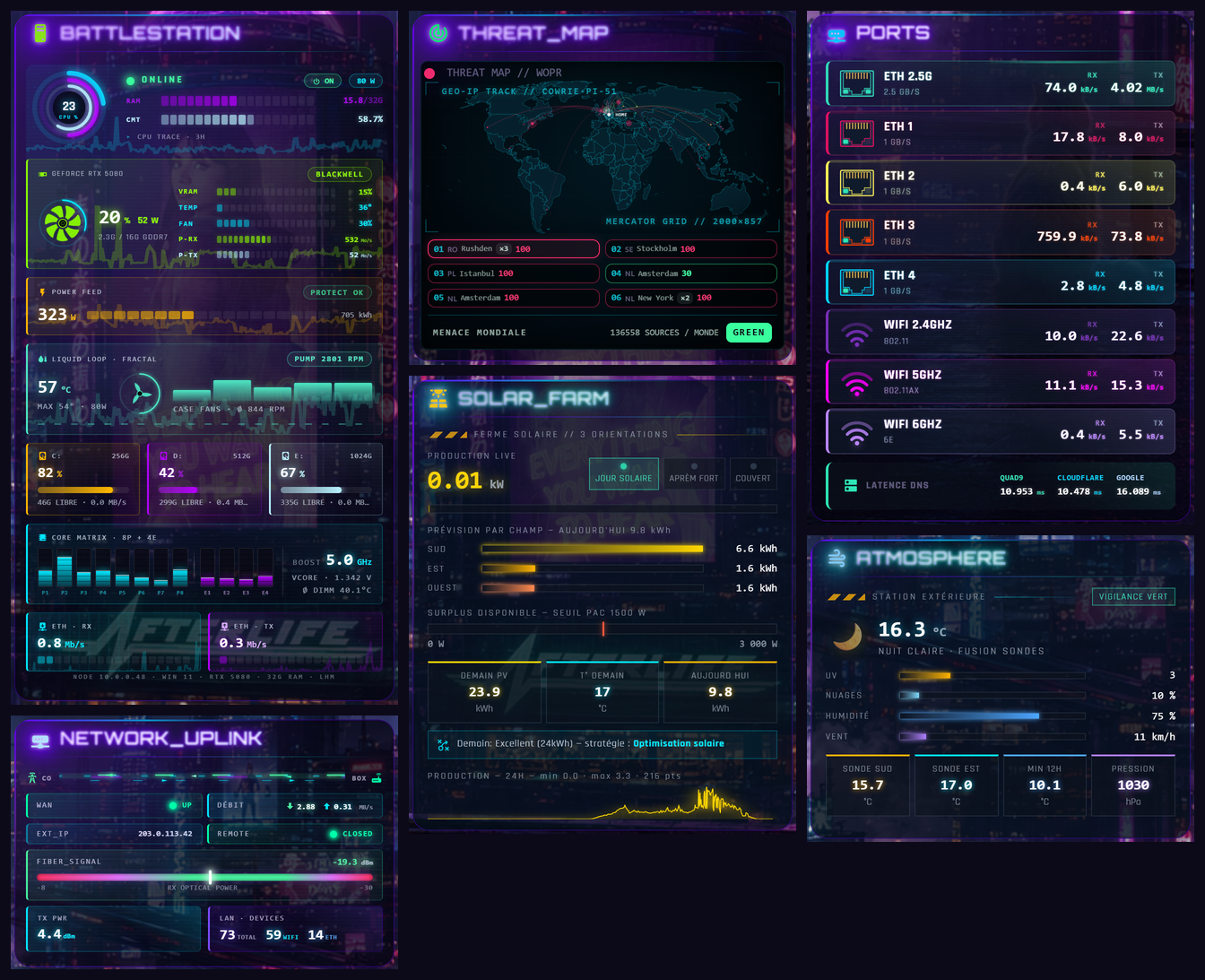
<img src="https://raw.githubusercontent.com/cerealkiller57540/neon-markdown-card/main/images/main.png" alt="Seven dashboards built with Neon Markdown Card: a PC monitor, a network uplink panel, a world threat map, a solar farm, network ports and a weather station" width="900">
</div>
Every panel above is **one `neon-markdown-card`**: no other custom card, no template sensor written for it. The body is HTML (or Markdown) with Jinja-style templates, evaluated in the browser against the live states: `{% for %}` over an attribute list, `{% set %}`, macros, filters, SVG sparklines from the recorder history, `<style>` blocks with `@container` queries and keyframe animations. The header on top is a neon title with glow, gradient, flicker and CRT scanline.
*These screenshots are examples of what the templates can do, taken from the author's dashboard (French labels, real data, Neo Tokyo theme). The card ships the engine and the header, not these layouts: you write the body.*
## ✨ Features
- **Client-side template engine**: `set`, `if / elif / else`, `for` (with `loop.*` and `else`), `macro`, `range()`, `now()`, `states()`, `state_attr()`, `states.domain.entity.attribute`, `as_timestamp()`, ternaries, `~` concatenation, and about thirty filters (`round`, `int`, `default`, `sort`, `map`, `selectattr`, `sum`, `clamp`, `format`, `zfill`, `thousands`…). No round-trip to the server: the card only re-renders when one of the entities it reads changes.
- **Full HTML and SVG body**, sanitised: layout tags, tables, images from `/local`, inline SVG, `<style>` blocks scoped to the card (classes, `@container`, `@media`, gradients, `clip-path`, `mask`, animations). Scripts, event handlers, external URLs and `javascript:` links are removed.
- **History sparklines**: declare `history: [{entity, hours}]` and draw `hist['sensor.x'].pts` straight into an SVG `<polyline>`.
- **`data-entity="sensor.x"`** on any element opens the native more-info dialog on tap.
- **Neon header**, the same as [neon-header-card](https://github.com/cerealkiller57540/Home-Assistant-Neon-Cards): icon, glow, two-colour gradient, flicker, scanline, hover glitch. Use `mode: title`, `body` or `both`.
- **25 ready-made keyframes** (`nmc-flicker`, `nmc-scan-scroll`, `nmc-ring-spin`, `nmc-data-flow`, `nmc-pulse-travel`, `nmc-dash-crawl`…) to use in inline `animation:`.
- **Visual editor** for the header and frame; the body is edited as text.
- `debug: true` prints template errors under the body. Guard rails cap output size, loop iterations and nesting depth, so a broken template cannot freeze the dashboard.
## 📦 Installation
### HACS (recommended)
1. Click the **Open in HACS** button above, or add this repository as a custom repository in HACS (category **Dashboard**): `https://github.com/cerealkiller57540/neon-markdown-card`.
2. Download **Neon Markdown Card**.
3. Reload your browser.
### Manual
1. Copy [`dist/neon-markdown-card.js`](dist/neon-markdown-card.js) to `config/www/neon-markdown-card/`.
2. Add a dashboard resource: URL `/local/neon-markdown-card/neon-markdown-card.js`, type **JavaScript module**.
## 🚀 Usage
```yaml
type: custom:neon-markdown-card
mode: both
title:
text: BATTERIES
icon: mdi:battery-high
glow: true
gradient: true
history:
- entity: sensor.home_battery
hours: 24
body:
format: html
content: >-
<style>
.row { display:flex; justify-content:space-between; padding:4px 0; }
.low { color:#ff2d6b; animation: nmc-flicker 2s infinite; }
</style>
{% set devices = [
{'n':'Phone', 'e':'sensor.phone_battery_level'},
{'n':'Tablet', 'e':'sensor.tablet_battery_level'},
{'n':'Remote', 'e':'sensor.remote_battery'}
] %}
{% for d in devices|sort(attribute='n') %}
{% set v = states(d.e)|int(0) %}
<div class="row" data-entity="{{ d.e }}">
<span>{{ loop.index }}. {{ d.n }}</span>
<b class="{{ 'low' if v < 20 else '' }}">{{ v }} %</b>
</div>
{% endfor %}
{% if hist['sensor.home_battery'] is defined %}
<svg viewBox="0 0 100 30" preserveAspectRatio="none" style="width:100%;height:40px">
<polyline points="{{ hist['sensor.home_battery'].pts }}" fill="none" stroke="#00f0ff"
vector-effect="non-scaling-stroke"/>
</svg>
{% endif %}
```
## ⚙️ Options
**Top level**
| Option | Default | Description |
|---|---|---|
| `mode` | `both` | `title`, `body` or `both` |
| `history` | — | List of `{entity, hours}`; exposes `hist['entity'] = {pts, min, max, first, last, n}` (refreshed about every 5 min) |
| `debug` | `false` | Show template errors under the body |
**`title:`**
| Option | Default | Description |
|---|---|---|
| `text` / `icon` / `icon_position` | — | Title text, `mdi:` icon, icon left or right |
| `color` / `icon_color` | theme | Text and icon colour |
| `font_family` / `font_size` / `font_weight` / `letter_spacing` | theme | Font (Orbitron, Rajdhani… load automatically from Google Fonts) |
| `uppercase` / `italic` | `false` | Text style |
| `glow` / `glow_color` / `glow_size` | — | Neon glow |
| `gradient` / `gradient_from` / `gradient_to` | — | Two-colour gradient text |
| `flicker` / `scanline` / `hover_glitch` | `false` | Animations |
**`body:`**
| Option | Default | Description |
|---|---|---|
| `format` | `html` | `html` or `markdown` |
| `content` | — | The template |
| `color` / `font_family` / `font_size` | theme | Default text style |
**`shared:`** (frame and action)
| Option | Default | Description |
|---|---|---|
| `align_h` / `align_v` | — | Content alignment |
| `bg_color` / `bg_opacity` / `bg_blur` | theme | Background, with optional backdrop blur |
| `border_color` / `border_width` / `border_style` / `border_radius` | theme | Frame |
| `font_family` | — | Font for the whole card |
| `tap_action` / `navigation_path` / `entity` | — | Tap on the card: more-info, navigate, or none |
## ❓ FAQ
**Is this the same Jinja as Home Assistant?** No. It is a separate engine that runs in your browser and covers the common subset listed above. A template that works in the HA developer tools may need small changes (no `{% call %}`, no keyword arguments in macros, no `|` inside a composed arithmetic expression: use `floor()` instead of `|int` there). Turn on `debug: true` to see what fails.
**Why are some of my tags or styles gone?** The body is sanitised. Scripts, `on*` attributes, external images, `@import`, external fonts and non-local `url()` are stripped on purpose.
**Can several cards share a macro?** Four macros ship with the engine (`fmt_eta`, `tuile`, `spark`, `hp_style`). Your own macros live in each card's body.
**The editor labels are in French.** Translation is on the way. Every option can also be set in YAML.
**Which theme is in the screenshots?** Neo Tokyo, the author's own dark theme (not published). The card works with any theme.
## 🌃 More neon cards
This card is part of a family. See the full collection at [**Home-Assistant-Neon-Cards**](https://github.com/cerealkiller57540/Home-Assistant-Neon-Cards).
---
## 🐾 Support this project
If you enjoy these cards, please consider donating to **Quatre Pattes**, an animal rescue organization.
[](https://don.quatre-pattes.org/s/?_jtsuid=70083177244599792679303)
> 💛 No need to support me — just help the animals. Thank you!
---
## 🤝 Contributing
1. Fork the repo
2. Create your branch: `git checkout -b feature/my-card`
3. Commit and push
4. Open a Pull Request
---
## 📄 License
[MIT License][license-url]
[hacs-badge]: https://img.shields.io/badge/HACS-Custom-orange.svg?style=for-the-badge
[hacs-url]: https://hacs.xyz
[release-badge]: https://img.shields.io/github/v/release/cerealkiller57540/neon-markdown-card?style=for-the-badge
[release-url]: https://github.com/cerealkiller57540/neon-markdown-card/releases
[validate-badge]: https://img.shields.io/github/actions/workflow/status/cerealkiller57540/neon-markdown-card/validate.yml?branch=main&label=HACS&style=for-the-badge
[validate-url]: https://github.com/cerealkiller57540/neon-markdown-card/actions/workflows/validate.yml
[license-badge]: https://img.shields.io/github/license/cerealkiller57540/neon-markdown-card?style=for-the-badge
[license-url]: LICENSE
Explore similar templates
Compare previews and descriptions within the same stack and category.

gentelella
Gentelella v4 is a free, open-source admin dashboard template maintained by Colorlib, built with vanilla JavaScript, SCSS, and Vite 8 without Bootstrap or jQuery.
HTML · Admin dashboard

coreui-free-bootstrap-admin-template
A free Bootstrap admin template maintained by CoreUI, built on CoreUI's own UI component library. It provides compiled HTML pages and Pug template source code, covering dashboards, authentication, forms, components, icons, and error pages.
HTML · Admin dashboard

dashboards
A collection of responsive dashboard HTML templates open-sourced by Keen IO, built on CSS Grid, offering multiple prebuilt admin data interface layouts.
HTML · Admin dashboard

SB Admin 2
SB Admin 2 is a classic Bootstrap admin template from Start Bootstrap, offering dashboards, charts, tables, and common management pages.
HTML · Admin dashboard

Adminator-admin-dashboard
Adminator 4 is a vanilla HTML, CSS and JavaScript admin dashboard template with a CSS-variable token design system, built-in light and dark themes, no jQuery or Bootstrap dependency, and 18 pages covering dashboards, mail, calendar, charts, forms, tables and error pages.
HTML · Admin dashboard

SB Admin
SB Admin is a lightweight, open-source Bootstrap admin template from Start Bootstrap. It offers a sidebar-and-top-bar layout with data tables, forms, and stat cards, plus responsive design.
HTML · Admin dashboard