浏览器端模板引擎,支持 set、if/elif/else、for、macro、range()、now()、states()、state_attr() 及约三十种过滤器
HTML后台
neon-markdown-card — HTML 后台模板
作者 cerealkiller57540
Home Assistant 自定义 Markdown 卡片,在浏览器端用 Jinja 风格模板渲染完整 HTML/SVG/CSS,并带霓虹标题头。
看看你的网站会是什么样
浏览真实页面截图,比较内容排版与手机效果。点击下方缩略图切换,放大查看整页细节。
目前有 1 张原始预览,可打开完整图片查看设计细节。
截图用于了解视觉与布局,交互效果请以实际项目为准。
采集于 2026-10-02查看来源
值得关注的模板亮点
从已有项目资料中,快速了解它的特点。
正文支持完整 HTML 与内联 SVG,并经过净化,可包含作用域内的 <style> 块、@container、@media 与动画
通过 history 声明实体历史,可将 hist['sensor.x'].pts 绘制为 SVG 迷你走势图
任意元素设置 data-entity 后点击可打开原生 more-info 对话框
霓虹标题头支持图标、辉光、双色渐变、闪烁、扫描线与悬停故障效果
内置 25 个关键帧动画,并提供 debug 模式与输出、循环、嵌套深度上限
模板详细介绍
Neon Markdown Card 是面向 Home Assistant 的自定义卡片,通过 HACS 或手动方式安装后,可在仪表盘中以单张卡片渲染 HTML 或 Markdown 内容。卡片自带浏览器端模板引擎,支持 set、if/elif/else、for(含 loop.* 与 else)、macro、range()、now()、states()、state_attr()、as_timestamp()、三元表达式、~ 拼接以及约三十种过滤器,模板直接读取实体实时状态,仅在所读取实体变化时重新渲染。
正文支持完整 HTML 与内联 SVG,并经过净化处理:脚本、事件处理属性、外部图片、@import、外部字体和非本地 url() 会被移除;<style> 块可作用于卡片内部,支持类选择器、@container、@media、渐变、clip-path、mask 与动画。通过 history: [{entity, hours}] 可声明历史数据,并在 SVG polyline 中绘制 hist['sensor.x'].pts 生成迷你走势图;任意元素加上 data-entity="sensor.x" 后点击可打开原生 more-info 对话框。标题部分提供霓虹效果,包括图标、辉光、双色渐变、闪烁、扫描线和悬停故障效果,模式可选 title、body 或 both。
卡片提供可视化编辑器用于标题和边框,正文以文本方式编辑;debug: true 可在正文下方显示模板错误。引擎设有输出大小、循环次数和嵌套深度上限,避免错误模板卡住仪表盘。需要注意的是,该模板引擎并非 Home Assistant 的 Jinja 实现,仅覆盖常见子集,部分在 HA 开发者工具中可用的写法(如 {% call %}、宏的关键字参数、组合算术表达式中的 |)需要调整;编辑器标签目前为法语,可通过 YAML 设置全部选项。卡片本身只提供引擎与标题头,不附带截图中的具体布局,正文需自行编写。
HTML后台
适合你的项目吗?
适用场景
- 在 Home Assistant 仪表盘中用单张卡片展示自定义 HTML/SVG 面板,例如电池状态列表或网络端口图
- 为实体状态生成内联 SVG 走势图,结合历史数据绘制迷你曲线
- 使用霓虹标题与动画构建暗色主题下的数据展示卡片
- 通过 data-entity 让卡片内元素点击后打开实体详情对话框
适合人群
- 使用 Home Assistant 并希望通过 HACS 或手动资源安装自定义卡片的用户
- 需要在仪表盘正文中直接编写 HTML、SVG 与 CSS 的进阶用户
- 偏好霓虹/暗色视觉风格并愿意自行编写模板内容的用户
上手与定制指南
结合仓库当前版本的说明,按下面的资料检查内容、配置与运行要求。
- 1
HACS 安装:将仓库添加为自定义仓库(类别 Dashboard),下载 Neon Markdown Card 后刷新浏览器
- 2
手动安装:把 dist/neon-markdown-card.js 复制到 config/www/neon-markdown-card/,并添加类型为 JavaScript module 的仪表盘资源
- 3
卡片类型为 custom:neon-markdown-card,正文通过 body.content 以 YAML 文本方式编写
- 4
模板引擎并非 Home Assistant 的 Jinja,部分写法需调整,可开启 debug: true 查看错误
- 5
编辑器标签目前为法语,所有选项均可通过 YAML 设置
授权与来源资料
使用条件与限制
免费使用 · 保留许可声明本次收录的是公开仓库中采用 MIT 许可的免费版本;免费范围为该版本代码,不代表外部服务或第三方素材免费。
使用时需要遵守
- 允许免费使用、修改、商用和分发该版本代码。
- 分发代码副本或实质性部分时,保留原作者版权声明和完整 MIT 许可声明。
- 代码按现状提供;担保与责任限制以原许可证及适用法律为准。
额外费用与待核对事项
- 标题字体(如 Orbitron、Rajdhani)会自动从 Google Fonts 加载,因此使用这些字体时需联网访问 Google 的外部字体服务。
- 正文经过净化处理:脚本、事件处理属性、外部 URL 与 javascript: 链接会被移除,因此无法在卡片正文中使用这些内容。
- 外部图片、@import、外部字体以及非本地 url() 会被有意剥离,正文只能引用本地资源(如 /local 下的图片)。
- 该模板引擎并非 Home Assistant 的 Jinja,不支持 {% call %}、宏的关键字参数,以及组合算术表达式中的 |,相关写法需改写。
- 可视化编辑器的界面标签目前为法语,尚未提供其他语言翻译。
- 截图中所用的 Neo Tokyo 主题为作者私有且未发布,用户无法获得该主题,卡片本身可配合任意主题使用。
- 演示图片、字体、图标及其他第三方素材需按各自许可核对,不能仅凭代码的 MIT 许可判断。
- 域名、托管、数据库、支付或 AI 等外部服务可能另外收费。
查看原文依据
Permission is hereby granted, free of charge
许可证原文
Font (Orbitron, Rajdhani… load automatically from Google Fonts)
README 原文
Scripts, event handlers, external URLs and `javascript:` links are removed.
README 原文
external images, `@import`, external fonts and non-local `url()` are stripped on purpose.
README 原文
no `{% call %}`, no keyword arguments in macros, no `|` inside a composed arithmetic expression
README 原文
The editor labels are in French.
README 原文
https://github.com/cerealkiller57540/neon-markdown-card/blob/main/LICENSEhttps://github.com/cerealkiller57540/neon-markdown-card/blob/main/README.mdNeo Tokyo, the author's own dark theme (not published).
README 原文
DeepSeek 根据仓库许可证和 README 整理 ·2026-10-02。结果仅覆盖已读取资料,依赖、图片、字体及后续条款变更以各自原文为准。
项目核对记录与介绍依据
模板资料
- 来源平台
- GitHub
- 资料与维护参考分
- 资料一般 · 68 / 100
- 技术栈
- HTML
- 网站类型
- 后台
这个分数如何计算
本站按许可资料(最高30分)、演示链接(12分)、预览图(10分)、Star数(15分)、记录的维护时间(15分)、描述完整度(8分)、功能记录(5分)和分类资料(5分)计算。它不是代码、安全或性能测试,也不是 Google 评分;有链接不代表已实测可用。
这个项目需要核对什么
- 记录的仓库更新时间
- 2026-10-02
- 截图检查日期
- 2026-10-02
目前没有记录演示链接。请依据仓库说明在本地评估;仅凭截图无法确认交互行为。
目录记录的主要技术栈是 HTML。请通过依赖清单和锁文件核对实际版本与托管要求。这些说明基于收录资料,不代表代码审计或部署实测。
查看具体选型方法 →介绍的制作与核对状态
介绍由 AI 辅助整理目录与仓库资料。仓库作者不等于这篇介绍的审核者。
已完成服务器许可规则与 AI 来源核对;未经过人工编辑审核。
查看当时使用的来源资料
SHA-256: aca181aba075629f9e45b21eb14406bc2b3ab759d18fb7ac7835ba30f0b0af58
2026-10-02T23:31:47.179Z
来源文件 / 仓库<div align="center">
# 🧩 Neon Markdown Card
**A Markdown card for Home Assistant that renders full HTML, SVG and CSS from Jinja templates in the browser, under a neon header.**
[![HACS Custom][hacs-badge]][hacs-url]
[![Release][release-badge]][release-url]
[![Validate][validate-badge]][validate-url]
[![License: MIT][license-badge]][license-url]
[](https://my.home-assistant.io/redirect/hacs_repository/?owner=cerealkiller57540&repository=neon-markdown-card&category=plugin)
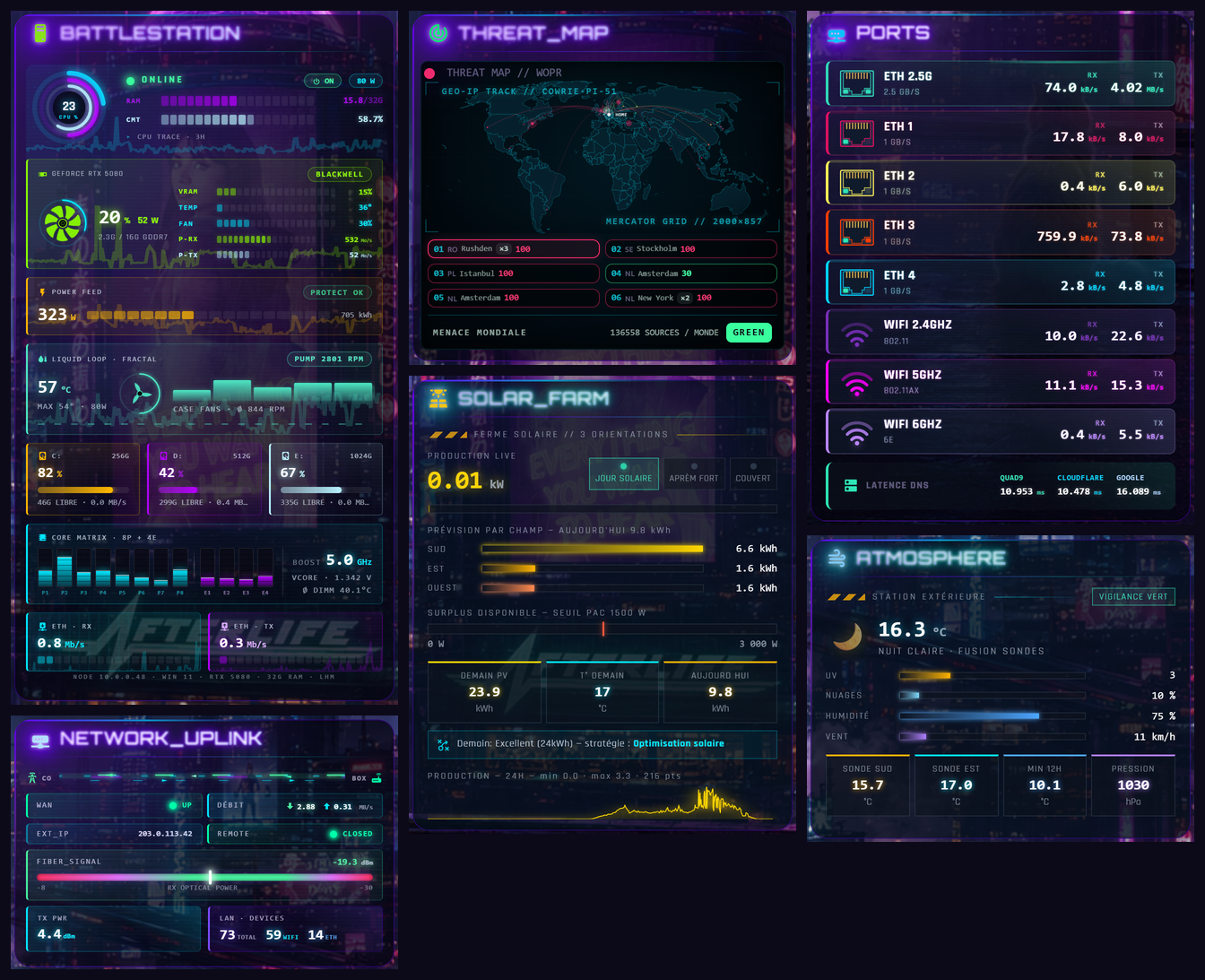
<img src="https://raw.githubusercontent.com/cerealkiller57540/neon-markdown-card/main/images/main.png" alt="Seven dashboards built with Neon Markdown Card: a PC monitor, a network uplink panel, a world threat map, a solar farm, network ports and a weather station" width="900">
</div>
Every panel above is **one `neon-markdown-card`**: no other custom card, no template sensor written for it. The body is HTML (or Markdown) with Jinja-style templates, evaluated in the browser against the live states: `{% for %}` over an attribute list, `{% set %}`, macros, filters, SVG sparklines from the recorder history, `<style>` blocks with `@container` queries and keyframe animations. The header on top is a neon title with glow, gradient, flicker and CRT scanline.
*These screenshots are examples of what the templates can do, taken from the author's dashboard (French labels, real data, Neo Tokyo theme). The card ships the engine and the header, not these layouts: you write the body.*
## ✨ Features
- **Client-side template engine**: `set`, `if / elif / else`, `for` (with `loop.*` and `else`), `macro`, `range()`, `now()`, `states()`, `state_attr()`, `states.domain.entity.attribute`, `as_timestamp()`, ternaries, `~` concatenation, and about thirty filters (`round`, `int`, `default`, `sort`, `map`, `selectattr`, `sum`, `clamp`, `format`, `zfill`, `thousands`…). No round-trip to the server: the card only re-renders when one of the entities it reads changes.
- **Full HTML and SVG body**, sanitised: layout tags, tables, images from `/local`, inline SVG, `<style>` blocks scoped to the card (classes, `@container`, `@media`, gradients, `clip-path`, `mask`, animations). Scripts, event handlers, external URLs and `javascript:` links are removed.
- **History sparklines**: declare `history: [{entity, hours}]` and draw `hist['sensor.x'].pts` straight into an SVG `<polyline>`.
- **`data-entity="sensor.x"`** on any element opens the native more-info dialog on tap.
- **Neon header**, the same as [neon-header-card](https://github.com/cerealkiller57540/Home-Assistant-Neon-Cards): icon, glow, two-colour gradient, flicker, scanline, hover glitch. Use `mode: title`, `body` or `both`.
- **25 ready-made keyframes** (`nmc-flicker`, `nmc-scan-scroll`, `nmc-ring-spin`, `nmc-data-flow`, `nmc-pulse-travel`, `nmc-dash-crawl`…) to use in inline `animation:`.
- **Visual editor** for the header and frame; the body is edited as text.
- `debug: true` prints template errors under the body. Guard rails cap output size, loop iterations and nesting depth, so a broken template cannot freeze the dashboard.
## 📦 Installation
### HACS (recommended)
1. Click the **Open in HACS** button above, or add this repository as a custom repository in HACS (category **Dashboard**): `https://github.com/cerealkiller57540/neon-markdown-card`.
2. Download **Neon Markdown Card**.
3. Reload your browser.
### Manual
1. Copy [`dist/neon-markdown-card.js`](dist/neon-markdown-card.js) to `config/www/neon-markdown-card/`.
2. Add a dashboard resource: URL `/local/neon-markdown-card/neon-markdown-card.js`, type **JavaScript module**.
## 🚀 Usage
```yaml
type: custom:neon-markdown-card
mode: both
title:
text: BATTERIES
icon: mdi:battery-high
glow: true
gradient: true
history:
- entity: sensor.home_battery
hours: 24
body:
format: html
content: >-
<style>
.row { display:flex; justify-content:space-between; padding:4px 0; }
.low { color:#ff2d6b; animation: nmc-flicker 2s infinite; }
</style>
{% set devices = [
{'n':'Phone', 'e':'sensor.phone_battery_level'},
{'n':'Tablet', 'e':'sensor.tablet_battery_level'},
{'n':'Remote', 'e':'sensor.remote_battery'}
] %}
{% for d in devices|sort(attribute='n') %}
{% set v = states(d.e)|int(0) %}
<div class="row" data-entity="{{ d.e }}">
<span>{{ loop.index }}. {{ d.n }}</span>
<b class="{{ 'low' if v < 20 else '' }}">{{ v }} %</b>
</div>
{% endfor %}
{% if hist['sensor.home_battery'] is defined %}
<svg viewBox="0 0 100 30" preserveAspectRatio="none" style="width:100%;height:40px">
<polyline points="{{ hist['sensor.home_battery'].pts }}" fill="none" stroke="#00f0ff"
vector-effect="non-scaling-stroke"/>
</svg>
{% endif %}
```
## ⚙️ Options
**Top level**
| Option | Default | Description |
|---|---|---|
| `mode` | `both` | `title`, `body` or `both` |
| `history` | — | List of `{entity, hours}`; exposes `hist['entity'] = {pts, min, max, first, last, n}` (refreshed about every 5 min) |
| `debug` | `false` | Show template errors under the body |
**`title:`**
| Option | Default | Description |
|---|---|---|
| `text` / `icon` / `icon_position` | — | Title text, `mdi:` icon, icon left or right |
| `color` / `icon_color` | theme | Text and icon colour |
| `font_family` / `font_size` / `font_weight` / `letter_spacing` | theme | Font (Orbitron, Rajdhani… load automatically from Google Fonts) |
| `uppercase` / `italic` | `false` | Text style |
| `glow` / `glow_color` / `glow_size` | — | Neon glow |
| `gradient` / `gradient_from` / `gradient_to` | — | Two-colour gradient text |
| `flicker` / `scanline` / `hover_glitch` | `false` | Animations |
**`body:`**
| Option | Default | Description |
|---|---|---|
| `format` | `html` | `html` or `markdown` |
| `content` | — | The template |
| `color` / `font_family` / `font_size` | theme | Default text style |
**`shared:`** (frame and action)
| Option | Default | Description |
|---|---|---|
| `align_h` / `align_v` | — | Content alignment |
| `bg_color` / `bg_opacity` / `bg_blur` | theme | Background, with optional backdrop blur |
| `border_color` / `border_width` / `border_style` / `border_radius` | theme | Frame |
| `font_family` | — | Font for the whole card |
| `tap_action` / `navigation_path` / `entity` | — | Tap on the card: more-info, navigate, or none |
## ❓ FAQ
**Is this the same Jinja as Home Assistant?** No. It is a separate engine that runs in your browser and covers the common subset listed above. A template that works in the HA developer tools may need small changes (no `{% call %}`, no keyword arguments in macros, no `|` inside a composed arithmetic expression: use `floor()` instead of `|int` there). Turn on `debug: true` to see what fails.
**Why are some of my tags or styles gone?** The body is sanitised. Scripts, `on*` attributes, external images, `@import`, external fonts and non-local `url()` are stripped on purpose.
**Can several cards share a macro?** Four macros ship with the engine (`fmt_eta`, `tuile`, `spark`, `hp_style`). Your own macros live in each card's body.
**The editor labels are in French.** Translation is on the way. Every option can also be set in YAML.
**Which theme is in the screenshots?** Neo Tokyo, the author's own dark theme (not published). The card works with any theme.
## 🌃 More neon cards
This card is part of a family. See the full collection at [**Home-Assistant-Neon-Cards**](https://github.com/cerealkiller57540/Home-Assistant-Neon-Cards).
---
## 🐾 Support this project
If you enjoy these cards, please consider donating to **Quatre Pattes**, an animal rescue organization.
[](https://don.quatre-pattes.org/s/?_jtsuid=70083177244599792679303)
> 💛 No need to support me — just help the animals. Thank you!
---
## 🤝 Contributing
1. Fork the repo
2. Create your branch: `git checkout -b feature/my-card`
3. Commit and push
4. Open a Pull Request
---
## 📄 License
[MIT License][license-url]
[hacs-badge]: https://img.shields.io/badge/HACS-Custom-orange.svg?style=for-the-badge
[hacs-url]: https://hacs.xyz
[release-badge]: https://img.shields.io/github/v/release/cerealkiller57540/neon-markdown-card?style=for-the-badge
[release-url]: https://github.com/cerealkiller57540/neon-markdown-card/releases
[validate-badge]: https://img.shields.io/github/actions/workflow/status/cerealkiller57540/neon-markdown-card/validate.yml?branch=main&label=HACS&style=for-the-badge
[validate-url]: https://github.com/cerealkiller57540/neon-markdown-card/actions/workflows/validate.yml
[license-badge]: https://img.shields.io/github/license/cerealkiller57540/neon-markdown-card?style=for-the-badge
[license-url]: LICENSE
看看同类模板
对比同技术栈与用途的模板,找到更适合的视觉与内容结构。

gentelella
Free admin dashboard template — vanilla JS, SCSS, Vite 8. No Bootstrap, no jQuery.
HTML · 后台

coreui-free-bootstrap-admin-template
Free Bootstrap Admin & Dashboard Template Built for AI-Assisted Development
HTML · 后台

dashboards
Responsive dashboard templates 📊✨
HTML · 后台

SB Admin 2
SB Admin 2 是 Start Bootstrap 推出的开源后台模板,基于 Bootstrap 构建,整体风格偏向经典管理界面。
HTML · 后台

Adminator-admin-dashboard
Adminator is easy to use and well design admin dashboard template with dark mode for web apps, websites, servi…
HTML · 后台

SB Admin
SB Admin 是 Start Bootstrap 推出的开源后台管理模板,基于 Bootstrap 构建,定位是简洁、实用的管理界面。
HTML · 后台