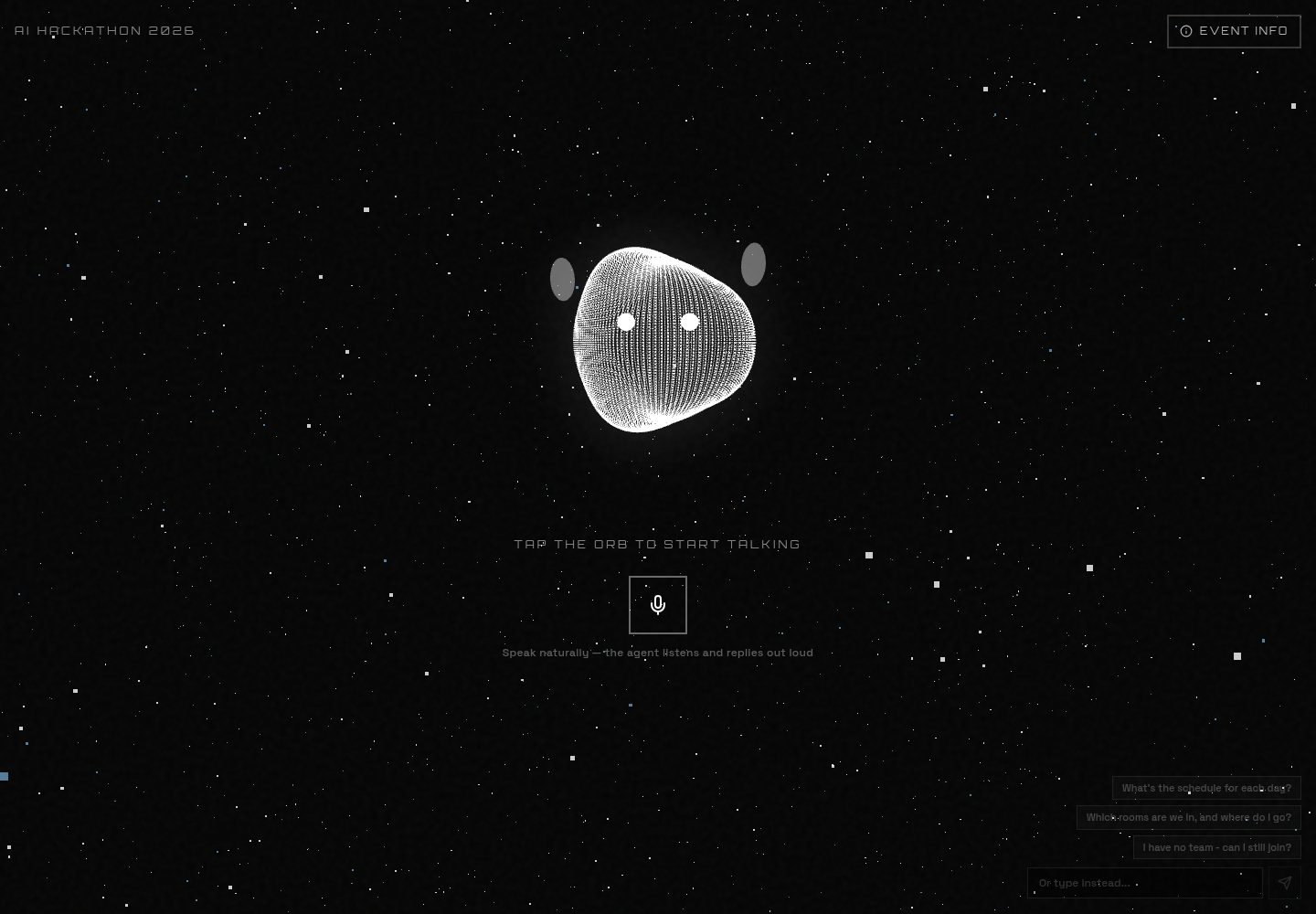
Single-page voice-first interaction: click the sphere or microphone button to start a two-way voice conversation, with the sphere pulsing and changing color with live audio
Next.jsReactCorporate Website
event-qa-ai-template — Next.js Business Template
By ChanMeng666
A single-page, voice-first Q&A template for the Aotearoa AI Hackathon Festival 2026, using the OpenAI Realtime API for voice and text Q&A.
Explore the design
Compare the page layouts and mobile experience. Open any screenshot for a closer look.
Desktop homepage1 / 2
Desktop captureTop of page
Actual screenshot captured by the server browser.
All pages & views 2
Screenshots show visual appearance; interactive behavior may differ.
Recorded 2026-10-14View source
What stands out
A quick read of the recorded project description.
Dual-channel voice and text Q&A: ask by voice or type text, and text replies are read aloud during a voice session
Live captions display both the user's and the agent's conversation content
Collapsible Event Info panel showing the event date, venue, and registration link
Voice key security: the server issues a short-lived temporary client secret, and the real OPENAI_API_KEY never enters the browser
Storage is optional and degrades gracefully: falls back to static configuration and an allow policy when Postgres or KV is not configured
Template Details
This is a single-page, voice-first event Q&A AI agent template, built for the Aotearoa AI Hackathon Festival 2026 (AUT City Campus). At the center of the page is a sphere that changes with audio: clicking the sphere or the microphone button starts a two-way voice conversation powered by the OpenAI Realtime API over WebRTC, and the sphere pulses and changes color with the live audio; you can also type questions directly, with replies shown as text and also read aloud during a voice session. Live captions display both the user's and the agent's speech. The page also provides a collapsible Event Info panel showing basic information such as the date, venue, and registration link.
Technically, the voice part obtains a short-lived temporary client secret from POST /v1/realtime/client_secrets via app/api/realtime/session/route.ts, so the real OPENAI_API_KEY never enters the browser; the client then exchanges SDP via POST /v1/realtime/calls and streams audio directly to OpenAI. The text part uses the Vercel AI SDK's streamText in app/api/chat/route.ts to call gpt-4o-mini. The knowledge base builds agent instructions from the knowledge table when the database is available, otherwise falling back to config/ai.config.ts; conversation transcripts are written to Postgres on a best-effort basis by lib/transcripts.ts, and features degrade gracefully when storage is not configured. The README explicitly states that the online deployment does not use a database, the knowledge base comes directly from config/knowledge.config.ts, and publishing changes pushes to master; the Postgres section describes the template's optional capability, not the site's actual configuration.
The README does not provide information about performance, concurrency, or production readiness, nor does it list model providers other than OpenAI.
Next.jsBusiness website
Is it right for your project?
Use Cases
- Build a voice Q&A agent for a conference or hackathon event to answer attendees' questions about dates, venue, and registration
- Provide a single-page voice and text dual-channel information query entry point at an event site
- Serve as a template demonstrating how the OpenAI Realtime API integrates voice-to-voice over WebRTC
- Deploy a database-free version on Vercel and update event knowledge by modifying configuration files
Suitable For
- Developers who need to quickly build a voice Q&A page for a specific event
- Frontend or full-stack developers who want a reference for integrating the OpenAI Realtime API with the Vercel AI SDK
- Teams deploying on Vercel and accepting configuration files as the knowledge base source
Getting started & customization
Use these recorded setup notes alongside the repository instructions for your chosen version.
- 1
Run npm install, copy .env.example to .env.local and fill in OPENAI_API_KEY, then npm run dev
- 2
The voice agent requires microphone permission and a secure context; localhost works
- 3
DATABASE_URL / POSTGRES_URL and KV_REST_API_URL / KV_REST_API_TOKEN are optional; when not configured, they fall back to static configuration and an allow policy respectively
- 4
When deploying to Vercel, use npx vercel link --project aihackathon-2026 --scope she-sharp1 --yes to avoid the CLI creating a wrong new project
- 5
To enable the database and rate limiting, add the Postgres (Neon) and KV (Upstash) integrations in the Vercel console, then run npm run db:seed
License & source material
Usage conditions & limitations
Free to use · keep license noticeThis entry covers the free version under the Apache-2.0 license in the public repository; the free scope is the code of that version and does not mean external services or third-party assets are free.
Must comply with when using
- Free use, modification, commercial use, and distribution are permitted; the Apache-2.0 license must be included when distributing.
- Modified files must prominently indicate changes, and relevant copyright, patent, trademark, and attribution notices must be retained.
- If the original project includes a NOTICE file, applicable attribution notices in it must be retained when distributing derivative works.
- The license includes an applicable contributor patent grant; initiating patent litigation as described in the license terminates that patent grant, and no trademark use rights are granted.
- The code is provided as-is; warranties and limitations of liability are governed by the original license and applicable law.
Additional costs & items to verify
- Demo images, fonts, icons, and other third-party assets must be checked against their respective licenses and cannot be judged solely by the code's Apache-2.0 license.
- External services such as domains, hosting, databases, payments, or AI may incur additional charges.
- OPENAI_API_KEY must be provided to use the voice and text Q&A features.
- DATABASE_URL / POSTGRES_URL is optional; when configured, Vercel Postgres (Neon) is used to store the knowledge base and conversation transcripts, otherwise it falls back to static configuration.
- KV_REST_API_URL / KV_REST_API_TOKEN is optional; when configured, Vercel KV (Upstash) is used for rate limiting, otherwise it falls back to an allow policy.
- Enabling the database and rate limiting requires adding the Postgres (Neon) and KV (Upstash) integrations in the Vercel console; these are external hosted services.
- When deploying, do not run vercel link without --project aihackathon-2026, otherwise the CLI will create a wrong new project.
View Original Text Basis
no-charge, royalty-free, irrevocable copyright license
Original License Text
| `OPENAI_API_KEY` | Yes | Realtime voice + text chat |
Original README
| `DATABASE_URL` / `POSTGRES_URL` | Optional | Vercel Postgres (Neon): knowledge base + transcripts. Falls back to static config. |
Original README
| `KV_REST_API_URL` / `KV_REST_API_TOKEN` | Optional | Vercel KV (Upstash): rate limiting. Falls back to allow-all. |
Original README
To enable the database and rate limiting, add the **Vercel Postgres (Neon)** and **Vercel KV (Upstash)** integrations from the Vercel dashboard (Storage tab). They inject the env vars automatically. Then seed the knowledge base:
Original README
https://github.com/ChanMeng666/event-qa-ai-template/blob/master/LICENSEhttps://github.com/ChanMeng666/event-qa-ai-template/blob/master/README.md**Do not** run `vercel link` without `--project aihackathon-2026`. The CLI will otherwise create a **new** project named `event-qa-ai-template` (wrong). Always verify `.vercel/project.json` contains `"projectName": "aihackathon-2026"` before deploying.
Original README
Compiled by DeepSeek based on repository license and README ·2026-10-14. Results only cover the materials read; dependencies, images, fonts, and subsequent term changes are subject to their respective original texts.
Project checks & description sources
Template Information
- Source platforms
- GitHub
- Documentation and maintenance reference score
- More documented · 80 / 100
- Technologies
- Next.js · React
- Website type
- Corporate Website
How this score is calculated
Our heuristic uses license records (up to 30), a demo link (12), a preview (10), stars (15), recorded maintenance (15), description completeness (8), feature records (5) and classification data (5). It is not a code, security or performance test, or a Google score. A link does not establish tested functionality.
What to verify for this project
- Repository update recorded
- 2026-08-06
- Screenshot last checked
- 2026-10-14
A demo link is listed. Check it with your own content and viewport sizes; its presence does not confirm that forms, authentication or payments work.
The catalog identifies Next.js as the primary stack. Check the actual dependency manifest and lockfile for versions and hosting requirements. These notes use recorded metadata, not a code audit or a deployment test.
Use a selection guide →How this description was prepared
AI-assisted description based on catalog records and repository material. Repository authors are not automatically the reviewers of this description.
Review declaration: codex-user-requested-batch-review-20261017 · 2026-10-16
Inspect the recorded source material
SHA-256: 49698cd03684e86b6473cd1a57a524b74b62659a35828fd9d5f4be820de39826
2026-10-14T12:45:12.421Z
Source file / repository<div align="center"><a name="readme-top"></a>
# Aotearoa AI Hackathon Festival 2026 - Voice AI Agent
A single-page, voice-first AI agent for the **Aotearoa AI Hackathon Festival 2026** (AUT City Campus).
Talk or type to an interactive orb that answers questions about the event - speech in, speech out, with live captions.
Built with **Next.js 16**, the **OpenAI Realtime API** (speech-to-speech), the **Vercel AI SDK**, and **Vercel** platform services (KV/Upstash, Analytics, Speed Insights). Postgres is supported but optional.
> **Note for the live deployment** (and for AI agents working on this repo): the production
> site runs **without a database** — the knowledge base is served straight from
> `config/knowledge.config.ts`, and publishing a change means pushing to `master`. The
> Postgres sections below describe an optional capability of the template, not how this
> site is configured. See [CLAUDE.md](CLAUDE.md), [docs/DECISIONS.md](docs/DECISIONS.md)
> and [docs/EVENT-RUNBOOK.md](docs/EVENT-RUNBOOK.md).
[](https://aihackathon-2026.vercel.app)
<img src="https://img.shields.io/badge/next.js-%23000000.svg?style=for-the-badge&logo=nextdotjs&logoColor=white"/>
<img src="https://img.shields.io/badge/typescript-%23007ACC.svg?style=for-the-badge&logo=typescript&logoColor=white"/>
<img src="https://img.shields.io/badge/OpenAI-412991.svg?style=for-the-badge&logo=openai&logoColor=white"/>
<img src="https://img.shields.io/badge/vercel-%23000000.svg?style=for-the-badge&logo=vercel&logoColor=white"/>
</div>
## What it is
The entire site is one page: a centered, audio-reactive orb.
- Tap the orb (or the mic button) to start a **two-way voice conversation** powered by the OpenAI Realtime API over WebRTC. The orb pulses and shifts color with the live audio.
- Or **type** a question - the same agent answers, with the reply shown as text and, when in a voice session, spoken aloud.
- Live **captions** show both your words and the agent's.
- A subtle **Event Info** panel exposes the essential facts (dates, venue, register link).
All AI is OpenAI. No other model providers are used.
## Architecture
```mermaid
flowchart TB
subgraph browser [Single Page /]
Orb[Audio-reactive orb]
Voice[useRealtimeVoice - WebRTC]
Text[Text input + captions]
end
subgraph vercel [Vercel Functions]
Session[POST /api/realtime/session]
ChatAPI[POST /api/chat]
Trans[POST /api/transcript]
end
subgraph data [Vercel Storage]
PG[(Postgres/Neon: knowledge + transcripts)]
KV[(KV/Upstash: rate limiting)]
end
OpenAIRT[OpenAI Realtime API]
OpenAI[OpenAI gpt-4o-mini via AI SDK]
Voice -->|ephemeral key| Session --> KV
Voice <-->|audio + events| OpenAIRT
OpenAIRT -->|remote audio| Orb
Text --> ChatAPI --> OpenAI
ChatAPI --> PG
Voice --> Trans --> PG
Session -->|instructions from KB| PG
```
- **Voice**: `app/api/realtime/session/route.ts` mints a short-lived ephemeral client secret from `POST /v1/realtime/client_secrets` (the real `OPENAI_API_KEY` never reaches the browser). The client (`hooks/use-realtime-voice.ts`) then exchanges SDP with `POST /v1/realtime/calls` and streams audio directly to OpenAI.
- **Text**: `app/api/chat/route.ts` uses the Vercel AI SDK (`streamText`) with `gpt-4o-mini`.
- **Knowledge**: `lib/knowledge.ts` builds the agent instructions from the DB `knowledge` table when available, otherwise from `config/ai.config.ts`.
- **Persistence**: `lib/transcripts.ts` best-effort stores conversation turns in Postgres. Everything degrades gracefully when storage is unconfigured.
## Project structure
```
app/
page.tsx # The single page (orb + agent)
layout.tsx # Metadata, fonts, Analytics + Speed Insights
opengraph-image.tsx # Dynamic OG image (next/og)
api/
realtime/session/route.ts # Mint ephemeral Realtime token (rate-limited)
chat/route.ts # Text chat (Vercel AI SDK + OpenAI)
transcript/route.ts # Persist voice transcripts
components/
agent/
voice-agent.tsx # Orchestrates orb + controls + captions
agent-orb.tsx # Audio-reactive Three.js orb
info-panel.tsx # Collapsible event-info overlay
three/cosmic-background.tsx # Background
hooks/
use-realtime-voice.ts # WebRTC realtime session + audio level
lib/
db.ts # Neon client + schema (graceful fallback)
knowledge.ts # KB loader + instruction builder
transcripts.ts # Conversation persistence
ratelimit.ts # Upstash rate limiting (allow-all fallback)
config/
site.config.ts # Event facts (2026)
ai.config.ts # Prompt/knowledge + realtime model/voice
content.config.ts # Suggested prompts
branding.config.ts # Logos, links, deployment URL
scripts/
seed-knowledge.ts # Seed the knowledge table (npm run db:seed)
```
## Getting started
```bash
npm install
cp .env.example .env.local # add OPENAI_API_KEY
npm run dev
```
Open http://localhost:3000. The voice agent needs microphone permission and a secure context (localhost is fine).
### Environment variables
| Variable | Required | Purpose |
|----------|----------|---------|
| `OPENAI_API_KEY` | Yes | Realtime voice + text chat |
| `DATABASE_URL` / `POSTGRES_URL` | Optional | Vercel Postgres (Neon): knowledge base + transcripts. Falls back to static config. |
| `KV_REST_API_URL` / `KV_REST_API_TOKEN` | Optional | Vercel KV (Upstash): rate limiting. Falls back to allow-all. |
## Deploying on Vercel
> **For AI agents:** full rules and incident post-mortem → **[AGENTS.md](AGENTS.md)**
| | |
|--|--|
| GitHub repo | `ChanMeng666/event-qa-ai-template` |
| **Vercel project** | **`she-sharp1/aihackathon-2026`** |
| Production | https://aihackathon-2026.vercel.app · https://hackathon.shesharp.org.nz |
**Do not** run `vercel link` without `--project aihackathon-2026`. The CLI will otherwise create a **new** project named `event-qa-ai-template` (wrong). Always verify `.vercel/project.json` contains `"projectName": "aihackathon-2026"` before deploying.
```bash
# Link to the correct project (once, or after clone)
npx vercel link --project aihackathon-2026 --scope she-sharp1 --yes
# Sync secrets (script refuses wrong project)
npm run sync:vercel-env
# Deploy
vercel deploy --prod --scope she-sharp1 --yes
```
To enable the database and rate limiting, add the **Vercel Postgres (Neon)** and **Vercel KV (Upstash)** integrations from the Vercel dashboard (Storage tab). They inject the env vars automatically. Then seed the knowledge base:
```bash
vercel env pull .env.local --scope she-sharp1
npm run db:seed
```
## Editing the event knowledge
- Quick edits: update `config/ai.config.ts` (`additionalContext`) and `config/site.config.ts`.
- Live edits (no redeploy) once Postgres is connected: update rows in the `knowledge` table (or re-run `npm run db:seed`).
## License
MIT - see [LICENSE](LICENSE).
---
<!-- CHAN MENG PERSONAL BRAND -->
<div align="center">
<a href="https://github.com/ChanMeng666" target="_blank">
<img src="./.github/brand/chan-meng-logo.svg" alt="Chan Meng" width="160" />
</a>
<p><strong>Chan Meng</strong><br/>Need a custom app like this one? I build them - let's talk.</p>
<a href="mailto:[email protected]"><img src="https://img.shields.io/badge/[email protected]?style=flat-square&logo=gmail&logoColor=white" alt="Email Chan Meng"/></a>
<a href="https://github.com/ChanMeng666"><img src="https://img.shields.io/badge/GitHub-ChanMeng666-181717?style=flat-square&logo=github&logoColor=white" alt="Chan Meng on GitHub"/></a>
</div>
<!-- /CHAN MENG PERSONAL BRAND -->
Explore similar templates
Compare previews and descriptions within the same stack and category.

SaaS-Boilerplate
SaaS-Boilerplate is an open-source SaaS starter template built with Next.js App Router, React 19, TypeScript, Tailwind CSS, and Shadcn UI.
Next.js · SaaS

Next-JS-Landing-Page-Starter-Template
A free Next.js landing page starter template written in Tailwind CSS and TypeScript, featuring built-in navbar, hero, features, CTA banner, and footer sections.
Next.js · Corporate Website

next-saas-starter
A free Next.js SaaS marketing landing page template from Blazity, using static generation and styled-components with no extra UI library.
Next.js · SaaS

startup-nextjs
Startup is a free, MIT-licensed Next.js template from NextJSTemplates for SaaS startups and corporate landing pages.
Next.js · SaaS

shadcn-landing-page
A Next.js landing page template built with Shadcn, TypeScript, and Tailwind, converted from a Shadcn-Vue version. It includes sections such as Navbar, mobile Sidebar, Hero, Pricing, FAQ, and Footer, and highlights responsive design, navigation, and dark mode.
Next.js · Corporate Website

shadcn-dashboard-landing-template
An open-source admin dashboard and marketing landing page template built on shadcn/ui and Tailwind CSS, with both Vite + React and Next.js versions in one repository.
Next.js · Admin dashboard