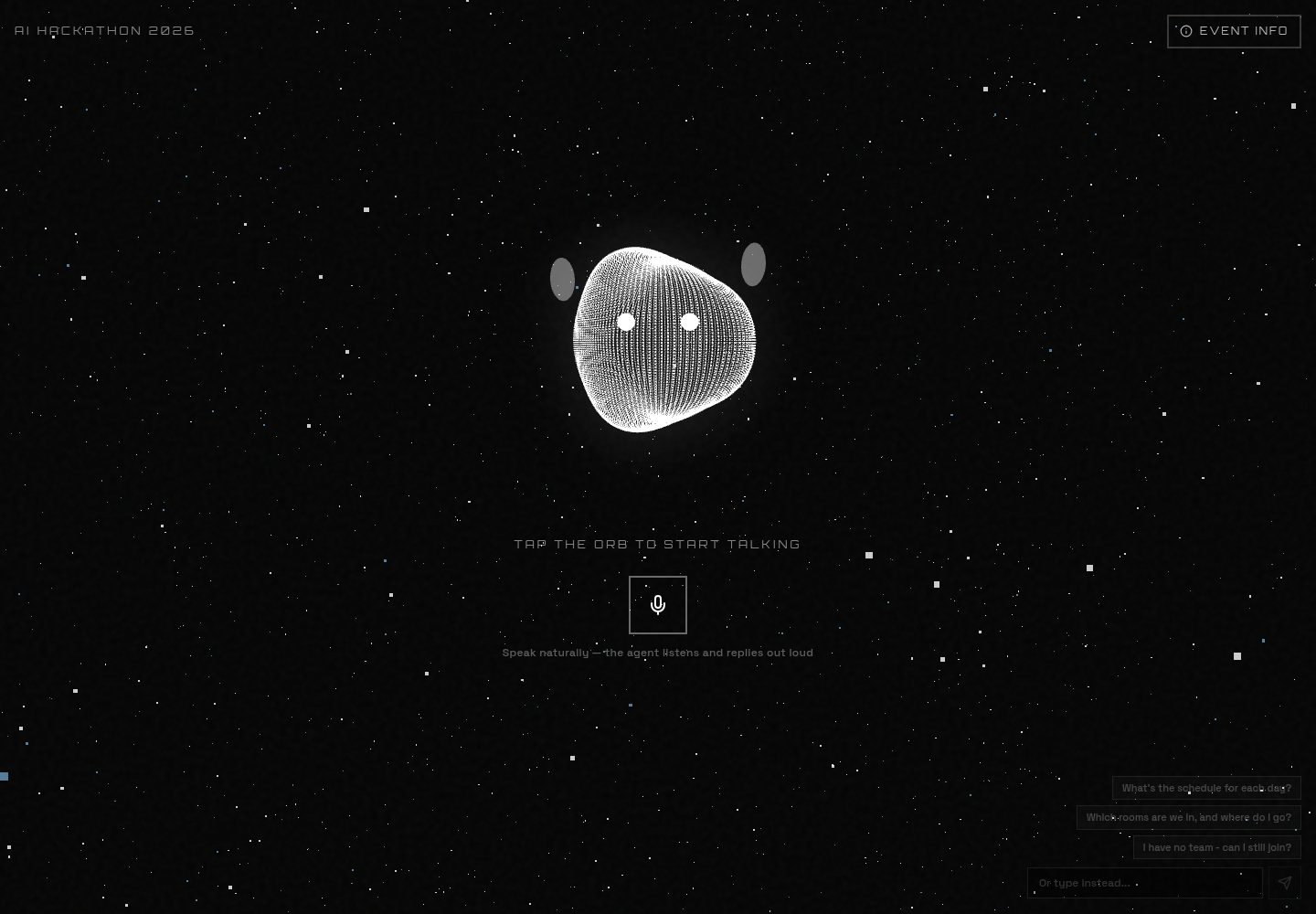
单页语音优先交互:点击球体或麦克风按钮即可开始双向语音对话,球体随实时音频脉动变色
Next.jsReact企业官网
event-qa-ai-template — Next.js 企业官网模板
作者 ChanMeng666
面向 Aotearoa AI Hackathon Festival 2026 的单页语音优先问答模板,用 OpenAI Realtime API 实现语音与文字问答。
看看你的网站会是什么样
浏览真实页面截图,比较内容排版与手机效果。点击下方缩略图切换,放大查看整页细节。
全部页面与视图 2
截图用于了解视觉与布局,交互效果请以实际项目为准。
采集于 2026-10-14查看来源
值得关注的模板亮点
从已有项目资料中,快速了解它的特点。
语音与文字双通道问答:既可语音提问,也可输入文字,语音会话中文字回复会被朗读
实时字幕同时显示用户与代理的对话内容
可折叠 Event Info 面板展示活动日期、场地与报名链接
语音密钥安全:服务端签发短期临时客户端密钥,真实 OPENAI_API_KEY 不进入浏览器
存储可选并优雅降级:未配置 Postgres 或 KV 时回退到静态配置与放行策略
模板详细介绍
这是一个单页、语音优先的活动问答 AI 代理模板,为 Aotearoa AI Hackathon Festival 2026(AUT City Campus)构建。页面中心是一个随音频变化的球体:点击球体或麦克风按钮可开启由 OpenAI Realtime API 经 WebRTC 驱动的双向语音对话,球体会随实时音频脉动与变色;也可以直接输入文字提问,回复以文本显示,在语音会话中还会朗读出来。实时字幕同时显示用户与代理的话。页面还提供可折叠的 Event Info 面板,展示日期、场地和报名链接等基本信息。
技术实现上,语音部分由 app/api/realtime/session/route.ts 从 POST /v1/realtime/client_secrets 获取短期临时客户端密钥,真实 OPENAI_API_KEY 不会进入浏览器,客户端随后通过 POST /v1/realtime/calls 交换 SDP 并直接向 OpenAI 传输音频;文字部分由 app/api/chat/route.ts 使用 Vercel AI SDK 的 streamText 调用 gpt-4o-mini。知识库在数据库可用时由 knowledge 表构建代理指令,否则回退到 config/ai.config.ts;对话记录由 lib/transcripts.ts 尽力写入 Postgres,未配置存储时各项功能会优雅降级。README 明确说明线上部署不使用数据库,知识库直接来自 config/knowledge.config.ts,发布更改即推送到 master;Postgres 部分描述的是模板的可选能力,而非该站点的实际配置。
README 未提供关于性能、并发量或生产就绪程度的说明,也未列出除 OpenAI 之外的其他模型提供方。
Next.js企业官网
适合你的项目吗?
适用场景
- 为会议或黑客松活动搭建语音问答代理,回答参会者关于日期、场地和报名的问题
- 在活动现场以单页形式提供语音与文字双通道的信息查询入口
- 作为模板演示 OpenAI Realtime API 经 WebRTC 的语音到语音集成方式
- 在 Vercel 上部署无数据库版本,通过修改配置文件更新活动知识
适合人群
- 需要为特定活动快速搭建语音问答页面的开发者
- 希望参考 OpenAI Realtime API 与 Vercel AI SDK 集成方式的前端或全栈开发者
- 在 Vercel 上部署并接受以配置文件作为知识库来源的团队
上手与定制指南
结合仓库当前版本的说明,按下面的资料检查内容、配置与运行要求。
- 1
运行 npm install,复制 .env.example 为 .env.local 并填入 OPENAI_API_KEY,然后 npm run dev
- 2
语音代理需要麦克风权限和安全上下文,localhost 可用
- 3
DATABASE_URL / POSTGRES_URL 与 KV_REST_API_URL / KV_REST_API_TOKEN 均为可选,未配置时分别回退到静态配置与放行策略
- 4
部署到 Vercel 时需使用 npx vercel link --project aihackathon-2026 --scope she-sharp1 --yes,避免 CLI 创建错误的新项目
- 5
启用数据库与限流需在 Vercel 控制台添加 Postgres(Neon)与 KV(Upstash)集成,然后运行 npm run db:seed
授权与来源资料
使用条件与限制
免费使用 · 保留许可声明本次收录的是公开仓库中采用 Apache-2.0 许可的免费版本;免费范围为该版本代码,不代表外部服务或第三方素材免费。
使用时需要遵守
- 允许免费使用、修改、商用和分发;分发时需随附 Apache-2.0 许可证。
- 修改过的文件需显著标明改动,并保留相关版权、专利、商标及归属声明。
- 若原项目附有 NOTICE 文件,分发衍生作品时需保留其中适用的归属声明。
- 许可包含适用的贡献者专利授权;发起许可所述专利诉讼会终止该专利授权,且不授予商标使用权。
- 代码按现状提供;担保与责任限制以原许可证及适用法律为准。
额外费用与待核对事项
- 演示图片、字体、图标及其他第三方素材需按各自许可核对,不能仅凭代码的 Apache-2.0 许可判断。
- 域名、托管、数据库、支付或 AI 等外部服务可能另外收费。
- 必须提供 OPENAI_API_KEY 才能使用语音与文字问答功能。
- DATABASE_URL / POSTGRES_URL 为可选;配置后使用 Vercel Postgres(Neon)存储知识库与对话记录,未配置则回退到静态配置。
- KV_REST_API_URL / KV_REST_API_TOKEN 为可选;配置后使用 Vercel KV(Upstash)做限流,未配置则回退为放行策略。
- 启用数据库与限流需在 Vercel 控制台添加 Postgres(Neon)与 KV(Upstash)集成,这些为外部托管服务。
- 部署时不要在不带 --project aihackathon-2026 的情况下运行 vercel link,否则 CLI 会创建错误的新项目。
查看原文依据
no-charge, royalty-free, irrevocable copyright license
许可证原文
| `OPENAI_API_KEY` | Yes | Realtime voice + text chat |
README 原文
| `DATABASE_URL` / `POSTGRES_URL` | Optional | Vercel Postgres (Neon): knowledge base + transcripts. Falls back to static config. |
README 原文
| `KV_REST_API_URL` / `KV_REST_API_TOKEN` | Optional | Vercel KV (Upstash): rate limiting. Falls back to allow-all. |
README 原文
To enable the database and rate limiting, add the **Vercel Postgres (Neon)** and **Vercel KV (Upstash)** integrations from the Vercel dashboard (Storage tab). They inject the env vars automatically. Then seed the knowledge base:
README 原文
https://github.com/ChanMeng666/event-qa-ai-template/blob/master/LICENSEhttps://github.com/ChanMeng666/event-qa-ai-template/blob/master/README.md**Do not** run `vercel link` without `--project aihackathon-2026`. The CLI will otherwise create a **new** project named `event-qa-ai-template` (wrong). Always verify `.vercel/project.json` contains `"projectName": "aihackathon-2026"` before deploying.
README 原文
DeepSeek 根据仓库许可证和 README 整理 ·2026-10-14。结果仅覆盖已读取资料,依赖、图片、字体及后续条款变更以各自原文为准。
项目核对记录与介绍依据
模板资料
- 来源平台
- GitHub
- 资料与维护参考分
- 资料较完整 · 80 / 100
- 技术栈
- Next.js · React
- 网站类型
- 企业官网
这个分数如何计算
本站按许可资料(最高30分)、演示链接(12分)、预览图(10分)、Star数(15分)、记录的维护时间(15分)、描述完整度(8分)、功能记录(5分)和分类资料(5分)计算。它不是代码、安全或性能测试,也不是 Google 评分;有链接不代表已实测可用。
这个项目需要核对什么
- 记录的仓库更新时间
- 2026-08-06
- 截图检查日期
- 2026-10-14
已收录演示链接。请用你的内容与屏幕尺寸检查;有演示不代表表单、认证或支付已经可用。
目录记录的主要技术栈是 Next.js。请通过依赖清单和锁文件核对实际版本与托管要求。这些说明基于收录资料,不代表代码审计或部署实测。
查看具体选型方法 →介绍的制作与核对状态
介绍由 AI 辅助整理目录与仓库资料。仓库作者不等于这篇介绍的审核者。
审核声明: codex-user-requested-batch-review-20261017 · 2026-10-16
查看当时使用的来源资料
SHA-256: 49698cd03684e86b6473cd1a57a524b74b62659a35828fd9d5f4be820de39826
2026-10-14T12:45:12.421Z
来源文件 / 仓库<div align="center"><a name="readme-top"></a>
# Aotearoa AI Hackathon Festival 2026 - Voice AI Agent
A single-page, voice-first AI agent for the **Aotearoa AI Hackathon Festival 2026** (AUT City Campus).
Talk or type to an interactive orb that answers questions about the event - speech in, speech out, with live captions.
Built with **Next.js 16**, the **OpenAI Realtime API** (speech-to-speech), the **Vercel AI SDK**, and **Vercel** platform services (KV/Upstash, Analytics, Speed Insights). Postgres is supported but optional.
> **Note for the live deployment** (and for AI agents working on this repo): the production
> site runs **without a database** — the knowledge base is served straight from
> `config/knowledge.config.ts`, and publishing a change means pushing to `master`. The
> Postgres sections below describe an optional capability of the template, not how this
> site is configured. See [CLAUDE.md](CLAUDE.md), [docs/DECISIONS.md](docs/DECISIONS.md)
> and [docs/EVENT-RUNBOOK.md](docs/EVENT-RUNBOOK.md).
[](https://aihackathon-2026.vercel.app)
<img src="https://img.shields.io/badge/next.js-%23000000.svg?style=for-the-badge&logo=nextdotjs&logoColor=white"/>
<img src="https://img.shields.io/badge/typescript-%23007ACC.svg?style=for-the-badge&logo=typescript&logoColor=white"/>
<img src="https://img.shields.io/badge/OpenAI-412991.svg?style=for-the-badge&logo=openai&logoColor=white"/>
<img src="https://img.shields.io/badge/vercel-%23000000.svg?style=for-the-badge&logo=vercel&logoColor=white"/>
</div>
## What it is
The entire site is one page: a centered, audio-reactive orb.
- Tap the orb (or the mic button) to start a **two-way voice conversation** powered by the OpenAI Realtime API over WebRTC. The orb pulses and shifts color with the live audio.
- Or **type** a question - the same agent answers, with the reply shown as text and, when in a voice session, spoken aloud.
- Live **captions** show both your words and the agent's.
- A subtle **Event Info** panel exposes the essential facts (dates, venue, register link).
All AI is OpenAI. No other model providers are used.
## Architecture
```mermaid
flowchart TB
subgraph browser [Single Page /]
Orb[Audio-reactive orb]
Voice[useRealtimeVoice - WebRTC]
Text[Text input + captions]
end
subgraph vercel [Vercel Functions]
Session[POST /api/realtime/session]
ChatAPI[POST /api/chat]
Trans[POST /api/transcript]
end
subgraph data [Vercel Storage]
PG[(Postgres/Neon: knowledge + transcripts)]
KV[(KV/Upstash: rate limiting)]
end
OpenAIRT[OpenAI Realtime API]
OpenAI[OpenAI gpt-4o-mini via AI SDK]
Voice -->|ephemeral key| Session --> KV
Voice <-->|audio + events| OpenAIRT
OpenAIRT -->|remote audio| Orb
Text --> ChatAPI --> OpenAI
ChatAPI --> PG
Voice --> Trans --> PG
Session -->|instructions from KB| PG
```
- **Voice**: `app/api/realtime/session/route.ts` mints a short-lived ephemeral client secret from `POST /v1/realtime/client_secrets` (the real `OPENAI_API_KEY` never reaches the browser). The client (`hooks/use-realtime-voice.ts`) then exchanges SDP with `POST /v1/realtime/calls` and streams audio directly to OpenAI.
- **Text**: `app/api/chat/route.ts` uses the Vercel AI SDK (`streamText`) with `gpt-4o-mini`.
- **Knowledge**: `lib/knowledge.ts` builds the agent instructions from the DB `knowledge` table when available, otherwise from `config/ai.config.ts`.
- **Persistence**: `lib/transcripts.ts` best-effort stores conversation turns in Postgres. Everything degrades gracefully when storage is unconfigured.
## Project structure
```
app/
page.tsx # The single page (orb + agent)
layout.tsx # Metadata, fonts, Analytics + Speed Insights
opengraph-image.tsx # Dynamic OG image (next/og)
api/
realtime/session/route.ts # Mint ephemeral Realtime token (rate-limited)
chat/route.ts # Text chat (Vercel AI SDK + OpenAI)
transcript/route.ts # Persist voice transcripts
components/
agent/
voice-agent.tsx # Orchestrates orb + controls + captions
agent-orb.tsx # Audio-reactive Three.js orb
info-panel.tsx # Collapsible event-info overlay
three/cosmic-background.tsx # Background
hooks/
use-realtime-voice.ts # WebRTC realtime session + audio level
lib/
db.ts # Neon client + schema (graceful fallback)
knowledge.ts # KB loader + instruction builder
transcripts.ts # Conversation persistence
ratelimit.ts # Upstash rate limiting (allow-all fallback)
config/
site.config.ts # Event facts (2026)
ai.config.ts # Prompt/knowledge + realtime model/voice
content.config.ts # Suggested prompts
branding.config.ts # Logos, links, deployment URL
scripts/
seed-knowledge.ts # Seed the knowledge table (npm run db:seed)
```
## Getting started
```bash
npm install
cp .env.example .env.local # add OPENAI_API_KEY
npm run dev
```
Open http://localhost:3000. The voice agent needs microphone permission and a secure context (localhost is fine).
### Environment variables
| Variable | Required | Purpose |
|----------|----------|---------|
| `OPENAI_API_KEY` | Yes | Realtime voice + text chat |
| `DATABASE_URL` / `POSTGRES_URL` | Optional | Vercel Postgres (Neon): knowledge base + transcripts. Falls back to static config. |
| `KV_REST_API_URL` / `KV_REST_API_TOKEN` | Optional | Vercel KV (Upstash): rate limiting. Falls back to allow-all. |
## Deploying on Vercel
> **For AI agents:** full rules and incident post-mortem → **[AGENTS.md](AGENTS.md)**
| | |
|--|--|
| GitHub repo | `ChanMeng666/event-qa-ai-template` |
| **Vercel project** | **`she-sharp1/aihackathon-2026`** |
| Production | https://aihackathon-2026.vercel.app · https://hackathon.shesharp.org.nz |
**Do not** run `vercel link` without `--project aihackathon-2026`. The CLI will otherwise create a **new** project named `event-qa-ai-template` (wrong). Always verify `.vercel/project.json` contains `"projectName": "aihackathon-2026"` before deploying.
```bash
# Link to the correct project (once, or after clone)
npx vercel link --project aihackathon-2026 --scope she-sharp1 --yes
# Sync secrets (script refuses wrong project)
npm run sync:vercel-env
# Deploy
vercel deploy --prod --scope she-sharp1 --yes
```
To enable the database and rate limiting, add the **Vercel Postgres (Neon)** and **Vercel KV (Upstash)** integrations from the Vercel dashboard (Storage tab). They inject the env vars automatically. Then seed the knowledge base:
```bash
vercel env pull .env.local --scope she-sharp1
npm run db:seed
```
## Editing the event knowledge
- Quick edits: update `config/ai.config.ts` (`additionalContext`) and `config/site.config.ts`.
- Live edits (no redeploy) once Postgres is connected: update rows in the `knowledge` table (or re-run `npm run db:seed`).
## License
MIT - see [LICENSE](LICENSE).
---
<!-- CHAN MENG PERSONAL BRAND -->
<div align="center">
<a href="https://github.com/ChanMeng666" target="_blank">
<img src="./.github/brand/chan-meng-logo.svg" alt="Chan Meng" width="160" />
</a>
<p><strong>Chan Meng</strong><br/>Need a custom app like this one? I build them - let's talk.</p>
<a href="mailto:[email protected]"><img src="https://img.shields.io/badge/[email protected]?style=flat-square&logo=gmail&logoColor=white" alt="Email Chan Meng"/></a>
<a href="https://github.com/ChanMeng666"><img src="https://img.shields.io/badge/GitHub-ChanMeng666-181717?style=flat-square&logo=github&logoColor=white" alt="Chan Meng on GitHub"/></a>
</div>
<!-- /CHAN MENG PERSONAL BRAND -->
看看同类模板
对比同技术栈与用途的模板,找到更适合的视觉与内容结构。

SaaS-Boilerplate
🚀🎉📚 SaaS Boilerplate built with Next.js + Tailwind CSS + Shadcn UI + TypeScript. ⚡️ Full-stack React applic…
Next.js · SaaS

Next-JS-Landing-Page-Starter-Template
🚀 Free NextJS Landing Page Template written in Tailwind CSS 3 and TypeScript ⚡️ Made with developer experienc…
Next.js · 企业官网

next-saas-starter
⚡️ Free Next.js responsive landing page template for SaaS products made using JAMStack architecture.
Next.js · SaaS

startup-nextjs
Startup is free Next.js template for SaaS startups comes with all the essential pages, components, and section…
Next.js · SaaS

shadcn-landing-page
New design 🎉 Nextjs + Shadcn + TypeScript + Tailwind. Landing page template ease-to-use
Next.js · 企业官网

shadcn-dashboard-landing-template
Accelerate your development with a sleek, open-source admin dashboard and landing page built on Vite-React, Ne…
Next.js · 后台