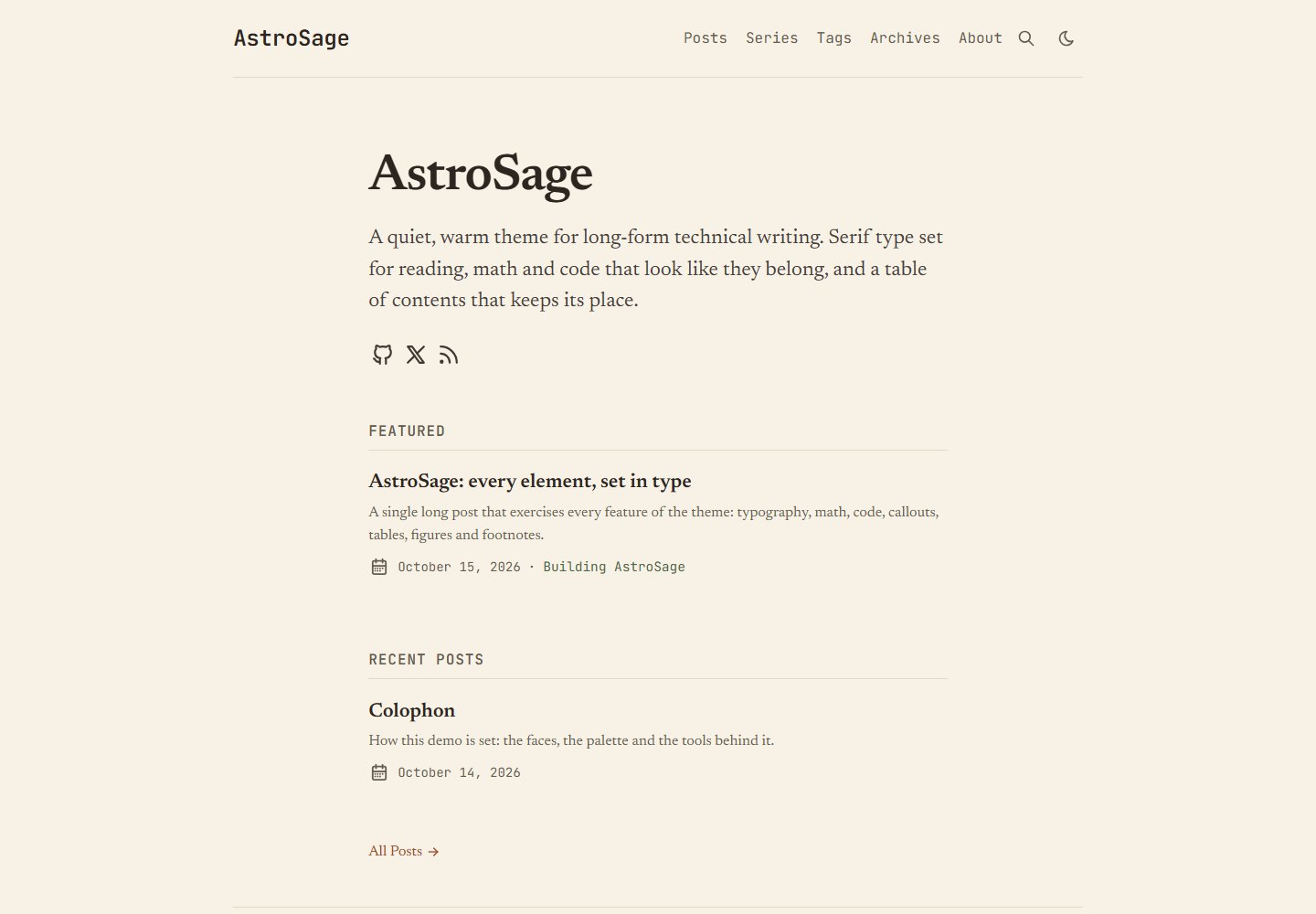
Typography centered on long-form reading: serif fonts such as Newsreader, 18.5px body text, a 66–71 character measure, self-hosted fonts with metric-matched fallbacks
AstroBlog
astro-sage — Astro Blog Template
By chintak
AstroSage is an Astro blog theme for long-form reading, centered on serif typography, warm paper colors, a fixed table of contents, build-time KaTeX math, and Expressive Code blocks, with optional GitHub login comments.
Explore the design
Compare the page layouts and mobile experience. Open any screenshot for a closer look.
Desktop homepage1 / 2
Desktop captureTop of page
Actual browser screenshot from the verified demo.
All pages & views 2
Screenshots show visual appearance; interactive behavior may differ.
Recorded 2026-10-16View source
What stands out
A quick read of the recorded project description.
A fixed table of contents on the right at ≥1280px that highlights the current section, collapsing on small screens into an expandable "On this page" block
Build-time rendering of KaTeX math and Mermaid and Excalidraw diagrams, without loading math JavaScript, and with KaTeX CSS loaded only on demand
Expressive Code blocks support titles, language labels, line numbers, diff lines, collapsible regions, terminal frames, and copy buttons
Optional utterances or giscus comments, loaded only when the reader scrolls to the comment area and following light/dark theme switching, requiring no server or database, and off by default
Support for wiki links, series posts, GitHub alerts and ::: directive callouts, task lists, blockquotes with BibTeX, Pagefind search, RSS, sitemap, and OG image generation
Template Details
AstroSage is a readability-first Astro blog theme. The README states that it is refactored from AstroPaper into an Astro integration, using Tailwind CSS, MDX, Expressive Code, KaTeX, and Pagefind. The repository is organized as a pnpm workspace, containing the theme package packages/astro-sage and a directly editable demo site apps/demo.
For typography, body text uses Newsreader (with Source Serif 4 or Literata as options), the interface uses JetBrains Mono, and fonts are self-hosted with metric-matched fallback fonts; body text is 18.5px with a line width limited to 66–71 characters. The color scheme is light warm paper and dark espresso, with all colors centralized as CSS variables in a single file.
Content capabilities include: a fixed table of contents on the right at ≥1280px that highlights the current section, collapsing to "On this page" on small screens; build-time rendering of $…$ and $$…$$ by KaTeX, without loading math JavaScript, and with KaTeX CSS loaded only on pages that use math; Expressive Code providing a Gruvbox theme, 1px border code blocks without padding, titles, language labels, line numbers, diff lines, collapsible regions, terminal frames, and copy buttons; Mermaid and Excalidraw diagrams rendered at build time by headless Chromium into inline SVG and cached to .sage-cache/diagrams/, which readers can expand into a zoom/pan viewer. There are also two callout styles—GitHub alerts and ::: directives—task lists, wiki links in the form [[slug]], series posts, collapsible blockquotes with BibTeX, Pagefind search, RSS, sitemap, OG image generation, reading time, archives, and tags.
Comments are optional, using utterances (GitHub Issues) or giscus (GitHub Discussions), loaded only when the reader scrolls to the comment area, following light/dark theme switching, requiring no server or database, and off by default. Sharing supports X, LinkedIn, Bluesky, Reddit, Hacker News, and email, plus copy link and the device native share sheet; after selecting text, readers can generate a share link with a text fragment or a 1200×630 quote card.
There are two ways to use it: create a new project from this template with pnpm create astro, or install it into an existing Astro site with pnpm add astro-sage and wire it up in astro.config.ts, src/content.config.ts, and sage.config.ts. The README requires Node 22.12+ and pnpm; the build output is a pure static site deployable to any static host; the demo site uses Cloudflare (pnpm deploy:demo and apps/demo/wrangler.jsonc). The README does not provide more deployment details beyond performance benchmarks, and does not document comment backends other than GitHub login comments.
AstroBlog
Is it right for your project?
Use Cases
- Building a personal technical blog focused on long-form reading that needs a fixed table of contents and comfortable typography
- Writing technical articles that include math formulas, code blocks, and Mermaid/Excalidraw diagrams
- Organizing multiple serialized articles as a series and generating a series index and "Part N of M" navigation
- Adding GitHub-based comments to a pure static site via utterances or giscus
- Installing the theme as an Astro integration into an existing Astro site and reusing its routes, components, and Markdown plugins
Suitable For
- Developers using Astro who want a complete blog theme and demo site
- Technical writers who need build-time math formulas, code highlighting, and diagram rendering
- Bloggers who prefer pure static deployment and hosting on any static host
- Site owners who want to offer comments via GitHub Issues or Discussions without maintaining a backend
Getting started & customization
Use these recorded setup notes alongside the repository instructions for your chosen version.
- 1
The README requires Node 22.12+ and pnpm; the template is organized as a pnpm workspace, containing the packages/astro-sage theme and the apps/demo demo site
- 2
To create a new project, run pnpm create astro@latest my-blog --template chintak/astro-sage; to integrate into an existing site, use pnpm add astro-sage and configure it in astro.config.ts, src/content.config.ts, and sage.config.ts
- 3
First edit the site URL, title, author, and social information in apps/demo/sage.config.ts, and replace the posts under apps/demo/src/content/posts/ and about.md
- 4
pnpm build outputs to apps/demo/dist/, a pure static site deployable to any static host; the demo site uses Cloudflare, configured in apps/demo/wrangler.jsonc, and that file can be deleted
- 5
Rendering Mermaid and Excalidraw diagrams requires headless Chromium (pnpm add -D playwright && npx playwright install chromium, or an installed Chrome); SVG is cached in .sage-cache/diagrams/, and the README recommends committing that directory to avoid depending on a browser or network during deployment
License & source material
Usage conditions & limitations
Free to use · keep license noticeThis listing covers the free version under the MIT license in the public repository; the free scope is the code of that version and does not mean external services or third-party assets are free.
Must comply with when using
- You may use, modify, commercialize, and distribute the code of this version for free.
- When distributing copies or substantial portions of the code, retain the original author's copyright notice and the complete MIT license notice.
- The code is provided as is; warranties and limitations of liability are governed by the original license and applicable law.
Additional costs & items to verify
- Demo images, fonts, icons, and other third-party assets must be checked against their respective licenses and cannot be judged solely by the code's MIT license.
- External services such as domains, hosting, databases, payments, or AI may incur separate charges.
- Requires Node 22.12+ and pnpm (the template is a pnpm workspace).
- Build-time rendering of Mermaid/Excalidraw diagrams requires headless Chromium (Playwright or an installed Chrome), and committing the .sage-cache/diagrams/ cache directory is recommended.
- Using utterances comments requires installing the utterances GitHub App on the repository.
- Using giscus comments requires enabling GitHub Discussions, installing the giscus GitHub App, and copying the configuration ID from giscus.app.
- Comment readers must sign in with a GitHub account.
- The demo site uses Cloudflare deployment (pnpm deploy:demo and apps/demo/wrangler.jsonc); that file can be deleted to switch to another static host.
- The project is based on AstroPaper and must retain its copyright attribution (© Sat Naing).
View Original Text Basis
Permission is hereby granted, free of charge
Original License Text
Requires Node 22.12+ and [pnpm](https://pnpm.io) (the template is a pnpm workspace).
Original README
Diagrams are rendered once, at build time, in headless Chromium (`pnpm add -D playwright && npx playwright install chromium`, or an installed Chrome). The SVG is cached in `.sage-cache/diagrams/`. **Commit that folder**, and deploy builds won't need a browser or network. Add `wide` or `full` (a code-fence flag or the image title) to break out of the column. See Breakout figures below. Readers can expand any diagram into a zoom/pan viewer. Design notes: [docs/decisions/005-code-and-diagrams.md](docs/decisions/005-code-and-diagrams.md).
Original README
// utterances: one GitHub issue per post. Install https://github.com/apps/utterances on the repo.
Original README
// giscus: one GitHub Discussion per post, with reactions. Enable Discussions,
Original README
Both load only when the comments section nears the viewport, follow the theme toggle, and accept `theme: { light, dark }` (a theme name, or for giscus a CSS URL). Readers sign in with GitHub. Set `comments: false` in a post's frontmatter to hide them there.
Original README
3. `pnpm build` writes the site to `apps/demo/dist/`. It's a plain static site: deploy it to any static host (Netlify, Vercel, GitHub Pages, Cloudflare, S3, your own server). The live demo happens to use Cloudflare (`pnpm deploy:demo`, configured in `apps/demo/wrangler.jsonc`); you can delete that file.
Original README
https://github.com/chintak/astro-sage/blob/main/LICENSEhttps://github.com/chintak/astro-sage/blob/main/README.mdMIT. See [LICENSE](LICENSE). Based on AstroPaper © Sat Naing.
Original README
Compiled by DeepSeek based on repository license and README ·2026-10-16. Results only cover the materials read; dependencies, images, fonts, and subsequent term changes are subject to their respective original texts.
Project checks & description sources
Template Information
- Source platforms
- GitHub
- Documentation and maintenance reference score
- More documented · 80 / 100
- Technologies
- Astro
- Website type
- Blog
How this score is calculated
Our heuristic uses license records (up to 30), a demo link (12), a preview (10), stars (15), recorded maintenance (15), description completeness (8), feature records (5) and classification data (5). It is not a code, security or performance test, or a Google score. A link does not establish tested functionality.
What to verify for this project
- Repository update recorded
- 2026-10-16
- Screenshot last checked
- 2026-10-16
A demo link is listed. Check it with your own content and viewport sizes; its presence does not confirm that forms, authentication or payments work.
The catalog identifies Astro as the primary stack. Check the actual dependency manifest and lockfile for versions and hosting requirements. These notes use recorded metadata, not a code audit or a deployment test.
Use a selection guide →How this description was prepared
AI-assisted description based on catalog records and repository material. Repository authors are not automatically the reviewers of this description.
Review declaration: codex-user-requested-batch-review-20261017 · 2026-10-16
Inspect the recorded source material
SHA-256: 6d8bdbb7ac071aaf2821e0d8b41679b015e38c9b52d5c39b4e97290bbfc2f8d8
2026-10-16T09:16:28.238Z
Source file / repository# AstroSage
A readability-first blog theme for [Astro](https://astro.build): serif type set for long reading, a warm paper palette, a table of contents that stays pinned beside the text, build-time KaTeX, Expressive Code, and optional GitHub/X sign-in comments on Cloudflare's free tier.
**Live demo:** [astro-sage.chintak.sh](https://astro-sage.chintak.sh) · **Every element on one page:** [the showcase post](https://astro-sage.chintak.sh/posts/showcase/) · **All features:** [FEATURES.md](FEATURES.md)
Built for Astro 7 with Tailwind CSS 4, MDX, Expressive Code, KaTeX and Pagefind. Forked from [AstroPaper](https://github.com/satnaing/astro-paper) by Sat Naing and rebuilt as an Astro integration.
| Light | Dark |
|---|---|
|  |  |
## Features
- **Typography:** Newsreader for reading (or Source Serif 4 / Literata) with JetBrains Mono for the UI, self-hosted with metric-matched fallbacks (CLS 0). 18.5px body, a column clamped to 66–71 characters per line, `text-wrap: pretty`, old-style figures, optional optical sizing.
- **Warm palette:** warm paper in light mode, espresso in dark. Every colour is a CSS variable in one file and is WCAG-checked.
- **Pinned TOC:** a right rail at ≥ 1280px that highlights the section you're reading. It becomes a collapsible "On this page" block on smaller screens.
- **Math:** `$…$` and `$$…$$` rendered by KaTeX at build time. No math JavaScript, and KaTeX CSS loads only on posts that use it.
- **Code:** Expressive Code with Gruvbox, "hairline" blocks (no fill, a 1px frame) that sit on the paper, titles, a language label on the frame (e.g. "TypeScript"), line numbers, high-contrast diff lines, collapsible sections, terminal frames and a copy button. Every token is ≥ 5.5:1 against the page.
- **Diagrams:** Mermaid and Excalidraw (inline JSON, share links or files), rendered at build time to inline SVG that matches the palette. Includes a zoom/pan viewer and a full-width option. See below.
- **Callouts:** GitHub alerts (`> [!NOTE]`) or directives (`:::warning[Title]`). Both produce the same markup.
- **Task lists:** round checkboxes; done items get a sage tick and are struck through.
- **Wiki-links:** `[[slug]]`, `[[slug|text]]`, `[[slug#Heading]]` and `[[#Heading]]` link posts by slug, path or title (case-insensitive), titled for you. A target that's missing, a draft or still scheduled renders as muted text and warns at build time. Inside a table, escape the pipe: `[[slug\|text]]`.
- **Link styles:** links to other sites get a small ↗ (and `rel="noopener"`); links within the site keep a plain underline.
- **Series:** `series: "Name"` in frontmatter gives an index page, a per-series page and "Part N of M" navigation.
- **Comments (optional):** [utterances](https://utteranc.es) (GitHub Issues) or [giscus](https://giscus.app) (GitHub Discussions), loaded only when readers scroll to them and kept in sync with the light/dark toggle. No server or database. Off by default.
- **Sharing:** X, LinkedIn, Bluesky, Reddit, Hacker News and email, plus copy-link and the native share sheet on supporting devices. Configure with `shareLinks` (`{url}` / `{title}` placeholders).
- **Quote sharing:** select any passage to share it with a link that scrolls to that passage (a text fragment), or as an image: a 1200×630 quote card drawn in the browser, handed to the native share sheet on phones or downloaded as `quote.png` on desktop. Nothing is pre-rendered and no server is involved; the code loads only after the first selection.
- **Citations:** a folded "Cite this post" block (not a heading, so it stays out of the TOC) with a text citation and copyable BibTeX on every post (`citation: { author: "Sheth, Chintak" }`; `cite: false` in frontmatter to hide).
- Pagefind search, RSS, sitemap, generated OG images, reading time, archives, tags with post counts, native view transitions.
- About 2.8 KB of gzipped JS on an article page. Lighthouse desktop 100/100/100/100.
## Get started
Requires Node 22.12+ and [pnpm](https://pnpm.io) (the template is a pnpm workspace).
```bash
pnpm create astro@latest my-blog --template chintak/astro-sage
cd my-blog
pnpm dev
```
This gives you the theme (`packages/astro-sage`) and a ready-to-edit site (`apps/demo`), the same code that runs the live demo. Make it yours:
1. Edit `apps/demo/sage.config.ts`: site URL, title, author, socials.
2. Replace the posts in `apps/demo/src/content/posts/` and the page in `apps/demo/src/content/pages/about.md`.
3. `pnpm build` writes the site to `apps/demo/dist/`. It's a plain static site: deploy it to any static host (Netlify, Vercel, GitHub Pages, Cloudflare, S3, your own server). The live demo happens to use Cloudflare (`pnpm deploy:demo`, configured in `apps/demo/wrangler.jsonc`); you can delete that file.
### Add it to an existing Astro site
Install the theme from npm (any package manager works):
```bash
pnpm add astro-sage
```
Then wire it up:
```ts
// astro.config.ts
import { defineConfig } from "astro/config";
import astroSage from "astro-sage";
import sageConfig from "./sage.config";
export default defineConfig({
site: sageConfig.site.url,
integrations: [astroSage(sageConfig)],
});
```
```ts
// src/content.config.ts
import { defineSageCollections } from "astro-sage/content";
import config from "../sage.config";
export const collections = defineSageCollections({ author: config.site.author });
```
```ts
// sage.config.ts
import { defineSageConfig } from "astro-sage";
export default defineSageConfig({
site: {
url: "https://example.com/",
title: "My notes",
description: "Things I learned.",
author: "Ada Lovelace",
},
typography: { serif: "newsreader" }, // or "source-serif-4" | "literata"
home: { intro: "A short paragraph shown on the home page." },
});
```
Every option is listed in [FEATURES.md](FEATURES.md#configuration-sageconfigts).
Write posts in `src/content/posts/` (`.md` or `.mdx`; a folder with `index.mdx` works too) and pages in `src/content/pages/` (`about.md`). The theme injects every route, so your site needs no page files.
### Frontmatter
```yaml
title: "Attention is all you need, annotated"
description: "One-line summary used in lists, RSS and meta tags."
pubDatetime: 2026-10-15T09:00:00Z
tags: ["ml", "transformers"]
series: "Reading papers" # optional
featured: true # optional
toc: true # default true
math: true # default true; set false to skip KaTeX CSS
comments: true # default true (when comments are configured)
cite: true # default true: show the "Cite this post" block
```
## Diagrams
````md
```mermaid title="How a post is built"
flowchart LR
md[Markdown] --> html[HTML]
```
```excalidraw title="Pasted from Excalidraw"
{ "type": "excalidraw/clipboard", "elements": [ ... ] }
```


````
Diagrams are rendered once, at build time, in headless Chromium (`pnpm add -D playwright && npx playwright install chromium`, or an installed Chrome). The SVG is cached in `.sage-cache/diagrams/`. **Commit that folder**, and deploy builds won't need a browser or network. Add `wide` or `full` (a code-fence flag or the image title) to break out of the column. See Breakout figures below. Readers can expand any diagram into a zoom/pan viewer. Design notes: [docs/decisions/005-code-and-diagrams.md](docs/decisions/005-code-and-diagrams.md).
## Breakout figures
Images, diagrams and figures come in three sizes, written the same way everywhere:
| Size | Width | Markdown image / Excalidraw | Diagram fence | Component |
|---|---|---|---|---|
| column | the reading column | `` | ` ```mermaid ` | `<Figure src={x} alt="…" />` |
| wide | column + TOC rail (up to 64rem without the rail) | `` | ` ```mermaid wide ` | `<Figure … size="wide" />` |
| full | the whole viewport, minus the page gutter on each side | `` | ` ```mermaid full ` | `<Figure … size="full" />` |
Captions are centred under the figure. The pinned TOC fades out while a `wide` or `full` figure passes beneath it. Markdown images use their alt text as the caption.
## Comments
AstroSage builds a fully static site, so comments come from a GitHub-backed widget that runs in the reader's browser. Pick one in `sage.config.ts`:
```ts
// utterances: one GitHub issue per post. Install https://github.com/apps/utterances on the repo.
comments: { provider: "utterances", repo: "you/your-repo", label: "comments" },
// giscus: one GitHub Discussion per post, with reactions. Enable Discussions,
// install https://github.com/apps/giscus, and copy the ids from https://giscus.app.
comments: {
provider: "giscus",
repo: "you/your-repo",
repoId: "R_…",
category: "Comments",
categoryId: "DIC_…",
},
```
Both load only when the comments section nears the viewport, follow the theme toggle, and accept `theme: { light, dark }` (a theme name, or for giscus a CSS URL). Readers sign in with GitHub. Set `comments: false` in a post's frontmatter to hide them there.
## Developing the theme
```bash
pnpm install
pnpm dev # demo site at http://localhost:4321, showcase at /posts/showcase/
pnpm build
pnpm test # Playwright + axe, desktop and mobile
pnpm lint && pnpm format:check
```
The showcase post (`apps/demo/src/content/posts/showcase/index.mdx`) exercises every feature and is what the tests run against.
## Upgrading from AstroPaper
| AstroPaper | AstroSage |
|---|---|
| `astro-paper.config.ts` | `sage.config.ts` with `defineSageConfig` (same `site`, `posts`, `features`, `socials`, `shareLinks`, plus `typography`, `home`, `comments`) |
| `src/pages/*` in your repo | injected by the integration |
| `## Table of contents` heading | automatic right-rail TOC (`toc: false` to hide) |
| rehype-callouts syntax | GitHub alerts or `:::type[Title]` |
| Shiki transformers (`// [!code ++]`) | Expressive Code meta: `ins={4}`, `del={3}`, `{1-2}`, `"word"`, `collapse={1-4}` |
## Versioning
AstroSage follows [SemVer](https://semver.org) and is published to npm as [`astro-sage`](https://www.npmjs.com/package/astro-sage); upgrade with `pnpm update astro-sage`. Each release is also a git tag (`[email protected]`) with notes in [`packages/astro-sage/CHANGELOG.md`](packages/astro-sage/CHANGELOG.md) and on [GitHub Releases](https://github.com/chintak/astro-sage/releases). Changes are recorded with [Changesets](.changeset/README.md).
## Repository layout
```
packages/astro-sage/ the theme (integration, routes, components, styles, markdown plugins, comments)
apps/demo/ demo site and showcase post; Playwright tests
docs/decisions/ architecture decision records
FEATURES.md every feature, option and frontmatter field, with examples
AGENTS.md conventions for contributors and coding agents
```
## License
MIT. See [LICENSE](LICENSE). Based on AstroPaper © Sat Naing.
Explore similar templates
Compare previews and descriptions within the same stack and category.

astrowind
AstroWind is a free, open-source Astro starter theme using Astro and Tailwind CSS, released under the MIT license.
Astro · Blog

astro-paper
An Astro blog theme with Markdown/MDX content, Tailwind styling and Pagefind search. Search is a feature of the blog, rather than a separate tool-site product.
Astro · Blog

fuwari
Fuwari is a static blog template built with Astro and Tailwind CSS for personal blogs. It manages posts as Markdown files in src/content/posts/, with frontmatter for title, date, description, cover, tags, categories, draft status, and language.
Astro · Blog

Firefly
Firefly is a clean personal blog theme forked from Astro and Fuwari, offering four background modes, single/double sidebar and list/grid layouts, Pagefind client-side full-text search, and a six-language UI.
Astro · Blog

astro-theme-cactus
An Astro blog and notes starter with Markdown/MDX content, Tailwind styling and Pagefind search. Its main purpose is publishing posts and notes.
Astro · Blog

astrofy
Astrofy is a free and open-source personal portfolio website template built with Astro and TailwindCSS, with built-in blog, CV timeline, project showcase, store, and RSS feed modules.
Astro · Portfolio