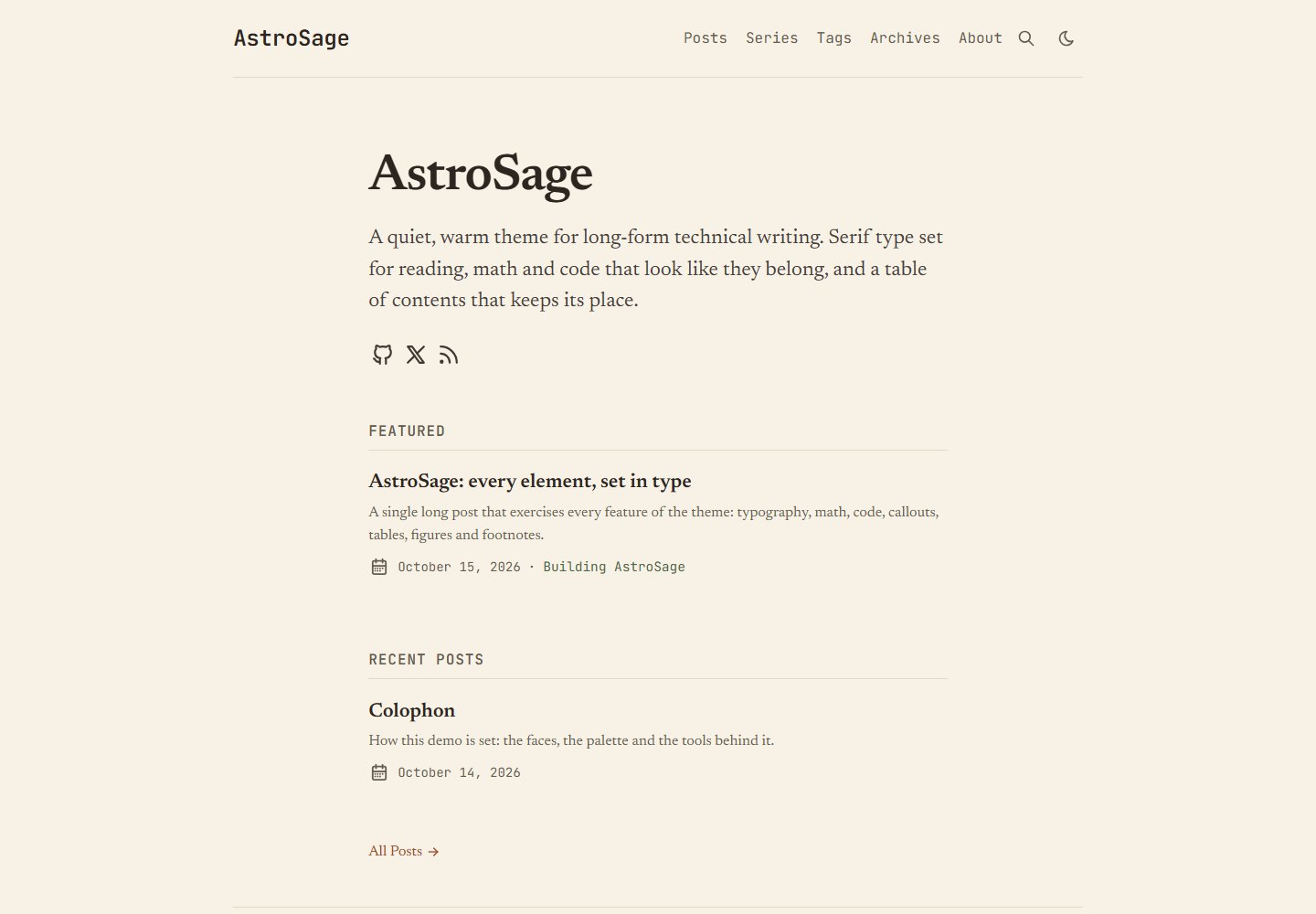
以长文阅读为中心的排版:Newsreader 等衬线字体、18.5px 正文、66–71 字符行宽,字体自托管并带度量匹配回退
Astro博客
astro-sage — Astro 博客模板
作者 chintak
AstroSage 是一个面向长文阅读的 Astro 博客主题,以衬线排版、暖色纸张配色、固定目录、构建期 KaTeX 数学公式和 Expressive Code 代码块为核心,并提供可选的 GitHub 登录评论。
看看你的网站会是什么样
浏览真实页面截图,比较内容排版与手机效果。点击下方缩略图切换,放大查看整页细节。
全部页面与视图 2
截图用于了解视觉与布局,交互效果请以实际项目为准。
采集于 2026-10-16查看来源
值得关注的模板亮点
从已有项目资料中,快速了解它的特点。
≥1280px 时右侧固定目录并高亮当前章节,小屏折叠为可展开的 “On this page” 区块
构建期渲染 KaTeX 数学公式与 Mermaid、Excalidraw 图,不加载数学 JavaScript,KaTeX CSS 仅按需加载
Expressive Code 代码块支持标题、语言标签、行号、diff 行、可折叠区域、终端框与复制按钮
可选 utterances 或 giscus 评论,滚动到评论区才加载并跟随明暗主题,无需服务器或数据库,默认关闭
支持 wiki 链接、系列文章、GitHub alerts 与 ::: 指令 callout、任务列表、引用块与 BibTeX、Pagefind 搜索、RSS、sitemap 和 OG 图片生成
模板详细介绍
AstroSage 是一个以可读性为优先的 Astro 博客主题,README 说明它基于 AstroPaper 重构为 Astro 集成(integration),使用 Tailwind CSS、MDX、Expressive Code、KaTeX 和 Pagefind,仓库以 pnpm workspace 组织,包含主题包 packages/astro-sage 与可直接编辑的示例站点 apps/demo。
排版方面,正文使用 Newsreader(也可选 Source Serif 4 或 Literata),界面使用 JetBrains Mono,字体自托管并配有度量匹配的回退字体;正文 18.5px,行宽限制在 66–71 个字符。配色为浅色暖纸色、深色 espresso,所有颜色以 CSS 变量集中在一个文件中。
内容能力包括:≥1280px 时右侧固定目录并高亮当前章节,小屏折叠为“On this page”;构建期由 KaTeX 渲染 $…$ 与 $$…$$,不加载数学 JavaScript,KaTeX CSS 仅在使用数学的页面加载;Expressive Code 提供 Gruvbox 主题、无填充的 1px 边框代码块、标题、语言标签、行号、diff 行、可折叠区域、终端框与复制按钮;Mermaid 和 Excalidraw 图在构建期由无头 Chromium 渲染为内联 SVG,并缓存到 .sage-cache/diagrams/,读者可展开为缩放/平移查看器。此外还有 GitHub alerts 与 ::: 指令两种 callout 写法、任务列表、[[slug]] 形式的 wiki 链接、系列文章(series)、引用块折叠展示与 BibTeX、Pagefind 搜索、RSS、sitemap、OG 图片生成、阅读时间、归档和标签。
评论为可选功能,使用 utterances(GitHub Issues)或 giscus(GitHub Discussions),在读者滚动到评论区时才加载,并跟随明暗主题切换,无需服务器或数据库,默认关闭。分享支持 X、LinkedIn、Bluesky、Reddit、Hacker News 和邮件,以及复制链接和设备原生分享面板;选中文字后可生成带文本片段链接的分享或 1200×630 引用卡片。
使用方式有两种:用 pnpm create astro 以该模板创建新项目,或通过 pnpm add astro-sage 安装到现有 Astro 站点,并在 astro.config.ts、src/content.config.ts 和 sage.config.ts 中接入。README 要求 Node 22.12+ 和 pnpm,构建产物为纯静态站点,可部署到任意静态托管;示例站点使用 Cloudflare(pnpm deploy:demo 与 apps/demo/wrangler.jsonc)。README 未提供关于性能基准之外的更多部署细节,也未说明除 GitHub 登录评论外的其他评论后端。
Astro博客
适合你的项目吗?
适用场景
- 搭建以长文阅读为主、需要固定目录与舒适排版的个人技术博客
- 撰写包含数学公式、代码块和 Mermaid/Excalidraw 图表的技术文章
- 用系列(series)形式组织多篇连载文章并生成系列索引与 “Part N of M” 导航
- 在纯静态站点上通过 utterances 或 giscus 接入基于 GitHub 的评论
- 把该主题作为 Astro 集成安装到已有 Astro 站点,复用其路由、组件与 Markdown 插件
适合人群
- 使用 Astro 并希望获得完整博客主题与示例站点的开发者
- 需要构建期数学公式、代码高亮和图表渲染的技术写作者
- 偏好纯静态部署、可托管到任意静态主机的博客作者
- 希望通过 GitHub Issues 或 Discussions 提供评论、且不想维护后端的站点所有者
上手与定制指南
结合仓库当前版本的说明,按下面的资料检查内容、配置与运行要求。
- 1
README 要求 Node 22.12+ 和 pnpm,模板以 pnpm workspace 组织,包含 packages/astro-sage 主题与 apps/demo 示例站点
- 2
新建项目可运行 pnpm create astro@latest my-blog --template chintak/astro-sage;接入已有站点则用 pnpm add astro-sage,并在 astro.config.ts、src/content.config.ts 和 sage.config.ts 中配置
- 3
需要先编辑 apps/demo/sage.config.ts 中的站点 URL、标题、作者与社交信息,并替换 apps/demo/src/content/posts/ 下的文章和 about.md
- 4
pnpm build 输出到 apps/demo/dist/,为纯静态站点,可部署到任意静态主机;示例站点使用 Cloudflare,配置在 apps/demo/wrangler.jsonc,可删除该文件
- 5
渲染 Mermaid 与 Excalidraw 图需要无头 Chromium(pnpm add -D playwright && npx playwright install chromium 或已安装的 Chrome),SVG 缓存于 .sage-cache/diagrams/,README 建议提交该目录以避免部署时依赖浏览器或网络
授权与来源资料
使用条件与限制
免费使用 · 保留许可声明本次收录的是公开仓库中采用 MIT 许可的免费版本;免费范围为该版本代码,不代表外部服务或第三方素材免费。
使用时需要遵守
- 允许免费使用、修改、商用和分发该版本代码。
- 分发代码副本或实质性部分时,保留原作者版权声明和完整 MIT 许可声明。
- 代码按现状提供;担保与责任限制以原许可证及适用法律为准。
额外费用与待核对事项
- 演示图片、字体、图标及其他第三方素材需按各自许可核对,不能仅凭代码的 MIT 许可判断。
- 域名、托管、数据库、支付或 AI 等外部服务可能另外收费。
- 需要 Node 22.12+ 与 pnpm(模板为 pnpm workspace)。
- 构建期渲染 Mermaid/Excalidraw 图需要无头 Chromium(Playwright 或已安装的 Chrome),并建议提交 .sage-cache/diagrams/ 缓存目录。
- 使用 utterances 评论需在仓库安装 utterances GitHub App。
- 使用 giscus 评论需启用 GitHub Discussions、安装 giscus GitHub App 并从 giscus.app 复制配置 ID。
- 评论读者需使用 GitHub 账号登录。
- 示例站点使用 Cloudflare 部署(pnpm deploy:demo 与 apps/demo/wrangler.jsonc),可删除该文件改用其他静态托管。
- 项目基于 AstroPaper,需保留其版权归属(© Sat Naing)。
查看原文依据
Permission is hereby granted, free of charge
许可证原文
Requires Node 22.12+ and [pnpm](https://pnpm.io) (the template is a pnpm workspace).
README 原文
Diagrams are rendered once, at build time, in headless Chromium (`pnpm add -D playwright && npx playwright install chromium`, or an installed Chrome). The SVG is cached in `.sage-cache/diagrams/`. **Commit that folder**, and deploy builds won't need a browser or network. Add `wide` or `full` (a code-fence flag or the image title) to break out of the column. See Breakout figures below. Readers can expand any diagram into a zoom/pan viewer. Design notes: [docs/decisions/005-code-and-diagrams.md](docs/decisions/005-code-and-diagrams.md).
README 原文
// utterances: one GitHub issue per post. Install https://github.com/apps/utterances on the repo.
README 原文
// giscus: one GitHub Discussion per post, with reactions. Enable Discussions,
README 原文
Both load only when the comments section nears the viewport, follow the theme toggle, and accept `theme: { light, dark }` (a theme name, or for giscus a CSS URL). Readers sign in with GitHub. Set `comments: false` in a post's frontmatter to hide them there.
README 原文
3. `pnpm build` writes the site to `apps/demo/dist/`. It's a plain static site: deploy it to any static host (Netlify, Vercel, GitHub Pages, Cloudflare, S3, your own server). The live demo happens to use Cloudflare (`pnpm deploy:demo`, configured in `apps/demo/wrangler.jsonc`); you can delete that file.
README 原文
https://github.com/chintak/astro-sage/blob/main/LICENSEhttps://github.com/chintak/astro-sage/blob/main/README.mdMIT. See [LICENSE](LICENSE). Based on AstroPaper © Sat Naing.
README 原文
DeepSeek 根据仓库许可证和 README 整理 ·2026-10-16。结果仅覆盖已读取资料,依赖、图片、字体及后续条款变更以各自原文为准。
项目核对记录与介绍依据
模板资料
- 来源平台
- GitHub
- 资料与维护参考分
- 资料较完整 · 80 / 100
- 技术栈
- Astro
- 网站类型
- 博客
这个分数如何计算
本站按许可资料(最高30分)、演示链接(12分)、预览图(10分)、Star数(15分)、记录的维护时间(15分)、描述完整度(8分)、功能记录(5分)和分类资料(5分)计算。它不是代码、安全或性能测试,也不是 Google 评分;有链接不代表已实测可用。
这个项目需要核对什么
- 记录的仓库更新时间
- 2026-10-16
- 截图检查日期
- 2026-10-16
已收录演示链接。请用你的内容与屏幕尺寸检查;有演示不代表表单、认证或支付已经可用。
目录记录的主要技术栈是 Astro。请通过依赖清单和锁文件核对实际版本与托管要求。这些说明基于收录资料,不代表代码审计或部署实测。
查看具体选型方法 →介绍的制作与核对状态
介绍由 AI 辅助整理目录与仓库资料。仓库作者不等于这篇介绍的审核者。
审核声明: codex-user-requested-batch-review-20261017 · 2026-10-16
查看当时使用的来源资料
SHA-256: 6d8bdbb7ac071aaf2821e0d8b41679b015e38c9b52d5c39b4e97290bbfc2f8d8
2026-10-16T09:16:28.238Z
来源文件 / 仓库# AstroSage
A readability-first blog theme for [Astro](https://astro.build): serif type set for long reading, a warm paper palette, a table of contents that stays pinned beside the text, build-time KaTeX, Expressive Code, and optional GitHub/X sign-in comments on Cloudflare's free tier.
**Live demo:** [astro-sage.chintak.sh](https://astro-sage.chintak.sh) · **Every element on one page:** [the showcase post](https://astro-sage.chintak.sh/posts/showcase/) · **All features:** [FEATURES.md](FEATURES.md)
Built for Astro 7 with Tailwind CSS 4, MDX, Expressive Code, KaTeX and Pagefind. Forked from [AstroPaper](https://github.com/satnaing/astro-paper) by Sat Naing and rebuilt as an Astro integration.
| Light | Dark |
|---|---|
|  |  |
## Features
- **Typography:** Newsreader for reading (or Source Serif 4 / Literata) with JetBrains Mono for the UI, self-hosted with metric-matched fallbacks (CLS 0). 18.5px body, a column clamped to 66–71 characters per line, `text-wrap: pretty`, old-style figures, optional optical sizing.
- **Warm palette:** warm paper in light mode, espresso in dark. Every colour is a CSS variable in one file and is WCAG-checked.
- **Pinned TOC:** a right rail at ≥ 1280px that highlights the section you're reading. It becomes a collapsible "On this page" block on smaller screens.
- **Math:** `$…$` and `$$…$$` rendered by KaTeX at build time. No math JavaScript, and KaTeX CSS loads only on posts that use it.
- **Code:** Expressive Code with Gruvbox, "hairline" blocks (no fill, a 1px frame) that sit on the paper, titles, a language label on the frame (e.g. "TypeScript"), line numbers, high-contrast diff lines, collapsible sections, terminal frames and a copy button. Every token is ≥ 5.5:1 against the page.
- **Diagrams:** Mermaid and Excalidraw (inline JSON, share links or files), rendered at build time to inline SVG that matches the palette. Includes a zoom/pan viewer and a full-width option. See below.
- **Callouts:** GitHub alerts (`> [!NOTE]`) or directives (`:::warning[Title]`). Both produce the same markup.
- **Task lists:** round checkboxes; done items get a sage tick and are struck through.
- **Wiki-links:** `[[slug]]`, `[[slug|text]]`, `[[slug#Heading]]` and `[[#Heading]]` link posts by slug, path or title (case-insensitive), titled for you. A target that's missing, a draft or still scheduled renders as muted text and warns at build time. Inside a table, escape the pipe: `[[slug\|text]]`.
- **Link styles:** links to other sites get a small ↗ (and `rel="noopener"`); links within the site keep a plain underline.
- **Series:** `series: "Name"` in frontmatter gives an index page, a per-series page and "Part N of M" navigation.
- **Comments (optional):** [utterances](https://utteranc.es) (GitHub Issues) or [giscus](https://giscus.app) (GitHub Discussions), loaded only when readers scroll to them and kept in sync with the light/dark toggle. No server or database. Off by default.
- **Sharing:** X, LinkedIn, Bluesky, Reddit, Hacker News and email, plus copy-link and the native share sheet on supporting devices. Configure with `shareLinks` (`{url}` / `{title}` placeholders).
- **Quote sharing:** select any passage to share it with a link that scrolls to that passage (a text fragment), or as an image: a 1200×630 quote card drawn in the browser, handed to the native share sheet on phones or downloaded as `quote.png` on desktop. Nothing is pre-rendered and no server is involved; the code loads only after the first selection.
- **Citations:** a folded "Cite this post" block (not a heading, so it stays out of the TOC) with a text citation and copyable BibTeX on every post (`citation: { author: "Sheth, Chintak" }`; `cite: false` in frontmatter to hide).
- Pagefind search, RSS, sitemap, generated OG images, reading time, archives, tags with post counts, native view transitions.
- About 2.8 KB of gzipped JS on an article page. Lighthouse desktop 100/100/100/100.
## Get started
Requires Node 22.12+ and [pnpm](https://pnpm.io) (the template is a pnpm workspace).
```bash
pnpm create astro@latest my-blog --template chintak/astro-sage
cd my-blog
pnpm dev
```
This gives you the theme (`packages/astro-sage`) and a ready-to-edit site (`apps/demo`), the same code that runs the live demo. Make it yours:
1. Edit `apps/demo/sage.config.ts`: site URL, title, author, socials.
2. Replace the posts in `apps/demo/src/content/posts/` and the page in `apps/demo/src/content/pages/about.md`.
3. `pnpm build` writes the site to `apps/demo/dist/`. It's a plain static site: deploy it to any static host (Netlify, Vercel, GitHub Pages, Cloudflare, S3, your own server). The live demo happens to use Cloudflare (`pnpm deploy:demo`, configured in `apps/demo/wrangler.jsonc`); you can delete that file.
### Add it to an existing Astro site
Install the theme from npm (any package manager works):
```bash
pnpm add astro-sage
```
Then wire it up:
```ts
// astro.config.ts
import { defineConfig } from "astro/config";
import astroSage from "astro-sage";
import sageConfig from "./sage.config";
export default defineConfig({
site: sageConfig.site.url,
integrations: [astroSage(sageConfig)],
});
```
```ts
// src/content.config.ts
import { defineSageCollections } from "astro-sage/content";
import config from "../sage.config";
export const collections = defineSageCollections({ author: config.site.author });
```
```ts
// sage.config.ts
import { defineSageConfig } from "astro-sage";
export default defineSageConfig({
site: {
url: "https://example.com/",
title: "My notes",
description: "Things I learned.",
author: "Ada Lovelace",
},
typography: { serif: "newsreader" }, // or "source-serif-4" | "literata"
home: { intro: "A short paragraph shown on the home page." },
});
```
Every option is listed in [FEATURES.md](FEATURES.md#configuration-sageconfigts).
Write posts in `src/content/posts/` (`.md` or `.mdx`; a folder with `index.mdx` works too) and pages in `src/content/pages/` (`about.md`). The theme injects every route, so your site needs no page files.
### Frontmatter
```yaml
title: "Attention is all you need, annotated"
description: "One-line summary used in lists, RSS and meta tags."
pubDatetime: 2026-10-15T09:00:00Z
tags: ["ml", "transformers"]
series: "Reading papers" # optional
featured: true # optional
toc: true # default true
math: true # default true; set false to skip KaTeX CSS
comments: true # default true (when comments are configured)
cite: true # default true: show the "Cite this post" block
```
## Diagrams
````md
```mermaid title="How a post is built"
flowchart LR
md[Markdown] --> html[HTML]
```
```excalidraw title="Pasted from Excalidraw"
{ "type": "excalidraw/clipboard", "elements": [ ... ] }
```


````
Diagrams are rendered once, at build time, in headless Chromium (`pnpm add -D playwright && npx playwright install chromium`, or an installed Chrome). The SVG is cached in `.sage-cache/diagrams/`. **Commit that folder**, and deploy builds won't need a browser or network. Add `wide` or `full` (a code-fence flag or the image title) to break out of the column. See Breakout figures below. Readers can expand any diagram into a zoom/pan viewer. Design notes: [docs/decisions/005-code-and-diagrams.md](docs/decisions/005-code-and-diagrams.md).
## Breakout figures
Images, diagrams and figures come in three sizes, written the same way everywhere:
| Size | Width | Markdown image / Excalidraw | Diagram fence | Component |
|---|---|---|---|---|
| column | the reading column | `` | ` ```mermaid ` | `<Figure src={x} alt="…" />` |
| wide | column + TOC rail (up to 64rem without the rail) | `` | ` ```mermaid wide ` | `<Figure … size="wide" />` |
| full | the whole viewport, minus the page gutter on each side | `` | ` ```mermaid full ` | `<Figure … size="full" />` |
Captions are centred under the figure. The pinned TOC fades out while a `wide` or `full` figure passes beneath it. Markdown images use their alt text as the caption.
## Comments
AstroSage builds a fully static site, so comments come from a GitHub-backed widget that runs in the reader's browser. Pick one in `sage.config.ts`:
```ts
// utterances: one GitHub issue per post. Install https://github.com/apps/utterances on the repo.
comments: { provider: "utterances", repo: "you/your-repo", label: "comments" },
// giscus: one GitHub Discussion per post, with reactions. Enable Discussions,
// install https://github.com/apps/giscus, and copy the ids from https://giscus.app.
comments: {
provider: "giscus",
repo: "you/your-repo",
repoId: "R_…",
category: "Comments",
categoryId: "DIC_…",
},
```
Both load only when the comments section nears the viewport, follow the theme toggle, and accept `theme: { light, dark }` (a theme name, or for giscus a CSS URL). Readers sign in with GitHub. Set `comments: false` in a post's frontmatter to hide them there.
## Developing the theme
```bash
pnpm install
pnpm dev # demo site at http://localhost:4321, showcase at /posts/showcase/
pnpm build
pnpm test # Playwright + axe, desktop and mobile
pnpm lint && pnpm format:check
```
The showcase post (`apps/demo/src/content/posts/showcase/index.mdx`) exercises every feature and is what the tests run against.
## Upgrading from AstroPaper
| AstroPaper | AstroSage |
|---|---|
| `astro-paper.config.ts` | `sage.config.ts` with `defineSageConfig` (same `site`, `posts`, `features`, `socials`, `shareLinks`, plus `typography`, `home`, `comments`) |
| `src/pages/*` in your repo | injected by the integration |
| `## Table of contents` heading | automatic right-rail TOC (`toc: false` to hide) |
| rehype-callouts syntax | GitHub alerts or `:::type[Title]` |
| Shiki transformers (`// [!code ++]`) | Expressive Code meta: `ins={4}`, `del={3}`, `{1-2}`, `"word"`, `collapse={1-4}` |
## Versioning
AstroSage follows [SemVer](https://semver.org) and is published to npm as [`astro-sage`](https://www.npmjs.com/package/astro-sage); upgrade with `pnpm update astro-sage`. Each release is also a git tag (`[email protected]`) with notes in [`packages/astro-sage/CHANGELOG.md`](packages/astro-sage/CHANGELOG.md) and on [GitHub Releases](https://github.com/chintak/astro-sage/releases). Changes are recorded with [Changesets](.changeset/README.md).
## Repository layout
```
packages/astro-sage/ the theme (integration, routes, components, styles, markdown plugins, comments)
apps/demo/ demo site and showcase post; Playwright tests
docs/decisions/ architecture decision records
FEATURES.md every feature, option and frontmatter field, with examples
AGENTS.md conventions for contributors and coding agents
```
## License
MIT. See [LICENSE](LICENSE). Based on AstroPaper © Sat Naing.
看看同类模板
对比同技术栈与用途的模板,找到更适合的视觉与内容结构。

astrowind
⭕️ AstroWind: A free template using Astro v7 and Tailwind CSS v4. Astro starter theme.
Astro · 博客

astro-paper
基于 Astro 的博客主题,使用 Markdown/MDX 内容、Tailwind 样式和 Pagefind 搜索。搜索属于博客功能,不代表独立工具站产品。
Astro · 博客

fuwari
✨A static blog template built with Astro.
Astro · 博客

Firefly
Firefly 是一款基于 Astro 的静态博客主题,由 CuteLeaf 在 saicaca 的 Fuwari 模板基础上二次开发,主打清新美观的视觉风格。
Astro · 博客

astro-theme-cactus
面向博客与笔记发布的 Astro 启动模板,支持 Markdown/MDX 内容、Tailwind 样式与 Pagefind 搜索,主要用途是发布文章和笔记。
Astro · 博客

astrofy
Astrofy is a free and open-source template for your Personal Portfolio Website built with Astro and TailwindCS…
Astro · 作品集