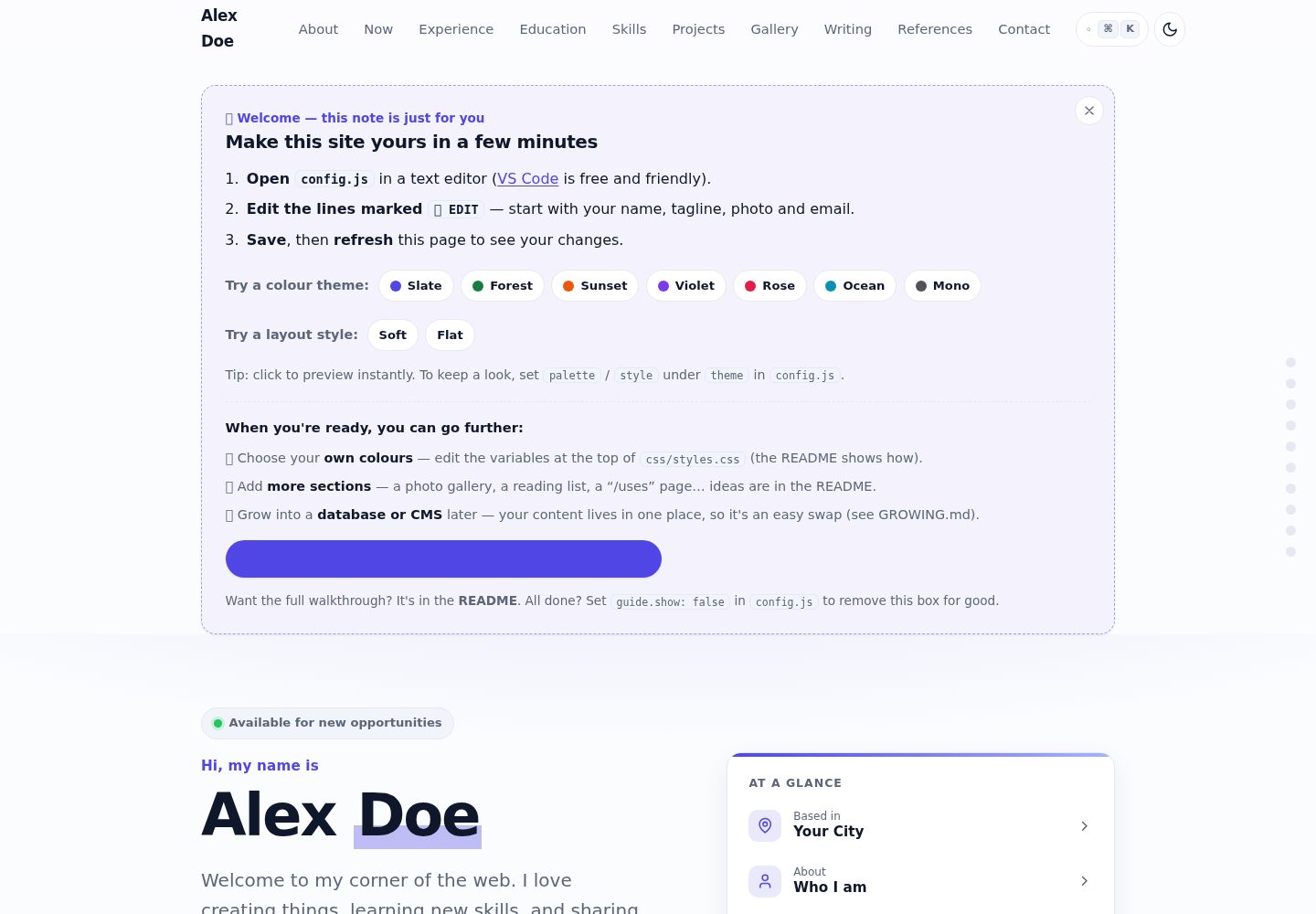
All content is edited in a single config.js file; refresh the page to see updates after changes
HTMLPortfolioStarter
portfolio-starter-kit — HTML Portfolio Template
By Christian-Y-Wu
A static personal portfolio website template built with pure HTML/CSS/JavaScript. All content is edited in config.js, no build tools required, and it can be deployed to GitHub Pages.
Explore the design
Compare the page layouts and mobile experience. Open any screenshot for a closer look.
Desktop homepage1 / 2
Desktop captureTop of page
Actual screenshot captured by the server browser.
All pages & views 2
Screenshots show visual appearance; interactive behavior may differ.
Recorded 2026-10-13View source
What stands out
A quick read of the recorded project description.
Pure HTML/CSS/JavaScript, no build step, no dependencies to install
Offers 7 color schemes (slate, forest, sunset, violet, rose, ocean, mono) and 2 layout styles (soft, flat)
Built-in command palette supporting Ctrl/⌘+K or / shortcuts to jump to sections, toggle light/dark mode, change accent color, and more
Project tags automatically generate clickable filter chips
Includes sections such as hero, about, now, experience, education, skills, projects, writing, references, and contact
Template Details
This template is aimed at individuals who need to showcase projects, experience, and a resume. The README states that no coding experience or build tools are required, and all editable content is centralized in a single config.js file; after making changes, refreshing the page shows the updates. The template includes sections such as hero, about, now, experience, education, skills, projects, writing, references, and contact, and offers 7 color schemes and 2 layout styles that can be switched by changing one word. Project tags automatically generate filter chips, and the command palette (Ctrl/⌘+K or /) can jump to sections, toggle light/dark mode, change the accent color, get the CV, or copy the email. The README also mentions optional image galleries, Highlights counters, and custom embedded content. The template includes a "Start here" guide box that can be removed with one line of code once completed.
For running, the README provides three local preview methods: double-click index.html directly, use a local server (VS Code Live Server, npx serve, or python -m http.server), or have an AI assistant start the preview. For deployment, the README explains in detail how to push the repository to GitHub via GitHub Desktop and enable GitHub Pages by selecting the main branch and / (root) directory in the repository Settings → Pages. The README also provides optional steps for a custom domain, involving purchasing a domain, configuring CNAME and DNS records.
The README does not provide specific framework version numbers, nor does it describe backend, database, or server-side functionality; the template is described as a static site. The README mentions GROWING.md as a reference for advanced upgrades, but its contents are not expanded in this material.
HTMLPortfolioStarter
Is it right for your project?
Use Cases
- Individual developers or designers building a portfolio website to showcase projects and experience
- Students or career changers creating an online resume with education, skills, and project experience
- Writers or creators showcasing articles, writing samples, and a personal bio
- Users who want to host a static personal website for free on GitHub Pages
Suitable For
- People with no programming experience who want to customize a website by editing a single configuration file
- Users who need to quickly build a personal portfolio or resume page
- Developers who prefer static sites and do not want to introduce build tools or backend services
- Individual users who want to deploy their website for free on GitHub Pages
Getting started & customization
Use these recorded setup notes alongside the repository instructions for your chosen version.
- 1
Get the files by clicking "Use this template" or "Download ZIP" on the GitHub page
- 2
Open config.js in a text editor and follow the README's 5-minute checklist to modify name, tagline, photo, projects, email, and color scheme
- 3
For local preview, double-click index.html, or use a local server such as VS Code Live Server, npx serve, or python -m http.server
- 4
To deploy to GitHub Pages: push the repository to GitHub, then select the main branch and / (root) directory in Settings → Pages
- 5
After going live, update site.url in config.js and the URLs in robots.txt and sitemap.xml
License & source material
Usage conditions & limitations
Free to use · keep license noticeThis entry covers the free version under the MIT license in the public repository; the free scope is the code of this version and does not mean external services or third-party assets are free.
Must comply with when using
- Free use, modification, commercial use, and distribution of this version's code are permitted.
- When distributing copies or substantial portions of the code, retain the original author's copyright notice and the full MIT license notice.
- The code is provided as is; warranties and limitations of liability are governed by the original license and applicable law.
Additional costs & items to verify
- The README mentions the Formspree form service; real submissions require configuring a service endpoint, and its usage quotas and fees must be checked separately.
- The README mentions Firebase integration; enabling related dynamic features requires self-configuration and checking Firebase's quotas and charges.
- Demo images, fonts, icons, and other third-party assets must be checked against their respective licenses; they cannot be judged solely by the code's MIT license.
- External services such as domains, hosting, databases, payments, or AI may incur additional charges.
- The contact form is disabled by default because it requires a free service (such as Formspree or Netlify Forms) to receive messages; enabling it requires signing up for that service and configuring an endpoint.
- Using a Google Font name will automatically load that font, requiring an internet connection.
- Using a custom domain is optional but requires purchasing a domain from a registrar, typically around 10–15 USD per year.
- Do not paste passwords, API keys, or any private information into chats or any files, because this is a public website.
View Original Text Basis
Permission is hereby granted, free of charge
Original License Text
The contact form is off by default because it needs a free service to receive messages.
Original README
Using a Google Font name auto-loads it (needs an internet connection). For full control, set the `--font` variable in `css/styles.css` instead.
Original README
1. **Buy a domain** from a registrar like [Namecheap](https://www.namecheap.com/), [Cloudflare](https://www.cloudflare.com/products/registrar/), or [Porkbun](https://porkbun.com/). Usually ~$10–15/year.
Original README
https://github.com/Christian-Y-Wu/portfolio-starter-kit/blob/main/LICENSEhttps://github.com/Christian-Y-Wu/portfolio-starter-kit/blob/main/README.md- **Never paste passwords, API keys, or anything private** into a chat or into any file — this is a public website (see [GROWING.md](GROWING.md)).
Original README
Compiled by DeepSeek based on repository license and README ·2026-10-13. Results only cover the materials read; dependencies, images, fonts, and subsequent term changes are subject to their respective original texts.
Project checks & description sources
Template Information
- Source platforms
- GitHub
- Documentation and maintenance reference score
- More documented · 85 / 100
- Technologies
- HTML
- Website type
- Portfolio · Starter
How this score is calculated
Our heuristic uses license records (up to 30), a demo link (12), a preview (10), stars (15), recorded maintenance (15), description completeness (8), feature records (5) and classification data (5). It is not a code, security or performance test, or a Google score. A link does not establish tested functionality.
What to verify for this project
- Repository update recorded
- 2026-07-24
- Screenshot last checked
- 2026-10-13
A demo link is listed. Check it with your own content and viewport sizes; its presence does not confirm that forms, authentication or payments work.
The catalog identifies HTML as the primary stack. Check the actual dependency manifest and lockfile for versions and hosting requirements. These notes use recorded metadata, not a code audit or a deployment test.
Use a selection guide →How this description was prepared
AI-assisted description based on catalog records and repository material. Repository authors are not automatically the reviewers of this description.
Review declaration: codex-user-requested-batch-review-20261015 · 2026-10-15
Inspect the recorded source material
SHA-256: 41ca183b2bb8c5cd1ab34761c09a11436e650e0cb9650f4a70488976f09896fb
2026-10-13T16:26:36.586Z
Source file / repository# Starter — a free personal portfolio template
A clean, modern, **one-file-to-edit** personal website for your projects, experience, and CV.
No coding experience needed. No build tools. No accounts required to try it.
You change one file — **`config.js`** — and the whole site updates.

> **🔴 Live demo:** https://christian-y-wu.github.io/portfolio-starter-kit/
>
> **🌟 Part of the Portfolio Community** — a friendly place to find more templates, ask for help, and share the site you build. Come say hi → https://example.com/portfolio-community *(link coming soon)*
---
## ✅ Edit these first (a 5-minute checklist)
Open **`config.js`** in any text editor and change these six things. Everything else already looks finished — you can come back to it later.
1. **Your name** — `HERO → name`
2. **Your tagline** — `HERO → tagline`
3. **Your photo** — `ABOUT → photo` (drop an image into `assets/img/`)
4. **One project** — the first item under `PROJECTS`
5. **Your email** — `CONTACT → email` (and the `mail` entry under `SOCIAL`)
6. **The colour** — `THEME → palette` (`"slate"`, `"forest"`, `"sunset"`, or `"violet"`)
Save the file, then refresh the page in your browser. That's it.
> 🔎 Tip: every editable line in `config.js` has a `👉 EDIT` note next to it telling you what it is.
---
## What you get
- 📱 **Looks great on phones and laptops** (360px → 1440px), with light & dark mode.
- 🎨 **7 ready-made colour palettes + 2 layout styles** — switch by changing one word.
- ⌨️ **A command palette** (press <kbd>Ctrl/⌘ + K</kbd> or <kbd>/</kbd>, or tap the search button) — jump to any section, flip light/dark, change the accent colour, grab your CV, or copy your email, all from the keyboard. Built automatically from your content.
- 🏷️ **Filterable projects** — clickable tag chips appear on their own, built from the tags you already write.
- 🧭 **A built-in “Start here” helper** right on the page that walks you through your first edits (with one-click colour previews) — and disappears in one line when you're done.
- 📍 **A reading-progress bar and a side rail** so visitors always see which section they're in and how far down the page they are.
- 🖼️ **Optional extras** — a **photo gallery** (click to enlarge) and a **“Highlights” counters** section, both ready to use and one line to remove. Plus a way to drop in your own embed (a map, video, or small tool).
- 🙂 **Generic, anyone-can-use example content** — student, designer, writer, maker, career-changer. It's not tied to any one job, so it's easy to make it *yours*.
- 🧩 **Every section a portfolio needs**: hero, about, "now", experience, education, skills, projects, writing, references, and contact.
- ♿ **Accessible & fast** — keyboard-friendly, screen-reader labels, respects "reduce motion", prints as a tidy résumé.
- 🔍 **Ready for Google & social sharing** — title, description, preview image, sitemap.
- 🛠️ **Plain HTML/CSS/JavaScript** — no build step, nothing to install, easy for you (or an AI assistant) to read.
---
## Quick start (5 minutes)
1. **Get the files** — click the green **“Use this template”** button at the top of the GitHub page (or **“Download ZIP”** and unzip it).
2. **Open the folder** in a text editor. [VS Code](https://code.visualstudio.com/) is free and great, but any editor works.
3. **Edit `config.js`** — do the [✅ checklist](#-edit-these-first-a-5-minute-checklist) above.
4. **Preview it** — see [Run it on your own computer](#run-it-on-your-own-computer) below.
5. **Put it online** — see [Put it online with GitHub Pages](#put-it-online-with-github-pages).
---
## Run it on your own computer
You want to *see* your changes before putting the site online. Here are three ways, easiest first.
### Option A — just double-click `index.html` (easiest)
Double-click `index.html` and it opens in your web browser. Done.
This works for almost everything. The only catch: a couple of browser features behave slightly differently when opening a file directly (the address bar says `file:///…`). If anything looks off, use Option B.
### Option B — a tiny local web server (recommended)
This runs the site exactly like a real website. Pick whichever you have:
- **VS Code “Live Server” extension** (no command line):
1. Install the **Live Server** extension from the Extensions panel.
2. Right-click `index.html` → **“Open with Live Server”**.
3. Your browser opens at `http://localhost:5500` and **auto-refreshes** when you save.
- **Node.js** (one command):
```bash
npx serve
```
Then open the address it prints (usually `http://localhost:3000`).
- **Python** (already installed on most Macs/Linux):
```bash
python -m http.server 8000
```
Then open `http://localhost:8000`.
> **What does “localhost” mean?** It’s your *own computer* pretending to be a web server, just for you. Nobody else can see `localhost` — it’s a private preview. The address `http://localhost:8000` simply means “the website running on my machine, on door number 8000”.
### Option C — let an AI assistant run it for you
If you’re using an AI coding assistant (next section), you can literally ask: *“start a local preview server so I can see the site.”*
---
## Edit it with an AI coding assistant (great for beginners)
You do **not** need to know how to code. An AI assistant can make changes for you while you describe them in plain English. This is often the fastest way to customise your site.
### Pick one (all have free options)
- **[Claude Code](https://www.anthropic.com/claude-code)** — Anthropic’s assistant in your terminal or VS Code. It can read and edit the whole project. Great for “just make these changes for me.”
- **[Cursor](https://cursor.com/)** — an AI-first code editor (a VS Code clone) with chat and inline edits.
- **[GitHub Copilot](https://github.com/features/copilot) in VS Code** — inline suggestions plus a chat panel.
- **[OpenAI Codex / ChatGPT](https://chatgpt.com/)** — paste a file in and ask for edits, or use the Codex CLI.
- No-install option: **[Claude.ai](https://claude.ai)** or the Claude desktop app — paste `config.js` in, describe your change, and copy the result back.
### The basic loop (in plain words)
1. **Open the project folder** in the tool.
2. **Describe what you want** in the chat.
3. **Review** the change it suggests.
4. **Save**, then **preview** locally (above).
5. **Commit & push** with GitHub Desktop (below) to update your live site.
### Copy-paste starter prompts
> “Open `config.js`. Change my name to **Sam Patel**, my tagline to **“Data analyst who loves clear charts.”**, and the accent colour palette to **forest**. Show me what you changed.”
> “Add a new project card titled **Budget Buddy** with this description: _‘A simple monthly budgeting app.’_, tech tags **React, Firebase**, and a live link to `https://example.com`.”
> “Add a new **Volunteering** section after Experience, following the same pattern as the Education section.”
> “Make the hero headline larger on mobile and turn on the typewriter animation for my name.”
> “Hide the Testimonials and Writing sections for now.”
### A few safety tips
- Keep all your content in **`config.js`** so changes are easy to read and review.
- **Commit before** asking for a big change, so you can undo if you don’t like it.
- **Never paste passwords, API keys, or anything private** into a chat or into any file — this is a public website (see [GROWING.md](GROWING.md)).
- The site is **static** on purpose. If an assistant suggests adding a “backend”, that’s an advanced upgrade — see [GROWING.md](GROWING.md).
This is all optional — you can edit `config.js` by hand with any text editor.
---
## Put it online with GitHub Pages
GitHub Pages hosts your site **for free**. These steps use **GitHub Desktop** so you never touch the command line.
### One-time setup
1. Create a **free** account at [github.com](https://github.com/).
2. Install **[GitHub Desktop](https://desktop.github.com/)**.
### Get the project into your account
1. On the template’s GitHub page, click **“Use this template” → “Create a new repository”** (or **Fork**).
2. Give it a name. Two choices for the web address you’ll get:
- **Normal name** (e.g. `portfolio`) → your site will live at `https://<username>.github.io/portfolio/`.
- **Special name** `‹username›.github.io` (using *your own* username) → your site lives at the shorter `https://<username>.github.io/` with no repo name on the end. ✨
3. In GitHub Desktop: **File → Clone repository →** pick your new repo **→** choose a local folder.
### Make a change and publish it
1. Edit `config.js` in your editor and **save**.
2. In GitHub Desktop you’ll see your change. At the bottom-left, write a short **Summary** (e.g. “Update name and colours”), then click **Commit to main**.
3. Click **Push origin** (top bar). Your code is now on GitHub.
### Turn on GitHub Pages
1. On github.com, open your repository → **Settings** → **Pages** (left sidebar).
2. Under **Build and deployment → Source**, choose **“Deploy from a branch”**.
3. Set the branch to **`main`** and the folder to **`/ (root)`**, then **Save**.
4. Wait ~1 minute, refresh the Settings → Pages screen, and you’ll see your live link:
`https://<username>.github.io/<repo>/`
🎉 That link is your live website. Share it!
> **“I edited but nothing changed.”** Three usual causes:
> 1. You didn’t **Commit** *and* **Push** in GitHub Desktop.
> 2. The Pages build takes a minute — wait, then refresh.
> 3. Your browser cached the old page — do a **hard refresh** (`Ctrl/Cmd + Shift + R`).
> **Important once you’re live:** update the web address in three small places so Google and share-previews work:
> `config.js → site.url`, `robots.txt`, and `sitemap.xml`.
---
## Use your own custom domain (optional, costs a little)
Want `yourname.com` instead of `github.io`? Totally optional.
1. **Buy a domain** from a registrar like [Namecheap](https://www.namecheap.com/), [Cloudflare](https://www.cloudflare.com/products/registrar/), or [Porkbun](https://porkbun.com/). Usually ~$10–15/year.
2. In your repo: **Settings → Pages → Custom domain** → type your domain → **Save**. (This creates a `CNAME` file in your repo.)
3. At your registrar’s **DNS** settings, add the records GitHub asks for:
- For a bare domain like `yourname.com` (the “apex”), add GitHub’s four **A records** and four **AAAA records**.
- For `www.yourname.com`, add a **CNAME** record pointing to `‹username›.github.io`.
- The exact values are in GitHub’s guide: **[Managing a custom domain for GitHub Pages](https://docs.github.com/en/pages/configuring-a-custom-domain-for-your-github-pages-site)**.
4. Back in **Settings → Pages**, tick **Enforce HTTPS** (it may be greyed out until DNS finishes — that can take a few minutes to a day).
---
## Customising (the cookbook)
Small, copy-pasteable recipes. All edits are in **`config.js`** unless noted.
### Change the colours
Easiest of all: on the live site, click the colour buttons in the **“Start here”** box (or open the **⌘K** search and type a colour name) to preview each theme instantly. When you find one you like, set it in `config.js`:
```js
theme: { palette: "forest" }, // "slate" | "forest" | "sunset" | "violet" | "rose" | "ocean" | "mono"
```
Want **custom** colours? Open `css/styles.css` and edit the variables at the very top (section **1. THEME VARIABLES**) — e.g. `--accent`, `--bg`, `--text`. Change one value, refresh, repeat.
### Change the whole look (layout style)
The palette changes the *colour*; the **style** changes the *shape & feel* — a different “view” of the same content. Preview it from the **“Start here”** box or the **⌘K** palette, then set it in `config.js`:
```js
theme: { style: "flat" }, // "soft" (rounded, default) | "flat" (squared, hairline borders, no shadows)
```
Adding your own look is a small copy-paste job — see `css/styles.css` section **3b. LAYOUT STYLE** and the [ROADMAP](ROADMAP.md).
### Change the font
In `config.js`:
```js
theme: { font: "Inter" }, // any Google Font name, or "system" for the default
```
Using a Google Font name auto-loads it (needs an internet connection). For full control, set the `--font` variable in `css/styles.css` instead.
### Add or remove a project
In `config.js`, find `PROJECTS`. To add one, copy a whole `{ … }` block (from `{` to `},`) and paste it in the list, then edit the text. To remove one, delete its block. Set `featured: true` on your best project to make its card big.
**Before / after example —** adding a project:
```js
// BEFORE: the projects list ends like this
],
},
],
},
// AFTER: paste a new block as the last item
],
},
{
featured: false,
title: "Budget Buddy",
description: "A simple monthly budgeting app with friendly charts.",
image: "assets/img/placeholder.svg",
tags: ["React", "Firebase"],
links: [
{ type: "demo", label: "Live demo", url: "https://example.com" },
{ type: "source", label: "Source", url: "" },
],
},
],
},
```
### Filter projects by tag
Above your projects, visitors get **clickable filter chips** (`All`, plus one per tag). You don't maintain a list — the chips are built automatically from the `tags` you already write on each project, and they only appear once you've used a couple of different tags. To turn them off, set `filters: false` under `PROJECTS` in `config.js`.
### Add or remove a job / school
Same idea: under `EXPERIENCE` or `EDUCATION`, copy a `{ … }` block to add an entry, or delete one to remove it.
### Reorder or hide a whole section
Find the `sections` list (the “section registry”) in `config.js`:
```js
sections: [
{ id: "about", nav: "About", show: true },
{ id: "projects", nav: "Work", show: true }, // renamed the nav link to "Work"
{ id: "now", nav: "Now", show: false }, // hidden
...
]
```
- **Hide** a section → set `show: false`.
- **Reorder** → move a whole line up or down.
- **Rename** the nav link → change the `nav` text. (Leave `id` alone.)
### Add a new social icon
Under `SOCIAL`, add a line. Available icons: `github`, `linkedin`, `x`, `instagram`, `dribbble`, `mastodon`, `bluesky`, `youtube`, `codepen`, `globe`, `mail`.
```js
{ icon: "youtube", label: "YouTube", url: "https://youtube.com/@you" },
```
### Replace the images
Your images live in **`assets/img/`**. Replace the placeholder files (keep the same names, or point `config.js` at your new file names). Recommended sizes:
- **Portrait:** square, ~600×600.
- **Project images:** ~1200×750.
- **OG / share image:** 1200×630.
💡 **Keep images small** so the site loads fast: aim for under ~300 KB each. Free tools like [Squoosh](https://squoosh.app/) compress images and can export the modern **WebP** (`.webp`) format, which is smaller.
### Swap the favicon and share image
- **Favicon** (the little tab icon): replace `assets/img/favicon.svg`.
- **Share image** (shown when your link is posted): replace `assets/img/og-image.svg` with a 1200×630 image. For the most reliable previews on social media, export a **PNG or JPG** and update the path in `config.js → site.ogImage` and in `index.html`’s `<head>`.
### Turn on the contact form
The contact form is off by default because it needs a free service to receive messages.
1. Create a free form at **[Formspree](https://formspree.io/)** (or use Netlify Forms).
2. They give you an endpoint like `https://formspree.io/f/abcwxyz`.
3. In `config.js → CONTACT`, set `form: true` and paste your endpoint into `formAction`. **That `formAction` line is the one thing you must change.**
Once your real endpoint is in place, the form **submits without reloading the page**: visitors see an inline “Thank you!” (or a friendly error), and a hidden spam **honeypot** quietly drops bots. If JavaScript is off, it still works the normal way. Prefer no form at all? Your **email** button and the **“Copy email”** button next to it are always there.
### The command palette (⌘K search)
Press <kbd>Ctrl/⌘ + K</kbd> or <kbd>/</kbd> — or tap the search button in the navbar — to open a quick search of everything on your site: jump to a section, toggle light/dark, switch the accent colour, download your CV, copy your email, or open a social link. It's **built automatically from `config.js`**, so there's nothing to fill in. To turn it off, set `commandPalette: false` under `NAV`.
### Add your CV
Replace `assets/cv.pdf` with your real PDF (keep the file name). The hero “Download CV” button already points to it. To hide the button, set `hero.cv.show: false`.
### Use (or remove) the photo gallery
A **Gallery** section is already included and turned on. Put your images in `assets/img/` and list them under `GALLERY` in `config.js`; visitors can **click any photo to enlarge it**. To remove the gallery completely, find its line in the `sections` list and set `show: false` (or delete the line):
```js
{ id: "gallery", nav: "Gallery", show: false }, // hidden
```
### Show the “Highlights” numbers
There's a **Highlights** section — big numbers that gently count up as you scroll. It's **off by default**. Turn it on in the `sections` list, then edit the numbers under `STATS`:
```js
{ id: "stats", nav: "Highlights", show: true }, // now visible
```
### Add your own custom section (a small tool, map, or video)
Want something the template doesn't include — an embedded map, a YouTube video, a booking widget, a CodePen, a tiny tool? You can add one **without touching any code**, straight from `config.js`:
1. Add a line to the `sections` list:
```js
{ id: "tools", nav: "Tools", show: true },
```
2. Add a matching block anywhere in `config.js` with an `html` field — paste in the embed code the service gives you:
```js
tools: {
intro: "A little tool I made",
html: '<iframe src="https://www.google.com/maps/embed?pb=..." height="360" loading="lazy"></iframe>',
},
```
That's it — the section appears with your embedded content. (Most maps, videos, and widgets give you an `<iframe>` to paste.) For anything more advanced, or a real backend tool, see [GROWING.md](GROWING.md).
### Hide the “Start here” helper box
That friendly box at the top of the page is just for you while you set up. When you're done, remove it for everyone by setting:
```js
guide: { show: false },
```
(Visitors can also click the **✕** to hide it in their own browser.)
### Add or change the GitHub link in the footer
There's a small footer link you can point at your repo (so visitors can see the code or give it a ⭐). In `config.js → FOOTER`:
```js
repo: {
label: "View the code on GitHub",
url: "https://github.com/your-username/your-repo", // set to "" to hide it
},
```
---
## Ideas for more sections (when you're ready)
Your portfolio can grow with you. A **photo gallery** and a **“Highlights” numbers** section are already built in (just toggle them in the `sections` list). Here are more that people love to add — all using the **same pattern** (one entry in the `sections` list + a matching block of content). Start simple; come back for these later.
- **🏆 Awards & recognition** — things you're proud of.
- **📚 Reading list / bookshelf** — what you're reading or recommend.
- **🧰 A “/uses” page** — the gear, apps, and setup you use every day.
- **🗺️ Travel map** — places you've been or want to go.
- **🎵 Playlists** — what you listen to while you work.
- **💬 Favourite quotes** — words that have stuck with you.
- **🙌 Volunteering** — causes you care about.
- **📰 A real blog** — turn the Writing section into full posts (see [GROWING.md](GROWING.md)).
- **📣 “What I'm open to”** — a clear call-to-action for opportunities.
> Not sure how? Ask an AI assistant: *“Add a new ‘Volunteering’ section after Experience, following the same pattern as the Education section.”*
## Your next steps — a simple roadmap
No rush — do these in order, whenever you like:
1. ✏️ **Make it yours** — edit the 6 quick-start fields, then work through the rest of `config.js`.
2. 🎨 **Pick your look** — try the seven palettes and two layout styles, or set your own colours in `css/styles.css`.
3. 🖼️ **Add real images** — your photo, project pictures, a share image, and your CV.
4. 🌐 **Go live** — deploy to GitHub Pages (steps above).
5. 🧩 **Add a section or two** — from the ideas just above.
6. 🚀 **Grow (optional)** — a contact form, a CMS, or a database later (see [GROWING.md](GROWING.md)).
7. 🌟 **Share it** — post your new site in the **[Portfolio Community](https://example.com/portfolio-community)** and help the next beginner get started.
## Keeping your copy up to date
Your personal content lives only in `config.js` and `assets/` — so if this template gets improvements later, updating rarely causes conflicts.
- If you used **“Use this template”**, you can re-download the latest files and copy over everything **except** your `config.js` and `assets/`.
- If you **forked**, GitHub’s **“Sync fork”** button pulls in updates.
When in doubt, **commit your work first** so you can always go back.
---
## Going further — databases, frameworks, and more
This template is static on purpose — simple, free, fast, and all most portfolios ever need. But it’s built so you can grow **without starting over**. When you’re ready, **[GROWING.md](GROWING.md)** walks you through each step in plain language:
- **A contact-form backend** — Formspree, Netlify Forms, or your own.
- **Live data** — pull your projects straight from GitHub, or your content from a CMS.
- **A database** — load your content from a real database or headless CMS instead of `config.js`. The page renders exactly the same; you just change *where the content comes from*.
- **A framework like React, Vue, Astro, or Next.js** — if you later want lots of interactivity or many pages, you can rebuild the same sections as components. Because your content already lives in one tidy object, it maps neatly onto props/components.
- **A real blog, private/gated content, analytics, and an installable app (PWA).**
It also explains — in plain words — **how to handle passwords and secrets safely**. Important before anything “dynamic”: a static site is public, so never put secrets in it.
**Want to improve the template itself** (or have an AI do it)? The **[ROADMAP](ROADMAP.md)** lists concrete next features — extra layout styles, presets, a testimonials carousel, and more — with pointers to exactly where each one lives.
---
## FAQ / troubleshooting
**The page is blank.**
Usually a small typo in `config.js` (a missing comma, quote, or `}`). Undo your last edit. To see the exact error, open the browser’s developer console (`F12` → **Console**).
**My images don’t show up.**
Check the file path and spelling in `config.js` (it’s case-sensitive online), and make sure the file is really inside `assets/img/`. Confirm you committed and pushed the image file too.
**GitHub Pages shows a 404.**
Give it a minute after enabling Pages. Double-check **Settings → Pages** is set to branch `main`, folder `/ (root)`. Make sure your repo isn’t empty.
**My changes aren’t appearing online.**
Did you **Commit** *and* **Push** in GitHub Desktop? Wait for the Pages build, then **hard refresh** (`Ctrl/Cmd + Shift + R`).
**Dark mode seems “stuck”.**
The site remembers your last choice. Click the sun/moon toggle to switch, or clear the site’s storage in your browser to reset to your device default.
**My custom domain isn’t working yet.**
DNS changes can take minutes to a day to spread. Re-check the records match GitHub’s exactly, then try again later.
---
## Credits & licence
- Built with the **Starter** portfolio template.
- Licensed under the **[MIT License](LICENSE)** — free to use, change, and share.
**Removing the footer credit:** in `config.js`, set `footer.showCredit: false`. (It’s genuinely fine to remove — but a link back is always appreciated. 💛)
Explore similar templates
Compare previews and descriptions within the same stack and category.

simplefolio
Simplefolio is a minimal single-page portfolio template for developers, built with HTML, Bootstrap, SCSS, and Parcel under the MIT license. It includes Hero, About, Projects, Contact, and Footer sections, with content edited in /src/index.html and theme colors controlled by two SCSS variables.
HTML · Portfolio

Freelancer
A bright, single-page Bootstrap portfolio template for freelancers, designers, and small studios. It includes a responsive portfolio grid with modal detail windows and an SB Forms contact form that requires an API token.
HTML · Portfolio

Resume
A single-page resume and CV template from Start Bootstrap, built on Bootstrap with a fixed sidebar and content sections.
HTML · Portfolio

Creative
A single-page marketing template by Start Bootstrap for creative agencies and product services, built on Bootstrap with SCSS, featuring a portfolio grid and call-to-action sections. It includes pre-set SB Forms markers for form integration and npm build scripts for source customization.
HTML · Corporate Website

startbootstrap-simple-sidebar
A Bootstrap off-canvas sidebar navigation HTML starter template from Start Bootstrap. It provides directly editable HTML and CSS in the dist directory, while the source uses Pug, SCSS, and JavaScript with npm build scripts for live preview and compilation.
HTML · Starter

adminkit
AdminKit is a free, MIT-licensed HTML admin and dashboard template built on Bootstrap 5. The free version includes 15 demo pages, 1 plugin, and 1 color scheme, with hundreds of UI components, forms, tables, charts, and icons.
HTML · Admin dashboard