Organizes blog posts, pages, authors, categories and social information as Astro content collections; post frontmatter supports title, description, author, date, image and tags
AstroBlog
astro-blog — Astro Blog Template
By ChristineTham
A streamlined Astro blog template based on Hello Astro, centered on Markdown content collections and UnoCSS, with built-in local full-text search, SEO metadata, light/dark themes and an image gallery.
Explore the design
Compare the page layouts and mobile experience. Open any screenshot for a closer look.
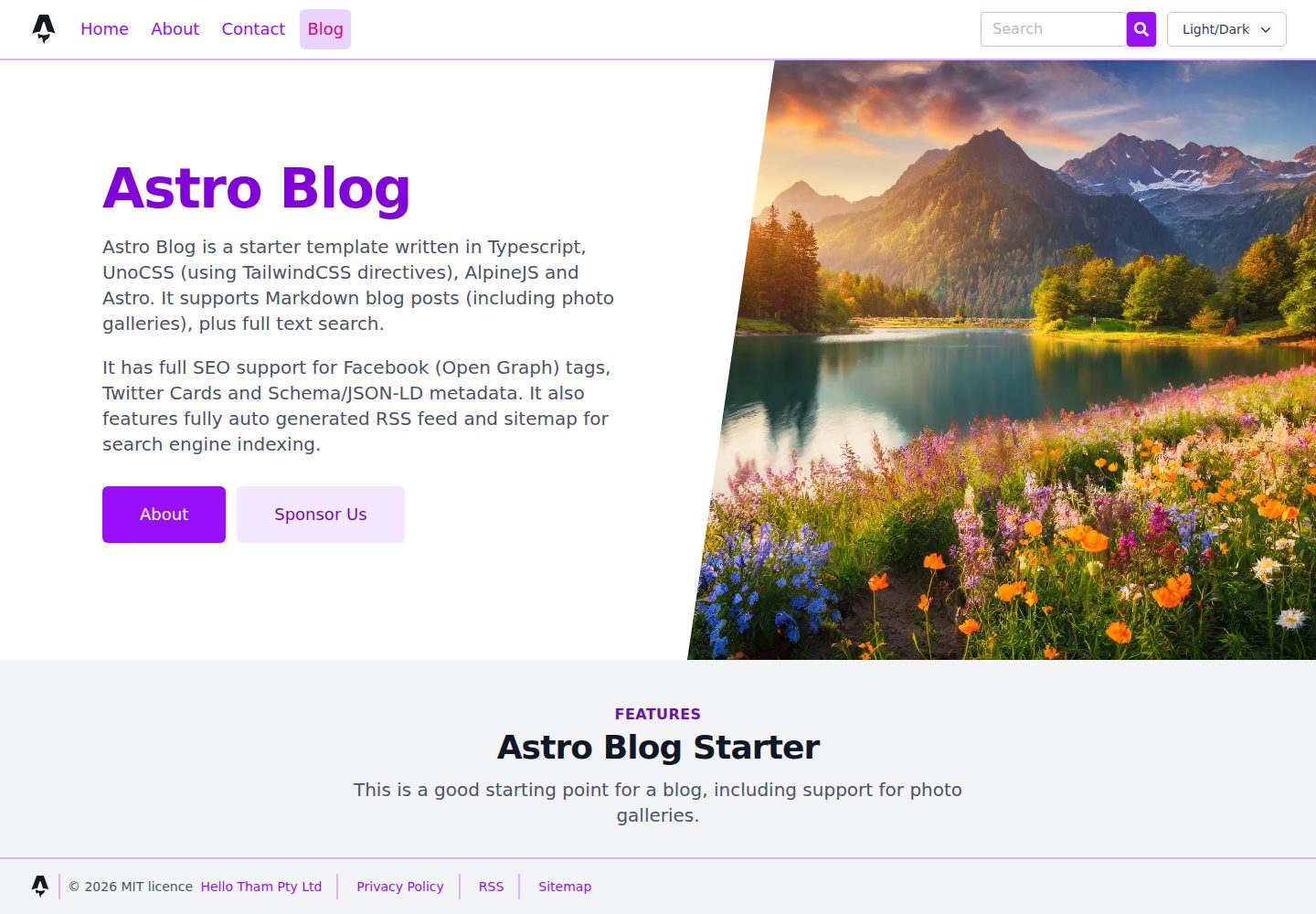
Desktop homepage1 / 3
Desktop captureTop of page
Actual screenshot captured by the server browser.
All pages & views 3
Screenshots show visual appearance; interactive behavior may differ.
Recorded 2026-10-12View source
What stands out
A quick read of the recorded project description.
Local full-text search based on Lunr, with lazy-loaded index, 300ms debounce on input, and results rendered using Alpine templates
Centralized SEO component generates canonical links, Open Graph, Twitter Cards and Schema.org JSON-LD, with Article structured data used only for blog posts
Built-in RSS, sitemap and robots.txt, with link handling adapted for deployment under a subpath
Image gallery and lightbox using PhotoSwipe (including EXIF display), Swiper carousel, and light/dark theme switching with system preference detection
Styling uses UnoCSS and Iconify icons; external library CSS/JS is loaded on demand per page and per package
Template Details
This is an Astro blog starter template aimed at Markdown writing. The author describes it as a simplified version of the Hello Astro theme, removing SVG, extra features and documentation pages, and switching to UnoCSS instead of Tailwind. In terms of content organization, blog posts, standalone pages, authors, categories and social information are all defined as Astro content collections, placed in directories such as src/blog, src/page, src/author, src/category and src/social. Post frontmatter supports title, description, author, date, image and tags. Page routes are automatically generated from files under src/pages, and blogs, categories, tags and authors all have index pages and pagination.
At the feature level, the template includes client-side full-text search based on Lunr. The index and document data are lazily loaded on the first search, queries are debounced by 300ms on input, and results are rendered via Alpine templates rather than innerHTML injection. SEO-related metadata is centralized in the seo.astro component, generating canonical links, Open Graph, Twitter Cards and Schema.org JSON-LD, where Article-type JSON-LD is output only for blog posts. The template also provides RSS, sitemap and robots.txt, and handles links for deployment under a subpath.
Other components include an image gallery and lightbox using PhotoSwipe (which can display EXIF information), a carousel component using Swiper, reading time calculation, a custom 404 page, and light/dark theme support with system preference detection and instant switching. CSS/JS for external libraries is loaded per page and per package, and AlpineJS is used only where needed.
In terms of usage limitations, the template builds a static site from the repository in a JAMstack manner, and the demo is deployed under a subpath on GitHub Pages. The code is released under the MIT license, but third-party assets such as demo images, fonts and icons need separate license verification, and external services such as domains and hosting may incur additional charges.
AstroBlog
Is it right for your project?
Use Cases
- Building a personal or technical blog focused on Markdown writing
- Static sites that need client-side full-text search, category and tag index pages
- Blog projects that want per-page control over third-party library loading to reduce unnecessary client-side scripts
- Sites that need basic SEO output such as RSS, sitemap, robots.txt and structured data
- Static blogs planned for deployment under a subpath such as GitHub Pages
Suitable For
- Front-end developers familiar with Markdown and Astro content collections
- Users who need a lightweight blog starter template and are willing to adjust styles and content themselves
- Projects that prefer UnoCSS over Tailwind
- Blogs that accept static build publishing and do not rely on server-side rendering
Getting started & customization
Use these recorded setup notes alongside the repository instructions for your chosen version.
- 1
Install dependencies with pnpm and run development, build and preview commands; all commands are executed in the project root directory
- 2
Blogs, pages, authors, categories and social information are defined as content collections; add Markdown or JSON files according to the corresponding directory structure
- 3
Images can be placed in src/assets, src/images or the public directory, depending on whether Astro processing is needed
- 4
When deploying to a subpath, configure according to the template's existing base path handling to ensure RSS, sitemap and links are correct
- 5
Third-party assets such as demo images, fonts and icons require separate license verification; the code's MIT license does not cover these
License & source material
Usage conditions & limitations
Free to use · keep license noticeThis entry covers the free version in a public repository under the MIT license; the free scope is the code of this version and does not imply that external services or third-party assets are free.
Must comply with when using
- Free use, modification, commercial use and distribution of this version's code are permitted.
- When distributing copies or substantial portions of the code, retain the original author's copyright notice and the full MIT license notice.
- The code is provided as is; warranties and liability limitations are governed by the original license and applicable law.
Additional costs & items to verify
- Demo images, fonts, icons and other third-party assets must be checked against their respective licenses and cannot be judged solely by the code's MIT license.
- External services such as domains, hosting, databases, payments or AI may incur additional charges.
- The demo site is deployed under a subpath on GitHub Pages, so the template's links, RSS, sitemap, etc. need to be configured with a base path; adjustments are required when deploying directly to the root path.
- The template uses a JAMstack static build approach, generating a static site from the repository, and does not provide server-side rendering or runtime backend capabilities.
View Original Text Basis
Permission is hereby granted, free of charge
Original License Text
The demo is deployed on GitHub Pages under a base path.
Original README
https://github.com/ChristineTham/astro-blog/blob/main/LICENSEhttps://github.com/ChristineTham/astro-blog/blob/main/README.mdIt follows the [JAMstack architecture](https://jamstack.org) by building a static site from the repository.
Original README
Compiled by DeepSeek based on repository license and README ·2026-10-12. Results only cover the materials read; dependencies, images, fonts, and subsequent term changes are subject to their respective original texts.
Project checks & description sources
Template Information
- Source platforms
- GitHub
- Documentation and maintenance reference score
- More documented · 80 / 100
- Technologies
- Astro
- Website type
- Blog
How this score is calculated
Our heuristic uses license records (up to 30), a demo link (12), a preview (10), stars (15), recorded maintenance (15), description completeness (8), feature records (5) and classification data (5). It is not a code, security or performance test, or a Google score. A link does not establish tested functionality.
What to verify for this project
- Repository update recorded
- 2026-04-12
- Screenshot last checked
- 2026-10-12
A demo link is listed. Check it with your own content and viewport sizes; its presence does not confirm that forms, authentication or payments work.
The catalog identifies Astro as the primary stack. Check the actual dependency manifest and lockfile for versions and hosting requirements. These notes use recorded metadata, not a code audit or a deployment test.
Use a selection guide →How this description was prepared
AI-assisted description based on catalog records and repository material. Repository authors are not automatically the reviewers of this description.
Review declaration: [email protected] · 2026-10-13
Inspect the recorded source material
SHA-256: 64e08d053c84a9f8d536bde2e9e76705b34eded0d8b2aacc53b4ac8e65d44288
2026-10-12T08:15:55.509Z
Source file / repository# Astro Blog Simple blog starter based on [Hello Astro](https://hellotham.github.io/hello-astro) focused on Markdown content, Astro content collections, and UnoCSS instead of Tailwind. Uses the following integrations: - @astrojs/sitemap - @astrojs/rss - @astrojs/alpinejs - astro-seo - astro-robots-txt ## Features - Full-featured blog with frontmatter (title, description, author, date, image, tags) - High performance with minimal client-side JavaScript (AlpineJS only where needed) - Full-text client-side search of blog pages via Lunr, bundled locally with Astro/Vite and loaded lazily on first search - Search-on-type behaviour with debounced queries and safe client-side rendering of results - Index page and individual pages for authors, categories and tags, including pagination - Support for RSS feed, sitemap and robots.txt - Full SEO support including canonical URLs, Open Graph, Twitter Cards and Schema.org JSON-LD - Article JSON-LD emitted only for blog posts, with page-aware canonical metadata and absolute RSS links - Full support for light and dark UI modes, including system preference detection and instant client-side switching without reload - Customised 404 error page - Calculates and show reading time for blog posts - CSS/JS assets of external libraries loaded only when needed on a per page and per package basis - no unnecessary bloat - Photo gallery and lightbox using PhotoSwipe (including display of EXIF tags) - Carousel component using Swiper - UnoCSS with Iconify-powered icons via `presetIcons`, plus safelisted dynamic icon tokens for runtime-generated classes ## External Packages The starter uses the following external packages: - [Astro](https://astro.build/) - [TypeScript](https://www.typescriptlang.org/) - [Markdown](https://www.markdownguide.org/) - [Schema.org](https://schema.org/) and [JSON for Linking Data](https://json-ld.org/), type-checked using [schema-dts](https://github.com/google/schema-dts) - [Open Graph](https://ogp.me/) used by [Facebook](https://developers.facebook.com/docs/sharing/webmasters/#markup) - [Twitter Cards](https://developer.twitter.com/en/docs/twitter-for-websites/cards/overview/abouts-cards) - [AlpineJS](https://alpinejs.dev) - Local full-text search using [Lunr](https://lunrjs.com) - [reading-time](https://github.com/ngryman/reading-time) - [PhotoSwipe](https://photoswipe.com) - [exifr](https://mutiny.cz/exifr/) - [Swiper](https://swiperjs.com/) - [Remark Emoji](https://github.com/rhysd/remark-emoji) - [UnoCSS](https://unocss.dev) - [Iconify](https://iconify.design/) icon sets via `presetIcons` It follows the [JAMstack architecture](https://jamstack.org) by building a static site from the repository. The demo is deployed on GitHub Pages under a base path. ## 🚀 Project Structure Inside this starter, you'll see the following folders and files: ```text / ├── public/ │ ├── favicon.ico │ └── site.webmanifest ├── remark-plugins/ │ └── remark-reading-time.mjs ├── src/ │ ├── assets/ │ ├── author/ │ │ └── *.md │ ├── blog/ │ │ └── *.md │ ├── category/ │ │ └── *.md │ ├── components/ │ │ └── *.astro │ ├── gallery/ │ ├── images/ │ ├── layouts/ │ │ ├── base.astro │ │ ├── blog.astro │ │ └── page.astro │ ├── page/ │ │ └── *.md │ ├── pages/ │ │ ├── index.astro │ │ ├── blog/ │ │ ├── category/ │ │ ├── tag/ │ │ └── rss.xml.js │ ├── social/ │ │ └── *.json │ └── config.ts ├── astro.config.ts ├── uno.config.ts └── package.json ``` Astro looks for `.astro`, `.md` or `.mdx` files in the `src/pages/` directory. Each page is exposed as a route based on its file name. `src/components/` is where we put any Astro components and similarly `src/layouts/` for layouts. Images can be placed in `src/assets/`, `src/images/`, or the `public/` directory depending on whether they should be processed by Astro. Blog, page, author, category and social metadata are defined as Astro content collections. Any static assets, eg. images, can be placed in the `public/` directory. ## 🧞 Commands All commands are run from the root of the project, from a terminal: | Command | Action | | :------------------ | :------------------------------------------------------------- | | `pnpm install` | Install dependencies | | `pnpm dev` | Start local dev server | | `pnpm build` | Build production site to `./dist/` | | `pnpm preview` | Preview the production build locally | | `pnpm check` | Run `astro check` | | `pnpm lint` | Run Prettier check and ESLint check | | `pnpm run lint:fix` | Auto-format and auto-fix lint issues | | `pnpm refresh` | Upgrade Astro-related packages and refresh dependency versions | | `pnpm astro ...` | Run Astro CLI commands directly | | `pnpm astro --help` | Show Astro CLI help | ## Search Notes - Search is implemented with Lunr and generated from `src/pages/search-index.json.js` and `src/pages/search-docs.json.js`. - The search UI lives in `src/components/search.astro` and uses bundled client-side Lunr, not a CDN script. - The index and document payload are fetched lazily on first search and cached in component state. - Search runs on type with a 300ms debounce and uses Alpine template rendering instead of `innerHTML` injection. ## SEO Notes - SEO metadata is centralised in `src/components/seo.astro`. - Canonical URLs, Open Graph, Twitter card metadata, and Schema.org JSON-LD are generated from page frontmatter and Astro route context. - Article schema is emitted only for blog posts; non-post pages emit site/organization/person/breadcrumb metadata only. - RSS, sitemap, robots.txt, and manifest/head links are configured to work correctly with the deployed base path. ## Release History - 1.0.0: Initial Release - 2.0.0: Upgrade to Astro 5 - 2.1.0: Remove extra packages, upgraded eslint/prettier configs, lints - 2.2.0: Enhanced PhotoSwipe integration, use astro-masonry and astro-swiper replacing bespoke components, improved linting workflow, strengthened SEO metadata, and modernised bundled Lunr search
Explore similar templates
Compare previews and descriptions within the same stack and category.

astrowind
AstroWind is a free, open-source Astro starter theme using Astro and Tailwind CSS, released under the MIT license.
Astro · Blog

astro-paper
An Astro blog theme with Markdown/MDX content, Tailwind styling and Pagefind search. Search is a feature of the blog, rather than a separate tool-site product.
Astro · Blog

fuwari
Fuwari is a static blog template built with Astro and Tailwind CSS for personal blogs. It manages posts as Markdown files in src/content/posts/, with frontmatter for title, date, description, cover, tags, categories, draft status, and language.
Astro · Blog

Firefly
Firefly is a clean personal blog theme forked from Astro and Fuwari, offering four background modes, single/double sidebar and list/grid layouts, Pagefind client-side full-text search, and a six-language UI.
Astro · Blog

astro-theme-cactus
An Astro blog and notes starter with Markdown/MDX content, Tailwind styling and Pagefind search. Its main purpose is publishing posts and notes.
Astro · Blog

astrofy
Astrofy is a free and open-source personal portfolio website template built with Astro and TailwindCSS, with built-in blog, CV timeline, project showcase, store, and RSS feed modules.
Astro · Portfolio