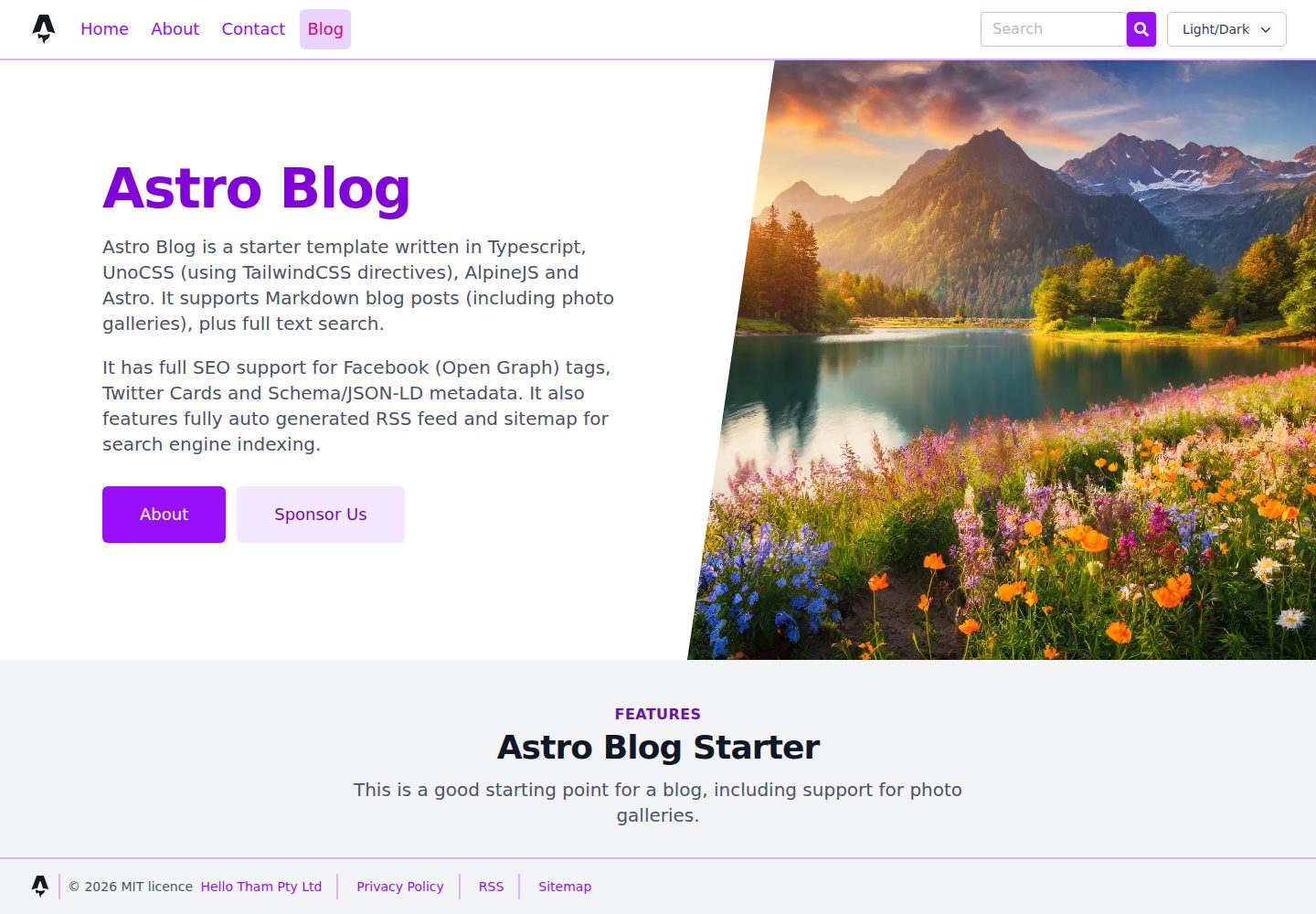
以 Astro 内容集合组织博客文章、页面、作者、分类与社交信息,文章 frontmatter 支持标题、描述、作者、日期、图片和标签
Astro博客
astro-blog — Astro 博客模板
作者 ChristineTham
基于 Hello Astro 精简的 Astro 博客模板,以 Markdown 内容集合和 UnoCSS 为核心,内置本地全文搜索、SEO 元数据、明暗主题与图片画廊等博客常用能力。
看看你的网站会是什么样
浏览真实页面截图,比较内容排版与手机效果。点击下方缩略图切换,放大查看整页细节。
全部页面与视图 3
截图用于了解视觉与布局,交互效果请以实际项目为准。
采集于 2026-10-12查看来源
值得关注的模板亮点
从已有项目资料中,快速了解它的特点。
基于 Lunr 的本地全文搜索,索引懒加载,输入时 300ms 防抖,结果使用 Alpine 模板渲染
集中式 SEO 组件生成规范链接、Open Graph、Twitter Cards 与 Schema.org JSON-LD,Article 结构化数据仅用于博客文章
内置 RSS、站点地图和 robots.txt,并适配部署在子路径下的链接
使用 PhotoSwipe 的图片画廊与灯箱(含 EXIF 显示)、Swiper 轮播,以及支持系统偏好检测的明暗主题切换
样式采用 UnoCSS 与 Iconify 图标,外部库 CSS/JS 按页面和按包按需加载
模板详细介绍
这是一个面向 Markdown 写作的 Astro 博客起始模板,作者将其描述为 Hello Astro 主题的精简版本,去掉了 SVG、额外功能与文档页面,并改用 UnoCSS 而非 Tailwind。内容组织上,博客文章、独立页面、作者、分类和社交信息都以 Astro 内容集合的形式定义,分别放在 src/blog、src/page、src/author、src/category 和 src/social 等目录中,文章 frontmatter 支持标题、描述、作者、日期、图片和标签。页面路由由 src/pages 下的文件自动生成,博客、分类、标签和作者都带有索引页与分页。
功能层面,模板内置基于 Lunr 的客户端全文搜索,索引与文档数据在首次搜索时懒加载,输入时以 300ms 防抖查询,结果通过 Alpine 模板渲染而非 innerHTML 注入。SEO 相关元数据集中在 seo.astro 组件中,生成规范链接、Open Graph、Twitter Cards 和 Schema.org JSON-LD,其中 Article 类型的 JSON-LD 只对博客文章输出。模板还提供 RSS、站点地图和 robots.txt,并针对部署在子路径下的情况做了链接处理。
其他组件包括使用 PhotoSwipe 的图片画廊与灯箱(可显示 EXIF 信息)、使用 Swiper 的轮播组件、阅读时长计算、自定义 404 页面,以及支持系统偏好检测和即时切换的明暗主题。外部库的 CSS/JS 按页面和按包加载,AlpineJS 仅在需要处使用。
使用限制方面,模板采用 JAMstack 方式从仓库构建静态站点,演示部署在 GitHub Pages 的子路径下。代码以 MIT 许可发布,但演示图片、字体、图标等第三方素材需单独核对许可,域名、托管等外部服务可能另外收费。
Astro博客
适合你的项目吗?
适用场景
- 搭建以 Markdown 写作为主的个人博客或技术博客
- 需要客户端全文搜索、分类与标签索引页的静态站点
- 希望按页面控制第三方库加载、减少不必要客户端脚本的博客项目
- 需要 RSS、站点地图、robots.txt 与结构化数据等基础 SEO 输出的站点
- 计划部署在 GitHub Pages 等子路径下的静态博客
适合人群
- 熟悉 Markdown 与 Astro 内容集合的前端开发者
- 需要轻量博客起始模板并愿意自行调整样式与内容的用户
- 偏好 UnoCSS 而非 Tailwind 的项目
- 接受以静态构建方式发布、不依赖服务端渲染的博客
上手与定制指南
结合仓库当前版本的说明,按下面的资料检查内容、配置与运行要求。
- 1
使用 pnpm 安装依赖并运行开发、构建与预览命令,命令均在项目根目录执行
- 2
博客、页面、作者、分类和社交信息以内容集合形式定义,需按对应目录结构添加 Markdown 或 JSON 文件
- 3
图片可放在 src/assets、src/images 或 public 目录,取决于是否需要 Astro 处理
- 4
部署到子路径时需按模板已有的 base path 处理方式配置,以保证 RSS、站点地图和链接正确
- 5
演示图片、字体、图标等第三方素材需单独核对许可,代码的 MIT 许可不覆盖这些内容
授权与来源资料
使用条件与限制
免费使用 · 保留许可声明本次收录的是公开仓库中采用 MIT 许可的免费版本;免费范围为该版本代码,不代表外部服务或第三方素材免费。
使用时需要遵守
- 允许免费使用、修改、商用和分发该版本代码。
- 分发代码副本或实质性部分时,保留原作者版权声明和完整 MIT 许可声明。
- 代码按现状提供;担保与责任限制以原许可证及适用法律为准。
额外费用与待核对事项
- 演示图片、字体、图标及其他第三方素材需按各自许可核对,不能仅凭代码的 MIT 许可判断。
- 域名、托管、数据库、支付或 AI 等外部服务可能另外收费。
- 演示站点部署在 GitHub Pages 的子路径下,因此模板的链接、RSS、站点地图等需按 base path 方式配置,直接部署到根路径时需自行调整。
- 模板采用 JAMstack 静态构建方式,从仓库生成静态站点,不提供服务端渲染或运行时后端能力。
查看原文依据
Permission is hereby granted, free of charge
许可证原文
The demo is deployed on GitHub Pages under a base path.
README 原文
https://github.com/ChristineTham/astro-blog/blob/main/LICENSEhttps://github.com/ChristineTham/astro-blog/blob/main/README.mdIt follows the [JAMstack architecture](https://jamstack.org) by building a static site from the repository.
README 原文
DeepSeek 根据仓库许可证和 README 整理 ·2026-10-12。结果仅覆盖已读取资料,依赖、图片、字体及后续条款变更以各自原文为准。
项目核对记录与介绍依据
模板资料
- 来源平台
- GitHub
- 资料与维护参考分
- 资料较完整 · 80 / 100
- 技术栈
- Astro
- 网站类型
- 博客
这个分数如何计算
本站按许可资料(最高30分)、演示链接(12分)、预览图(10分)、Star数(15分)、记录的维护时间(15分)、描述完整度(8分)、功能记录(5分)和分类资料(5分)计算。它不是代码、安全或性能测试,也不是 Google 评分;有链接不代表已实测可用。
这个项目需要核对什么
- 记录的仓库更新时间
- 2026-04-12
- 截图检查日期
- 2026-10-12
已收录演示链接。请用你的内容与屏幕尺寸检查;有演示不代表表单、认证或支付已经可用。
目录记录的主要技术栈是 Astro。请通过依赖清单和锁文件核对实际版本与托管要求。这些说明基于收录资料,不代表代码审计或部署实测。
查看具体选型方法 →介绍的制作与核对状态
介绍由 AI 辅助整理目录与仓库资料。仓库作者不等于这篇介绍的审核者。
审核声明: [email protected] · 2026-10-13
查看当时使用的来源资料
SHA-256: 64e08d053c84a9f8d536bde2e9e76705b34eded0d8b2aacc53b4ac8e65d44288
2026-10-12T08:15:55.509Z
来源文件 / 仓库# Astro Blog Simple blog starter based on [Hello Astro](https://hellotham.github.io/hello-astro) focused on Markdown content, Astro content collections, and UnoCSS instead of Tailwind. Uses the following integrations: - @astrojs/sitemap - @astrojs/rss - @astrojs/alpinejs - astro-seo - astro-robots-txt ## Features - Full-featured blog with frontmatter (title, description, author, date, image, tags) - High performance with minimal client-side JavaScript (AlpineJS only where needed) - Full-text client-side search of blog pages via Lunr, bundled locally with Astro/Vite and loaded lazily on first search - Search-on-type behaviour with debounced queries and safe client-side rendering of results - Index page and individual pages for authors, categories and tags, including pagination - Support for RSS feed, sitemap and robots.txt - Full SEO support including canonical URLs, Open Graph, Twitter Cards and Schema.org JSON-LD - Article JSON-LD emitted only for blog posts, with page-aware canonical metadata and absolute RSS links - Full support for light and dark UI modes, including system preference detection and instant client-side switching without reload - Customised 404 error page - Calculates and show reading time for blog posts - CSS/JS assets of external libraries loaded only when needed on a per page and per package basis - no unnecessary bloat - Photo gallery and lightbox using PhotoSwipe (including display of EXIF tags) - Carousel component using Swiper - UnoCSS with Iconify-powered icons via `presetIcons`, plus safelisted dynamic icon tokens for runtime-generated classes ## External Packages The starter uses the following external packages: - [Astro](https://astro.build/) - [TypeScript](https://www.typescriptlang.org/) - [Markdown](https://www.markdownguide.org/) - [Schema.org](https://schema.org/) and [JSON for Linking Data](https://json-ld.org/), type-checked using [schema-dts](https://github.com/google/schema-dts) - [Open Graph](https://ogp.me/) used by [Facebook](https://developers.facebook.com/docs/sharing/webmasters/#markup) - [Twitter Cards](https://developer.twitter.com/en/docs/twitter-for-websites/cards/overview/abouts-cards) - [AlpineJS](https://alpinejs.dev) - Local full-text search using [Lunr](https://lunrjs.com) - [reading-time](https://github.com/ngryman/reading-time) - [PhotoSwipe](https://photoswipe.com) - [exifr](https://mutiny.cz/exifr/) - [Swiper](https://swiperjs.com/) - [Remark Emoji](https://github.com/rhysd/remark-emoji) - [UnoCSS](https://unocss.dev) - [Iconify](https://iconify.design/) icon sets via `presetIcons` It follows the [JAMstack architecture](https://jamstack.org) by building a static site from the repository. The demo is deployed on GitHub Pages under a base path. ## 🚀 Project Structure Inside this starter, you'll see the following folders and files: ```text / ├── public/ │ ├── favicon.ico │ └── site.webmanifest ├── remark-plugins/ │ └── remark-reading-time.mjs ├── src/ │ ├── assets/ │ ├── author/ │ │ └── *.md │ ├── blog/ │ │ └── *.md │ ├── category/ │ │ └── *.md │ ├── components/ │ │ └── *.astro │ ├── gallery/ │ ├── images/ │ ├── layouts/ │ │ ├── base.astro │ │ ├── blog.astro │ │ └── page.astro │ ├── page/ │ │ └── *.md │ ├── pages/ │ │ ├── index.astro │ │ ├── blog/ │ │ ├── category/ │ │ ├── tag/ │ │ └── rss.xml.js │ ├── social/ │ │ └── *.json │ └── config.ts ├── astro.config.ts ├── uno.config.ts └── package.json ``` Astro looks for `.astro`, `.md` or `.mdx` files in the `src/pages/` directory. Each page is exposed as a route based on its file name. `src/components/` is where we put any Astro components and similarly `src/layouts/` for layouts. Images can be placed in `src/assets/`, `src/images/`, or the `public/` directory depending on whether they should be processed by Astro. Blog, page, author, category and social metadata are defined as Astro content collections. Any static assets, eg. images, can be placed in the `public/` directory. ## 🧞 Commands All commands are run from the root of the project, from a terminal: | Command | Action | | :------------------ | :------------------------------------------------------------- | | `pnpm install` | Install dependencies | | `pnpm dev` | Start local dev server | | `pnpm build` | Build production site to `./dist/` | | `pnpm preview` | Preview the production build locally | | `pnpm check` | Run `astro check` | | `pnpm lint` | Run Prettier check and ESLint check | | `pnpm run lint:fix` | Auto-format and auto-fix lint issues | | `pnpm refresh` | Upgrade Astro-related packages and refresh dependency versions | | `pnpm astro ...` | Run Astro CLI commands directly | | `pnpm astro --help` | Show Astro CLI help | ## Search Notes - Search is implemented with Lunr and generated from `src/pages/search-index.json.js` and `src/pages/search-docs.json.js`. - The search UI lives in `src/components/search.astro` and uses bundled client-side Lunr, not a CDN script. - The index and document payload are fetched lazily on first search and cached in component state. - Search runs on type with a 300ms debounce and uses Alpine template rendering instead of `innerHTML` injection. ## SEO Notes - SEO metadata is centralised in `src/components/seo.astro`. - Canonical URLs, Open Graph, Twitter card metadata, and Schema.org JSON-LD are generated from page frontmatter and Astro route context. - Article schema is emitted only for blog posts; non-post pages emit site/organization/person/breadcrumb metadata only. - RSS, sitemap, robots.txt, and manifest/head links are configured to work correctly with the deployed base path. ## Release History - 1.0.0: Initial Release - 2.0.0: Upgrade to Astro 5 - 2.1.0: Remove extra packages, upgraded eslint/prettier configs, lints - 2.2.0: Enhanced PhotoSwipe integration, use astro-masonry and astro-swiper replacing bespoke components, improved linting workflow, strengthened SEO metadata, and modernised bundled Lunr search
看看同类模板
对比同技术栈与用途的模板,找到更适合的视觉与内容结构。

astrowind
⭕️ AstroWind: A free template using Astro v7 and Tailwind CSS v4. Astro starter theme.
Astro · 博客

astro-paper
基于 Astro 的博客主题,使用 Markdown/MDX 内容、Tailwind 样式和 Pagefind 搜索。搜索属于博客功能,不代表独立工具站产品。
Astro · 博客

fuwari
✨A static blog template built with Astro.
Astro · 博客

Firefly
Firefly 是一款基于 Astro 的静态博客主题,由 CuteLeaf 在 saicaca 的 Fuwari 模板基础上二次开发,主打清新美观的视觉风格。
Astro · 博客

astro-theme-cactus
面向博客与笔记发布的 Astro 启动模板,支持 Markdown/MDX 内容、Tailwind 样式与 Pagefind 搜索,主要用途是发布文章和笔记。
Astro · 博客

astrofy
Astrofy is a free and open-source template for your Personal Portfolio Website built with Astro and TailwindCS…
Astro · 作品集