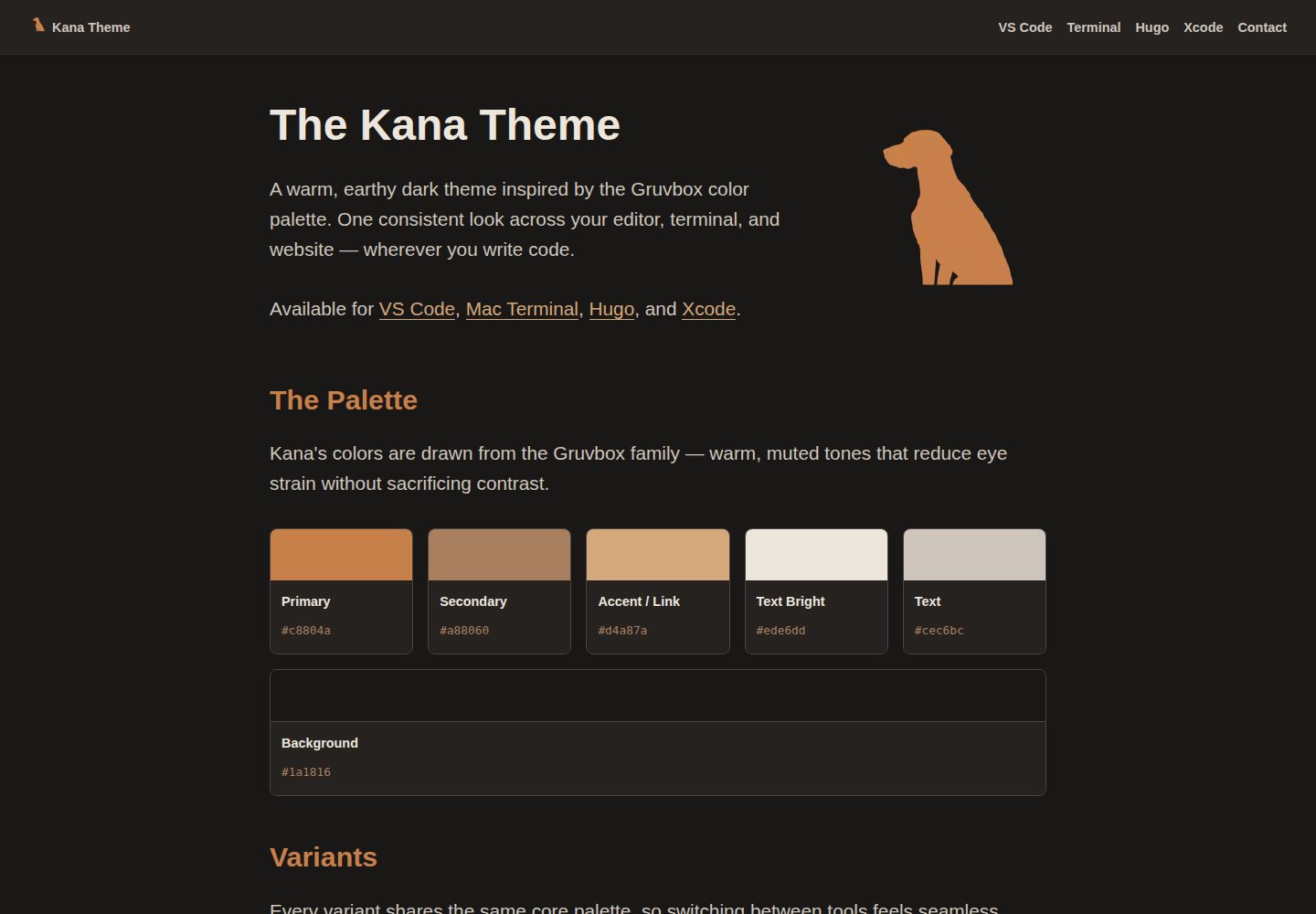
Warm earthy dark theme based on Gruvbox-style colors
HugoStarter
kana-hugo-theme — Hugo Starter Template
By ChrisWiegman
Kana is a Hugo dark theme for personal blogs, using warm earthy tones, with built-in client-side search, a reading library, short notes, responsive images, and Gruvbox code highlighting.
Explore the design
Compare the page layouts and mobile experience. Open any screenshot for a closer look.
Desktop homepage1 / 3
Desktop captureTop of page
Actual screenshot captured by the server browser.
All pages & views 3
Screenshots show visual appearance; interactive behavior may differ.
Recorded 2026-10-03View source
What stands out
A quick read of the recorded project description.
Client-side search indexing post titles, categories, tags, and body text, no server required
Reading library supports filtering and sorting by year, author, and rating, and displays reading statistics
Short notes have a separate paginated archive and RSS feed
Images automatically generate srcset, convert to WebP, and lazy load
Code blocks support Gruvbox highlighting, filename labels, and collapsible display
Template Details
Kana is a Hugo theme developed by ChrisWiegman, positioned as a starter for personal blogs. It uses a warm, earthy dark color scheme and provides several content organization methods around blog writing scenarios: standard posts, short notes, and a reading library. The theme includes client-side search, with the index coming from the homepage's JSON output, without relying on a server; the library page supports filtering by completion year, author, and star rating, and sorting by title, author, rating, or date, while displaying statistics such as yearly reading counts, prolific authors, and rating distribution. For images, the theme generates srcset via Markdown render hooks and the asset-image shortcode, converts to WebP, and enables lazy loading; code blocks use Gruvbox highlighting, with support for filename labels and collapsible blocks. SEO-related outputs include Open Graph, Twitter Cards, JSON-LD, canonical URLs, and Fediverse creator meta tags, and provide site-level RSS as well as a separate RSS for the notes section. Hugo extended version is required before use; Node.js and npm are only used for Playwright testing and toolchain. The theme is released under the MIT license, but third-party assets such as demo images, fonts, and icons need separate license verification.
HugoStarter
Is it right for your project?
Use Cases
- Building a personal blog focused on posts and short notes
- Creating a filterable, sortable online library with statistics for reading records
- Adding client-side full-text search to a site without server-side infrastructure
- Blogs requiring SEO meta output such as Open Graph, Twitter Cards, and JSON-LD
- Content sites wanting images to automatically adapt to multiple sizes and output WebP
Suitable For
- Developers using Hugo extended and willing to install the theme via Hugo Module, Git Submodule, or manual copy
- Sites primarily featuring personal writing, notes, and reading records
- Bloggers who prefer dark, warm color schemes and do not need complex backend services
Getting started & customization
Use these recorded setup notes alongside the repository instructions for your chosen version.
- 1
Requires Hugo extended v0.152.0 or higher; Node.js and npm are only used for Playwright testing and toolchain
- 2
The homepage output must include JSON (add "JSON" to outputs.home) for client-side search to work
- 3
Can be installed via Hugo Module, Git Submodule, or manual copy to themes/kana-hugo-theme
- 4
The library feature requires adding content/library.md and setting layout: library; the search page requires adding content/search.md and setting layout: search
- 5
Third-party assets such as demo images, fonts, and icons must be checked against their respective licenses; do not judge solely by the code's MIT license
License & source material
Usage conditions & limitations
Free to use · keep license noticeThis entry covers the free version under MIT license in the public repository; the free scope is the code of this version and does not imply that external services or third-party assets are free.
Must comply with when using
- Free use, modification, commercial use, and distribution of this version's code are permitted.
- When distributing copies or substantial portions of the code, retain the original author's copyright notice and the full MIT license notice.
- The code is provided as-is; warranties and limitations of liability are governed by the original license and applicable law.
Additional costs & items to verify
- Using this theme requires Hugo extended version, not lower than v0.152.0; standard Hugo cannot be used.
- Running Playwright end-to-end tests and toolchain requires additional installation of Node.js and npm; building the site itself does not.
- Client-side search depends on the homepage outputting JSON; "JSON" must be added to outputs.home, otherwise search is unavailable.
- The reading library feature requires manually creating content/library.md and setting layout: library to enable.
- The search page requires manually creating content/search.md and setting layout: search to enable.
- When running make test to execute Playwright tests, the hugo executable must be in the system PATH.
- Demo images, fonts, icons, and other third-party assets must be checked against their respective licenses; do not judge solely by the code's MIT license.
- External services such as domain, hosting, database, payment, or AI may incur additional charges.
View Original Text Basis
Permission is hereby granted, free of charge
Original License Text
- [Hugo](https://gohugo.io) extended, v0.152.0 or later
Original README
- [Node.js](https://nodejs.org/en) + [npm](https://www.npmjs.com) (for Playwright tests and tooling only)
Original README
The `JSON` output on `home` is required for client-side search to work.
Original README
Add a `content/library.md` page with `layout: library` to activate it.
Original README
Add a `content/search.md` page:
Original README
https://github.com/ChrisWiegman/kana-hugo-theme/blob/main/LICENSE.txthttps://github.com/ChrisWiegman/kana-hugo-theme/blob/main/README.mdRuns Playwright browser tests against the local dev site. Requires `hugo` on your `PATH`.
Original README
Compiled by DeepSeek based on repository license and README ·2026-10-03. Results only cover the materials read; dependencies, images, fonts, and subsequent term changes are subject to their respective original texts.
Project checks & description sources
Template Information
- Source platforms
- Hugo Themes
- Documentation and maintenance reference score
- More documented · 83 / 100
- Technologies
- Hugo
- Website type
- Starter
How this score is calculated
Our heuristic uses license records (up to 30), a demo link (12), a preview (10), stars (15), recorded maintenance (15), description completeness (8), feature records (5) and classification data (5). It is not a code, security or performance test, or a Google score. A link does not establish tested functionality.
What to verify for this project
- Repository update recorded
- 2026-08-29
- Screenshot last checked
- 2026-10-03
A demo link is listed. Check it with your own content and viewport sizes; its presence does not confirm that forms, authentication or payments work.
The catalog identifies Hugo as the primary stack. Check the actual dependency manifest and lockfile for versions and hosting requirements. These notes use recorded metadata, not a code audit or a deployment test.
Use a selection guide →How this description was prepared
AI-assisted description based on catalog records and repository material. Repository authors are not automatically the reviewers of this description.
Review declaration: [email protected] · 2026-10-04
Inspect the recorded source material
SHA-256: 849ce4c66db875152c32d2dcabb1d01b5938bc5a6df3cd03717ab59e2a3873ca
2026-10-03T16:40:45.144Z
Source file / repository# Kana Theme A warm, earthy dark Hugo theme for personal blogs. Features client-side search, a reading library, short-form notes, responsive images with WebP conversion, and Gruvbox syntax highlighting.  **Demo**: [chriswiegman.com](https://chriswiegman.com) ## Requirements - [Hugo](https://gohugo.io) extended, v0.152.0 or later - [Node.js](https://nodejs.org/en) + [npm](https://www.npmjs.com) (for Playwright tests and tooling only) ## Installation ### As a Hugo Module (recommended) Initialize Hugo modules in your site if you haven't already: ```sh hugo mod init github.com/your-username/your-site ``` Add the theme to your `hugo.toml`: ```toml theme = "github.com/ChrisWiegman/kana-hugo-theme" ``` Then fetch the module: ```sh hugo mod get github.com/ChrisWiegman/kana-hugo-theme ``` ### As a Git Submodule ```sh git submodule add https://github.com/ChrisWiegman/kana-hugo-theme themes/kana-hugo-theme ``` Then set the theme in your `hugo.toml`: ```toml theme = "kana-hugo-theme" ``` ### Manual Copy Download or clone the repository and copy it into your site's `themes/kana-hugo-theme` directory. ## Configuration For a complete working example, see [`dev/hugo.toml`](https://github.com/ChrisWiegman/kana-hugo-theme/blob/main/dev/hugo.toml). ### Minimal Configuration ```toml theme = "github.com/ChrisWiegman/kana-hugo-theme" [params] mainSections = ["posts"] description = "Your site description" [outputs] home = ["HTML", "RSS", "JSON"] ``` The `JSON` output on `home` is required for client-side search to work. ### Theme Parameters | Parameter | Type | Description | |---|---|---| | `author` | string | Author name used as `dc:creator` in RSS feeds | | `description` | string | Site description for meta tags | | `subtitle` | string | Subtitle appended to the homepage title tag | | `mainSections` | string[] | Content sections included in the homepage post list and RSS feed | | `headerIcon` | string | Path (relative to `assets/`) to the icon shown in the site header | | `imageSizes` | int[] | Image widths (px) to generate in srcset (e.g. `[850, 710, 300]`) | | `imageSizeString` | string | The HTML `sizes` attribute for responsive images. Must be ordered **smallest breakpoint first** with no-condition default last (e.g. `"(max-width: 300px) 300w, (max-width: 710px) 710w, 850w"`) | | `OpenGraph` | bool | Emit Open Graph meta tags | | `TwitterCards` | bool | Emit Twitter Card meta tags | | `jsonld` | bool | Emit JSON-LD meta tags | | `FediverseCreator` | string | Fediverse handle for `fediverse:creator` meta tag (e.g. `"@[email protected]"`) | | `MobileWebAppTitle` | string | `apple-mobile-web-app-title` meta value | | `policies` | string | Path to a policies page linked in the footer | | `license` | object | `name`, `title`, and `link` shown in the footer (see below) | ### License Footer ```toml [params.license] name = "MIT Licensed" title = "Short tooltip text" link = "https://example.com/license" ``` ### Menus The theme supports two menus: `main` (header) and `footer`. ```toml [[menus.main]] name = "Blog" pageRef = "/blog" weight = 10 [[menus.footer]] name = "RSS" url = "/index.xml" weight = 10 ``` ## Content Types ### Posts Standard blog posts. Recommended permalink structure: ```toml [permalinks] posts = "/:year/:month/:slug/" ``` Front matter: ```toml title = "Post title" date = 2025-09-15T15:47:00+00:00 draft = false images = ["/images/path/to/image.jpeg"] categories = ["Category"] tags = ["tag-one", "tag-two"] ``` ### Notes Short-form content with its own paginated archive and RSS feed at `/notes/index.xml`. Notes are grouped by year. Front matter: ```toml title = "Note title" date = 2025-06-27T00:00:00+00:00 draft = false ``` ### Books (Library) A reading library with interactive filtering and statistics. Books live in a headless `content/books/` section, organised by author slug. ``` content/ └── books/ ├── index.md # headless: true └── author-name/ └── book-title.md ``` Front matter: ```toml title = "Book Title" author = "Author Name" rating = 4 finished = ["2024-10-23"] # multiple dates supported for re-reads [links] amazon = "https://www.amazon.com/..." openlibrary = "https://openlibrary.org/..." goodreads = "https://www.goodreads.com/..." ``` The library page supports filtering by year finished, author, and star rating, plus sorting by title, author, rating, or date. A statistics panel shows books read per year, top authors, and rating distribution. Books load progressively: an initial batch is shown (controlled by `site.Params.pagerSize`, default 25), and further batches append to the bottom of the list as you scroll, with a "Load More Books" link as a fallback trigger. Changing a sort or filter starts back at the first batch. Add a `content/library.md` page with `layout: library` to activate it. ### Search Add a `content/search.md` page: ```toml +++ title = "Search" layout = "search" +++ ``` The search index is built from the JSON output on the homepage and runs entirely client-side — no server required. It searches post titles, categories, tags, and body content. ## Shortcodes ### asset-image Inserts a responsive image from `assets/` with automatic WebP conversion. ``` {{< asset-image "images/photo.jpg" "800" "600" "Alt text" >}} ``` | Position | Parameter | Default | Description | |---|---|---|---| | 1 | `path` | — | Path relative to `assets/` | | 2 | `width` | `"225"` | Width in pixels | | 3 | `height` | `"225"` | Height in pixels | | 4 | `alt` | `""` | Alt text | ## Markdown Render Hooks ### Images Markdown images are automatically rendered with: - Responsive `srcset` based on `params.imageSizes` - Lazy loading (`loading="lazy"`) - WebP format output - `<figure>`/`<figcaption>` for block images with a title ### Code Blocks Code blocks support extra attributes: ````markdown ```go {file="main.go"} package main ``` ```` Features: - Gruvbox syntax highlighting - Optional filename label (`file=`) - Collapsible blocks (`details=true`) - Supports 200+ languages ## Features - **Dark theme** — warm Gruvbox-inspired palette - **Client-side search** — no server needed; indexes title, tags, categories, and content - **Reading library** — filterable, sortable book list with statistics - **Notes** — short-form content with its own RSS feed - **Responsive images** — automatic WebP conversion, srcset generation, lazy loading - **Syntax highlighting** — Gruvbox theme, collapsible blocks, filename labels - **SEO** — Open Graph, Twitter Cards, Schema.org, Fediverse creator meta tag, canonical URLs, JSON-LD - **RSS** — site-wide feed plus a per-section feed for notes - **Sitemap** and **robots.txt** included ## Local Development ### Running the Development Site ```sh make dev ``` The site will be available at `http://localhost:1313`. ### End-to-End Testing ```sh make test ``` Runs Playwright browser tests against the local dev site. Requires `hugo` on your `PATH`. ### Updating Screenshots ```sh make screenshots ``` Regenerates `images/screenshot.png` (1500×1000) and `images/tn.png` (900×600) from the dev site. ## Project Structure ``` ├── assets/ │ ├── scripts/ │ │ ├── library.js # book filtering and sorting │ │ └── search.js # client-side search │ └── scss/ # component-based stylesheets ├── dev/ # local development site │ ├── content/ │ └── hugo.toml ├── e2e/ # Playwright tests ├── images/ # theme screenshots ├── layouts/ │ ├── _default/ # generic list templates │ ├── _markup/ # image and code block render hooks │ ├── blog/ # blog archive template │ ├── library/ # reading library template │ ├── notes/ # notes archive and RSS feed │ ├── partials/ # shared template fragments │ ├── shortcodes/ # asset-image shortcode │ ├── home.html │ ├── search.html │ ├── single.html │ └── 404.html └── scripts/ └── screenshots.mjs # screenshot generation script ``` ## Formatting Templates in `layouts/` are formatted with Prettier using the `go-template` parser. Use the Prettier VS Code extension (configured in `.vscode/settings.json`) to avoid breaking Hugo template markup. ## License [MIT](https://github.com/ChrisWiegman/kana-hugo-theme/blob/main/LICENSE.txt)
Explore similar templates
Compare previews and descriptions within the same stack and category.

hugo-xmin
hugo-xmin is an extremely minimal Hugo theme written by Yihui Xie for template beginners. HTML and CSS total about 140 lines, with no external dependencies, and it uses the MIT license.
Hugo · Starter

hugo-theme-gallery
A Hugo Extended photo gallery theme that organizes images with Page Bundles, automatically generating album lists and gallery pages with a Justified layout and PhotoSwipe lightbox.
Hugo · Starter

reveal-hugo
reveal-hugo is a Hugo theme that converts Markdown content into Reveal.js-based HTML presentations. It supports slide separation with `---`, shortcodes for fragments, slides, sections, notes, Markdown, and MathJax, and organizes content as root or section presentations with order controlled by weight.
Hugo · Starter

anatole
Anatole is a minimalistic two-column Hugo theme ported from farbox-theme-Anatole, featuring dark mode, multilingual and RTL support, and optional portfolio, comments, analytics, KaTeX, and Mermaid integrations. It suits personal blogs, portfolios, or documentation sites built with Hugo.
Hugo · Starter

hugo-theme-diary
A Hugo diary-style theme ported from the Hexo theme Journal, with a grid homepage for essays and daily notes. It supports six languages, dark mode, table-of-contents scroll positioning, reading time, code highlighting, and configurable sidebar, fonts, and colors.
Hugo · Starter

risotto
risotto is a minimalist, responsive Hugo theme inspired by terminal ricing aesthetics. It uses semantic HTML and pure CSS with no JavaScript, and its layout relies on CSS Grid for native responsiveness without manual breakpoints.
Hugo · Starter