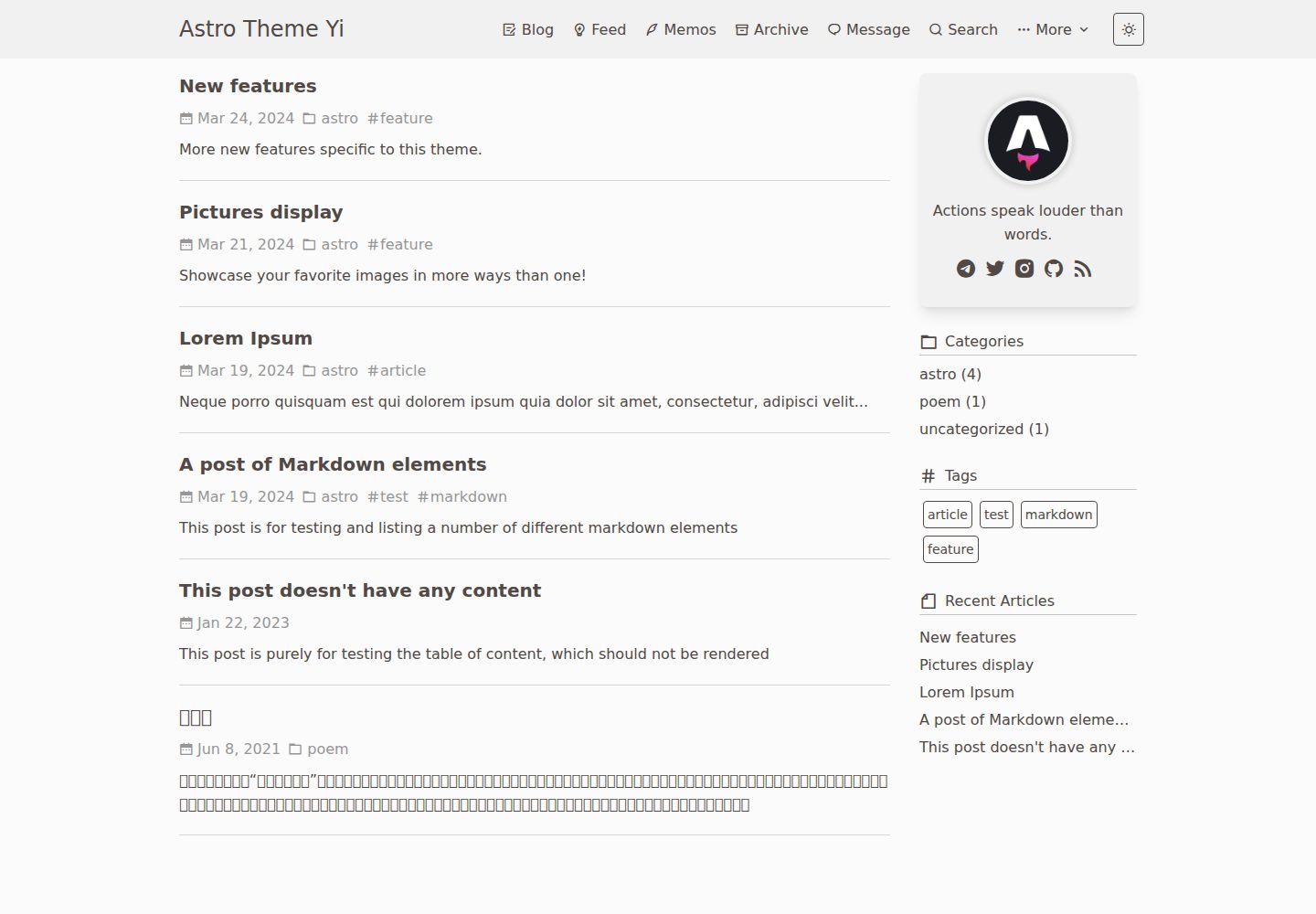
Content managed as Markdown, with posts in src/content/blog and short posts in src/content/feed
AstroBlog
astro-yi — Astro Blog Template
By cirry
astro-yi is a lightweight Astro blog theme with content managed as Markdown files, offering built-in dark mode, i18n, search, comments, and RSS.
Explore the design
Compare the page layouts and mobile experience. Open any screenshot for a closer look.
Desktop homepage1 / 3
Desktop captureTop of page
Actual screenshot captured by the server browser.
All pages & views 3
Screenshots show visual appearance; interactive behavior may differ.
Recorded 2026-09-30View source
What stands out
A quick read of the recorded project description.
Site information, navigation, comments, donations, friend links, and analytics centralized in src/consts.ts
Supports dark mode, i18n, search, sitemap and RSS, post drafts, and permalinks
Comments can be Waline or Giscus; analytics can be Umami, Google Analytics, or busuanzi
Supports content blocks such as mermaid, mathjax, expressive code, GitHub Card, and Admonitions
Supports GitHub Pages deployment and provides a one-click Vercel deployment entry
Template Details
astro-yi is an Astro blog theme focused on content writing. The repository is MIT-licensed, and the demo site is deployed on Vercel. The theme centralizes site information, navigation, comments, donations, friend links, and analytics configuration in src/consts.ts. Blog posts are placed in src/content/blog, and short posts (feed) in src/content/feed, with frontmatter fields such as title, date, tags, pinned, and permalink declared according to Astro's Markdown conventions.
In terms of features, the README lists support for GitHub Pages deployment, multi-device display, dark mode, i18n, search, SEO, sitemap and RSS, post drafts, Waline/Giscus comments, image lazy loading and zooming, permalinks, mermaid, mathjax, expressive code, Button, GitHub Card, and Admonitions. Comments, donations, and analytics (Umami, Google Analytics, busuanzi) are disabled by default and require filling in the corresponding service parameters to enable.
There are some usage notes to keep in mind: manual installation recommends Node.js >= 20 and pnpm >= 8, with local development on port 4321. When using GitHub Pages, you must set url and a baseUrl starting with / (the repository name) in src/consts.ts, and also update the site field in astro.config.js to correctly generate the sitemap, and append the Sitemap address at the end of public/robots.txt. Third-party assets such as demo images, fonts, and icons need to be checked separately under their respective licenses.
AstroBlog
Is it right for your project?
Use Cases
- Writing a personal blog in Markdown and publishing to GitHub Pages or Vercel
- An independent blog needing dark mode, multiple languages, site search, and RSS
- Sites wanting to integrate comments via Waline or Giscus and analytics via Umami or GA
- Writing scenarios that display math formulas, mermaid diagrams, or code block highlighting in articles
Suitable For
- Individual bloggers accustomed to writing in Markdown and wanting configuration centralized in a few files
- Bloggers needing multilingual interfaces such as Chinese and English plus search capabilities
- Front-end developers planning to deploy their blog to GitHub Pages or Vercel
- Independent sites needing basic blog capabilities such as comments, RSS, and sitemap
Getting started & customization
Use these recorded setup notes alongside the repository instructions for your chosen version.
- 1
Manual installation recommends Node.js >= 20 and pnpm >= 8; after cloning the repository, run pnpm i, and npm run dev previews at localhost:4321
- 2
Site information, navigation, comments, donations, friend links, and analytics are configured in src/consts.ts; modify as needed
- 3
When using GitHub Pages, set url and a baseUrl starting with / (the repository name) in src/consts.ts, and also update the site field in astro.config.js
- 4
Comments, donations, and analytics are disabled by default; before enabling, fill in service parameters such as Waline/Giscus and Umami/GA
- 5
Append the Sitemap address at the end of public/robots.txt, e.g., Sitemap: [blog-url]/sitemap-0.xml
License & source material
Usage conditions & limitations
Free to use · keep license noticeThis entry covers the free version in the public repository under the MIT license; the free scope is the code of this version and does not imply that external services or third-party assets are free.
Must comply with when using
- Free use, modification, commercial use, and distribution of this version's code are permitted.
- When distributing copies or substantial portions of the code, retain the original author's copyright notice and the full MIT license notice.
- The code is provided as is; warranties and limitations of liability are governed by the original license and applicable law.
Additional costs & items to verify
- Manual installation and local development require Node.js 20 or later and pnpm 8 or later; lower versions may fail to install dependencies or run.
- The Memos feature requires providing and filling in a Memos service address and login name; it depends on an external service and is unavailable if not configured.
- Enabling Waline comments requires deploying or providing a Waline server address and filling in serverUrl; it depends on an external service.
- Enabling Giscus comments requires creating and configuring the corresponding repository and category on GitHub, and filling in parameters such as repo, repo-id, and category-id; it depends on GitHub services.
- Enabling Umami analytics requires providing a Umami service address and site ID; it depends on an external service.
- Enabling Google Analytics requires applying for a GA site ID; it depends on an external service.
- When deploying to GitHub Pages, you must fill in the repository name starting with / as baseUrl, otherwise the site path will be incorrect.
- You need to change the site in astro.config.js to your own website address, otherwise sitemap and other generated files will be incorrect.
- You need to manually append your own Sitemap address at the end of public/robots.txt, otherwise search engines cannot correctly discover the sitemap.
- Before using the donation feature, replace the WeChat and Alipay QR code images and the PayPal link, otherwise it will not work properly.
- Demo images, fonts, icons, and other third-party assets need to be checked under their respective licenses; do not judge solely based on the code's MIT license.
- External services such as domains, hosting, databases, payments, or AI may incur additional charges.
View Original Text Basis
Permission is hereby granted, free of charge
Original License Text
Recommended for use `nodejs >= 20`,`pnpm >= 8`。
Original README
memosUrl: '', // https://xxxx.xxx.xx
Original README
serverUrl: "https://xxxxx.xxxxx.app",
Original README
'data-repo': "xxxxxxx",
Original README
umamiConfig: { enable: false, id: "", url: ""
Original README
gaConfig: { enable: false, id: ""
Original README
baseUrl: '/yi.github.io', // When using GitHubPages, you must enter the repository name startwith '/'
Original README
site: 'https://xxxx.com',// Modify to your own website address
Original README
Sitemap: [blog-url]/sitemap-0.xml
Original README
https://github.com/cirry/astro-yi/blob/main/LICENSEhttps://github.com/cirry/astro-yi/blob/main/README.mdPlease replace the image and paypal link before use.
Original README
Compiled by DeepSeek based on repository license and README ·2026-10-02. Results only cover the materials read; dependencies, images, fonts, and subsequent term changes are subject to their respective original texts.
Project checks & description sources
Template Information
- Source platforms
- GitHub
- Documentation and maintenance reference score
- More documented · 91 / 100
- Technologies
- Astro
- Website type
- Blog
How this score is calculated
Our heuristic uses license records (up to 30), a demo link (12), a preview (10), stars (15), recorded maintenance (15), description completeness (8), feature records (5) and classification data (5). It is not a code, security or performance test, or a Google score. A link does not establish tested functionality.
What to verify for this project
- Repository update recorded
- 2026-09-24
- Screenshot last checked
- 2026-10-02
A demo link is listed. Check it with your own content and viewport sizes; its presence does not confirm that forms, authentication or payments work.
The catalog identifies Astro as the primary stack. Check the actual dependency manifest and lockfile for versions and hosting requirements. These notes use recorded metadata, not a code audit or a deployment test.
Use a selection guide →How this description was prepared
AI-assisted description based on catalog records and repository material. Repository authors are not automatically the reviewers of this description.
Automatically checked against source and license rules; no manual editorial review.
Inspect the recorded source material
SHA-256: cdf0ea61aebb383675969eb17105da50873cc7d47d2d25ad5eecf82c7dca557f
2026-10-02T15:30:38.618Z
Source file / repository# Astro Theme Yi
[[English]](./README.md) | [[简体中文]](./README-ZH-CN.md)
Demo:[Astro-Theme-Yi](https://astro-yi-nu.vercel.app/)
A content-focused Astro blog theme, Yi, in Chinese, it means fast and concise.


### 🔥 Features
- [x] Support github pages.
- [x] Supports multi-platform display.
- [x] Supports dark mode.
- [x] Supports Memos.
- [x] supports i18n.
- [x] Supports search functionality.
- [x] SEO-friendly
- [x] Supports sitemap and RSS.
- [x] Supports article drafts.
- [x] Supports Waline/Giscus Comment.
- [x] Image lazy loading and scaling support.
- [x] Supports fixed permalinks for articles.
- [x] Supports meriand
- [x] Supports mathjax
- [x] Supports expressive code
- [x] Support Button
- [x] Support Github Card
- [x] Support Admonitions
......
### Vercel Deplyment
[](https://vercel.com/import/project?template=https%3A%2F%2Fgithub.com%2Fcirry%2Fastro-yi)
Give it a try! Click the button above, and you can deploy with just one click.
### 👨🏻💻 Manual Installation
Recommended for use `nodejs >= 20`,`pnpm >= 8`。
```bash
git clone https://github.com/cirry/astro-yi.git
cd astro-yi
npm install -g pnpm # install pnpm
pnpm i # installs dependencies
npm run dev # preview, starts local dev server at localhost:4321
```
```bash
npm run build # build your production site to ./dist
```
After the packaging is completed, Upload the `dist` folder to the web server directory.
### GitHub Pages deployment
In /src/consts.ts, modify the contents of the site field:
```js
export const site = {
// ...
url: 'https://cirry.github.io', // required, website origin
baseUrl: '/yi.github.io', // When using GitHubPages, you must enter the repository name startwith '/'
// ...
}
```
## Configuration
The only profile for this blog is: `src/consts.ts`, you can make some modifications according to your needs.
```ts
/**
* title {string} website title
* favicon {string} website favicon url
* description {string} website description
* author {string} author
* avatar {string} Avatar used in the profile
* motto {string} used in the profile
* url {string} Website link
* baseUrl {string} When using GitHubPages, you must enter the repository name
* recentBlogSize {number} Number of recent articles displayed in the sidebar
* archivePageSize {number} Number of articles on archive pages
* postPageSize {number} Number of articles on blog pages
* feedPageSize {number} Number of articles on feed pages
* beian {string} Chinese policy
*/
export const site = {
title: 'Astro Theme Yi',
favicon: '/favicon.svg',
description: 'Welcome to my independent blog website! ',
author: "xxxxx",
avatar: '/avatar.png',
motto: 'Keep moving.',
url: 'https://astro-yi-nu.vercel.app',
recentBlogSize: 5,
archivePageSize: 25,
postPageSize: 10,
feedPageSize: 20,
beian: ''
}
/**
* lang {string} Default website language: English
* codeFoldingStartLines {number} default 16
* memosUrl {string} memos server url
* memosUsername {string} memos login name
* memosPageSize {number} 10
*/
export const config = {
lang: 'en', // English: en | 简体中文: zh-cn | 繁體中文: zh-hant | cs
codeFoldingStartLines: 16, // Need to re-run the project to take effect
// memos config
memosUrl: '', // https://xxxx.xxx.xx
memosUsername: '', // login name
memosPageSize: 10, // number
}
/**
* Navigator
*/
export const categories = [
{
name: "Homepage",
iconClass: "ri-home-4-line",
href: "/",
},
{
name: "Blog",
iconClass: "ri-draft-line",
href: "/blog/1",
},
{
name: "Feed",
iconClass: "ri-lightbulb-flash-line",
href: "/feed/1",
},
{
name: "Archive",
iconClass: "ri-archive-line",
href: "/archive/1",
},
{
name: "Message",
iconClass: "ri-chat-1-line",
href: "/message/",
},
{
name: "Search",
iconClass: "ri-search-line",
href: "/search",
},
{
name: "More",
iconClass: "ri-more-fill",
href: "javascript:void(0);",
children: [
{
name: 'About',
iconClass: 'ri-information-line',
href: '/about',
},
{
name: 'Friends',
iconClass: 'ri-user-5-line',
href: '/friends',
target: '_self', // _self | _blank
},
]
}
]
/**
* Personal link address
*/
export const infoLinks = [
{
icon: 'ri-telegram-fill',
name: 'telegram',
outlink: 'xxxxxxx',
},
{
icon: 'ri-twitter-fill',
name: 'twitter',
outlink: 'xxxxxxx',
},
{
icon: 'ri-instagram-fill',
name: 'instagram',
outlink: 'xxxxxxx',
},
{
icon: 'ri-github-fill',
name: 'github',
outlink: 'https://github.com/cirry',
},
{
icon: 'ri-mail-fill',
name: '[email protected]',
outlink: 'mailto:[email protected]',
},
{
icon: 'ri-rss-fill',
name: 'rss',
outlink: 'https://xxxxx.com/rss.xml',
}
]
/**
* Donation feature
* Please replace the image and paypal link before use.
* enable {boolean}
* tip {string}
*/
export const donate = {
enable: false,
tip: "Thanks for the coffee !!!☕",
wechatQRCode: "/WeChatQR.png",
alipayQRCode: "/AliPayQR.png",
paypalUrl: "https://paypal.me/xxxxxxxx",
}
/**
* Friends Links Page
* name {string}
* url {string}
* avatar {string}
* description {string}
*/
export const friendshipLinks =
[
{
name: "Cirry's Blog",
url: 'https://cirry.cn',
avatar: "https://cirry.cn/avatar.png",
description: 'frontend development'
},
]
/**
* Comment Feature
* enable {boolean}
* type {string} giscus and waline are currently supported.
* walineConfig.serverUrl {string} server link
* walineConfig.pageSize {number} number of comments per page. default 10
* walineConfig.wordLimit {number} Comment word s limit. When a single number is filled in, it 's the maximum number of comment words. No limit when set to 0
* walineConfig.count {number} recent comment numbers
* walineConfig.pageview {boolean} display the number of page views and comments of the article
* walineConfig.reaction {string | string[]} Add emoji interaction function to the article
* walineConfig.requiredMeta {string[]} Set required fields, default anonymous
*/
export const comment = {
enable: false,
type: 'giscus', // waline | giscus,
walineConfig:{
serverUrl: "https://xxxxx.xxxxx.app",
lang: 'en',
pageSize: 20,
wordLimit: '',
count: 5,
pageview: true,
reaction: true,
requiredMeta: ["nick", "mail"],
whiteList: ['/message/', '/friends/'],
},
// giscus config
giscusConfig: {
'data-repo': "xxxxxxx",
'data-repo-id': "xxxxxx",
'data-category': "Announcements",
'data-category-id': "xxxxxxxxx",
'data-mapping': "pathname",
'data-strict': "0",
'data-reactions-enabled': "1",
'data-emit-metadata': "0",
'data-input-position': "bottom",
'data-theme': "light",
'data-lang': "xxxxxxxxxxx",
'crossorigin': "anonymous",
}
}
/**
* Analytics Feature Configuration
*
* This file centralizes the analytics configuration for the application.
* It defines and exports the default settings for Umami and Google Analytics.
*/
export const analytics: AnalyticsConfig = {
enable: false,
umamiConfig: {
enable: false,
id: "",
url: ""
},
gaConfig: {
enable: false,
id: ""
},
busuanzi: false,
};
```
Please modify your website configuration, comment system configuration, appreciation function image, personal information links, and of course, you can also modify other configuration content.
### Write a blog
With the Yi theme, all you need to do is create a new md document in `src/content/blog` and you're ready to start writing your blog.
According to Astro's Markdown document standard, each document should have its own frontmatter information and add `---` as the beginning and the end of the document's header in md to mark the frontmatter, which gives us a lot of convenience:.
1. for example, if we want to add tags and categories to a document or top some documents, we can add some attributes to the document in Frontmatter, such as `tags`, `sticky` and so on.
2. For example, to avoid using Chinese as the blog path and file name, we can set `title` as the title of the md document in Chinese, and the file name in English with `-` as the word connecting symbol.
In Astro-Yi, You need to set two important properties: **title** and **date**, the following is the simplest frontmatter setup for a Md document:
```yaml
---
title: Display pictures
date: 2024-03-05
---
```
If you feel that this is not quite enough, Yi also provides more properties for you to use, this is a complete example:
```yaml
---
title: Display pictures
description: Display pictures
date: 2024-03-05
tags: [astro]
category: astro
sticky: 100 // Document top weight, the larger the number, the greater the weight
slug: poem/ci // Permanent link to document
mathjax: false // enable formula display
mermaid: false // enable mermaid
draft: false
toc: true
donate: false
comment: false
ogImage: https://xxxxx/xxxxx/xxxxx // cover image
---
```
### Write a feed
With the Yi theme, all you need to do is create a new md document in `src/content/feed` and you're ready to start writing.
feed frontmatter needs to set an important property **date**, the rest of the attributes are optional.
```yaml
---
date: 2024-03-20
---
```
### Modify icons
All the icons in the blog are using the open source icon library [remixicon](https://remixicon.cn/), you can replace your favorite icons by yourself.
### Note
In the `astro.config.js` file in the root directory, it is recommended to modify the `site` property to correctly generate the site map.
```js
export default defineConfig({
site: 'https://xxxx.com',// Modify to your own website address
// ...
})
```
Add a line to the path of your sitemap file at the end of the robots.txt file in the public directory.
```text
Sitemap: [blog-url]/sitemap-0.xml
// ps:Sitemap: https://astro-yi-nu.vercel.app/sitemap-0.xml
```
Explore similar templates
Compare previews and descriptions within the same stack and category.

astrowind
AstroWind is a free, open-source Astro starter theme using Astro and Tailwind CSS, released under the MIT license.
Astro · Blog

astro-paper
AstroPaper is a minimal, responsive, accessible, and SEO-friendly Astro blog theme. Articles are stored as Markdown/MDX in src/content/posts/, with subdirectories affecting URLs.
Astro · Blog

fuwari
Fuwari is a static blog template built with Astro and Tailwind CSS for personal blogs. It manages posts as Markdown files in src/content/posts/, with frontmatter for title, date, description, cover, tags, categories, draft status, and language.
Astro · Blog

Firefly
Firefly is a clean personal blog theme forked from Astro and Fuwari, offering four background modes, single/double sidebar and list/grid layouts, Pagefind client-side full-text search, and a six-language UI.
Astro · Blog

astro-theme-cactus
Astro Cactus is an Astro-based blog and portfolio theme that uses Markdown/MDX content collections to manage posts, notes, and tags, with frontmatter type-checked by a schema.
Astro · Portfolio

astrofy
Astrofy is a free and open-source personal portfolio website template built with Astro and TailwindCSS, with built-in blog, CV timeline, project showcase, store, and RSS feed modules.
Astro · Portfolio