内容以 Markdown 管理,文章放在 src/content/blog,短文放在 src/content/feed
Astro博客
astro-yi — Astro 博客模板
作者 cirry
astro-yi 是一个基于 Astro 的轻量博客主题,内容以 Markdown 文件管理,内置深色模式、i18n、搜索、评论与 RSS 等常用博客能力。
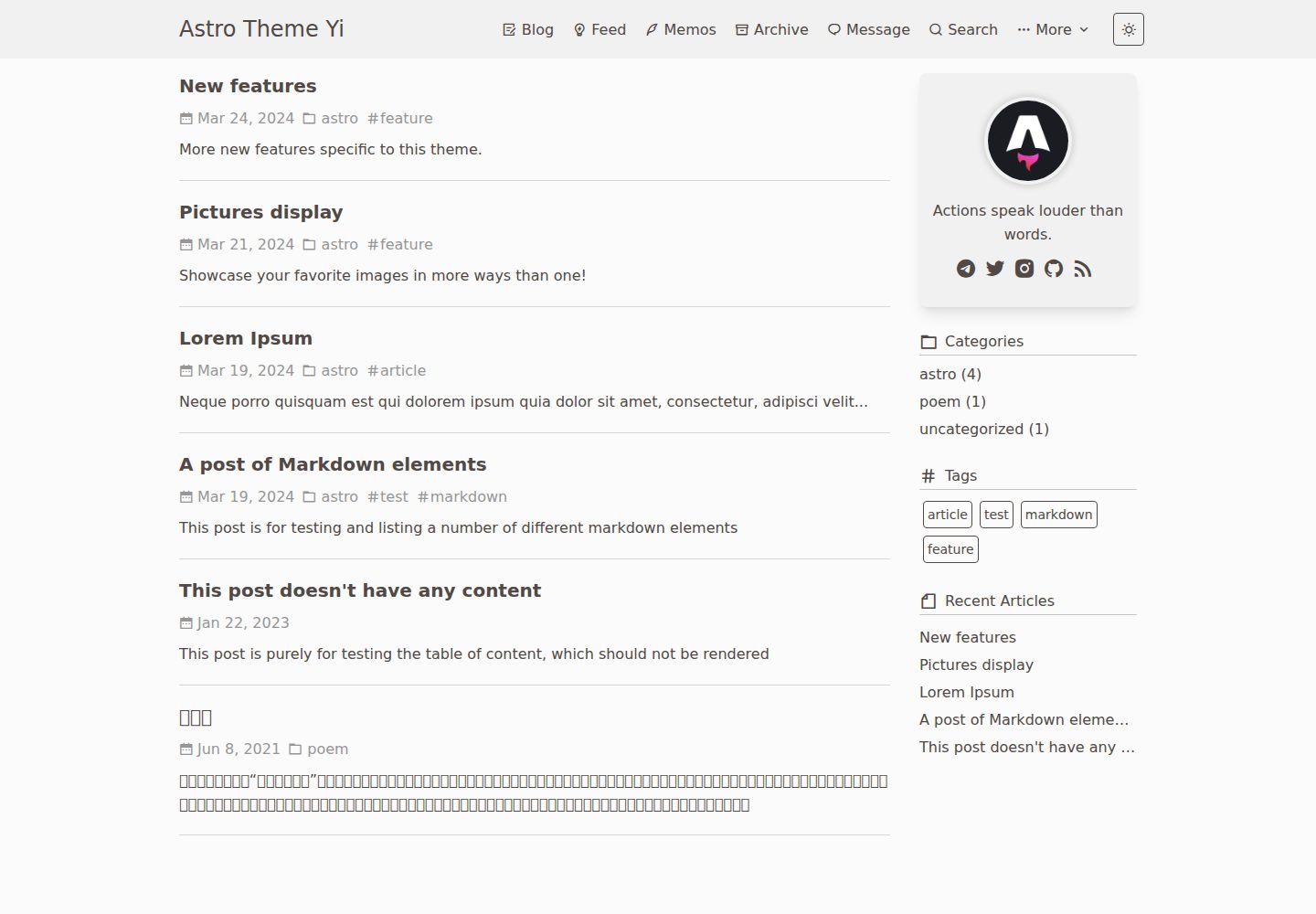
看看你的网站会是什么样
浏览真实页面截图,比较内容排版与手机效果。点击下方缩略图切换,放大查看整页细节。
全部页面与视图 3
截图用于了解视觉与布局,交互效果请以实际项目为准。
采集于 2026-09-30查看来源
值得关注的模板亮点
从已有项目资料中,快速了解它的特点。
站点信息、导航、评论、打赏、友链、统计等集中在 src/consts.ts 配置
支持深色模式、i18n、搜索、sitemap 与 RSS、文章草稿和固定链接
评论可选 Waline 或 Giscus,统计可选 Umami、Google Analytics 与 busuanzi
支持 mermaid、mathjax、expressive code、GitHub Card 与 Admonitions 等内容块
支持 GitHub Pages 部署,并提供 Vercel 一键部署入口
模板详细介绍
astro-yi 是一个面向内容写作的 Astro 博客主题,仓库采用 MIT 许可,演示站点部署在 Vercel。主题把站点信息、导航、评论、打赏、友链、统计等配置集中放在 src/consts.ts 中,博客文章放在 src/content/blog,短文(feed)放在 src/content/feed,按 Astro 的 Markdown 规范通过 frontmatter 声明标题、日期、标签、置顶、固定链接等字段。
功能方面,README 列出支持 GitHub Pages 部署、多端显示、深色模式、i18n、搜索、SEO、sitemap 与 RSS、文章草稿、Waline/Giscus 评论、图片懒加载与缩放、固定链接、mermaid、mathjax、expressive code、Button、GitHub Card 和 Admonitions。评论、打赏、统计(Umami、Google Analytics、busuanzi)默认关闭,需要自行填写对应服务参数后启用。
使用上有一些需要留意的点:手动安装建议 Node.js >= 20、pnpm >= 8,本地开发端口为 4321;使用 GitHub Pages 时必须在 src/consts.ts 中设置 url 与以 / 开头的 baseUrl(仓库名),并同步修改 astro.config.js 的 site 字段以正确生成 sitemap,同时在 public/robots.txt 末尾补充 Sitemap 地址。演示图片、字体、图标等第三方素材需按各自许可单独核对。
Astro博客
适合你的项目吗?
适用场景
- 用 Markdown 写个人博客并发布到 GitHub Pages 或 Vercel
- 需要深色模式、多语言、站内搜索和 RSS 的独立博客
- 希望用 Waline 或 Giscus 接入评论、用 Umami 或 GA 做访问统计的站点
- 在文章中展示数学公式、mermaid 图表或代码块高亮的写作场景
适合人群
- 习惯用 Markdown 写作、希望配置集中在少量文件中的个人博主
- 需要中英文等多语言界面与搜索能力的博客作者
- 打算把博客部署到 GitHub Pages 或 Vercel 的前端开发者
- 需要评论、RSS、sitemap 等基础博客能力的独立站点
上手与定制指南
结合仓库当前版本的说明,按下面的资料检查内容、配置与运行要求。
- 1
手动安装建议 Node.js >= 20、pnpm >= 8,克隆仓库后执行 pnpm i,npm run dev 在 localhost:4321 预览
- 2
站点信息、导航、评论、打赏、友链和统计等配置集中在 src/consts.ts,按需修改
- 3
使用 GitHub Pages 时需在 src/consts.ts 设置 url 和以 / 开头的 baseUrl(仓库名),并同步修改 astro.config.js 的 site 字段
- 4
评论、打赏和统计默认关闭,启用前需填写 Waline/Giscus、Umami/GA 等服务参数
- 5
在 public/robots.txt 末尾补充 Sitemap 地址,如 Sitemap: [blog-url]/sitemap-0.xml
授权与来源资料
使用条件与限制
免费使用 · 保留许可声明本次收录的是公开仓库中采用 MIT 许可的免费版本;免费范围为该版本代码,不代表外部服务或第三方素材免费。
使用时需要遵守
- 允许免费使用、修改、商用和分发该版本代码。
- 分发代码副本或实质性部分时,保留原作者版权声明和完整 MIT 许可声明。
- 代码按现状提供;担保与责任限制以原许可证及适用法律为准。
额外费用与待核对事项
- 手动安装与本地开发需使用 Node.js 20 及以上版本、pnpm 8 及以上版本,低于该版本可能无法正常安装依赖或运行。
- Memos 功能需要自行提供并填写 Memos 服务地址与登录名,属于外部服务依赖,未配置时该功能不可用。
- 启用 Waline 评论需自行部署或提供 Waline 服务端地址并填写 serverUrl,属于外部服务依赖。
- 启用 Giscus 评论需在 GitHub 上创建并配置对应仓库与分类,填写 repo、repo-id、category-id 等参数,依赖 GitHub 服务。
- 启用 Umami 统计需自行提供 Umami 服务地址与站点 ID,属于外部服务依赖。
- 启用 Google Analytics 统计需自行申请 GA 站点 ID,属于外部服务依赖。
- 使用 GitHub Pages 部署时必须填写以 / 开头的仓库名作为 baseUrl,否则站点路径会出错。
- 需将 astro.config.js 中的 site 修改为自己的网站地址,否则 sitemap 等生成不正确。
- 需在 public/robots.txt 末尾手动补充自己的 Sitemap 地址,否则搜索引擎无法正确发现站点地图。
- 打赏功能使用前需替换微信、支付宝收款码图片与 PayPal 链接,否则无法正常使用。
- 演示图片、字体、图标及其他第三方素材需按各自许可核对,不能仅凭代码的 MIT 许可判断。
- 域名、托管、数据库、支付或 AI 等外部服务可能另外收费。
查看原文依据
Permission is hereby granted, free of charge
许可证原文
Recommended for use `nodejs >= 20`,`pnpm >= 8`。
README 原文
memosUrl: '', // https://xxxx.xxx.xx
README 原文
serverUrl: "https://xxxxx.xxxxx.app",
README 原文
'data-repo': "xxxxxxx",
README 原文
umamiConfig: { enable: false, id: "", url: ""
README 原文
gaConfig: { enable: false, id: ""
README 原文
baseUrl: '/yi.github.io', // When using GitHubPages, you must enter the repository name startwith '/'
README 原文
site: 'https://xxxx.com',// Modify to your own website address
README 原文
Sitemap: [blog-url]/sitemap-0.xml
README 原文
https://github.com/cirry/astro-yi/blob/main/LICENSEhttps://github.com/cirry/astro-yi/blob/main/README.mdPlease replace the image and paypal link before use.
README 原文
DeepSeek 根据仓库许可证和 README 整理 ·2026-10-02。结果仅覆盖已读取资料,依赖、图片、字体及后续条款变更以各自原文为准。
项目核对记录与介绍依据
模板资料
- 来源平台
- GitHub
- 资料与维护参考分
- 资料较完整 · 91 / 100
- 技术栈
- Astro
- 网站类型
- 博客
这个分数如何计算
本站按许可资料(最高30分)、演示链接(12分)、预览图(10分)、Star数(15分)、记录的维护时间(15分)、描述完整度(8分)、功能记录(5分)和分类资料(5分)计算。它不是代码、安全或性能测试,也不是 Google 评分;有链接不代表已实测可用。
这个项目需要核对什么
- 记录的仓库更新时间
- 2026-09-24
- 截图检查日期
- 2026-10-02
已收录演示链接。请用你的内容与屏幕尺寸检查;有演示不代表表单、认证或支付已经可用。
目录记录的主要技术栈是 Astro。请通过依赖清单和锁文件核对实际版本与托管要求。这些说明基于收录资料,不代表代码审计或部署实测。
查看具体选型方法 →介绍的制作与核对状态
介绍由 AI 辅助整理目录与仓库资料。仓库作者不等于这篇介绍的审核者。
已完成服务器许可规则与 AI 来源核对;未经过人工编辑审核。
查看当时使用的来源资料
SHA-256: cdf0ea61aebb383675969eb17105da50873cc7d47d2d25ad5eecf82c7dca557f
2026-10-02T15:30:38.618Z
来源文件 / 仓库# Astro Theme Yi
[[English]](./README.md) | [[简体中文]](./README-ZH-CN.md)
Demo:[Astro-Theme-Yi](https://astro-yi-nu.vercel.app/)
A content-focused Astro blog theme, Yi, in Chinese, it means fast and concise.


### 🔥 Features
- [x] Support github pages.
- [x] Supports multi-platform display.
- [x] Supports dark mode.
- [x] Supports Memos.
- [x] supports i18n.
- [x] Supports search functionality.
- [x] SEO-friendly
- [x] Supports sitemap and RSS.
- [x] Supports article drafts.
- [x] Supports Waline/Giscus Comment.
- [x] Image lazy loading and scaling support.
- [x] Supports fixed permalinks for articles.
- [x] Supports meriand
- [x] Supports mathjax
- [x] Supports expressive code
- [x] Support Button
- [x] Support Github Card
- [x] Support Admonitions
......
### Vercel Deplyment
[](https://vercel.com/import/project?template=https%3A%2F%2Fgithub.com%2Fcirry%2Fastro-yi)
Give it a try! Click the button above, and you can deploy with just one click.
### 👨🏻💻 Manual Installation
Recommended for use `nodejs >= 20`,`pnpm >= 8`。
```bash
git clone https://github.com/cirry/astro-yi.git
cd astro-yi
npm install -g pnpm # install pnpm
pnpm i # installs dependencies
npm run dev # preview, starts local dev server at localhost:4321
```
```bash
npm run build # build your production site to ./dist
```
After the packaging is completed, Upload the `dist` folder to the web server directory.
### GitHub Pages deployment
In /src/consts.ts, modify the contents of the site field:
```js
export const site = {
// ...
url: 'https://cirry.github.io', // required, website origin
baseUrl: '/yi.github.io', // When using GitHubPages, you must enter the repository name startwith '/'
// ...
}
```
## Configuration
The only profile for this blog is: `src/consts.ts`, you can make some modifications according to your needs.
```ts
/**
* title {string} website title
* favicon {string} website favicon url
* description {string} website description
* author {string} author
* avatar {string} Avatar used in the profile
* motto {string} used in the profile
* url {string} Website link
* baseUrl {string} When using GitHubPages, you must enter the repository name
* recentBlogSize {number} Number of recent articles displayed in the sidebar
* archivePageSize {number} Number of articles on archive pages
* postPageSize {number} Number of articles on blog pages
* feedPageSize {number} Number of articles on feed pages
* beian {string} Chinese policy
*/
export const site = {
title: 'Astro Theme Yi',
favicon: '/favicon.svg',
description: 'Welcome to my independent blog website! ',
author: "xxxxx",
avatar: '/avatar.png',
motto: 'Keep moving.',
url: 'https://astro-yi-nu.vercel.app',
recentBlogSize: 5,
archivePageSize: 25,
postPageSize: 10,
feedPageSize: 20,
beian: ''
}
/**
* lang {string} Default website language: English
* codeFoldingStartLines {number} default 16
* memosUrl {string} memos server url
* memosUsername {string} memos login name
* memosPageSize {number} 10
*/
export const config = {
lang: 'en', // English: en | 简体中文: zh-cn | 繁體中文: zh-hant | cs
codeFoldingStartLines: 16, // Need to re-run the project to take effect
// memos config
memosUrl: '', // https://xxxx.xxx.xx
memosUsername: '', // login name
memosPageSize: 10, // number
}
/**
* Navigator
*/
export const categories = [
{
name: "Homepage",
iconClass: "ri-home-4-line",
href: "/",
},
{
name: "Blog",
iconClass: "ri-draft-line",
href: "/blog/1",
},
{
name: "Feed",
iconClass: "ri-lightbulb-flash-line",
href: "/feed/1",
},
{
name: "Archive",
iconClass: "ri-archive-line",
href: "/archive/1",
},
{
name: "Message",
iconClass: "ri-chat-1-line",
href: "/message/",
},
{
name: "Search",
iconClass: "ri-search-line",
href: "/search",
},
{
name: "More",
iconClass: "ri-more-fill",
href: "javascript:void(0);",
children: [
{
name: 'About',
iconClass: 'ri-information-line',
href: '/about',
},
{
name: 'Friends',
iconClass: 'ri-user-5-line',
href: '/friends',
target: '_self', // _self | _blank
},
]
}
]
/**
* Personal link address
*/
export const infoLinks = [
{
icon: 'ri-telegram-fill',
name: 'telegram',
outlink: 'xxxxxxx',
},
{
icon: 'ri-twitter-fill',
name: 'twitter',
outlink: 'xxxxxxx',
},
{
icon: 'ri-instagram-fill',
name: 'instagram',
outlink: 'xxxxxxx',
},
{
icon: 'ri-github-fill',
name: 'github',
outlink: 'https://github.com/cirry',
},
{
icon: 'ri-mail-fill',
name: '[email protected]',
outlink: 'mailto:[email protected]',
},
{
icon: 'ri-rss-fill',
name: 'rss',
outlink: 'https://xxxxx.com/rss.xml',
}
]
/**
* Donation feature
* Please replace the image and paypal link before use.
* enable {boolean}
* tip {string}
*/
export const donate = {
enable: false,
tip: "Thanks for the coffee !!!☕",
wechatQRCode: "/WeChatQR.png",
alipayQRCode: "/AliPayQR.png",
paypalUrl: "https://paypal.me/xxxxxxxx",
}
/**
* Friends Links Page
* name {string}
* url {string}
* avatar {string}
* description {string}
*/
export const friendshipLinks =
[
{
name: "Cirry's Blog",
url: 'https://cirry.cn',
avatar: "https://cirry.cn/avatar.png",
description: 'frontend development'
},
]
/**
* Comment Feature
* enable {boolean}
* type {string} giscus and waline are currently supported.
* walineConfig.serverUrl {string} server link
* walineConfig.pageSize {number} number of comments per page. default 10
* walineConfig.wordLimit {number} Comment word s limit. When a single number is filled in, it 's the maximum number of comment words. No limit when set to 0
* walineConfig.count {number} recent comment numbers
* walineConfig.pageview {boolean} display the number of page views and comments of the article
* walineConfig.reaction {string | string[]} Add emoji interaction function to the article
* walineConfig.requiredMeta {string[]} Set required fields, default anonymous
*/
export const comment = {
enable: false,
type: 'giscus', // waline | giscus,
walineConfig:{
serverUrl: "https://xxxxx.xxxxx.app",
lang: 'en',
pageSize: 20,
wordLimit: '',
count: 5,
pageview: true,
reaction: true,
requiredMeta: ["nick", "mail"],
whiteList: ['/message/', '/friends/'],
},
// giscus config
giscusConfig: {
'data-repo': "xxxxxxx",
'data-repo-id': "xxxxxx",
'data-category': "Announcements",
'data-category-id': "xxxxxxxxx",
'data-mapping': "pathname",
'data-strict': "0",
'data-reactions-enabled': "1",
'data-emit-metadata': "0",
'data-input-position': "bottom",
'data-theme': "light",
'data-lang': "xxxxxxxxxxx",
'crossorigin': "anonymous",
}
}
/**
* Analytics Feature Configuration
*
* This file centralizes the analytics configuration for the application.
* It defines and exports the default settings for Umami and Google Analytics.
*/
export const analytics: AnalyticsConfig = {
enable: false,
umamiConfig: {
enable: false,
id: "",
url: ""
},
gaConfig: {
enable: false,
id: ""
},
busuanzi: false,
};
```
Please modify your website configuration, comment system configuration, appreciation function image, personal information links, and of course, you can also modify other configuration content.
### Write a blog
With the Yi theme, all you need to do is create a new md document in `src/content/blog` and you're ready to start writing your blog.
According to Astro's Markdown document standard, each document should have its own frontmatter information and add `---` as the beginning and the end of the document's header in md to mark the frontmatter, which gives us a lot of convenience:.
1. for example, if we want to add tags and categories to a document or top some documents, we can add some attributes to the document in Frontmatter, such as `tags`, `sticky` and so on.
2. For example, to avoid using Chinese as the blog path and file name, we can set `title` as the title of the md document in Chinese, and the file name in English with `-` as the word connecting symbol.
In Astro-Yi, You need to set two important properties: **title** and **date**, the following is the simplest frontmatter setup for a Md document:
```yaml
---
title: Display pictures
date: 2024-03-05
---
```
If you feel that this is not quite enough, Yi also provides more properties for you to use, this is a complete example:
```yaml
---
title: Display pictures
description: Display pictures
date: 2024-03-05
tags: [astro]
category: astro
sticky: 100 // Document top weight, the larger the number, the greater the weight
slug: poem/ci // Permanent link to document
mathjax: false // enable formula display
mermaid: false // enable mermaid
draft: false
toc: true
donate: false
comment: false
ogImage: https://xxxxx/xxxxx/xxxxx // cover image
---
```
### Write a feed
With the Yi theme, all you need to do is create a new md document in `src/content/feed` and you're ready to start writing.
feed frontmatter needs to set an important property **date**, the rest of the attributes are optional.
```yaml
---
date: 2024-03-20
---
```
### Modify icons
All the icons in the blog are using the open source icon library [remixicon](https://remixicon.cn/), you can replace your favorite icons by yourself.
### Note
In the `astro.config.js` file in the root directory, it is recommended to modify the `site` property to correctly generate the site map.
```js
export default defineConfig({
site: 'https://xxxx.com',// Modify to your own website address
// ...
})
```
Add a line to the path of your sitemap file at the end of the robots.txt file in the public directory.
```text
Sitemap: [blog-url]/sitemap-0.xml
// ps:Sitemap: https://astro-yi-nu.vercel.app/sitemap-0.xml
```
看看同类模板
对比同技术栈与用途的模板,找到更适合的视觉与内容结构。

astrowind
⭕️ AstroWind: A free template using Astro v7 and Tailwind CSS v4. Astro starter theme.
Astro · 博客

astro-paper
A minimal, accessible and SEO-friendly Astro blog theme.
Astro · 博客

fuwari
✨A static blog template built with Astro.
Astro · 博客

Firefly
Firefly 是一款基于 Astro 的静态博客主题,由 CuteLeaf 在 saicaca 的 Fuwari 模板基础上二次开发,主打清新美观的视觉风格。
Astro · 博客

astro-theme-cactus
A simple Astro theme. Use it to create your blog or website.
Astro · 作品集

astrofy
Astrofy is a free and open-source template for your Personal Portfolio Website built with Astro and TailwindCS…
Astro · 作品集