Built on Next.js 15 App Router and strict TypeScript
Next.jsReactAdmin dashboardSaaS
thinboard — Next.js Admin dashboard Template
By claretnnamocha
Thinboard is an open-source admin dashboard template built on the Next.js 15 App Router, offering a collapsible sidebar, theme switching, the shadcn/ui component library, and example pages; it does not include real authentication, a database, or an API layer.
Explore the design
Compare the page layouts and mobile experience. Open any screenshot for a closer look.
Desktop homepage1 / 2
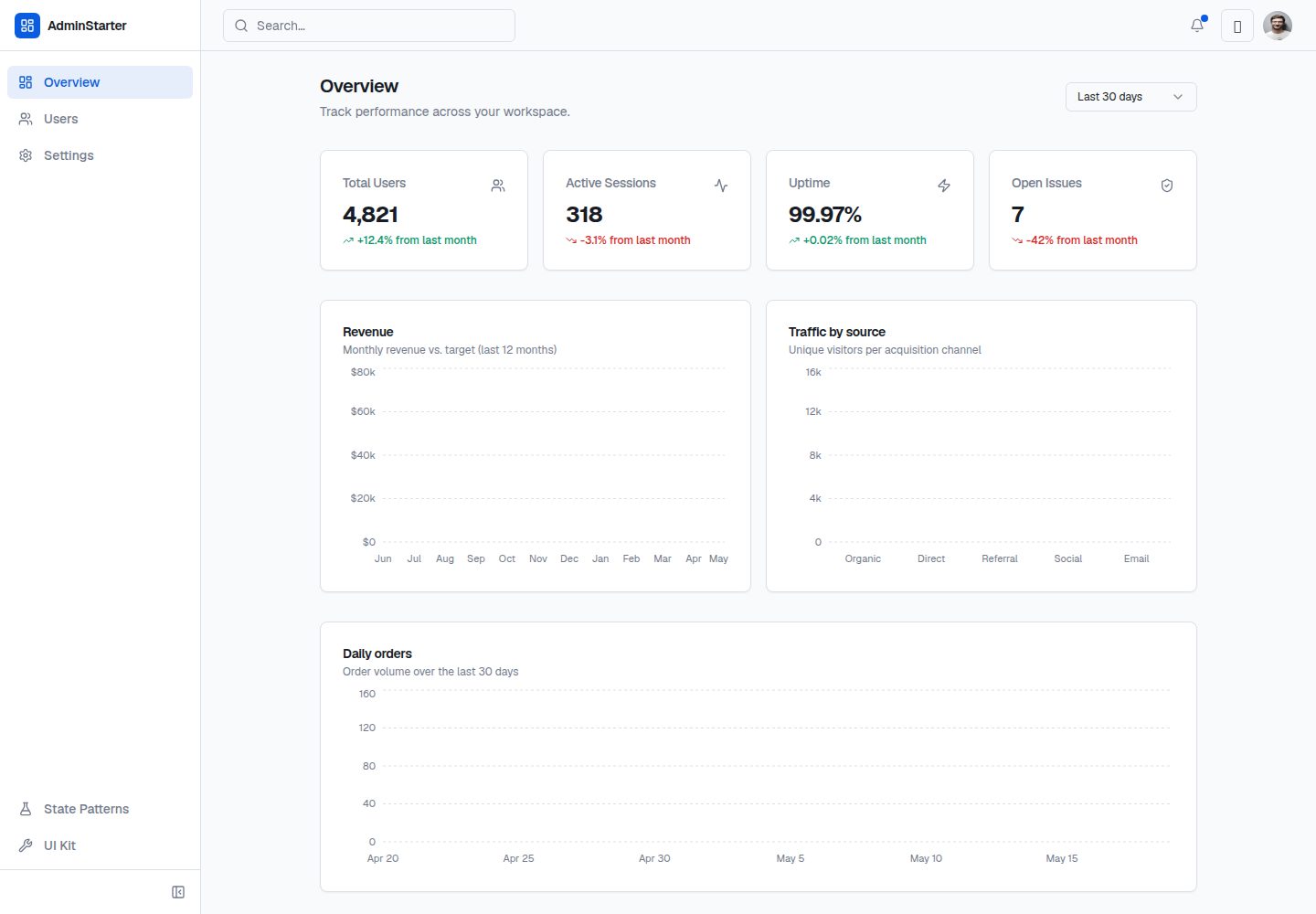
Desktop captureTop of page
Actual screenshot captured by the server browser.
All pages & views 2
Screenshots show visual appearance; interactive behavior may differ.
Recorded 2026-10-15View source
What stands out
A quick read of the recorded project description.
Uses shadcn/ui, Tailwind CSS, and CSS variable theming
Supports light, dark, and system-following themes (next-themes)
Provides a collapsible sidebar and mobile drawer layout
Includes a data table example with search, sorting, and pagination (client-side demo)
Provides a /ui-kit component showcase page
Template Details
Thinboard is an admin dashboard template for Next.js, positioned as a reusable shell for internal tools, SaaS admin panels, or CRUD-style back-office interfaces. It provides layout, design tokens, UI primitives, and example pages, but is deliberately lightweight: it does not include real authentication, a database, or an API layer, which users must integrate per project.
The template includes a collapsible sidebar, page header, page scaffolding, and light/dark theme switching; UI components are based on shadcn/ui and include buttons, inputs, tables, dialogs, toasts, and more. Example pages include an overview page with charts, a user list, and a settings form; the charts use Recharts and mock data, and the settings form uses react-hook-form with Zod validation.
The README also provides quick start, script descriptions, demo routes, project structure, and steps for customizing themes, adding navigation items, list pages, forms, and charts. The tech stack includes Next.js 15 App Router, TypeScript, Tailwind CSS, shadcn/ui, Lucide, Recharts, react-hook-form, Zod, and Sonner.
Next.jsAdminSaaS
Is it right for your project?
Use Cases
- Building the interface shell for an internal tool or SaaS admin panel
- Rapidly prototyping CRUD-style back-office pages
- Using as a sample project to learn how Next.js App Router and shadcn/ui work together
- Reusing its layout and UI component patterns in an existing project
Suitable For
- Developers who need a lightweight admin template and will integrate authentication, a database, and an API themselves
- Teams using the Next.js, TypeScript, and Tailwind CSS stack
- Projects that want to quickly build an admin interface based on shadcn/ui
Getting started & customization
Use these recorded setup notes alongside the repository instructions for your chosen version.
- 1
After cloning the repository, run npm install, then run npm run dev to start the development server; the default address is http://localhost:3000
- 2
Available scripts include npm run dev, npm run build, npm run start, and npm run lint
- 3
The template does not include real authentication, a database, or an API layer; these must be implemented per project
- 4
The theme can be reconfigured by modifying CSS variables in app/globals.css (such as --primary and --radius)
License & source material
Usage conditions & limitations
Free to use · keep license noticeThis entry covers the free version in the public repository under the MIT license; the free scope is the code of that version and does not mean external services or third-party assets are free.
Must comply with when using
- You may use, modify, commercialize, and distribute the code of this version for free.
- When distributing copies or substantial portions of the code, retain the original author's copyright notice and the full MIT license notice.
- The code is provided as is; warranties and limitations of liability are governed by the original license and applicable law.
Additional costs & items to verify
- Demo images, fonts, icons, and other third-party assets must be checked against their respective licenses; the code's MIT license alone is not sufficient to determine this.
- External services such as domains, hosting, databases, payments, or AI may incur separate charges.
View Original Text Basis
https://github.com/claretnnamocha/thinboard/blob/main/LICENSEhttps://github.com/claretnnamocha/thinboard/blob/main/README.mdPermission is hereby granted, free of charge
Original License Text
Compiled by DeepSeek based on repository license and README ·2026-10-15. Results only cover the materials read; dependencies, images, fonts, and subsequent term changes are subject to their respective original texts.
Project checks & description sources
Template Information
- Source platforms
- GitHub
- Documentation and maintenance reference score
- More documented · 85 / 100
- Technologies
- Next.js · React
- Website type
- Admin dashboard · SaaS
How this score is calculated
Our heuristic uses license records (up to 30), a demo link (12), a preview (10), stars (15), recorded maintenance (15), description completeness (8), feature records (5) and classification data (5). It is not a code, security or performance test, or a Google score. A link does not establish tested functionality.
What to verify for this project
- Repository update recorded
- 2026-05-21
- Screenshot last checked
- 2026-10-15
A demo link is listed. Check it with your own content and viewport sizes; its presence does not confirm that forms, authentication or payments work.
The catalog identifies Next.js as the primary stack. Check the actual dependency manifest and lockfile for versions and hosting requirements. These notes use recorded metadata, not a code audit or a deployment test.
Use a selection guide →How this description was prepared
AI-assisted description based on catalog records and repository material. Repository authors are not automatically the reviewers of this description.
Review declaration: codex-user-requested-batch-review-20261017 · 2026-10-16
Inspect the recorded source material
SHA-256: 0e1ab11da36a16e94947b9b0a851446c5d8bb124a25dae4b87e4ffde0a5095a1
2026-10-15T09:36:45.822Z
Source file / repository# Thinboard **Thinboard** is a thin, open-source admin dashboard template for Next.js — a reusable shell you clone, re-theme, and extend for internal tools, SaaS admin panels, or any CRUD-style backend UI.     ## What this is Thinboard is intentionally **thin**: layout, design tokens, UI primitives, and example pages — not a full product. - **Shell**: collapsible sidebar, header, page scaffolding, light/dark theming - **UI kit**: buttons, inputs, tables, dialogs, toasts, and more ([shadcn/ui](https://ui.shadcn.com)) - **Examples**: overview with charts, users list, settings forms - **Excluded by design**: real authentication, database, and API layers (bring your own per project) ## Features - Next.js 15 **App Router** + strict TypeScript - **shadcn/ui** + Tailwind CSS + CSS variable theming - **Light / dark / system** theme via `next-themes` - Collapsible sidebar + mobile drawer layout - Data table pattern: search, sort, pagination (client-side demo) - **Recharts** dashboard widgets with mock data - **react-hook-form** + Zod on the settings example - **Sonner** toasts - **`/ui-kit`** — living catalog of components ## Quick start ```bash git clone https://github.com/YOUR_USERNAME/thinboard.git cd thinboard npm install npm run dev ``` Open [http://localhost:3000](http://localhost:3000). ### Scripts | Command | Description | |-----------------|--------------------------| | `npm run dev` | Start dev server | | `npm run build` | Production build | | `npm run start` | Run production build | | `npm run lint` | Run ESLint | ## Demo routes | Route | Purpose | |-------------|-------------------------------------| | `/` | Dashboard overview (stats + charts) | | `/users` | Data table example | | `/settings` | Forms + validation example | | `/ui-kit` | Component showcase | | `/login` | Auth UI shell (no real auth) | ## Project structure ``` app/ (auth)/login/ # Login shell (dashboard)/ # Sidebar layout + pages components/ ui/ # shadcn primitives dashboard/ # Sidebar, header, page chrome charts/ # Chart wrappers data/ # Table, search, badges forms/ # Form helpers + examples lib/ mock-data.ts # Typed demo data validators.ts # Zod schemas utils.ts # cn() and helpers types/ index.ts # Shared TypeScript types ``` ## Customize for your project ### 1. Re-theme Edit CSS variables in `app/globals.css` (`--primary`, `--radius`, etc.). Components inherit tokens automatically. ### 2. Add a nav item + page 1. Add a link in `components/dashboard/nav-config.ts` 2. Create `app/(dashboard)/your-page/page.tsx` 3. Use `<PageHeader />` inside the existing dashboard layout ### 3. Add a list page (CRUD) Copy the `/users` pattern: - Define types in `types/` - Add mock or API-backed data in `lib/` - Compose `DataTable`, `SearchInput`, `StatusBadge`, dialogs, and toasts ### 4. Add a form 1. Add a Zod schema in `lib/validators.ts` 2. Build a form in `components/forms/` with react-hook-form 3. Follow `/settings` for validation and submit feedback ### 5. Add a chart 1. Add series data in `lib/mock-data.ts` 2. Drop a widget from `components/charts/` into `ChartCard` ## Tech stack | Layer | Choice | |-------------|---------------------------| | Framework | Next.js 15 (App Router) | | Language | TypeScript | | Styling | Tailwind CSS | | Components | shadcn/ui (Radix) | | Icons | Lucide | | Charts | Recharts | | Forms | react-hook-form + Zod | | Toasts | Sonner | ## Philosophy **Thin, not opinionated.** Thinboard ships patterns and UI so you can focus on domain logic — wire your APIs, auth, and data layer without fighting the layout. ## Roadmap - [ ] Command palette (⌘K) - [ ] i18n example - [ ] Storybook for `components/ui` - [ ] Example API route + data-fetching pattern ## Contributing Contributions are welcome. Please open an issue before large changes. Keep PRs focused on the generic template — avoid product-specific auth providers, databases, or branding. 1. Fork the repo 2. Create a branch (`git checkout -b feat/your-feature`) 3. Commit with a clear message 4. Open a pull request ## License Thinboard is open source under the [MIT License](LICENSE). Copyright (c) 2026 Claret Nnamocha You are free to use, modify, and distribute this project, including in commercial work, with minimal restrictions. See [LICENSE](LICENSE) for the full text. --- **Thinboard** — clone it, theme it, ship your admin.
Explore similar templates
Compare previews and descriptions within the same stack and category.

Next.js SaaS Starter
The official Next.js SaaS starter template, integrating email/password authentication, Stripe Checkout subscriptions, a dashboard with user/team CRUD, basic Owner/Member RBAC, and activity logging.
Next.js · SaaS

SaaS-Boilerplate
SaaS-Boilerplate is an open-source SaaS starter template built with Next.js App Router, React 19, TypeScript, Tailwind CSS, and Shadcn UI.
Next.js · SaaS

next-shadcn-dashboard-starter
An MIT-licensed admin dashboard starter built with Next.js 16, shadcn/ui, Tailwind CSS v4, and TypeScript.
Next.js · Admin dashboard

create-t3-turbo
A full-stack TypeScript monorepo starter from T3 OSS, listed in the Vercel template directory. It splits apps for Next.js, Expo and optional TanStack Start, with shared packages for tRPC v11, better-auth, Drizzle + Supabase and shadcn/ui.
Next.js · Starter

saas-starter-kit
BoxyHQ's open-source Next.js enterprise SaaS starter template provides a reusable foundation with authentication, team management, SAML SSO, directory sync, webhooks, audit logs, and Stripe payments.
Next.js · SaaS

Studio Admin · Radix UI
Studio Admin is an admin dashboard template built with Next.js 16, TypeScript, Tailwind CSS v4, and Shadcn UI.
Next.js · Admin dashboard