Static generation based on Astro, with interactive components using React and custom hooks
AstroTool SiteCorporate Website
sendit-astro-template — Astro Tool Template
By CloudCannon
Sendit is an Astro marketing website template maintained by CloudCannon, featuring a blog, theme colors, and visual editing configuration, under the MIT license.
Explore the design
Compare the page layouts and mobile experience. Open any screenshot for a closer look.
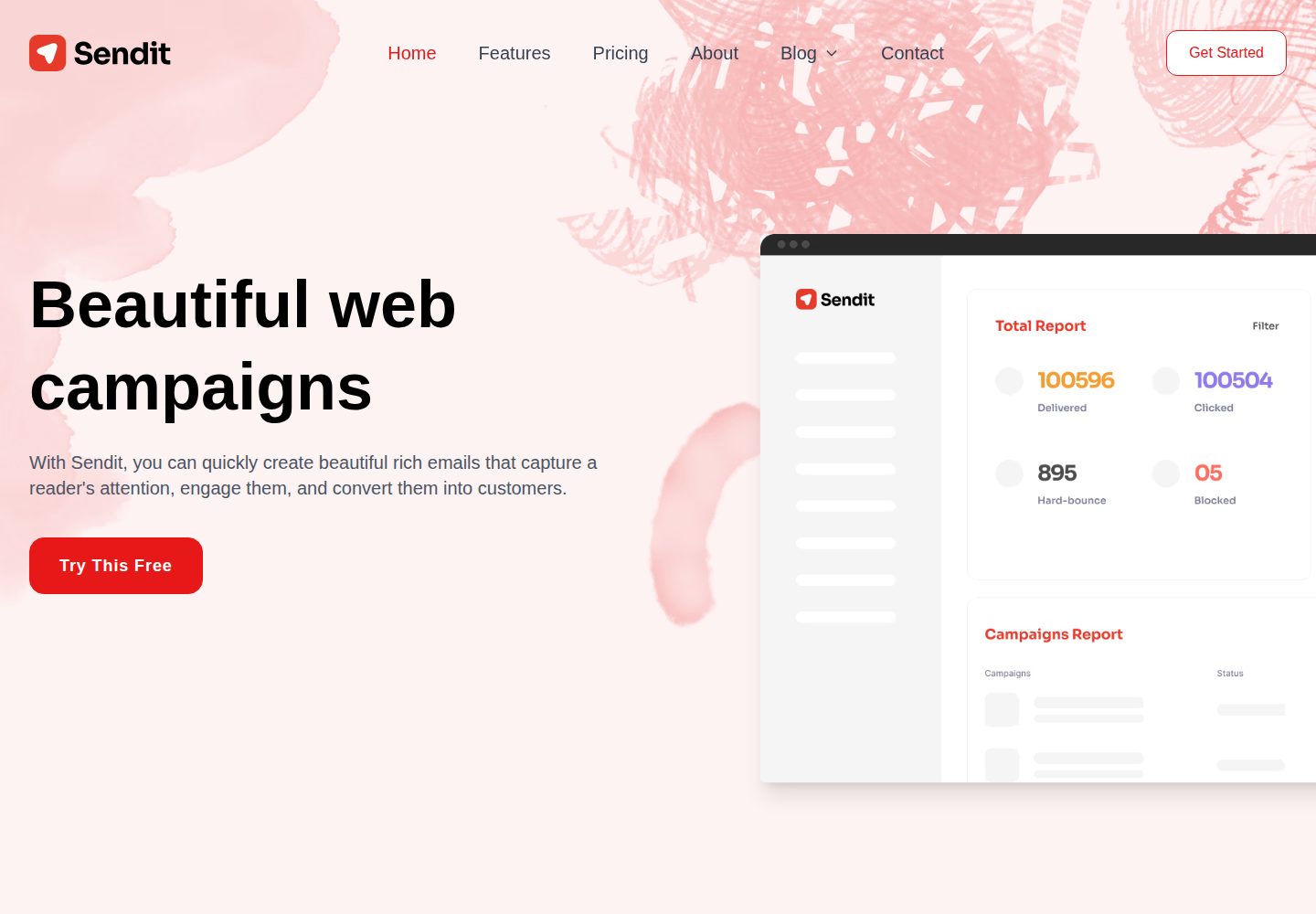
Desktop homepage1 / 3
Desktop captureTop of page
Actual screenshot captured by the server browser.
All pages & views 3
Screenshots show visual appearance; interactive behavior may differ.
Recorded 2026-10-02View source
What stands out
A quick read of the recorded project description.
Styling built with Tailwind CSS, theme colors can be updated in real time within CloudCannon
Built-in blog system, including pagination and category pages
Pre-configured CloudCannon split configuration and visual editing regions, supporting direct in-page editing
Centralized site configuration for company information, navigation, footer, etc.
Image assets processed using Astro's built-in image optimization
Template Details
Sendit is an Astro website template for marketing scenarios, maintained by CloudCannon and open-sourced on GitHub. It provides a reusable component-based structure, with pages statically generated by Astro and interactive parts implemented using React components and custom hooks. Styling is based on Tailwind CSS, and theme colors can be adjusted in real time within CloudCannon and propagated to the design system.
The template includes a built-in blog system with pagination and category pages, and offers site-level configuration items for centrally managing company information, navigation, and footer. It comes with CloudCannon's split configuration and visual editing regions, allowing content to be edited directly on the page with live preview. Images are processed using Astro's built-in image optimization capabilities.
Before use, Node.js 24 or higher is required (the README states Astro requires 22.12.0 or higher, and CloudCannon CLI requires 24). Local development involves installing dependencies via npm and running the development server; to debug the CloudCannon editing experience locally, you need to build the output first, then start the CloudCannon CLI pointing to the dist directory. Third-party assets such as images, fonts, and icons in the demo site require separate license verification; the MIT license for the code itself does not cover these assets.
AstroTool SiteCorporate Website
Is it right for your project?
Use Cases
- Building a product marketing website or corporate introduction site
- Brand websites that need blog content and category archives
- Projects that want visual content editing in CloudCannon
- Static sites based on Astro that require React interactive components
Suitable For
- Developers using Astro who want a ready-made marketing page structure
- Teams planning to manage content and visual editing with CloudCannon
- Website projects that need blog, pagination, and category features
- Users who accept the MIT license and will independently verify third-party asset licensing
Getting started & customization
Use these recorded setup notes alongside the repository instructions for your chosen version.
- 1
Environment requires Node.js 24 or higher (Astro requires 22.12.0 or higher, CloudCannon CLI requires 24)
- 2
For local development, run npm install then npm run dev, accessible by default at localhost:4321
- 3
To debug CloudCannon editing locally, first run npm run build, then start with cloudcannon dev dist, default port 10101
- 4
Before submitting CloudCannon configuration changes, validate with cloudcannon validate
- 5
Third-party assets such as demo images, fonts, and icons require separate license verification
License & source material
Usage conditions & limitations
Free to use · keep license noticeThis entry covers the free version under the MIT license in the public repository; the free scope applies to the code of this version and does not imply that external services or third-party assets are free.
Must comply with when using
- Free use, modification, commercial use, and distribution of this version's code are permitted.
- When distributing copies or substantial portions of the code, retain the original author's copyright notice and the full MIT license notice.
- The code is provided as-is; warranties and limitations of liability are governed by the original license and applicable law.
Additional costs & items to verify
- Using CloudCannon's local visual editing features requires installing the CloudCannon CLI and logging into a CloudCannon account, which is an external service dependency.
- Local debugging of the CloudCannon editing experience requires running cloudcannon login to log into a CloudCannon account; without logging in, this editing workflow cannot be used.
- The runtime environment requires Node.js 24 or higher; if only using Astro for local development, 22.12.0 or higher is required, while CloudCannon CLI mandates 24.
- The CloudCannon local dev server is only for development debugging; editors should not access it, and it cannot be used as a production environment.
- Demo images, fonts, icons, and other third-party assets require license verification according to their respective licenses; they cannot be judged solely based on the code's MIT license.
- External services such as domains, hosting, databases, payments, or AI may incur additional charges.
View Original Text Basis
Permission is hereby granted, free of charge
Original License Text
Install the CLI and log in (requires Node.js 24+):
Original README
cloudcannon login
Original README
Node.js 24+ (Astro 7 requires >= 22.12.0; the CloudCannon CLI requires 24).
Original README
https://github.com/CloudCannon/sendit-astro-template/blob/main/LICENSE.mdhttps://github.com/CloudCannon/sendit-astro-template/blob/main/README.mdThe dev server is a development tool only — editors never access it.
Original README
Compiled by DeepSeek based on repository license and README ·2026-10-02. Results only cover the materials read; dependencies, images, fonts, and subsequent term changes are subject to their respective original texts.
Project checks & description sources
Template Information
- Source platforms
- GitHub
- Documentation and maintenance reference score
- More documented · 96 / 100
- Technologies
- Astro
- Website type
- Tool Site · Corporate Website
How this score is calculated
Our heuristic uses license records (up to 30), a demo link (12), a preview (10), stars (15), recorded maintenance (15), description completeness (8), feature records (5) and classification data (5). It is not a code, security or performance test, or a Google score. A link does not establish tested functionality.
What to verify for this project
- Repository update recorded
- 2026-09-24
- Screenshot last checked
- 2026-10-02
A demo link is listed. Check it with your own content and viewport sizes; its presence does not confirm that forms, authentication or payments work.
The catalog identifies Astro as the primary stack. Check the actual dependency manifest and lockfile for versions and hosting requirements. These notes use recorded metadata, not a code audit or a deployment test.
Use a selection guide →How this description was prepared
AI-assisted description based on catalog records and repository material. Repository authors are not automatically the reviewers of this description.
Automatically checked against source and license rules; no manual editorial review.
Inspect the recorded source material
SHA-256: eeb7180e6bb508077d0e0f5067bc5463d8fa6d7b1ff89733e1917c2b5a7c83dc
2026-10-02T07:51:42.019Z
Source file / repository# Sendit Sendit is a polished, marketing website template for Astro. Browse through a [live demo](https://top-quail.cloudvent.net/).  [](https://app.cloudcannon.com/register#sites/connect/github/CloudCannon/sendit-astro-template) ## Features - **Modern Architecture**: Built with Astro and React for optimal performance - **Tailwind CSS**: Custom styling with utility-first CSS framework - **Component Library**: Reusable, componentized architecture for better maintainability - **Visual Editing**: Visual editing with [CloudCannon](https://cloudcannon.com/) editable regions - edit directly on the pages - **Interactive Components**: Custom React hooks for interactivity - **Image Optimization**: Astro's built-in image optimization for all images - **Accessibility**: Fully accessible navigation and components - **Dynamic Theming**: Real-time theme color updates - **Blog System**: Complete blog with pagination and category pages - **SEO Optimized**: Pre-configured for search engine optimization ## Prerequisites - Node.js 24+ (Astro 7 requires >= 22.12.0; the CloudCannon CLI requires 24). ## Getting Started 1. Get a workflow going to see your site's output (with [CloudCannon](https://app.cloudcannon.com/) or Astro locally). ### Local Development Sendit is built with [Astro](https://astro.build/), [React](https://react.dev/), and [Tailwind CSS](https://tailwindcss.com/) for a modern, performant development experience. ```bash npm install npm run dev ``` Your site is available at [localhost:4321](http://localhost:4321). ### Editing Locally with CloudCannon Run CloudCannon against your local files with the [CloudCannon CLI](https://cloudcannon.com/documentation/developer-reference/cli/) dev server. This is the fastest way to iterate on `cloudcannon.config.yml`, inputs, and structures — you see the editing experience without committing and pushing first. 1. Install the CLI and log in (requires Node.js 24+): ```bash npm install --global @cloudcannon/cli cloudcannon login ``` 2. Build the site, so the dev server has output to serve: ```bash npm run build ``` 3. Start CloudCannon locally, pointing it at the build output: ```bash cloudcannon dev dist ``` The dev server runs on port `10101` by default and opens CloudCannon in your browser, pointed at the files in this repo. Content edits sync to disk as you make them; re-run `npm run build` after changing components or templates to refresh the preview. Before you commit configuration changes, validate them: ```bash cloudcannon validate ``` The dev server is a development tool only — editors never access it. See [Build your editing experience locally](https://cloudcannon.com/blog/build-your-editing-experience-locally-with-the-cloudcannon-dev-server/) for the full workflow. ### AI Agent Skills If you build with an AI coding agent (Claude Code, Cursor, Copilot, and others), install [CloudCannon's agent skills](https://github.com/CloudCannon/agent-skills). They teach your agent how CloudCannon configuration, editable regions, and snippets actually work, so it stops guessing. ```bash npx skills add cloudcannon/agent-skills --all ``` To see what's on offer before installing anything, or to install a subset: ```bash npx skills add cloudcannon/agent-skills --list npx skills add cloudcannon/agent-skills --skill <names> ``` Other useful flags and commands: | Command | What it does | | --------------------------------- | ------------------------------------------------------------- | | `--all` | Install every skill for every detected agent, without prompts | | `-l`, `--list` | List the skills in the repository without installing | | `-g`, `--global` | Install for your user account instead of just this project | | `npx skills ls` | List the skills you have installed, project and global | | `npx skills update` | Update installed skills to their latest versions | | `npx skills remove` | Remove installed skills | | `npx skills experimental_install` | Restore the exact skills recorded in `skills-lock.json` | Skills install to `.agents/skills/`, with agent-specific directories such as `.claude/skills/` and `agent/skills/` pointing at them. Those directories are gitignored, but `skills-lock.json` is committed — so a teammate can restore the same set and versions you used. In Claude Code you can install them as a plugin instead: ``` /plugin marketplace add CloudCannon/agent-skills /plugin install agent-skills@cloudcannon ``` ## Site Details ### Tech Stack - **Astro**: Static site generation with component islands - **React**: Interactive components with custom hooks - **Tailwind CSS**: Utility-first CSS framework - **TypeScript**: Type-safe development experience ## Editing Sendit features advanced visual editing capabilities with CloudCannon's split configuration, allowing for intuitive content management and real-time preview. ### Visual Editing - **Live Preview**: See changes instantly as you edit - **Component-based**: Edit reusable components directly in context - **Interactive Elements**: Visual editing works seamlessly with React components - **Split Configuration**: Modern CloudCannon setup for enhanced editing experience ### Content Management #### Posts - Add, update or remove posts in the _Posts_ collection - Automatic pagination and category organization - Rich content editing with live preview #### Site Configuration - **Company Details**: Centralized company information reused across the site - **Navigation**: Fully accessible, responsive navigation management - **Footer**: Configurable footer elements and links #### Theme Customization - **Dynamic Colors**: Update theme colors in real-time through CloudCannon - **Tailwind Integration**: Colors automatically propagate through the design system ### Interactive Components - Custom React hooks handle all interactive functionality - Lightweight with minimal external dependencies - Accessible by default with proper ARIA attributes - Optimized for performance with Astro's component islands ## Learn More - [CloudCannon documentation](https://cloudcannon.com/documentation/) — configuration, editing, and build reference - [CloudCannon CLI reference](https://cloudcannon.com/documentation/developer-reference/cli/) — `cloudcannon dev`, `validate`, and more - [CloudCannon agent skills](https://github.com/CloudCannon/agent-skills) — skills for working on CloudCannon sites with AI agents ## License MIT
Explore similar templates
Compare previews and descriptions within the same stack and category.

astrowind
AstroWind is a free, open-source Astro starter theme using Astro and Tailwind CSS, released under the MIT license.
Astro · Blog

astro-paper
AstroPaper is a minimal, responsive, accessible, and SEO-friendly Astro blog theme. Articles are stored as Markdown/MDX in src/content/posts/, with subdirectories affecting URLs.
Astro · Blog

astro-theme-cactus
Astro Cactus is an Astro-based blog and portfolio theme that uses Markdown/MDX content collections to manage posts, notes, and tags, with frontmatter type-checked by a schema.
Astro · Portfolio

astrofy
Astrofy is a free and open-source personal portfolio website template built with Astro and TailwindCSS, with built-in blog, CV timeline, project showcase, store, and RSS feed modules.
Astro · Portfolio

astro-landing-page
An Astro + Tailwind CSS landing page example template with theme variables, dark mode, responsive layout, and Open Graph tags, under the MIT license, suitable as a starting point for single-page product, event, or corporate homepage sites.
Astro · Corporate Website

Tailcast
Tailcast is a dark-themed corporate website template built with Astro and Tailwind CSS for a fictional startup.
Astro · Corporate Website