基于 Astro 静态生成,交互组件使用 React 与自定义 hooks
Astro工具站企业官网
sendit-astro-template — Astro 工具站模板
作者 CloudCannon
Sendit 是 CloudCannon 维护的 Astro 营销网站模板,包含博客、主题配色与可视化编辑配置,采用 MIT 许可。
看看你的网站会是什么样
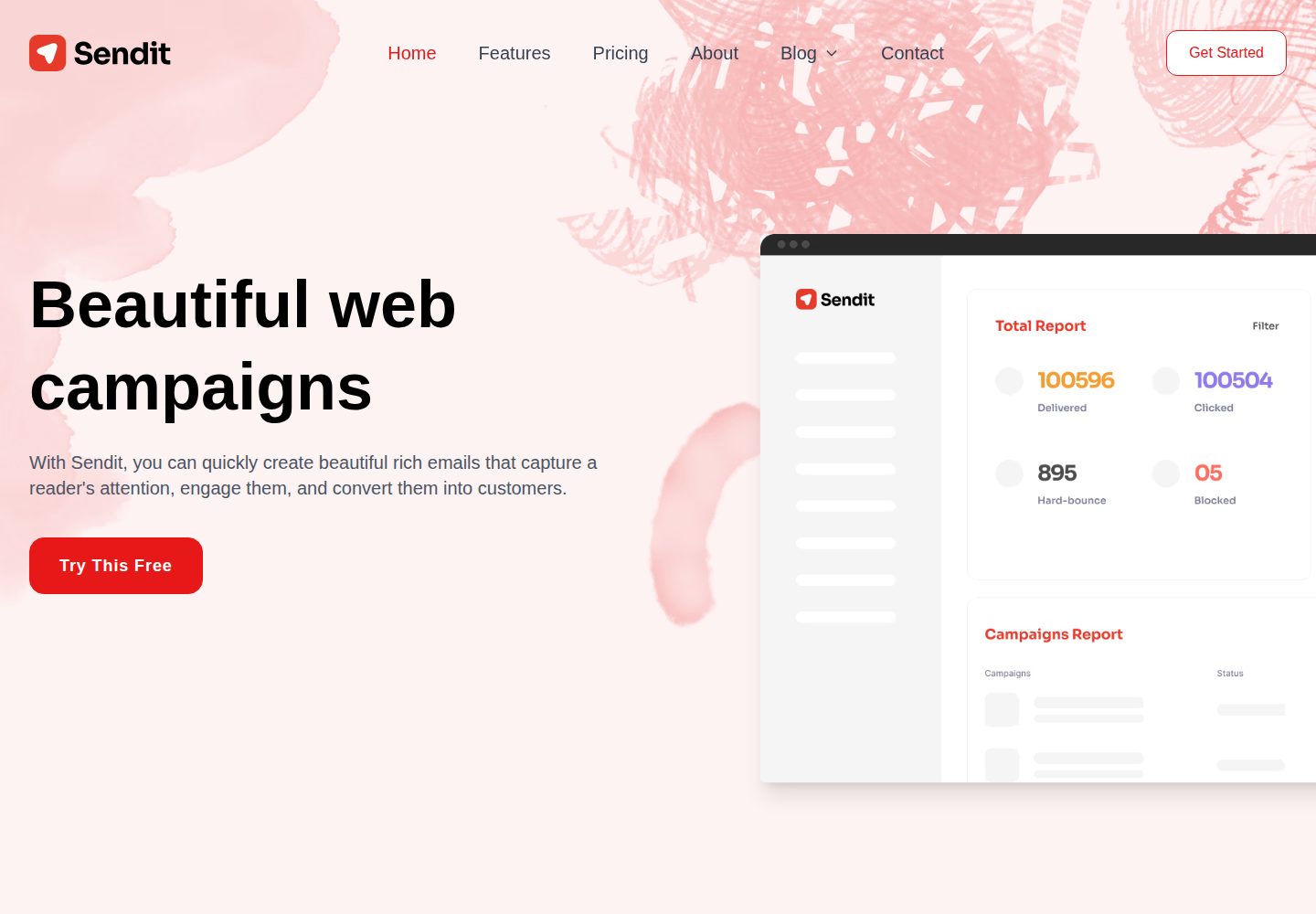
浏览真实页面截图,比较内容排版与手机效果。点击下方缩略图切换,放大查看整页细节。
全部页面与视图 3
截图用于了解视觉与布局,交互效果请以实际项目为准。
采集于 2026-10-02查看来源
值得关注的模板亮点
从已有项目资料中,快速了解它的特点。
使用 Tailwind CSS 构建样式,主题颜色可在 CloudCannon 中实时更新
内置博客系统,包含分页与分类页面
预置 CloudCannon 拆分配置与可视化编辑区域,支持页面内直接编辑
提供公司信息、导航、页脚等集中式站点配置
使用 Astro 内置图片优化处理图片资源
模板详细介绍
Sendit 是一个面向营销场景的 Astro 网站模板,由 CloudCannon 维护并在 GitHub 上开源。它提供可复用的组件化结构,页面由 Astro 静态生成,交互部分使用 React 组件与自定义 hooks 实现。样式基于 Tailwind CSS,主题颜色可在 CloudCannon 中实时调整并传递到设计系统。
模板内置博客系统,支持分页与分类页面,并提供站点级配置项,用于集中管理公司信息、导航和页脚。它预置了 CloudCannon 的拆分配置与可视化编辑区域,可以在页面上直接编辑内容并实时预览。图片使用 Astro 内置的图片优化能力处理。
使用前需要 Node.js 24 及以上版本(README 说明 Astro 需要 22.12.0 以上,CloudCannon CLI 需要 24)。本地开发通过 npm 安装依赖并运行开发服务器;如需在本地调试 CloudCannon 编辑体验,需先构建产物,再用 CloudCannon CLI 指向 dist 目录启动。演示站点中的图片、字体、图标等第三方素材需单独核对其许可,代码本身的 MIT 许可不覆盖这些素材。
Astro工具站企业官网
适合你的项目吗?
适用场景
- 搭建产品营销官网或企业介绍站点
- 需要博客内容与分类归档的品牌网站
- 希望在 CloudCannon 中进行可视化内容编辑的项目
- 以 Astro 为基础、需要 React 交互组件的静态站点
适合人群
- 使用 Astro 并希望获得现成营销页面结构的开发者
- 计划用 CloudCannon 管理内容与可视化编辑的团队
- 需要博客、分页和分类功能的网站项目
- 接受 MIT 许可并会自行核对第三方素材授权的使用者
上手与定制指南
结合仓库当前版本的说明,按下面的资料检查内容、配置与运行要求。
- 1
环境要求 Node.js 24 及以上(Astro 需 22.12.0 以上,CloudCannon CLI 需 24)
- 2
本地开发执行 npm install 后运行 npm run dev,默认访问 localhost:4321
- 3
本地调试 CloudCannon 编辑需先 npm run build,再用 cloudcannon dev dist 启动,默认端口 10101
- 4
提交 CloudCannon 配置变更前可用 cloudcannon validate 校验
- 5
演示图片、字体、图标等第三方素材需按各自许可单独核对
授权与来源资料
使用条件与限制
免费使用 · 保留许可声明本次收录的是公开仓库中采用 MIT 许可的免费版本;免费范围为该版本代码,不代表外部服务或第三方素材免费。
使用时需要遵守
- 允许免费使用、修改、商用和分发该版本代码。
- 分发代码副本或实质性部分时,保留原作者版权声明和完整 MIT 许可声明。
- 代码按现状提供;担保与责任限制以原许可证及适用法律为准。
额外费用与待核对事项
- 使用 CloudCannon 本地可视化编辑功能需安装 CloudCannon CLI 并登录 CloudCannon 账号,属于外部服务依赖。
- 本地调试 CloudCannon 编辑体验需要执行 cloudcannon login 登录 CloudCannon 账号,未登录无法使用该编辑工作流。
- 运行环境要求 Node.js 24 及以上;若仅用 Astro 本地开发则需 22.12.0 以上,CloudCannon CLI 强制要求 24。
- CloudCannon 本地 dev server 仅用于开发调试,编辑人员不应访问,不能作为生产环境使用。
- 演示图片、字体、图标及其他第三方素材需按各自许可核对,不能仅凭代码的 MIT 许可判断。
- 域名、托管、数据库、支付或 AI 等外部服务可能另外收费。
查看原文依据
Permission is hereby granted, free of charge
许可证原文
Install the CLI and log in (requires Node.js 24+):
README 原文
cloudcannon login
README 原文
Node.js 24+ (Astro 7 requires >= 22.12.0; the CloudCannon CLI requires 24).
README 原文
https://github.com/CloudCannon/sendit-astro-template/blob/main/LICENSE.mdhttps://github.com/CloudCannon/sendit-astro-template/blob/main/README.mdThe dev server is a development tool only — editors never access it.
README 原文
DeepSeek 根据仓库许可证和 README 整理 ·2026-10-02。结果仅覆盖已读取资料,依赖、图片、字体及后续条款变更以各自原文为准。
项目核对记录与介绍依据
模板资料
- 来源平台
- GitHub
- 资料与维护参考分
- 资料较完整 · 96 / 100
- 技术栈
- Astro
- 网站类型
- 工具站 · 企业官网
这个分数如何计算
本站按许可资料(最高30分)、演示链接(12分)、预览图(10分)、Star数(15分)、记录的维护时间(15分)、描述完整度(8分)、功能记录(5分)和分类资料(5分)计算。它不是代码、安全或性能测试,也不是 Google 评分;有链接不代表已实测可用。
这个项目需要核对什么
- 记录的仓库更新时间
- 2026-09-24
- 截图检查日期
- 2026-10-02
已收录演示链接。请用你的内容与屏幕尺寸检查;有演示不代表表单、认证或支付已经可用。
目录记录的主要技术栈是 Astro。请通过依赖清单和锁文件核对实际版本与托管要求。这些说明基于收录资料,不代表代码审计或部署实测。
查看具体选型方法 →介绍的制作与核对状态
介绍由 AI 辅助整理目录与仓库资料。仓库作者不等于这篇介绍的审核者。
已完成服务器许可规则与 AI 来源核对;未经过人工编辑审核。
查看当时使用的来源资料
SHA-256: eeb7180e6bb508077d0e0f5067bc5463d8fa6d7b1ff89733e1917c2b5a7c83dc
2026-10-02T07:51:42.019Z
来源文件 / 仓库# Sendit Sendit is a polished, marketing website template for Astro. Browse through a [live demo](https://top-quail.cloudvent.net/).  [](https://app.cloudcannon.com/register#sites/connect/github/CloudCannon/sendit-astro-template) ## Features - **Modern Architecture**: Built with Astro and React for optimal performance - **Tailwind CSS**: Custom styling with utility-first CSS framework - **Component Library**: Reusable, componentized architecture for better maintainability - **Visual Editing**: Visual editing with [CloudCannon](https://cloudcannon.com/) editable regions - edit directly on the pages - **Interactive Components**: Custom React hooks for interactivity - **Image Optimization**: Astro's built-in image optimization for all images - **Accessibility**: Fully accessible navigation and components - **Dynamic Theming**: Real-time theme color updates - **Blog System**: Complete blog with pagination and category pages - **SEO Optimized**: Pre-configured for search engine optimization ## Prerequisites - Node.js 24+ (Astro 7 requires >= 22.12.0; the CloudCannon CLI requires 24). ## Getting Started 1. Get a workflow going to see your site's output (with [CloudCannon](https://app.cloudcannon.com/) or Astro locally). ### Local Development Sendit is built with [Astro](https://astro.build/), [React](https://react.dev/), and [Tailwind CSS](https://tailwindcss.com/) for a modern, performant development experience. ```bash npm install npm run dev ``` Your site is available at [localhost:4321](http://localhost:4321). ### Editing Locally with CloudCannon Run CloudCannon against your local files with the [CloudCannon CLI](https://cloudcannon.com/documentation/developer-reference/cli/) dev server. This is the fastest way to iterate on `cloudcannon.config.yml`, inputs, and structures — you see the editing experience without committing and pushing first. 1. Install the CLI and log in (requires Node.js 24+): ```bash npm install --global @cloudcannon/cli cloudcannon login ``` 2. Build the site, so the dev server has output to serve: ```bash npm run build ``` 3. Start CloudCannon locally, pointing it at the build output: ```bash cloudcannon dev dist ``` The dev server runs on port `10101` by default and opens CloudCannon in your browser, pointed at the files in this repo. Content edits sync to disk as you make them; re-run `npm run build` after changing components or templates to refresh the preview. Before you commit configuration changes, validate them: ```bash cloudcannon validate ``` The dev server is a development tool only — editors never access it. See [Build your editing experience locally](https://cloudcannon.com/blog/build-your-editing-experience-locally-with-the-cloudcannon-dev-server/) for the full workflow. ### AI Agent Skills If you build with an AI coding agent (Claude Code, Cursor, Copilot, and others), install [CloudCannon's agent skills](https://github.com/CloudCannon/agent-skills). They teach your agent how CloudCannon configuration, editable regions, and snippets actually work, so it stops guessing. ```bash npx skills add cloudcannon/agent-skills --all ``` To see what's on offer before installing anything, or to install a subset: ```bash npx skills add cloudcannon/agent-skills --list npx skills add cloudcannon/agent-skills --skill <names> ``` Other useful flags and commands: | Command | What it does | | --------------------------------- | ------------------------------------------------------------- | | `--all` | Install every skill for every detected agent, without prompts | | `-l`, `--list` | List the skills in the repository without installing | | `-g`, `--global` | Install for your user account instead of just this project | | `npx skills ls` | List the skills you have installed, project and global | | `npx skills update` | Update installed skills to their latest versions | | `npx skills remove` | Remove installed skills | | `npx skills experimental_install` | Restore the exact skills recorded in `skills-lock.json` | Skills install to `.agents/skills/`, with agent-specific directories such as `.claude/skills/` and `agent/skills/` pointing at them. Those directories are gitignored, but `skills-lock.json` is committed — so a teammate can restore the same set and versions you used. In Claude Code you can install them as a plugin instead: ``` /plugin marketplace add CloudCannon/agent-skills /plugin install agent-skills@cloudcannon ``` ## Site Details ### Tech Stack - **Astro**: Static site generation with component islands - **React**: Interactive components with custom hooks - **Tailwind CSS**: Utility-first CSS framework - **TypeScript**: Type-safe development experience ## Editing Sendit features advanced visual editing capabilities with CloudCannon's split configuration, allowing for intuitive content management and real-time preview. ### Visual Editing - **Live Preview**: See changes instantly as you edit - **Component-based**: Edit reusable components directly in context - **Interactive Elements**: Visual editing works seamlessly with React components - **Split Configuration**: Modern CloudCannon setup for enhanced editing experience ### Content Management #### Posts - Add, update or remove posts in the _Posts_ collection - Automatic pagination and category organization - Rich content editing with live preview #### Site Configuration - **Company Details**: Centralized company information reused across the site - **Navigation**: Fully accessible, responsive navigation management - **Footer**: Configurable footer elements and links #### Theme Customization - **Dynamic Colors**: Update theme colors in real-time through CloudCannon - **Tailwind Integration**: Colors automatically propagate through the design system ### Interactive Components - Custom React hooks handle all interactive functionality - Lightweight with minimal external dependencies - Accessible by default with proper ARIA attributes - Optimized for performance with Astro's component islands ## Learn More - [CloudCannon documentation](https://cloudcannon.com/documentation/) — configuration, editing, and build reference - [CloudCannon CLI reference](https://cloudcannon.com/documentation/developer-reference/cli/) — `cloudcannon dev`, `validate`, and more - [CloudCannon agent skills](https://github.com/CloudCannon/agent-skills) — skills for working on CloudCannon sites with AI agents ## License MIT
看看同类模板
对比同技术栈与用途的模板,找到更适合的视觉与内容结构。

astrowind
⭕️ AstroWind: A free template using Astro v7 and Tailwind CSS v4. Astro starter theme.
Astro · 博客

astro-paper
A minimal, accessible and SEO-friendly Astro blog theme.
Astro · 博客

astro-theme-cactus
A simple Astro theme. Use it to create your blog or website.
Astro · 作品集

astrofy
Astrofy is a free and open-source template for your Personal Portfolio Website built with Astro and TailwindCS…
Astro · 作品集

astro-landing-page
An Astro + Tailwind CSS Example/Template for Landing Pages
Astro · 企业官网

Tailcast
Dark-themed website template built on Astro and Tailwind CSS
Astro · 企业官网