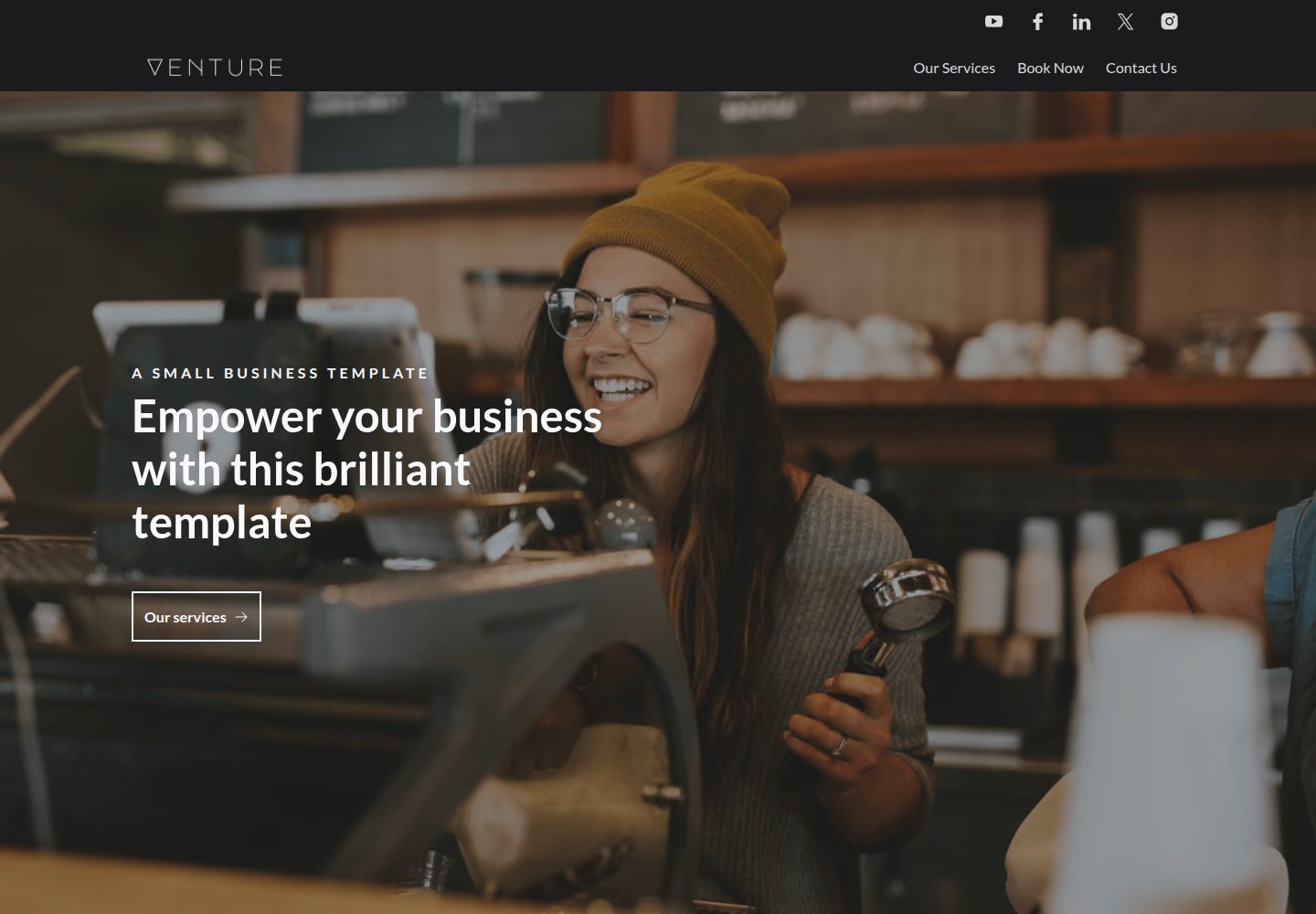
Pre-built pages and pre-styled components covering common marketing site sections
EleventyTool SiteCorporate WebsiteStarter
venture-eleventy-template — Eleventy Tool Template
By CloudCannon
Venture is a marketing website template for Eleventy created by CloudCannon, offering pre-built pages, configurable components and themes, and optimized for CloudCannon visual editing.
Explore the design
Compare the page layouts and mobile experience. Open any screenshot for a closer look.
Desktop homepage1 / 2
Desktop captureTop of page
Actual screenshot captured by the server browser.
All pages & views 2
Screenshots show visual appearance; interactive behavior may differ.
Recorded 2026-10-03View source
What stands out
A quick read of the recorded project description.
Navigation and footer configured centrally in data files and reused in multiple places
Supports multiple hero options and components such as forms, galleries, images, videos, pricing, and split layouts
Theme colors and fonts adjustable in data files, generating corresponding CSS variables at build time
Adapted for CloudCannon visual editing, with components organized as Liquid partials and structure value files
Provides a generic Embed component for embedding third-party content
Template Details
Venture is a marketing website template for Eleventy, maintained by CloudCannon and released under the MIT license. It provides pre-built pages and pre-styled components. Navigation and footer can be configured centrally in data files. It supports multiple hero options, forms, galleries, images, videos, pricing, split layouts, and other sections, plus a generic Embed component for embedding third-party content. Theme colors and fonts can be adjusted in data files, and page SEO and favicon also have corresponding configuration entries.
The template is positioned as a marketing site and does not include a blog or post collection. It is adapted for CloudCannon visual editing; components are implemented as Eleventy Liquid partials and work with CloudCannon structure value files via editable-regions. Changes in data files require a rebuild to take effect, and navigation and footer do not update instantly in live editing.
Local development requires Node.js 22 or newer; CloudCannon builds use Node 24. Image optimization relies on the Eleventy Image plugin, and source images should be kept within 1600px wide. The form component can submit to a CloudCannon inbox, but an inbox key must be configured first. The Embed component supports several third-party embeds, but the template does not guarantee seamless operation for all embeddable content. Demo photography comes from Unsplash and is placeholder content that should be replaced before launch.
EleventyTool SiteCorporate WebsiteStarter
Is it right for your project?
Use Cases
- Building a product marketing or corporate website that needs pre-built pages and reusable sections
- Having non-technical editors maintain page, navigation, and footer content in CloudCannon
- Needing to quickly adjust theme colors and fonts without changing component code
- Collecting leads through the form component and submitting them to a CloudCannon inbox
- Embedding third-party content such as Google Forms, Hubspot forms, Instagram, and Spotify with the Embed component
Suitable For
- Developers building marketing websites or corporate sites with Eleventy
- Teams planning to do visual content editing on CloudCannon
- Projects that need pre-built components and configurable themes rather than building styles from scratch
- Sites that can accept a page-and-section-centric structure without a blog or post collection
Getting started & customization
Use these recorded setup notes alongside the repository instructions for your chosen version.
- 1
Local development requires Node.js 22 or newer; CloudCannon builds use Node 24.
- 2
Run npm i to install dependencies, npm run start to start the watch build, and npm run build to generate the _site output.
- 3
Changes in data files require a rebuild to take effect; navigation and footer do not update instantly in live editing.
- 4
Before forms can submit to a CloudCannon inbox, you need to create an inbox and configure an inbox key.
- 5
Demo photography is Unsplash placeholder content and should be replaced with your own assets before launch.
License & source material
Usage conditions & limitations
Free to use · keep license noticeThis entry covers the free version in the public repository under the MIT license; the free scope is the code of that version and does not mean external services or third-party assets are free.
Must comply with when using
- You may use, modify, commercialize, and distribute the code of this version for free.
- When distributing copies or substantial portions of the code, retain the original author's copyright notice and the full MIT license notice.
- The code is provided as is; warranties and limitations of liability are governed by the original license and applicable law.
Additional costs & items to verify
- The form component submits to a CloudCannon inbox by default; you must first create an inbox and configure an inbox key. If you need a custom submission method, you must use the Embed component and integrate it yourself.
- Using the CloudCannon CLI for local editing requires installing @cloudcannon/cli and running cloudcannon login to sign in, and requires Node.js 24 or above.
- Demo photography comes from Unsplash and is placeholder content only; it does not constitute a reusable license and must be replaced with your own assets before launch.
- The local development environment requires Node.js 22 or newer; CloudCannon builds use Node 24, and versions below that cannot run.
- The Embed component does not guarantee seamless operation for all embeddable content; the official recommendation is to try other components first.
- Changes to data files (navigation, footer, theme, etc.) must be rebuilt for the site to take effect and do not update instantly in live editing.
- Demo images, fonts, icons, and other third-party assets must be checked against their respective licenses; you cannot judge solely based on the code's MIT license.
- External services such as domains, hosting, databases, payments, or AI may incur additional charges.
View Original Text Basis
Permission is hereby granted, free of charge
Original License Text
This component is set up to submit to a CloudCannon inbox as long as you configure the inbox key following the instructions below.
Original README
Install the CLI and log in (requires Node.js 24+):
Original README
Demo photography is from [Unsplash](https://unsplash.com) and listed in
Original README
**Requires Node.js 22 or newer.** Eleventy Image v7 is ESM-only and sets the floor at Node 22;
Original README
The "Embed" component is built to be generic and support any embed, however we cannot guarantee it will work seamlessly with all embeddable content.
Original README
https://github.com/CloudCannon/venture-eleventy-template/blob/main/LICENSEhttps://github.com/CloudCannon/venture-eleventy-template/blob/main/README.mdChanges in the data files require the site to be rebuilt to see your changes.
Original README
Compiled by DeepSeek based on repository license and README ·2026-10-03. Results only cover the materials read; dependencies, images, fonts, and subsequent term changes are subject to their respective original texts.
Project checks & description sources
Template Information
- Source platforms
- GitHub
- Documentation and maintenance reference score
- More documented · 92 / 100
- Technologies
- Eleventy
- Website type
- Tool Site · Corporate Website · Starter
How this score is calculated
Our heuristic uses license records (up to 30), a demo link (12), a preview (10), stars (15), recorded maintenance (15), description completeness (8), feature records (5) and classification data (5). It is not a code, security or performance test, or a Google score. A link does not establish tested functionality.
What to verify for this project
- Repository update recorded
- 2026-09-24
- Screenshot last checked
- 2026-10-03
A demo link is listed. Check it with your own content and viewport sizes; its presence does not confirm that forms, authentication or payments work.
The catalog identifies Eleventy as the primary stack. Check the actual dependency manifest and lockfile for versions and hosting requirements. These notes use recorded metadata, not a code audit or a deployment test.
Use a selection guide →How this description was prepared
AI-assisted description based on catalog records and repository material. Repository authors are not automatically the reviewers of this description.
Automatically checked against source and license rules; no manual editorial review.
Inspect the recorded source material
SHA-256: 33f5fee93237b11b6aef919c292989b9310f6a82e730fe7375e6a59f0dcba9da
2026-10-03T00:11:21.581Z
Source file / repository# Venture
Venture is a polished, marketing website template for Eleventy. Browse through a [live demo](https://spiky-polar.cloudvent.net).

[](https://app.cloudcannon.com/register/#sites/connect/github/cloudcannon/venture-eleventy-template)
## Features
- Pre-built pages
- Pre-styled components
- Configurable navigation and footer
- Multiple hero options
- Configurable form, gallery, image, video, pricing, left/right block, and more components
- Generic "Embed" component for custom embeds
- Configurable theme colors
- Configurable fonts
- Optimized for editing in CloudCannon
- Responsive layouts
## Editing
Venture is set up for adding, updating and removing pages, components, navigation and footer elements in [CloudCannon](https://app.cloudcannon.com/).
There is no blog or posts collection — Venture is a marketing site template, not a publishing one.
Changes in the data files require the site to be rebuilt to see your changes.
### Nav/footer details
- Reused around the site to save multiple editing locations.
- Set in the *Data* / *Nav* and *Data* / *Footer* sections
- Changes in these files are not reflected in live editing - you must save to see the changes in page building
### SEO details and favicon
- Favicon and site SEO details are set in the *Data* / *SEO* section
- Page SEO details are set in the frontmatter for each page (if they aren't set the site SEO details are used by default)
### Theme colors and fonts
- Theme colors and fonts can be set in *Data* / *Theme*
- The colors will update on the next build
- More font options can be added in *Data* / *Fonts*
## Setup
Get a workflow going to see your site's output (with [CloudCannon](https://app.cloudcannon.com/) or locally).
## CloudCannon agent skills
If you're working on this template with an AI coding agent, install CloudCannon's
[agent skills](https://github.com/CloudCannon/agent-skills) first — they cover configuration,
structures, snippets and Visual Editor support.
They are **deliberately not committed** to this repo. Skills are updated upstream, and a stale copy
checked into a template is worse than none at all, so install them fresh:
```bash
npx skills add CloudCannon/agent-skills
```
That installs into `.agents/`. To pick individual skills:
```bash
npx skills add CloudCannon/agent-skills --list
npx skills add CloudCannon/agent-skills --skill cloudcannon-configuration
```
If you use Claude Code, you can install them as a plugin instead:
```
/plugin marketplace add CloudCannon/agent-skills
/plugin install agent-skills@cloudcannon
```
Plugin skills are namespaced, e.g. `agent-skills:cloudcannon-configuration`.
## Editor documentation
`.cloudcannon/README.md` is written for non-technical editors using this site in CloudCannon. Worth
updating alongside any change to the components or data files.
## Development
**Requires Node.js 22 or newer.** Eleventy Image v7 is ESM-only and sets the floor at Node 22;
Sass and Sharp need 20.19+ and 20.9+ respectively. CloudCannon builds this template on Node 24
(set in `.cloudcannon/initial-site-settings.json`), so matching that locally is the safest bet.
1. Run `npm i` to install the modules.
2. Run `npm run start` to build and watch the site.
This will create a `_site` folder, containing the output files.
Any changes made to source files updates these output files.
By default the site's output files are hosted at `http://localhost:8080`
## Building
1. Run `npm i` to install the modules.
2. Run `npm run build` to build the site.
This will create a `_site` folder, containing the output files.
## Editing Locally with CloudCannon
Run CloudCannon against your local files with the [CloudCannon CLI](https://cloudcannon.com/documentation/developer-reference/cli/)
dev server. This is the fastest way to iterate on `cloudcannon.config.yml`, inputs, and structures —
you see the editing experience without committing and pushing first.
1. Install the CLI and log in (requires Node.js 24+):
```bash
npm install --global @cloudcannon/cli
cloudcannon login
```
2. Build the site, so the dev server has output to serve:
```bash
npm run build
```
3. Start CloudCannon locally, pointing it at the build output:
```bash
cloudcannon dev _site
```
The dev server runs on port `10101` by default and opens CloudCannon in your browser, pointed at the
files in this repo. Content edits sync to disk as you make them; re-run the build after changing
components or templates to refresh the preview.
Before you commit configuration changes, validate them:
```bash
cloudcannon validate
```
The dev server is a development tool only — editors never access it. See
[Build your editing experience locally](https://cloudcannon.com/blog/build-your-editing-experience-locally-with-the-cloudcannon-dev-server/)
for the full workflow.
## Components
Venture is built from plain Eleventy Liquid partials in `src/_includes/components/`, wired for
CloudCannon's Visual Editor with [`@cloudcannon/editable-regions`](https://cloudcannon.com/documentation/articles/using-editable-regions/).
Each component lives in its own folder, named after the component, holding all of its files:
```
components/sections/price-list/
├── price-list.liquid
├── price-list.scss
└── price-list.cloudcannon.structure-value.yml
```
The include path therefore repeats the name — `components/sections/price-list/price-list`.
Those folders are grouped by the structure the component belongs to, because CloudCannon collects
structure values by directory glob:
| Directory | Structure | Contents |
| --- | --- | --- |
| `components/sections/` | `content_blocks` | Page-builder sections |
| `components/heroes/` | `hero_blocks` | Page heroes |
| `components/form/` | `form_blocks` | Form inputs (sub-parts in `form/parts/`) |
| `components/icons/` | `icon_blocks` | Icon components |
| `components/assets/` | `asset_blocks` | Image and video |
| `components/layout/` | — | Shared layout partials, no structure |
| `components/generic/`, `components/simple/` | — | Shared building blocks |
### Adding a component
1. Add `my-component/my-component.liquid` (and an optional `my-component/my-component.scss`) to the
right directory. The SCSS index is regenerated automatically by `npm run component-styles`.
2. Add `my-component.cloudcannon.structure-value.yml` beside it, in the same folder. Its
`value._type` must be the component's include path (e.g.
`components/sections/my-component/my-component`) — that same string is used as `data-component`
and by `includeWith`, and all three must match.
3. Nothing to register: the directory glob (`components/sections/*/*.cloudcannon.structure-value.yml`)
picks the structure up, and the editable-regions browser bundle resolves any component by include
path.
### Editable regions
Sections are re-rendered in the editor from their stored data, which means a component's props must
be exactly the object at one data path. Partials that meet that bar (`heading`, `image`, `card`, …)
carry bare, self-relative `data-prop` values and are wrapped in a `data-editable="component"` region
by their caller. Shared layout partials that take a reshaped mix of fields (`layout/left-right-block`)
instead receive already-rendered editable markup from the section as captured HTML.
`ENV_CLIENT` is true only inside the editor bundle; use it to guard anything that can't run in the
browser (image optimisation, SVG inlining).
## Forms
You can use the "Form" component to create a form with a range of inputs. This component is set up to submit to a CloudCannon inbox as long as you configure the inbox key following the instructions below. If you want to integrate your custom form with custom submission actions you can use the "Embed" component.
- Create an inbox for your organisation/site following [these instructions](https://cloudcannon.com/documentation/articles/creating-an-inbox-to-receive-your-forms/) - note down the key that you use
- Connect your site to your inbox following [these instructions](https://cloudcannon.com/documentation/articles/connecting-your-site-to-an-inbox/)
- Add a "Form" and "Form Builder" component
- Add your inbox key to the relevant field in the form builder
The "Form" component has validation and error messages build in.
## Image optimization
The site uses the [eleventy image plugin](https://www.11ty.dev/docs/plugins/image/) to optimize your images.
Image caching is already configured: `.cloudcannon/initial-site-settings.json` ships with the
preserved paths set to `node_modules/,_site/optimized/`, so a new site only re-optimizes images that
have actually changed. You do not need to set this up by hand.
If you are connecting an existing site and want to check it, go to *Site Settings* → *Configuration*
→ *Caching options* and confirm `node_modules/,_site/optimized/` is listed.
Source photography is kept at 1600px wide, which is the largest size `eleventy-img` generates —
anything larger is discarded at build time and only slows the first build down. Resize your own
images before committing them.
See [this blog](https://cloudcannon.com/blog/automatically-optimize-your-images-with-eleventy-image-and-cloudcannon/) for more on optimizing images with Eleventy and CloudCannon.
## Embedding content
- The "Embed" component is built to be generic and support any embed, however we cannot guarantee it will work seamlessly with all embeddable content.
- We recommend using other components to check if they can meet your requirements first.
- We have successfully tested the following embeds:
- Google forms
- Hubspot forms
- Instagram
- Spotify
- X (formerly Twitter)
- Google docs
- YouTube video (although we would recommend using the "Centered Large Asset" component with a video instead)
- Lottie files
- PDFs
All options in the above list (except YouTube videos) require you to use the "Embed" component.
## Accessibility
We have made efforts to prioritize accessibility in our design, but we acknowledge that it may not be perfect. Your feedback is valuable to us, so please feel free to share any suggestions or concerns to help us improve accessibility further.
## Component links
All blocks have an id field that can be set and then used as a link to that component.
This is helpful (for example) if you want to link to information about your services from the nav without having a fully seperate page for it. You can set the id field in the services block to be `services` and then in *Data* / *Nav* you can have a link to `#services`.
### Prebuild
There is a prebuild step with this template to process the user-defined theme variables (such as `color_groups` or `fonts`, defined in `src/_data/theme.yml`) and create associated CSS variables. The file which does this processing is located at `utils/fetch-theme-variables.js`.
When developing locally, you can run `$ npm run fetch-theme-variables` to execute the preprocessing.
This command runs automatically as part of `$ npm run start` and `$ npm run build`.
## Photography
Demo photography is from [Unsplash](https://unsplash.com) and listed in
[`src/assets/images/CREDITS.md`](src/assets/images/CREDITS.md). Replace it with your own before
launching — it is placeholder content, not a licence to reuse.
Explore similar templates
Compare previews and descriptions within the same stack and category.

eleventy-base-blog
The officially maintained Eleventy blog starter template, MIT licensed, includes posts, tag pages, archives, an about page, a 404 page, an Atom feed, and sitemap.xml, with per-page CSS bundling, syntax highlighting, and image optimization.
Eleventy · Blog

eleventy-garden
An Eleventy-based digital garden starter template for building a personal knowledge site organized through hyperlinks. It supports Roam-style double-bracket links, backlink display, and hover cards for backlinks.
Eleventy · Starter

eleventastic
Eleventastic is an Eleventy starter kit by Max Böck, used as the base for new 11ty projects. It integrates Sass, Webpack, SVG icon sprites, critical CSS, and HTML minification into the 11ty build without external steps.
Eleventy · Starter

neat-starter
An Eleventy-based static site starter template integrating Netlify CMS, Alpine.js, and Tailwind CSS. It provides a ready-to-run example site, a one-click Netlify deploy button, and an MIT-licensed codebase.
Eleventy · Starter

Eleventy-Starter-Boilerplate
An Eleventy-based blog starter template with Tailwind CSS, Webpack, PostCSS, ESLint, and Prettier, optional Netlify CMS, and built-in SEO metadata, sitemap, and 404 page.
Eleventy · Blog

eleventy-plus-vite
A static site starter combining Eleventy and Vite, with a live-reloading development server, Vite-based production post-processing, a PostCSS pipeline with Autoprefixer and cssnano, critical CSS inlining and asynchronous CSS loading, a web font loading strategy example, fluid typography, basic dark mode, an…
Eleventy · Starter