预建页面与预样式组件,覆盖营销站点常见区块
Eleventy工具站企业官网启动器
venture-eleventy-template — Eleventy 工具站模板
作者 CloudCannon
Venture 是 CloudCannon 为 Eleventy 制作的营销网站模板,提供预建页面、可配置组件与主题,并针对 CloudCannon 可视化编辑优化。
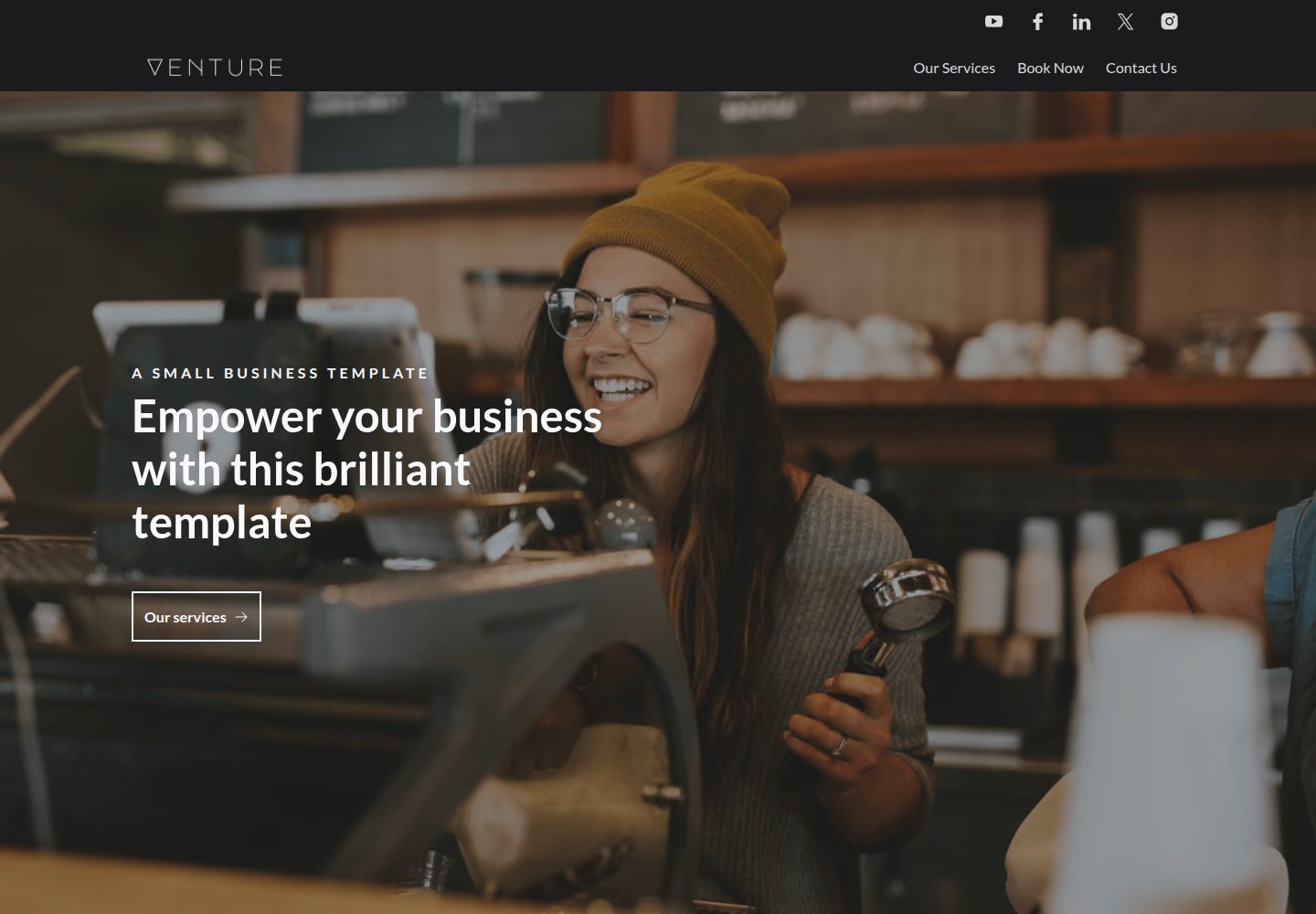
看看你的网站会是什么样
浏览真实页面截图,比较内容排版与手机效果。点击下方缩略图切换,放大查看整页细节。
全部页面与视图 2
截图用于了解视觉与布局,交互效果请以实际项目为准。
采集于 2026-10-03查看来源
值得关注的模板亮点
从已有项目资料中,快速了解它的特点。
导航与页脚在数据文件中集中配置,多处复用
支持多种 hero 选项及表单、画廊、图片、视频、定价、左右分栏等组件
主题颜色与字体可在数据文件中调整,构建时生成对应 CSS 变量
针对 CloudCannon 可视化编辑适配,组件以 Liquid partials 与结构值文件组织
提供通用 Embed 组件,用于嵌入第三方内容
模板详细介绍
Venture 是一个面向 Eleventy 的营销网站模板,由 CloudCannon 维护,采用 MIT 许可。它提供预建页面和预样式组件,导航与页脚可在数据文件中统一配置,并支持多种 hero 选项、表单、画廊、图片、视频、定价、左右分栏等区块,以及一个通用的 Embed 组件用于嵌入第三方内容。主题颜色和字体可在数据文件中调整,页面 SEO 与 favicon 也有对应配置入口。
该模板定位为营销站点,不包含博客或文章集合。它针对 CloudCannon 的可视化编辑做了适配,组件以 Eleventy Liquid partials 实现,并通过 editable-regions 与 CloudCannon 结构值文件配合。数据文件中的改动需要重新构建才能生效,导航和页脚在实时编辑中不会即时反映。
本地开发需要 Node.js 22 或更新版本,CloudCannon 构建使用 Node 24。图片优化依赖 Eleventy Image 插件,源图建议保持在 1600px 宽以内。表单组件可提交到 CloudCannon inbox,需先配置 inbox key;Embed 组件支持若干第三方嵌入,但模板不保证对所有可嵌入内容都无缝工作。演示摄影来自 Unsplash,属于占位内容,上线前应替换。
Eleventy工具站企业官网启动器
适合你的项目吗?
适用场景
- 搭建产品营销或企业官网,需要预建页面与可复用区块
- 在 CloudCannon 中由非技术编辑维护页面、导航和页脚内容
- 需要快速调整主题颜色与字体,而不改动组件代码
- 通过表单组件收集线索并提交到 CloudCannon inbox
- 以 Embed 组件嵌入 Google 表单、Hubspot 表单、Instagram、Spotify 等第三方内容
适合人群
- 使用 Eleventy 构建营销网站或企业官网的开发者
- 计划在 CloudCannon 上进行可视化内容编辑的团队
- 需要预建组件与可配置主题、而非从零搭建样式的项目
- 能接受无博客/文章集合、以页面和区块为核心的站点结构
上手与定制指南
结合仓库当前版本的说明,按下面的资料检查内容、配置与运行要求。
- 1
本地开发需要 Node.js 22 或更新版本;CloudCannon 构建使用 Node 24。
- 2
运行 npm i 安装依赖,npm run start 启动监听构建,npm run build 生成 _site 输出。
- 3
数据文件中的改动需要重新构建才能看到效果;导航和页脚在实时编辑中不会即时更新。
- 4
表单提交到 CloudCannon inbox 前,需创建 inbox 并配置 inbox key。
- 5
演示摄影为 Unsplash 占位内容,上线前应替换为自有素材。
授权与来源资料
使用条件与限制
免费使用 · 保留许可声明本次收录的是公开仓库中采用 MIT 许可的免费版本;免费范围为该版本代码,不代表外部服务或第三方素材免费。
使用时需要遵守
- 允许免费使用、修改、商用和分发该版本代码。
- 分发代码副本或实质性部分时,保留原作者版权声明和完整 MIT 许可声明。
- 代码按现状提供;担保与责任限制以原许可证及适用法律为准。
额外费用与待核对事项
- 表单组件默认提交到 CloudCannon inbox,需先创建 inbox 并配置 inbox key;若需自定义提交方式,须改用 Embed 组件自行集成。
- 本地使用 CloudCannon CLI 编辑需安装 @cloudcannon/cli 并执行 cloudcannon login 登录账号,且要求 Node.js 24 以上。
- 演示摄影来自 Unsplash,仅为占位内容,不构成可复用授权,上线前必须替换为自有素材。
- 本地开发环境要求 Node.js 22 或更新版本,CloudCannon 构建使用 Node 24,低于该版本无法运行。
- Embed 组件不保证对所有可嵌入内容都能无缝工作,官方建议优先尝试其他组件。
- 数据文件(导航、页脚、主题等)的改动必须重新构建站点才能生效,实时编辑中不会即时反映。
- 演示图片、字体、图标及其他第三方素材需按各自许可核对,不能仅凭代码的 MIT 许可判断。
- 域名、托管、数据库、支付或 AI 等外部服务可能另外收费。
查看原文依据
Permission is hereby granted, free of charge
许可证原文
This component is set up to submit to a CloudCannon inbox as long as you configure the inbox key following the instructions below.
README 原文
Install the CLI and log in (requires Node.js 24+):
README 原文
Demo photography is from [Unsplash](https://unsplash.com) and listed in
README 原文
**Requires Node.js 22 or newer.** Eleventy Image v7 is ESM-only and sets the floor at Node 22;
README 原文
The "Embed" component is built to be generic and support any embed, however we cannot guarantee it will work seamlessly with all embeddable content.
README 原文
https://github.com/CloudCannon/venture-eleventy-template/blob/main/LICENSEhttps://github.com/CloudCannon/venture-eleventy-template/blob/main/README.mdChanges in the data files require the site to be rebuilt to see your changes.
README 原文
DeepSeek 根据仓库许可证和 README 整理 ·2026-10-03。结果仅覆盖已读取资料,依赖、图片、字体及后续条款变更以各自原文为准。
项目核对记录与介绍依据
模板资料
- 来源平台
- GitHub
- 资料与维护参考分
- 资料较完整 · 92 / 100
- 技术栈
- Eleventy
- 网站类型
- 工具站 · 企业官网 · 启动器
这个分数如何计算
本站按许可资料(最高30分)、演示链接(12分)、预览图(10分)、Star数(15分)、记录的维护时间(15分)、描述完整度(8分)、功能记录(5分)和分类资料(5分)计算。它不是代码、安全或性能测试,也不是 Google 评分;有链接不代表已实测可用。
这个项目需要核对什么
- 记录的仓库更新时间
- 2026-09-24
- 截图检查日期
- 2026-10-03
已收录演示链接。请用你的内容与屏幕尺寸检查;有演示不代表表单、认证或支付已经可用。
目录记录的主要技术栈是 Eleventy。请通过依赖清单和锁文件核对实际版本与托管要求。这些说明基于收录资料,不代表代码审计或部署实测。
查看具体选型方法 →介绍的制作与核对状态
介绍由 AI 辅助整理目录与仓库资料。仓库作者不等于这篇介绍的审核者。
已完成服务器许可规则与 AI 来源核对;未经过人工编辑审核。
查看当时使用的来源资料
SHA-256: 33f5fee93237b11b6aef919c292989b9310f6a82e730fe7375e6a59f0dcba9da
2026-10-03T00:11:21.581Z
来源文件 / 仓库# Venture
Venture is a polished, marketing website template for Eleventy. Browse through a [live demo](https://spiky-polar.cloudvent.net).

[](https://app.cloudcannon.com/register/#sites/connect/github/cloudcannon/venture-eleventy-template)
## Features
- Pre-built pages
- Pre-styled components
- Configurable navigation and footer
- Multiple hero options
- Configurable form, gallery, image, video, pricing, left/right block, and more components
- Generic "Embed" component for custom embeds
- Configurable theme colors
- Configurable fonts
- Optimized for editing in CloudCannon
- Responsive layouts
## Editing
Venture is set up for adding, updating and removing pages, components, navigation and footer elements in [CloudCannon](https://app.cloudcannon.com/).
There is no blog or posts collection — Venture is a marketing site template, not a publishing one.
Changes in the data files require the site to be rebuilt to see your changes.
### Nav/footer details
- Reused around the site to save multiple editing locations.
- Set in the *Data* / *Nav* and *Data* / *Footer* sections
- Changes in these files are not reflected in live editing - you must save to see the changes in page building
### SEO details and favicon
- Favicon and site SEO details are set in the *Data* / *SEO* section
- Page SEO details are set in the frontmatter for each page (if they aren't set the site SEO details are used by default)
### Theme colors and fonts
- Theme colors and fonts can be set in *Data* / *Theme*
- The colors will update on the next build
- More font options can be added in *Data* / *Fonts*
## Setup
Get a workflow going to see your site's output (with [CloudCannon](https://app.cloudcannon.com/) or locally).
## CloudCannon agent skills
If you're working on this template with an AI coding agent, install CloudCannon's
[agent skills](https://github.com/CloudCannon/agent-skills) first — they cover configuration,
structures, snippets and Visual Editor support.
They are **deliberately not committed** to this repo. Skills are updated upstream, and a stale copy
checked into a template is worse than none at all, so install them fresh:
```bash
npx skills add CloudCannon/agent-skills
```
That installs into `.agents/`. To pick individual skills:
```bash
npx skills add CloudCannon/agent-skills --list
npx skills add CloudCannon/agent-skills --skill cloudcannon-configuration
```
If you use Claude Code, you can install them as a plugin instead:
```
/plugin marketplace add CloudCannon/agent-skills
/plugin install agent-skills@cloudcannon
```
Plugin skills are namespaced, e.g. `agent-skills:cloudcannon-configuration`.
## Editor documentation
`.cloudcannon/README.md` is written for non-technical editors using this site in CloudCannon. Worth
updating alongside any change to the components or data files.
## Development
**Requires Node.js 22 or newer.** Eleventy Image v7 is ESM-only and sets the floor at Node 22;
Sass and Sharp need 20.19+ and 20.9+ respectively. CloudCannon builds this template on Node 24
(set in `.cloudcannon/initial-site-settings.json`), so matching that locally is the safest bet.
1. Run `npm i` to install the modules.
2. Run `npm run start` to build and watch the site.
This will create a `_site` folder, containing the output files.
Any changes made to source files updates these output files.
By default the site's output files are hosted at `http://localhost:8080`
## Building
1. Run `npm i` to install the modules.
2. Run `npm run build` to build the site.
This will create a `_site` folder, containing the output files.
## Editing Locally with CloudCannon
Run CloudCannon against your local files with the [CloudCannon CLI](https://cloudcannon.com/documentation/developer-reference/cli/)
dev server. This is the fastest way to iterate on `cloudcannon.config.yml`, inputs, and structures —
you see the editing experience without committing and pushing first.
1. Install the CLI and log in (requires Node.js 24+):
```bash
npm install --global @cloudcannon/cli
cloudcannon login
```
2. Build the site, so the dev server has output to serve:
```bash
npm run build
```
3. Start CloudCannon locally, pointing it at the build output:
```bash
cloudcannon dev _site
```
The dev server runs on port `10101` by default and opens CloudCannon in your browser, pointed at the
files in this repo. Content edits sync to disk as you make them; re-run the build after changing
components or templates to refresh the preview.
Before you commit configuration changes, validate them:
```bash
cloudcannon validate
```
The dev server is a development tool only — editors never access it. See
[Build your editing experience locally](https://cloudcannon.com/blog/build-your-editing-experience-locally-with-the-cloudcannon-dev-server/)
for the full workflow.
## Components
Venture is built from plain Eleventy Liquid partials in `src/_includes/components/`, wired for
CloudCannon's Visual Editor with [`@cloudcannon/editable-regions`](https://cloudcannon.com/documentation/articles/using-editable-regions/).
Each component lives in its own folder, named after the component, holding all of its files:
```
components/sections/price-list/
├── price-list.liquid
├── price-list.scss
└── price-list.cloudcannon.structure-value.yml
```
The include path therefore repeats the name — `components/sections/price-list/price-list`.
Those folders are grouped by the structure the component belongs to, because CloudCannon collects
structure values by directory glob:
| Directory | Structure | Contents |
| --- | --- | --- |
| `components/sections/` | `content_blocks` | Page-builder sections |
| `components/heroes/` | `hero_blocks` | Page heroes |
| `components/form/` | `form_blocks` | Form inputs (sub-parts in `form/parts/`) |
| `components/icons/` | `icon_blocks` | Icon components |
| `components/assets/` | `asset_blocks` | Image and video |
| `components/layout/` | — | Shared layout partials, no structure |
| `components/generic/`, `components/simple/` | — | Shared building blocks |
### Adding a component
1. Add `my-component/my-component.liquid` (and an optional `my-component/my-component.scss`) to the
right directory. The SCSS index is regenerated automatically by `npm run component-styles`.
2. Add `my-component.cloudcannon.structure-value.yml` beside it, in the same folder. Its
`value._type` must be the component's include path (e.g.
`components/sections/my-component/my-component`) — that same string is used as `data-component`
and by `includeWith`, and all three must match.
3. Nothing to register: the directory glob (`components/sections/*/*.cloudcannon.structure-value.yml`)
picks the structure up, and the editable-regions browser bundle resolves any component by include
path.
### Editable regions
Sections are re-rendered in the editor from their stored data, which means a component's props must
be exactly the object at one data path. Partials that meet that bar (`heading`, `image`, `card`, …)
carry bare, self-relative `data-prop` values and are wrapped in a `data-editable="component"` region
by their caller. Shared layout partials that take a reshaped mix of fields (`layout/left-right-block`)
instead receive already-rendered editable markup from the section as captured HTML.
`ENV_CLIENT` is true only inside the editor bundle; use it to guard anything that can't run in the
browser (image optimisation, SVG inlining).
## Forms
You can use the "Form" component to create a form with a range of inputs. This component is set up to submit to a CloudCannon inbox as long as you configure the inbox key following the instructions below. If you want to integrate your custom form with custom submission actions you can use the "Embed" component.
- Create an inbox for your organisation/site following [these instructions](https://cloudcannon.com/documentation/articles/creating-an-inbox-to-receive-your-forms/) - note down the key that you use
- Connect your site to your inbox following [these instructions](https://cloudcannon.com/documentation/articles/connecting-your-site-to-an-inbox/)
- Add a "Form" and "Form Builder" component
- Add your inbox key to the relevant field in the form builder
The "Form" component has validation and error messages build in.
## Image optimization
The site uses the [eleventy image plugin](https://www.11ty.dev/docs/plugins/image/) to optimize your images.
Image caching is already configured: `.cloudcannon/initial-site-settings.json` ships with the
preserved paths set to `node_modules/,_site/optimized/`, so a new site only re-optimizes images that
have actually changed. You do not need to set this up by hand.
If you are connecting an existing site and want to check it, go to *Site Settings* → *Configuration*
→ *Caching options* and confirm `node_modules/,_site/optimized/` is listed.
Source photography is kept at 1600px wide, which is the largest size `eleventy-img` generates —
anything larger is discarded at build time and only slows the first build down. Resize your own
images before committing them.
See [this blog](https://cloudcannon.com/blog/automatically-optimize-your-images-with-eleventy-image-and-cloudcannon/) for more on optimizing images with Eleventy and CloudCannon.
## Embedding content
- The "Embed" component is built to be generic and support any embed, however we cannot guarantee it will work seamlessly with all embeddable content.
- We recommend using other components to check if they can meet your requirements first.
- We have successfully tested the following embeds:
- Google forms
- Hubspot forms
- Instagram
- Spotify
- X (formerly Twitter)
- Google docs
- YouTube video (although we would recommend using the "Centered Large Asset" component with a video instead)
- Lottie files
- PDFs
All options in the above list (except YouTube videos) require you to use the "Embed" component.
## Accessibility
We have made efforts to prioritize accessibility in our design, but we acknowledge that it may not be perfect. Your feedback is valuable to us, so please feel free to share any suggestions or concerns to help us improve accessibility further.
## Component links
All blocks have an id field that can be set and then used as a link to that component.
This is helpful (for example) if you want to link to information about your services from the nav without having a fully seperate page for it. You can set the id field in the services block to be `services` and then in *Data* / *Nav* you can have a link to `#services`.
### Prebuild
There is a prebuild step with this template to process the user-defined theme variables (such as `color_groups` or `fonts`, defined in `src/_data/theme.yml`) and create associated CSS variables. The file which does this processing is located at `utils/fetch-theme-variables.js`.
When developing locally, you can run `$ npm run fetch-theme-variables` to execute the preprocessing.
This command runs automatically as part of `$ npm run start` and `$ npm run build`.
## Photography
Demo photography is from [Unsplash](https://unsplash.com) and listed in
[`src/assets/images/CREDITS.md`](src/assets/images/CREDITS.md). Replace it with your own before
launching — it is placeholder content, not a licence to reuse.
看看同类模板
对比同技术栈与用途的模板,找到更适合的视觉与内容结构。

eleventy-base-blog
A starter repository for a blog web site using the Eleventy static site generator.
Eleventy · 博客

eleventy-garden
:seedling: A starter site for building a mind garden with eleventy
Eleventy · 启动器

eleventastic
An Eleventy Starter Kit
Eleventy · 启动器

neat-starter
Starter Template for Netlify CMS, Eleventy, Alpine JS & Tailwind CSS
Eleventy · 启动器

Eleventy-Starter-Boilerplate
🚀 Eleventy Starter is production-ready with SEO-friendly for quickly starting a blog. ⚡ Built with Eleventy, …
Eleventy · 博客

eleventy-plus-vite
A clean and fast Eleventy Starter Project with Vite
Eleventy · 启动器