Hugo static site theme serving both portfolio and blog purposes
HugoPortfolioBlog
ab-hugo-theme — Hugo Portfolio Template
By coder-Aayush
A Hugo-based portfolio and blog theme that configures the homepage, social icons, menus, and comments through config.toml, supporting posts and standalone pages.
Explore the design
Compare the page layouts and mobile experience. Open any screenshot for a closer look.
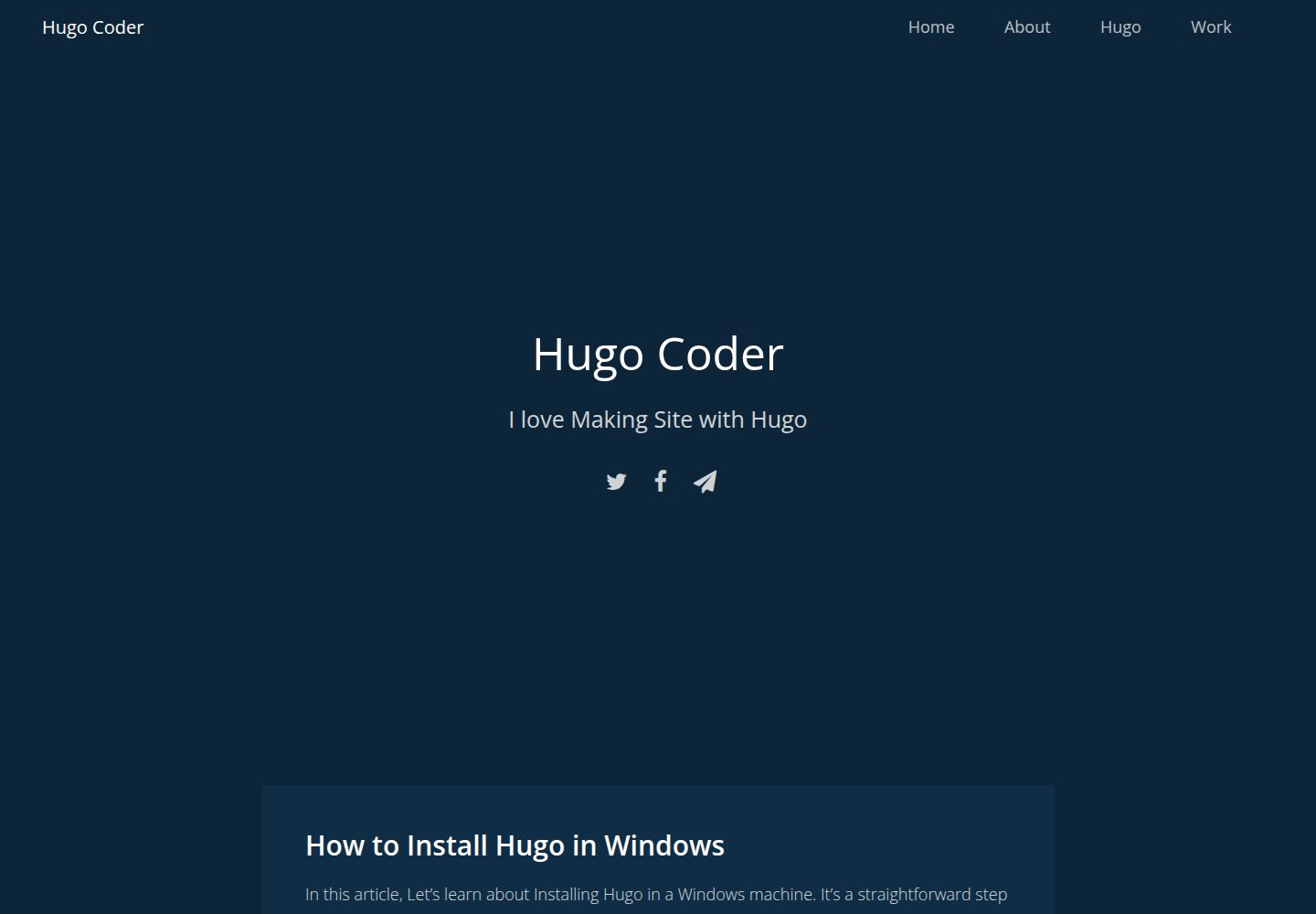
Desktop homepage1 / 3
Desktop captureTop of page
Actual screenshot captured by the server browser.
All pages & views 3
Screenshots show visual appearance; interactive behavior may differ.
Recorded 2026-10-01View source
What stands out
A quick read of the recorded project description.
Site information, author, favicon, featured images, and Disqus comments are configured centrally in config.toml
Social icons are configured via [[params.social]], using Font Awesome icons
Blog posts go in the posts directory; standalone pages such as an about page are created directly in the content root
Navigation menu items are added via [[menu.main]] as pages or external links
Released under the MIT license, permitting use, modification, commercial use, and distribution
Template Details
ab-hugo-theme is a portfolio and blog theme built with Hugo, maintained by coder-Aayush and released under the MIT license. The theme centrally configures site information, homepage copy, author, favicon, featured images, and Disqus comments through config.toml. Social links are added as a [[params.social]] array, with icons from Font Awesome. For content, blog posts must be placed in the posts directory (hugo new posts/<filename>.md), while standalone pages such as an about page are created directly in the content root (for example, hugo new about.md) and then added to the navigation menu via [[menu.main]] as either pages or external links. Image assets go in assets/images, with paths written as images/filename. The README notes that if the homepage is blank, it is usually because there is no content in the content directory. The theme can be installed as a git submodule into themes/ab-hugo-theme, and the theme field set in config.toml. The repository has few stars and was last updated in 2020; before use, it is advisable to check compatibility with the current Hugo version yourself.
HugoPortfolioBlog
Is it right for your project?
Use Cases
- Building a personal portfolio site with Hugo while publishing blog posts on the same site
- A personal site that needs centralized config.toml configuration with minimal template changes
- Organizing an about page, gallery page, and external links (such as GitHub) into the navigation via menus
- A personal blog using Disqus comments and social icon links
Suitable For
- Individual developers or writers using Hugo who want a quick start
- Personal sites that need to showcase both work and articles
- Users comfortable maintaining content through config.toml and Markdown files
Getting started & customization
Use these recorded setup notes alongside the repository instructions for your chosen version.
- 1
Install Hugo first and create a project with hugo new site
- 2
In the project root, run git submodule add https://github.com/coder-Aayush/ab-hugo-theme themes/ab-hugo-theme
- 3
Set theme = "ab-hugo-theme" in config.toml and fill in parameters by referring to exampleSite/config.toml
- 4
Blog posts must be created under the posts directory, otherwise they will not appear; a blank homepage is usually because the content directory is empty
- 5
Place images in assets/images and reference paths as images/filename; place the favicon in static/img
License & source material
Usage conditions & limitations
Free to use · keep license noticeThis entry covers the free version under the MIT license in the public repository; the free scope is the code of that version and does not mean external services or third-party assets are free.
Must comply with when using
- You may use, modify, commercially use, and distribute the code of this version for free.
- When distributing copies or substantial portions of the code, retain the original author's copyright notice and the full MIT license notice.
- The code is provided as is; warranties and limitations of liability are governed by the original license and applicable law.
Additional costs & items to verify
- The comment feature depends on the third-party Disqus service; you must register yourself to obtain a shortname and configure it, which is an external service dependency.
- Social icons use the Font Awesome icon set; its asset license must be verified independently and is not covered by this theme's MIT authorization.
- Demo images, fonts, icons, and other third-party assets must be checked under their respective licenses and cannot be judged solely by the code's MIT license.
- External services such as domains, hosting, databases, payments, or AI may incur additional charges.
View Original Text Basis
Permission is hereby granted, free of charge
Original License Text
disqusShortname = "" # get username from disqus
Original README
https://github.com/coder-Aayush/ab-hugo-theme/blob/dev/LICENSEhttps://github.com/coder-Aayush/ab-hugo-theme/blob/dev/README.md**Note: Use Icon From [Font Awesome](https://fontawesome.com/v4.7.0/icons/)**
Original README
Compiled by DeepSeek based on repository license and README ·2026-10-01. Results only cover the materials read; dependencies, images, fonts, and subsequent term changes are subject to their respective original texts.
Project checks & description sources
Template Information
- Source platforms
- GitHub
- Documentation and maintenance reference score
- Partly documented · 73 / 100
- Technologies
- Hugo
- Website type
- Portfolio · Blog
How this score is calculated
Our heuristic uses license records (up to 30), a demo link (12), a preview (10), stars (15), recorded maintenance (15), description completeness (8), feature records (5) and classification data (5). It is not a code, security or performance test, or a Google score. A link does not establish tested functionality.
What to verify for this project
- Repository update recorded
- 2020-08-19
- Screenshot last checked
- 2026-10-01
A demo link is listed. Check it with your own content and viewport sizes; its presence does not confirm that forms, authentication or payments work.
The catalog identifies Hugo as the primary stack. Check the actual dependency manifest and lockfile for versions and hosting requirements. These notes use recorded metadata, not a code audit or a deployment test.
Use a selection guide →How this description was prepared
AI-assisted description based on catalog records and repository material. Repository authors are not automatically the reviewers of this description.
Automatically checked against source and license rules; no manual editorial review.
Inspect the recorded source material
SHA-256: 1841859163c50a8b0dd233491a83e823deb3cef6ce2309aa632e4be93b345171
2026-10-01T01:00:21.913Z
Source file / repository### How to Use this theme
Create Hugo Project
```
Hugo new site <project name>
```
Make sure you have hugo install. For installing hugo check [Hugo Documentation](https://gohugo.io/getting-started/installing#readout)
At the root of your Hugo project, run:
```
git submodule add https://github.com/coder-Aayush/ab-hugo-theme themes/ab-hugo-theme
```
Add **AB HUGO Theme** at you _config.toml_ file.
```
theme = "ab-hugo-theme"
```
Next, copy the contents of the [config.toml](exampleSite/config.toml) to your site's config.toml. Make sure to read all the comments.
Finally, Run
```
hugo server -D
```
**Note: If you are seeing a blank page it is probably because you have nothing in your content/ directory. Read on to fix that.**
### Configuring the Home Page
In the **config.toml** file you can customize homepage.
```
title = "Title of Your Website"
```
You can always override all the template in **layouts folder**
### Confugring Paramaters
This paramaters are all over the site. If you don't like confuging just copy & paste as same.
```
[params]
bio = "I am Hugo Coder"
discription = "Hola I am aayush"
author = "Aayush Bhattarai"
showcredit = true
favicon = "img/ab-hugo-coder.ico"
featuredImage = "" # add Featured Image inside assets/images and your path be like images/filename.jpg
disqusShortname = "" # get username from disqus
showComment = true # either true or false
```
**Note Add your Images inside _assets/images_ and path must be _images/filename.jpg_**
### Social Icons
In your _config.toml_ file add
```
[[params.social]]
url = "https://twitter.com/"
icon = "twitter"
[[params.social]]
url = "https://facebook.com/"
icon = "facebook-f"
[[params.social]]
url = "mailto:[email protected]" # For a direct email link, use "mailto:[email protected]".
icon = "paper-plane"
```
**Note: Use Icon From [Font Awesome](https://fontawesome.com/v4.7.0/icons/)**
### Creating Blog Post
You can create a new blog post page by going to the root of your project and typing:
```
hugo new posts/<my-lifestyle-post>.md
```
**Note: You Must Type _Posts_ and Your FileName. If You don't do so, then Your Post is not Visiable**
Now Open **content/posts<my-lifestyle-post>.md file and start writing post. [Learn markdown Here](https://guides.github.com/features/mastering-markdown/)**
### Creating About Page and Other Pages
You can simply create about page using this command.
```
hugo new about.md
```
**Note: Here you shouldn't write _posts_ path. You can also add other file just using this command.**
Example
```
hugo new gallery.md
```
### Displaying Other Pages in Menu/Nav
For Displaying Your other files like _gallery.md_, Open _config.toml file and type_
```
[[menu.main]]
name = "Gallery"
url = "/gallery/"
# add more same like this...
[[menu.main]]
name = "About"
url = "/about/"
[[menu.main]]
name = "GitHub"
url = "https://github.com/coder-Aayush"
```
### Adding Favicon
Add you favicon at _static/img_ also yo need to add in _config.toml_ file
```hugo
[params]
....
favicon = "/img/ab-hugo-coder.ico"
....
```
You can also Add Featured Image same as above.
This is the confugration for **AB Hugo Theme.** For more you can see [config.toml]()
Explore similar templates
Compare previews and descriptions within the same stack and category.

hugo-PaperMod
A fast, clean, responsive Hugo theme for blogs and lightweight portfolios, with three layout modes (Regular, Home-Info, Profile), automatic and manual light/dark themes, Fuse.js client-side search, multilingual support, and built-in Open Graph, Twitter Cards, and Schema.org data.
Hugo · Portfolio

LoveIt
LoveIt is a clean, elegant, and feature-rich Hugo blog theme derived from LeaveIt and KeepIt, MIT-licensed. It offers light/dark modes, responsive layout, multilingual support, and search via Lunr.js or Algolia.
Hugo · Blog

hugo-coder
hugo-coder is a minimalist Hugo blog theme maintained by luizdepra under the MIT license. It provides a clean, text-focused blog appearance, configuration documentation in the docs directory, and a complete exampleSite with hugo.toml.
Hugo · Blog

blowfish
Blowfish is a Hugo personal website and blog theme built with Tailwind CSS 4, focused on lightness, simplicity, and content-first presentation.
Hugo · Blog

hugo-paper
hugo-paper is a simple, clean, and customizable Hugo blog theme configured through config.toml or hugo.toml.
Hugo · Blog

hextra
Hextra is a Hugo theme for documentation and blog sites, built on Hugo and Tailwind CSS with design referencing Nextra.
Hugo · Documentation