Hugo 静态站点主题,同时面向作品集与博客两种用途
Hugo作品集博客
ab-hugo-theme — Hugo 作品集模板
作者 coder-Aayush
基于 Hugo 的作品集与博客主题,通过 config.toml 配置首页、社交图标、菜单与评论,支持文章与独立页面。
看看你的网站会是什么样
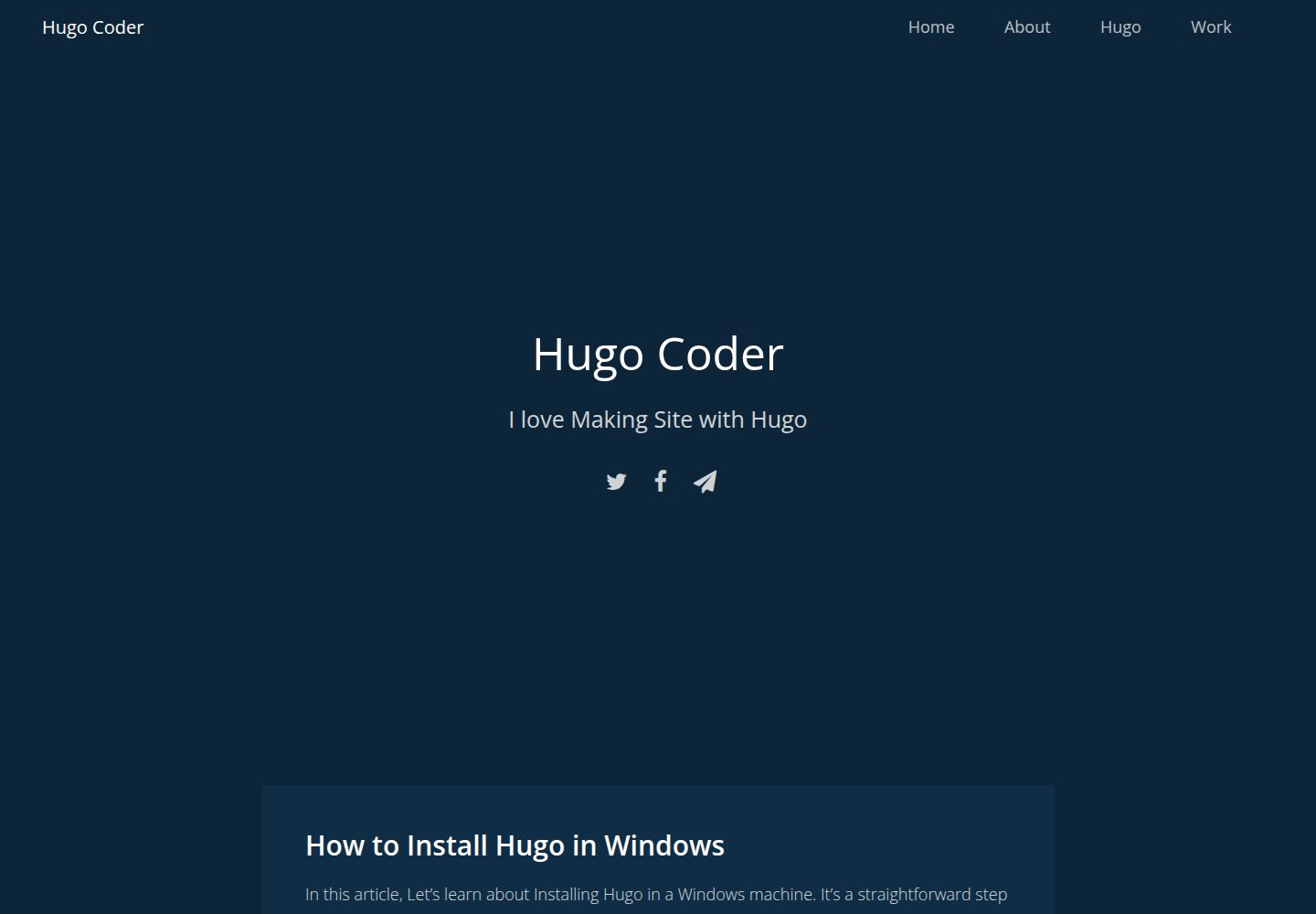
浏览真实页面截图,比较内容排版与手机效果。点击下方缩略图切换,放大查看整页细节。
全部页面与视图 3
截图用于了解视觉与布局,交互效果请以实际项目为准。
采集于 2026-10-01查看来源
值得关注的模板亮点
从已有项目资料中,快速了解它的特点。
站点信息、作者、favicon、特色图片、Disqus 评论等集中在 config.toml 配置
社交图标通过 [[params.social]] 配置,图标使用 Font Awesome
博客文章放在 posts 目录,关于页等独立页面直接创建在 content 根目录
导航菜单通过 [[menu.main]] 添加页面或外部链接
采用 MIT 许可,允许使用、修改、商用与分发
模板详细介绍
ab-hugo-theme 是一个用 Hugo 构建的作品集与博客主题,仓库由 coder-Aayush 维护,采用 MIT 许可。主题通过 config.toml 集中配置站点信息、首页文案、作者、favicon、特色图片与 Disqus 评论等参数,社交链接以 [[params.social]] 数组形式添加,图标取自 Font Awesome。内容方面,博客文章需放在 posts 目录下(hugo new posts/<文件名>.md),关于页等独立页面直接创建在 content 根目录(如 hugo new about.md),再通过 [[menu.main]] 将页面或外部链接加入导航菜单。图片资源需放入 assets/images,路径写作 images/文件名。README 提示:若首页空白,通常是因为 content 目录中没有内容。模板可通过 git submodule 方式安装到 themes/ab-hugo-theme,并在 config.toml 中设置 theme 字段。仓库星标较少,最后更新于 2020 年,使用前建议自行核对与当前 Hugo 版本的兼容性。
Hugo作品集博客
适合你的项目吗?
适用场景
- 用 Hugo 搭建个人作品集站点,并在同一站点发布博客文章
- 需要集中式 config.toml 配置、较少模板改动的个人站点
- 通过菜单把关于页、图库页与外部链接(如 GitHub)组织到导航中
- 使用 Disqus 评论与社交图标链接的个人博客
适合人群
- 使用 Hugo 并希望快速起步的个人开发者或写作者
- 需要同时展示作品与文章的个人站点
- 能接受通过 config.toml 与 Markdown 文件维护内容的用户
上手与定制指南
结合仓库当前版本的说明,按下面的资料检查内容、配置与运行要求。
- 1
需先安装 Hugo,并用 hugo new site 创建项目
- 2
在项目根目录执行 git submodule add https://github.com/coder-Aayush/ab-hugo-theme themes/ab-hugo-theme
- 3
在 config.toml 中设置 theme = "ab-hugo-theme",并参考 exampleSite/config.toml 填写参数
- 4
博客文章必须创建在 posts 目录下,否则不会显示;首页空白通常是因为 content 目录为空
- 5
图片放入 assets/images,引用路径写作 images/文件名;favicon 放入 static/img
授权与来源资料
使用条件与限制
免费使用 · 保留许可声明本次收录的是公开仓库中采用 MIT 许可的免费版本;免费范围为该版本代码,不代表外部服务或第三方素材免费。
使用时需要遵守
- 允许免费使用、修改、商用和分发该版本代码。
- 分发代码副本或实质性部分时,保留原作者版权声明和完整 MIT 许可声明。
- 代码按现状提供;担保与责任限制以原许可证及适用法律为准。
额外费用与待核对事项
- 评论功能依赖第三方 Disqus 服务,需自行注册获取 shortname 并配置,属于外部服务依赖。
- 社交图标使用 Font Awesome 图标集,其资源许可需自行核实,不属于本主题 MIT 授权范围。
- 演示图片、字体、图标及其他第三方素材需按各自许可核对,不能仅凭代码的 MIT 许可判断。
- 域名、托管、数据库、支付或 AI 等外部服务可能另外收费。
查看原文依据
Permission is hereby granted, free of charge
许可证原文
disqusShortname = "" # get username from disqus
README 原文
https://github.com/coder-Aayush/ab-hugo-theme/blob/dev/LICENSEhttps://github.com/coder-Aayush/ab-hugo-theme/blob/dev/README.md**Note: Use Icon From [Font Awesome](https://fontawesome.com/v4.7.0/icons/)**
README 原文
DeepSeek 根据仓库许可证和 README 整理 ·2026-10-01。结果仅覆盖已读取资料,依赖、图片、字体及后续条款变更以各自原文为准。
项目核对记录与介绍依据
模板资料
- 来源平台
- GitHub
- 资料与维护参考分
- 资料一般 · 73 / 100
- 技术栈
- Hugo
- 网站类型
- 作品集 · 博客
这个分数如何计算
本站按许可资料(最高30分)、演示链接(12分)、预览图(10分)、Star数(15分)、记录的维护时间(15分)、描述完整度(8分)、功能记录(5分)和分类资料(5分)计算。它不是代码、安全或性能测试,也不是 Google 评分;有链接不代表已实测可用。
这个项目需要核对什么
- 记录的仓库更新时间
- 2020-08-19
- 截图检查日期
- 2026-10-01
已收录演示链接。请用你的内容与屏幕尺寸检查;有演示不代表表单、认证或支付已经可用。
目录记录的主要技术栈是 Hugo。请通过依赖清单和锁文件核对实际版本与托管要求。这些说明基于收录资料,不代表代码审计或部署实测。
查看具体选型方法 →介绍的制作与核对状态
介绍由 AI 辅助整理目录与仓库资料。仓库作者不等于这篇介绍的审核者。
已完成服务器许可规则与 AI 来源核对;未经过人工编辑审核。
查看当时使用的来源资料
SHA-256: 1841859163c50a8b0dd233491a83e823deb3cef6ce2309aa632e4be93b345171
2026-10-01T01:00:21.913Z
来源文件 / 仓库### How to Use this theme
Create Hugo Project
```
Hugo new site <project name>
```
Make sure you have hugo install. For installing hugo check [Hugo Documentation](https://gohugo.io/getting-started/installing#readout)
At the root of your Hugo project, run:
```
git submodule add https://github.com/coder-Aayush/ab-hugo-theme themes/ab-hugo-theme
```
Add **AB HUGO Theme** at you _config.toml_ file.
```
theme = "ab-hugo-theme"
```
Next, copy the contents of the [config.toml](exampleSite/config.toml) to your site's config.toml. Make sure to read all the comments.
Finally, Run
```
hugo server -D
```
**Note: If you are seeing a blank page it is probably because you have nothing in your content/ directory. Read on to fix that.**
### Configuring the Home Page
In the **config.toml** file you can customize homepage.
```
title = "Title of Your Website"
```
You can always override all the template in **layouts folder**
### Confugring Paramaters
This paramaters are all over the site. If you don't like confuging just copy & paste as same.
```
[params]
bio = "I am Hugo Coder"
discription = "Hola I am aayush"
author = "Aayush Bhattarai"
showcredit = true
favicon = "img/ab-hugo-coder.ico"
featuredImage = "" # add Featured Image inside assets/images and your path be like images/filename.jpg
disqusShortname = "" # get username from disqus
showComment = true # either true or false
```
**Note Add your Images inside _assets/images_ and path must be _images/filename.jpg_**
### Social Icons
In your _config.toml_ file add
```
[[params.social]]
url = "https://twitter.com/"
icon = "twitter"
[[params.social]]
url = "https://facebook.com/"
icon = "facebook-f"
[[params.social]]
url = "mailto:[email protected]" # For a direct email link, use "mailto:[email protected]".
icon = "paper-plane"
```
**Note: Use Icon From [Font Awesome](https://fontawesome.com/v4.7.0/icons/)**
### Creating Blog Post
You can create a new blog post page by going to the root of your project and typing:
```
hugo new posts/<my-lifestyle-post>.md
```
**Note: You Must Type _Posts_ and Your FileName. If You don't do so, then Your Post is not Visiable**
Now Open **content/posts<my-lifestyle-post>.md file and start writing post. [Learn markdown Here](https://guides.github.com/features/mastering-markdown/)**
### Creating About Page and Other Pages
You can simply create about page using this command.
```
hugo new about.md
```
**Note: Here you shouldn't write _posts_ path. You can also add other file just using this command.**
Example
```
hugo new gallery.md
```
### Displaying Other Pages in Menu/Nav
For Displaying Your other files like _gallery.md_, Open _config.toml file and type_
```
[[menu.main]]
name = "Gallery"
url = "/gallery/"
# add more same like this...
[[menu.main]]
name = "About"
url = "/about/"
[[menu.main]]
name = "GitHub"
url = "https://github.com/coder-Aayush"
```
### Adding Favicon
Add you favicon at _static/img_ also yo need to add in _config.toml_ file
```hugo
[params]
....
favicon = "/img/ab-hugo-coder.ico"
....
```
You can also Add Featured Image same as above.
This is the confugration for **AB Hugo Theme.** For more you can see [config.toml]()
看看同类模板
对比同技术栈与用途的模板,找到更适合的视觉与内容结构。

hugo-PaperMod
PaperMod 是 Hugo 生态里知名度较高的主题之一,定位很明确:给博客和轻量作品集站点提供一套干净、响应式的阅读界面。
Hugo · 作品集

LoveIt
❤️A clean, elegant but advanced blog theme for Hugo 一个简洁、优雅且高效的 Hugo 主题
Hugo · 博客

hugo-coder
A minimalist blog theme for hugo.
Hugo · 博客

blowfish
Personal Website & Blog Theme for Hugo
Hugo · 博客

hugo-paper
🪺 A simple, clean, customizable Hugo theme
Hugo · 博客

hextra
Hextra 是一个 Hugo 主题,定位在文档站与博客之间:既提供侧边栏导航、目录、面包屑、分页这类文档站结构,也能承载博客内容。
Hugo · 文档