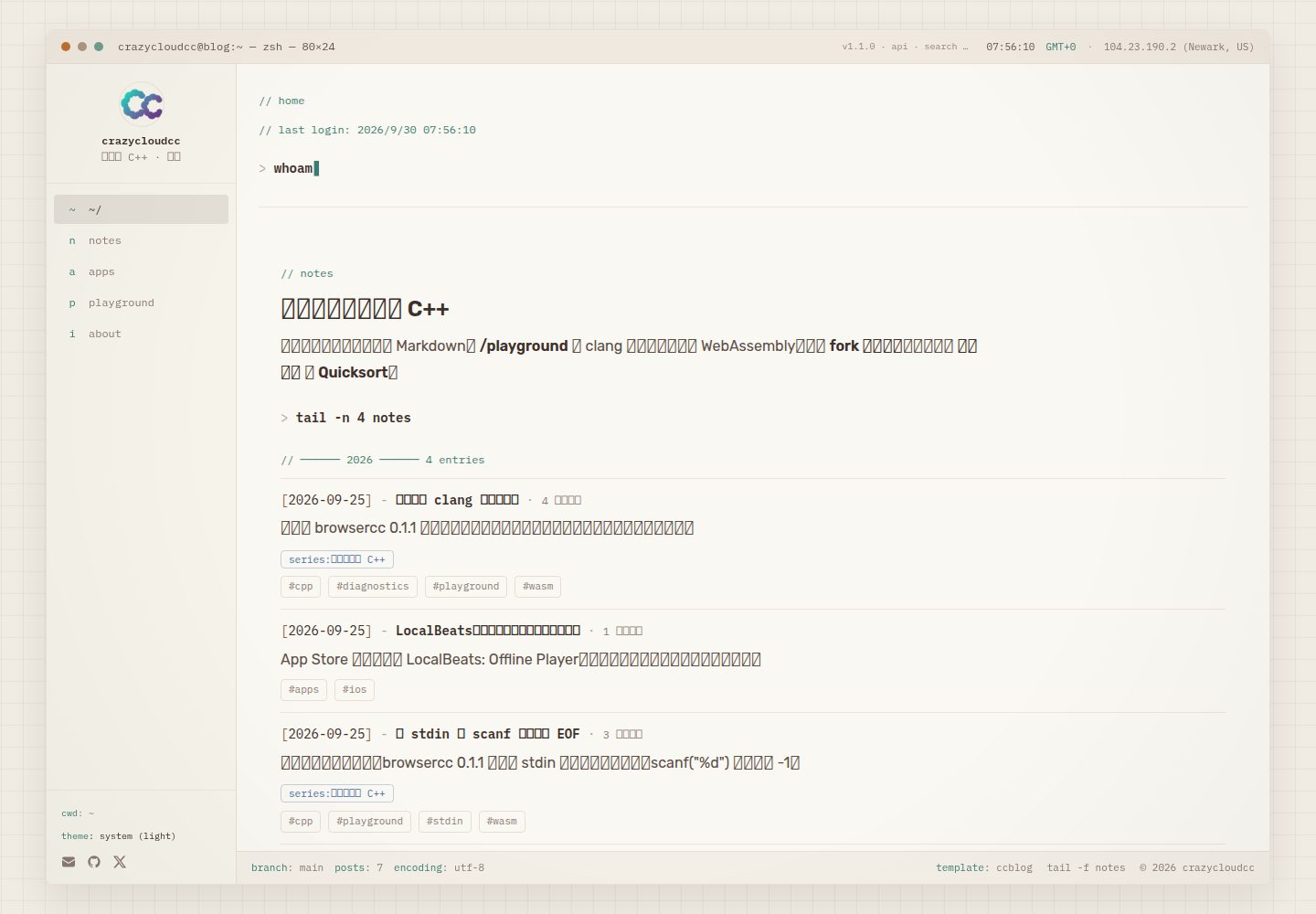
Terminal-session interface: homepage boot sequence, command-style navigation, and panel appearance; theme supports light/dark/system-follow and respects reduced motion
Next.jsReactBlog
ccblog — Next.js Blog Template
By crazycloudcc
ccblog is a Next.js blog template styled as a macOS terminal session, with articles stored in Markdown and a built-in WASM-based in-browser C11 / C++17 compile-and-run environment.
Explore the design
Compare the page layouts and mobile experience. Open any screenshot for a closer look.
Desktop homepage1 / 3
Desktop captureTop of page
Actual screenshot captured by the server browser.
All pages & views 3
Screenshots show visual appearance; interactive behavior may differ.
Recorded 2026-09-30View source
What stands out
A quick read of the recorded project description.
In-browser C11 / C++17 compile and run: browsercc-based WASM toolchain with Monaco editor, stdin, share links, and compile timeline
Runnable code embedded in articles: custom directive blocks such as :::playground embed runners, annotations, steps, and benchmark blocks in Markdown
Single configuration surface: ccblog.config.ts centrally manages site identity, social links, feature toggles, and App Store ID; components do not hard-code identity information
Built-in static search and metadata: Pagefind client-side index, RSS, sitemap, JSON-LD, and Open Graph images
Template Details
ccblog is a forkable Next.js blog site template whose interface simulates a macOS terminal session: the homepage opens with a short boot sequence, and navigation and panels use command-style expressions such as cd, cat, and grep rather than a conventional blog card layout. The theme supports light, dark, and system-follow modes, and respects the system's reduced-motion setting.
Content is stored as Markdown files in the content/notes/ directory, with frontmatter declaring fields such as title, summary, date, tags, series, and difficulty; the filename determines the article URL. List pages provide tag and series filtering, reading time, previous/next navigation, and related articles; search uses a static index generated by Pagefind. In addition to standard Markdown and fenced code, article bodies support custom directive blocks such as :::trace, :::bench, :::annotate, and :::playground.
Another component of the template is the /playground page: using browsercc's WASM toolchain, it compiles and runs C11 / C++17 code in the browser, with a Monaco editor, standard input, share links, and a compile timeline; runnable code can also be embedded in articles via the :::playground directive. The site also outputs RSS, sitemap, JSON-LD, and Open Graph images.
A few limitations to note before use: the ccblog.config.ts committed in the repository is a demo identity, so you need to copy ccblog.config.example.ts over it and modify the name, author, social links, and site URL; the /blog search index is generated by Pagefind only during the postbuild stage of a production build, so running next dev alone has no index; the Playground's WASM toolchain is fetched from unpkg in production and is not bundled into the deployment artifact, and can be overridden via NEXT_PUBLIC_TOOLCHAIN_BASE; the /apps route is disabled by default and only makes sense with an Apple developer ID.
Next.jsBlog
Is it right for your project?
Use Cases
- Building a personal technical blog, writing articles in Markdown while retaining organization such as tags, series, related articles, and reading time
- Embedding compilable and runnable C / C++ examples directly in articles so readers can see results without installing a compiler locally
- Needing a showcase site with a terminal style rather than a conventional blog layout, for notes, experiments, and project documentation
- Using it as a starting point for a Next.js App Router project, enabling or disabling routes such as blog, Playground, about page, and App Store as needed
Suitable For
- Developers familiar with Next.js and Markdown writing who want to fork quickly and modify the configuration themselves
- Technical authors who need to present C / C++ code and let readers run it directly in the browser
- Maintainers of personal sites who prefer terminal aesthetics and command-style interaction
Getting started & customization
Use these recorded setup notes alongside the repository instructions for your chosen version.
- 1
Requires Node.js 20+ and npm 9+; first copy ccblog.config.example.ts to ccblog.config.ts and modify the name, author, social links, and URL, otherwise the site still shows the demo identity
- 2
In production, set NEXT_PUBLIC_SITE_URL for the canonical address used by RSS, sitemap, and Open Graph
- 3
/blog search depends on npm run build generating the Pagefind index during the postbuild stage; running next dev alone provides no search index
- 4
The Playground's WASM toolchain is fetched from unpkg in production and is not bundled with the deployment; the CDN address can be overridden with NEXT_PUBLIC_TOOLCHAIN_BASE
- 5
The /apps route is disabled by default; enabling it and syncing App Store metadata requires an Apple developer ID
License & source material
Usage conditions & limitations
Free to use · keep license noticeThis entry covers the free version under the MIT license in the public repository; the free scope is the code of this version and does not mean external services or third-party assets are free.
Must comply with when using
- You may use, modify, commercialize, and distribute the code of this version for free.
- When distributing copies or substantial portions of the code, retain the original author's copyright notice and the full MIT license notice.
- The code is provided as is; warranties and limitations of liability are governed by the original license and applicable law.
Additional costs & items to verify
- In production, the Playground's WASM toolchain is fetched from the unpkg CDN and is not bundled with the deployment; the first load requires network access, and the CDN address can be overridden with NEXT_PUBLIC_TOOLCHAIN_BASE.
- The /blog search index is generated by Pagefind only during the postbuild stage of npm run build; running next dev alone provides no search index.
- The /apps route is disabled by default; enabling it and syncing App Store metadata requires an Apple developer ID, otherwise features.apps should remain false.
- The ccblog.config.ts committed in the repository is a demo identity; until ccblog.config.example.ts is copied over it, the site still shows crazycloudcc and may sync the demo App Store listing.
- Production deployment requires setting the NEXT_PUBLIC_SITE_URL environment variable for the canonical address used by RSS, sitemap, and Open Graph.
- Demo images, fonts, icons, and other third-party assets must be checked against their respective licenses and cannot be judged solely by the code's MIT license.
- External services such as domains, hosting, databases, payments, or AI may incur separate charges.
View Original Text Basis
Permission is hereby granted, free of charge
Original License Text
Playground WASM is fetched from unpkg in production, not bundled into the deploy.
Original README
Search on `/blog` needs `npm run build` (Pagefind is generated at `postbuild`). `next dev` alone has no index.
Original README
leave features.apps false unless you have an Apple developer ID
Original README
The committed `ccblog.config.ts` is the **demo identity**. Until you copy the example file, the site still says crazycloudcc and may sync the demo App Store list.
Original README
https://github.com/crazycloudcc/ccblog/blob/main/LICENSEhttps://github.com/crazycloudcc/ccblog/blob/main/README.mdSet NEXT_PUBLIC_SITE_URL to your production URL
Original README
Compiled by DeepSeek based on repository license and README ·2026-09-30. Results only cover the materials read; dependencies, images, fonts, and subsequent term changes are subject to their respective original texts.
Project checks & description sources
Template Information
- Source platforms
- GitHub
- Documentation and maintenance reference score
- More documented · 83 / 100
- Technologies
- Next.js · React
- Website type
- Blog
How this score is calculated
Our heuristic uses license records (up to 30), a demo link (12), a preview (10), stars (15), recorded maintenance (15), description completeness (8), feature records (5) and classification data (5). It is not a code, security or performance test, or a Google score. A link does not establish tested functionality.
What to verify for this project
- Repository update recorded
- 2026-09-30
- Screenshot last checked
- 2026-09-30
A demo link is listed. Check it with your own content and viewport sizes; its presence does not confirm that forms, authentication or payments work.
The catalog identifies Next.js as the primary stack. Check the actual dependency manifest and lockfile for versions and hosting requirements. These notes use recorded metadata, not a code audit or a deployment test.
Use a selection guide →How this description was prepared
AI-assisted description based on catalog records and repository material. Repository authors are not automatically the reviewers of this description.
Automatically checked against source and license rules; no manual editorial review.
Inspect the recorded source material
SHA-256: fd4a4b982419205a24b17c31828a591611ded8f20009e989ad9cf1ec106c8f63
2026-09-30T07:56:37.229Z
Source file / repository# ccblog     Forkable terminal blog. C and C++ compile in the browser. One config file, then deploy. [Use this template](https://github.com/crazycloudcc/ccblog/generate) · [](https://vercel.com/new/clone?repository-url=https%3A%2F%2Fgithub.com%2Fcrazycloudcc%2Fccblog&env=NEXT_PUBLIC_SITE_URL&envDescription=Canonical%20public%20URL%20(e.g.%20https%3A%2F%2Fyour-domain.com)&project-name=ccblog&repository-name=ccblog) · [Live demo](https://crazycloud.cc) · [Run quicksort in the article](https://crazycloud.cc/blog/quicksort) · [中文文档](README.zh-CN.md)  <p align="center"> <img src="docs/media/home-dark.png" alt="Home terminal session" width="32%" /> <img src="docs/media/playground-run.png" alt="Playground compile and run" width="32%" /> <img src="docs/media/quicksort-embed.png" alt="Annotated quicksort in a post" width="32%" /> </p> ### Why fork this - Rebrand by editing `ccblog.config.ts` — name, social links, feature flags - In-browser **C11 / C++17** via clang-in-WASM (no server, no install) - Posts can embed a live runner (`:::playground`) plus annotate / steps / bench blocks - Static search (Pagefind), RSS, sitemap, JSON-LD, Open Graph - No App Store? Leave `features.apps` off (the default in the example config) The first Deploy still looks like the demo site. Copy `ccblog.config.example.ts` over `ccblog.config.ts`, set `NEXT_PUBLIC_SITE_URL`, and redeploy. --- ## What it is **ccblog** is a Next.js site styled like a macOS terminal session. Posts live as markdown files; the UI leans into `cd`, `cat`, `grep`, and panel chrome rather than a conventional blog layout. The home page opens with a short boot sequence (notes type in, then settle). Theme follows light / dark / system, with reduced-motion respected throughout. ### Highlights | Area | What you get | |------|----------------| | **Blog** | Markdown + frontmatter, tag & series filters, reading time, prev/next, related posts | | **Search** | [Pagefind](https://pagefind.app/) static index, built on `postbuild` | | **Playground** | C11 / C++17 compile & run via [browsercc](https://www.npmjs.com/package/browsercc) WASM - Monaco editor, stdin, share links, compile timeline | | **Content blocks** | `:::trace`, `:::bench`, `:::annotate`, `:::playground` directives in posts | | **Meta** | RSS, sitemap, JSON-LD, Open Graph image | | **Apps** | Optional App Store catalog, off unless you turn `features.apps` on | --- ## Stack - [Next.js 16](https://nextjs.org) (App Router) · React 19 · TypeScript - [Tailwind CSS v4](https://tailwindcss.com) - [gray-matter](https://github.com/jonschlinkert/gray-matter) for post frontmatter - [Monaco Editor](https://microsoft.github.io/monaco-editor/) + browsercc for `/playground` - [Pagefind](https://pagefind.app) for client-side search - [@vercel/analytics](https://vercel.com/analytics) for privacy-friendly page-view stats (auto on Vercel; remove `<Analytics />` in `app/layout.tsx` to disable) --- ## Fork & deploy **Requirements:** Node.js 20+, npm 9+. ```bash # 1. Use this template (or fork), then clone your copy git clone https://github.com/<your-username>/ccblog.git cd ccblog npm install # 2. Make it yours — do this before the first real deploy cp ccblog.config.example.ts ccblog.config.ts # edit name, author, social links, url # leave features.apps false unless you have an Apple developer ID # 3. Run locally npm run dev # http://localhost:3000 # 4. Deploy on Vercel # Use the Deploy button above, or Import the repo at https://vercel.com/new # Set NEXT_PUBLIC_SITE_URL to your production URL ``` A few things the first deploy will otherwise get wrong: - The committed `ccblog.config.ts` is the **demo identity**. Until you copy the example file, the site still says crazycloudcc and may sync the demo App Store list. - Search on `/blog` needs `npm run build` (Pagefind is generated at `postbuild`). `next dev` alone has no index. - Playground WASM is fetched from unpkg in production, not bundled into the deploy. That is the whole loop. For a detailed walkthrough, see the **Start Up** post (`content/notes/nextjs-blog-setup.md`). Maintainer dry-run: `docs/fork-dry-run.md`. --- ## Configure `ccblog.config.ts` at the repo root is the single rebrand surface - identity, social links, feature flags, and the App Store ID all live there. Everything works with zero environment variables on `npm run dev`; in production set the canonical URL: ```bash # .env.local (not committed) NEXT_PUBLIC_SITE_URL=https://your-domain.com ``` | Variable | When | Purpose | |----------|------|---------| | `NEXT_PUBLIC_SITE_URL` | Production | Canonical URL for RSS, sitemap, Open Graph | | `NEXT_PUBLIC_CCBLOG_BRANCH` | Optional | Git branch shown in the terminal status bar | | `APPLE_DEVELOPER_ID` | Optional | Overrides `apps.developerId` for `/apps` sync | | `NEXT_PUBLIC_TOOLCHAIN_BASE` | Optional | Override Playground WASM CDN in production | Feature flags in `ccblog.config.ts` (`features.blog`, `features.apps`, `features.playground`, `features.about`) toggle whole routes - nav, sitemap, and the apps sync all respect them. `/apps` defaults to **off**. --- ## Writing posts Add markdown files under `content/notes/`: ```yaml --- title: My Post excerpt: One-line summary for lists and RSS. date: 2026-07-08 tags: - nextjs series: my-series # optional seriesSlug: my-series # optional; public page at /blog/series/my-series index: false # optional; keep the URL, omit it from sitemap, RSS, and the public list difficulty: intermediate # optional --- ``` Inline links, code spans, bold, emphasis, and strikethrough render in headings, paragraphs, and list items. Raw HTML stays escaped; links support relative URLs, HTTP(S), and email. Custom blocks and fenced code keep their existing rendering. The filename becomes the URL (`/blog/my-post`). The body supports standard markdown, fenced code, images, and custom blocks (`:::trace`, `:::bench`, `:::annotate`, `:::playground`, …) - see `content/notes/content-blocks.md` for examples. --- ## Scripts ```bash npm run dev # local dev (webpack) npm run build # validate config -> sync apps -> build -> pagefind index npm run start # serve the production build npm run lint # eslint npm test # inline Markdown regression tests npm run sync:apps # refresh lib/apps.ts from the iTunes API ``` `npm run build` runs: 1. **prebuild** - `validate-config.mjs` checks `ccblog.config.ts`, then `sync-apps.mjs` syncs App Store metadata (skipped when `features.apps` is false) 2. **build** - Next.js static generation 3. **postbuild** - Pagefind search index into `public/pagefind/` Search on `/blog` needs a production build; `next dev` alone does not generate the index. --- ## Routes | Path | Description | |------|-------------| | `/` | Home - boot sequence + recent notes | | `/blog` | Notes list, tag/series filters, search | | `/blog/[slug]` | Post detail | | `/playground` | In-browser C/C++ editor & runner | | `/apps` | App Store releases (optional, off by default) | | `/about` | About & contact | | `/feed.xml` | RSS | --- ## Playground toolchain | Environment | Source | |-------------|--------| | **Development** | `/api/toolchain` - local proxy (GitHub release, falls back to `node_modules/browsercc`) | | **Production** | [unpkg](https://unpkg.com) CDN (`[email protected]`), overridable via `NEXT_PUBLIC_TOOLCHAIN_BASE` | Toolchain files are not bundled into the deployment (keeps Vercel Hobby under size limits). The browser fetches and caches them on first load. --- ## Project layout ``` app/ # Next.js routes & API components/ # UI (terminal shell, blog, playground, …) content/notes/ # Markdown posts lib/ # Site config adapter, posts parser, playground core ccblog.config.ts # the single rebrand surface scripts/ # Build helpers (config validation, apps sync) public/ # Static assets (pagefind index generated at build) ``` --- ## Contributing Bug fixes, new content-block directives, social icons, and docs are all welcome - see [CONTRIBUTING.md](CONTRIBUTING.md). The golden rule: never hardcode identity into a component; route it through `ccblog.config.ts` via `lib/site.ts`. ## Author Built and maintained by [crazycloudcc](https://github.com/crazycloudcc). Questions or forks welcome - see `/about` on the live site for contact links. --- ## License [MIT](LICENSE) © 2026 crazycloudcc
Explore similar templates
Compare previews and descriptions within the same stack and category.

tailwind-nextjs-starter-blog
A Next.js and Tailwind CSS blog starter template using Contentlayer for Markdown/MDX, with built-in SEO, code highlighting, and tags. It targets personal technical blogs and migration from Jekyll/Hugo to React, and supports one-click Vercel deployment.
Next.js · Blog

Nextjs-tailwindcss-blog-template
A personal blog template built with Next.js and Tailwind CSS, using Velite to process Markdown content. It includes home, about, contact and article pages, with a demo site and a companion YouTube tutorial.
Next.js · Blog

Next-js-Blog-Boilerplate
A blog starter built on Next.js 12 and Tailwind CSS 3, integrating TypeScript, ESLint, Prettier, and PostCSS.
Next.js · Blog

nextjs-blog-theme
A Next.js 15 and Tailwind CSS 4.x blog starter by Netlify, designed by Bejamas, with MDX support, dark/light theme switching, and environment-variable configuration. It includes a visual setup wizard for deploying to Netlify and manages content via local .mdx files.
Next.js · Blog

blog
A personal blog forked from Timlrx's tailwind-nextjs-starter-blog, built with Next.js, React, and Tailwind CSS. Content is stored as Markdown/MDX under data/, with site, author, navigation, and project data in separate files.
Next.js · Blog

tailnext
Tailnext is a free, open-source template built on the Next.js 14 App Router and Tailwind CSS, created by the onWidget team.
Next.js · Blog