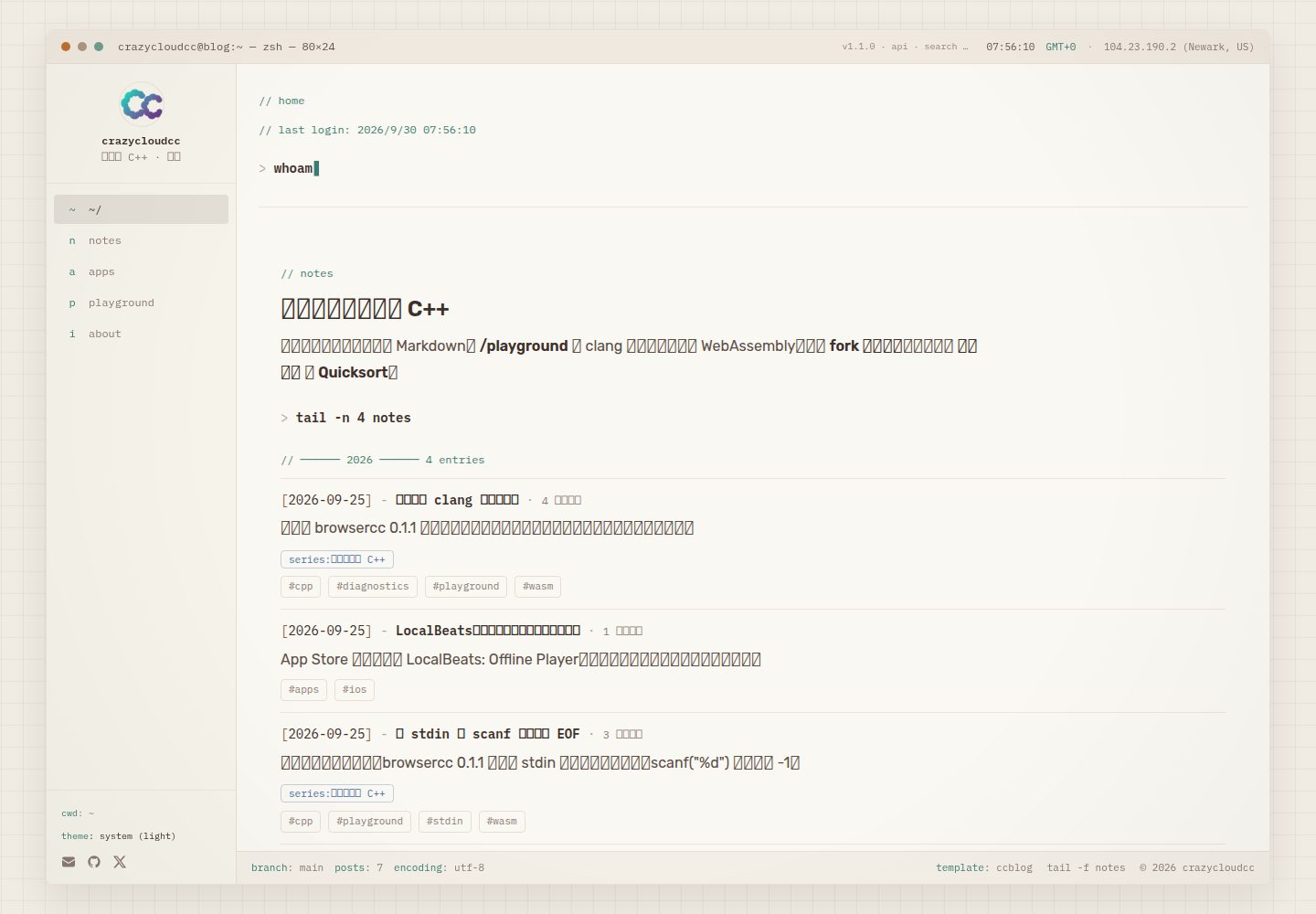
终端会话式界面:首页启动序列、命令风格导航与面板外观,主题支持浅色/深色/跟随系统并尊重减少动态效果
Next.jsReact博客
ccblog — Next.js 博客模板
作者 crazycloudcc
ccblog 是一个以 macOS 终端会话为视觉风格的 Next.js 博客模板,文章用 Markdown 存放,并内置基于 WASM 的浏览器内 C11 / C++17 编译运行环境。
看看你的网站会是什么样
浏览真实页面截图,比较内容排版与手机效果。点击下方缩略图切换,放大查看整页细节。
全部页面与视图 3
截图用于了解视觉与布局,交互效果请以实际项目为准。
采集于 2026-09-30查看来源
值得关注的模板亮点
从已有项目资料中,快速了解它的特点。
浏览器内 C11 / C++17 编译运行:基于 browsercc 的 WASM 工具链,配 Monaco 编辑器、stdin、分享链接与编译时间线
文章内嵌可运行代码:通过 :::playground 等自定义指令块在 Markdown 中嵌入运行器、注解、步骤与基准块
单一配置面:ccblog.config.ts 集中管理站点身份、社交链接、功能开关与 App Store ID,组件不硬编码身份信息
内置静态搜索与元信息:Pagefind 客户端索引、RSS、sitemap、JSON-LD 与 Open Graph 图片
模板详细介绍
ccblog 是一个可 Fork 的 Next.js 博客站点模板,界面模拟 macOS 终端会话:首页以一段简短的启动序列开场,导航与面板使用 cd、cat、grep 等命令式表达,而不是常规博客的卡片布局。主题支持浅色、深色与跟随系统,并遵循系统的减少动态效果设置。
内容以 Markdown 文件存放在 content/notes/ 目录,通过 frontmatter 声明标题、摘要、日期、标签、系列、难度等字段,文件名决定文章 URL。列表页提供标签与系列筛选、阅读时长、上一篇/下一篇与相关文章;搜索使用 Pagefind 生成静态索引。文章正文除标准 Markdown 与围栏代码外,还支持 :::trace、:::bench、:::annotate、:::playground 等自定义指令块。
模板的另一个组成部分是 /playground 页面:借助 browsercc 的 WASM 工具链,在浏览器内编译并运行 C11 / C++17 代码,配有 Monaco 编辑器、标准输入、分享链接与编译时间线;文章里也可以通过 :::playground 指令嵌入可运行的代码。站点同时输出 RSS、sitemap、JSON-LD 与 Open Graph 图片。
使用前需要注意几点限制:仓库中提交的 ccblog.config.ts 是演示身份,需要复制 ccblog.config.example.ts 覆盖并修改名称、作者、社交链接与站点 URL;/blog 的搜索索引只在生产构建的 postbuild 阶段由 Pagefind 生成,单独运行 next dev 没有索引;Playground 的 WASM 工具链在生产环境从 unpkg 拉取,不打包进部署产物,可通过 NEXT_PUBLIC_TOOLCHAIN_BASE 覆盖;/apps 路由默认关闭,需要 Apple 开发者 ID 才有意义。
Next.js博客
适合你的项目吗?
适用场景
- 搭建个人技术博客,用 Markdown 写文章并保留标签、系列、相关文章与阅读时长等组织方式
- 在文章中直接嵌入可编译运行的 C / C++ 示例,读者无需本地安装编译器即可查看结果
- 需要一个终端风格而非传统博客版式的展示型站点,用于记录笔记、实验与项目说明
- 作为 Next.js App Router 项目的起点,按需开启或关闭博客、Playground、关于页与 App Store 等路由
适合人群
- 熟悉 Next.js 与 Markdown 写作、希望快速 Fork 并自行改配置的开发者
- 需要展示 C / C++ 代码并让读者在浏览器里直接运行的技术作者
- 偏好终端美学与命令式交互界面的个人站点维护者
上手与定制指南
结合仓库当前版本的说明,按下面的资料检查内容、配置与运行要求。
- 1
需要 Node.js 20+ 与 npm 9+;先复制 ccblog.config.example.ts 为 ccblog.config.ts 并修改名称、作者、社交链接与 URL,否则站点仍显示演示身份
- 2
生产环境需设置 NEXT_PUBLIC_SITE_URL,用于 RSS、sitemap 与 Open Graph 的规范地址
- 3
/blog 的搜索依赖 npm run build 在 postbuild 阶段生成 Pagefind 索引,仅运行 next dev 时没有搜索索引
- 4
Playground 的 WASM 工具链在生产环境从 unpkg 获取,不随部署打包,可用 NEXT_PUBLIC_TOOLCHAIN_BASE 覆盖 CDN 地址
- 5
/apps 路由默认关闭,开启并同步 App Store 元数据需要 Apple 开发者 ID
授权与来源资料
使用条件与限制
免费使用 · 保留许可声明本次收录的是公开仓库中采用 MIT 许可的免费版本;免费范围为该版本代码,不代表外部服务或第三方素材免费。
使用时需要遵守
- 允许免费使用、修改、商用和分发该版本代码。
- 分发代码副本或实质性部分时,保留原作者版权声明和完整 MIT 许可声明。
- 代码按现状提供;担保与责任限制以原许可证及适用法律为准。
额外费用与待核对事项
- 生产环境下 Playground 的 WASM 工具链从 unpkg CDN 拉取,不随部署打包;首次加载需联网获取,可通过 NEXT_PUBLIC_TOOLCHAIN_BASE 覆盖 CDN 地址。
- /blog 的搜索索引仅在 npm run build 的 postbuild 阶段由 Pagefind 生成,单独运行 next dev 时没有搜索索引。
- /apps 路由默认关闭;开启并同步 App Store 元数据需要 Apple 开发者 ID,否则应保持 features.apps 为 false。
- 仓库中提交的 ccblog.config.ts 为演示身份,未复制 ccblog.config.example.ts 覆盖前,站点仍显示 crazycloudcc 并可能同步演示 App Store 列表。
- 生产部署需设置 NEXT_PUBLIC_SITE_URL 环境变量,用于 RSS、sitemap 与 Open Graph 的规范地址。
- 演示图片、字体、图标及其他第三方素材需按各自许可核对,不能仅凭代码的 MIT 许可判断。
- 域名、托管、数据库、支付或 AI 等外部服务可能另外收费。
查看原文依据
Permission is hereby granted, free of charge
许可证原文
Playground WASM is fetched from unpkg in production, not bundled into the deploy.
README 原文
Search on `/blog` needs `npm run build` (Pagefind is generated at `postbuild`). `next dev` alone has no index.
README 原文
leave features.apps false unless you have an Apple developer ID
README 原文
The committed `ccblog.config.ts` is the **demo identity**. Until you copy the example file, the site still says crazycloudcc and may sync the demo App Store list.
README 原文
https://github.com/crazycloudcc/ccblog/blob/main/LICENSEhttps://github.com/crazycloudcc/ccblog/blob/main/README.mdSet NEXT_PUBLIC_SITE_URL to your production URL
README 原文
DeepSeek 根据仓库许可证和 README 整理 ·2026-09-30。结果仅覆盖已读取资料,依赖、图片、字体及后续条款变更以各自原文为准。
项目核对记录与介绍依据
模板资料
- 来源平台
- GitHub
- 资料与维护参考分
- 资料较完整 · 83 / 100
- 技术栈
- Next.js · React
- 网站类型
- 博客
这个分数如何计算
本站按许可资料(最高30分)、演示链接(12分)、预览图(10分)、Star数(15分)、记录的维护时间(15分)、描述完整度(8分)、功能记录(5分)和分类资料(5分)计算。它不是代码、安全或性能测试,也不是 Google 评分;有链接不代表已实测可用。
这个项目需要核对什么
- 记录的仓库更新时间
- 2026-09-30
- 截图检查日期
- 2026-09-30
已收录演示链接。请用你的内容与屏幕尺寸检查;有演示不代表表单、认证或支付已经可用。
目录记录的主要技术栈是 Next.js。请通过依赖清单和锁文件核对实际版本与托管要求。这些说明基于收录资料,不代表代码审计或部署实测。
查看具体选型方法 →介绍的制作与核对状态
介绍由 AI 辅助整理目录与仓库资料。仓库作者不等于这篇介绍的审核者。
已完成服务器许可规则与 AI 来源核对;未经过人工编辑审核。
查看当时使用的来源资料
SHA-256: fd4a4b982419205a24b17c31828a591611ded8f20009e989ad9cf1ec106c8f63
2026-09-30T07:56:37.229Z
来源文件 / 仓库# ccblog     Forkable terminal blog. C and C++ compile in the browser. One config file, then deploy. [Use this template](https://github.com/crazycloudcc/ccblog/generate) · [](https://vercel.com/new/clone?repository-url=https%3A%2F%2Fgithub.com%2Fcrazycloudcc%2Fccblog&env=NEXT_PUBLIC_SITE_URL&envDescription=Canonical%20public%20URL%20(e.g.%20https%3A%2F%2Fyour-domain.com)&project-name=ccblog&repository-name=ccblog) · [Live demo](https://crazycloud.cc) · [Run quicksort in the article](https://crazycloud.cc/blog/quicksort) · [中文文档](README.zh-CN.md)  <p align="center"> <img src="docs/media/home-dark.png" alt="Home terminal session" width="32%" /> <img src="docs/media/playground-run.png" alt="Playground compile and run" width="32%" /> <img src="docs/media/quicksort-embed.png" alt="Annotated quicksort in a post" width="32%" /> </p> ### Why fork this - Rebrand by editing `ccblog.config.ts` — name, social links, feature flags - In-browser **C11 / C++17** via clang-in-WASM (no server, no install) - Posts can embed a live runner (`:::playground`) plus annotate / steps / bench blocks - Static search (Pagefind), RSS, sitemap, JSON-LD, Open Graph - No App Store? Leave `features.apps` off (the default in the example config) The first Deploy still looks like the demo site. Copy `ccblog.config.example.ts` over `ccblog.config.ts`, set `NEXT_PUBLIC_SITE_URL`, and redeploy. --- ## What it is **ccblog** is a Next.js site styled like a macOS terminal session. Posts live as markdown files; the UI leans into `cd`, `cat`, `grep`, and panel chrome rather than a conventional blog layout. The home page opens with a short boot sequence (notes type in, then settle). Theme follows light / dark / system, with reduced-motion respected throughout. ### Highlights | Area | What you get | |------|----------------| | **Blog** | Markdown + frontmatter, tag & series filters, reading time, prev/next, related posts | | **Search** | [Pagefind](https://pagefind.app/) static index, built on `postbuild` | | **Playground** | C11 / C++17 compile & run via [browsercc](https://www.npmjs.com/package/browsercc) WASM - Monaco editor, stdin, share links, compile timeline | | **Content blocks** | `:::trace`, `:::bench`, `:::annotate`, `:::playground` directives in posts | | **Meta** | RSS, sitemap, JSON-LD, Open Graph image | | **Apps** | Optional App Store catalog, off unless you turn `features.apps` on | --- ## Stack - [Next.js 16](https://nextjs.org) (App Router) · React 19 · TypeScript - [Tailwind CSS v4](https://tailwindcss.com) - [gray-matter](https://github.com/jonschlinkert/gray-matter) for post frontmatter - [Monaco Editor](https://microsoft.github.io/monaco-editor/) + browsercc for `/playground` - [Pagefind](https://pagefind.app) for client-side search - [@vercel/analytics](https://vercel.com/analytics) for privacy-friendly page-view stats (auto on Vercel; remove `<Analytics />` in `app/layout.tsx` to disable) --- ## Fork & deploy **Requirements:** Node.js 20+, npm 9+. ```bash # 1. Use this template (or fork), then clone your copy git clone https://github.com/<your-username>/ccblog.git cd ccblog npm install # 2. Make it yours — do this before the first real deploy cp ccblog.config.example.ts ccblog.config.ts # edit name, author, social links, url # leave features.apps false unless you have an Apple developer ID # 3. Run locally npm run dev # http://localhost:3000 # 4. Deploy on Vercel # Use the Deploy button above, or Import the repo at https://vercel.com/new # Set NEXT_PUBLIC_SITE_URL to your production URL ``` A few things the first deploy will otherwise get wrong: - The committed `ccblog.config.ts` is the **demo identity**. Until you copy the example file, the site still says crazycloudcc and may sync the demo App Store list. - Search on `/blog` needs `npm run build` (Pagefind is generated at `postbuild`). `next dev` alone has no index. - Playground WASM is fetched from unpkg in production, not bundled into the deploy. That is the whole loop. For a detailed walkthrough, see the **Start Up** post (`content/notes/nextjs-blog-setup.md`). Maintainer dry-run: `docs/fork-dry-run.md`. --- ## Configure `ccblog.config.ts` at the repo root is the single rebrand surface - identity, social links, feature flags, and the App Store ID all live there. Everything works with zero environment variables on `npm run dev`; in production set the canonical URL: ```bash # .env.local (not committed) NEXT_PUBLIC_SITE_URL=https://your-domain.com ``` | Variable | When | Purpose | |----------|------|---------| | `NEXT_PUBLIC_SITE_URL` | Production | Canonical URL for RSS, sitemap, Open Graph | | `NEXT_PUBLIC_CCBLOG_BRANCH` | Optional | Git branch shown in the terminal status bar | | `APPLE_DEVELOPER_ID` | Optional | Overrides `apps.developerId` for `/apps` sync | | `NEXT_PUBLIC_TOOLCHAIN_BASE` | Optional | Override Playground WASM CDN in production | Feature flags in `ccblog.config.ts` (`features.blog`, `features.apps`, `features.playground`, `features.about`) toggle whole routes - nav, sitemap, and the apps sync all respect them. `/apps` defaults to **off**. --- ## Writing posts Add markdown files under `content/notes/`: ```yaml --- title: My Post excerpt: One-line summary for lists and RSS. date: 2026-07-08 tags: - nextjs series: my-series # optional seriesSlug: my-series # optional; public page at /blog/series/my-series index: false # optional; keep the URL, omit it from sitemap, RSS, and the public list difficulty: intermediate # optional --- ``` Inline links, code spans, bold, emphasis, and strikethrough render in headings, paragraphs, and list items. Raw HTML stays escaped; links support relative URLs, HTTP(S), and email. Custom blocks and fenced code keep their existing rendering. The filename becomes the URL (`/blog/my-post`). The body supports standard markdown, fenced code, images, and custom blocks (`:::trace`, `:::bench`, `:::annotate`, `:::playground`, …) - see `content/notes/content-blocks.md` for examples. --- ## Scripts ```bash npm run dev # local dev (webpack) npm run build # validate config -> sync apps -> build -> pagefind index npm run start # serve the production build npm run lint # eslint npm test # inline Markdown regression tests npm run sync:apps # refresh lib/apps.ts from the iTunes API ``` `npm run build` runs: 1. **prebuild** - `validate-config.mjs` checks `ccblog.config.ts`, then `sync-apps.mjs` syncs App Store metadata (skipped when `features.apps` is false) 2. **build** - Next.js static generation 3. **postbuild** - Pagefind search index into `public/pagefind/` Search on `/blog` needs a production build; `next dev` alone does not generate the index. --- ## Routes | Path | Description | |------|-------------| | `/` | Home - boot sequence + recent notes | | `/blog` | Notes list, tag/series filters, search | | `/blog/[slug]` | Post detail | | `/playground` | In-browser C/C++ editor & runner | | `/apps` | App Store releases (optional, off by default) | | `/about` | About & contact | | `/feed.xml` | RSS | --- ## Playground toolchain | Environment | Source | |-------------|--------| | **Development** | `/api/toolchain` - local proxy (GitHub release, falls back to `node_modules/browsercc`) | | **Production** | [unpkg](https://unpkg.com) CDN (`[email protected]`), overridable via `NEXT_PUBLIC_TOOLCHAIN_BASE` | Toolchain files are not bundled into the deployment (keeps Vercel Hobby under size limits). The browser fetches and caches them on first load. --- ## Project layout ``` app/ # Next.js routes & API components/ # UI (terminal shell, blog, playground, …) content/notes/ # Markdown posts lib/ # Site config adapter, posts parser, playground core ccblog.config.ts # the single rebrand surface scripts/ # Build helpers (config validation, apps sync) public/ # Static assets (pagefind index generated at build) ``` --- ## Contributing Bug fixes, new content-block directives, social icons, and docs are all welcome - see [CONTRIBUTING.md](CONTRIBUTING.md). The golden rule: never hardcode identity into a component; route it through `ccblog.config.ts` via `lib/site.ts`. ## Author Built and maintained by [crazycloudcc](https://github.com/crazycloudcc). Questions or forks welcome - see `/about` on the live site for contact links. --- ## License [MIT](LICENSE) © 2026 crazycloudcc
看看同类模板
对比同技术栈与用途的模板,找到更适合的视觉与内容结构。

tailwind-nextjs-starter-blog
tailwind-nextjs-starter-blog 是一个面向个人技术博客的 Next.js 与 Tailwind CSS 启动模板,其 v2 版本基于 App Router 与 React Server Comp…
Next.js · 博客

Nextjs-tailwindcss-blog-template
⭐Build SEO optimized personal blog website with Next.js, Tailwind CSS and Contentlayer. If you want to learn t…
Next.js · 博客

Next-js-Blog-Boilerplate
Next-js-Blog-Boilerplate 是一套面向个人与技术博客的启动代码,基于 Next.js 12 与 Tailwind CSS 3 构建,同时集成了 TypeScript、ESLint、Prettier …
Next.js · 博客

nextjs-blog-theme
nextjs-blog-theme 是 Netlify 团队维护的一个博客启动模板,基于 Next.js 15(Pages Router)和 Tailwind CSS 4.x 构建,设计由 Bejamas 机构完成。
Next.js · 博客

blog
🚀 My personal blog made with Tailwind CSS and NextJS. Template from Timlrx. Feel free to fork, follow and use…
Next.js · 博客

tailnext
Tailnext 是一个基于 Next.js 14 App Router 和 Tailwind CSS 的免费开源模板,由 onWidget 团队创建并维护。
Next.js · 博客