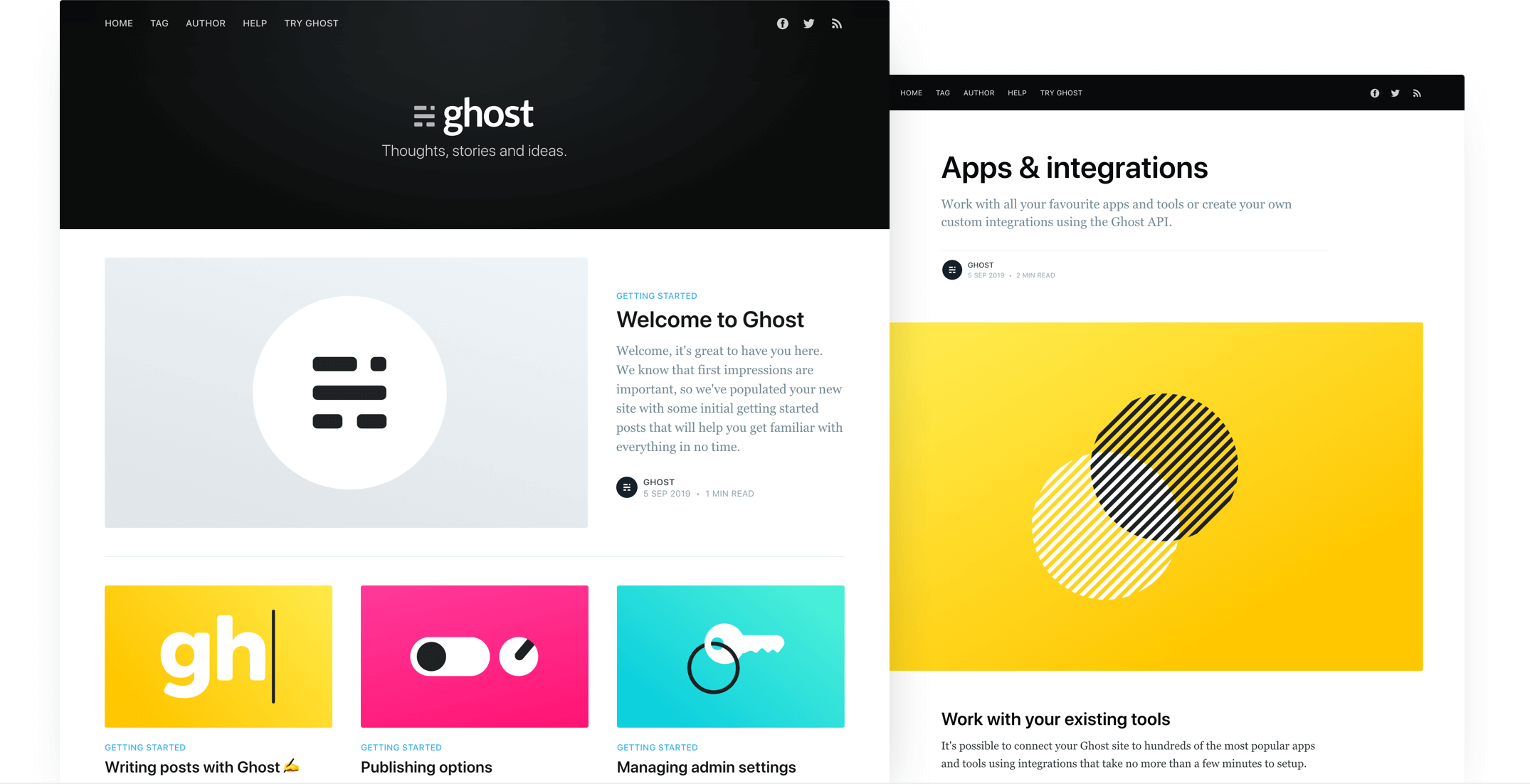
A Ghost CMS website theme based on Ghost's default Casper theme, used for feteam.space
HTMLStarter
feteam — HTML Starter Template
By cwray-tech
feteam is a Ghost CMS website theme built by cwray-tech for feteam.space. Based on the Casper theme, it uses Handlebars templates and a Gulp/PostCSS build process, and is released under the MIT license.
Explore the design
Compare the page layouts and mobile experience. Open any screenshot for a closer look.
Author preview
Author-provided preview
Preview provided in the project README.
One original preview is available. Open the full image to inspect the design.
Screenshots show visual appearance; interactive behavior may differ.
Recorded 2026-10-12View source
What stands out
A quick read of the recorded project description.
Uses the Handlebars templating language, with core templates including default.hbs, index.hbs, post.hbs, page.hbs, tag.hbs, and author.hbs
Supports one-off custom templates by slug, such as page-about.hbs, tag-news.hbs, and author-ali.hbs
Styles are compiled with Gulp and PostCSS, using Autoprefixer, CSS variables, and Color Function
SVG icons are inlined via Handlebars partials, with icons located in /partials/icons
Released under the MIT license; this version's code may be used, modified, used commercially, and distributed for free
Template Details
feteam is a website theme for Ghost CMS, derived from Ghost's default Casper theme and used by its author for the feteam.space site. The repository README follows Casper's documentation, so the theme structure, template naming, and development approach match Casper.
The theme uses Ghost's Handlebars templating language. The main template files include default.hbs (the parent template containing the global header and footer), index.hbs (the post list, usually the homepage), post.hbs (a single post), page.hbs (a standalone page), tag.hbs (tag archives), and author.hbs (author archives). In addition, one-off custom templates can be created by adding a page slug to the template filename, for example page-about.hbs for the /about/ page, tag-news.hbs for the /tag/news/ archive, and author-ali.hbs for the /author/ali/ archive.
Styles are compiled with Gulp and PostCSS to supplement future CSS specifications. Development requires Node, Yarn, and Gulp installed globally, then running yarn install in the theme root to install dependencies and yarn dev to start the development server; editing files under /assets/css/ automatically compiles to /assets/built/. The yarn zip task packages the theme as dist/<theme-name>.zip for upload to a site. PostCSS features used include Autoprefixer, pure CSS variables, and Color Function.
For icons, the theme uses inline SVG introduced through Handlebars partials, with icon files located in /partials/icons; for example, {{> "icons/rss"}} includes /partials/icons/rss.hbs, and custom SVG icons can be added in the same way.
Note that the repository description and README do not fully correspond: the README is Casper's original documentation and does not describe customizations for feteam.space, so it is not possible to determine from the available material which specific changes this theme makes relative to Casper. The repository was last updated in 2022 and is licensed under MIT.
HTMLLauncher
Is it right for your project?
Use Cases
- Building post lists, post detail pages, standalone pages, tag archives, and author archives for a Ghost CMS site
- Modifying styles or templates on top of the Casper theme for a self-hosted Ghost blog
- Customizing templates for specific pages or archives through naming conventions such as page-<slug>.hbs and tag-<slug>.hbs
- Using the Gulp/PostCSS process to compile theme CSS and package it into an uploadable zip file
Suitable For
- Users building a website with Ghost CMS who need a ready-made theme
- Front-end developers who want to do secondary development based on the Casper theme
- Ghost site maintainers who need to customize Handlebars templates by page or archive
Getting started & customization
Use these recorded setup notes alongside the repository instructions for your chosen version.
- 1
Node, Yarn, and Gulp need to be installed globally
- 2
Run yarn install in the theme root to install dependencies, and yarn dev to start the development server
- 3
Editing files under /assets/css/ automatically compiles to /assets/built/
- 4
Run yarn zip to generate dist/<theme-name>.zip, then upload it to the Ghost site
- 5
The README is Casper's original documentation and does not explain the specific customizations for feteam.space; before use, it is advisable to check the repository code to confirm
License & source material
Usage conditions & limitations
Free to use · keep license noticeThis listing covers the free version in the public repository under the MIT license; the free scope is this version's code and does not mean that external services or third-party assets are free.
Must comply with when using
- This version's code may be used, modified, used commercially, and distributed for free.
- When distributing copies or substantial portions of the code, retain the original author's copyright notice and the full MIT license notice.
- The code is provided as is; warranties and limitations of liability are governed by the original license and applicable law.
Additional costs & items to verify
- Demo images, fonts, icons, and other third-party assets must be checked against their respective licenses and cannot be judged solely by the code's MIT license.
- External services such as domains, hosting, databases, payments, or AI may incur separate charges.
View Original Text Basis
https://github.com/cwray-tech/feteam/blob/master/LICENSEhttps://github.com/cwray-tech/feteam/blob/master/README.mdPermission is hereby granted, free of charge
Original License Text
Compiled by DeepSeek based on repository license and README ·2026-10-12. Results only cover the materials read; dependencies, images, fonts, and subsequent term changes are subject to their respective original texts.
Project checks & description sources
Template Information
- Source platforms
- GitHub
- Documentation and maintenance reference score
- Less documented · 53 / 100
- Technologies
- HTML
- Website type
- Starter
How this score is calculated
Our heuristic uses license records (up to 30), a demo link (12), a preview (10), stars (15), recorded maintenance (15), description completeness (8), feature records (5) and classification data (5). It is not a code, security or performance test, or a Google score. A link does not establish tested functionality.
What to verify for this project
- Repository update recorded
- 2022-12-12
- Screenshot last checked
- 2026-10-12
No demo link is recorded. Use the repository instructions to evaluate the project locally; the screenshot alone cannot establish interactive behavior.
The catalog identifies HTML as the primary stack. Check the actual dependency manifest and lockfile for versions and hosting requirements. These notes use recorded metadata, not a code audit or a deployment test.
Use a selection guide →How this description was prepared
AI-assisted description based on catalog records and repository material. Repository authors are not automatically the reviewers of this description.
Review declaration: [email protected] · 2026-10-13
Inspect the recorded source material
SHA-256: e4f79b1e76a7d7bd64c67676092c7f1e7c3d2f2f7a205546fd2a000530cc30ae
2026-10-12T19:52:21.824Z
Source file / repository# Casper
The default theme for [Ghost](http://github.com/tryghost/ghost/). This is the latest development version of Casper! If you're just looking to download the latest release, head over to the [releases](https://github.com/TryGhost/Casper/releases) page.

# First time using a Ghost theme?
Ghost uses a simple templating language called [Handlebars](http://handlebarsjs.com/) for its themes.
This theme has lots of code comments to help explain what's going on just by reading the code. Once you feel comfortable with how everything works, we also have full [theme API documentation](https://ghost.org/docs/api/handlebars-themes/) which explains every possible Handlebars helper and template.
**The main files are:**
- `default.hbs` - The parent template file, which includes your global header/footer
- `index.hbs` - The main template to generate a list of posts, usually the home page
- `post.hbs` - The template used to render individual posts
- `page.hbs` - Used for individual pages
- `tag.hbs` - Used for tag archives, eg. "all posts tagged with `news`"
- `author.hbs` - Used for author archives, eg. "all posts written by Jamie"
One neat trick is that you can also create custom one-off templates by adding the slug of a page to a template file. For example:
- `page-about.hbs` - Custom template for an `/about/` page
- `tag-news.hbs` - Custom template for `/tag/news/` archive
- `author-ali.hbs` - Custom template for `/author/ali/` archive
# Development
Casper styles are compiled using Gulp/PostCSS to polyfill future CSS spec. You'll need [Node](https://nodejs.org/), [Yarn](https://yarnpkg.com/) and [Gulp](https://gulpjs.com) installed globally. After that, from the theme's root directory:
```bash
# install dependencies
yarn install
# run development server
yarn dev
```
Now you can edit `/assets/css/` files, which will be compiled to `/assets/built/` automatically.
The `zip` Gulp task packages the theme files into `dist/<theme-name>.zip`, which you can then upload to your site.
```bash
# create .zip file
yarn zip
```
# PostCSS Features Used
- Autoprefixer - Don't worry about writing browser prefixes of any kind, it's all done automatically with support for the latest 2 major versions of every browser.
- Variables - Simple pure CSS variables
- [Color Function](https://github.com/postcss/postcss-color-function)
# SVG Icons
Casper uses inline SVG icons, included via Handlebars partials. You can find all icons inside `/partials/icons`. To use an icon just include the name of the relevant file, eg. To include the SVG icon in `/partials/icons/rss.hbs` - use `{{> "icons/rss"}}`.
You can add your own SVG icons in the same manner.
# Copyright & License
Copyright (c) 2013-2020 Ghost Foundation - Released under the [MIT license](LICENSE).
Explore similar templates
Compare previews and descriptions within the same stack and category.

startbootstrap-simple-sidebar
A Bootstrap off-canvas sidebar navigation HTML starter template from Start Bootstrap. It provides directly editable HTML and CSS in the dist directory, while the source uses Pug, SCSS, and JavaScript with npm build scripts for live preview and compilation.
HTML · Starter

adminkit
AdminKit is a free, MIT-licensed HTML admin and dashboard template built on Bootstrap 5. The free version includes 15 demo pages, 1 plugin, and 1 color scheme, with hundreds of UI components, forms, tables, charts, and icons.
HTML · Admin dashboard

Landing-Page
A general-purpose landing page HTML template maintained by Tailwind Toolbox, written in pure HTML and loading the complete Tailwind CSS via CDN.
HTML · Corporate Website

light-bootstrap-dashboard
Light Bootstrap Dashboard is a free, MIT-licensed admin dashboard template from Creative Tim, built on Bootstrap with a responsive static HTML structure.
HTML · Admin dashboard

sing-app
Sing App Lite is a free, open-source admin dashboard template from Flatlogic, built with Bootstrap 4.5 and SCSS. It provides a responsive layout, dashboard examples, typography, tables, notifications, basic charts, icons, maps, and a hover sidebar, along with styled Bootstrap components.
HTML · Admin dashboard

startbootstrap-modern-business
Modern Business is a multipurpose Bootstrap full-site HTML template from Start Bootstrap with 17 standalone pages covering home, about, services, portfolio, pricing, blog, FAQ, and contact.
HTML · Starter