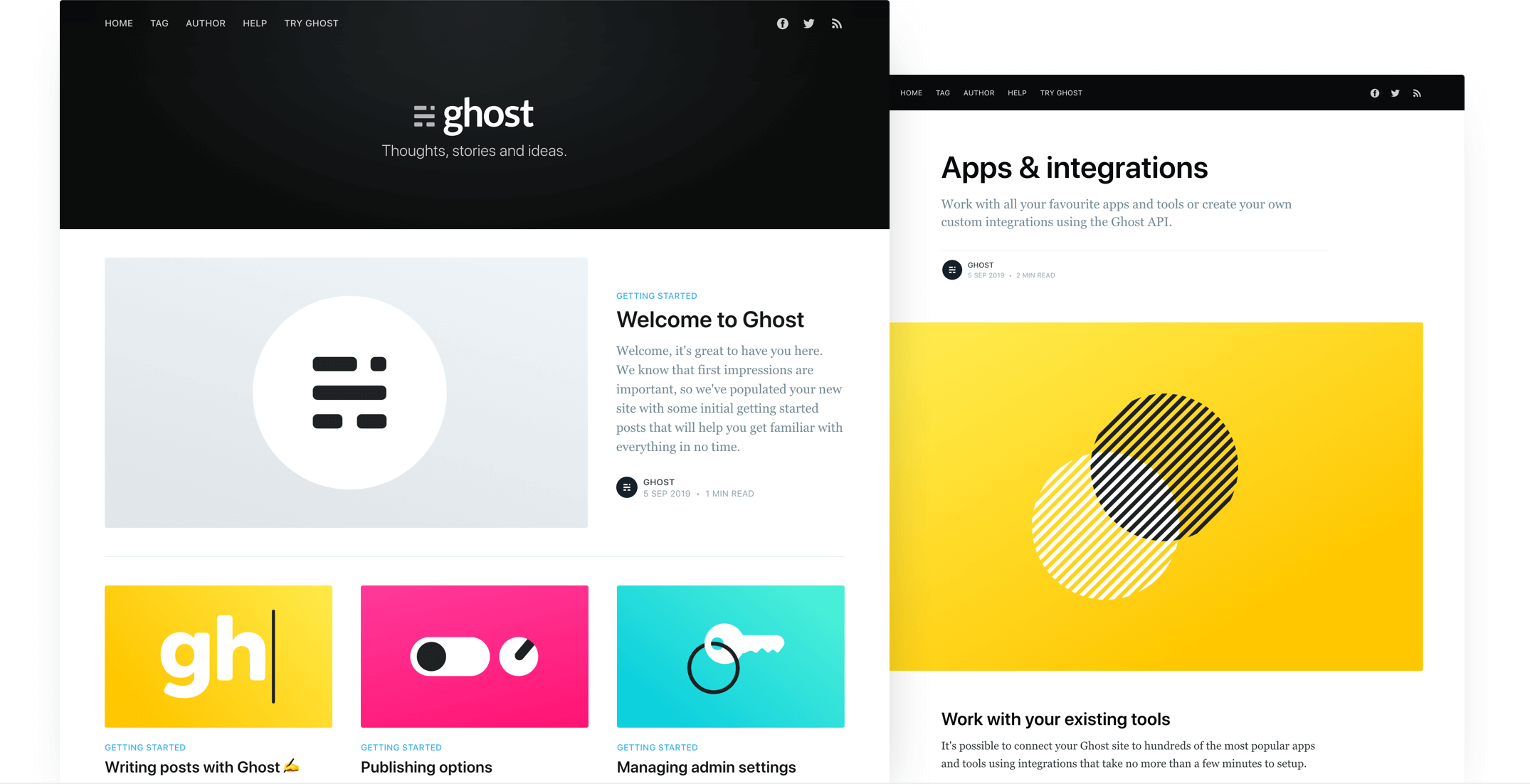
基于 Ghost 官方默认主题 Casper 的 Ghost CMS 网站主题,用于 feteam.space
HTML启动器
feteam — HTML 启动器模板
作者 cwray-tech
feteam 是 cwray-tech 为 feteam.space 构建的 Ghost CMS 网站主题,基于 Casper 主题,采用 Handlebars 模板与 Gulp/PostCSS 构建流程,仓库以 MIT 许可发布。
看看你的网站会是什么样
浏览真实页面截图,比较内容排版与手机效果。点击下方缩略图切换,放大查看整页细节。
目前有 1 张原始预览,可打开完整图片查看设计细节。
截图用于了解视觉与布局,交互效果请以实际项目为准。
采集于 2026-10-12查看来源
值得关注的模板亮点
从已有项目资料中,快速了解它的特点。
使用 Handlebars 模板语言,核心模板包括 default.hbs、index.hbs、post.hbs、page.hbs、tag.hbs、author.hbs
支持按 slug 创建一次性自定义模板,如 page-about.hbs、tag-news.hbs、author-ali.hbs
样式由 Gulp 与 PostCSS 编译,使用 Autoprefixer、CSS 变量和 Color Function
SVG 图标以内联方式通过 Handlebars partial 引入,图标位于 /partials/icons
以 MIT 许可发布,可免费使用、修改、商用和分发该版本代码
模板详细介绍
feteam 是一个用于 Ghost CMS 的网站主题,源自 Ghost 官方默认主题 Casper,作者将其用于 feteam.space 站点。仓库 README 沿用 Casper 的说明,因此主题结构、模板命名和开发方式与 Casper 一致。
主题使用 Ghost 的 Handlebars 模板语言。主要模板文件包括 default.hbs(包含全局页头页脚的父模板)、index.hbs(文章列表,通常为首页)、post.hbs(单篇文章)、page.hbs(独立页面)、tag.hbs(标签归档)和 author.hbs(作者归档)。此外可以通过在模板文件名中加入页面 slug 来创建一次性自定义模板,例如 page-about.hbs 对应 /about/ 页面,tag-news.hbs 对应 /tag/news/ 归档,author-ali.hbs 对应 /author/ali/ 归档。
样式通过 Gulp 与 PostCSS 编译,用于补齐未来 CSS 规范。开发需要全局安装 Node、Yarn 和 Gulp,然后在主题根目录执行 yarn install 安装依赖、yarn dev 启动开发服务器,编辑 /assets/css/ 下的文件会自动编译到 /assets/built/。yarn zip 任务会把主题打包为 dist/<theme-name>.zip,供上传到站点使用。使用的 PostCSS 特性包括 Autoprefixer、纯 CSS 变量和 Color Function。
图标方面,主题使用内联 SVG,通过 Handlebars partial 引入,图标文件位于 /partials/icons,例如 {{> "icons/rss"}} 会引入 /partials/icons/rss.hbs,也可以按同样方式添加自定义 SVG 图标。
需要留意的是,仓库描述与 README 内容并不完全对应:README 是 Casper 的原始文档,未针对 feteam.space 做定制说明,因此无法从资料判断该主题相对 Casper 做了哪些具体修改。仓库更新时间为 2022 年,许可证为 MIT。
HTML启动器
适合你的项目吗?
适用场景
- 为 Ghost CMS 站点搭建文章列表、文章详情、独立页面、标签归档和作者归档页面
- 在 Casper 主题基础上修改样式或模板,用于自建 Ghost 博客
- 通过 page-<slug>.hbs、tag-<slug>.hbs 等命名方式为特定页面或归档定制模板
- 使用 Gulp/PostCSS 流程编译主题 CSS 并打包为可上传的 zip 文件
适合人群
- 使用 Ghost CMS 搭建网站并需要现成主题的用户
- 希望基于 Casper 主题进行二次开发的前端开发者
- 需要按页面或归档定制 Handlebars 模板的 Ghost 站点维护者
上手与定制指南
结合仓库当前版本的说明,按下面的资料检查内容、配置与运行要求。
- 1
需要全局安装 Node、Yarn 和 Gulp
- 2
在主题根目录执行 yarn install 安装依赖,执行 yarn dev 启动开发服务器
- 3
编辑 /assets/css/ 下的文件会自动编译到 /assets/built/
- 4
执行 yarn zip 生成 dist/<theme-name>.zip,再上传到 Ghost 站点
- 5
README 为 Casper 原始文档,未说明 feteam.space 的具体定制内容,使用前建议对照仓库代码确认
授权与来源资料
使用条件与限制
免费使用 · 保留许可声明本次收录的是公开仓库中采用 MIT 许可的免费版本;免费范围为该版本代码,不代表外部服务或第三方素材免费。
使用时需要遵守
- 允许免费使用、修改、商用和分发该版本代码。
- 分发代码副本或实质性部分时,保留原作者版权声明和完整 MIT 许可声明。
- 代码按现状提供;担保与责任限制以原许可证及适用法律为准。
额外费用与待核对事项
- 演示图片、字体、图标及其他第三方素材需按各自许可核对,不能仅凭代码的 MIT 许可判断。
- 域名、托管、数据库、支付或 AI 等外部服务可能另外收费。
查看原文依据
https://github.com/cwray-tech/feteam/blob/master/LICENSEhttps://github.com/cwray-tech/feteam/blob/master/README.mdPermission is hereby granted, free of charge
许可证原文
DeepSeek 根据仓库许可证和 README 整理 ·2026-10-12。结果仅覆盖已读取资料,依赖、图片、字体及后续条款变更以各自原文为准。
项目核对记录与介绍依据
模板资料
- 来源平台
- GitHub
- 资料与维护参考分
- 资料较少 · 53 / 100
- 技术栈
- HTML
- 网站类型
- 启动器
这个分数如何计算
本站按许可资料(最高30分)、演示链接(12分)、预览图(10分)、Star数(15分)、记录的维护时间(15分)、描述完整度(8分)、功能记录(5分)和分类资料(5分)计算。它不是代码、安全或性能测试,也不是 Google 评分;有链接不代表已实测可用。
这个项目需要核对什么
- 记录的仓库更新时间
- 2022-12-12
- 截图检查日期
- 2026-10-12
目前没有记录演示链接。请依据仓库说明在本地评估;仅凭截图无法确认交互行为。
目录记录的主要技术栈是 HTML。请通过依赖清单和锁文件核对实际版本与托管要求。这些说明基于收录资料,不代表代码审计或部署实测。
查看具体选型方法 →介绍的制作与核对状态
介绍由 AI 辅助整理目录与仓库资料。仓库作者不等于这篇介绍的审核者。
审核声明: [email protected] · 2026-10-13
查看当时使用的来源资料
SHA-256: e4f79b1e76a7d7bd64c67676092c7f1e7c3d2f2f7a205546fd2a000530cc30ae
2026-10-12T19:52:21.824Z
来源文件 / 仓库# Casper
The default theme for [Ghost](http://github.com/tryghost/ghost/). This is the latest development version of Casper! If you're just looking to download the latest release, head over to the [releases](https://github.com/TryGhost/Casper/releases) page.

# First time using a Ghost theme?
Ghost uses a simple templating language called [Handlebars](http://handlebarsjs.com/) for its themes.
This theme has lots of code comments to help explain what's going on just by reading the code. Once you feel comfortable with how everything works, we also have full [theme API documentation](https://ghost.org/docs/api/handlebars-themes/) which explains every possible Handlebars helper and template.
**The main files are:**
- `default.hbs` - The parent template file, which includes your global header/footer
- `index.hbs` - The main template to generate a list of posts, usually the home page
- `post.hbs` - The template used to render individual posts
- `page.hbs` - Used for individual pages
- `tag.hbs` - Used for tag archives, eg. "all posts tagged with `news`"
- `author.hbs` - Used for author archives, eg. "all posts written by Jamie"
One neat trick is that you can also create custom one-off templates by adding the slug of a page to a template file. For example:
- `page-about.hbs` - Custom template for an `/about/` page
- `tag-news.hbs` - Custom template for `/tag/news/` archive
- `author-ali.hbs` - Custom template for `/author/ali/` archive
# Development
Casper styles are compiled using Gulp/PostCSS to polyfill future CSS spec. You'll need [Node](https://nodejs.org/), [Yarn](https://yarnpkg.com/) and [Gulp](https://gulpjs.com) installed globally. After that, from the theme's root directory:
```bash
# install dependencies
yarn install
# run development server
yarn dev
```
Now you can edit `/assets/css/` files, which will be compiled to `/assets/built/` automatically.
The `zip` Gulp task packages the theme files into `dist/<theme-name>.zip`, which you can then upload to your site.
```bash
# create .zip file
yarn zip
```
# PostCSS Features Used
- Autoprefixer - Don't worry about writing browser prefixes of any kind, it's all done automatically with support for the latest 2 major versions of every browser.
- Variables - Simple pure CSS variables
- [Color Function](https://github.com/postcss/postcss-color-function)
# SVG Icons
Casper uses inline SVG icons, included via Handlebars partials. You can find all icons inside `/partials/icons`. To use an icon just include the name of the relevant file, eg. To include the SVG icon in `/partials/icons/rss.hbs` - use `{{> "icons/rss"}}`.
You can add your own SVG icons in the same manner.
# Copyright & License
Copyright (c) 2013-2020 Ghost Foundation - Released under the [MIT license](LICENSE).
看看同类模板
对比同技术栈与用途的模板,找到更适合的视觉与内容结构。

startbootstrap-simple-sidebar
An off canvas sidebar navigation Bootstrap HTML template created by Start Bootstrap
HTML · 启动器

adminkit
AdminKit is a free & open-source HTML dashboard & admin template based on Bootstrap 5
HTML · 后台

Landing-Page
Tailwind CSS Starter Template - Landing Page
HTML · 企业官网

light-bootstrap-dashboard
Light Bootstrap Dashboard is an admin dashboard template designed to be beautiful and simple.
HTML · 后台

sing-app
💥Free and open-source admin dashboard template built with Bootstrap 4.5 💥
HTML · 后台

startbootstrap-modern-business
A multipurpose Bootstrap full website template created by Start Bootstrap
HTML · 启动器