Publication list based on BibTeX, with author highlighting, abstract expansion, and Altmetric, Dimensions, and Google Scholar citation badges
AstroPortfolioBlog
as-folio — Astro Portfolio Template
By dadangnh
as-folio is an Astro-based academic portfolio and blog template with built-in BibTeX publication lists, CV, projects, bookshelf, and full-text search, suited for researchers building a personal homepage.
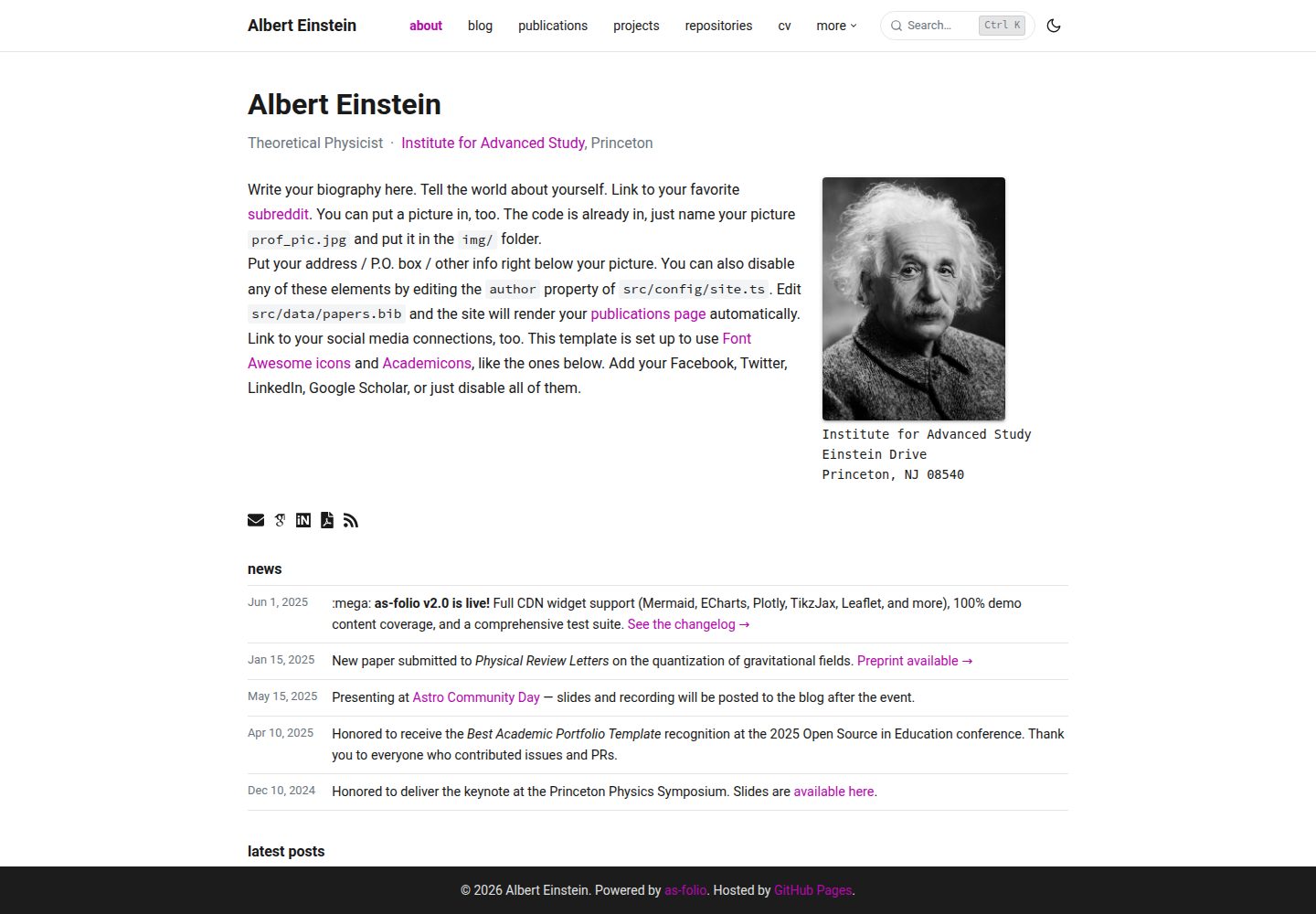
Explore the design
Compare the page layouts and mobile experience. Open any screenshot for a closer look.
Desktop homepage1 / 3
Desktop captureTop of page
Actual screenshot captured by the server browser.
All pages & views 3
Screenshots show visual appearance; interactive behavior may differ.
Recorded 2026-10-02View source
What stands out
A quick read of the recorded project description.
Blog supports MDX, KaTeX math, code highlighting, table of contents, reading progress, related posts, and drafts
CV supports both RenderCV YAML and JSONResume JSON formats, and can be downloaded as PDF
Built-in ⌘K full-text search implemented with Pagefind and ninja-keys
Provides content types for projects, bookshelf, repositories, courses, and member profiles, plus dark mode, RSS, and sitemap
Includes deployment configurations for GitHub Pages, GitLab Pages, Cloudflare Pages, Netlify, and Vercel
Template Details
as-folio is an Astro template for academic scenarios, bringing the personal homepage content researchers commonly need into a single site. It is built with Astro, styled with Tailwind CSS, and constrained by TypeScript for configuration and content types. The template includes demo content covering different personas such as academic and open-source profiles, which can serve as a reference when building.
On the content side, the template provides publications (BibTeX bibliography with author highlighting, abstract expansion, and citation metric badges from Altmetric, Dimensions, Google Scholar, and others), blog (MDX with KaTeX math, code highlighting, reading progress, table of contents, image zoom, related posts, grouping by year, and drafts), projects (card grid, category grouping, GitHub star counts, and citations on detail pages), CV (RenderCV YAML or JSONResume JSON, downloadable as PDF), bookshelf (Open Library covers, star ratings, and reading status), repository page (GitHub user stats, pinned repositories, and trophies), course list, lab member profiles, and ⌘K full-text search powered by Pagefind and ninja-keys. The site also includes dark mode, RSS and sitemap, comments (Giscus or Disqus), analytics (choose from GA4, Pirsch, OpenPanel, or Cronitor), Loops.so email subscription, and a cookie consent component.
There are some clear limitations in use. The deployment URL and base path are determined by the environment variables ASTRO_SITE and ASTRO_BASE; you should not directly change the corresponding values in src/config/site.ts. Local development requires Node 24+, Astro 6.4+, and Corepack enabled, with Yarn 4 as the package manager. The template includes deployment configurations for GitHub Pages, GitLab Pages, Cloudflare Pages, Netlify, and Vercel, but whether external services such as hosting and domains charge fees must be confirmed independently. The licenses for third-party assets such as demo images, fonts, and icons must be checked separately and cannot be judged solely by the code's MIT license.
AstroPortfolioBlog
Is it right for your project?
Use Cases
- Researchers building a personal academic homepage with publications, CV, blog, and project showcases
- Authors who need to maintain a publication list in BibTeX and display citation metrics
- Scholars or students who want to write technical blogs with math formulas using Markdown/MDX
- Academic personal sites that need to display courses, lab members, or open-source repository information
Suitable For
- Users with experience in Astro or static sites who are willing to maintain content through configuration files
- Researchers who need to consolidate publications, CV, blog, and projects into one site
- Users who prefer managing content with Markdown, MDX, and BibTeX
- Users planning to deploy to GitHub Pages, Cloudflare Pages, Netlify, or Vercel
Getting started & customization
Use these recorded setup notes alongside the repository instructions for your chosen version.
- 1
Local development requires Node 24+, Astro 6.4+, and Corepack enabled, with Yarn 4 as the package manager
- 2
The deployment URL and base path are controlled by the environment variables ASTRO_SITE and ASTRO_BASE; do not directly modify the corresponding values in src/config/site.ts
- 3
Site settings are centralized in src/config/site.ts; fill in the title, author, social accounts, and other information according to CUSTOMIZE.md
- 4
For GitHub Pages deployment, select GitHub Actions in the repository Settings → Pages, and set the ASTRO_SITE and ASTRO_BASE repository variables
- 5
The licenses for third-party assets such as demo images, fonts, and icons must be checked separately; external services such as hosting and domains may charge additional fees
License & source material
Usage conditions & limitations
Free to use · keep license noticeThis entry covers the free version under the MIT license in the public repository; the free scope is the code of that version and does not mean external services or third-party assets are free.
Must comply with when using
- Permits free use, modification, commercial use, and distribution of this version's code.
- When distributing copies or substantial portions of the code, retain the original author's copyright notice and the full MIT license notice.
- The code is provided as is; warranties and limitations of liability are governed by the original license and applicable law.
Additional costs & items to verify
- The deployment URL and base path must be set via the environment variables ASTRO_SITE and ASTRO_BASE; you cannot directly modify the corresponding values in src/config/site.ts.
- Local development requires Node 24+, Astro 6.4+, and Corepack enabled, with Yarn 4 as the package manager.
- GitHub Pages deployment requires setting repository variables such as ASTRO_SITE in the repository and selecting GitHub Actions as the Pages source.
- GitLab Pages deployment requires adding ASTRO_SITE and ASTRO_BASE variables in the CI/CD settings.
- Netlify deployment requires connecting the repository in the Netlify panel; the hosting service may charge additional fees.
- Vercel deployment requires connecting the repository in the Vercel panel; the hosting service may charge additional fees.
- The comment feature depends on external services such as Giscus (requires GitHub Discussions) or Disqus.
- The email subscription feature depends on the external Loops.so service and may require an account or payment.
- The analytics feature depends on external services such as GA4, Pirsch, OpenPanel, or Cronitor and may require an account or payment.
- The repository page's stats, pinned items, and trophies depend on the external github-readme-stats service.
- Bookshelf covers depend on the external Open Library service.
- Citation counts are automatically refreshed at each deployment via a prebuild script and depend on external data sources.
- Demo images, fonts, icons, and other third-party assets must be checked under their respective licenses and cannot be judged solely by the code's MIT license.
- External services such as domains, hosting, databases, payments, or AI may charge additional fees.
View Original Text Basis
Permission is hereby granted, free of charge
Original License Text
Deployment URL and base path come from `ASTRO_SITE` and `ASTRO_BASE`, not from editing `src/config/site.ts` directly.
Original README
# Prerequisites: Node 24+, Astro 6.4+, Corepack enabled
Original README
Setting repository variable `ASTRO_SITE` to your site origin
Original README
Going to **Settings** → **CI/CD** → **Variables** and adding:
Original README
Connect your repo in Netlify dashboard.
Original README
Connect your repo in Vercel dashboard.
Original README
Comments** — Giscus (GitHub Discussions) or Disqus
Original README
Newsletter** — Loops.so integration
Original README
Analytics** — GA4, Pirsch, OpenPanel, Cronitor (pick any)
Original README
Repositories** — GitHub user stats, repo pins, and trophies via github-readme-stats
Original README
Books** — Reading shelf with Open Library cover art
Original README
https://github.com/dadangnh/as-folio/blob/main/LICENSEhttps://github.com/dadangnh/as-folio/blob/main/README.mdCitation counts for `google_scholar_id` entries are stored in `src/data/citations.yml` and refreshed automatically on every deploy (via the pre-build script)
Original README
Compiled by DeepSeek based on repository license and README ·2026-10-02. Results only cover the materials read; dependencies, images, fonts, and subsequent term changes are subject to their respective original texts.
Project checks & description sources
Template Information
- Source platforms
- GitHub
- Documentation and maintenance reference score
- More documented · 92 / 100
- Technologies
- Astro
- Website type
- Portfolio · Blog
How this score is calculated
Our heuristic uses license records (up to 30), a demo link (12), a preview (10), stars (15), recorded maintenance (15), description completeness (8), feature records (5) and classification data (5). It is not a code, security or performance test, or a Google score. A link does not establish tested functionality.
What to verify for this project
- Repository update recorded
- 2026-08-21
- Screenshot last checked
- 2026-10-02
A demo link is listed. Check it with your own content and viewport sizes; its presence does not confirm that forms, authentication or payments work.
The catalog identifies Astro as the primary stack. Check the actual dependency manifest and lockfile for versions and hosting requirements. These notes use recorded metadata, not a code audit or a deployment test.
Use a selection guide →How this description was prepared
AI-assisted description based on catalog records and repository material. Repository authors are not automatically the reviewers of this description.
Automatically checked against source and license rules; no manual editorial review.
Inspect the recorded source material
SHA-256: 75ff630116deb1ccf0ea4721688c9d487fe705d0c1697e8a5bc0b4ce5423f09c
2026-10-02T16:50:59.303Z
Source file / repository# as-folio
**A clean, responsive Astro template for academic portfolios.**
[](https://astro.build)
[](https://tailwindcss.com)
[](https://www.typescriptlang.org)
[](LICENSE)
[](https://dadangnh.github.io/as-folio/)
---
## Screenshots
<table>
<tr>
<td align="center"><b>Homepage</b></td>
<td align="center"><b>Blog</b></td>
<td align="center"><b>Search</b></td>
</tr>
<tr>
<td><img src="public/assets/img/as_folio_homepage.png" alt="Homepage" /></td>
<td><img src="public/assets/img/as_folio_blog.png" alt="Blog" /></td>
<td><img src="public/assets/img/as_folio_search.png" alt="Search" /></td>
</tr>
</table>
---
## Features
- **Publications** — BibTeX bibliography with configurable author highlighting, abstract toggles, and Altmetric/Dimensions/Google Scholar badges
- **Blog** — MDX posts with math (KaTeX), syntax highlighting, reading progress bar, table of contents, image zoom, related posts, year-grouped listings, and draft post support
- **Projects** — Card grid with category groupings, live GitHub star counts, and project detail pages with inline citations
- **CV** — Supports both RenderCV YAML and JSONResume JSON formats, with PDF download
- **Books** — Reading shelf with Open Library cover art, star ratings, and reading status
- **Repositories** — GitHub user stats, repo pins, and trophies via github-readme-stats
- **Teaching** — Course listing with current/past groupings
- **People** — Lab member profiles with social links
- **Search** — Full-text ⌘K search powered by Pagefind + ninja-keys
- **Dark mode** — System-aware, flash-free, toggleable
- **Distill layout** — Academic paper layout with footnotes, citations, and figure numbers
- **Jupyter notebooks** — Notebook cells rendered as blog posts
- **Per-post CDN widgets** — Mermaid, Chart.js, ECharts, Vega, Plotly, Pseudocode, TikzJax, Leaflet, PhotoSwipe, and more
- **Analytics** — GA4, Pirsch, OpenPanel, Cronitor (pick any)
- **Comments** — Giscus (GitHub Discussions) or Disqus
- **Newsletter** — Loops.so integration
- **Cookie consent** — GDPR-compliant via vanilla-cookieconsent
- **RSS feed + sitemap** — Auto-generated
- **Deploy anywhere** — GitHub Pages, Cloudflare Pages, Netlify, Vercel
---
## Demo
The template ships with demo content for three personas:
| Persona | Purpose |
| --------------- | ---------------------------------------------------- |
| Albert Einstein | Academic profile: publications, CV, blog, math posts |
| Linus Torvalds | OSS profile: repositories page, GitHub stats |
| Dadang NH | Template creator and maintainer |
---
## Getting started
Deployment config is env-first:
- `ASTRO_SITE` and `ASTRO_BASE` are the source of truth
- `astro.config.mjs` reads them during the build
- `src/config/site.ts` only consumes the resolved Astro values
Use `.env` for local development and repository variables for GitHub Pages.
For project pages, keep `ASTRO_SITE` as the site origin, for example
`https://YOUR-USERNAME.github.io`, and put the repo path in `ASTRO_BASE`, for example
`/as-folio`.
### Option A — GitHub Pages (recommended)
1. **Fork** this repository on GitHub
2. Go to your fork → **Settings** → **Pages** → Source: **GitHub Actions**
3. Edit `src/config/site.ts` with your details (see [CUSTOMIZE.md](CUSTOMIZE.md))
4. Push to `main` — the site deploys automatically
### Option B — Local development
```bash
# Prerequisites: Node 24+, Astro 6.4+, Corepack enabled
corepack enable
# Clone
git clone https://github.com/YOUR-USERNAME/as-folio.git
cd as-folio
# Copy env template
cp .env.example .env
# Install
yarn install
# Dev server
yarn dev
# Production build
yarn build
```
---
## Configuration
Deployment URL and base path come from `ASTRO_SITE` and `ASTRO_BASE`, not from editing
`src/config/site.ts` directly.
All site settings live in one file: **`src/config/site.ts`**
This replaces al-folio's `_config.yml`. Every option is typed and documented with JSDoc — your editor will catch mistakes before the build does.
### Minimum required changes
```typescript
// src/config/site.ts
export const site = {
title: 'Your Name',
description: 'Your site description',
author: {
name: 'Your Name',
email: '[email protected]',
avatar: '/assets/img/prof_pic.jpg',
subtitle: 'Your Title · Your Institution',
moreInfo: '<p>Your address here</p>',
},
socials: {
email: '[email protected]',
github_username: 'your-github',
scholar_userid: 'YOUR_SCHOLAR_ID',
// ... set others to undefined to hide
},
};
```
See [CUSTOMIZE.md](CUSTOMIZE.md) for a full step-by-step guide.
---
## Project structure
```
src/
├── config/
│ └── site.ts ← single config file (start here)
├── content/
│ ├── posts/ ← blog posts (.md or .mdx)
│ ├── projects/ ← project pages (.md or .mdx)
│ ├── books/ ← bookshelf entries (.md)
│ ├── teaching/ ← course listings (.md)
│ ├── announcements/ ← news items (.md)
│ └── people/ ← lab member profiles (.md)
├── data/
│ ├── papers.bib ← BibTeX bibliography
│ ├── coauthors.yml ← co-author profile links
│ ├── citations.yml ← citation counts (auto-updated)
│ ├── cv.yml ← RenderCV format CV
│ ├── resume.json ← JSONResume format CV
│ └── repositories.yml ← GitHub repos config
├── pages/ ← Astro pages (rarely need editing)
scripts/
└── update-citations.ts ← fetches citation counts from OpenAlex
```
---
## Adding content
### Blog post
Create `src/content/posts/my-post.md`:
```yaml
---
title: 'My First Post'
date: 2024-01-01
lastmod: 2024-06-15 # optional: last modified date
description: 'Optional description for meta tags'
tags: [math, physics]
categories: [science]
math: true # enable KaTeX
toc: true # table of contents sidebar
draft: false # set true to exclude from listings
---
Your post content here. Math works: $E = mc^2$.
```
### Publication (BibTeX)
Add an entry to `src/data/papers.bib`:
```bibtex
@article{einstein1905,
title = {On the Electrodynamics of Moving Bodies},
author = {Einstein, Albert},
journal = {Annalen der Physik},
year = {1905},
volume = {17},
pages = {891--921},
doi = {10.1002/andp.19053221004},
% as-folio display fields:
selected = {true}, % shows on About page
abbr = {Ann. Phys.},
abstract = {Your abstract.},
pdf = {https://example.com/paper.pdf},
code = {https://github.com/you/repo},
slides = {/assets/pdf/talk.pdf},
video = {https://youtube.com/watch?v=...},
html = {https://doi.org/...},
% citation metric badges (all optional):
google_scholar_id = {YOUR_PAPER_ID}, % from Scholar URL citation_for_view=...
altmetric = {true}, % true = use DOI; or explicit Altmetric ID
dimensions = {true}, % true = use DOI
inspirehep_id = {12345}, % InspireHEP literature record ID
}
```
Citation counts for `google_scholar_id` entries are stored in `src/data/citations.yml` and refreshed automatically on every deploy (via the pre-build script) or on demand with `yarn citations:update`.
### Project
Create `src/content/projects/my-project.md`:
```yaml
---
title: 'My Project'
description: 'What it does'
img: /assets/img/project-thumb.jpg
github: username/repo
github_stars: username/repo # enables live star count
importance: 1 # lower = shown first
category: open source
---
Project description content here.
```
### Book
Create `src/content/books/my-book.md`:
```yaml
---
title: 'The Book Title'
author: Author Name
isbn: '9780000000000'
status: finished # reading | finished | queued | paused | abandoned
stars: 4
started: 2024-01-01
finished: 2024-03-15
---
Optional notes about the book.
```
---
## Deployment
### GitHub Pages
Already configured. Push to `main` after:
1. Setting source to GitHub Actions in repo Settings → Pages
2. Setting repository variable `ASTRO_SITE` to your site origin, e.g. `https://username.github.io`
3. Setting repository variable `ASTRO_BASE` to `''` for user pages or `/repo-name` for project pages
### GitLab Pages
Already configured in `.gitlab-ci.yml`. Push to your default branch after:
1. Forking or mirroring this repo to GitLab
2. Going to **Settings** → **CI/CD** → **Variables** and adding:
- `ASTRO_SITE` — full URL, e.g. `https://username.gitlab.io` or your custom domain
- `ASTRO_BASE` — base path for project pages, e.g. `/as-folio`; leave unset for user/group pages (`username.gitlab.io`)
3. Pushing to your default branch — the pipeline runs typecheck → lint → unit tests → deploy automatically
### Cloudflare Pages
```
Build command: yarn build
Output dir: dist
Node version: 24
```
### Netlify
Already configured in `netlify.toml`. Connect your repo in Netlify dashboard.
### Vercel
Already configured in `vercel.json`. Connect your repo in Vercel dashboard.
---
## Tech stack
| Layer | Technology |
| --------------- | ---------------------------------------------------------------------------------------- |
| Framework | [Astro 6.4+](https://astro.build) |
| CSS | [Tailwind CSS v4](https://tailwindcss.com) |
| Types | TypeScript (strict) |
| Math | KaTeX via remark-math + rehype-katex |
| Search | [Pagefind](https://pagefind.app) + [ninja-keys](https://github.com/ssleptsov/ninja-keys) |
| BibTeX | Custom build-time parser (zero runtime deps) |
| Icons | [Iconify](https://iconify.design) (Font Awesome + Academicons) |
| Package manager | Yarn 4 (Berry) |
| Node | 24+ |
---
## Contributing
Issues and PRs are welcome. See [AGENTS.md](AGENTS.md) for AI-assisted contribution guidelines.
```bash
yarn lint # run ESLint
yarn format # run Prettier
yarn test # run unit tests
yarn build # verify production build
```
---
## Acknowledgements
as-folio began as an Astro reimplementation of the [al-folio](https://github.com/alshedivat/al-folio) Jekyll theme and has since evolved into an independent project. All code in this repository is an original implementation.
---
## License
MIT © [Dadang NH](https://github.com/dadangnh)
Explore similar templates
Compare previews and descriptions within the same stack and category.

astrowind
AstroWind is a free, open-source Astro starter theme using Astro and Tailwind CSS, released under the MIT license.
Astro · Blog

astro-paper
AstroPaper is a minimal, responsive, accessible, and SEO-friendly Astro blog theme. Articles are stored as Markdown/MDX in src/content/posts/, with subdirectories affecting URLs.
Astro · Blog

fuwari
Fuwari is a static blog template built with Astro and Tailwind CSS for personal blogs. It manages posts as Markdown files in src/content/posts/, with frontmatter for title, date, description, cover, tags, categories, draft status, and language.
Astro · Blog

Firefly
Firefly is a clean personal blog theme forked from Astro and Fuwari, offering four background modes, single/double sidebar and list/grid layouts, Pagefind client-side full-text search, and a six-language UI.
Astro · Blog

astro-theme-cactus
Astro Cactus is an Astro-based blog and portfolio theme that uses Markdown/MDX content collections to manage posts, notes, and tags, with frontmatter type-checked by a schema.
Astro · Portfolio

astrofy
Astrofy is a free and open-source personal portfolio website template built with Astro and TailwindCSS, with built-in blog, CV timeline, project showcase, store, and RSS feed modules.
Astro · Portfolio