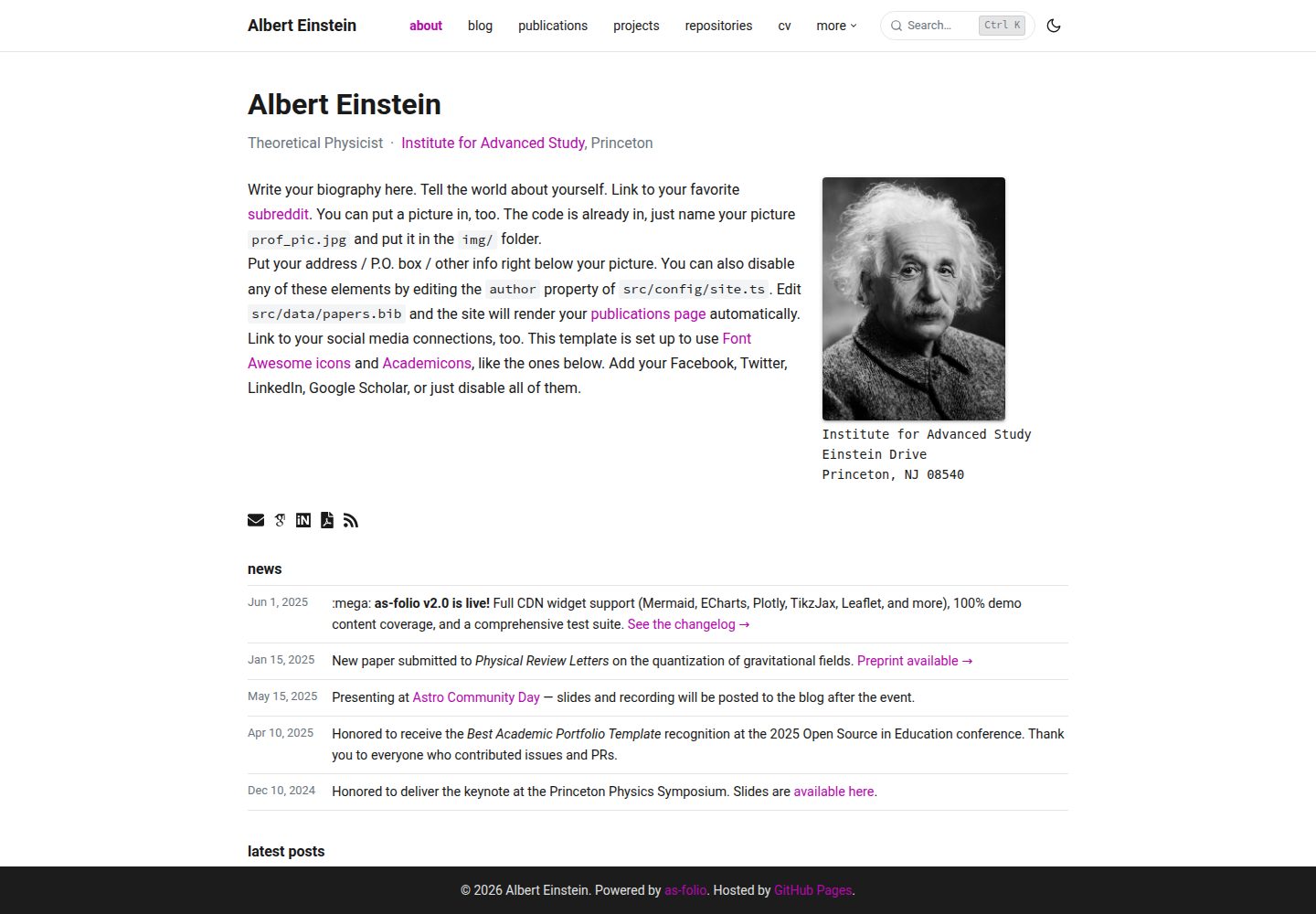
论文列表基于 BibTeX,支持作者高亮、摘要展开和 Altmetric、Dimensions、Google Scholar 引用徽章
Astro作品集博客
as-folio — Astro 作品集模板
作者 dadangnh
as-folio 是一个基于 Astro 的学术作品集与博客模板,内置 BibTeX 论文列表、CV、项目、书架和全文搜索,适合研究人员搭建个人主页。
看看你的网站会是什么样
浏览真实页面截图,比较内容排版与手机效果。点击下方缩略图切换,放大查看整页细节。
全部页面与视图 3
截图用于了解视觉与布局,交互效果请以实际项目为准。
采集于 2026-10-02查看来源
值得关注的模板亮点
从已有项目资料中,快速了解它的特点。
博客支持 MDX、KaTeX 数学公式、代码高亮、目录、阅读进度、相关文章和草稿
CV 同时支持 RenderCV YAML 与 JSONResume JSON 两种格式,并可下载 PDF
内置 Pagefind 与 ninja-keys 实现的 ⌘K 全文搜索
提供项目、书架、仓库、课程、成员档案等内容类型,以及深色模式、RSS 和站点地图
附带 GitHub Pages、GitLab Pages、Cloudflare Pages、Netlify、Vercel 的部署配置
模板详细介绍
as-folio 是面向学术场景的 Astro 模板,把研究人员常用的个人主页内容集中到一套站点里。它用 Astro 构建,样式基于 Tailwind CSS,配置与内容类型由 TypeScript 约束。模板自带演示内容,覆盖学术型、开源型等不同人物设定,可作为搭建时的参照。
内容层面,模板提供论文(BibTeX 书目,支持作者高亮、摘要展开和 Altmetric、Dimensions、Google Scholar 等引用指标徽章)、博客(MDX,支持 KaTeX 数学公式、代码高亮、阅读进度、目录、图片缩放、相关文章、按年分组和草稿)、项目(卡片网格、分类分组、GitHub 星标数与详情页引用)、CV(RenderCV YAML 或 JSONResume JSON,可下载 PDF)、书架(Open Library 封面、星级和阅读状态)、仓库页(GitHub 用户统计、置顶仓库和奖杯)、课程列表、实验室成员档案,以及基于 Pagefind 与 ninja-keys 的 ⌘K 全文搜索。站点还包含深色模式、RSS 与站点地图、评论(Giscus 或 Disqus)、分析(GA4、Pirsch、OpenPanel、Cronitor 任选)、Loops.so 邮件订阅和 cookie 同意组件。
使用上有一些明确限制。部署地址与基础路径由环境变量 ASTRO_SITE 和 ASTRO_BASE 决定,不应直接改 src/config/site.ts 里的对应值;本地开发需要 Node 24+、Astro 6.4+ 并启用 Corepack,包管理器为 Yarn 4。模板附带 GitHub Pages、GitLab Pages、Cloudflare Pages、Netlify 和 Vercel 的部署配置,但托管、域名等外部服务是否收费需自行确认。演示图片、字体、图标等第三方素材的许可需单独核对,不能仅凭代码的 MIT 许可判断。
Astro作品集博客
适合你的项目吗?
适用场景
- 研究人员搭建包含论文、CV、博客和项目展示的个人学术主页
- 需要以 BibTeX 维护论文列表并展示引用指标的作者
- 希望用 Markdown/MDX 写带数学公式的技术博客的学者或学生
- 需要展示课程、实验室成员或开源仓库信息的学术个人站点
适合人群
- 有 Astro 或静态站点使用经验、愿意通过配置文件维护内容的用户
- 需要把论文、CV、博客、项目集中在一个站点的研究人员
- 偏好用 Markdown、MDX 和 BibTeX 管理内容的用户
- 计划部署到 GitHub Pages、Cloudflare Pages、Netlify 或 Vercel 的用户
上手与定制指南
结合仓库当前版本的说明,按下面的资料检查内容、配置与运行要求。
- 1
本地开发需要 Node 24+、Astro 6.4+,并启用 Corepack,包管理器为 Yarn 4
- 2
部署地址与基础路径由环境变量 ASTRO_SITE 和 ASTRO_BASE 控制,不要直接修改 src/config/site.ts 中的对应值
- 3
站点设置集中在 src/config/site.ts,需按 CUSTOMIZE.md 填写标题、作者、社交账号等信息
- 4
GitHub Pages 部署需在仓库 Settings → Pages 中选择 GitHub Actions,并设置 ASTRO_SITE、ASTRO_BASE 仓库变量
- 5
演示图片、字体、图标等第三方素材的许可需单独核对,托管、域名等外部服务可能另行收费
授权与来源资料
使用条件与限制
免费使用 · 保留许可声明本次收录的是公开仓库中采用 MIT 许可的免费版本;免费范围为该版本代码,不代表外部服务或第三方素材免费。
使用时需要遵守
- 允许免费使用、修改、商用和分发该版本代码。
- 分发代码副本或实质性部分时,保留原作者版权声明和完整 MIT 许可声明。
- 代码按现状提供;担保与责任限制以原许可证及适用法律为准。
额外费用与待核对事项
- 部署地址与基础路径必须通过环境变量 ASTRO_SITE 和 ASTRO_BASE 设置,不能直接修改 src/config/site.ts 中的对应值。
- 本地开发需 Node 24+、Astro 6.4+ 并启用 Corepack,包管理器为 Yarn 4。
- GitHub Pages 部署需在仓库中设置 ASTRO_SITE 等仓库变量,并选择 GitHub Actions 作为 Pages 来源。
- GitLab Pages 部署需在 CI/CD 设置中添加 ASTRO_SITE、ASTRO_BASE 变量。
- Netlify 部署需在 Netlify 面板连接仓库,托管服务可能另行收费。
- Vercel 部署需在 Vercel 面板连接仓库,托管服务可能另行收费。
- 评论功能依赖 Giscus(需 GitHub Discussions)或 Disqus 等外部服务。
- 邮件订阅功能依赖 Loops.so 外部服务,可能需要账号或付费。
- 分析功能依赖 GA4、Pirsch、OpenPanel 或 Cronitor 等外部服务,可能需要账号或付费。
- 仓库页的统计、置顶与奖杯依赖 github-readme-stats 外部服务。
- 书架封面依赖 Open Library 外部服务。
- 引用计数在每次部署时通过预构建脚本自动刷新,依赖外部数据源。
- 演示图片、字体、图标及其他第三方素材需按各自许可核对,不能仅凭代码的 MIT 许可判断。
- 域名、托管、数据库、支付或 AI 等外部服务可能另外收费。
查看原文依据
Permission is hereby granted, free of charge
许可证原文
Deployment URL and base path come from `ASTRO_SITE` and `ASTRO_BASE`, not from editing `src/config/site.ts` directly.
README 原文
# Prerequisites: Node 24+, Astro 6.4+, Corepack enabled
README 原文
Setting repository variable `ASTRO_SITE` to your site origin
README 原文
Going to **Settings** → **CI/CD** → **Variables** and adding:
README 原文
Connect your repo in Netlify dashboard.
README 原文
Connect your repo in Vercel dashboard.
README 原文
Comments** — Giscus (GitHub Discussions) or Disqus
README 原文
Newsletter** — Loops.so integration
README 原文
Analytics** — GA4, Pirsch, OpenPanel, Cronitor (pick any)
README 原文
Repositories** — GitHub user stats, repo pins, and trophies via github-readme-stats
README 原文
Books** — Reading shelf with Open Library cover art
README 原文
https://github.com/dadangnh/as-folio/blob/main/LICENSEhttps://github.com/dadangnh/as-folio/blob/main/README.mdCitation counts for `google_scholar_id` entries are stored in `src/data/citations.yml` and refreshed automatically on every deploy (via the pre-build script)
README 原文
DeepSeek 根据仓库许可证和 README 整理 ·2026-10-02。结果仅覆盖已读取资料,依赖、图片、字体及后续条款变更以各自原文为准。
项目核对记录与介绍依据
模板资料
- 来源平台
- GitHub
- 资料与维护参考分
- 资料较完整 · 92 / 100
- 技术栈
- Astro
- 网站类型
- 作品集 · 博客
这个分数如何计算
本站按许可资料(最高30分)、演示链接(12分)、预览图(10分)、Star数(15分)、记录的维护时间(15分)、描述完整度(8分)、功能记录(5分)和分类资料(5分)计算。它不是代码、安全或性能测试,也不是 Google 评分;有链接不代表已实测可用。
这个项目需要核对什么
- 记录的仓库更新时间
- 2026-08-21
- 截图检查日期
- 2026-10-02
已收录演示链接。请用你的内容与屏幕尺寸检查;有演示不代表表单、认证或支付已经可用。
目录记录的主要技术栈是 Astro。请通过依赖清单和锁文件核对实际版本与托管要求。这些说明基于收录资料,不代表代码审计或部署实测。
查看具体选型方法 →介绍的制作与核对状态
介绍由 AI 辅助整理目录与仓库资料。仓库作者不等于这篇介绍的审核者。
已完成服务器许可规则与 AI 来源核对;未经过人工编辑审核。
查看当时使用的来源资料
SHA-256: 75ff630116deb1ccf0ea4721688c9d487fe705d0c1697e8a5bc0b4ce5423f09c
2026-10-02T16:50:59.303Z
来源文件 / 仓库# as-folio
**A clean, responsive Astro template for academic portfolios.**
[](https://astro.build)
[](https://tailwindcss.com)
[](https://www.typescriptlang.org)
[](LICENSE)
[](https://dadangnh.github.io/as-folio/)
---
## Screenshots
<table>
<tr>
<td align="center"><b>Homepage</b></td>
<td align="center"><b>Blog</b></td>
<td align="center"><b>Search</b></td>
</tr>
<tr>
<td><img src="public/assets/img/as_folio_homepage.png" alt="Homepage" /></td>
<td><img src="public/assets/img/as_folio_blog.png" alt="Blog" /></td>
<td><img src="public/assets/img/as_folio_search.png" alt="Search" /></td>
</tr>
</table>
---
## Features
- **Publications** — BibTeX bibliography with configurable author highlighting, abstract toggles, and Altmetric/Dimensions/Google Scholar badges
- **Blog** — MDX posts with math (KaTeX), syntax highlighting, reading progress bar, table of contents, image zoom, related posts, year-grouped listings, and draft post support
- **Projects** — Card grid with category groupings, live GitHub star counts, and project detail pages with inline citations
- **CV** — Supports both RenderCV YAML and JSONResume JSON formats, with PDF download
- **Books** — Reading shelf with Open Library cover art, star ratings, and reading status
- **Repositories** — GitHub user stats, repo pins, and trophies via github-readme-stats
- **Teaching** — Course listing with current/past groupings
- **People** — Lab member profiles with social links
- **Search** — Full-text ⌘K search powered by Pagefind + ninja-keys
- **Dark mode** — System-aware, flash-free, toggleable
- **Distill layout** — Academic paper layout with footnotes, citations, and figure numbers
- **Jupyter notebooks** — Notebook cells rendered as blog posts
- **Per-post CDN widgets** — Mermaid, Chart.js, ECharts, Vega, Plotly, Pseudocode, TikzJax, Leaflet, PhotoSwipe, and more
- **Analytics** — GA4, Pirsch, OpenPanel, Cronitor (pick any)
- **Comments** — Giscus (GitHub Discussions) or Disqus
- **Newsletter** — Loops.so integration
- **Cookie consent** — GDPR-compliant via vanilla-cookieconsent
- **RSS feed + sitemap** — Auto-generated
- **Deploy anywhere** — GitHub Pages, Cloudflare Pages, Netlify, Vercel
---
## Demo
The template ships with demo content for three personas:
| Persona | Purpose |
| --------------- | ---------------------------------------------------- |
| Albert Einstein | Academic profile: publications, CV, blog, math posts |
| Linus Torvalds | OSS profile: repositories page, GitHub stats |
| Dadang NH | Template creator and maintainer |
---
## Getting started
Deployment config is env-first:
- `ASTRO_SITE` and `ASTRO_BASE` are the source of truth
- `astro.config.mjs` reads them during the build
- `src/config/site.ts` only consumes the resolved Astro values
Use `.env` for local development and repository variables for GitHub Pages.
For project pages, keep `ASTRO_SITE` as the site origin, for example
`https://YOUR-USERNAME.github.io`, and put the repo path in `ASTRO_BASE`, for example
`/as-folio`.
### Option A — GitHub Pages (recommended)
1. **Fork** this repository on GitHub
2. Go to your fork → **Settings** → **Pages** → Source: **GitHub Actions**
3. Edit `src/config/site.ts` with your details (see [CUSTOMIZE.md](CUSTOMIZE.md))
4. Push to `main` — the site deploys automatically
### Option B — Local development
```bash
# Prerequisites: Node 24+, Astro 6.4+, Corepack enabled
corepack enable
# Clone
git clone https://github.com/YOUR-USERNAME/as-folio.git
cd as-folio
# Copy env template
cp .env.example .env
# Install
yarn install
# Dev server
yarn dev
# Production build
yarn build
```
---
## Configuration
Deployment URL and base path come from `ASTRO_SITE` and `ASTRO_BASE`, not from editing
`src/config/site.ts` directly.
All site settings live in one file: **`src/config/site.ts`**
This replaces al-folio's `_config.yml`. Every option is typed and documented with JSDoc — your editor will catch mistakes before the build does.
### Minimum required changes
```typescript
// src/config/site.ts
export const site = {
title: 'Your Name',
description: 'Your site description',
author: {
name: 'Your Name',
email: '[email protected]',
avatar: '/assets/img/prof_pic.jpg',
subtitle: 'Your Title · Your Institution',
moreInfo: '<p>Your address here</p>',
},
socials: {
email: '[email protected]',
github_username: 'your-github',
scholar_userid: 'YOUR_SCHOLAR_ID',
// ... set others to undefined to hide
},
};
```
See [CUSTOMIZE.md](CUSTOMIZE.md) for a full step-by-step guide.
---
## Project structure
```
src/
├── config/
│ └── site.ts ← single config file (start here)
├── content/
│ ├── posts/ ← blog posts (.md or .mdx)
│ ├── projects/ ← project pages (.md or .mdx)
│ ├── books/ ← bookshelf entries (.md)
│ ├── teaching/ ← course listings (.md)
│ ├── announcements/ ← news items (.md)
│ └── people/ ← lab member profiles (.md)
├── data/
│ ├── papers.bib ← BibTeX bibliography
│ ├── coauthors.yml ← co-author profile links
│ ├── citations.yml ← citation counts (auto-updated)
│ ├── cv.yml ← RenderCV format CV
│ ├── resume.json ← JSONResume format CV
│ └── repositories.yml ← GitHub repos config
├── pages/ ← Astro pages (rarely need editing)
scripts/
└── update-citations.ts ← fetches citation counts from OpenAlex
```
---
## Adding content
### Blog post
Create `src/content/posts/my-post.md`:
```yaml
---
title: 'My First Post'
date: 2024-01-01
lastmod: 2024-06-15 # optional: last modified date
description: 'Optional description for meta tags'
tags: [math, physics]
categories: [science]
math: true # enable KaTeX
toc: true # table of contents sidebar
draft: false # set true to exclude from listings
---
Your post content here. Math works: $E = mc^2$.
```
### Publication (BibTeX)
Add an entry to `src/data/papers.bib`:
```bibtex
@article{einstein1905,
title = {On the Electrodynamics of Moving Bodies},
author = {Einstein, Albert},
journal = {Annalen der Physik},
year = {1905},
volume = {17},
pages = {891--921},
doi = {10.1002/andp.19053221004},
% as-folio display fields:
selected = {true}, % shows on About page
abbr = {Ann. Phys.},
abstract = {Your abstract.},
pdf = {https://example.com/paper.pdf},
code = {https://github.com/you/repo},
slides = {/assets/pdf/talk.pdf},
video = {https://youtube.com/watch?v=...},
html = {https://doi.org/...},
% citation metric badges (all optional):
google_scholar_id = {YOUR_PAPER_ID}, % from Scholar URL citation_for_view=...
altmetric = {true}, % true = use DOI; or explicit Altmetric ID
dimensions = {true}, % true = use DOI
inspirehep_id = {12345}, % InspireHEP literature record ID
}
```
Citation counts for `google_scholar_id` entries are stored in `src/data/citations.yml` and refreshed automatically on every deploy (via the pre-build script) or on demand with `yarn citations:update`.
### Project
Create `src/content/projects/my-project.md`:
```yaml
---
title: 'My Project'
description: 'What it does'
img: /assets/img/project-thumb.jpg
github: username/repo
github_stars: username/repo # enables live star count
importance: 1 # lower = shown first
category: open source
---
Project description content here.
```
### Book
Create `src/content/books/my-book.md`:
```yaml
---
title: 'The Book Title'
author: Author Name
isbn: '9780000000000'
status: finished # reading | finished | queued | paused | abandoned
stars: 4
started: 2024-01-01
finished: 2024-03-15
---
Optional notes about the book.
```
---
## Deployment
### GitHub Pages
Already configured. Push to `main` after:
1. Setting source to GitHub Actions in repo Settings → Pages
2. Setting repository variable `ASTRO_SITE` to your site origin, e.g. `https://username.github.io`
3. Setting repository variable `ASTRO_BASE` to `''` for user pages or `/repo-name` for project pages
### GitLab Pages
Already configured in `.gitlab-ci.yml`. Push to your default branch after:
1. Forking or mirroring this repo to GitLab
2. Going to **Settings** → **CI/CD** → **Variables** and adding:
- `ASTRO_SITE` — full URL, e.g. `https://username.gitlab.io` or your custom domain
- `ASTRO_BASE` — base path for project pages, e.g. `/as-folio`; leave unset for user/group pages (`username.gitlab.io`)
3. Pushing to your default branch — the pipeline runs typecheck → lint → unit tests → deploy automatically
### Cloudflare Pages
```
Build command: yarn build
Output dir: dist
Node version: 24
```
### Netlify
Already configured in `netlify.toml`. Connect your repo in Netlify dashboard.
### Vercel
Already configured in `vercel.json`. Connect your repo in Vercel dashboard.
---
## Tech stack
| Layer | Technology |
| --------------- | ---------------------------------------------------------------------------------------- |
| Framework | [Astro 6.4+](https://astro.build) |
| CSS | [Tailwind CSS v4](https://tailwindcss.com) |
| Types | TypeScript (strict) |
| Math | KaTeX via remark-math + rehype-katex |
| Search | [Pagefind](https://pagefind.app) + [ninja-keys](https://github.com/ssleptsov/ninja-keys) |
| BibTeX | Custom build-time parser (zero runtime deps) |
| Icons | [Iconify](https://iconify.design) (Font Awesome + Academicons) |
| Package manager | Yarn 4 (Berry) |
| Node | 24+ |
---
## Contributing
Issues and PRs are welcome. See [AGENTS.md](AGENTS.md) for AI-assisted contribution guidelines.
```bash
yarn lint # run ESLint
yarn format # run Prettier
yarn test # run unit tests
yarn build # verify production build
```
---
## Acknowledgements
as-folio began as an Astro reimplementation of the [al-folio](https://github.com/alshedivat/al-folio) Jekyll theme and has since evolved into an independent project. All code in this repository is an original implementation.
---
## License
MIT © [Dadang NH](https://github.com/dadangnh)
看看同类模板
对比同技术栈与用途的模板,找到更适合的视觉与内容结构。

astrowind
⭕️ AstroWind: A free template using Astro v7 and Tailwind CSS v4. Astro starter theme.
Astro · 博客

astro-paper
A minimal, accessible and SEO-friendly Astro blog theme.
Astro · 博客

fuwari
✨A static blog template built with Astro.
Astro · 博客

Firefly
Firefly 是一款基于 Astro 的静态博客主题,由 CuteLeaf 在 saicaca 的 Fuwari 模板基础上二次开发,主打清新美观的视觉风格。
Astro · 博客

astro-theme-cactus
A simple Astro theme. Use it to create your blog or website.
Astro · 作品集

astrofy
Astrofy is a free and open-source template for your Personal Portfolio Website built with Astro and TailwindCS…
Astro · 作品集