Astro blog theme based on AstroPaper, using TypeScript and TailwindCSS
AstroBlogTool Site
astro-bolt — Astro Blog Template
By dantehemerson
An Astro blog theme based on AstroPaper, using TypeScript and TailwindCSS, with built-in Pagefind static search, drafts and pagination, sitemap and RSS, MDX, light/dark mode, and dynamic OG image generation.
Explore the design
Compare the page layouts and mobile experience. Open any screenshot for a closer look.
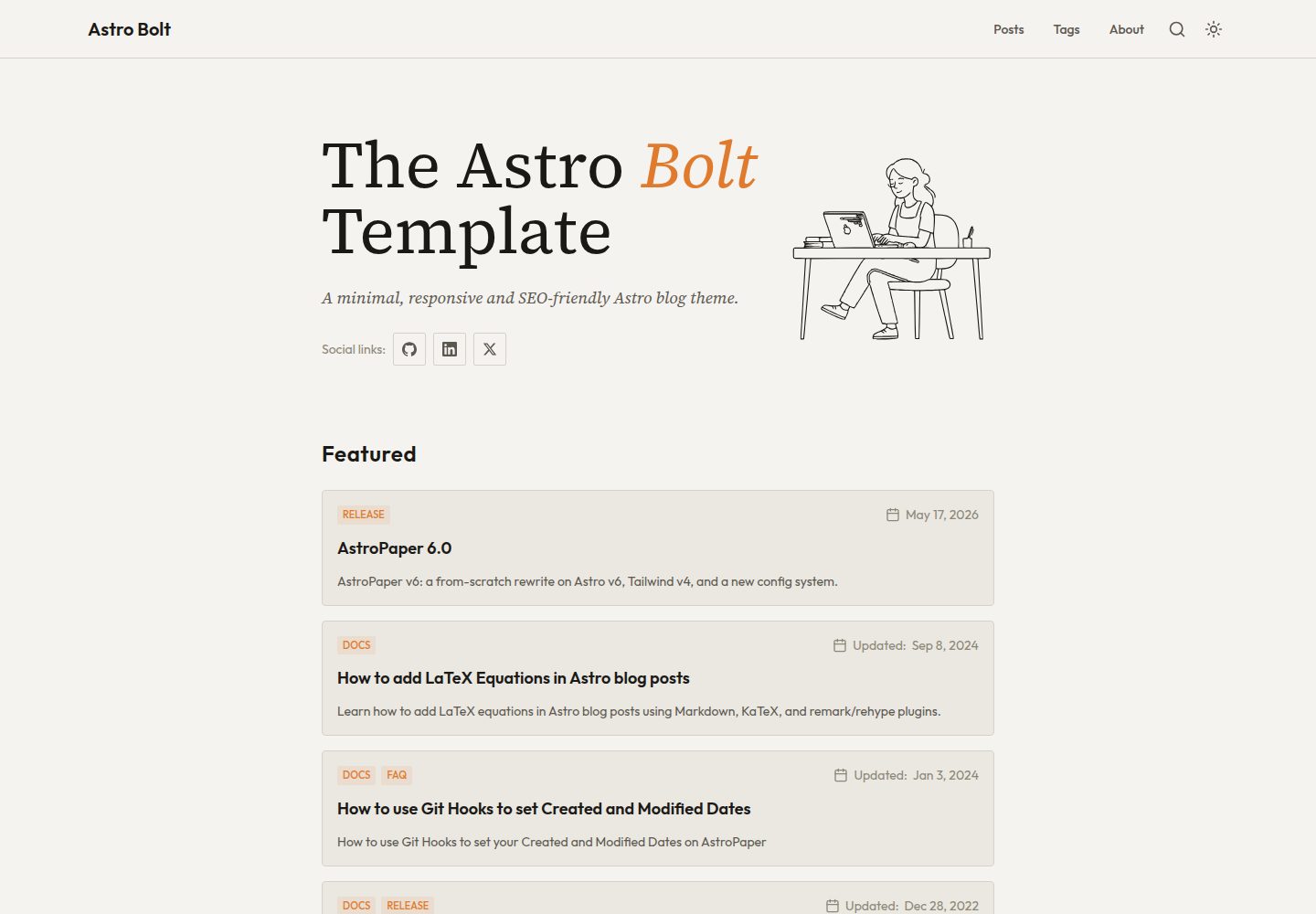
Desktop homepage1 / 3
Desktop captureTop of page
Actual screenshot captured by the server browser.
All pages & views 3
Screenshots show visual appearance; interactive behavior may differ.
Recorded 2026-10-13View source
What stands out
A quick read of the recorded project description.
Markdown/MDX content stored in src/content/posts/, supports subdirectory organization that affects post URLs
Built-in Pagefind static search, draft posts and pagination, sitemap and RSS
Supports light/dark mode and a collapsible table of contents
Dynamic OG image generation for blog posts (Satori, Sharp, Astro Fonts)
Configuration centralized in astro-template.config.ts, where options such as Google site verification can be set
Template Details
astro-bolt is an Astro-based blog theme. The author states in the README that it is derived from AstroPaper and positions it as a minimalist, responsive, accessible, and SEO-friendly blog template. Content is stored as Markdown/MDX in the src/content/posts/ directory and can be organized into subdirectories; subdirectory names become part of the post URL. It also supports draft posts and pagination.
In terms of features, the theme provides light/dark mode, a collapsible table of contents, Pagefind-based static search, sitemap and RSS output, and dynamic OG image generation for blog posts (using Satori, Sharp, and Astro Fonts). Site configuration is centralized in astro-template.config.ts, where options such as Google site verification can be set. The build command runs type checking, builds, indexes with Pagefind, and copies the index to public/pagefind/.
For the tech stack, the README lists Astro, TypeScript, TailwindCSS, Pagefind, Lucide React icons, Prettier, ESLint, and provides Figma design files; the deployment example is Cloudflare Pages. Regarding accessibility, the author states that testing was only done on Mac VoiceOver and Android TalkBack; other screen readers were not individually verified.
The license is MIT (Copyright © 2026). This version of the code can be used, modified, used commercially, and distributed for free; when distributing, the copyright and license notice must be retained. Third-party assets such as demo images, fonts, and icons must be checked against their respective licenses. External services such as domains and hosting may incur separate charges.
AstroBlogTool site
Is it right for your project?
Use Cases
- Building a personal technical blog written in Markdown/MDX
- Content sites that need static search, RSS, and sitemap
- Blogs that want automatically generated social sharing OG images for posts
- Reading-oriented sites that need light/dark mode and a collapsible table of contents
Suitable For
- Developers familiar with Astro and TypeScript
- Blog authors who primarily write in Markdown/MDX
- Maintainers of content sites that need static search and RSS output
- Users who accept the MIT license and are willing to retain the copyright notice
Getting started & customization
Use these recorded setup notes alongside the repository instructions for your chosen version.
- 1
After cloning the repository, run npm install to install dependencies
- 2
Use npm run dev to start the local development server at localhost:4321
- 3
npm run build runs type checking, builds, indexes with Pagefind, and copies the index to public/pagefind/
- 4
Site configuration is modified in astro-template.config.ts, such as site.googleVerification
- 5
Accessibility was only tested on Mac VoiceOver and Android TalkBack; other screen readers were not individually verified
License & source material
Usage conditions & limitations
Free to use · keep license noticeThis entry covers the free version under the MIT license in the public repository; the free scope is the code of this version and does not mean external services or third-party assets are free.
Must comply with when using
- This version of the code may be used, modified, used commercially, and distributed for free.
- When distributing copies or substantial portions of the code, retain the original author's copyright notice and the full MIT license notice.
- The code is provided as is; warranties and limitations of liability are governed by the original license and applicable law.
Additional costs & items to verify
- Demo images, fonts, icons, and other third-party assets must be checked against their respective licenses; they cannot be judged solely by the code's MIT license.
- External services such as domains, hosting, databases, payments, or AI may incur separate charges.
- Accessibility was only tested on Mac VoiceOver and Android TalkBack; the author did not test other screen readers. Accessibility on other screen readers is unverified and not guaranteed.
- The README points the deployment example to Cloudflare Pages; using that external hosting service may require account registration and may incur fees.
- The design file is provided as a Figma community file; using Figma requires account registration, and the license for that external asset must be checked separately.
- Dynamic OG images depend on third-party components such as Satori, Sharp, and Astro Fonts; their respective licenses and usage conditions must be checked individually.
- Google site verification is an optional feature that requires a Google account and a verification value, and is an external service.
View Original Text Basis
Permission is hereby granted, free of charge
Original License Text
_Note: Screen-reader accessibility of Astro Bolt is tested using **VoiceOver** on Mac and **TalkBack** on Android. I couldn't test all other screen-readers out there. However, accessibility enhancements in Astro Bolt should be working fine on others as well._
Original README
**Deployment** - [Cloudflare Pages](https://pages.cloudflare.com/)
Original README
**UI/UX** - [Figma Design File](https://www.figma.com/community/file/1356898632249991861)
Original README
**Dynamic OG images** - [Satori](https://github.com/vercel/satori) + [Sharp](https://sharp.pixelplumbing.com/) + [Astro Fonts](https://docs.astro.build/en/guides/fonts/)
Original README
https://github.com/dantehemerson/astro-bolt/blob/main/LICENSEhttps://github.com/dantehemerson/astro-bolt/blob/main/README.mdYou can add your [Google Site Verification HTML tag](https://support.google.com/webmasters/answer/9008080#meta_tag_verification&zippy=%2Chtml-tag) by setting `site.googleVerification` in `astro-template.config.ts`:
Original README
Compiled by DeepSeek based on repository license and README ·2026-10-13. Results only cover the materials read; dependencies, images, fonts, and subsequent term changes are subject to their respective original texts.
Project checks & description sources
Template Information
- Source platforms
- GitHub
- Documentation and maintenance reference score
- More documented · 85 / 100
- Technologies
- Astro
- Website type
- Blog · Tool Site
How this score is calculated
Our heuristic uses license records (up to 30), a demo link (12), a preview (10), stars (15), recorded maintenance (15), description completeness (8), feature records (5) and classification data (5). It is not a code, security or performance test, or a Google score. A link does not establish tested functionality.
What to verify for this project
- Repository update recorded
- 2026-07-20
- Screenshot last checked
- 2026-10-13
A demo link is listed. Check it with your own content and viewport sizes; its presence does not confirm that forms, authentication or payments work.
The catalog identifies Astro as the primary stack. Check the actual dependency manifest and lockfile for versions and hosting requirements. These notes use recorded metadata, not a code audit or a deployment test.
Use a selection guide →How this description was prepared
AI-assisted description based on catalog records and repository material. Repository authors are not automatically the reviewers of this description.
Review declaration: [email protected] · 2026-10-13
Inspect the recorded source material
SHA-256: f71d47b7d82045080f8df69866aec778072554c474decf532593ea36bc6d1d7d
2026-10-13T00:31:17.010Z
Source file / repository# Astro Bolt 📄
<!--
Take screenshot on https://www.site-shot.com/
Options:
Width: 1280
Height: 820
Zoom: 125
Format: PNG
-->
<p align="center">
<a href="https://astro-bolt.netlify.app/">
<img width="1280" height="820" alt="Astro Bolt" src="https://github.com/user-attachments/assets/e31b8de7-3ec5-4967-9db3-68b015feff76" />
</a>
</p>
<div align="center">
[](https://astro-bolt.netlify.app/)


</div>
Astro Bolt is a minimal, responsive, accessible and SEO-friendly Astro blog theme.
Read [the blog posts](https://astro-bolt.netlify.app/posts/) or check [the README Documentation Section](#-documentation) for more info.
## 🔥 Features
- [x] type-safe markdown
- [x] super fast performance
- [x] accessible (Keyboard/VoiceOver)
- [x] responsive (mobile ~ desktops)
- [x] SEO-friendly
- [x] light & dark mode
- [x] static search ([Pagefind](https://pagefind.app/))
- [x] draft posts & pagination
- [x] sitemap & rss feed
- [x] MDX support
- [x] collapsible table of contents
- [x] followed best practices
- [x] highly customizable
- [x] dynamic OG image generation for blog posts
- [x] i18n ready
_Note: Screen-reader accessibility of Astro Bolt is tested using **VoiceOver** on Mac and **TalkBack** on Android. I couldn't test all other screen-readers out there. However, accessibility enhancements in Astro Bolt should be working fine on others as well._
<!--## ✅ Lighthouse Score
<p align="center">
<a href="https://pagespeed.web.dev/report?url=https%3A%2F%2Fastro-bolt.netlify.app%2F&form_factor=desktop">
<img width="710" alt="Astro Bolt Lighthouse Score" src="AstroPaper-lighthouse-score.svg">
</a>
</p>-->
## 🚀 Project Structure
Inside of Astro Bolt, you'll see the following folders and files:
```bash
/
├── public/
│ ├── pagefind/ # auto-generated on build
│ ├── favicon.svg
│ └── default-og.jpg
├── src/
│ ├── assets/
│ │ ├── icons/
│ │ └── images/
│ ├── components/
│ ├── content/
│ │ ├── pages/
│ │ │ └── about.md
│ │ └── posts/
│ │ └── some-blog-posts.md
│ ├── i18n/
│ ├── layouts/
│ ├── pages/
│ ├── scripts/
│ ├── styles/
│ ├── types/
│ ├── utils/
│ ├── config.ts
│ └── content.config.ts
├── astro-template.config.ts # user-defined configurations
└── astro.config.ts
```
All blog posts are stored in the `src/content/posts/` directory. You can organise posts into subdirectories — the subdirectory name becomes part of the post URL.
## 📖 Documentation
Documentation can be read in two formats\_ _markdown_ & _blog post_.
- Configuration - [markdown](src/content/posts/how-to-configure-astropaper-theme.md) | [blog post](https://astro-paper.pages.dev/posts/how-to-configure-astropaper-theme/)
- Add Posts - [markdown](src/content/posts/adding-new-post.md) | [blog post](https://astro-paper.pages.dev/posts/adding-new-posts-in-astropaper-theme/)
- Customize Color Schemes - [markdown](src/content/posts/customizing-astropaper-theme-color-schemes.md) | [blog post](https://astro-paper.pages.dev/posts/customizing-astropaper-theme-color-schemes/)
- Predefined Color Schemes - [markdown](src/content/posts/predefined-color-schemes.md) | [blog post](https://astro-paper.pages.dev/posts/predefined-color-schemes/)
## 💻 Tech Stack
**Main Framework** - [Astro](https://astro.build/)
**Type Checking** - [TypeScript](https://www.typescriptlang.org/)
**Styling** - [TailwindCSS](https://tailwindcss.com/)
**UI/UX** - [Figma Design File](https://www.figma.com/community/file/1356898632249991861)
**Static Search** - [Pagefind](https://pagefind.app/)
**Icons** - [Lucide React](https://lucide.dev/)
**Code Formatting** - [Prettier](https://prettier.io/)
**Deployment** - [Cloudflare Pages](https://pages.cloudflare.com/)
**Linting** - [ESLint](https://eslint.org)
**Dynamic OG images** - [Satori](https://github.com/vercel/satori) + [Sharp](https://sharp.pixelplumbing.com/) + [Astro Fonts](https://docs.astro.build/en/guides/fonts/)
## 👨🏻💻 Running Locally
Clone this repository and start the project by running the following commands:
```bash
# install dependencies
npm install
# start running the project
npm run dev
```
## Google Site Verification (optional)
You can add your [Google Site Verification HTML tag](https://support.google.com/webmasters/answer/9008080#meta_tag_verification&zippy=%2Chtml-tag) by setting `site.googleVerification` in `astro-template.config.ts`:
```ts file="astro-template.config.ts"
export default defineAstroTemplateConfig({
site: {
// ...
googleVerification: "your-google-site-verification-value",
},
// ...
});
```
## 🧞 Commands
All commands are run from the root of the project, from a terminal:
| Command | Action |
| :---------------- | :----------------------------------------------------------------------------------------------- |
| `npm install` | Installs dependencies |
| `npm run dev` | Starts local dev server at `localhost:4321` |
| `npm run build` | Type-checks, builds the site, runs Pagefind indexing, and copies the index to `public/pagefind/` |
| `npm run preview` | Preview your build locally, before deploying |
| `npm run astro` | Run CLI commands like `astro add`, `astro check` |
## ✨ Feedback & Suggestions
If you have any suggestions/feedback, feel free to open an issue if you find bugs or want to request new features.
## 📜 License
Licensed under the MIT License, Copyright © 2026
---
Based on [AstroPaper](https://github.com/satnaing/astro-paper) by [Sat Naing](https://satnaing.dev) 👨🏻💻 and [contributors](https://github.com/satnaing/astro-paper/graphs/contributors).
Explore similar templates
Compare previews and descriptions within the same stack and category.

astrowind
AstroWind is a free, open-source Astro starter theme using Astro and Tailwind CSS, released under the MIT license.
Astro · Blog

astro-paper
An Astro blog theme with Markdown/MDX content, Tailwind styling and Pagefind search. Search is a feature of the blog, rather than a separate tool-site product.
Astro · Blog

fuwari
Fuwari is a static blog template built with Astro and Tailwind CSS for personal blogs. It manages posts as Markdown files in src/content/posts/, with frontmatter for title, date, description, cover, tags, categories, draft status, and language.
Astro · Blog

Firefly
Firefly is a clean personal blog theme forked from Astro and Fuwari, offering four background modes, single/double sidebar and list/grid layouts, Pagefind client-side full-text search, and a six-language UI.
Astro · Blog

astro-theme-cactus
An Astro blog and notes starter with Markdown/MDX content, Tailwind styling and Pagefind search. Its main purpose is publishing posts and notes.
Astro · Blog

astrofy
Astrofy is a free and open-source personal portfolio website template built with Astro and TailwindCSS, with built-in blog, CV timeline, project showcase, store, and RSS feed modules.
Astro · Portfolio