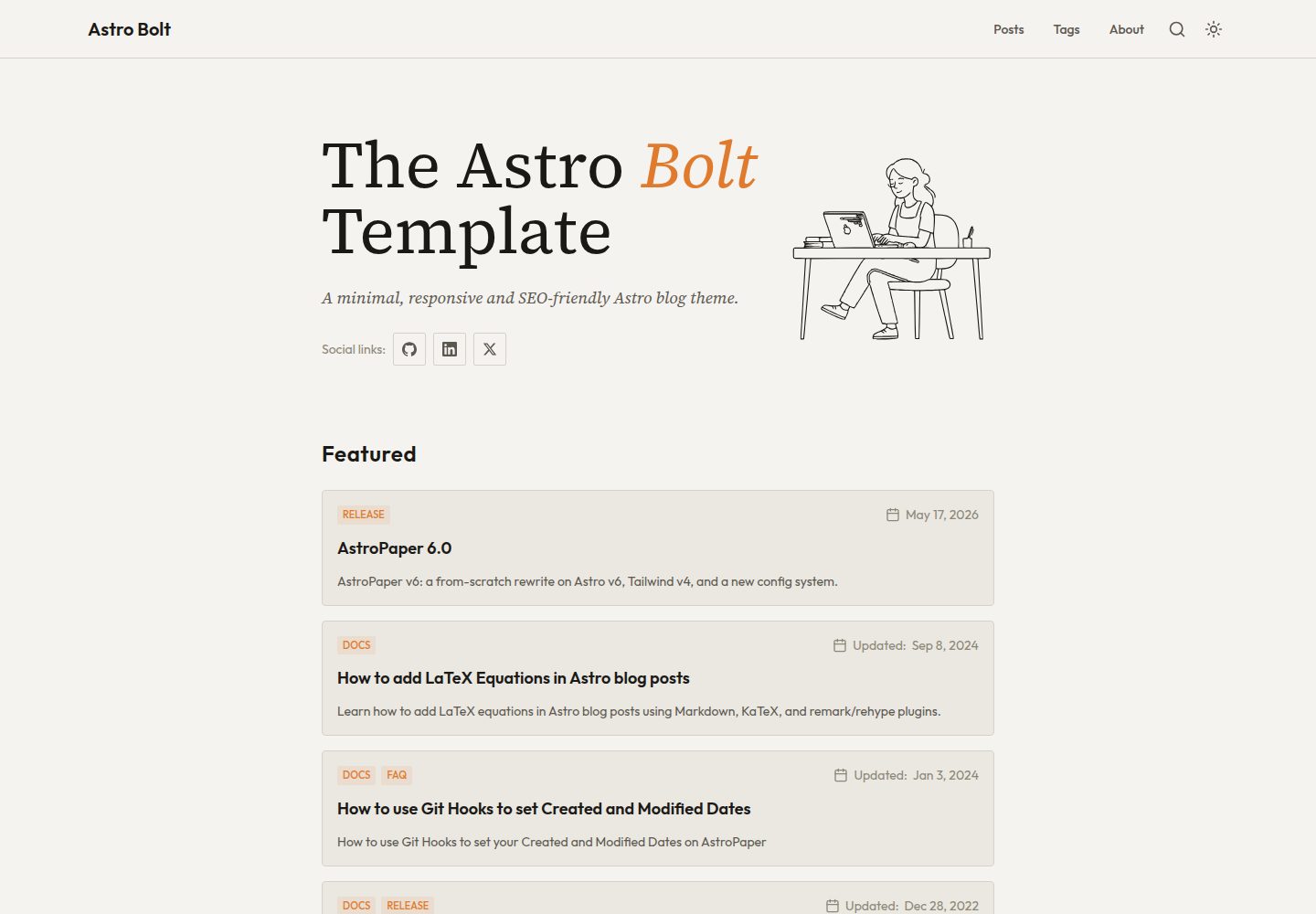
基于 AstroPaper 的 Astro 博客主题,使用 TypeScript 与 TailwindCSS
Astro博客工具站
astro-bolt — Astro 博客模板
作者 dantehemerson
基于 AstroPaper 的 Astro 博客主题,使用 TypeScript 与 TailwindCSS,内置 Pagefind 静态搜索、草稿与分页、站点地图与 RSS、MDX、明暗模式及动态 OG 图片生成。
看看你的网站会是什么样
浏览真实页面截图,比较内容排版与手机效果。点击下方缩略图切换,放大查看整页细节。
全部页面与视图 3
截图用于了解视觉与布局,交互效果请以实际项目为准。
采集于 2026-10-13查看来源
值得关注的模板亮点
从已有项目资料中,快速了解它的特点。
Markdown/MDX 内容存于 src/content/posts/,支持子目录组织并影响文章 URL
内置 Pagefind 静态搜索、草稿文章与分页、sitemap 与 RSS
支持明暗模式与可折叠目录
为博客文章动态生成 OG 图片(Satori、Sharp、Astro Fonts)
配置集中在 astro-template.config.ts,可设置 Google 站点验证等选项
模板详细介绍
astro-bolt 是一个基于 Astro 的博客主题,作者在 README 中说明其派生自 AstroPaper,定位为极简、响应式、可访问且对 SEO 友好的博客模板。内容以 Markdown/MDX 存放在 src/content/posts/ 目录,可分子目录组织,子目录名会成为文章 URL 的一部分;同时支持草稿文章与分页。
功能层面,主题提供明暗模式、可折叠目录、基于 Pagefind 的静态搜索、sitemap 与 RSS 输出,以及为博客文章动态生成 OG 图片(使用 Satori、Sharp 与 Astro Fonts)。站点配置集中在 astro-template.config.ts,可设置 Google 站点验证等选项;构建命令会执行类型检查、构建、Pagefind 索引并复制索引到 public/pagefind/。
技术栈方面,README 列出 Astro、TypeScript、TailwindCSS、Pagefind、Lucide React 图标、Prettier、ESLint,并提供 Figma 设计文件;部署示例为 Cloudflare Pages。可访问性方面作者说明仅在 Mac 的 VoiceOver 与 Android 的 TalkBack 上测试过,其他读屏软件未逐一验证。
许可为 MIT(Copyright © 2026),可免费使用、修改、商用与分发该版本代码,分发时需保留版权与许可声明;演示图片、字体、图标等第三方素材需按各自许可核对,域名、托管等外部服务可能另行收费。
Astro博客工具站
适合你的项目吗?
适用场景
- 搭建以 Markdown/MDX 写作的个人技术博客
- 需要静态搜索、RSS 与 sitemap 的内容站点
- 希望文章自动生成社交分享 OG 图片的博客
- 需要明暗模式与可折叠目录的阅读型站点
适合人群
- 熟悉 Astro 与 TypeScript 的开发者
- 以 Markdown/MDX 为主要写作方式的博客作者
- 需要静态搜索与 RSS 输出的内容站点维护者
- 接受 MIT 许可并愿意保留版权声明的使用者
上手与定制指南
结合仓库当前版本的说明,按下面的资料检查内容、配置与运行要求。
- 1
克隆仓库后执行 npm install 安装依赖
- 2
使用 npm run dev 在 localhost:4321 启动本地开发服务器
- 3
npm run build 会执行类型检查、构建、Pagefind 索引并复制索引到 public/pagefind/
- 4
站点配置在 astro-template.config.ts 中修改,如 site.googleVerification
- 5
可访问性仅在 Mac VoiceOver 与 Android TalkBack 上测试过,其他读屏软件未逐一验证
授权与来源资料
使用条件与限制
免费使用 · 保留许可声明本次收录的是公开仓库中采用 MIT 许可的免费版本;免费范围为该版本代码,不代表外部服务或第三方素材免费。
使用时需要遵守
- 允许免费使用、修改、商用和分发该版本代码。
- 分发代码副本或实质性部分时,保留原作者版权声明和完整 MIT 许可声明。
- 代码按现状提供;担保与责任限制以原许可证及适用法律为准。
额外费用与待核对事项
- 演示图片、字体、图标及其他第三方素材需按各自许可核对,不能仅凭代码的 MIT 许可判断。
- 域名、托管、数据库、支付或 AI 等外部服务可能另外收费。
- 可访问性仅在 Mac 的 VoiceOver 与 Android 的 TalkBack 上测试过,作者未测试其他读屏软件;其他读屏软件上的可访问性未经验证,不构成保证。
- README 将部署示例指向 Cloudflare Pages,使用该外部托管服务可能需要注册账号,并可能产生费用。
- 设计稿以 Figma 社区文件形式提供,使用 Figma 需注册账号,该外部素材的许可需另行核对。
- 动态 OG 图片依赖 Satori、Sharp 与 Astro Fonts 等第三方组件,其各自许可与使用条件需单独核对。
- Google 站点验证为可选功能,需使用 Google 账号并获取验证值,属于外部服务。
查看原文依据
Permission is hereby granted, free of charge
许可证原文
_Note: Screen-reader accessibility of Astro Bolt is tested using **VoiceOver** on Mac and **TalkBack** on Android. I couldn't test all other screen-readers out there. However, accessibility enhancements in Astro Bolt should be working fine on others as well._
README 原文
**Deployment** - [Cloudflare Pages](https://pages.cloudflare.com/)
README 原文
**UI/UX** - [Figma Design File](https://www.figma.com/community/file/1356898632249991861)
README 原文
**Dynamic OG images** - [Satori](https://github.com/vercel/satori) + [Sharp](https://sharp.pixelplumbing.com/) + [Astro Fonts](https://docs.astro.build/en/guides/fonts/)
README 原文
https://github.com/dantehemerson/astro-bolt/blob/main/LICENSEhttps://github.com/dantehemerson/astro-bolt/blob/main/README.mdYou can add your [Google Site Verification HTML tag](https://support.google.com/webmasters/answer/9008080#meta_tag_verification&zippy=%2Chtml-tag) by setting `site.googleVerification` in `astro-template.config.ts`:
README 原文
DeepSeek 根据仓库许可证和 README 整理 ·2026-10-13。结果仅覆盖已读取资料,依赖、图片、字体及后续条款变更以各自原文为准。
项目核对记录与介绍依据
模板资料
- 来源平台
- GitHub
- 资料与维护参考分
- 资料较完整 · 85 / 100
- 技术栈
- Astro
- 网站类型
- 博客 · 工具站
这个分数如何计算
本站按许可资料(最高30分)、演示链接(12分)、预览图(10分)、Star数(15分)、记录的维护时间(15分)、描述完整度(8分)、功能记录(5分)和分类资料(5分)计算。它不是代码、安全或性能测试,也不是 Google 评分;有链接不代表已实测可用。
这个项目需要核对什么
- 记录的仓库更新时间
- 2026-07-20
- 截图检查日期
- 2026-10-13
已收录演示链接。请用你的内容与屏幕尺寸检查;有演示不代表表单、认证或支付已经可用。
目录记录的主要技术栈是 Astro。请通过依赖清单和锁文件核对实际版本与托管要求。这些说明基于收录资料,不代表代码审计或部署实测。
查看具体选型方法 →介绍的制作与核对状态
介绍由 AI 辅助整理目录与仓库资料。仓库作者不等于这篇介绍的审核者。
审核声明: [email protected] · 2026-10-13
查看当时使用的来源资料
SHA-256: f71d47b7d82045080f8df69866aec778072554c474decf532593ea36bc6d1d7d
2026-10-13T00:31:17.010Z
来源文件 / 仓库# Astro Bolt 📄
<!--
Take screenshot on https://www.site-shot.com/
Options:
Width: 1280
Height: 820
Zoom: 125
Format: PNG
-->
<p align="center">
<a href="https://astro-bolt.netlify.app/">
<img width="1280" height="820" alt="Astro Bolt" src="https://github.com/user-attachments/assets/e31b8de7-3ec5-4967-9db3-68b015feff76" />
</a>
</p>
<div align="center">
[](https://astro-bolt.netlify.app/)


</div>
Astro Bolt is a minimal, responsive, accessible and SEO-friendly Astro blog theme.
Read [the blog posts](https://astro-bolt.netlify.app/posts/) or check [the README Documentation Section](#-documentation) for more info.
## 🔥 Features
- [x] type-safe markdown
- [x] super fast performance
- [x] accessible (Keyboard/VoiceOver)
- [x] responsive (mobile ~ desktops)
- [x] SEO-friendly
- [x] light & dark mode
- [x] static search ([Pagefind](https://pagefind.app/))
- [x] draft posts & pagination
- [x] sitemap & rss feed
- [x] MDX support
- [x] collapsible table of contents
- [x] followed best practices
- [x] highly customizable
- [x] dynamic OG image generation for blog posts
- [x] i18n ready
_Note: Screen-reader accessibility of Astro Bolt is tested using **VoiceOver** on Mac and **TalkBack** on Android. I couldn't test all other screen-readers out there. However, accessibility enhancements in Astro Bolt should be working fine on others as well._
<!--## ✅ Lighthouse Score
<p align="center">
<a href="https://pagespeed.web.dev/report?url=https%3A%2F%2Fastro-bolt.netlify.app%2F&form_factor=desktop">
<img width="710" alt="Astro Bolt Lighthouse Score" src="AstroPaper-lighthouse-score.svg">
</a>
</p>-->
## 🚀 Project Structure
Inside of Astro Bolt, you'll see the following folders and files:
```bash
/
├── public/
│ ├── pagefind/ # auto-generated on build
│ ├── favicon.svg
│ └── default-og.jpg
├── src/
│ ├── assets/
│ │ ├── icons/
│ │ └── images/
│ ├── components/
│ ├── content/
│ │ ├── pages/
│ │ │ └── about.md
│ │ └── posts/
│ │ └── some-blog-posts.md
│ ├── i18n/
│ ├── layouts/
│ ├── pages/
│ ├── scripts/
│ ├── styles/
│ ├── types/
│ ├── utils/
│ ├── config.ts
│ └── content.config.ts
├── astro-template.config.ts # user-defined configurations
└── astro.config.ts
```
All blog posts are stored in the `src/content/posts/` directory. You can organise posts into subdirectories — the subdirectory name becomes part of the post URL.
## 📖 Documentation
Documentation can be read in two formats\_ _markdown_ & _blog post_.
- Configuration - [markdown](src/content/posts/how-to-configure-astropaper-theme.md) | [blog post](https://astro-paper.pages.dev/posts/how-to-configure-astropaper-theme/)
- Add Posts - [markdown](src/content/posts/adding-new-post.md) | [blog post](https://astro-paper.pages.dev/posts/adding-new-posts-in-astropaper-theme/)
- Customize Color Schemes - [markdown](src/content/posts/customizing-astropaper-theme-color-schemes.md) | [blog post](https://astro-paper.pages.dev/posts/customizing-astropaper-theme-color-schemes/)
- Predefined Color Schemes - [markdown](src/content/posts/predefined-color-schemes.md) | [blog post](https://astro-paper.pages.dev/posts/predefined-color-schemes/)
## 💻 Tech Stack
**Main Framework** - [Astro](https://astro.build/)
**Type Checking** - [TypeScript](https://www.typescriptlang.org/)
**Styling** - [TailwindCSS](https://tailwindcss.com/)
**UI/UX** - [Figma Design File](https://www.figma.com/community/file/1356898632249991861)
**Static Search** - [Pagefind](https://pagefind.app/)
**Icons** - [Lucide React](https://lucide.dev/)
**Code Formatting** - [Prettier](https://prettier.io/)
**Deployment** - [Cloudflare Pages](https://pages.cloudflare.com/)
**Linting** - [ESLint](https://eslint.org)
**Dynamic OG images** - [Satori](https://github.com/vercel/satori) + [Sharp](https://sharp.pixelplumbing.com/) + [Astro Fonts](https://docs.astro.build/en/guides/fonts/)
## 👨🏻💻 Running Locally
Clone this repository and start the project by running the following commands:
```bash
# install dependencies
npm install
# start running the project
npm run dev
```
## Google Site Verification (optional)
You can add your [Google Site Verification HTML tag](https://support.google.com/webmasters/answer/9008080#meta_tag_verification&zippy=%2Chtml-tag) by setting `site.googleVerification` in `astro-template.config.ts`:
```ts file="astro-template.config.ts"
export default defineAstroTemplateConfig({
site: {
// ...
googleVerification: "your-google-site-verification-value",
},
// ...
});
```
## 🧞 Commands
All commands are run from the root of the project, from a terminal:
| Command | Action |
| :---------------- | :----------------------------------------------------------------------------------------------- |
| `npm install` | Installs dependencies |
| `npm run dev` | Starts local dev server at `localhost:4321` |
| `npm run build` | Type-checks, builds the site, runs Pagefind indexing, and copies the index to `public/pagefind/` |
| `npm run preview` | Preview your build locally, before deploying |
| `npm run astro` | Run CLI commands like `astro add`, `astro check` |
## ✨ Feedback & Suggestions
If you have any suggestions/feedback, feel free to open an issue if you find bugs or want to request new features.
## 📜 License
Licensed under the MIT License, Copyright © 2026
---
Based on [AstroPaper](https://github.com/satnaing/astro-paper) by [Sat Naing](https://satnaing.dev) 👨🏻💻 and [contributors](https://github.com/satnaing/astro-paper/graphs/contributors).
看看同类模板
对比同技术栈与用途的模板,找到更适合的视觉与内容结构。

astrowind
⭕️ AstroWind: A free template using Astro v7 and Tailwind CSS v4. Astro starter theme.
Astro · 博客

astro-paper
基于 Astro 的博客主题,使用 Markdown/MDX 内容、Tailwind 样式和 Pagefind 搜索。搜索属于博客功能,不代表独立工具站产品。
Astro · 博客

fuwari
✨A static blog template built with Astro.
Astro · 博客

Firefly
Firefly 是一款基于 Astro 的静态博客主题,由 CuteLeaf 在 saicaca 的 Fuwari 模板基础上二次开发,主打清新美观的视觉风格。
Astro · 博客

astro-theme-cactus
面向博客与笔记发布的 Astro 启动模板,支持 Markdown/MDX 内容、Tailwind 样式与 Pagefind 搜索,主要用途是发布文章和笔记。
Astro · 博客

astrofy
Astrofy is a free and open-source template for your Personal Portfolio Website built with Astro and TailwindCS…
Astro · 作品集