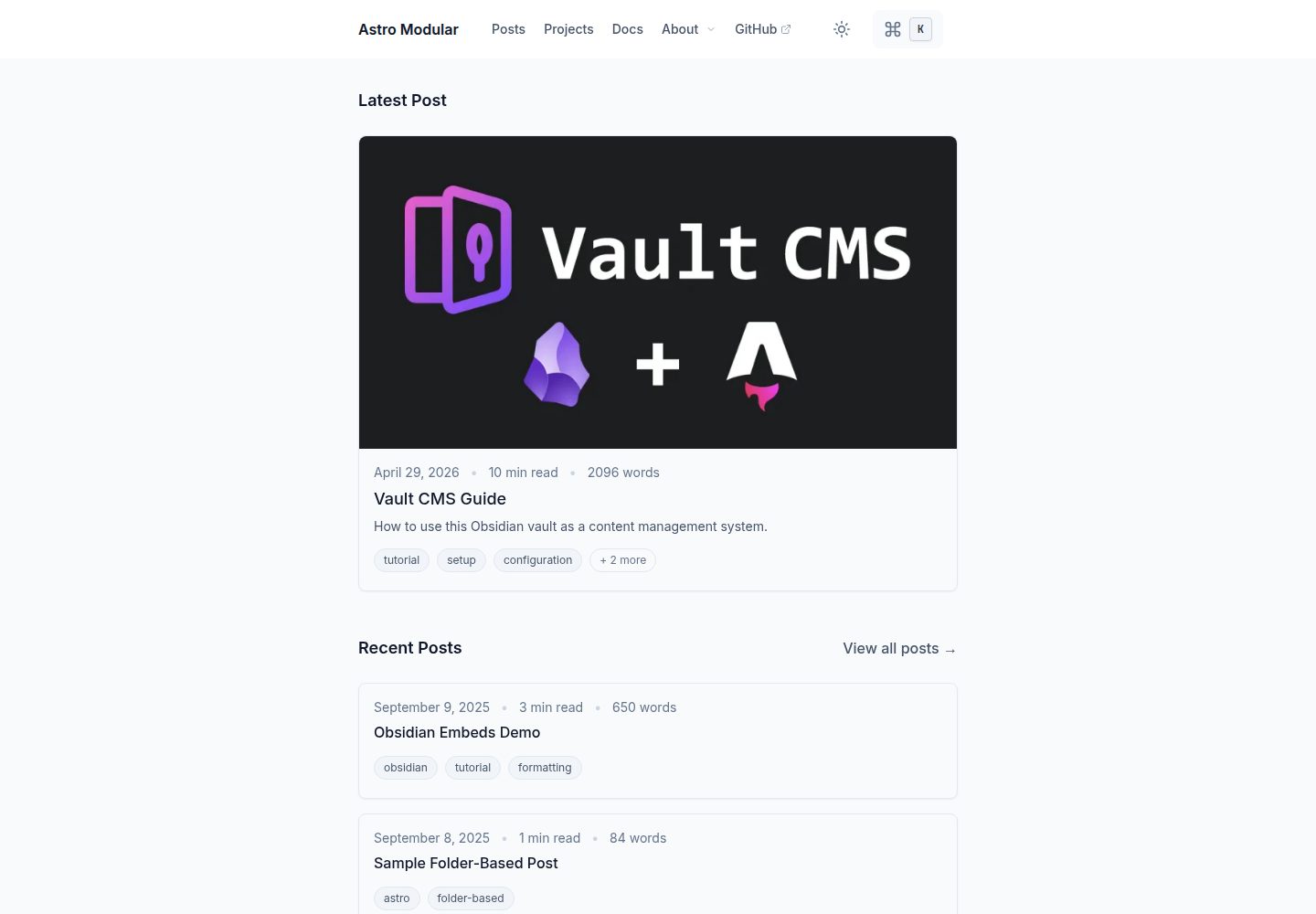
Uses an Obsidian vault as the content source, working with Vault CMS to write and publish directly
AstroBlog
astro-modular — Astro Blog Template
By davidvkimball
An Astro blog theme for Obsidian users that treats an Obsidian vault as the content source through Vault CMS, with feature toggles and support for several Obsidian-style syntaxes.
Explore the design
Compare the page layouts and mobile experience. Open any screenshot for a closer look.
Desktop homepage1 / 3
Desktop captureTop of page
Actual screenshot captured by the server browser.
All pages & views 3
Screenshots show visual appearance; interactive behavior may differ.
Recorded 2026-09-30View source
What stands out
A quick read of the recorded project description.
Features can be independently enabled or disabled, configured centrally in src/config.ts
Supports Wikilinks, link mentions, Obsidian-style callouts, and embedded files
Built-in Mermaid diagrams, LaTeX math formulas, image galleries, and lightboxes
Provides blog features such as graph view, tags, table of contents, reading time, and word count
Automatically generates sitemap, RSS feed, and Open Graph images
Template Details
Astro Modular is an Astro-based blog theme positioned to let Obsidian users write and publish directly from the note vault they already know. It is built on Vault CMS, and the src/content directory in the repository is also an Obsidian vault, where notes are organized into articles by folder and multiple content types are supported.
The theme makes many features independently toggleable options, configured centrally in src/config.ts, including theme appearance, light and dark modes, search and command palette, tags, table of contents, reading time and word count, comments, and personal avatar. At the content level, it supports Wikilinks and link mentions, Obsidian-style callouts, Obsidian embedded files, Mermaid diagrams, LaTeX and math formula rendering, image galleries and lightboxes, and a graph view implemented based on the Spaceship theme.
For deployment, after specifying netlify, vercel, github-pages, or cloudflare-workers in config.ts, the build process generates the corresponding platform configuration files. The site includes a sitemap, RSS feed, and Open Graph image generation.
Usage limitations: the theme is optimized for Obsidian but can also be used with other Markdown editors; when creating a repository via the GitHub template button, you need to confirm whether the plugins directory under src/content/.obsidian/ is copied, otherwise the setup wizard has no configurable plugins and new notes will not include frontmatter, and the official recommendation is to initialize via the CLI.
AstroBlog
Is it right for your project?
Use Cases
- Publishing an existing Obsidian note vault as a public blog
- Using Obsidian as a daily writing tool while maintaining an Astro site
- Technical note sites that need Obsidian-style presentation such as graph view, backlinks, and callouts
- Deploying a static blog on Netlify, Vercel, GitHub Pages, or Cloudflare Workers
Suitable For
- Individual bloggers who are used to writing in Obsidian and want to reduce the publishing steps
- Content sites that need backlinks, callouts, Mermaid, and math formulas
- Developers willing to edit config.ts to toggle features and adjust the theme
- Projects using Astro that want to organize articles and multiple content types by folder
Getting started & customization
Use these recorded setup notes alongside the repository instructions for your chosen version.
- 1
Requires Node.js 24.13.0+ and pnpm 10.29.3+ or npm 9.6.5+
- 2
Recommended to initialize with pnpm create astro-modular my-blog, which automatically downloads the template, cleans up development files, and installs dependencies
- 3
If creating a repository via the GitHub template button, confirm that the plugins directory under src/content/.obsidian/ exists, otherwise the setup wizard cannot configure plugins and new notes will not generate frontmatter
- 4
Use pnpm dev for local preview, with the default address at http://localhost:5000, and pnpm build for production builds
- 5
After specifying the deployment platform in deployment.platform in src/config.ts, the build automatically generates the corresponding configuration file
License & source material
Usage conditions & limitations
Free to use · keep license noticeThis entry covers the free version under the MIT license in the public repository; the free scope is the code of that version and does not mean external services or third-party assets are free.
Must comply with when using
- Free use, modification, commercial use, and distribution of this version's code are permitted.
- When distributing copies or substantial portions of the code, retain the original author's copyright notice and the full MIT license notice.
- The code is provided as is; warranties and limitations of liability are governed by the original license and applicable law.
Additional costs & items to verify
- Although the theme can be used with any Markdown editor, it is specifically optimized for Obsidian, and Obsidian-related features (such as backlinks, callouts, embedded files, and graph view) may be incomplete in non-Obsidian workflows.
- When creating a repository via the GitHub template button, confirm that the plugins directory exists under src/content/.obsidian/; if it is missing or empty, the setup wizard will have no configurable plugins and new notes will not generate frontmatter, and the official recommendation is to use CLI initialization instead.
- The runtime requires Node.js 24.13.0 or later; lower versions cannot build properly.
- The package manager must be pnpm 10.29.3+ or npm 9.6.5+; lower versions may cause installation or build failures.
- Demo images, fonts, icons, and other third-party assets must be checked against their respective licenses and cannot be judged solely by the code's MIT license.
- External services such as domains, hosting, databases, payments, or AI may incur additional charges.
View Original Text Basis
Permission is hereby granted, free of charge
Original License Text
While this theme works great with any markdown editor, it's specifically optimized for Obsidian use.
Original README
After cloning, confirm that `src/content/.obsidian/` exists and contains a `plugins` folder.
Original README
Node.js 24.13.0+
Original README
https://github.com/davidvkimball/astro-modular/blob/master/LICENSEhttps://github.com/davidvkimball/astro-modular/blob/master/README.mdpnpm 10.29.3+ or npm 9.6.5+
Original README
Compiled by DeepSeek based on repository license and README ·2026-10-01. Results only cover the materials read; dependencies, images, fonts, and subsequent term changes are subject to their respective original texts.
Project checks & description sources
Template Information
- Source platforms
- GitHub
- Documentation and maintenance reference score
- More documented · 91 / 100
- Technologies
- Astro
- Website type
- Blog
How this score is calculated
Our heuristic uses license records (up to 30), a demo link (12), a preview (10), stars (15), recorded maintenance (15), description completeness (8), feature records (5) and classification data (5). It is not a code, security or performance test, or a Google score. A link does not establish tested functionality.
What to verify for this project
- Repository update recorded
- 2026-09-28
- Screenshot last checked
- 2026-10-01
A demo link is listed. Check it with your own content and viewport sizes; its presence does not confirm that forms, authentication or payments work.
The catalog identifies Astro as the primary stack. Check the actual dependency manifest and lockfile for versions and hosting requirements. These notes use recorded metadata, not a code audit or a deployment test.
Use a selection guide →How this description was prepared
AI-assisted description based on catalog records and repository material. Repository authors are not automatically the reviewers of this description.
Automatically checked against source and license rules; no manual editorial review.
Inspect the recorded source material
SHA-256: 7b9fadfa6d852d4d97d0add593ffc238dea1401441d4b17b02b310fd8b558212
2026-10-01T14:52:32.905Z
Source file / repository# Astro Modular
A flexible [Astro](https://astro.build) blog theme designed for [Obsidian](https://obsidian.md) users.
[](https://astro.build/themes/details/astro-modular/)
## Made with Vault CMS
Use Obsidian as a CMS with [Vault CMS](https://github.com/davidvkimball/vault-cms).

## Stats

### Status
[](https://app.netlify.com/sites/astro-modular/deploys)
[](https://github.com/davidvkimball/astro-modular)
[](https://github.com/davidvkimball/astro-modular)
### Tech Stack
[](https://astro.build/)
[](https://www.typescriptlang.org/)
[](https://tailwindcss.com/)
[](https://nodejs.org/)
[](https://pnpm.io/)
[](https://obsidian.md/)
## Why Astro Modular?
- **Obsidian As A CMS**: Works with Obsidian out of the box (built upon [Vault CMS](https://github.com/davidvkimball/vault-cms)), write and publish instantly
- **Highly Customizable**: Every feature can be enabled/disabled independently
- **Performance-Focused**: Assets are highly optimized for lightning-fast loading
- **SEO-Ready**: Automatic sitemap, RSS feed, and Open Graph image generation
## Features
- [x] **Custom Themes**
- [x] **Feature Toggle Control**
- [x] **Dark/Light Mode**
- [x] **Search & Command Palette**
- [x] **Wikilinks & Linked Mentions**
- [x] **Obsidian-Style Callouts**
- [x] **Obsidian Embeds Files**
- [x] **Folder-Based Posts**
- [x] **Multiple Content Types**
- [x] **Image Optimization**
- [x] **Automatic Feed Generation**
- [x] **Table of Contents**
- [x] **Smooth Scroll & Page Transitions**
- [x] **Image Gallery & Lightbox**
- [x] **Reading Time & Word Count**
- [x] **Tagging**
- [x] **Graph View**
- [x] **Mermaid Diagrams**
- [x] **LaTeX & Math Rendering**
- [x] **Custom Typography**
- [x] **Profile Picture**
- [x] **Comments**
## Quick Start
[](https://app.netlify.com/start/deploy?repository=https://github.com/davidvkimball/astro-modular)
[](https://vercel.com/new/clone?repository-url=https://github.com/davidvkimball/astro-modular)
[](https://deploy.workers.cloudflare.com/?url=https://github.com/davidvkimball/astro-modular)
### Get the Code
Choose one of the following methods to get started:
#### Option 1: CLI (Recommended)
```bash
pnpm create astro-modular my-blog
cd my-blog
```
[](https://www.npmjs.com/package/create-astro-modular)
This downloads the latest template, removes dev-only files, and installs dependencies automatically. Also works with `npm create astro-modular my-blog`.
#### Option 2: Use GitHub Template
1. Click the **"Use this template"** button on the [repository page](https://github.com/davidvkimball/astro-modular)
2. Select **"Create a new repository"**
3. Choose your repository name and settings
4. Click **"Create repository from template"**
5. Clone your new repository:
```bash
git clone https://github.com/your-username/your-repo-name.git
cd your-repo-name
```
> [!IMPORTANT]
> After cloning, confirm that `src/content/.obsidian/` exists and contains a `plugins` folder. The Obsidian vault lives in a dotfolder, and the template button does not always copy dotfolders. If it is missing or empty, the setup wizard will have no plugins to configure, and new notes will be created without frontmatter.
>
> Dotfolders are hidden by default, so check with `ls -a src/content` (macOS and Linux) or `dir /a src\content` (Windows). Option 1 above avoids this entirely and is the recommended path.
### Prerequisites
- Node.js 24.13.0+
- pnpm 10.29.3+ or npm 9.6.5+
> [!NOTE]
> While this theme works great with any markdown editor, it's specifically optimized for Obsidian use. See the [Astro Suite Vault Guide](src/content/posts/vault-cms-guide.md) for Obsidian-specific features.
### Setup
1. **Install pnpm (if you don't have it):**
```bash
npm install -g pnpm
```
2. **Install dependencies:**
```bash
pnpm install
```
3. **Preview:**
```bash
pnpm dev
```
Your blog will be available at `http://localhost:5000`
4. **Build for production:**
```bash
pnpm build
```
### Updating the theme
To pull the latest theme release (framework files, Astro, config) while keeping your content and assets:
```bash
pnpm run update
```
This downloads the latest release from GitHub, replaces framework files, restores your `src/content` and profile/favicon assets, then runs `pnpm install`. After updating, open Obsidian and use **Astro Modular Settings → Apply all settings** so your saved settings are written to the new `config.ts` if needed.
### Configuration
Edit `src/config.ts` to customize your site - change the theme, enable/disable features, and configure all settings.
## Deployment
Set your deployment platform once in `src/config.ts` under `deployment.platform` ("netlify", "vercel", "github-pages", or "cloudflare-workers"). The build process automatically generates the correct configuration files for your chosen platform - no environment variables needed!
## Documentation
For detailed guides, see the included blog posts:
- **[Getting Started](src/content/posts/getting-started.md)** - complete setup and workflow guide
- **[Formatting Reference](src/content/posts/formatting-reference.md)** - comprehensive formatting reference
- **[Vault CMS Guide](src/content/posts/vault-cms-guide.md)** - Obsidian vault walkthrough
- **[Obsidian Embeds Demo](src/content/posts/obsidian-embeds-demo.md)** - Obsidian embed examples
**For AI Agents & Developers:** See [AGENTS.md](AGENTS.md) for comprehensive technical documentation.
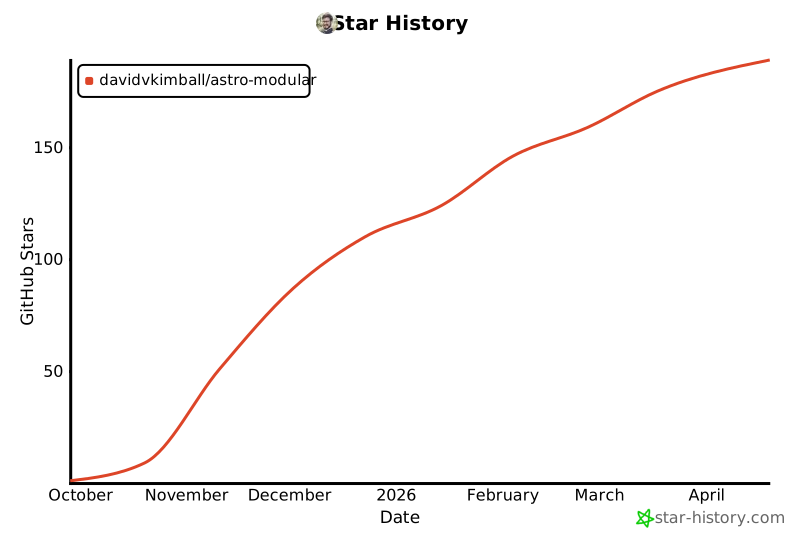
## Star History
[](https://www.star-history.com/#davidvkimball/astro-modular&type=date&legend=top-left)
## Acknowledgments
[Spaceship Astro theme](https://github.com/aitorllj93/astro-theme-spaceship) for the graph view functionality upon which this theme's is based.
[ogImage.click](https://ogimage.click/) to generate the open graph image used for this theme.
## Contributing
This is an open-source project. Feel free to submit feature requests, report bugs, or contribute improvements.
If you are contributing code back to the theme itself, please fork the repository and submit a Pull Request. **Do not fork the repository if you are just building your own site from this template.**
## License
[MIT License](https://github.com/davidvkimball/astro-modular?tab=MIT-1-ov-file)
Explore similar templates
Compare previews and descriptions within the same stack and category.

astrowind
AstroWind is a free, open-source Astro starter theme using Astro and Tailwind CSS, released under the MIT license.
Astro · Blog

astro-paper
AstroPaper is a minimal, responsive, accessible, and SEO-friendly Astro blog theme. Articles are stored as Markdown/MDX in src/content/posts/, with subdirectories affecting URLs.
Astro · Blog

fuwari
Fuwari is a static blog template built with Astro and Tailwind CSS for personal blogs. It manages posts as Markdown files in src/content/posts/, with frontmatter for title, date, description, cover, tags, categories, draft status, and language.
Astro · Blog

Firefly
Firefly is a clean personal blog theme forked from Astro and Fuwari, offering four background modes, single/double sidebar and list/grid layouts, Pagefind client-side full-text search, and a six-language UI.
Astro · Blog

astro-theme-cactus
Astro Cactus is an Astro-based blog and portfolio theme that uses Markdown/MDX content collections to manage posts, notes, and tags, with frontmatter type-checked by a schema.
Astro · Portfolio

astrofy
Astrofy is a free and open-source personal portfolio website template built with Astro and TailwindCSS, with built-in blog, CV timeline, project showcase, store, and RSS feed modules.
Astro · Portfolio