以 Obsidian 仓库作为内容源,配合 Vault CMS 直接写作并发布
Astro博客
astro-modular — Astro 博客模板
作者 davidvkimball
面向 Obsidian 用户的 Astro 博客主题,通过 Vault CMS 把 Obsidian 仓库当作内容源,支持功能开关与多种 Obsidian 风格语法。
看看你的网站会是什么样
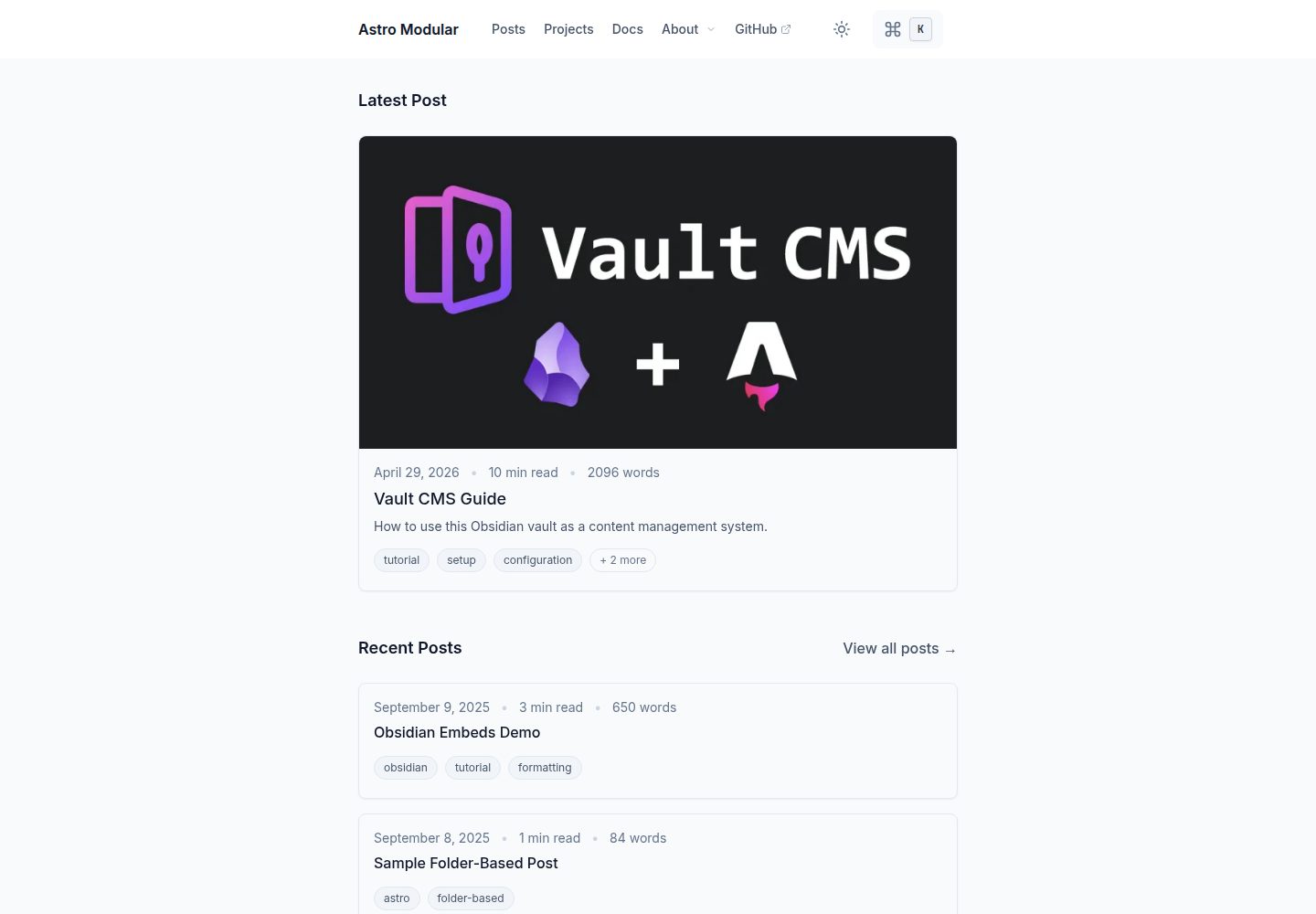
浏览真实页面截图,比较内容排版与手机效果。点击下方缩略图切换,放大查看整页细节。
全部页面与视图 3
截图用于了解视觉与布局,交互效果请以实际项目为准。
采集于 2026-09-30查看来源
值得关注的模板亮点
从已有项目资料中,快速了解它的特点。
功能可独立启用或禁用,统一在 src/config.ts 中配置
支持 Wikilinks、链接提及、Obsidian 风格 Callout 与嵌入文件
内置 Mermaid 图表、LaTeX 数学公式、图片画廊与灯箱
提供图谱视图、标签、目录、阅读时间与字数等博客功能
自动生成 sitemap、RSS 订阅与 Open Graph 图片
模板详细介绍
Astro Modular 是一个基于 Astro 的博客主题,定位是让 Obsidian 用户直接把自己熟悉的笔记仓库当作 CMS 来写作和发布。它构建在 Vault CMS 之上,仓库中的 src/content 目录同时是一个 Obsidian 仓库,笔记按文件夹组织成文章,并支持多种内容类型。
主题把大量功能做成可独立开关的选项,集中在 src/config.ts 中配置,包括主题外观、深浅色模式、搜索与命令面板、标签、目录、阅读时间与字数、评论、个人头像等。内容层面支持 Wikilinks 与链接提及、Obsidian 风格 Callout、Obsidian 嵌入文件、Mermaid 图表、LaTeX 与数学公式渲染、图片画廊与灯箱,以及基于 Spaceship 主题实现的图谱视图。
部署方面,在 config.ts 中指定 netlify、vercel、github-pages 或 cloudflare-workers 后,构建过程会生成对应平台的配置文件。站点自带 sitemap、RSS 订阅和 Open Graph 图片生成。
使用限制:主题针对 Obsidian 做了优化,但也可配合其他 Markdown 编辑器使用;通过 GitHub 模板按钮创建仓库时,需确认 src/content/.obsidian/ 下的 plugins 目录是否被复制,否则设置向导没有可配置的插件,新建笔记也不会带 frontmatter,官方推荐用 CLI 方式初始化。
Astro博客
适合你的项目吗?
适用场景
- 把已有的 Obsidian 笔记仓库整理成公开博客发布
- 用 Obsidian 作为日常写作工具,同时维护一个 Astro 站点
- 需要图谱视图、双链和 Callout 等 Obsidian 风格呈现的技术笔记站
- 希望在 Netlify、Vercel、GitHub Pages 或 Cloudflare Workers 上部署静态博客
适合人群
- 习惯用 Obsidian 写作、希望减少发布环节的个人博主
- 需要双链、Callout、Mermaid 与数学公式的内容型站点
- 愿意通过编辑 config.ts 来开关功能、调整主题的开发者
- 使用 Astro 并希望以文件夹组织文章与多内容类型的项目
上手与定制指南
结合仓库当前版本的说明,按下面的资料检查内容、配置与运行要求。
- 1
需要 Node.js 24.13.0+,以及 pnpm 10.29.3+ 或 npm 9.6.5+
- 2
推荐用 pnpm create astro-modular my-blog 初始化,会自动下载模板、清理开发文件并安装依赖
- 3
若通过 GitHub 模板按钮创建仓库,需确认 src/content/.obsidian/ 下的 plugins 目录存在,否则设置向导无法配置插件、新笔记也不会生成 frontmatter
- 4
本地预览使用 pnpm dev,默认地址为 http://localhost:5000,生产构建使用 pnpm build
- 5
在 src/config.ts 的 deployment.platform 中指定部署平台后,构建会自动生成对应配置文件
授权与来源资料
使用条件与限制
免费使用 · 保留许可声明本次收录的是公开仓库中采用 MIT 许可的免费版本;免费范围为该版本代码,不代表外部服务或第三方素材免费。
使用时需要遵守
- 允许免费使用、修改、商用和分发该版本代码。
- 分发代码副本或实质性部分时,保留原作者版权声明和完整 MIT 许可声明。
- 代码按现状提供;担保与责任限制以原许可证及适用法律为准。
额外费用与待核对事项
- 主题虽可配合任意 Markdown 编辑器使用,但针对 Obsidian 做了专门优化,Obsidian 相关功能(如双链、Callout、嵌入文件、图谱视图)在非 Obsidian 工作流下体验可能不完整。
- 通过 GitHub 模板按钮创建仓库时,需确认 src/content/.obsidian/ 下存在 plugins 目录;若缺失或为空,设置向导将没有可配置的插件,新建笔记也不会生成 frontmatter,官方推荐改用 CLI 初始化。
- 运行环境要求 Node.js 24.13.0 及以上版本,低于该版本无法正常构建。
- 包管理器需使用 pnpm 10.29.3+ 或 npm 9.6.5+,版本过低可能导致安装或构建失败。
- 演示图片、字体、图标及其他第三方素材需按各自许可核对,不能仅凭代码的 MIT 许可判断。
- 域名、托管、数据库、支付或 AI 等外部服务可能另外收费。
查看原文依据
Permission is hereby granted, free of charge
许可证原文
While this theme works great with any markdown editor, it's specifically optimized for Obsidian use.
README 原文
After cloning, confirm that `src/content/.obsidian/` exists and contains a `plugins` folder.
README 原文
Node.js 24.13.0+
README 原文
https://github.com/davidvkimball/astro-modular/blob/master/LICENSEhttps://github.com/davidvkimball/astro-modular/blob/master/README.mdpnpm 10.29.3+ or npm 9.6.5+
README 原文
DeepSeek 根据仓库许可证和 README 整理 ·2026-10-01。结果仅覆盖已读取资料,依赖、图片、字体及后续条款变更以各自原文为准。
项目核对记录与介绍依据
模板资料
- 来源平台
- GitHub
- 资料与维护参考分
- 资料较完整 · 91 / 100
- 技术栈
- Astro
- 网站类型
- 博客
这个分数如何计算
本站按许可资料(最高30分)、演示链接(12分)、预览图(10分)、Star数(15分)、记录的维护时间(15分)、描述完整度(8分)、功能记录(5分)和分类资料(5分)计算。它不是代码、安全或性能测试,也不是 Google 评分;有链接不代表已实测可用。
这个项目需要核对什么
- 记录的仓库更新时间
- 2026-09-28
- 截图检查日期
- 2026-10-01
已收录演示链接。请用你的内容与屏幕尺寸检查;有演示不代表表单、认证或支付已经可用。
目录记录的主要技术栈是 Astro。请通过依赖清单和锁文件核对实际版本与托管要求。这些说明基于收录资料,不代表代码审计或部署实测。
查看具体选型方法 →介绍的制作与核对状态
介绍由 AI 辅助整理目录与仓库资料。仓库作者不等于这篇介绍的审核者。
已完成服务器许可规则与 AI 来源核对;未经过人工编辑审核。
查看当时使用的来源资料
SHA-256: 7b9fadfa6d852d4d97d0add593ffc238dea1401441d4b17b02b310fd8b558212
2026-10-01T14:52:32.905Z
来源文件 / 仓库# Astro Modular
A flexible [Astro](https://astro.build) blog theme designed for [Obsidian](https://obsidian.md) users.
[](https://astro.build/themes/details/astro-modular/)
## Made with Vault CMS
Use Obsidian as a CMS with [Vault CMS](https://github.com/davidvkimball/vault-cms).

## Stats

### Status
[](https://app.netlify.com/sites/astro-modular/deploys)
[](https://github.com/davidvkimball/astro-modular)
[](https://github.com/davidvkimball/astro-modular)
### Tech Stack
[](https://astro.build/)
[](https://www.typescriptlang.org/)
[](https://tailwindcss.com/)
[](https://nodejs.org/)
[](https://pnpm.io/)
[](https://obsidian.md/)
## Why Astro Modular?
- **Obsidian As A CMS**: Works with Obsidian out of the box (built upon [Vault CMS](https://github.com/davidvkimball/vault-cms)), write and publish instantly
- **Highly Customizable**: Every feature can be enabled/disabled independently
- **Performance-Focused**: Assets are highly optimized for lightning-fast loading
- **SEO-Ready**: Automatic sitemap, RSS feed, and Open Graph image generation
## Features
- [x] **Custom Themes**
- [x] **Feature Toggle Control**
- [x] **Dark/Light Mode**
- [x] **Search & Command Palette**
- [x] **Wikilinks & Linked Mentions**
- [x] **Obsidian-Style Callouts**
- [x] **Obsidian Embeds Files**
- [x] **Folder-Based Posts**
- [x] **Multiple Content Types**
- [x] **Image Optimization**
- [x] **Automatic Feed Generation**
- [x] **Table of Contents**
- [x] **Smooth Scroll & Page Transitions**
- [x] **Image Gallery & Lightbox**
- [x] **Reading Time & Word Count**
- [x] **Tagging**
- [x] **Graph View**
- [x] **Mermaid Diagrams**
- [x] **LaTeX & Math Rendering**
- [x] **Custom Typography**
- [x] **Profile Picture**
- [x] **Comments**
## Quick Start
[](https://app.netlify.com/start/deploy?repository=https://github.com/davidvkimball/astro-modular)
[](https://vercel.com/new/clone?repository-url=https://github.com/davidvkimball/astro-modular)
[](https://deploy.workers.cloudflare.com/?url=https://github.com/davidvkimball/astro-modular)
### Get the Code
Choose one of the following methods to get started:
#### Option 1: CLI (Recommended)
```bash
pnpm create astro-modular my-blog
cd my-blog
```
[](https://www.npmjs.com/package/create-astro-modular)
This downloads the latest template, removes dev-only files, and installs dependencies automatically. Also works with `npm create astro-modular my-blog`.
#### Option 2: Use GitHub Template
1. Click the **"Use this template"** button on the [repository page](https://github.com/davidvkimball/astro-modular)
2. Select **"Create a new repository"**
3. Choose your repository name and settings
4. Click **"Create repository from template"**
5. Clone your new repository:
```bash
git clone https://github.com/your-username/your-repo-name.git
cd your-repo-name
```
> [!IMPORTANT]
> After cloning, confirm that `src/content/.obsidian/` exists and contains a `plugins` folder. The Obsidian vault lives in a dotfolder, and the template button does not always copy dotfolders. If it is missing or empty, the setup wizard will have no plugins to configure, and new notes will be created without frontmatter.
>
> Dotfolders are hidden by default, so check with `ls -a src/content` (macOS and Linux) or `dir /a src\content` (Windows). Option 1 above avoids this entirely and is the recommended path.
### Prerequisites
- Node.js 24.13.0+
- pnpm 10.29.3+ or npm 9.6.5+
> [!NOTE]
> While this theme works great with any markdown editor, it's specifically optimized for Obsidian use. See the [Astro Suite Vault Guide](src/content/posts/vault-cms-guide.md) for Obsidian-specific features.
### Setup
1. **Install pnpm (if you don't have it):**
```bash
npm install -g pnpm
```
2. **Install dependencies:**
```bash
pnpm install
```
3. **Preview:**
```bash
pnpm dev
```
Your blog will be available at `http://localhost:5000`
4. **Build for production:**
```bash
pnpm build
```
### Updating the theme
To pull the latest theme release (framework files, Astro, config) while keeping your content and assets:
```bash
pnpm run update
```
This downloads the latest release from GitHub, replaces framework files, restores your `src/content` and profile/favicon assets, then runs `pnpm install`. After updating, open Obsidian and use **Astro Modular Settings → Apply all settings** so your saved settings are written to the new `config.ts` if needed.
### Configuration
Edit `src/config.ts` to customize your site - change the theme, enable/disable features, and configure all settings.
## Deployment
Set your deployment platform once in `src/config.ts` under `deployment.platform` ("netlify", "vercel", "github-pages", or "cloudflare-workers"). The build process automatically generates the correct configuration files for your chosen platform - no environment variables needed!
## Documentation
For detailed guides, see the included blog posts:
- **[Getting Started](src/content/posts/getting-started.md)** - complete setup and workflow guide
- **[Formatting Reference](src/content/posts/formatting-reference.md)** - comprehensive formatting reference
- **[Vault CMS Guide](src/content/posts/vault-cms-guide.md)** - Obsidian vault walkthrough
- **[Obsidian Embeds Demo](src/content/posts/obsidian-embeds-demo.md)** - Obsidian embed examples
**For AI Agents & Developers:** See [AGENTS.md](AGENTS.md) for comprehensive technical documentation.
## Star History
[](https://www.star-history.com/#davidvkimball/astro-modular&type=date&legend=top-left)
## Acknowledgments
[Spaceship Astro theme](https://github.com/aitorllj93/astro-theme-spaceship) for the graph view functionality upon which this theme's is based.
[ogImage.click](https://ogimage.click/) to generate the open graph image used for this theme.
## Contributing
This is an open-source project. Feel free to submit feature requests, report bugs, or contribute improvements.
If you are contributing code back to the theme itself, please fork the repository and submit a Pull Request. **Do not fork the repository if you are just building your own site from this template.**
## License
[MIT License](https://github.com/davidvkimball/astro-modular?tab=MIT-1-ov-file)
看看同类模板
对比同技术栈与用途的模板,找到更适合的视觉与内容结构。

astrowind
⭕️ AstroWind: A free template using Astro v7 and Tailwind CSS v4. Astro starter theme.
Astro · 博客

astro-paper
A minimal, accessible and SEO-friendly Astro blog theme.
Astro · 博客

fuwari
✨A static blog template built with Astro.
Astro · 博客

Firefly
Firefly 是一款基于 Astro 的静态博客主题,由 CuteLeaf 在 saicaca 的 Fuwari 模板基础上二次开发,主打清新美观的视觉风格。
Astro · 博客

astro-theme-cactus
A simple Astro theme. Use it to create your blog or website.
Astro · 作品集

astrofy
Astrofy is a free and open-source template for your Personal Portfolio Website built with Astro and TailwindCS…
Astro · 作品集