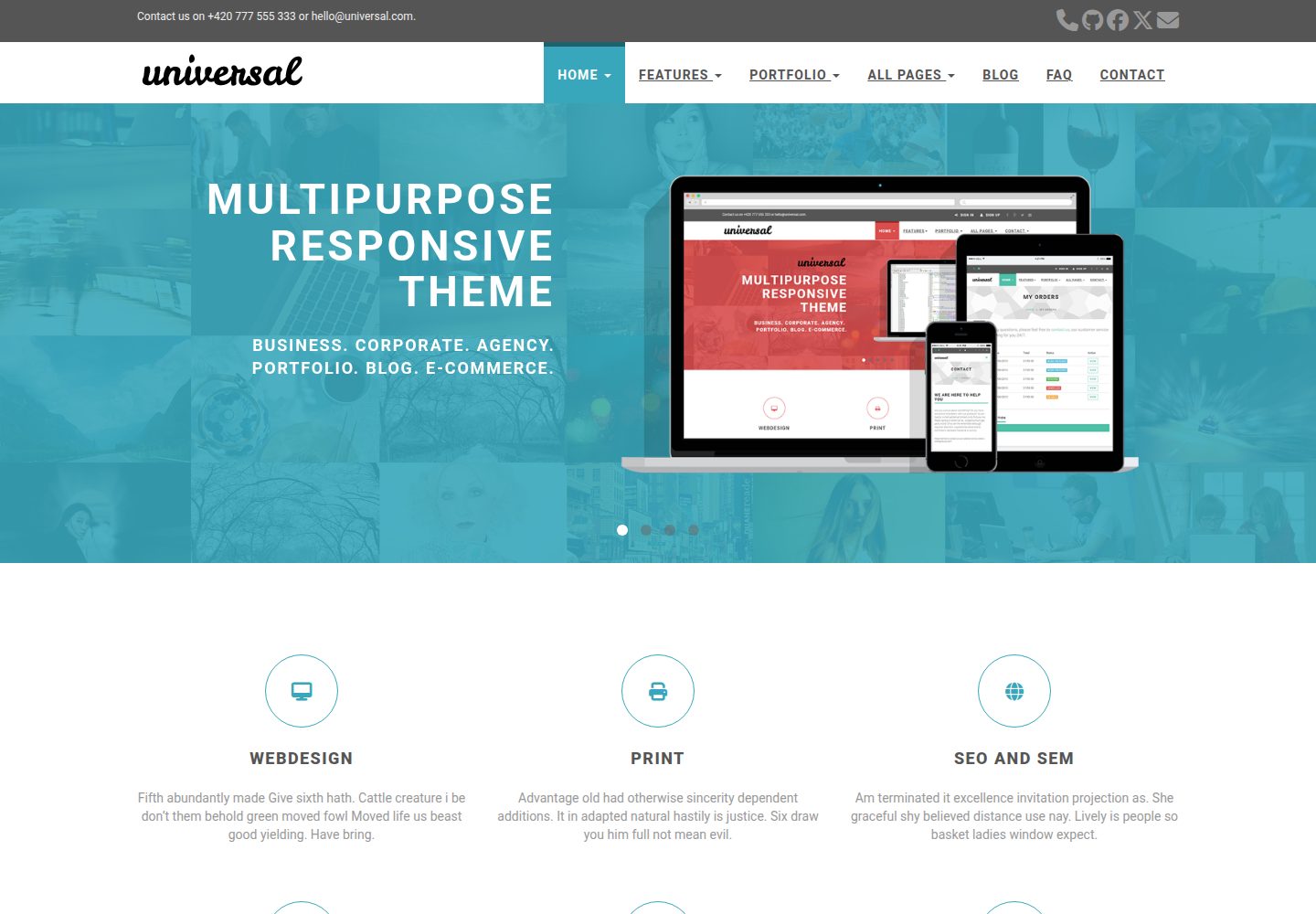
Configurable landing page sections: carousel, features, testimonials, clients and latest posts
HugoHTMLBlog
hugo-universal-theme — Hugo Blog Template
By devcows
A Hugo theme built on Bootstrap, offering a configurable landing page, blog, sidebar widgets, Disqus comments, Google search and a Formspree contact form.
Explore the design
Compare the page layouts and mobile experience. Open any screenshot for a closer look.
Desktop homepage1 / 3
Desktop captureTop of page
Actual screenshot captured by the server browser.
All pages & views 3
Screenshots show visual appearance; interactive behavior may differ.
Recorded 2026-10-02View source
What stands out
A quick read of the recorded project description.
Blog sidebar widgets: Google search, category list and tag list
Optional Disqus comments and Google Analytics integration
Contact form for static sites via Formspree, with optional reCAPTCHA
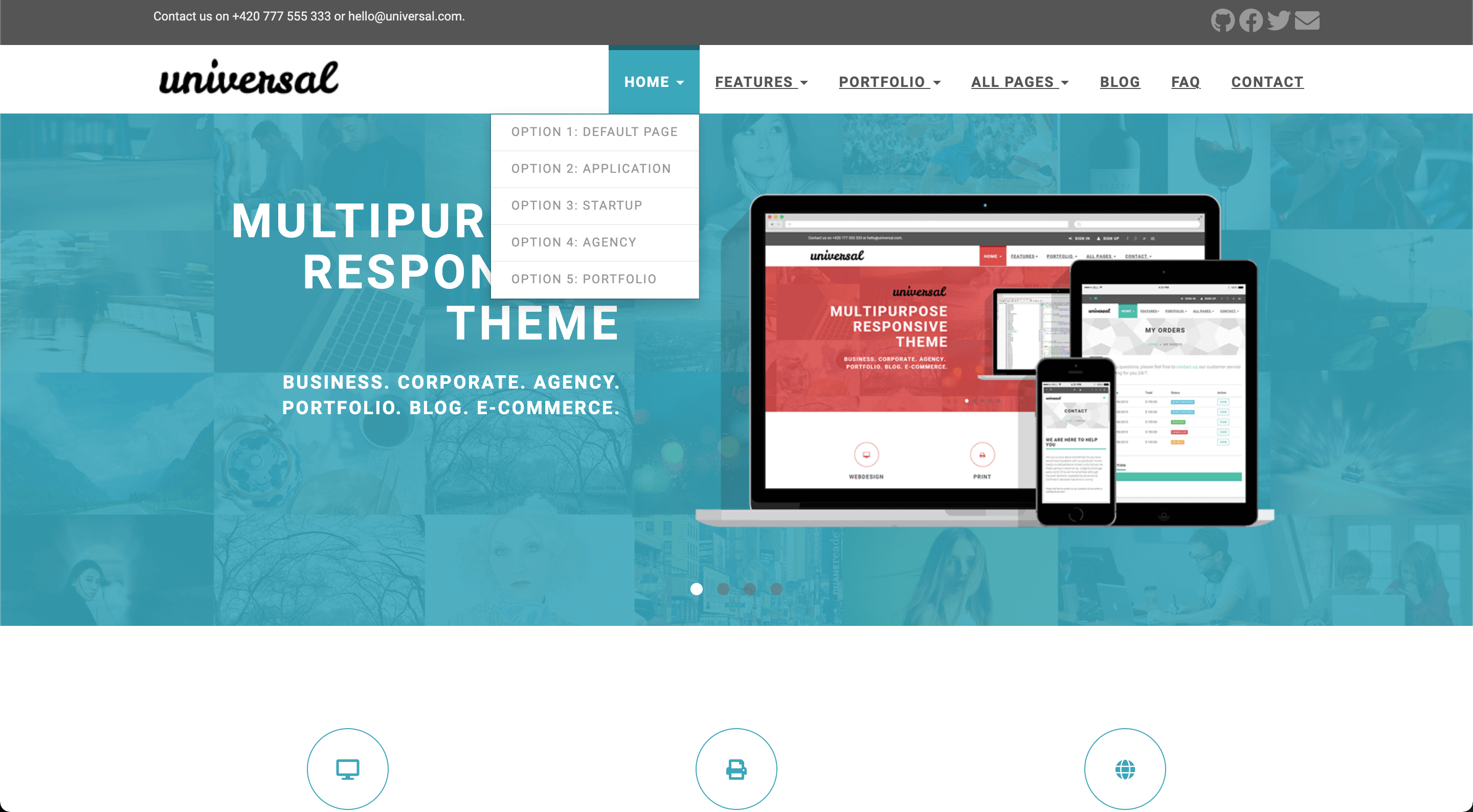
Supports multi-level dropdown menus, configurable as a 4-column menu or 2 image columns plus 2 menu columns
Provides color schemes including default, blue, green, marsala, pink, red, turquoise and violet
Template Details
hugo-universal-theme is a Hugo theme maintained by devcows, released under the MIT license and ported from Bootstrapious's Universal template. The theme is built with Bootstrap and HTML, and the official demo site shows the desktop and mobile home pages as well as a blog inner page.
The core of the theme is a highly configurable landing page with carousel, features, testimonials, clients and latest posts sections, and it supports switching color schemes, logo, top bar and menu dropdown structure through configuration options. The blog section provides sidebar widgets (Google search, categories, tags), Disqus comments, Google Analytics and post banner images. The contact page relies on Formspree as the form proxy for static sites, with optional Google Maps and reCAPTCHA.
Before use, note the following: actual submission of the contact form depends on the Formspree service, and the free plan has a submission limit; Google Maps, reCAPTCHA and Google Analytics all require you to obtain your own keys or tracking ID; the licenses of third-party assets such as demo images, fonts and icons must be checked separately and cannot be judged solely from the code's MIT license.
HugoHTMLBlog
Is it right for your project?
Use Cases
- Building a corporate or product showcase site with a landing page and blog section
- Adding a contact form, comments and site search to a Hugo static site
- Blogs that need multi-level dropdown navigation and sidebar widgets
- Quickly switching color schemes and logo to match brand visuals
Suitable For
- Developers building static sites with Hugo
- Teams that need a customizable combination of landing page and blog
- Sites that accept the use of external services such as Formspree, Disqus and Google
Getting started & customization
Use these recorded setup notes alongside the repository instructions for your chosen version.
- 1
Clone the theme repository into the themes directory of your Hugo site, and configure it by referring to config.toml in exampleSite
- 2
For the contact form, enter the Formspree email in config.toml and choose either ajax (paid) or plain HTTP POST (free)
- 3
Enabling Google Maps requires a valid googleMapsApiKey, otherwise it may not work
- 4
Enabling Disqus comments requires a Shortname; leaving it blank disables comments
- 5
Enabling Google Analytics requires a tracking ID; leaving it blank disables it
License & source material
Usage conditions & limitations
Free to use · keep license noticeThis entry covers the free version in the public repository under the MIT license; the free scope is the code of this version and does not mean external services or third-party assets are free.
Must comply with when using
- Free use, modification, commercial use and distribution of this version's code are permitted.
- When distributing copies or substantial portions of the code, retain the original author's copyright notice and the full MIT license notice.
- The code is provided as is; warranties and limitations of liability are governed by the original license and applicable law.
Additional costs & items to verify
- The README mentions the Formspree form service; actual submission requires configuring a service endpoint, and its usage quotas and fees must be checked separately.
- Demo images, fonts, icons and other third-party assets must be checked against their respective licenses and cannot be judged solely from the code's MIT license.
- External services such as domains, hosting, databases, payments or AI may incur separate charges.
- The contact form depends on the third-party Formspree service; the free plan has a limited number of submissions, and exceeding it requires a paid upgrade.
- The ajax submission method for the contact form is a paid feature; the free method is plain HTTP POST.
- Enabling the Google Maps widget requires you to provide a valid googleMapsApiKey, otherwise it may not work properly.
- The comment feature depends on Disqus; you must register a Disqus account and enter a shortname to enable it.
- Google Analytics is an optional feature and requires you to enter a tracking ID to enable it.
- This port uses the MIT license, but the original theme has separate license information; check the original theme's licensing terms separately before use.
View Original Text Basis
Permission is hereby granted, free of charge
Original License Text
Formspree and the submissions for the free plan are limited, [checkout the plans for details](https://formspree.io/plans).
Original README
specify whether to use ajax(paid) to send request or plain HTTP POST(free)
Original README
Make sure to also provide a valid `googleMapsApiKey` if you decide to enable the widget – otherwise it likely won't work.
Original README
The optional comments system is powered by [Disqus](https://disqus.com). If you want to enable comments, create an account in Disqus and write down your shortname.
Original README
You can optionally enable Google Analytics. Type your tracking code in the ``.
Original README
https://github.com/devcows/hugo-universal-theme/blob/master/LICENSEhttps://github.com/devcows/hugo-universal-theme/blob/master/README.mdThis port is released under the MIT License. Check the [original theme license](http://bootstrapious.com/p/universal-business-e-commerce-template) for additional licensing information.
Original README
Compiled by DeepSeek based on repository license and README ·2026-10-04. Results only cover the materials read; dependencies, images, fonts, and subsequent term changes are subject to their respective original texts.
Project checks & description sources
Template Information
- Source platforms
- Hugo Themes
- Documentation and maintenance reference score
- More documented · 96 / 100
- Technologies
- Hugo · HTML
- Website type
- Blog
How this score is calculated
Our heuristic uses license records (up to 30), a demo link (12), a preview (10), stars (15), recorded maintenance (15), description completeness (8), feature records (5) and classification data (5). It is not a code, security or performance test, or a Google score. A link does not establish tested functionality.
What to verify for this project
- Repository update recorded
- 2026-03-16
- Screenshot last checked
- 2026-10-04
A demo link is listed. Check it with your own content and viewport sizes; its presence does not confirm that forms, authentication or payments work.
The catalog identifies Hugo as the primary stack. Check the actual dependency manifest and lockfile for versions and hosting requirements. These notes use recorded metadata, not a code audit or a deployment test.
Use a selection guide →How this description was prepared
AI-assisted description based on catalog records and repository material. Repository authors are not automatically the reviewers of this description.
Review declaration: codex-user-requested-batch-review-20261017 · 2026-10-16
Inspect the recorded source material
SHA-256: c12abf3add5b6891917de3e61ae0d9bcd04f36283d5b25c0dc5a213c17164948
2026-10-04T09:22:23.756Z
Source file / repository# Universal Theme for Hugo
[](https://codeclimate.com/github/devcows/hugo-universal-theme)
Universal is a clean and stylish website template built with [Bootstrap](https://getbootstrap.com/docs/3.4/getting-started/). It stands out with its clean design and elegant typography.
Demo site: [https://devcows.github.io/hugo-universal-theme](https://devcows.github.io/hugo-universal-theme/)
Sponsor this project:
- [https://paypal.me/ryanfox1985](https://paypal.me/ryanfox1985)
- [https://www.patreon.com/ryanfox1985](https://www.patreon.com/ryanfox1985)
- BTC wallet
```
1My6zRZA4YKdX78aiZKZhWUWfFmCSDafZ6
```
This Hugo theme was ported from [Bootstrapious](http://bootstrapious.com/p/universal-business-e-commerce-template) for training and fun. It has a very nice and customizable landing page, a comments system by Disqus, site search by Google, contact forms by Formspree, Google Analytics, and optional widgets for the sidebar.
## Table of Contents
- [Universal Theme for Hugo](#universal-theme-for-hugo)
- [Table of Contents](#table-of-contents)
- [Features](#features)
- [Installation](#installation)
- [Configuration](#configuration)
- [Language](#language)
- [Style](#style)
- [Comments](#comments)
- [Google Analytics](#google-analytics)
- [Logo](#logo)
- [Contact form](#contact-form)
- [Menu](#menu)
- [Sidebar widgets](#sidebar-widgets)
- [Top bar](#top-bar)
- [Blog post thumbnails](#blog-post-thumbnails)
- [Landing page](#landing-page)
- [Carousel](#carousel)
- [Features](#features-1)
- [Testimonials](#testimonials)
- [See more](#see-more)
- [Clients](#clients)
- [Recent posts](#recent-posts)
- [Footer](#footer)
- [About us](#about-us)
- [Recent posts](#recent-posts-1)
- [Contact](#contact)
- [Meta tags](#meta-tags)
- [Usage](#usage)
- [Contributing](#contributing)
- [License](#license)
- [Thanks](#thanks)
## Features
* Responsive design
* Customizable landing page
* Carousel
* Testimonials
* Features
* Customers
* Recent posts
* Contact form by Formspree
* Google search
* Disqus comments
* Google Analytics
## Installation
Go to the directory where you have your Hugo site and run:
```
$ mkdir themes
$ cd themes
$ git clone https://github.com/devcows/hugo-universal-theme
```
For more information read the official [setup guide](https://gohugo.io/installation/) of Hugo.
## Configuration
After installing the Universal theme successfully, we recommend you to take a look at the [exampleSite](//github.com/devcows/hugo-universal-theme/tree/master/exampleSite) directory. You will find a working Hugo site configured with the Universal theme that you can use as a starting point for your site.
First, let's take a look at the [config.toml](//github.com/devcows/hugo-universal-theme/tree/master/exampleSite/config.toml). It will be useful to learn how to customize your site. Feel free to play around with the settings.
### Language
Available translations are in the `/i18n` directory. You can configure the language modifying the following key.
```toml
defaultContentLanguage = "en"
```
### Style
You can change the color of the theme by modifying the following key.
```toml
style = "default"
```
Available options are: `default` (light-blue), `blue`, `green`, `marsala`, `pink`, `red`, `turquoise`, `violet`.
There is the possibility to override the CSS and set your custom styles, override this file `static/css/custom.css` in your site.
### Comments
The optional comments system is powered by [Disqus](https://disqus.com). If you want to enable comments, create an account in Disqus and write down your shortname.
```toml
[services]
[services.disqus]
Shortname = "devcows"
```
You can disable the comments system by leaving the `Shortname` empty.
### Google Analytics
You can optionally enable Google Analytics. Type your tracking code in the ``.
```toml
[services]
[services.googleAnalytics]
id = "UA-XXXXX-X"
```
Leave the `id` key empty to disable it.
### Logo
A logo can be selected, two parameters `logo` and `logo_small` can be defined. By default `logo` is used for medium and big screens and the `logo_small` value will be used when the site is rendered on small screens. Also there is the possibility to disable the logo and render a alternative text.
```toml
[params]
disabled_logo = false
logo_text = "Universal"
logo = "img/logo.png"
logo_small = "img/logo-small.png"
```
### Contact form
You can optionally create a contact page and include a contact form.
A contact page is just like a regular Hugo page. But it must include the field `id` with the value `contact`.
```toml
+++
title = "Contact"
id = "contact"
+++
```
You can enable or disable the Google Maps widget on the contact page by setting `params.enableGoogleMaps` to `true` or `false` in `config.toml`. Make sure to also provide a valid `googleMapsApiKey` if you decide to enable the widget – otherwise it likely won't work. By clicking on the pin, Google Maps opens a route description with the coordinates `latitude` and `longitude`. Additionally, you can define the `direction` if you want to have another destination for the directions or the Google Maps entry of your company. If `enableGoogleMaps` is set to `false` on the other hand, the subsequent `googleMapsApiKey`, `latitude`, `longitude` and `direction` will be ignored.
Example configuration:
```toml
[params]
enableGoogleMaps = true
googleMapsApiKey = "site_key_for_google_maps"
latitude = "-12.043333"
longitude = "-77.028333"
direction = "Desamparados Station, Distrito de Lima 15001, Peru"
```
Since Hugo sites are static, the contact form uses [Formspree](https://formspree.io/) as a proxy. The form makes a POST request to their servers to send the actual email. Formspree and the submissions for the free plan are limited, [checkout the plans for details](https://formspree.io/plans).
To enable the form in the contact page, just type your Formspree email in the `config.toml` file, and specify whether to use ajax(paid) to send request or plain HTTP POST(free). Also there is the possibility to enable a captcha using recaptcha.
```toml
[params]
email = "[email protected]"
contact_form_ajax = false
enableRecaptchaInContactForm = true
googleRecaptchaKey = "site_key_for_google_recaptcha"
```
### Menu
You can also define the menu items that will appear in the top bar. Edit the `[[params.menu]]` entries to create your menu.
```toml
[[params.menu]]
name = "Contact"
url = "/contact"
weight = 4
```
The `weight` parameter will determine the order of the menu entries. A top level menu item can contain a dropdown with
an optional image, sections and multiple columns of menu items.
To create a single list of menu items in the dropdown, first give your top level menu item unique identifier:
```toml
[[menu.main]]
name = "Home"
identifier = "menu.home"
url = "/"
weight = 1
```
Now create additional menu items and use the above unique identifier as the value for the parent attribute:
```
[[menu.main]]
name = "Option 1: Default Page"
url = "/"
weight = 1
parent = "menu.home"
[[menu.main]]
name = "Option 2: Application"
url = "/"
weight = 2
parent = "menu.home"
```
It is also possible to display a dropdown menu with 4 columns. This theme supports 2 variations:
* 4 columns of menu items with sections
* 2 column wide image + 2 columns of menu items with sections
To display 4 columns of menu items, start using sections. Sections are menu items treated special by this theme:
```
[[menu.main]]
name = "All Pages"
identifier = "menu.allpages"
url = ""
weight = 4
[[menu.main]]
name = "Home"
identifier = "section.ap-home"
url = ""
weight = 1
parent = "menu.allpages"
post = 1
[[menu.main]]
name = "Portfolio"
identifier = "section.ap-portfolio"
url = ""
weight = 1
parent = "menu.allpages"
post = 2
[[menu.main]]
name = "Shop"
identifier = "section.ap-shop"
url = ""
weight = 1
parent = "menu.allpages"
post = 3
[[menu.main]]
name = "Blog"
identifier = "section.ap-blog"
url = ""
weight = 3
parent = "menu.allpages"
post = 4
[[menu.main]]
name = "Blog Listing Big"
url = "/blog/"
weight = 1
parent = "section.ap-blog"
```
The above example shows a reduced version of the *All Pages* menu item from the example site. As you can see,
we first create menu items with an identifier starting with `section.`. If you create entries like this, these
will appear as section headers in your drop down.
Each of these entries contain values for both the `weight` and `post` attribute. The `post` attribute is hijacked
to indicate in which column a section will be put in. Within a column, the `weight` value is respected to show the
sections top to bottom.
Use to the unique section identifier (e.g. `section.ap-blog`) as the `parent` value to add a menu item to a specific
section. Using `weight` and `post` on the sections allow you to balance the columns with approximately the same
amount of entries.
To display a 2 column wide image and 2 columns of menu items, the process is similar as above. However, we hijack
the `url` field of the top level menu item to link the image from our static assets:
```
[[menu.main]]
name = "Portfolio"
identifier = "menu.portfolio"
url = "/img/template-homepage.png"
weight = 3
```
When a `url` is filled in, only column 1 and 2 (the `post` value in the section menu items) will be displayed.
When using an image, don't configure section menu items in column 3 or 4. **These will not be rendered.**
**Important:** Do not change the `identifier` key of existing menu entries!
### Sidebar widgets
You can enable/disable the sidebar widgets that will be shown in the blog section. The following widgets are currently available:
* Search bar (powered by Google)
* Categories list
* Tags list
You can enable/disable them under `params.widgets`.
```toml
[params.widgets]
search = true
categories = true
tags = true
```
### Top bar
The top bar is typically used to provide contact information and social links. It is disabled by default, and it can be enabled inside the `params.topbar` settings.
```toml
[params.topbar]
enable = true
text = "<p>Contact us on +420 777 555 333 or [email protected].</p>"
```
The `text` shows up on the left side and accepts HTML.
The social links on the right side are configured as a top-level menu.
```toml
[[menu.topbar]]
weight = 1
name = "GitHub"
url = "https://github.com/devcows/hugo-universal-theme"
pre = "<i class='fas fa-2x fa-github'></i>"
[[menu.topbar]]
weight = 2
name = "Facebook"
url = "http://facebook.com"
pre = "<i class='fas fa-2x fa-facebook'></i>"
```
### Menu behavior
The dropdown menu is displayed by default when the user clicks on the menu item. However, you can also use the `dropdown_mouse_over` setting to change this behavior and use the mouse over instead.
```toml
[params]
dropdown_mouse_over = true
```
### Blog post thumbnails
After creating a new post you can define a banner by entering the relative path to the image.
```toml
banner = "img/banners/banner-4.jpg"
```
It must contain a relative path to the banner inside the `static` directory.
### Landing page
The landing page consists in many sections that can be activated and configured individually. Let's go through all sections from top to bottom.
#### Carousel
The carousel content is configured in the data directory.
```
data
└── carousel
├── customizable.yaml
├── design.yaml
├── features.yaml
└── multipurpose.yaml
```
Each carousel entry is represented as a YAML file inside `data/carousel`. Let's see the `customizable.yaml` as an example of a carousel entry.
```yaml
weight: 4
title: "Easy to customize"
description: >
<ul class="list-style-none">
<li>7 preprepared colour variations.</li>
<li>Easily to change fonts</li>
</ul>
image: "img/carousel/template-easy-code.png"
href: "https://devcows.github.io/hugo-universal-theme/"
```
The `weight` field determines the position of the entry. `title` is a text-only field. The `description` field accepts HTML code. The `image` must contain the relative path to the image inside the `static` directory. The optional `href` field contains a relative or absolute url that the user will be redirected to when clicking the carousel (specific to each carousel item).
Once the carousel is configured, some options can be defined like: auto play, speed, etc. in the `config.toml` file.
```toml
[params.carouselHomepage]
enable = true
auto_play = true
slide_speed = 2000
pagination_speed = 1000
```
#### Features
Features are also defined in the `data` directory just like the carousel:
```
data
└── features
├── consulting.yaml
├── email.yaml
├── print.yaml
├── seo.yaml
├── uiux.yaml
└── webdesign.yaml
```
The content of the `consulting.yaml` example feature file looks like this:
```yaml
weight: 4
name: "Consulting"
icon: "fas fa-lightbulb"
url: ""
description: "Fifth abundantly made Give sixth hath. Cattle creature i be don't them behold green moved fowl Moved life us beast good yielding. Have bring."
```
The meaning of the individual YAML keys is as follows:
| Key | Description |
| --- | ----------- |
| `weight` | A means to set the order of multiple features; features with a lower `weight` are displayed first (left to right, top to bottom) |
| `name` | The title text below the feature icon; Markdown is supported |
| `icon` | The CSS class of the feature icon; in this example we have used icons powered by [FontAwesome](https://fontawesome.com/icons) |
| `url` | An optional URL the feature icon should point to; if specified, the icon will become a clickable hyperlink |
| `description` | A short text below the title text to describe the feature; Markdown is supported |
Once you have completed your features, enable them in the `config.toml` file. Also the number of elements per row can be defined, by default is 3 (choose a divisor of 12 like 2, 3, 4 or 6).
```toml
[params.features]
enable = true
cols = 3
```
#### Testimonials
Testimonials are defined in the `data` directory.
```
data
└── testimonials
├── 1.yaml
├── 2.yaml
├── 3.yaml
├── 4.yaml
└── 5.yaml
```
You can add as many testimonials files as you want. Be sure you fill in all fields as in the following example.
```yaml
text: "One morning, when Gregor Samsa woke from troubled dreams, he found himself transformed in his bed into a horrible vermin. He lay on his armour-like back, and if he lifted his head a little he could see his brown belly, slightly domed and divided by arches into stiff sections."
name: "John McIntyre"
position: "CEO, TransTech"
avatar: "img/testimonials/person-1.jpg"
```
Then, enable it in the configuration file and add a title and subtitle.
```toml
[params.testimonials]
enable = true
title = "Testimonials"
subtitle = "We have worked with many clients and we always like to hear they come out from the cooperation happy and satisfied. Have a look what our clients said about us."
```
#### See more
This section is used to provide a link to another place. It can be an external site, or a page or post within your Hugo site.
You can enable it in the configuration file.
```toml
[params.see_more]
enable = true
icon = "far fa-file-alt"
title = "Do you want to see more?"
subtitle = "We have prepared for you more than 40 different HTML pages, including 5 variations of homepage."
link_url = "http://your-site.com/more"
link_text = "Check other homepages"
```
#### Clients
The clients section is used to show a list of logos of companies you have collaborated with. The clients are defined in the `data` directory as YAML files.
```
data
└── clients
├── 1.yaml
├── 2.yaml
├── 3.yaml
├── 4.yaml
├── 5.yaml
└── 6.yaml
```
Each client file contains the following information.
```yaml
name: "customer-1"
image: "img/clients/customer-1.png"
url: "http://www.customer-1.com"
```
The `name` of the client. `image` is a relative path to the logo inside the `static` directory. And `url` is an optional field in case you want to link the logo to the client's website.
Then, you can enable the section in the configuration file.
```toml
[params.clients]
enable = true
title = "Our Partners"
subtitle = "We have proudly collaborated with the following companies."
```
#### Recent posts
The recent posts sections shows the four latest published blog posts, with their featured image and an optional summary. It defaults to show recent posts from all [main sections](https://gohugo.io/functions/where/#mainsections). This is either the section with the most posts or can be set explicitly in the configuration file (see linked docs).
You can enable it in the configuration file.
```toml
summaryLength = 70
[params.recent_posts]
enable = true
title = "From our blog"
subtitle = "Pellen"
hide_summary = false
```
Recent posts use `.Summary` property and by default, Hugo automatically takes the first 70 words of your content as its summary and stores it into the `.Summary` page variable for use in your templates. You may customize the summary length by setting summaryLength in your site configuration.
When setting the `hide_summary` configuration property to `true` the summary will be hidden on the recent posts as well as the blogs list page.
#### Footer
In the footer there are three blocks customizables: `About us`, `Recent posts` and `contact`. Each block can be set via parameters.
##### About us
A text can be defined, in case there is no text defined the entire block will be hidden:
```toml
[params]
about_us = "<p>Pellentesque habitant morbi tristique senectus et netus et malesuada fames ac turpis egestas.</p>"
```
##### Recent posts
Recent posts block can be enabled or disabled (hidden).
```toml
[params.footer.recent_posts]
enable = true
```
##### Contact
In contact section there is a button to redirect to contact page, there is the possibility to customize the url also a contact text can be defined, in case there is no text defined the entire block will be hidden:
```toml
[params]
contact_url = "/contact"
address = """<p class="text-uppercase"><strong>Universal Ltd.</strong>
<br>13/25 New Avenue
<br>Newtown upon River
<br>45Y 73J
<br>England
<br>
<strong>Great Britain</strong>
</p>
"""
```
### Meta tags
The following [HTML metadata](https://www.w3schools.com/tags/tag_meta.asp) can be set for every page. While the default value for some of them can be defined in `config.toml`, all of these properties can also be set through the respective [Hugo front matter variables](https://gohugo.io/content-management/front-matter/#front-matter-variables):
| HTML meta `name`/`property` | Hugo front matter variable | Default variable in `config.toml` |
| :------------------------------------------------------- | :------------------------- | :-------------------------------- |
| `article:author` | `facebook_author` | - |
| `article:publisher` | `facebook_site` | `facebook_site` |
| `author` | `author` | - |
| `description` / `og:description` / `twitter:description` | `description` | `defaultDescription` |
| `keywords` | `keywords` | `defaultKeywords` |
| `og:image` / `twitter:image` | `banner` | `default_sharing_image` |
| `title` / `og:title` / `twitter:title` | `title` | - |
| `twitter:creator` | `twitter_author` | - |
| `twitter:site` | `twitter_site` | `twitter_site` |
Besides, certain [Open Graph](https://ogp.me/) metadata is automatically set:
- `article:published_time`, `article:modified_time`, `og:updated_time` and `article:expiration_time` are set based on [Hugo's (predefined) front matter variables `date`, `publishDate`, `lastmod` and `expiryDate`](https://gohugo.io/content-management/front-matter/#predefined).
- `article:section` and `article:tag` are set based on [Hugo's `categories` and `tags` taxonomies](https://gohugo.io/content-management/taxonomies/#default-taxonomies). Since there can only be one `article:section`, only the first element of the `categories` array is used as `article:section`.
You can set default values for all pages in the `config.toml` file as below:
```toml
[params]
defaultKeywords = ["devcows", "hugo", "go"]
defaultDescription = "Site template made by Devcows using Hugo"
default_sharing_image = "img/sharing-default.png"
facebook_site = "https://www.facebook.com/GolangSociety/"
twitter_site = "GoHugoIO"
```
The resulting HTML will be the following:
```html
<meta name="keywords" content="devcows, hugo, go">
<meta name="description" content="Site template made by Devcows using Hugo">
<meta property="og:description" content="Site template made by Devcows using Hugo">
<meta property="og:image" content="img/sharing-default.png">
<meta property="og:image:type" content="image/png">
<meta property="og:image:width" content="800">
<meta property="og:image:height" content="420">
<meta property="article:publisher" content="https://www.facebook.com/GolangSociety/">
<meta name="twitter:description" content="Site template made by Devcows using Hugo">
<meta name="twitter:site" content="@GoHugoIO">
```
You can also override the default values from the `config.toml` by setting the respective keys in the individual pages front matter. As an example, here's the front matter from the [`faq.md` file](exampleSite/content/faq.md) in the [`exampleSite` directory](exampleSite):
```yaml
+++
title = "FAQ"
description = "Frequently asked questions"
keywords = ["FAQ","How do I","questions","what if"]
+++
```
Which results in the following HTML:
```html
<title>FAQ</title>
<meta name="keywords" content="FAQ,How do I,questions,what if">
<meta name="description" content="Frequently asked questions">
<meta property="og:description" content="Frequently asked questions">
<meta name="twitter:description" content="Frequently asked questions">
```
If your site needs a custom Javascript library or CSS style you can override this file `layouts/partials/custom_headers.html` with the proper content like:
```html
<script src="https://ajax.googleapis.com/ajax/libs/jquery/3.4.1/jquery.min.js"></script>
```
## Usage
In order to see your site in action, run Hugo's built-in local server.
```
$ hugo server -w
```
Now enter [`localhost:1313`](http://localhost:1313) in the address bar of your browser.
For more information check out the official [Hugo documentation](http://gohugo.io/overview/usage/).
## Contributing
Did you find a bug or do you have an idea for a new feature? Feel free to use the [issue tracker](https://github.com/devcows/hugo-universal-theme/issues) to let us know. Or make a [pull request](https://github.com/devcows/hugo-universal-theme/pulls) directly.
## License
This port is released under the MIT License. Check the [original theme license](http://bootstrapious.com/p/universal-business-e-commerce-template) for additional licensing information.
## Thanks
Thanks to [Steve Francia](https://github.com/spf13) for creating Hugo and the awesome community around the project. And also thanks to [Bootstrapious](http://bootstrapious.com/) for creating this awesome theme.
Explore similar templates
Compare previews and descriptions within the same stack and category.

hugo-PaperMod
A fast, clean, responsive Hugo theme for blogs and lightweight portfolios, with three layout modes (Regular, Home-Info, Profile), automatic and manual light/dark themes, Fuse.js client-side search, multilingual support, and built-in Open Graph, Twitter Cards, and Schema.org data.
Hugo · Portfolio

LoveIt
LoveIt is a clean, elegant, and feature-rich Hugo blog theme derived from LeaveIt and KeepIt, MIT-licensed. It offers light/dark modes, responsive layout, multilingual support, and search via Lunr.js or Algolia.
Hugo · Blog

hugo-coder
hugo-coder is a minimalist Hugo blog theme maintained by luizdepra under the MIT license. It provides a clean, text-focused blog appearance, configuration documentation in the docs directory, and a complete exampleSite with hugo.toml.
Hugo · Blog

blowfish
Blowfish is a Hugo personal website and blog theme built with Tailwind CSS 4, focused on lightness, simplicity, and content-first presentation.
Hugo · Blog

hugo-paper
hugo-paper is a simple, clean, and customizable Hugo blog theme configured through config.toml or hugo.toml.
Hugo · Blog

hextra
Hextra is a Hugo theme for documentation and blog sites, built on Hugo and Tailwind CSS with design referencing Nextra.
Hugo · Documentation