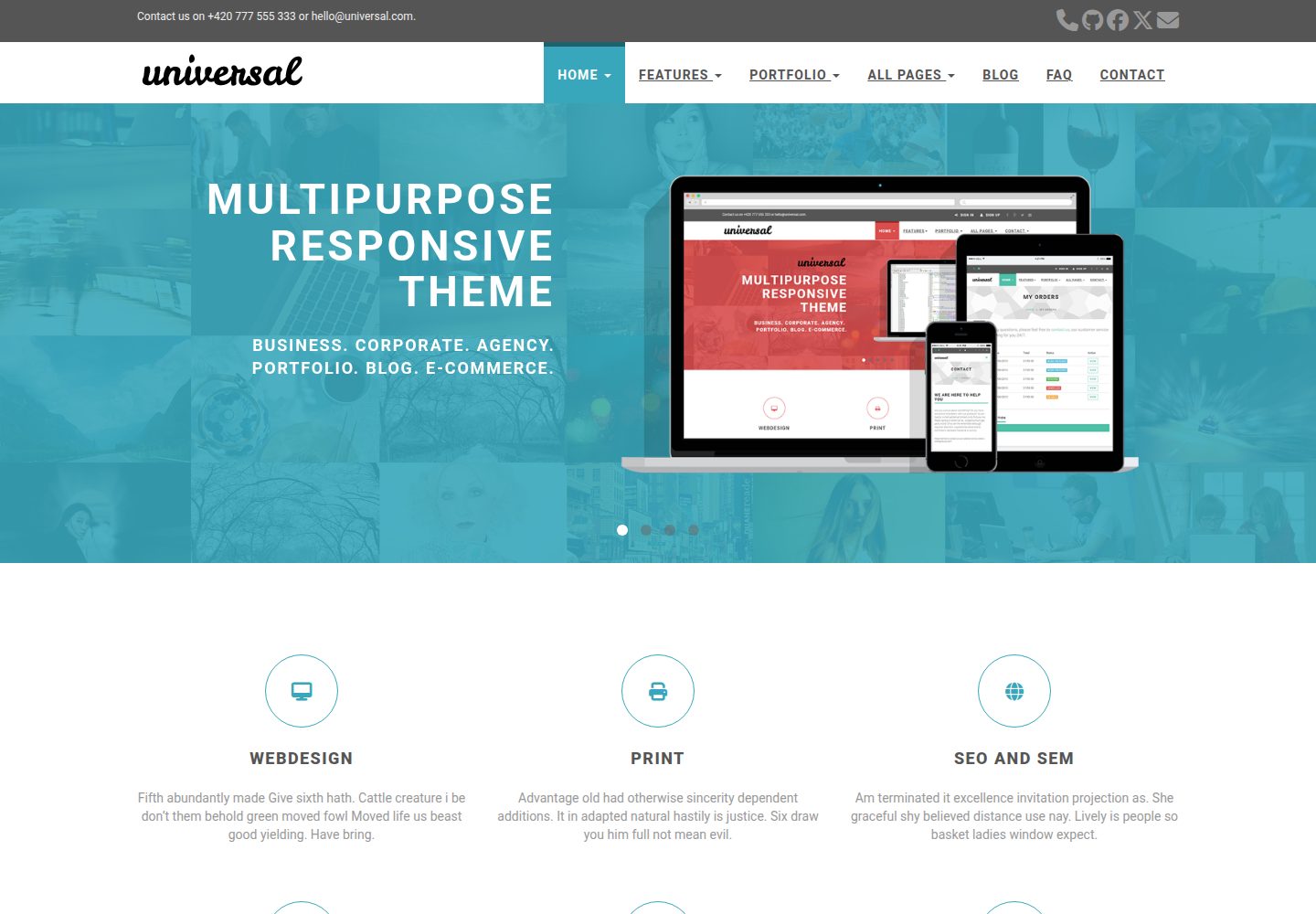
可配置的落地页区块:轮播、特色、客户评价、客户列表与最新文章
HugoHTML博客
hugo-universal-theme — Hugo 博客模板
作者 devcows
基于 Bootstrap 构建的 Hugo 主题,提供可配置的落地页、博客、侧栏小工具、Disqus 评论、Google 搜索与 Formspree 联系表单。
看看你的网站会是什么样
浏览真实页面截图,比较内容排版与手机效果。点击下方缩略图切换,放大查看整页细节。
全部页面与视图 3
截图用于了解视觉与布局,交互效果请以实际项目为准。
采集于 2026-10-02查看来源
值得关注的模板亮点
从已有项目资料中,快速了解它的特点。
博客侧栏小工具:Google 搜索、分类列表与标签列表
可选 Disqus 评论与 Google Analytics 集成
通过 Formspree 实现静态站点的联系表单,可选 reCAPTCHA
支持多级下拉菜单,可配置为 4 列菜单或 2 列图片加 2 列菜单
提供 default、blue、green、marsala、pink、red、turquoise、violet 等配色方案
模板详细介绍
hugo-universal-theme 是 devcows 维护的 Hugo 主题,采用 MIT 许可,从 Bootstrapious 的 Universal 模板移植而来。主题使用 Bootstrap 与 HTML 构建,官方演示站展示了桌面端与手机端首页以及博客内页。
主题的核心是高度可配置的落地页,包含轮播、特色、客户评价、客户列表与最新文章等区块,并支持通过配置项切换配色、Logo、顶部栏与菜单下拉结构。博客部分提供侧栏小工具(Google 搜索、分类、标签)、Disqus 评论、Google Analytics 以及文章横幅图。联系页依赖 Formspree 作为静态站点的表单代理,可选 Google Maps 与 reCAPTCHA。
使用前需注意:联系表单的真实提交依赖 Formspree 服务,免费计划有提交次数限制;Google Maps、reCAPTCHA 与 Google Analytics 均需要自行申请密钥或跟踪 ID;演示图片、字体、图标等第三方素材的许可需单独核对,不能仅凭代码的 MIT 许可判断。
HugoHTML博客
适合你的项目吗?
适用场景
- 搭建带有落地页与博客板块的企业或产品展示站点
- 为 Hugo 静态站点添加联系表单、评论与站点搜索
- 需要多级下拉导航与侧栏小工具的博客
- 快速切换配色与 Logo 以匹配品牌视觉
适合人群
- 使用 Hugo 构建静态站点的开发者
- 需要可定制落地页与博客组合的团队
- 接受使用 Formspree、Disqus、Google 等外部服务的站点
上手与定制指南
结合仓库当前版本的说明,按下面的资料检查内容、配置与运行要求。
- 1
在 Hugo 站点的 themes 目录下克隆该主题仓库,参考 exampleSite 中的 config.toml 进行配置
- 2
联系表单需在 config.toml 中填写 Formspree 邮箱,并选择 ajax(付费)或普通 HTTP POST(免费)方式
- 3
启用 Google Maps 需提供有效的 googleMapsApiKey,否则可能无法工作
- 4
启用 Disqus 评论需填写 Shortname,留空则关闭评论
- 5
启用 Google Analytics 需填写跟踪 ID,留空则关闭
授权与来源资料
使用条件与限制
免费使用 · 保留许可声明本次收录的是公开仓库中采用 MIT 许可的免费版本;免费范围为该版本代码,不代表外部服务或第三方素材免费。
使用时需要遵守
- 允许免费使用、修改、商用和分发该版本代码。
- 分发代码副本或实质性部分时,保留原作者版权声明和完整 MIT 许可声明。
- 代码按现状提供;担保与责任限制以原许可证及适用法律为准。
额外费用与待核对事项
- README 提及 Formspree 表单服务;真实提交需配置服务端点,其使用额度与费用需单独核对。
- 演示图片、字体、图标及其他第三方素材需按各自许可核对,不能仅凭代码的 MIT 许可判断。
- 域名、托管、数据库、支付或 AI 等外部服务可能另外收费。
- 联系表单依赖第三方 Formspree 服务,免费计划的提交次数有限,超出需付费升级。
- 联系表单的 ajax 提交方式属于付费功能,免费方式为普通 HTTP POST。
- 启用 Google Maps 小工具需自行提供有效的 googleMapsApiKey,否则可能无法正常工作。
- 评论功能依赖 Disqus,需注册 Disqus 账号并填写 shortname 才能启用。
- Google Analytics 为可选功能,需自行填写跟踪 ID 才能启用。
- 该移植版采用 MIT 许可,但原始主题另有许可信息,使用前需另行核对原始主题的授权条款。
查看原文依据
Permission is hereby granted, free of charge
许可证原文
Formspree and the submissions for the free plan are limited, [checkout the plans for details](https://formspree.io/plans).
README 原文
specify whether to use ajax(paid) to send request or plain HTTP POST(free)
README 原文
Make sure to also provide a valid `googleMapsApiKey` if you decide to enable the widget – otherwise it likely won't work.
README 原文
The optional comments system is powered by [Disqus](https://disqus.com). If you want to enable comments, create an account in Disqus and write down your shortname.
README 原文
You can optionally enable Google Analytics. Type your tracking code in the ``.
README 原文
https://github.com/devcows/hugo-universal-theme/blob/master/LICENSEhttps://github.com/devcows/hugo-universal-theme/blob/master/README.mdThis port is released under the MIT License. Check the [original theme license](http://bootstrapious.com/p/universal-business-e-commerce-template) for additional licensing information.
README 原文
DeepSeek 根据仓库许可证和 README 整理 ·2026-10-04。结果仅覆盖已读取资料,依赖、图片、字体及后续条款变更以各自原文为准。
项目核对记录与介绍依据
模板资料
- 来源平台
- Hugo Themes
- 资料与维护参考分
- 资料较完整 · 96 / 100
- 技术栈
- Hugo · HTML
- 网站类型
- 博客
这个分数如何计算
本站按许可资料(最高30分)、演示链接(12分)、预览图(10分)、Star数(15分)、记录的维护时间(15分)、描述完整度(8分)、功能记录(5分)和分类资料(5分)计算。它不是代码、安全或性能测试,也不是 Google 评分;有链接不代表已实测可用。
这个项目需要核对什么
- 记录的仓库更新时间
- 2026-03-16
- 截图检查日期
- 2026-10-04
已收录演示链接。请用你的内容与屏幕尺寸检查;有演示不代表表单、认证或支付已经可用。
目录记录的主要技术栈是 Hugo。请通过依赖清单和锁文件核对实际版本与托管要求。这些说明基于收录资料,不代表代码审计或部署实测。
查看具体选型方法 →介绍的制作与核对状态
介绍由 AI 辅助整理目录与仓库资料。仓库作者不等于这篇介绍的审核者。
审核声明: codex-user-requested-batch-review-20261017 · 2026-10-16
查看当时使用的来源资料
SHA-256: c12abf3add5b6891917de3e61ae0d9bcd04f36283d5b25c0dc5a213c17164948
2026-10-04T09:22:23.756Z
来源文件 / 仓库# Universal Theme for Hugo
[](https://codeclimate.com/github/devcows/hugo-universal-theme)
Universal is a clean and stylish website template built with [Bootstrap](https://getbootstrap.com/docs/3.4/getting-started/). It stands out with its clean design and elegant typography.
Demo site: [https://devcows.github.io/hugo-universal-theme](https://devcows.github.io/hugo-universal-theme/)
Sponsor this project:
- [https://paypal.me/ryanfox1985](https://paypal.me/ryanfox1985)
- [https://www.patreon.com/ryanfox1985](https://www.patreon.com/ryanfox1985)
- BTC wallet
```
1My6zRZA4YKdX78aiZKZhWUWfFmCSDafZ6
```
This Hugo theme was ported from [Bootstrapious](http://bootstrapious.com/p/universal-business-e-commerce-template) for training and fun. It has a very nice and customizable landing page, a comments system by Disqus, site search by Google, contact forms by Formspree, Google Analytics, and optional widgets for the sidebar.
## Table of Contents
- [Universal Theme for Hugo](#universal-theme-for-hugo)
- [Table of Contents](#table-of-contents)
- [Features](#features)
- [Installation](#installation)
- [Configuration](#configuration)
- [Language](#language)
- [Style](#style)
- [Comments](#comments)
- [Google Analytics](#google-analytics)
- [Logo](#logo)
- [Contact form](#contact-form)
- [Menu](#menu)
- [Sidebar widgets](#sidebar-widgets)
- [Top bar](#top-bar)
- [Blog post thumbnails](#blog-post-thumbnails)
- [Landing page](#landing-page)
- [Carousel](#carousel)
- [Features](#features-1)
- [Testimonials](#testimonials)
- [See more](#see-more)
- [Clients](#clients)
- [Recent posts](#recent-posts)
- [Footer](#footer)
- [About us](#about-us)
- [Recent posts](#recent-posts-1)
- [Contact](#contact)
- [Meta tags](#meta-tags)
- [Usage](#usage)
- [Contributing](#contributing)
- [License](#license)
- [Thanks](#thanks)
## Features
* Responsive design
* Customizable landing page
* Carousel
* Testimonials
* Features
* Customers
* Recent posts
* Contact form by Formspree
* Google search
* Disqus comments
* Google Analytics
## Installation
Go to the directory where you have your Hugo site and run:
```
$ mkdir themes
$ cd themes
$ git clone https://github.com/devcows/hugo-universal-theme
```
For more information read the official [setup guide](https://gohugo.io/installation/) of Hugo.
## Configuration
After installing the Universal theme successfully, we recommend you to take a look at the [exampleSite](//github.com/devcows/hugo-universal-theme/tree/master/exampleSite) directory. You will find a working Hugo site configured with the Universal theme that you can use as a starting point for your site.
First, let's take a look at the [config.toml](//github.com/devcows/hugo-universal-theme/tree/master/exampleSite/config.toml). It will be useful to learn how to customize your site. Feel free to play around with the settings.
### Language
Available translations are in the `/i18n` directory. You can configure the language modifying the following key.
```toml
defaultContentLanguage = "en"
```
### Style
You can change the color of the theme by modifying the following key.
```toml
style = "default"
```
Available options are: `default` (light-blue), `blue`, `green`, `marsala`, `pink`, `red`, `turquoise`, `violet`.
There is the possibility to override the CSS and set your custom styles, override this file `static/css/custom.css` in your site.
### Comments
The optional comments system is powered by [Disqus](https://disqus.com). If you want to enable comments, create an account in Disqus and write down your shortname.
```toml
[services]
[services.disqus]
Shortname = "devcows"
```
You can disable the comments system by leaving the `Shortname` empty.
### Google Analytics
You can optionally enable Google Analytics. Type your tracking code in the ``.
```toml
[services]
[services.googleAnalytics]
id = "UA-XXXXX-X"
```
Leave the `id` key empty to disable it.
### Logo
A logo can be selected, two parameters `logo` and `logo_small` can be defined. By default `logo` is used for medium and big screens and the `logo_small` value will be used when the site is rendered on small screens. Also there is the possibility to disable the logo and render a alternative text.
```toml
[params]
disabled_logo = false
logo_text = "Universal"
logo = "img/logo.png"
logo_small = "img/logo-small.png"
```
### Contact form
You can optionally create a contact page and include a contact form.
A contact page is just like a regular Hugo page. But it must include the field `id` with the value `contact`.
```toml
+++
title = "Contact"
id = "contact"
+++
```
You can enable or disable the Google Maps widget on the contact page by setting `params.enableGoogleMaps` to `true` or `false` in `config.toml`. Make sure to also provide a valid `googleMapsApiKey` if you decide to enable the widget – otherwise it likely won't work. By clicking on the pin, Google Maps opens a route description with the coordinates `latitude` and `longitude`. Additionally, you can define the `direction` if you want to have another destination for the directions or the Google Maps entry of your company. If `enableGoogleMaps` is set to `false` on the other hand, the subsequent `googleMapsApiKey`, `latitude`, `longitude` and `direction` will be ignored.
Example configuration:
```toml
[params]
enableGoogleMaps = true
googleMapsApiKey = "site_key_for_google_maps"
latitude = "-12.043333"
longitude = "-77.028333"
direction = "Desamparados Station, Distrito de Lima 15001, Peru"
```
Since Hugo sites are static, the contact form uses [Formspree](https://formspree.io/) as a proxy. The form makes a POST request to their servers to send the actual email. Formspree and the submissions for the free plan are limited, [checkout the plans for details](https://formspree.io/plans).
To enable the form in the contact page, just type your Formspree email in the `config.toml` file, and specify whether to use ajax(paid) to send request or plain HTTP POST(free). Also there is the possibility to enable a captcha using recaptcha.
```toml
[params]
email = "[email protected]"
contact_form_ajax = false
enableRecaptchaInContactForm = true
googleRecaptchaKey = "site_key_for_google_recaptcha"
```
### Menu
You can also define the menu items that will appear in the top bar. Edit the `[[params.menu]]` entries to create your menu.
```toml
[[params.menu]]
name = "Contact"
url = "/contact"
weight = 4
```
The `weight` parameter will determine the order of the menu entries. A top level menu item can contain a dropdown with
an optional image, sections and multiple columns of menu items.
To create a single list of menu items in the dropdown, first give your top level menu item unique identifier:
```toml
[[menu.main]]
name = "Home"
identifier = "menu.home"
url = "/"
weight = 1
```
Now create additional menu items and use the above unique identifier as the value for the parent attribute:
```
[[menu.main]]
name = "Option 1: Default Page"
url = "/"
weight = 1
parent = "menu.home"
[[menu.main]]
name = "Option 2: Application"
url = "/"
weight = 2
parent = "menu.home"
```
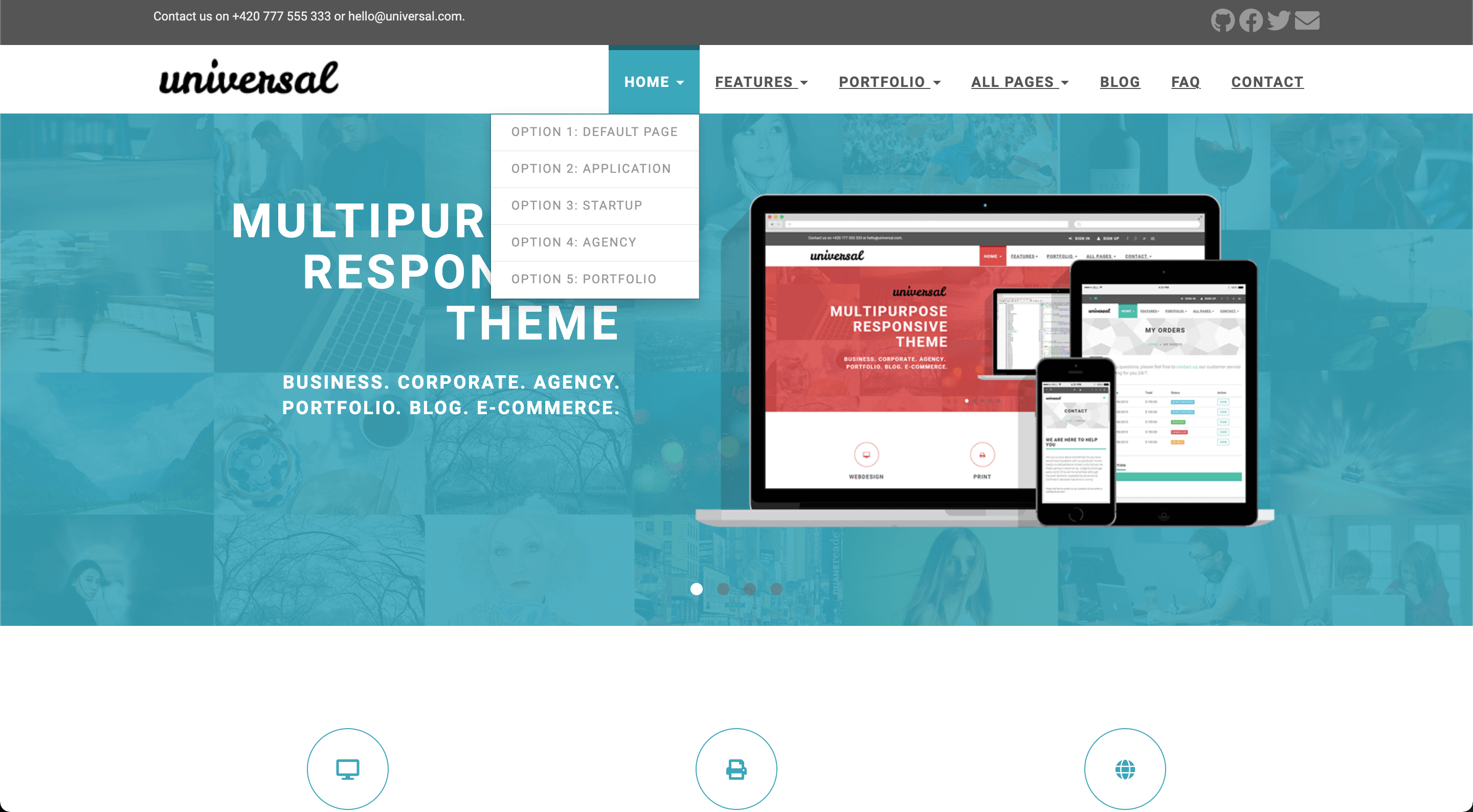
It is also possible to display a dropdown menu with 4 columns. This theme supports 2 variations:
* 4 columns of menu items with sections
* 2 column wide image + 2 columns of menu items with sections
To display 4 columns of menu items, start using sections. Sections are menu items treated special by this theme:
```
[[menu.main]]
name = "All Pages"
identifier = "menu.allpages"
url = ""
weight = 4
[[menu.main]]
name = "Home"
identifier = "section.ap-home"
url = ""
weight = 1
parent = "menu.allpages"
post = 1
[[menu.main]]
name = "Portfolio"
identifier = "section.ap-portfolio"
url = ""
weight = 1
parent = "menu.allpages"
post = 2
[[menu.main]]
name = "Shop"
identifier = "section.ap-shop"
url = ""
weight = 1
parent = "menu.allpages"
post = 3
[[menu.main]]
name = "Blog"
identifier = "section.ap-blog"
url = ""
weight = 3
parent = "menu.allpages"
post = 4
[[menu.main]]
name = "Blog Listing Big"
url = "/blog/"
weight = 1
parent = "section.ap-blog"
```
The above example shows a reduced version of the *All Pages* menu item from the example site. As you can see,
we first create menu items with an identifier starting with `section.`. If you create entries like this, these
will appear as section headers in your drop down.
Each of these entries contain values for both the `weight` and `post` attribute. The `post` attribute is hijacked
to indicate in which column a section will be put in. Within a column, the `weight` value is respected to show the
sections top to bottom.
Use to the unique section identifier (e.g. `section.ap-blog`) as the `parent` value to add a menu item to a specific
section. Using `weight` and `post` on the sections allow you to balance the columns with approximately the same
amount of entries.
To display a 2 column wide image and 2 columns of menu items, the process is similar as above. However, we hijack
the `url` field of the top level menu item to link the image from our static assets:
```
[[menu.main]]
name = "Portfolio"
identifier = "menu.portfolio"
url = "/img/template-homepage.png"
weight = 3
```
When a `url` is filled in, only column 1 and 2 (the `post` value in the section menu items) will be displayed.
When using an image, don't configure section menu items in column 3 or 4. **These will not be rendered.**
**Important:** Do not change the `identifier` key of existing menu entries!
### Sidebar widgets
You can enable/disable the sidebar widgets that will be shown in the blog section. The following widgets are currently available:
* Search bar (powered by Google)
* Categories list
* Tags list
You can enable/disable them under `params.widgets`.
```toml
[params.widgets]
search = true
categories = true
tags = true
```
### Top bar
The top bar is typically used to provide contact information and social links. It is disabled by default, and it can be enabled inside the `params.topbar` settings.
```toml
[params.topbar]
enable = true
text = "<p>Contact us on +420 777 555 333 or [email protected].</p>"
```
The `text` shows up on the left side and accepts HTML.
The social links on the right side are configured as a top-level menu.
```toml
[[menu.topbar]]
weight = 1
name = "GitHub"
url = "https://github.com/devcows/hugo-universal-theme"
pre = "<i class='fas fa-2x fa-github'></i>"
[[menu.topbar]]
weight = 2
name = "Facebook"
url = "http://facebook.com"
pre = "<i class='fas fa-2x fa-facebook'></i>"
```
### Menu behavior
The dropdown menu is displayed by default when the user clicks on the menu item. However, you can also use the `dropdown_mouse_over` setting to change this behavior and use the mouse over instead.
```toml
[params]
dropdown_mouse_over = true
```
### Blog post thumbnails
After creating a new post you can define a banner by entering the relative path to the image.
```toml
banner = "img/banners/banner-4.jpg"
```
It must contain a relative path to the banner inside the `static` directory.
### Landing page
The landing page consists in many sections that can be activated and configured individually. Let's go through all sections from top to bottom.
#### Carousel
The carousel content is configured in the data directory.
```
data
└── carousel
├── customizable.yaml
├── design.yaml
├── features.yaml
└── multipurpose.yaml
```
Each carousel entry is represented as a YAML file inside `data/carousel`. Let's see the `customizable.yaml` as an example of a carousel entry.
```yaml
weight: 4
title: "Easy to customize"
description: >
<ul class="list-style-none">
<li>7 preprepared colour variations.</li>
<li>Easily to change fonts</li>
</ul>
image: "img/carousel/template-easy-code.png"
href: "https://devcows.github.io/hugo-universal-theme/"
```
The `weight` field determines the position of the entry. `title` is a text-only field. The `description` field accepts HTML code. The `image` must contain the relative path to the image inside the `static` directory. The optional `href` field contains a relative or absolute url that the user will be redirected to when clicking the carousel (specific to each carousel item).
Once the carousel is configured, some options can be defined like: auto play, speed, etc. in the `config.toml` file.
```toml
[params.carouselHomepage]
enable = true
auto_play = true
slide_speed = 2000
pagination_speed = 1000
```
#### Features
Features are also defined in the `data` directory just like the carousel:
```
data
└── features
├── consulting.yaml
├── email.yaml
├── print.yaml
├── seo.yaml
├── uiux.yaml
└── webdesign.yaml
```
The content of the `consulting.yaml` example feature file looks like this:
```yaml
weight: 4
name: "Consulting"
icon: "fas fa-lightbulb"
url: ""
description: "Fifth abundantly made Give sixth hath. Cattle creature i be don't them behold green moved fowl Moved life us beast good yielding. Have bring."
```
The meaning of the individual YAML keys is as follows:
| Key | Description |
| --- | ----------- |
| `weight` | A means to set the order of multiple features; features with a lower `weight` are displayed first (left to right, top to bottom) |
| `name` | The title text below the feature icon; Markdown is supported |
| `icon` | The CSS class of the feature icon; in this example we have used icons powered by [FontAwesome](https://fontawesome.com/icons) |
| `url` | An optional URL the feature icon should point to; if specified, the icon will become a clickable hyperlink |
| `description` | A short text below the title text to describe the feature; Markdown is supported |
Once you have completed your features, enable them in the `config.toml` file. Also the number of elements per row can be defined, by default is 3 (choose a divisor of 12 like 2, 3, 4 or 6).
```toml
[params.features]
enable = true
cols = 3
```
#### Testimonials
Testimonials are defined in the `data` directory.
```
data
└── testimonials
├── 1.yaml
├── 2.yaml
├── 3.yaml
├── 4.yaml
└── 5.yaml
```
You can add as many testimonials files as you want. Be sure you fill in all fields as in the following example.
```yaml
text: "One morning, when Gregor Samsa woke from troubled dreams, he found himself transformed in his bed into a horrible vermin. He lay on his armour-like back, and if he lifted his head a little he could see his brown belly, slightly domed and divided by arches into stiff sections."
name: "John McIntyre"
position: "CEO, TransTech"
avatar: "img/testimonials/person-1.jpg"
```
Then, enable it in the configuration file and add a title and subtitle.
```toml
[params.testimonials]
enable = true
title = "Testimonials"
subtitle = "We have worked with many clients and we always like to hear they come out from the cooperation happy and satisfied. Have a look what our clients said about us."
```
#### See more
This section is used to provide a link to another place. It can be an external site, or a page or post within your Hugo site.
You can enable it in the configuration file.
```toml
[params.see_more]
enable = true
icon = "far fa-file-alt"
title = "Do you want to see more?"
subtitle = "We have prepared for you more than 40 different HTML pages, including 5 variations of homepage."
link_url = "http://your-site.com/more"
link_text = "Check other homepages"
```
#### Clients
The clients section is used to show a list of logos of companies you have collaborated with. The clients are defined in the `data` directory as YAML files.
```
data
└── clients
├── 1.yaml
├── 2.yaml
├── 3.yaml
├── 4.yaml
├── 5.yaml
└── 6.yaml
```
Each client file contains the following information.
```yaml
name: "customer-1"
image: "img/clients/customer-1.png"
url: "http://www.customer-1.com"
```
The `name` of the client. `image` is a relative path to the logo inside the `static` directory. And `url` is an optional field in case you want to link the logo to the client's website.
Then, you can enable the section in the configuration file.
```toml
[params.clients]
enable = true
title = "Our Partners"
subtitle = "We have proudly collaborated with the following companies."
```
#### Recent posts
The recent posts sections shows the four latest published blog posts, with their featured image and an optional summary. It defaults to show recent posts from all [main sections](https://gohugo.io/functions/where/#mainsections). This is either the section with the most posts or can be set explicitly in the configuration file (see linked docs).
You can enable it in the configuration file.
```toml
summaryLength = 70
[params.recent_posts]
enable = true
title = "From our blog"
subtitle = "Pellen"
hide_summary = false
```
Recent posts use `.Summary` property and by default, Hugo automatically takes the first 70 words of your content as its summary and stores it into the `.Summary` page variable for use in your templates. You may customize the summary length by setting summaryLength in your site configuration.
When setting the `hide_summary` configuration property to `true` the summary will be hidden on the recent posts as well as the blogs list page.
#### Footer
In the footer there are three blocks customizables: `About us`, `Recent posts` and `contact`. Each block can be set via parameters.
##### About us
A text can be defined, in case there is no text defined the entire block will be hidden:
```toml
[params]
about_us = "<p>Pellentesque habitant morbi tristique senectus et netus et malesuada fames ac turpis egestas.</p>"
```
##### Recent posts
Recent posts block can be enabled or disabled (hidden).
```toml
[params.footer.recent_posts]
enable = true
```
##### Contact
In contact section there is a button to redirect to contact page, there is the possibility to customize the url also a contact text can be defined, in case there is no text defined the entire block will be hidden:
```toml
[params]
contact_url = "/contact"
address = """<p class="text-uppercase"><strong>Universal Ltd.</strong>
<br>13/25 New Avenue
<br>Newtown upon River
<br>45Y 73J
<br>England
<br>
<strong>Great Britain</strong>
</p>
"""
```
### Meta tags
The following [HTML metadata](https://www.w3schools.com/tags/tag_meta.asp) can be set for every page. While the default value for some of them can be defined in `config.toml`, all of these properties can also be set through the respective [Hugo front matter variables](https://gohugo.io/content-management/front-matter/#front-matter-variables):
| HTML meta `name`/`property` | Hugo front matter variable | Default variable in `config.toml` |
| :------------------------------------------------------- | :------------------------- | :-------------------------------- |
| `article:author` | `facebook_author` | - |
| `article:publisher` | `facebook_site` | `facebook_site` |
| `author` | `author` | - |
| `description` / `og:description` / `twitter:description` | `description` | `defaultDescription` |
| `keywords` | `keywords` | `defaultKeywords` |
| `og:image` / `twitter:image` | `banner` | `default_sharing_image` |
| `title` / `og:title` / `twitter:title` | `title` | - |
| `twitter:creator` | `twitter_author` | - |
| `twitter:site` | `twitter_site` | `twitter_site` |
Besides, certain [Open Graph](https://ogp.me/) metadata is automatically set:
- `article:published_time`, `article:modified_time`, `og:updated_time` and `article:expiration_time` are set based on [Hugo's (predefined) front matter variables `date`, `publishDate`, `lastmod` and `expiryDate`](https://gohugo.io/content-management/front-matter/#predefined).
- `article:section` and `article:tag` are set based on [Hugo's `categories` and `tags` taxonomies](https://gohugo.io/content-management/taxonomies/#default-taxonomies). Since there can only be one `article:section`, only the first element of the `categories` array is used as `article:section`.
You can set default values for all pages in the `config.toml` file as below:
```toml
[params]
defaultKeywords = ["devcows", "hugo", "go"]
defaultDescription = "Site template made by Devcows using Hugo"
default_sharing_image = "img/sharing-default.png"
facebook_site = "https://www.facebook.com/GolangSociety/"
twitter_site = "GoHugoIO"
```
The resulting HTML will be the following:
```html
<meta name="keywords" content="devcows, hugo, go">
<meta name="description" content="Site template made by Devcows using Hugo">
<meta property="og:description" content="Site template made by Devcows using Hugo">
<meta property="og:image" content="img/sharing-default.png">
<meta property="og:image:type" content="image/png">
<meta property="og:image:width" content="800">
<meta property="og:image:height" content="420">
<meta property="article:publisher" content="https://www.facebook.com/GolangSociety/">
<meta name="twitter:description" content="Site template made by Devcows using Hugo">
<meta name="twitter:site" content="@GoHugoIO">
```
You can also override the default values from the `config.toml` by setting the respective keys in the individual pages front matter. As an example, here's the front matter from the [`faq.md` file](exampleSite/content/faq.md) in the [`exampleSite` directory](exampleSite):
```yaml
+++
title = "FAQ"
description = "Frequently asked questions"
keywords = ["FAQ","How do I","questions","what if"]
+++
```
Which results in the following HTML:
```html
<title>FAQ</title>
<meta name="keywords" content="FAQ,How do I,questions,what if">
<meta name="description" content="Frequently asked questions">
<meta property="og:description" content="Frequently asked questions">
<meta name="twitter:description" content="Frequently asked questions">
```
If your site needs a custom Javascript library or CSS style you can override this file `layouts/partials/custom_headers.html` with the proper content like:
```html
<script src="https://ajax.googleapis.com/ajax/libs/jquery/3.4.1/jquery.min.js"></script>
```
## Usage
In order to see your site in action, run Hugo's built-in local server.
```
$ hugo server -w
```
Now enter [`localhost:1313`](http://localhost:1313) in the address bar of your browser.
For more information check out the official [Hugo documentation](http://gohugo.io/overview/usage/).
## Contributing
Did you find a bug or do you have an idea for a new feature? Feel free to use the [issue tracker](https://github.com/devcows/hugo-universal-theme/issues) to let us know. Or make a [pull request](https://github.com/devcows/hugo-universal-theme/pulls) directly.
## License
This port is released under the MIT License. Check the [original theme license](http://bootstrapious.com/p/universal-business-e-commerce-template) for additional licensing information.
## Thanks
Thanks to [Steve Francia](https://github.com/spf13) for creating Hugo and the awesome community around the project. And also thanks to [Bootstrapious](http://bootstrapious.com/) for creating this awesome theme.
看看同类模板
对比同技术栈与用途的模板,找到更适合的视觉与内容结构。

hugo-PaperMod
PaperMod 是 Hugo 生态里知名度较高的主题之一,定位很明确:给博客和轻量作品集站点提供一套干净、响应式的阅读界面。
Hugo · 作品集

LoveIt
❤️A clean, elegant but advanced blog theme for Hugo 一个简洁、优雅且高效的 Hugo 主题
Hugo · 博客

hugo-coder
A minimalist blog theme for hugo.
Hugo · 博客

blowfish
Personal Website & Blog Theme for Hugo
Hugo · 博客

hugo-paper
🪺 A simple, clean, customizable Hugo theme
Hugo · 博客

hextra
Hextra 是一个 Hugo 主题,定位在文档站与博客之间:既提供侧边栏导航、目录、面包屑、分页这类文档站结构,也能承载博客内容。
Hugo · 文档