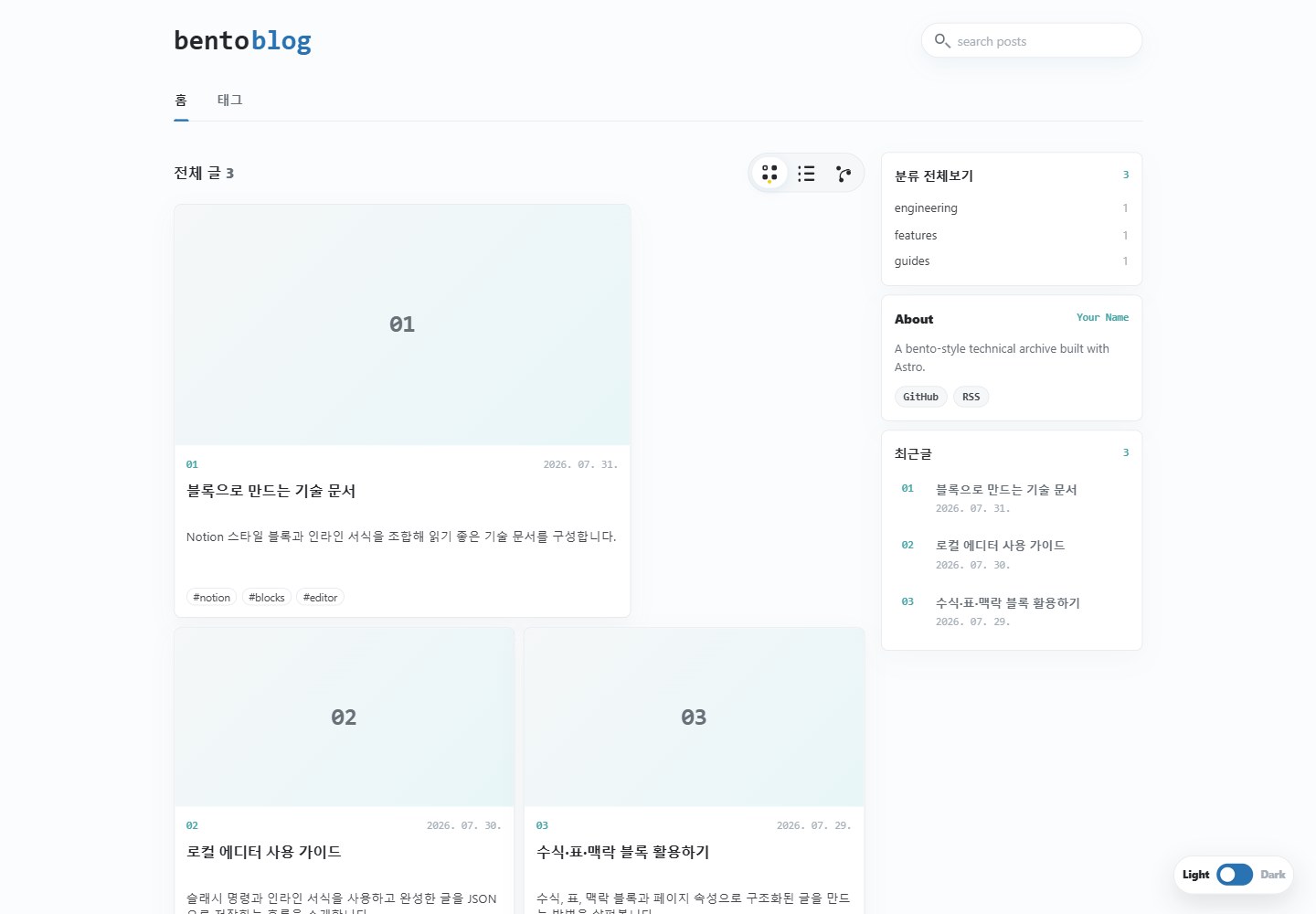
Provides three archive layouts: bento, list and post network; the network view automatically links posts by shared tags
AstroBlog
astro-bento-blog-template — Astro Blog Template
By dgddgd314
An open-source Astro blog template offering bento, list and network archive views, plus JSON-based block-style post editing and export.
Explore the design
Compare the page layouts and mobile experience. Open any screenshot for a closer look.
Desktop homepage1 / 2
Desktop captureTop of page
Actual browser screenshot of the verified live demo.
All pages & views 2
Screenshots show visual appearance; interactive behavior may differ.
Recorded 2026-10-21View source
What stands out
A quick read of the recorded project description.
Posts use the Post JSON v2 block structure, supporting rich text, tables, formulas, callouts, bookmarks and covers
Includes a built-in /editor/ browser editor that can create, import and export post JSON files
Supports categories, tags, search, RSS and automatic related-post links
Includes light and dark themes and View Transitions, and provides a GitHub Pages deployment workflow
The editor can be configured for Google Drive image upload, using the drive.file scope with access tokens kept only in memory
Template Details
The template uses Astro Content Collections to read Post JSON v2 files stored under src/content/blog/. Post content is made up of blocks and supports rich text, tables, formulas, callouts, bookmarks and covers. The archive page provides three layouts: bento, list and post network, and includes categories, tags, search, RSS and automatic related-post links. The template includes a built-in /editor/ browser editor that can create or import posts and export JSON files, and also supports image upload via Google Drive. Site configuration is centralized in src/config.ts, where you can set the title, description, author, language, date locale, deployment URL, basePath, brand wordmark, social links and View Transitions. The README includes instructions for a GitHub Pages deployment workflow, but does not provide details on performance, production readiness or deployment to other hosting platforms.
AstroBlog
Is it right for your project?
Use Cases
- Individual writers who want to manage blog content as JSON files and export it as a static site
- Blog projects that need bento-style or network-style post archive displays
- Workflows that use a local browser editor to write block-style posts and export them to the content directory
- Projects deployed as static blogs via GitHub Pages that need a build workflow included
Suitable For
- Developers familiar with Astro and JSON content structures
- Blog authors who need a block-style post format and multiple archive views
- Projects planning to host a static site on GitHub Pages
Getting started & customization
Use these recorded setup notes alongside the repository instructions for your chosen version.
- 1
Requires Node.js 22.12.0 or higher. After creating the project with npm create astro or GitHub Use this template, run npm install and npm run dev.
- 2
Main site configuration is in src/config.ts; set url and basePath according to the deployment address. A GitHub Pages project site should use basePath: "/my-blog", while a custom domain or user site uses basePath: "/".
- 3
Posts are Post JSON v2 files stored under src/content/blog/; the collection reads *.json recursively. If meta.category is omitted, the folder path is used as the category.
- 4
After creating or importing a post with /editor/, save it as JSON to download the file, then move it into src/content/blog/ and rebuild the site.
- 5
Google Drive image upload requires enabling the Drive API in Google Cloud, creating a Web application OAuth client ID, adding the authorized JavaScript origin, and entering the client ID and folder ID in the editor's Drive settings; do not enter a client secret or upload private images.
License & source material
Usage conditions & limitations
Free to use · keep license noticeThis listing covers the free version under the MIT license in the public repository; the free scope is the code of this version and does not mean external services or third-party assets are free.
Must comply with when using
- The code of this version may be used, modified, used commercially and distributed free of charge.
- When distributing copies or substantial portions of the code, retain the original author's copyright notice and the full MIT license notice.
- The code is provided as is; warranties and limitations of liability are governed by the original license and applicable law.
Additional costs & items to verify
- Demo images, fonts, icons and other third-party assets must be checked against their respective licenses; the code's MIT license alone cannot be used to judge them.
- External services such as domains, hosting, databases, payments or AI may incur separate charges.
- Running requires Node.js 22.12.0 or higher.
- Google Drive image upload is an optional feature; the rest of the blog works without configuration.
- Using Drive upload requires enabling the Google Drive API in a Google Cloud project.
- You must create a Web application OAuth client ID yourself.
- You must enter the public OAuth client ID and Drive folder ID in the editor's Drive settings.
- The editor requests only the drive.file scope, and uploaded images are set to public read access; do not upload private images and do not enter a client secret.
- When using Drive upload on GitHub Pages, the authorized JavaScript origin can only be the origin (e.g. https://username.github.io) and must not include a path.
- The source and target in the post network configuration must match post slugs.
View Original Text Basis
Permission is hereby granted, free of charge
Original License Text
Node.js 22.12.0 or newer is required. The local site runs at `http://localhost:4321` by default.
Original README
Drive upload is a built-in editor feature. The rest of the blog works without configuring it; setup begins only when a user chooses **Drive settings** or **Upload to Drive**.
Original README
2. Enable the Google Drive API in a Google Cloud project.
Original README
3. Create a Web application OAuth client ID.
Original README
5. In `/editor/`, enter the public OAuth client ID and Drive folder ID under **Drive settings**.
Original README
The editor requests the narrow `drive.file` scope, stores the access token only in memory, and makes newly uploaded images publicly readable. Never enter a client secret, and do not upload private images. See `public/drive-image-upload.md` for the full setup guide.
Original README
If you use Drive uploads on GitHub Pages, add only the origin, such as `https://username.github.io`, to the OAuth client's Authorized JavaScript origins. URL paths are not valid origins.
Original README
https://github.com/dgddgd314/astro-bento-blog-template/blob/main/LICENSEhttps://github.com/dgddgd314/astro-bento-blog-template/blob/main/README.mdBoth `source` and `target` must match post slugs.
Original README
Compiled by DeepSeek based on repository license and README ·2026-10-20. Results only cover the materials read; dependencies, images, fonts, and subsequent term changes are subject to their respective original texts.
Project checks & description sources
Template Information
- Source platforms
- GitHub
- Documentation and maintenance reference score
- More documented · 83 / 100
- Technologies
- Astro
- Website type
- Blog
How this score is calculated
Our heuristic uses license records (up to 30), a demo link (12), a preview (10), stars (15), recorded maintenance (15), description completeness (8), feature records (5) and classification data (5). It is not a code, security or performance test, or a Google score. A link does not establish tested functionality.
What to verify for this project
- Repository update recorded
- 2026-08-14
- Screenshot last checked
- 2026-10-21
A demo link is listed. Check it with your own content and viewport sizes; its presence does not confirm that forms, authentication or payments work.
The catalog identifies Astro as the primary stack. Check the actual dependency manifest and lockfile for versions and hosting requirements. These notes use recorded metadata, not a code audit or a deployment test.
Use a selection guide →How this description was prepared
AI-assisted description based on catalog records and repository material. Repository authors are not automatically the reviewers of this description.
Review declaration: codex-user-requested-batch-review-20261021 · 2026-10-21
Inspect the recorded source material
SHA-256: 0e7667519a4a50a21fcc1dab610a7a8d1bbb83b25d1afb725edb08b799565823
2026-10-20T23:46:05.062Z
Source file / repository# Astro Bento Blog Template
A free, open-source Astro blog theme with a bento archive, list and network views, a block-based post format, dark mode, and a browser-based post editor.
- Demo: [dgddgd314.github.io/astro-bento-blog-template](https://dgddgd314.github.io/astro-bento-blog-template/)
- Repository: [github.com/dgddgd314/astro-bento-blog-template](https://github.com/dgddgd314/astro-bento-blog-template)
## Features
- Responsive bento, list, and post-network archive layouts
- Astro Content Collections backed by portable JSON documents
- Categories, tags, search, RSS, and automatic related-post links
- Notion-inspired block renderer with rich text, tables, equations, callouts, bookmarks, and covers
- Built-in `/editor/` for creating and exporting Post JSON v2 files
- Google Drive image upload directly from the editor
- Light and dark themes with View Transitions
- GitHub Pages deployment workflow included
- TypeScript and Tailwind CSS 4
## Quick start
Use GitHub's **Use this template** button, or create a new Astro project from the repository:
```bash
npm create astro@latest my-blog -- --template dgddgd314/astro-bento-blog-template
cd my-blog
npm install
npm run dev
```
Node.js 22.12.0 or newer is required. The local site runs at `http://localhost:4321` by default.
## Customize the site
Edit `src/config.ts`. This is the main configuration surface for:
- `title`, `description`, and `author`
- document `language` and date `locale`
- deployment `url` and `basePath`
- the two-part wordmark under `brand`
- GitHub, RSS, and other `socialLinks`
- the browser-storage namespace
- View Transitions
For a GitHub Pages project site such as `https://username.github.io/my-blog/`, use:
```ts
url: "https://username.github.io",
basePath: "/my-blog",
```
For a custom domain or a repository named `username.github.io`, use `basePath: "/"`.
UI copy is kept close to the relevant components: the archive is in `src/components/blog/BlogArchive.astro`, and the editor shell is in `src/pages/editor/index.astro`.
## Write posts
Posts are Post JSON v2 documents stored anywhere below `src/content/blog/`. The collection reads `*.json` files recursively.
```json
{
"version": 2,
"meta": {
"title": "Post title",
"slug": "post-slug",
"description": "A short summary for the archive and RSS feed.",
"pubDate": "2026-08-15",
"category": "engineering",
"tags": ["astro", "notes"],
"status": ["published"]
},
"page": {
"icon": "📝",
"cover": { "type": "color", "value": "#eaf4ff", "position": 50 }
},
"blocks": []
}
```
If `meta.category` is omitted or empty, the folder path becomes the category. For example, `src/content/blog/engineering/post.json` belongs to `engineering`.
### Browser editor
Open `/editor/` during local development. Create or import a document, then use **JSON 저장** to download it. Move the exported file into `src/content/blog/` and rebuild the site.
The editor keeps drafts, recent emoji, and non-secret Drive settings only in the current browser. No account profile or Google access token is persisted. The complete Post JSON contract is available from the editor as `public/editor.md`.
## Google Drive image upload
Drive upload is a built-in editor feature. The rest of the blog works without configuring it; setup begins only when a user chooses **Drive settings** or **Upload to Drive**.
1. Create a Google Drive folder for blog images.
2. Enable the Google Drive API in a Google Cloud project.
3. Create a Web application OAuth client ID.
4. Add the local and deployed origins to **Authorized JavaScript origins**.
5. In `/editor/`, enter the public OAuth client ID and Drive folder ID under **Drive settings**.
The editor requests the narrow `drive.file` scope, stores the access token only in memory, and makes newly uploaded images publicly readable. Never enter a client secret, and do not upload private images. See `public/drive-image-upload.md` for the full setup guide.
## Post network
Posts sharing tags are linked automatically in the network view. Add curated relationships in `src/data/post-network.json`:
```json
{
"source": "first-post-slug",
"target": "second-post-slug",
"type": "reference",
"label": "reference",
"weight": 2
}
```
Both `source` and `target` must match post slugs.
## Deploy to GitHub Pages
1. Update `SITE.url` and `SITE.basePath` in `src/config.ts`.
2. Push the project to a GitHub repository using the `main` branch.
3. Open **Settings → Pages** in GitHub.
4. Select **GitHub Actions** as the deployment source.
5. Run the included workflow or push another commit.
The workflow uses Node.js 22.12, installs from `package-lock.json`, builds the site, and publishes `dist/`.
If you use Drive uploads on GitHub Pages, add only the origin, such as `https://username.github.io`, to the OAuth client's Authorized JavaScript origins. URL paths are not valid origins.
## Commands
| Command | Action |
| --- | --- |
| `npm run dev` | Start the local development server |
| `npm run build` | Build the production site into `dist/` |
| `npm run preview` | Preview the production build locally |
## Project structure
```text
src/
components/ Archive and block components
content/blog/ Post JSON files
data/ Post-network configuration
layouts/ Shared and post layouts
pages/ Blog, tag, editor, RSS, and 404 routes
scripts/ Editor and Google Drive upload logic
styles/ Theme, archive, editor, and block styles
config.ts Main user configuration
```
## License
MIT © dgddgd314. See [LICENSE](./LICENSE).
Explore similar templates
Compare previews and descriptions within the same stack and category.

astrowind
AstroWind is a free, open-source Astro starter theme using Astro and Tailwind CSS, released under the MIT license.
Astro · Blog

astro-paper
An Astro blog theme with Markdown/MDX content, Tailwind styling and Pagefind search. Search is a feature of the blog, rather than a separate tool-site product.
Astro · Blog

fuwari
Fuwari is a static blog template built with Astro and Tailwind CSS for personal blogs. It manages posts as Markdown files in src/content/posts/, with frontmatter for title, date, description, cover, tags, categories, draft status, and language.
Astro · Blog

Firefly
Firefly is a clean personal blog theme forked from Astro and Fuwari, offering four background modes, single/double sidebar and list/grid layouts, Pagefind client-side full-text search, and a six-language UI.
Astro · Blog

astro-theme-cactus
An Astro blog and notes starter with Markdown/MDX content, Tailwind styling and Pagefind search. Its main purpose is publishing posts and notes.
Astro · Blog

astrofy
Astrofy is a free and open-source personal portfolio website template built with Astro and TailwindCSS, with built-in blog, CV timeline, project showcase, store, and RSS feed modules.
Astro · Portfolio