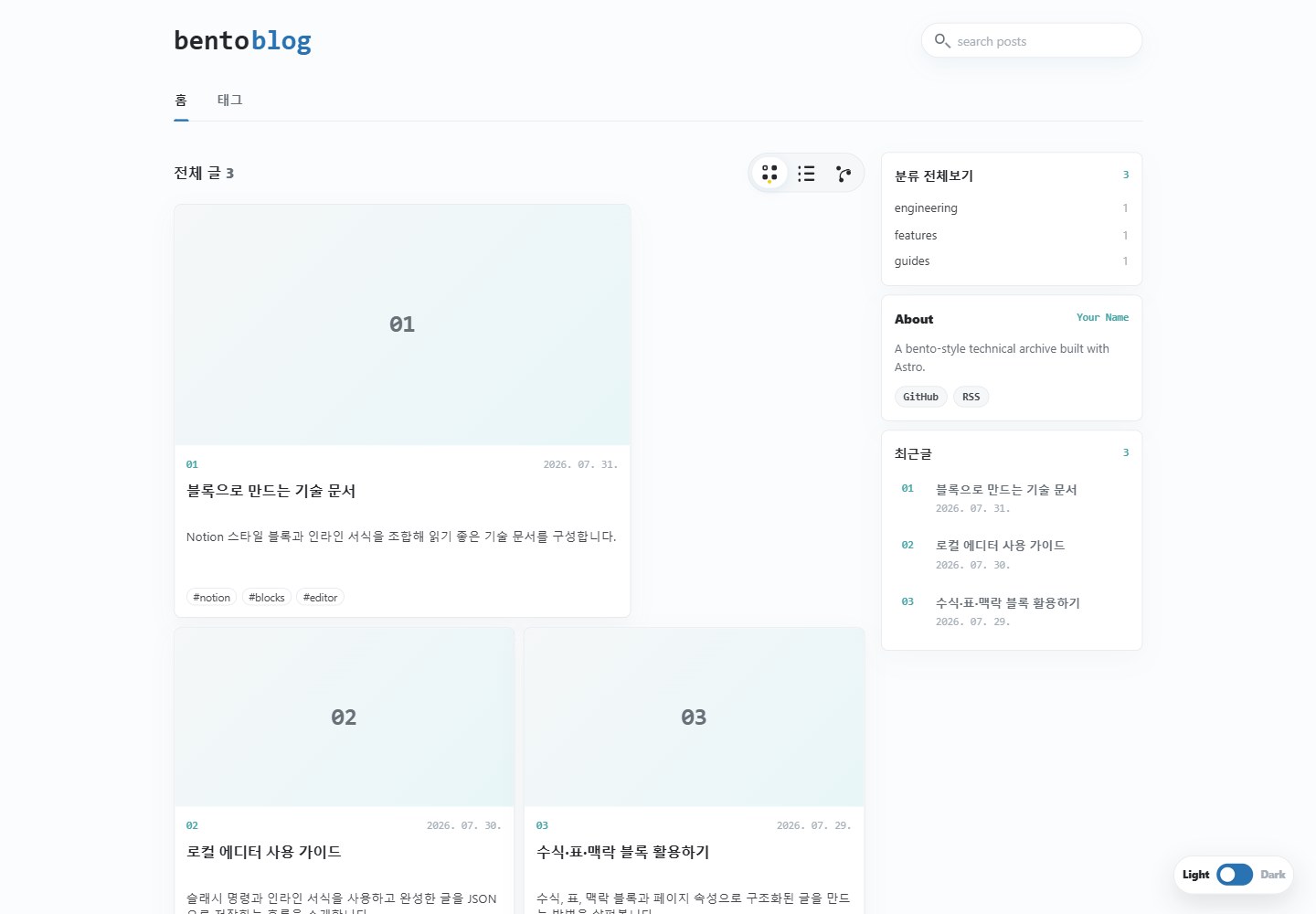
提供便当、列表和文章网络三种归档布局,网络视图按共享标签自动关联文章
Astro博客
astro-bento-blog-template — Astro 博客模板
作者 dgddgd314
一个基于 Astro 的开源博客模板,提供便当、列表和网络三种归档视图,以及基于 JSON 的块式文章编辑与导出。
看看你的网站会是什么样
浏览真实页面截图,比较内容排版与手机效果。点击下方缩略图切换,放大查看整页细节。
全部页面与视图 2
截图用于了解视觉与布局,交互效果请以实际项目为准。
采集于 2026-10-21查看来源
值得关注的模板亮点
从已有项目资料中,快速了解它的特点。
文章采用 Post JSON v2 块式结构,支持富文本、表格、公式、标注、书签和封面
内置 /editor/ 浏览器编辑器,可创建、导入并导出文章 JSON 文件
支持分类、标签、搜索、RSS 和自动相关文章链接
包含亮暗主题与 View Transitions,并提供 GitHub Pages 部署工作流
编辑器可配置 Google Drive 图片上传,使用 drive.file 范围且访问令牌仅存于内存
模板详细介绍
该模板使用 Astro Content Collections 读取存放在 src/content/blog/ 下的 Post JSON v2 文件,文章内容由块(blocks)组成,支持富文本、表格、公式、标注、书签和封面。归档页提供便当、列表和文章网络三种布局,并包含分类、标签、搜索、RSS 和自动关联文章链接。模板内置 /editor/ 浏览器编辑器,可创建或导入文章并导出 JSON 文件,还支持通过 Google Drive 上传图片。站点配置集中在 src/config.ts,可设置标题、描述、作者、语言、日期区域、部署 URL、basePath、品牌字标、社交链接和 View Transitions。README 包含 GitHub Pages 部署工作流说明,但未提供性能、生产就绪程度或其他托管平台的部署细节。
Astro博客
适合你的项目吗?
适用场景
- 希望用 JSON 文件管理博客内容并导出为静态站点的个人写作者
- 需要便当式或网络式文章归档展示的博客项目
- 在本地使用浏览器编辑器撰写块式文章并导出到内容目录的工作流
- 通过 GitHub Pages 部署静态博客并需要包含构建工作流的项目
适合人群
- 熟悉 Astro 和 JSON 内容结构的开发者
- 需要块式文章格式与多种归档视图的博客作者
- 计划使用 GitHub Pages 托管静态站点的项目
上手与定制指南
结合仓库当前版本的说明,按下面的资料检查内容、配置与运行要求。
- 1
需要 Node.js 22.12.0 或更高版本,使用 npm create astro 或 GitHub Use this template 创建项目后运行 npm install 和 npm run dev。
- 2
站点主要配置在 src/config.ts,需根据部署地址设置 url 和 basePath;GitHub Pages 项目站点应使用 basePath: "/my-blog",自定义域名或用户站点使用 basePath: "/"。
- 3
文章为 Post JSON v2 文件,存放在 src/content/blog/ 下,集合会递归读取 *.json;若省略 meta.category,则使用文件夹路径作为分类。
- 4
使用 /editor/ 创建或导入文章后,通过 JSON 保存下载文件,再移入 src/content/blog/ 并重新构建站点。
- 5
Google Drive 图片上传需在 Google Cloud 启用 Drive API、创建 Web 应用 OAuth 客户端 ID、添加授权 JavaScript 源,并在编辑器 Drive 设置中填写客户端 ID 和文件夹 ID;不要填写客户端密钥或上传私密图片。
授权与来源资料
使用条件与限制
免费使用 · 保留许可声明本次收录的是公开仓库中采用 MIT 许可的免费版本;免费范围为该版本代码,不代表外部服务或第三方素材免费。
使用时需要遵守
- 允许免费使用、修改、商用和分发该版本代码。
- 分发代码副本或实质性部分时,保留原作者版权声明和完整 MIT 许可声明。
- 代码按现状提供;担保与责任限制以原许可证及适用法律为准。
额外费用与待核对事项
- 演示图片、字体、图标及其他第三方素材需按各自许可核对,不能仅凭代码的 MIT 许可判断。
- 域名、托管、数据库、支付或 AI 等外部服务可能另外收费。
- 运行需要 Node.js 22.12.0 或更高版本。
- Google Drive 图片上传为可选功能,博客其余部分无需配置即可使用。
- 使用 Drive 上传需在 Google Cloud 项目中启用 Google Drive API。
- 需自行创建 Web 应用 OAuth 客户端 ID。
- 需在编辑器 Drive 设置中填写公开的 OAuth 客户端 ID 和 Drive 文件夹 ID。
- 编辑器仅请求 drive.file 范围,上传的图片会被设为公开可读;不要上传私密图片,也不要填写客户端密钥。
- 在 GitHub Pages 使用 Drive 上传时,授权 JavaScript 源只能填写源(如 https://username.github.io),不能包含路径。
- 文章网络配置中的 source 和 target 必须与文章 slug 匹配。
查看原文依据
Permission is hereby granted, free of charge
许可证原文
Node.js 22.12.0 or newer is required. The local site runs at `http://localhost:4321` by default.
README 原文
Drive upload is a built-in editor feature. The rest of the blog works without configuring it; setup begins only when a user chooses **Drive settings** or **Upload to Drive**.
README 原文
2. Enable the Google Drive API in a Google Cloud project.
README 原文
3. Create a Web application OAuth client ID.
README 原文
5. In `/editor/`, enter the public OAuth client ID and Drive folder ID under **Drive settings**.
README 原文
The editor requests the narrow `drive.file` scope, stores the access token only in memory, and makes newly uploaded images publicly readable. Never enter a client secret, and do not upload private images. See `public/drive-image-upload.md` for the full setup guide.
README 原文
If you use Drive uploads on GitHub Pages, add only the origin, such as `https://username.github.io`, to the OAuth client's Authorized JavaScript origins. URL paths are not valid origins.
README 原文
https://github.com/dgddgd314/astro-bento-blog-template/blob/main/LICENSEhttps://github.com/dgddgd314/astro-bento-blog-template/blob/main/README.mdBoth `source` and `target` must match post slugs.
README 原文
DeepSeek 根据仓库许可证和 README 整理 ·2026-10-20。结果仅覆盖已读取资料,依赖、图片、字体及后续条款变更以各自原文为准。
项目核对记录与介绍依据
模板资料
- 来源平台
- GitHub
- 资料与维护参考分
- 资料较完整 · 83 / 100
- 技术栈
- Astro
- 网站类型
- 博客
这个分数如何计算
本站按许可资料(最高30分)、演示链接(12分)、预览图(10分)、Star数(15分)、记录的维护时间(15分)、描述完整度(8分)、功能记录(5分)和分类资料(5分)计算。它不是代码、安全或性能测试,也不是 Google 评分;有链接不代表已实测可用。
这个项目需要核对什么
- 记录的仓库更新时间
- 2026-08-14
- 截图检查日期
- 2026-10-21
已收录演示链接。请用你的内容与屏幕尺寸检查;有演示不代表表单、认证或支付已经可用。
目录记录的主要技术栈是 Astro。请通过依赖清单和锁文件核对实际版本与托管要求。这些说明基于收录资料,不代表代码审计或部署实测。
查看具体选型方法 →介绍的制作与核对状态
介绍由 AI 辅助整理目录与仓库资料。仓库作者不等于这篇介绍的审核者。
审核声明: codex-user-requested-batch-review-20261021 · 2026-10-21
查看当时使用的来源资料
SHA-256: 0e7667519a4a50a21fcc1dab610a7a8d1bbb83b25d1afb725edb08b799565823
2026-10-20T23:46:05.062Z
来源文件 / 仓库# Astro Bento Blog Template
A free, open-source Astro blog theme with a bento archive, list and network views, a block-based post format, dark mode, and a browser-based post editor.
- Demo: [dgddgd314.github.io/astro-bento-blog-template](https://dgddgd314.github.io/astro-bento-blog-template/)
- Repository: [github.com/dgddgd314/astro-bento-blog-template](https://github.com/dgddgd314/astro-bento-blog-template)
## Features
- Responsive bento, list, and post-network archive layouts
- Astro Content Collections backed by portable JSON documents
- Categories, tags, search, RSS, and automatic related-post links
- Notion-inspired block renderer with rich text, tables, equations, callouts, bookmarks, and covers
- Built-in `/editor/` for creating and exporting Post JSON v2 files
- Google Drive image upload directly from the editor
- Light and dark themes with View Transitions
- GitHub Pages deployment workflow included
- TypeScript and Tailwind CSS 4
## Quick start
Use GitHub's **Use this template** button, or create a new Astro project from the repository:
```bash
npm create astro@latest my-blog -- --template dgddgd314/astro-bento-blog-template
cd my-blog
npm install
npm run dev
```
Node.js 22.12.0 or newer is required. The local site runs at `http://localhost:4321` by default.
## Customize the site
Edit `src/config.ts`. This is the main configuration surface for:
- `title`, `description`, and `author`
- document `language` and date `locale`
- deployment `url` and `basePath`
- the two-part wordmark under `brand`
- GitHub, RSS, and other `socialLinks`
- the browser-storage namespace
- View Transitions
For a GitHub Pages project site such as `https://username.github.io/my-blog/`, use:
```ts
url: "https://username.github.io",
basePath: "/my-blog",
```
For a custom domain or a repository named `username.github.io`, use `basePath: "/"`.
UI copy is kept close to the relevant components: the archive is in `src/components/blog/BlogArchive.astro`, and the editor shell is in `src/pages/editor/index.astro`.
## Write posts
Posts are Post JSON v2 documents stored anywhere below `src/content/blog/`. The collection reads `*.json` files recursively.
```json
{
"version": 2,
"meta": {
"title": "Post title",
"slug": "post-slug",
"description": "A short summary for the archive and RSS feed.",
"pubDate": "2026-08-15",
"category": "engineering",
"tags": ["astro", "notes"],
"status": ["published"]
},
"page": {
"icon": "📝",
"cover": { "type": "color", "value": "#eaf4ff", "position": 50 }
},
"blocks": []
}
```
If `meta.category` is omitted or empty, the folder path becomes the category. For example, `src/content/blog/engineering/post.json` belongs to `engineering`.
### Browser editor
Open `/editor/` during local development. Create or import a document, then use **JSON 저장** to download it. Move the exported file into `src/content/blog/` and rebuild the site.
The editor keeps drafts, recent emoji, and non-secret Drive settings only in the current browser. No account profile or Google access token is persisted. The complete Post JSON contract is available from the editor as `public/editor.md`.
## Google Drive image upload
Drive upload is a built-in editor feature. The rest of the blog works without configuring it; setup begins only when a user chooses **Drive settings** or **Upload to Drive**.
1. Create a Google Drive folder for blog images.
2. Enable the Google Drive API in a Google Cloud project.
3. Create a Web application OAuth client ID.
4. Add the local and deployed origins to **Authorized JavaScript origins**.
5. In `/editor/`, enter the public OAuth client ID and Drive folder ID under **Drive settings**.
The editor requests the narrow `drive.file` scope, stores the access token only in memory, and makes newly uploaded images publicly readable. Never enter a client secret, and do not upload private images. See `public/drive-image-upload.md` for the full setup guide.
## Post network
Posts sharing tags are linked automatically in the network view. Add curated relationships in `src/data/post-network.json`:
```json
{
"source": "first-post-slug",
"target": "second-post-slug",
"type": "reference",
"label": "reference",
"weight": 2
}
```
Both `source` and `target` must match post slugs.
## Deploy to GitHub Pages
1. Update `SITE.url` and `SITE.basePath` in `src/config.ts`.
2. Push the project to a GitHub repository using the `main` branch.
3. Open **Settings → Pages** in GitHub.
4. Select **GitHub Actions** as the deployment source.
5. Run the included workflow or push another commit.
The workflow uses Node.js 22.12, installs from `package-lock.json`, builds the site, and publishes `dist/`.
If you use Drive uploads on GitHub Pages, add only the origin, such as `https://username.github.io`, to the OAuth client's Authorized JavaScript origins. URL paths are not valid origins.
## Commands
| Command | Action |
| --- | --- |
| `npm run dev` | Start the local development server |
| `npm run build` | Build the production site into `dist/` |
| `npm run preview` | Preview the production build locally |
## Project structure
```text
src/
components/ Archive and block components
content/blog/ Post JSON files
data/ Post-network configuration
layouts/ Shared and post layouts
pages/ Blog, tag, editor, RSS, and 404 routes
scripts/ Editor and Google Drive upload logic
styles/ Theme, archive, editor, and block styles
config.ts Main user configuration
```
## License
MIT © dgddgd314. See [LICENSE](./LICENSE).
看看同类模板
对比同技术栈与用途的模板,找到更适合的视觉与内容结构。

astrowind
⭕️ AstroWind: A free template using Astro v7 and Tailwind CSS v4. Astro starter theme.
Astro · 博客

astro-paper
基于 Astro 的博客主题,使用 Markdown/MDX 内容、Tailwind 样式和 Pagefind 搜索。搜索属于博客功能,不代表独立工具站产品。
Astro · 博客

fuwari
✨A static blog template built with Astro.
Astro · 博客

Firefly
Firefly 是一款基于 Astro 的静态博客主题,由 CuteLeaf 在 saicaca 的 Fuwari 模板基础上二次开发,主打清新美观的视觉风格。
Astro · 博客

astro-theme-cactus
面向博客与笔记发布的 Astro 启动模板,支持 Markdown/MDX 内容、Tailwind 样式与 Pagefind 搜索,主要用途是发布文章和笔记。
Astro · 博客

astrofy
Astrofy is a free and open-source template for your Personal Portfolio Website built with Astro and TailwindCS…
Astro · 作品集