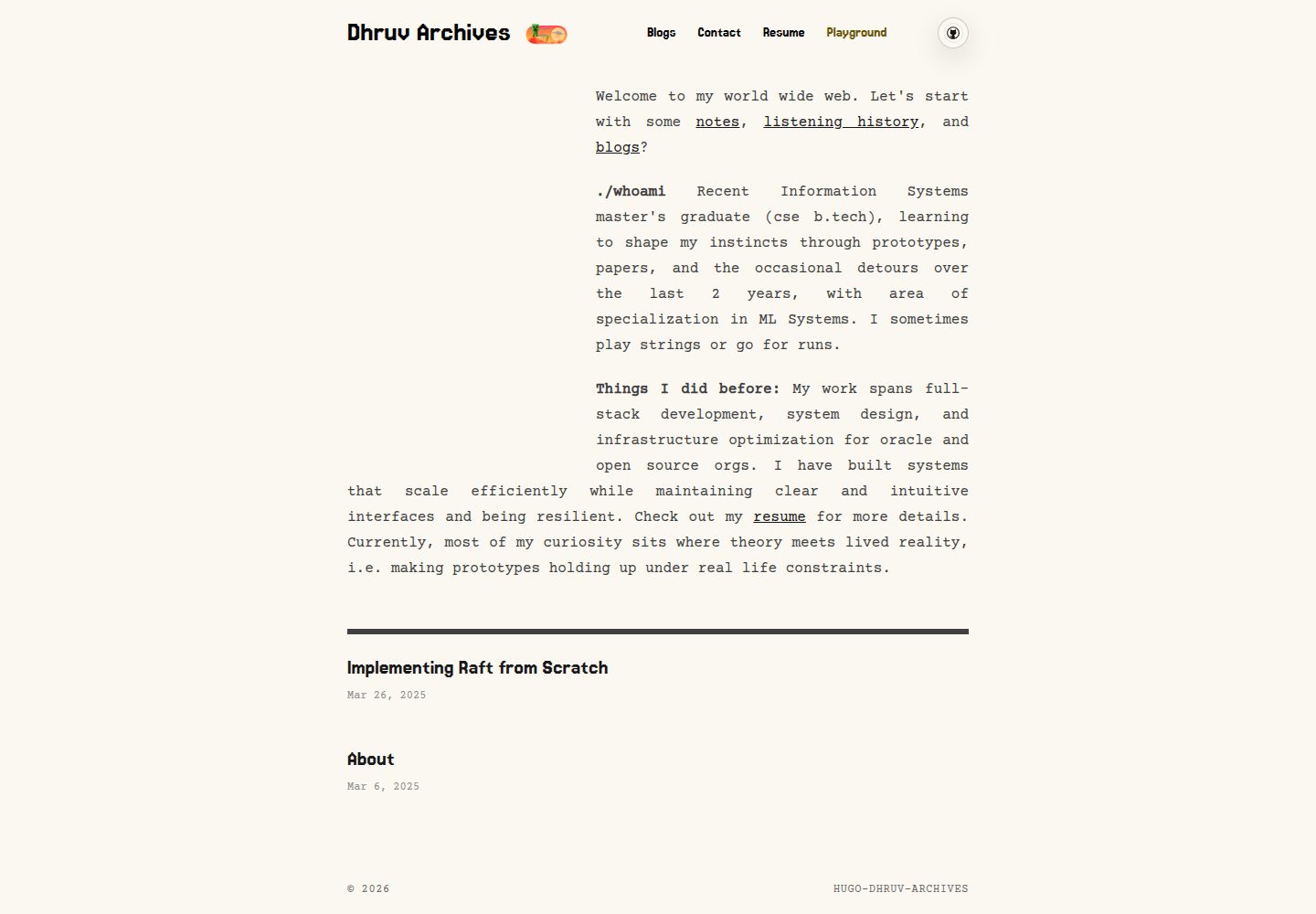
Reworks the homepage UI on top of hugo-paper, with most customization done through params in hugo.toml
HugoPortfolio
hugo-dhruv-archives-theme — Hugo Portfolio Template
By dhruv0000
A Hugo portfolio theme forked from hugo-paper, with fonts, colors, homepage cards, and an optional Playground module configured through params, plus build-time encrypted password-protected posts.
Explore the design
Compare the page layouts and mobile experience. Open any screenshot for a closer look.
Desktop homepage1 / 3
Desktop captureTop of page
Actual screenshot captured by the server browser.
All pages & views 3
Screenshots show visual appearance; interactive behavior may differ.
Recorded 2026-10-13View source
What stands out
A quick read of the recorded project description.
The homepage "postcard" area randomly selects media from top-level files in static/animation/, using *-dark / *-bright suffixes to distinguish light and dark modes
Supports params.postcardFocus to set horizontal or vertical crop focus for individual media files, using landscape and portrait crops for mobile and desktop respectively
Optional Playground page with a tabbed puzzle module, browser-local progress tracking, and an instrument tuner
Supports password-protected posts encrypted at build time, decrypted in the browser using PBKDF2-HMAC-SHA256 and AES-256-GCM
Template Details
This is a Hugo theme customized for dhruv-archives.com. It makes substantial changes on top of hugo-paper, and the author has disconnected fork update tracking from the original repository. The theme exposes most customization options as params in hugo.toml, including heading and body fonts, Google Fonts loading, and Flexoki-inspired light and dark color schemes. The homepage includes a responsive "postcard" area that randomly selects media from top-level files in static/animation/, distinguishes light and dark modes by filename suffix, and allows setting horizontal or vertical crop focus for individual files via params.postcardFocus; the homepage introduction block is defined by params.aboutItems. List pages and the homepage use a grid-style article list, and the theme toggle button uses custom animated assets. The theme also provides an optional local Playground page with a tabbed puzzle module, progress tracking, and an instrument tuner. In addition, it supports password-protected posts that are encrypted at build time and unlocked in the browser, though this mechanism is not server-side authentication.
HugoPortfolio
Is it right for your project?
Use Cases
- Building a personal portfolio or archive site that needs configurable fonts, colors, and homepage card areas
- Wanting to randomly display local animation or image media on the homepage and filter assets by light or dark mode
- Needing to publish password-protected posts on a blog, such as drafts, diaries, or content intended only for friends
- Wanting to add optional local mini-games and a tuner page to a site while recording progress locally
Suitable For
- Developers using Hugo who are familiar with configuring hugo.toml params
- Users who need a portfolio or archive-style personal site
- Site maintainers who accept params-driven customization and are willing to prepare their own media assets
- Users who need password-protected posts but understand the non-server-side authentication limitation
Getting started & customization
Use these recorded setup notes alongside the repository instructions for your chosen version.
- 1
Add the theme as a git submodule under themes/hugo-dhruv-archives and set theme = "hugo-dhruv-archives" in hugo.toml
- 2
Configure params according to the README's Config Template, including mainSections, color, fonts, social links, and aboutItems
- 3
Place homepage postcard media as top-level files in static/animation/; filenames can use *-dark or *-bright suffixes to control light or dark mode display
- 4
To enable password-protected posts, run tools/protect-content.mjs after the Hugo build and set folder passwords through CONTENT_PASSWORD__* environment variables
- 5
Password protection is build-time encryption with browser-side decryption; the encrypted payload is publicly downloadable, weak passwords can be brute-forced offline, and it should not be treated as a high-security confidentiality measure
License & source material
Usage conditions & limitations
Free to use · keep license noticeThis listing covers the free version in the public repository under the MIT license; the free scope is the code of that version and does not mean external services or third-party assets are free.
Must comply with when using
- The code of this version may be used, modified, used commercially, and distributed free of charge.
- When distributing copies or substantial portions of the code, retain the original author's copyright notice and the full MIT license notice.
- The code is provided as is; warranties and limitations of liability are governed by the original license and applicable law.
Additional costs & items to verify
- Demo images, fonts, icons, and other third-party assets must be checked against their respective licenses and cannot be judged solely by the code's MIT license.
- External services such as domains, hosting, databases, payments, or AI may incur separate charges.
- Password protection is not server-side authentication; the encrypted payload is publicly downloadable and cannot be used as a high-security confidentiality measure.
- Weak passwords can be brute-forced offline, so strong passwords are required and it should not be treated as a high-value confidentiality solution.
- When using the password protection feature, it is recommended to set the content/site repository to private while keeping the theme repository public.
- The encryption script must be run in the build process to publish selected folders as encrypted payloads.
- Passwords must be set for folders through environment variables, with paths relative to the site's content/ directory.
- If deployed on Cloudflare Pages, these environment variables must be set in Variables and Secrets for the corresponding environment.
- After changing environment variables, redeploy so the build reads the new variables.
- Font loading depends on the external Google Fonts service and may involve external network requests.
View Original Text Basis
Permission is hereby granted, free of charge
Original License Text
This is not server-side authentication. The encrypted payload is public and can be downloaded.
Original README
A weak password can be brute-forced offline. Use a strong password and do not treat this as high-stakes secrecy.
Original README
For a private Hugo blog setup, keep your content/site repo private and keep this theme public.
Original README
Run the encryptor in your build pipeline so selected folders are shipped as encrypted payloads.
Original README
Set one or more folder passwords via env vars (paths are relative to your site's `content/`):
Original README
If you deploy on Cloudflare Pages, set these env vars in Variables and Secrets for the matching environment.
Original README
Redeploy after variable changes so the build picks them up.
Original README
https://github.com/dhruv0000/hugo-dhruv-archives-theme/blob/main/LICENSEhttps://github.com/dhruv0000/hugo-dhruv-archives-theme/blob/main/README.mdModular typography + font loading via Hugo params + Google Fonts
Original README
Compiled by DeepSeek based on repository license and README ·2026-10-13. Results only cover the materials read; dependencies, images, fonts, and subsequent term changes are subject to their respective original texts.
Project checks & description sources
Template Information
- Source platforms
- GitHub
- Documentation and maintenance reference score
- More documented · 80 / 100
- Technologies
- Hugo
- Website type
- Portfolio
How this score is calculated
Our heuristic uses license records (up to 30), a demo link (12), a preview (10), stars (15), recorded maintenance (15), description completeness (8), feature records (5) and classification data (5). It is not a code, security or performance test, or a Google score. A link does not establish tested functionality.
What to verify for this project
- Repository update recorded
- 2026-06-16
- Screenshot last checked
- 2026-10-13
A demo link is listed. Check it with your own content and viewport sizes; its presence does not confirm that forms, authentication or payments work.
The catalog identifies Hugo as the primary stack. Check the actual dependency manifest and lockfile for versions and hosting requirements. These notes use recorded metadata, not a code audit or a deployment test.
Use a selection guide →How this description was prepared
AI-assisted description based on catalog records and repository material. Repository authors are not automatically the reviewers of this description.
Review declaration: [email protected] · 2026-10-13
Inspect the recorded source material
SHA-256: f4f383025b9f739d6522da52f65550caada45fe676b6f7d1f116921252f11401
2026-10-13T01:40:49.610Z
Source file / repository# Hugo Dhruv Archives Theme
Custom Hugo theme for [dhruv-archives.com](https://dhruv-archives.com) with modular, param-driven customization and a redesigned homepage UI.
## Credits
Built on top of [hugo-paper](https://github.com/nanxiaobei/hugo-paper). I disabled the "github" fork updates connection because the repo has comptletely diverged from origial code. But i have still tried to keep the history commits alive. Credits where due :)
## My Bits and Bobs
First, the philosophy. Most customizations are exposed as `params.*` in your `hugo.toml` so the theme stays modular.
- Modular typography + font loading via Hugo params + Google Fonts (`heading_*`, `body_*`, `google_fonts`) (compiled into CSS variables via `assets/font-variables.css`)
- Responsive homepage featured "postcard" area (fluid across devices) with random media sourced from:
- `static/animation/` (top-level files only)
- CSS-driven golden-ratio framing:
- mobile (`<=768px`): landscape crop
- desktop (`>=769px`): portrait crop
- Filename mode masking:
- `*-dark.*` only in dark mode
- `*-bright.*` only in light mode
- untagged files are eligible in both modes
- Optional per-file crop focus via `params.postcardFocus` in `hugo.toml`:
- set `landscape` and `portrait` as `"x% y%"`
- Homepage intro blocks via `params.aboutItems`
- Animated theme toggle with custom assets (`/static/button/*.webp`)
- Flexoki-inspired light/dark background palette controlled by `params.color`
- Grid-style post listing on list/home pages
- Optional local-first `Playground` hub with tabbed puzzle modes, progress tracking, and an instrument tuner
- [Private / Protected Posts (Optional)](#private--protected-posts-optional): build-time encryption + in-browser unlock UI (see section below)
## Screenshots
The images in `./images/` are snapshots and may not match your latest local changes.
Latest (images/new/):
Protected content gate:
<img src="./images/new/image.png" width="640" alt="Protected content gate screenshot" />
Homepage (mobile):
<img src="./images/new/image%20copy.png" width="360" alt="Homepage mobile screenshot" />
Homepage (desktop):
<img src="./images/new/image%20copy%202.png" width="720" alt="Homepage desktop screenshot" />
Homepage (mobile, alt):
<img src="./images/new/image%20copy%203.png" width="360" alt="Homepage mobile screenshot (alt)" />
Snapshot (light):
<img src="./images/screenshot.png" width="720" alt="Theme snapshot (light)" />
Snapshot (dark):
<img src="./images/screenshot_dark.png" width="720" alt="Theme snapshot (dark)" />
## Install
As a git submodule:
```bash
git submodule add https://github.com/dhruv0000/hugo-dhruv-archives-theme themes/hugo-dhruv-archives
```
Then in your `hugo.toml`:
```toml
theme = "hugo-dhruv-archives"
```
Run:
```bash
hugo server
```
## Config Template
Copy/paste and tweak:
```toml
theme = "hugo-dhruv-archives"
baseURL = "https://example.com/"
languageCode = "en-us"
title = "Your Site Title"
[params]
# which sections count as "posts" (affects home + prev/next nav)
mainSections = ["blog"]
# valid: linen, wheat, gray, light
color = "linen"
# fonts (optional)
google_fonts = [
["Jersey 15", "400"],
["Courier Prime", "400,700"]
]
heading_font = "Jersey 15"
heading_weight = "400"
body_font = "Courier Prime"
body_weight = "400,700"
body_h_weight = "700"
# social (optional)
github = "YOUR_GITHUB_ID"
twitter = "YOUR_TWITTER_ID"
linkedin = "YOUR_LINKEDIN_ID"
behance = "YOUR_BEHANCE_ID"
rss = true
# icons (optional)
favicon = "favicon.ico"
appleTouchIcon = "apple-touch-icon.png"
[[params.aboutItems]]
title = "./whoami"
description = "Short blurb for the homepage."
[params.puzzles]
enabled = true
navLabel = "Playground"
title = "Playground"
description = "Runtime puzzles, an instrument tuner, and a local progress desk."
[params.puzzles.modes.equationGrid]
enabled = true
label = "Equation Grid"
order = 1
[params.puzzles.modes.cageLogic]
enabled = true
label = "Cage Logic"
order = 2
[params.puzzles.modes.game2048]
enabled = true
label = "2048"
order = 3
[params.puzzles.modes.instrumentTuner]
enabled = true
label = "Instrument Tuner"
order = 4
# optional postcard crop focus (per file)
[params.postcardFocus]
[params.postcardFocus."cowboy-bright.webm"]
landscape = "55% 50%"
portrait = "70% 52%"
[menu]
[[menu.main]]
identifier = "blog"
name = "Blog"
url = "/blog/"
weight = 10
[[menu.main]]
identifier = "puzzles"
name = "Playground"
url = "/puzzles/"
weight = 10
```
## Playground Hub
The theme can render an optional `/puzzles/` playground page driven by `params.puzzles`.
- Shared progress desk stored in browser-local storage
- Tabbed puzzle modules (`Equation Grid`, `Cage Logic`, `2048`)
- Instrument tuner with preset tunings, custom note sequences, mic capture, and local progress tracking
- Nav item visibility is tied to enabled playground modes
## Additional Supported Params (From old template)
```toml
[services]
[services.disqus]
shortname = "YOUR_DISQUS_SHORTNAME"
[params]
# social icons rendered in header:
# twitter, github, instagram, linkedin, mastodon, threads, bluesky, behance, rss
mastodon = "https://mastodon.instance/@you"
threads = "@your_handle"
bluesky = "your-handle.bsky.social"
rss = true
# profile card
avatar = "[email protected]" # or image URL
name = "Your Name"
bio = "Your bio"
# behavior
disableHLJS = true
disablePostNavigation = true
monoDarkIcon = true
gravatarCdn = "https://cdn.v2ex.com/gravatar/"
math = true
localKatex = false
graphCommentId = "YOUR_GRAPHCOMMENT_ID"
direction = "rtl"
[params.giscus]
repo = "owner/repo"
repoId = "..."
category = "General"
categoryId = "..."
mapping = "pathname"
strict = "1"
reactionsEnabled = "0"
emitMetadata = "0"
inputPosition = "top"
theme = "light"
lang = "en"
loading = "lazy"
```
Front matter:
```toml
comments = false
math = true
mermaid = true
```
## Private / Protected Posts (Optional)
This theme supports password-protected pages intended for:
- Unfinished drafts you want to publish later
- Private diary entries
- Personal notes / study notes
- "Friends-only" writeups (shared password)
How it works (static-site friendly):
- At build time, your rendered post HTML is encrypted and replaced with a small unlock form + encrypted payload.
- At runtime (in the browser), readers enter the password to decrypt and render the post.
Important limitations:
- This is not server-side authentication. The encrypted payload is public and can be downloaded.
- A weak password can be brute-forced offline. Use a strong password and do not treat this as high-stakes secrecy.
### What The Theme Includes
- Runtime decrypt + unlock UI: `static/content-protection.js`
- Build-time encryptor reference: `themes/hugo-dhruv-archives/tools/protect-content.mjs`
- Unlock styles: `assets/custom.css` (protected-content-* classes)
- Single page content slot: `layouts/_default/single.html` (`id="protected-content-slot"`)
- Script include: `layouts/partials/head.html` (loads `content-protection.js` on pages)
### What You Add In Your Site Repo
For a private Hugo blog setup, keep your content/site repo private and keep this theme public.
Run the encryptor in your build pipeline so selected folders are shipped as encrypted payloads.
This lets you publish unfinished blogs, diary pages, or personal notes behind a password prompt.
1. Add a build step after Hugo:
(If you deploy on Cloudflare Pages, set these env vars in Variables and Secrets for the matching environment.
Preview branch deployments use Preview vars, and your production branch uses Production vars.
Redeploy after variable changes so the build picks them up.)
```bash
hugo --minify
node themes/hugo-dhruv-archives/tools/protect-content.mjs
```
2. Set one or more folder passwords via env vars (paths are relative to your site's `content/`):
```bash
# Protect all posts under content/blog/
CONTENT_PASSWORD__BLOG=change-this-password
# Protect only content/diary/
CONTENT_PASSWORD__DIARY=change-this-password
# Protect only content/primer/
CONTENT_PASSWORD__PRIMER=change-this-password
# Optional: KDF work factor (default is 600000)
CONTENT_PROTECTION_PBKDF2_ITERATIONS=600000
```
Env var mapping rules:
- `CONTENT_PASSWORD__BLOG__MY_POST=...` maps to `content/blog/my-post/` (`__` -> `/`, `_` -> `-`)
- If both a parent folder and a more specific folder are set, the more specific one wins.
Crypto choice:
- PBKDF2-HMAC-SHA256 + AES-256-GCM (WebCrypto in-browser).
- Random 16-byte salt + random 12-byte IV per page.
Sources:
- OWASP Password Storage Cheat Sheet: https://cheatsheetseries.owasp.org/cheatsheets/Password_Storage_Cheat_Sheet.html
- MDN SubtleCrypto.deriveKey (PBKDF2/AES-GCM): https://developer.mozilla.org/en-US/docs/Web/API/SubtleCrypto/deriveKey
- MDN AesGcmParams (IV requirements): https://developer.mozilla.org/en-US/docs/Web/API/AesGcmParams
## License
[MIT](./LICENSE) (c) [Dhruv Patel](https://dhruv-archives.com/)
Explore similar templates
Compare previews and descriptions within the same stack and category.

hugo-PaperMod
A fast, clean, responsive Hugo theme for blogs and lightweight portfolios, with three layout modes (Regular, Home-Info, Profile), automatic and manual light/dark themes, Fuse.js client-side search, multilingual support, and built-in Open Graph, Twitter Cards, and Schema.org data.
Hugo · Portfolio

Congo
Congo is a minimal Hugo content theme built on Tailwind CSS 3.0, designed for blogs, portfolios, and lightweight content sites. It offers multiple homepage layouts, customizable dark mode, multilingual support including RTL, and built-in client-side search, Mermaid, Chart.js, and KaTeX.
Hugo · Blog

toha
Toha is a Hugo theme for personal portfolios, featuring a minimalist, responsive design with configurable homepage sections such as about, experience timeline, and achievements gallery.
Hugo · Portfolio

hugo-profile
hugo-profile is a mobile-first Hugo theme for personal portfolios and blogs, with multilingual support, light/dark themes, categories and tags, Google Analytics, Disqus comments, and Formspree contact forms.
Hugo · Portfolio

hugo-theme-introduction
Introduction is a minimal Hugo theme that can be configured as a single-page site or a full site with multiple sections. Homepage sections are generated from Markdown files under content/home/, with weight sorting and optional images.
Hugo · Portfolio

hugo-theme-console
A minimalist, responsive Hugo theme inspired by the system terminal and built on Terminal CSS. It includes blog posts, photo galleries, and custom pages, with light/dark theming and style overrides via CSS variables.
Hugo · Portfolio